Creating Azure App Configuration in Microsoft Azure Portal - Step-by-Step Guide
· 3 min read

Step-by-step guide to creating Azure App Configuration in the Microsoft Azure Portal. Simplify app settings and enhance feature management with ease.
Cloud Computing Technologies and Solutions
View All TagsStep-by-step guide to creating Azure App Configuration in the Microsoft Azure Portal. Simplify app settings and enhance feature management with ease.
Learn how to create and manage a Key Vault in Microsoft Azure Portal for secure secret, keys and certificates management.
Learn how to create a User Assigned Managed Identity in Microsoft Azure Portal to enhance security and manage access to your Azure resources efficiently.
Learn how to set up a new Microsoft Azure subscription with this step-by-step guide. Discover requirements, account setup tips, and cost management for beginners.
If you encounter the error The account being accessed does not support HTTP while trying to access a blob resource using a custom domain. This error typically occurs when the Azure Storage account is configured to only allow secure HTTPS connections, and you are trying to access it via HTTP.

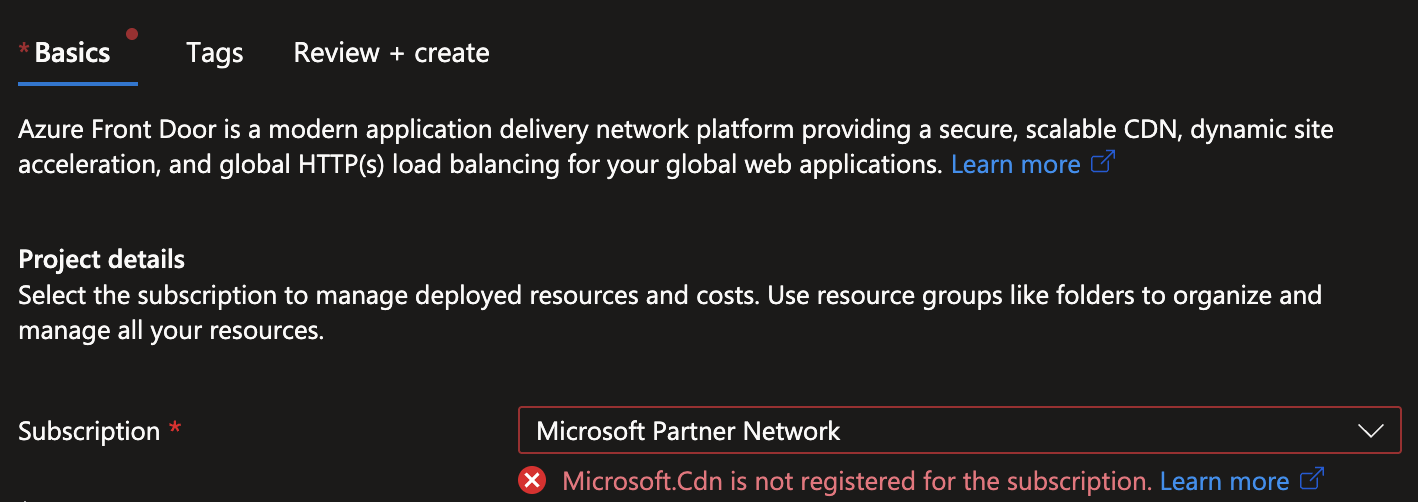
If you encounter the error Microsoft.Cdn is not registered for the subscription while trying to create a CDN profile in Azure, it means that the Microsoft.Cdn resource provider is not registered for your Azure subscription.
If you encounter the error ResourceProvider is not registered for the subscription while trying to create or use a resource in Azure, it means that the required resource provider is not registered for your Azure subscription.
