Which Platforms Allow Stakeholder Access to Live Project Views?

Your manager, client, or product owner wants to see project progress without you exporting a status report every week. Most platforms have some kind of view-only role for this — but "free" means three very different things, and picking the wrong one is how teams end up with a surprise invoice.
The Short Answer
Azure DevOps is the only platform here with a free, uncapped stakeholder role that needs no paid plan underneath it. GitLab Ultimate comes closest, with Guest users who consume no licence seat — but only on its most expensive tier.
Everything else either bills the seat, or gives you a free viewer role that only exists once you are already paying for a plan.
First, Separate Three Things That All Get Called "Free"
This is where most comparisons — and most budgets — go wrong.
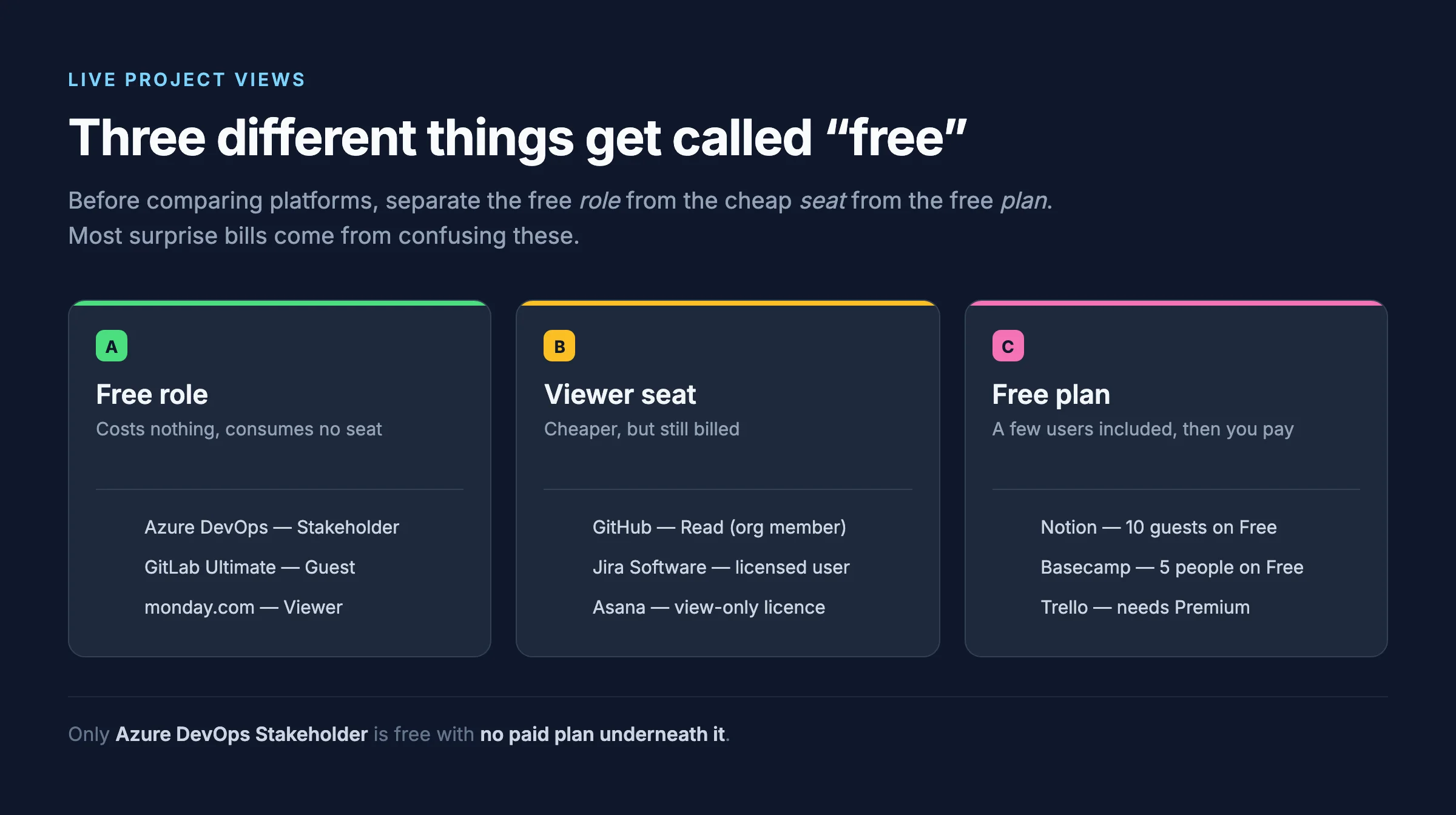
| What it means | The trap | |
|---|---|---|
| A. Free role | The person consumes no licence seat, no matter how many you add | Often requires a paid plan to exist at all |
| B. Viewer seat | A cheaper licence, but still a licence you pay for | Marketed as "view-only" so it sounds free |
| C. Free plan | The plan includes a handful of users total | The cap counts your team too, not just stakeholders |
A role can be genuinely free and still cost you money, because it only unlocks once you buy a plan. That distinction is the single most useful thing on this page.
The Comparison
"Minimum plan" is the cheapest paid tier you must already be on before the free role exists at all.
| Platform | Role name | Costs a seat? | Minimum plan | Sees code? |
|---|---|---|---|---|
| Azure DevOps | Stakeholder | No, unlimited | None — works on the free tier | No |
| GitLab | Guest | No, on Ultimate only | Ultimate | No |
| monday.com | Viewer | No, unlimited | Basic | n/a |
| Asana | Guest | No, unlimited | A paid tier | n/a |
| ClickUp | View only guest | No, unlimited | Any paid plan | n/a |
| Smartsheet | Contributor / Guest | No | Pro (Contributor), Business (Guest) | n/a |
| Notion | Guest | No | None, but Free caps at 10 guests | n/a |
| Trello | Observer | No | Premium workspace | n/a |
| GitHub | Read | Yes — org members are billed | Team | Yes |
| Jira Software | none | Yes — read-only users still need a licence | Free (10 users) | n/a |
| Basecamp | none | Flat rate, no per-user fee | Free caps at 5 people | n/a |
Azure DevOps — Stakeholder
Microsoft's wording is unusually direct: "Stakeholder access gives an unlimited number of users free, limited access to your organization." No seat cap, no paid plan required, and it does not eat into the five free Basic licences.
A Stakeholder can open boards, backlogs, work items, dashboards, and the project wiki, run queries, and view and approve releases.
Four things the marketing does not tell you:
- Stakeholder is not a read-only role. It is an access level. Stakeholders can create and edit work items, drag a card between columns to change its State, and bulk-edit backlogs. If you want genuine view-only, you also need to put the person in the Readers security group — access level and security group are two separate controls.
- It is not a security boundary. Microsoft warns: "Don't use Stakeholder access as a substitute for more limited permissions, as users with a Visual Studio subscription or a GitHub Enterprise license automatically get upgraded from Stakeholder when they sign in."
- They see everything in Boards by default. Area Path permissions default to Allow for all user security groups, so scoping a stakeholder to one area takes deliberate configuration.
- No code and no Test Plans. Stakeholders have no access to Azure Repos — no source, no repository READMEs, no code search — and no access to Azure Test Plans. On Pipelines they can view and approve releases but cannot view the release pipeline definition.
Azure DevOps has no account-free live view of a private project. Every stakeholder must sign in. Public projects were the only anonymous route, and Microsoft is retiring them — new public projects can no longer be created, and in 2027 the remaining ones convert to private with anonymous access permanently disabled. Microsoft's own advice is to migrate to GitHub if you need public visibility.
Already using Azure DevOps? See Fixed: Cannot See Repos in Azure DevOps with Stakeholder Access for what to do when Stakeholder is assigned to someone who actually needed code access.
GitLab — Guest
The closest analogue to Stakeholder, with one sharp catch. Per GitLab's docs, on Ultimate, "users with the Guest role do not count as a billable user or consume a license seat." On Free and Premium, "users with the Guest role count as a billable user and consume a license seat."
So the free stakeholder role exists only on GitLab's most expensive tier. A Guest sees issues, epics, analytics, and incident reports, but cannot view code in projects.
monday.com — Viewer
If your requirement is strictly no-touch read-only, monday.com is a better fit than Azure DevOps out of the box. Viewers are unlimited, do not count toward billing, and cannot change content, structure, or settings — they cannot even comment. No second configuration step needed.
The catch is the plan floor: monday's user-types documentation says viewers are unlimited "regardless of your plan", but its Free-plan article says viewers and guests cannot be invited on Free. Treat Basic as the real entry point.
Scoping caveat: a Viewer's access is account-wide, so they can see Main boards across open workspaces.
Jira Software
Atlassian is blunt about this one: "Creating read-only users requires granting them a Jira license." There is no free read-only seat, which surprises people coming from Azure DevOps.
Two things soften it:
- Free non-billable guests exist as a site role for external collaborators.
- On Standard and above, an admin can set the Browse Projects permission to Public, giving live access with no account at all — but that means public to the entire internet, not just your client.
Jira Product Discovery is a different product with different rules: contributors are free and do not consume a Jira Product Discovery licence.
GitHub — Read
GitHub has no free viewer role and no discounted read-only SKU. The project role Read is genuinely view-only, but the person has to be an organization member, and org members are billed.
The genuinely free paths are not roles at all:
- Set a project's Visibility to Public — unlimited anonymous viewers, no account, no seat.
- Outside collaborators on public repositories. On Enterprise Cloud these are explicitly listed as not consuming a licence.
Both mean public to everyone, which is fine for open source and useless for a client project.
Asana — Guest
Guests are free and unlimited on paid plans and consume no seat. Assign the Viewer project access level for read-only.
Do not use Asana guests for your own employees. Asana's Subscriber Terms state that customers are not permitted to provide employees, or employees of affiliates, with access as guests instead of purchasing subscriptions. A guest must have an email domain outside your organization. For internal executives, the compliant route is a paid seat — Asana's view-only licence is an Enterprise-tier option.
Trello — Observer
Observers cost nothing extra and there is no cap on how many a board can have. But the role requires a Premium workspace, and the person must remain a single-board guest. Add them to a second board and they silently convert to a billable multi-board guest at full member rate.
ClickUp — View only guests
"There is no fee for view only guests. All paid plans can have an unlimited number." Straightforward — for external people, on a paid plan.
For internal stakeholders it is murkier. ClickUp's pricing-per-role article lists "Limited members" among roles that incur a fee, and we could not confirm from an official page whether a free view-only variant exists for internal users. Budget for a seat until ClickUp confirms otherwise.
Notion — Guest
"Guests are free of charge — but they can only access individual pages they are invited to." Guests never consume a billed seat. The Free plan caps you at 10 guests; paid plans list unlimited.
Notion's per-page scoping is genuinely stronger than most: a guest sees exactly the pages you invited them to and nothing else.
Smartsheet — Contributor or Guest
Smartsheet keeps two ideas separate, and mixing them up causes most of the confusion:
- Seat types: Member (paid), Contributor (free, internal), Guest (free, external).
- Permission levels: Owner, Admin, Editor, Commenter, Viewer.
"Viewer" is a permission, not a seat type. Read-only stakeholder access means a Contributor or Guest shared at Viewer permission. Contributors are free on Pro and above; Guests are free on Business and above, with no cap stated in the seat-types documentation.
Watch for the Provisional Member auto-upgrade, which can silently convert a free user into a billable one.
Basecamp
Basecamp has no view-only role at all. Its permission types are people who work at your company, Outside Collaborators, Clients, and admins. Read-only-ness comes from you simply not marking things client-visible, not from a role.
What Basecamp does have is no per-user fee on any plan — but the cheapest plans cap total headcount, and clients count against it.
How to Choose
| Your situation | Best option |
|---|---|
| Already on Azure DevOps, need free stakeholder views | Stakeholder access, plus the Readers group for true read-only |
| Need strict no-touch read-only with zero configuration | monday.com Viewer |
| On GitLab and want free guests | Ultimate only — on Free or Premium they are billed |
| Sharing with genuinely external clients | Notion guests or Asana guests (external only) |
| Open-source project, anyone can look | GitHub public project visibility |
| Stakeholder must see code | Budget a paid seat — no free role includes code |
Common Mistakes
| Mistake | Consequence |
|---|---|
| Assuming "free viewer role" means no subscription | Five platforms here require a paid plan before the free role exists |
| Using Asana guests for employees | Breaches Asana's Subscriber Terms |
| Treating Azure DevOps Stakeholder as read-only | Stakeholders can edit work items and change card State |
| Treating Stakeholder as a permission boundary | Visual Studio subscribers auto-upgrade on sign-in |
| Adding a Trello Observer to a second board | Silently converts them to a billable guest |
| Planning around Azure DevOps public projects | Retiring — converts to private in 2027 |
| Expecting any free role to show source code | None of them do, on any platform here |
Frequently Asked Questions
Which platform gives free stakeholder access with no paid plan at all?
Azure DevOps. Stakeholder access is free, unlimited, and works on the free tier alongside the five free Basic licences. Every other free viewer role on this page either requires a paid subscription underneath it or caps you on a free plan.
Can stakeholders see source code for free anywhere?
No. Azure DevOps Stakeholders have no Repos access, and GitLab Guests explicitly cannot view code. GitLab does offer a custom role with only the "View repository code" permission that avoids consuming a seat — but adding any other permission makes it billable. Otherwise, code access means a paid seat.
What is the strictest true read-only role?
monday.com's Viewer. It cannot edit content, structure, or settings, and cannot comment. Azure DevOps Stakeholder is more permissive by default and needs the Readers security group to match it.
Can I give someone a live view without them creating an account?
Only by making the project public. GitHub project visibility and Jira's public Browse Projects permission both allow it, but both mean visible to the entire internet. Azure DevOps has no equivalent for private projects, and its public-project route is being retired.
Do these free roles count toward free-plan user limits?
It varies, and this is worth checking before you commit. Azure DevOps Stakeholders do not consume the five free Basic seats. Basecamp clients do count against its headcount caps. Notion caps guests at 10 on Free.
Why does pricing not appear in this comparison?
Because per-user prices change constantly and several vendors quote introductory rates that expire after twelve months. The licensing rules above are stable and verifiable; the numbers are not. Check each vendor's pricing page for your seat count.
Conclusion
If you are already on Azure DevOps, Stakeholder access is the strongest free stakeholder story on the market — just remember it is an access level rather than a read-only role, and pair it with the Readers group if you want genuine view-only.
If you are choosing fresh and need strict read-only with no setup, monday.com's Viewer is cleaner. If your stakeholders need to see code, none of these free roles will do it, on any platform.
Additional Resources
- Stakeholder access quick reference — Microsoft's definition of what Stakeholders can and cannot do.
- Public projects retirement — the 2027 timeline and what changes.
- GitLab guest users — which tiers make Guests billable.
- Create a read-only user in Jira Cloud — Atlassian on why this needs a licence.
- Fixed: Cannot See Repos in Azure DevOps with Stakeholder Access — the most common Stakeholder complaint, and how to fix it.
