MLflow Tutorial for Machine Learning in Python — Part 8: Register, Version and Promote Models with the Model Registry

Part 7's quality gate can tell whether a new model is good enough, but nothing records which model is in use: every command so far named a model by its ID. In this part you'll put the shopper models in the MLflow Model Registry, where each one becomes a numbered version of a single named model, and mark the version in use with an alias, champion. Then you'll build a promote command that registers a candidate, runs Part 7's gate against the champion, and moves the alias only when the candidate wins, so a release, and a rollback, is one change in the registry.
This is Part 8 of a 10-part series.
- Part 1: Install MLflow and Track Your First Experiment
- Part 2: Log Metrics Over Time and System Metrics
- Part 3: Log Artifacts and Datasets
- Part 4: Search and Filter Runs
- Part 5: Autologging and Hyperparameter Tuning with Nested Runs
- Part 6: Log, Load and Validate Models
- Part 7: Evaluate Models and Set Quality Gates
- Part 8: Register, Version and Promote Models with the Model Registry (you are here)
- Part 9: Serve a Model as a REST API and in Docker (coming soon)
- Part 10: Production Checklist and Recap (coming soon)
Every command and output on this page is real, captured while building the project.
What You'll Build in This Part
- the Part 6 model registered from the UI as version 1 of
shopper-purchase-prediction, with a description and thechampionalias; - a
predictcommand that scores with the champion when you don't name a model; - a
promotecommand: it registers a candidate as a new version, runs Part 7's quality gate against the champion, records the verdict on the version, and moves the alias only when the candidate passes; - two promotions: a model that wins and becomes version 2, and one the gate refuses, version 3;
- a rollback in the UI, by moving the alias back to version 1, and forward again.
What the Model Registry Is
So far every model lived inside its experiment as a logged model, known by an ID such as m-6e2a8bb0…. The Model Registry adds a layer on top for the models you actually use. MLflow's Model Registry page defines its pieces:
- A registered model is a named entry, here
shopper-purchase-prediction. "A registered model has a unique name, contains versions, aliases, tags, and other metadata." - A model version is one model registered under that name. "When a new model is added to the Model Registry, it is added as version 1. Each new model registered to the same model name increments the version number." A version points to the logged model it holds and to the run that trained it, and that never changes.
- An alias is a movable name for one version: "Model aliases allow you to assign a mutable, named reference to a particular version of a registered model." Code loads the version with the
championalias, and releasing a better model means moving the alias. - Tags and descriptions are notes on the registered model or on one version, such as whether a version passed the quality gate.
Each of these has its own address, and MLflow loads a model from any of them:
| Address | What it loads |
|---|---|
models:/m-6e2a8bb07fc44b02843eca07c555586f | One logged model, by its ID, as in Parts 6 and 7 |
models:/shopper-purchase-prediction/1 | Version 1 of the registered model, always the same model |
models:/shopper-purchase-prediction@champion | Whichever version has the champion alias at that moment |
Older MLflow guides move versions between stages named Staging and Production. MLflow's Model Registry workflows page now says: "Model Stages are deprecated and will be removed in a future major release." Aliases and tags replace them, and this series uses only those.
The promote command you'll build turns the registry into a release process:
The Example Project
The shopper project from Part 7 predicts whether an online shopping session ends in a purchase. It has three logged models in its experiment, shopper-purchase-prediction:
first-model's model from Part 6,m-6e2a8bb0…, the model in use until now;retrain's model from Part 7,m-216dd052…, trained again with the same settings, which failed the quality gate;balanced-weights's model from Part 7,m-1266079c…, trained with balanced class weights, which passed it.
In this part the first model becomes version 1 and the champion, and the other two compete for the alias through promote.
What This Part Costs
Nothing. Everything runs on your own computer.
Prerequisites
- Part 7 finished: the
mlflow-serverfolder and its tracking server, and thedewiride-shopper-purchase-predictionproject with its three models, from Part 7.
Step 1: Start the Tracking Server
Open a terminal in the mlflow-server folder and start the server, as before:
uv run mlflow server --port 8080
Wait for Application startup complete and leave it running. Open a second terminal in the dewiride-shopper-purchase-prediction folder for the steps below. The Model Registry needs a tracking server with a database, and this one has had one since Part 1: mlflow.db.
Step 2: Register the Part 6 Model in the UI
Open http://127.0.0.1:8080, open the shopper-purchase-prediction experiment, and click its Models tab. Click the model logged by the run first-model. How to Find Logged Models in the MLflow UI shows the tab. The model's page says Not registered, with a Register model button:

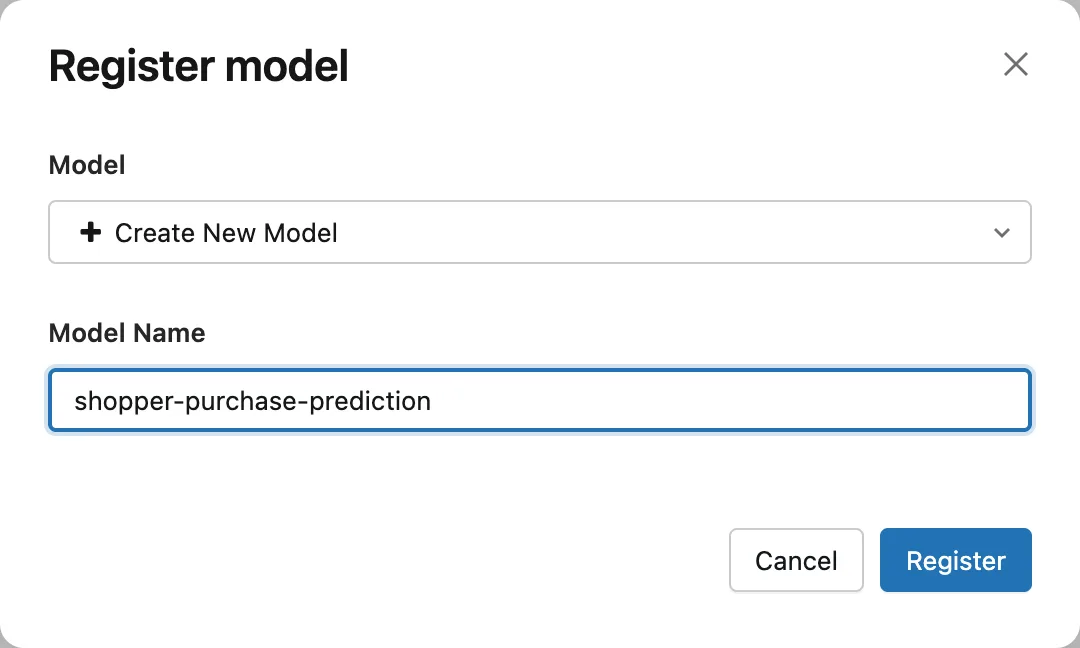
Click Register model. In Model, choose Create New Model, type shopper-purchase-prediction as the Model Name, and click Register:
MLflow says "Model registered successfully", and the page's About this logged model panel now lists the new version under Model versions:
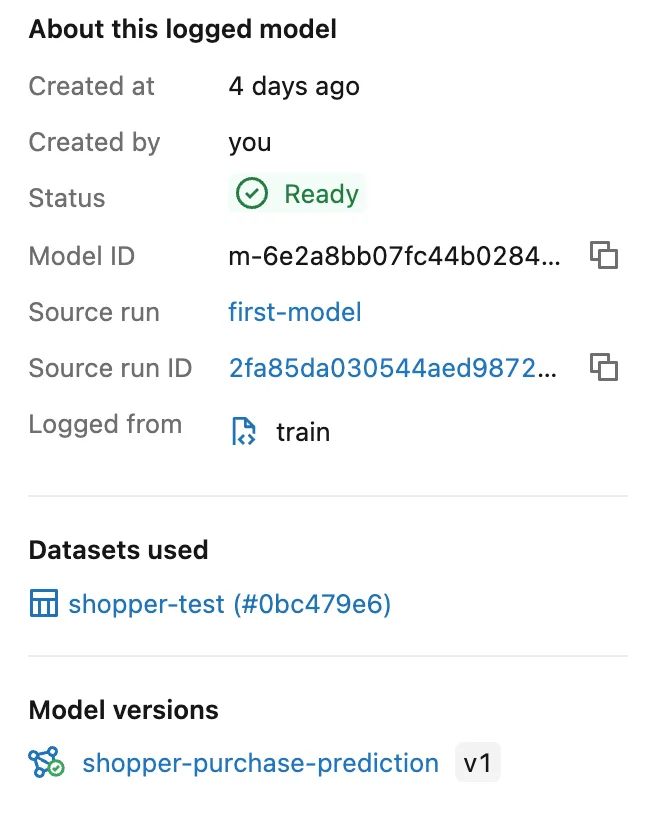
The logged model is now version 1 of the registered model shopper-purchase-prediction. The registered model has the same name as the experiment, which makes the two easy to connect, but they're separate things: the experiment holds runs and logged models, and the registry holds named versions. How to Register a Model in the MLflow UI covers the dialog on its own.
Step 3: Name the Champion and Describe the Model
Click Model registry on the left. The first time you open it, MLflow introduces its newer registry pages:
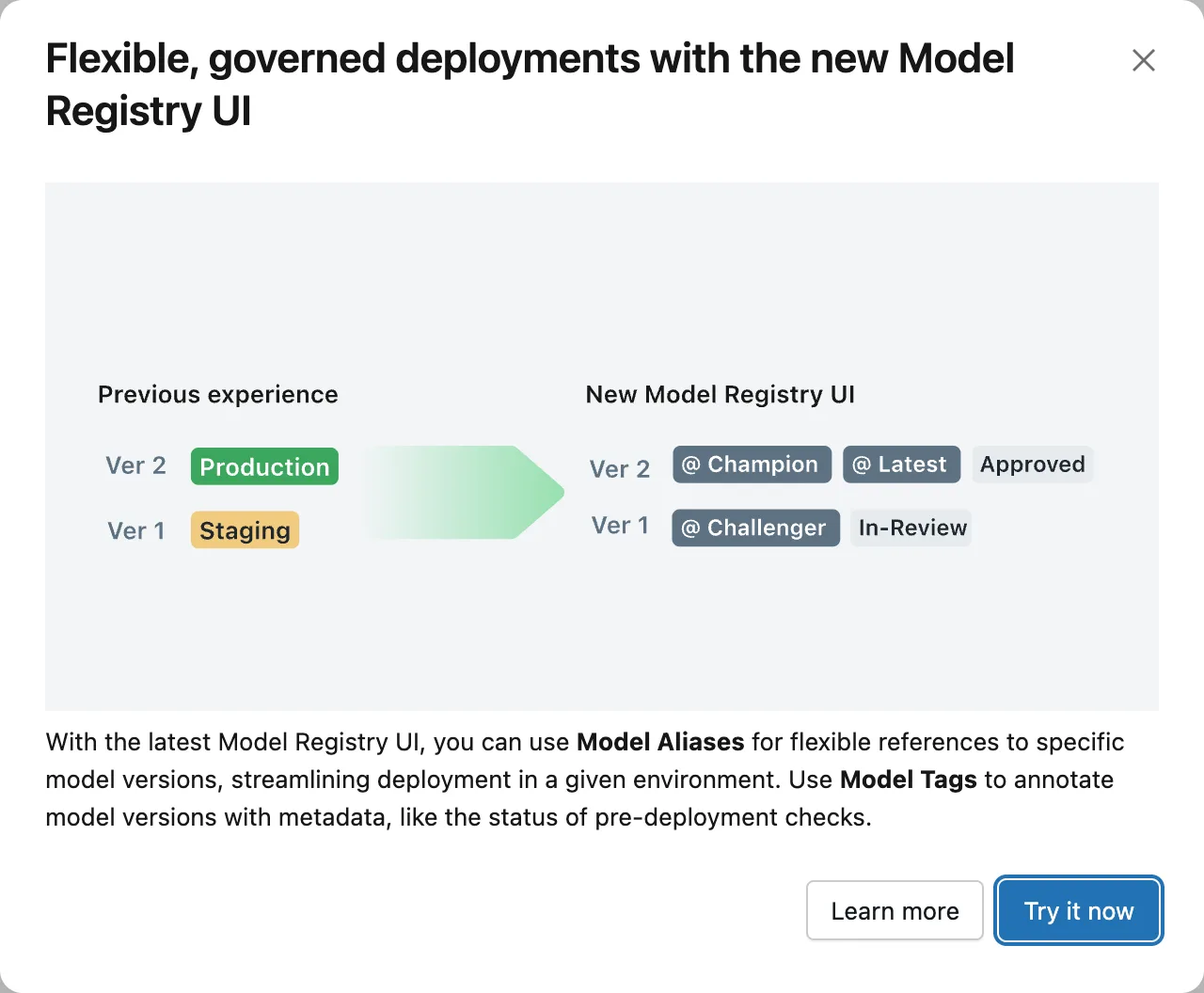
The picture is the move from stages to aliases and tags in one image. Click Try it now, then shopper-purchase-prediction in the list.
The alias. The page's Versions table has one row, Version 1. Click Add in its Aliases column, type champion, press Enter, and click Save aliases:
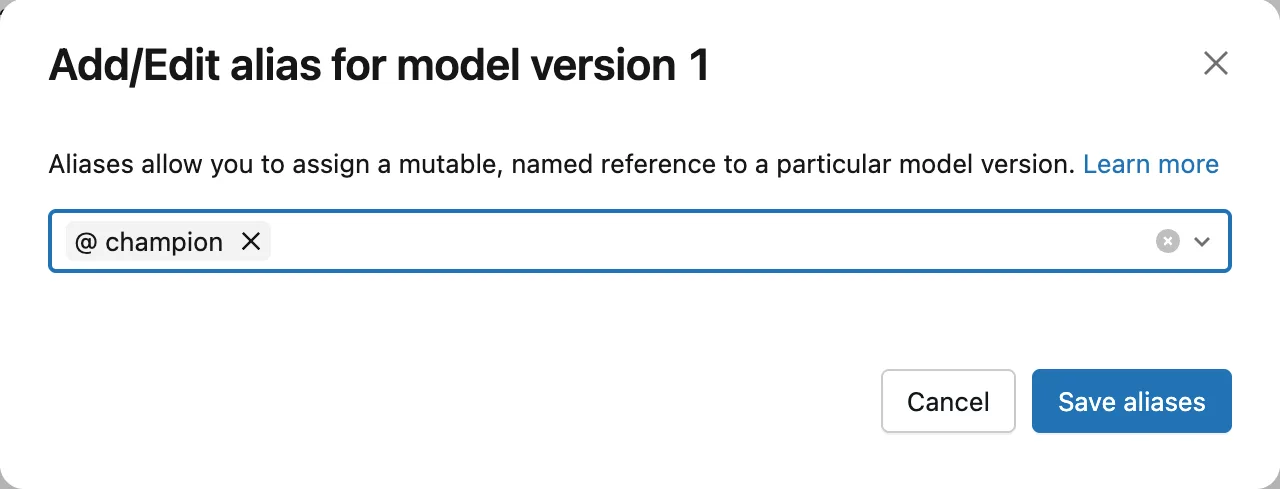
The table still shows Add after the dialog closes: MLflow 3.18.0 saves the alias but doesn't redraw the table. Reload the page to see it, as Fixed: The MLflow Model Registry Doesn't Show a New Alias Until You Reload the Page explains. I reported it to MLflow as issue #28120. How to Add an Alias to a Model Version in the MLflow UI covers the dialog in detail.
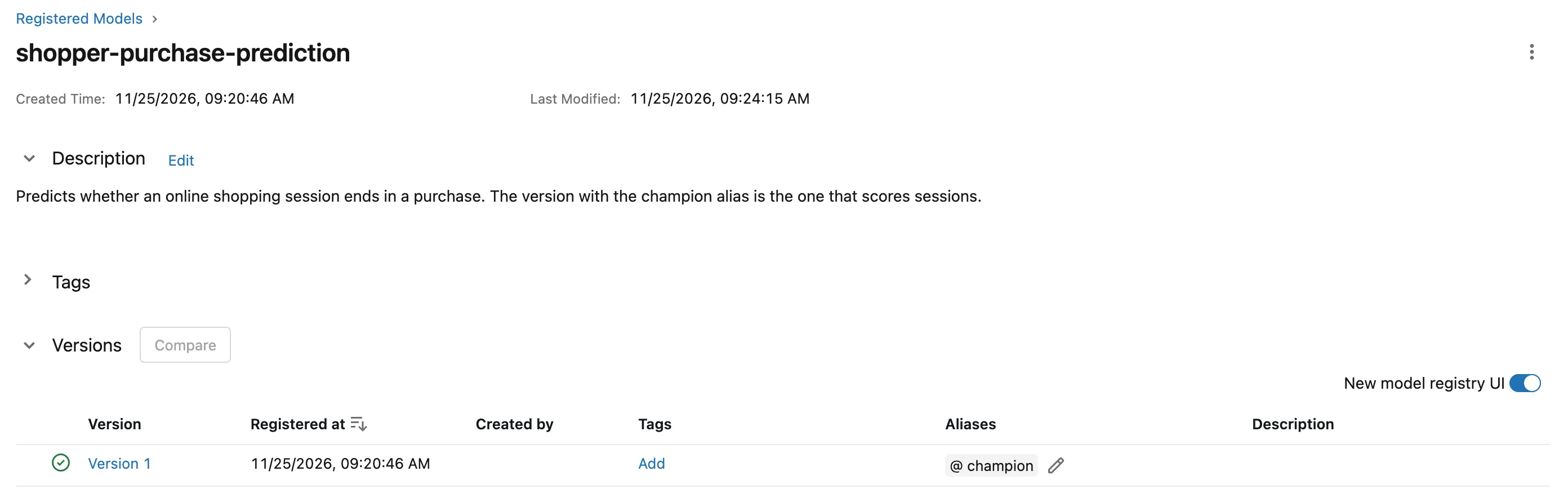
The description. Click Edit next to Description, write what the model is for in the Write tab, and click Save:
Predicts whether an online shopping session ends in a purchase. The version with the champion alias is the one that scores sessions.
The registered model's page now says what it's for and which version is in use:
Descriptions can be set from Python too: How to Add Descriptions to Registered Models and Model Versions in MLflow.
Step 4: Add the Registered Model's Name to the Settings
The commands need the registered model's name. Add it to Settings in config.py, below data_dir:
    registered_model_name: str = Field(
        default="shopper-purchase-prediction",
        min_length=1,
        description="The registered model that holds this project's model versions.",
    )
With the SHOPPER_ prefix from Part 6, its variable is SHOPPER_REGISTERED_MODEL_NAME. Add it to .env.example, so whoever sets the project up next sees it:
# The registered model in the MLflow Model Registry that holds this project's model versions.
SHOPPER_REGISTERED_MODEL_NAME=shopper-purchase-prediction
Your .env needs no change: the default is the same name. Add the line there only to use another registered model.
Step 5: Find the Champion in Code
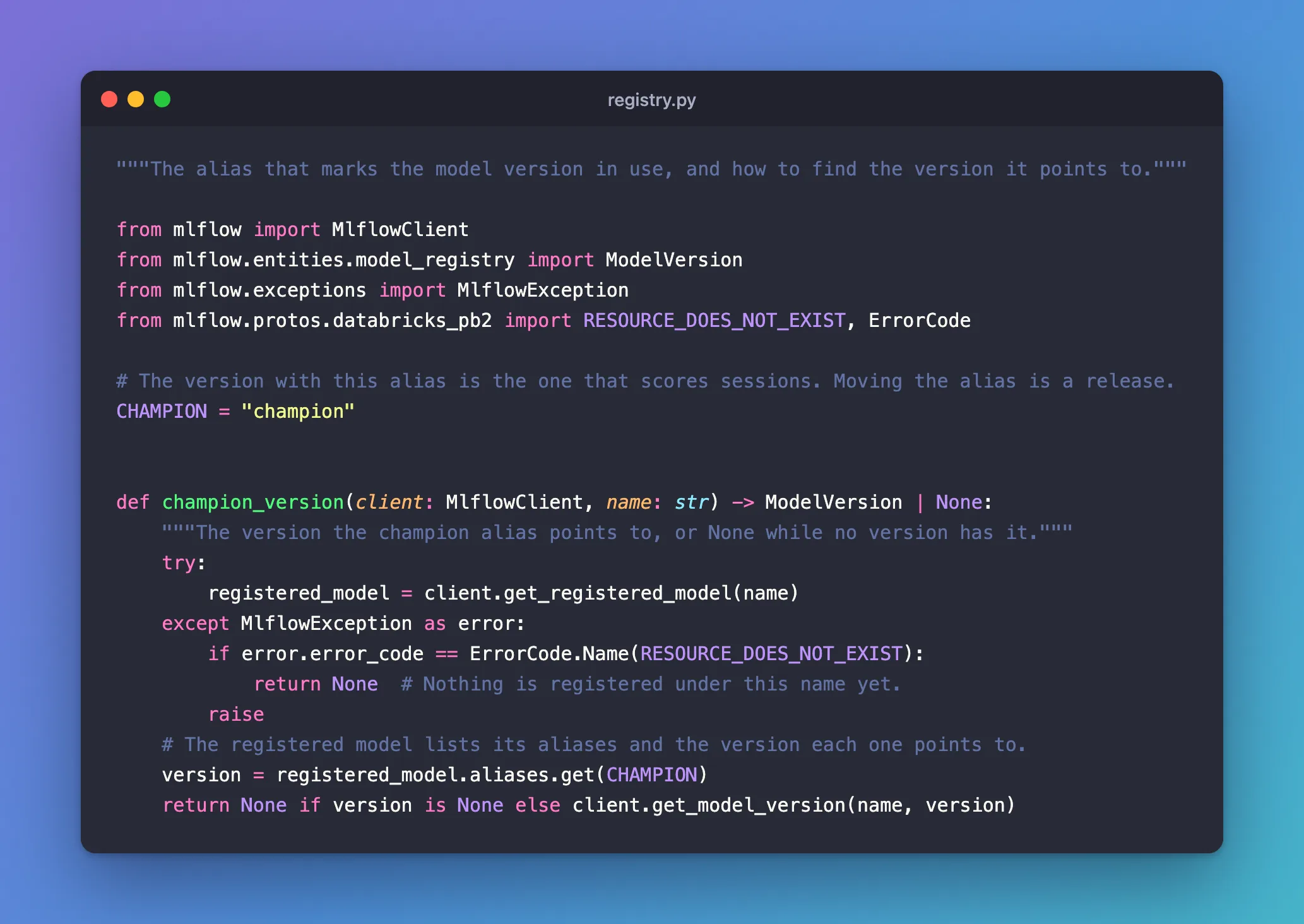
Both commands you're about to change need to ask the same question: which version is the champion right now? A small new module answers it in one place:
"""The alias that marks the model version in use, and how to find the version it points to."""

from mlflow import MlflowClient
from mlflow.entities.model_registry import ModelVersion
from mlflow.exceptions import MlflowException
from mlflow.protos.databricks_pb2 import RESOURCE_DOES_NOT_EXIST, ErrorCode

# The version with this alias is the one that scores sessions. Moving the alias is a release.
CHAMPION = "champion"


def champion_version(client: MlflowClient, name: str) -> ModelVersion | None:
    """The version the champion alias points to, or None while no version has it."""
    try:
        registered_model = client.get_registered_model(name)
    except MlflowException as error:
        if error.error_code == ErrorCode.Name(RESOURCE_DOES_NOT_EXIST):
            return None  # Nothing is registered under this name yet.
        raise
    # The registered model lists its aliases and the version each one points to.
    version = registered_model.aliases.get(CHAMPION)
    return None if version is None else client.get_model_version(name, version)
CHAMPION = "champion"keeps the alias's name in one place.client.get_registered_model(name)returns the registered model, and itsaliasesis a dictionary of every alias and the version it points to, such as{'champion': '1'}..get(CHAMPION)gives the version number, orNonewhen no version has the alias.RESOURCE_DOES_NOT_EXISTis the error MLflow raises when nothing is registered under the name yet, which is true before the first promotion on a new server. Any other error is a real problem, so it's raised again.client.get_model_version(name, version)returns the version itself, with its number, itssource, the logged model it holds, and itsrun_id.
My first version asked client.get_model_version_by_alias(name, "champion") directly and caught RESOURCE_DOES_NOT_EXIST. It caught the wrong error: when the alias doesn't exist, MLflow 3.18.0 raises INVALID_PARAMETER_VALUE: Registered model alias champion not found., the same error code as other bad input. Reading the registered model's aliases needs no error for that case at all. How to Find Which Version an Alias Points To in MLflow shows get_model_version_by_alias on its own.
Step 6: Score with the Champion
predict has always needed --model-uri. Now it can find the model itself. First, the option becomes optional:
    parser.add_argument(
        "--model-uri",
        default=None,
        help="the model to load, such as models:/m-... (default: the champion version of the "
        "registered model)",
    )
Import the client and the new module:
import mlflow
import pandas as pd
from mlflow import MlflowClient
from mlflow.exceptions import MlflowException
from mlflow.types import DataType

from shopper_purchase_prediction.config import get_settings
from shopper_purchase_prediction.registry import CHAMPION, champion_version
Then main works out which model to load before loading it:
    args = parse_args(argv)
    settings = get_settings()
    mlflow.set_tracking_uri(settings.mlflow_tracking_uri)

    model_uri = args.model_uri
    if model_uri is None:
        name = settings.registered_model_name
        champion = champion_version(MlflowClient(), name)
        if champion is None:
            logger.error("No version of %s has the %s alias yet", name, CHAMPION)
            return 1
        # Load the exact version the alias points to now, so the log names the model that scores.
        model_uri = f"models:/{name}/{champion.version}"
        logger.info("Scoring with version %s of %s, the %s", champion.version, name, CHAMPION)

    model = mlflow.pyfunc.load_model(model_uri)
- A model named with
--model-uristill wins, so any logged model or version can be scored on purpose. - Without it,
predictasks for the champion and stops with a clear message if there's none. models:/{name}/{champion.version}loads the version by number, notmodels:/{name}@champion. Both would load the same model right now, but resolving the alias once means the log line names exactly the version that scores, even if someone moves the alias a second later. How to Load a Registered Model by Alias in MLflow and How to Load a Specific Version of a Registered Model in MLflow show both addresses.
The complete file:
"""Load a model logged in MLflow and score online shopping sessions from a CSV file."""

import argparse
import logging
from collections.abc import Sequence
from pathlib import Path

import mlflow
import pandas as pd
from mlflow import MlflowClient
from mlflow.exceptions import MlflowException
from mlflow.types import DataType

from shopper_purchase_prediction.config import get_settings
from shopper_purchase_prediction.registry import CHAMPION, champion_version

logger = logging.getLogger("shopper_purchase_prediction")


def parse_args(argv: Sequence[str] | None = None) -> argparse.Namespace:
    """Read the model and the files from the command line."""
    parser = argparse.ArgumentParser(
        prog="predict",
        description="Score online shopping sessions with a model logged in MLflow.",
    )
    parser.add_argument(
        "--model-uri",
        default=None,
        help="the model to load, such as models:/m-... (default: the champion version of the "
        "registered model)",
    )
    parser.add_argument(
        "--input", type=Path, required=True, help="CSV file of sessions, one per row"
    )
    parser.add_argument(
        "--output",
        type=Path,
        default=None,
        help="CSV file for the sessions and their purchase probability "
        "(default: print each session's probability)",
    )
    return parser.parse_args(argv)


def main(argv: Sequence[str] | None = None) -> int:
    """Check the sessions against the model's signature, then predict who will buy."""
    logging.basicConfig(
        level=logging.INFO,
        format="%(asctime)s %(levelname)s %(name)s: %(message)s",
        datefmt="%Y/%m/%d %H:%M:%S",
    )
    args = parse_args(argv)
    settings = get_settings()
    mlflow.set_tracking_uri(settings.mlflow_tracking_uri)

    model_uri = args.model_uri
    if model_uri is None:
        name = settings.registered_model_name
        champion = champion_version(MlflowClient(), name)
        if champion is None:
            logger.error("No version of %s has the %s alias yet", name, CHAMPION)
            return 1
        # Load the exact version the alias points to now, so the log names the model that scores.
        model_uri = f"models:/{name}/{champion.version}"
        logger.info("Scoring with version %s of %s, the %s", champion.version, name, CHAMPION)

    model = mlflow.pyfunc.load_model(model_uri)
    schema = model.metadata.get_input_schema()
    # A CSV file doesn't say which numbers are decimals, so pandas reads whole numbers as
    # 64-bit integers, which MLflow won't turn into the doubles the signature asks for.
    # Read those columns as decimals from the start.
    decimals = {
        column.name: "float64" for column in schema.inputs if column.type == DataType.double
    }
    sessions = pd.read_csv(args.input, dtype=decimals)
    try:
        # The signature lists every column the model needs and its type. Checking first turns
        # a bad file into one clear sentence instead of a failed prediction.
        mlflow.models.validate_schema(sessions, schema)
    except MlflowException as error:
        logger.error("%s doesn't match the model's signature: %s", args.input, error.message)
        return 2

    probabilities = model.predict(sessions)  # one row per session: (didn't buy, bought)
    scored = sessions.assign(purchase_probability=probabilities[:, 1].round(4))
    if args.output is None:
        # One line per session, numbered in the file's order.
        summary = pd.DataFrame(
            {
                "session": range(1, len(scored) + 1),
                "purchase_probability": scored.purchase_probability,
            }
        )
        print(summary.to_string(index=False))
    else:
        scored.to_csv(args.output, index=False)
        logger.info("Wrote %d scored sessions to %s", len(scored), args.output)
    return 0
Score Part 6's three example sessions, with no model named:
uv run predict --input examples/sessions.csv
2026/11/25 09:25:45 INFO shopper_purchase_prediction: Scoring with version 1 of shopper-purchase-prediction, the champion
2026/11/25 09:25:45 WARNING mlflow.utils.requirements_utils: Detected one or more mismatches between the model's dependencies and the current Python environment:
 - charset-normalizer (current: 3.5.3, required: charset-normalizer==3.5.2)
 - databricks-sdk (current: 0.171.0, required: databricks-sdk==0.169.0)
 - google-auth (current: 2.63.1, required: google-auth==2.63.0)
 - packaging (current: 26.4, required: packaging==26.3)
 - wcwidth (current: 0.9.5, required: wcwidth==0.9.4)
To fix the mismatches, call `mlflow.pyfunc.get_model_dependencies(model_uri)` to fetch the model's environment and install dependencies using the resulting environment file.
 session  purchase_probability
       1                0.8179
       2                0.0006
       3                0.0014
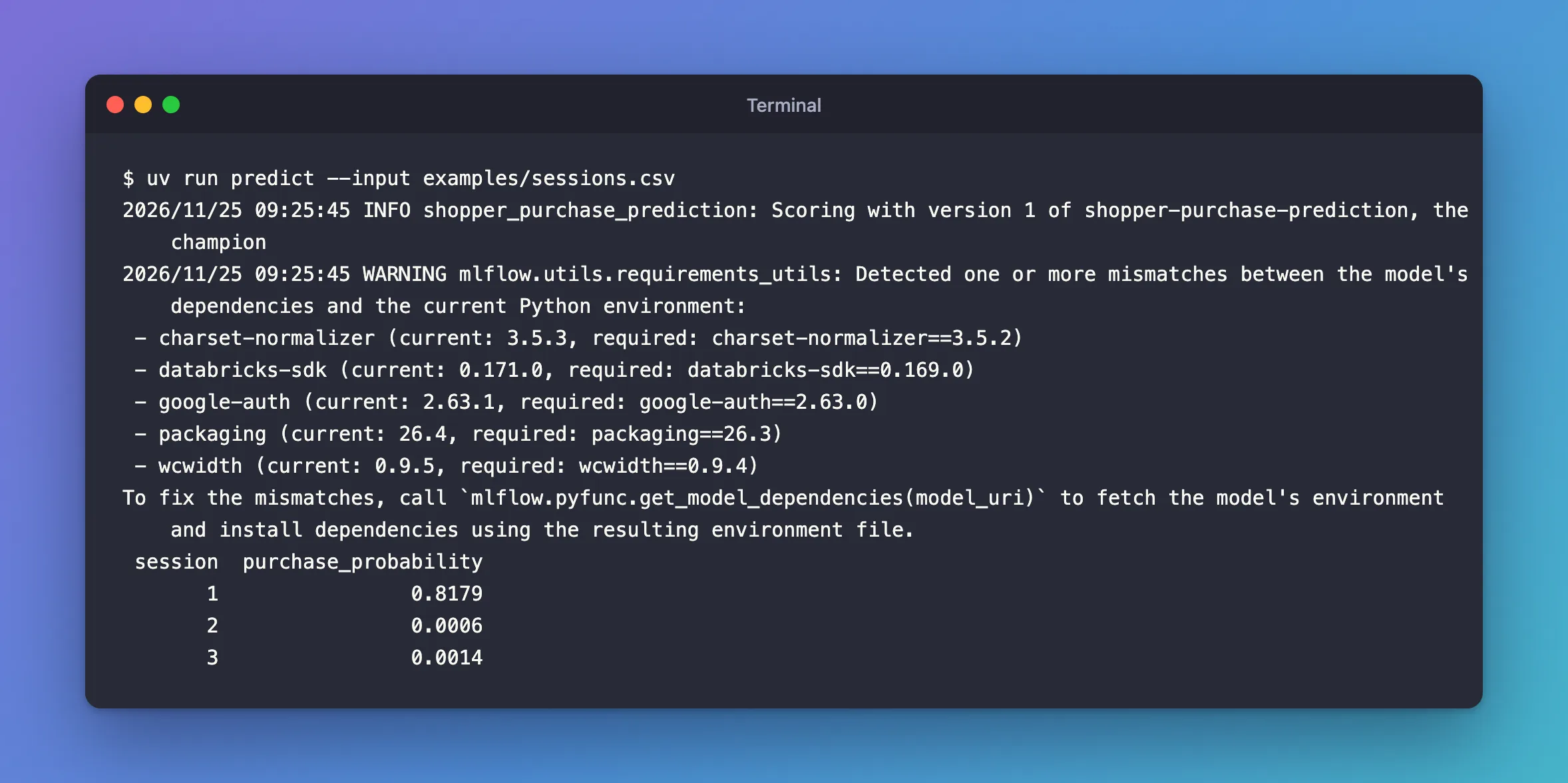
Scoring with version 1 of shopper-purchase-prediction, the champion:predictfound the alias you set in the UI, and the scores are Part 6's, 0.8179, 0.0006 and 0.0014, because version 1 holds the Part 6 model.- The
WARNINGis about packages, not about the registry. MLflow saves a uv project's exact package versions with every model it logs, and compares them with the project's packages each time it loads the model. I upgraded the project's packages to their newest releases between Parts 7 and 8, so five of them moved on. The scores don't change, and you'll see the same warning only if your packages changed too. Fixed: Detected one or more mismatches between the model's dependencies and the current Python environment traces it and shows how to run the model in its own environment, which Step 14 does.
Step 7: Turn the Quality Gate into a Function
Part 7's gate lives inside evaluate's main, which turns the result into an exit code. promote needs the same check but must act on the result itself, so the gate moves into a function of its own that returns whether the model passed. In evaluate.py, add it above main:
def check_quality_gate(model_uri: str, baseline_uri: str | None, sessions: PandasDataset) -> bool:
    """Evaluate the model, and the baseline if there is one, in the active run, then apply the
    quality gate. The run gets a quality_gate tag, and the result says whether the model passed."""
    # Keyed by role, so the table below shows one column per model.
    results = {"model": evaluate(model_uri, sessions)}
    if baseline_uri is not None:
        # The baseline's metrics and plots go to a run of their own, inside this one.
        with mlflow.start_run(run_name="baseline", nested=True):
            results["baseline"] = evaluate(baseline_uri, sessions)
    scores = pd.DataFrame({name: result.metrics for name, result in results.items()})
    print(scores.loc[SHOWN_METRICS].round(4).to_string())

    try:
        mlflow.validate_evaluation_results(
            quality_gate(with_baseline="baseline" in results),
            results["model"],
            results.get("baseline"),
        )
    except ModelValidationFailedException as error:
        mlflow.set_tag("quality_gate", "failed")
        logger.error("%s failed the quality gate:\n%s", model_uri, error.message)
        return False
    mlflow.set_tag("quality_gate", "passed")
    logger.info("%s passed the quality gate", model_uri)
    return True
The body is Part 7's code, moved: the evaluations, the table, the check and the quality_gate tag. It takes the two addresses as parameters instead of reading args, and answers True or False where main returned 0 or 1. main now calls the function and turns its answer into the exit code, so uv run evaluate works exactly as in Part 7:
    with mlflow.start_run(run_name=args.run_name):
        mlflow.log_params({"model_uri": args.model_uri, "baseline_uri": args.baseline_uri})
        passed = check_quality_gate(args.model_uri, args.baseline_uri, sessions)
    return 0 if passed else 1
The complete file:
"""Evaluate a logged model on the held-back test sessions, and check it against the quality gate
before it replaces the model in use."""

import argparse
import logging
from collections.abc import Sequence

import mlflow
import pandas as pd
from mlflow.data.pandas_dataset import PandasDataset
from mlflow.models import EvaluationResult, MetricThreshold, make_metric
from mlflow.models.evaluation.validation import ModelValidationFailedException
from sklearn.metrics import recall_score

from shopper_purchase_prediction.config import get_settings
from shopper_purchase_prediction.data import (
    RANDOM_STATE,
    SOURCE_URL,
    TARGET,
    TEST_SIZE,
    DataSplit,
    load_sessions,
    split_data,
)

logger = logging.getLogger("shopper_purchase_prediction")

# The scores the terminal shows, out of the many that MLflow logs.
SHOWN_METRICS = [
    "roc_auc",
    "balanced_accuracy",
    "recall_score",
    "precision_score",
    "f1_score",
    "accuracy_score",
    "log_loss",
]


def balanced_accuracy(predictions: pd.Series, targets: pd.Series) -> float:
    """The share of buyers the model spots and the share of non-buyers it clears, averaged, so the
    5 in 6 sessions that didn't buy can't hide its mistakes on the ones that did."""
    # Balanced accuracy is the average recall of the two classes. MLflow first tries a metric on a
    # single session, which holds only one class, so name both classes, and score a class with no
    # sessions as 0 instead of warning.
    return recall_score(targets, predictions, labels=[0, 1], average="macro", zero_division=0.0)


BALANCED_ACCURACY = make_metric(
    eval_fn=balanced_accuracy, greater_is_better=True, name="balanced_accuracy"
)


def quality_gate(with_baseline: bool) -> dict[str, MetricThreshold]:
    """The scores a model needs to pass. Compared with a baseline, it must also beat it."""
    return {
        # A buyer gets a higher score than a non-buyer at least 9 times in 10.
        "roc_auc": MetricThreshold(threshold=0.90, greater_is_better=True),
        # Right about buyers and non-buyers alike, and better than the baseline by 0.01 or more.
        "balanced_accuracy": MetricThreshold(
            threshold=0.75,
            min_absolute_change=0.01 if with_baseline else None,
            greater_is_better=True,
        ),
    }


def parse_args(argv: Sequence[str] | None = None) -> argparse.Namespace:
    """Read the models to evaluate from the command line."""
    parser = argparse.ArgumentParser(
        prog="evaluate",
        description="Evaluate a model logged in MLflow on the test sessions, and check it "
        "against the quality gate.",
    )
    parser.add_argument(
        "--model-uri", required=True, help="the model to evaluate, such as models:/m-..."
    )
    parser.add_argument(
        "--baseline-uri",
        default=None,
        help="a model it must beat, such as the one in use (default: check the scores only)",
    )
    parser.add_argument(
        "--run-name", default=None, help="name shown in the MLflow UI (default: MLflow picks one)"
    )
    return parser.parse_args(argv)


def test_dataset(data: DataSplit) -> PandasDataset:
    """The held-back test sessions and their outcomes, as an MLflow dataset."""
    # MLflow tells a classifier's labels by their type: True and False are classes, while 1 and 0
    # could be any number.
    sessions = data.X_test.assign(**{TARGET: data.y_test.astype(bool)})
    return mlflow.data.from_pandas(sessions, source=SOURCE_URL, targets=TARGET, name="shopper-test")


def evaluate(model_uri: str, sessions: PandasDataset) -> EvaluationResult:
    """Score the model on the test sessions. MLflow logs the metrics and plots to the active run,
    and links the metrics to the model."""
    logger.info("Evaluating %s on %d test sessions", model_uri, len(sessions.df))
    return mlflow.models.evaluate(
        model_uri,
        sessions,
        model_type="classifier",
        extra_metrics=[BALANCED_ACCURACY],
        # SHAP explanations need every column to hold numbers, and Month and VisitorType hold words.
        evaluator_config={"log_model_explainability": False},
    )


def check_quality_gate(model_uri: str, baseline_uri: str | None, sessions: PandasDataset) -> bool:
    """Evaluate the model, and the baseline if there is one, in the active run, then apply the
    quality gate. The run gets a quality_gate tag, and the result says whether the model passed."""
    # Keyed by role, so the table below shows one column per model.
    results = {"model": evaluate(model_uri, sessions)}
    if baseline_uri is not None:
        # The baseline's metrics and plots go to a run of their own, inside this one.
        with mlflow.start_run(run_name="baseline", nested=True):
            results["baseline"] = evaluate(baseline_uri, sessions)
    scores = pd.DataFrame({name: result.metrics for name, result in results.items()})
    print(scores.loc[SHOWN_METRICS].round(4).to_string())

    try:
        mlflow.validate_evaluation_results(
            quality_gate(with_baseline="baseline" in results),
            results["model"],
            results.get("baseline"),
        )
    except ModelValidationFailedException as error:
        mlflow.set_tag("quality_gate", "failed")
        logger.error("%s failed the quality gate:\n%s", model_uri, error.message)
        return False
    mlflow.set_tag("quality_gate", "passed")
    logger.info("%s passed the quality gate", model_uri)
    return True


def main(argv: Sequence[str] | None = None) -> int:
    """Evaluate the model, and the baseline if there is one, then apply the quality gate."""
    logging.basicConfig(
        level=logging.INFO,
        format="%(asctime)s %(levelname)s %(name)s: %(message)s",
        datefmt="%Y/%m/%d %H:%M:%S",
    )
    args = parse_args(argv)
    settings = get_settings()

    mlflow.set_tracking_uri(settings.mlflow_tracking_uri)
    mlflow.set_experiment(settings.mlflow_experiment_name)

    logger.info("Loading the online shoppers data")
    sessions = test_dataset(split_data(load_sessions(settings.data_dir), TEST_SIZE, RANDOM_STATE))

    with mlflow.start_run(run_name=args.run_name):
        mlflow.log_params({"model_uri": args.model_uri, "baseline_uri": args.baseline_uri})
        passed = check_quality_gate(args.model_uri, args.baseline_uri, sessions)
    return 0 if passed else 1
Step 8: Write the promote Command
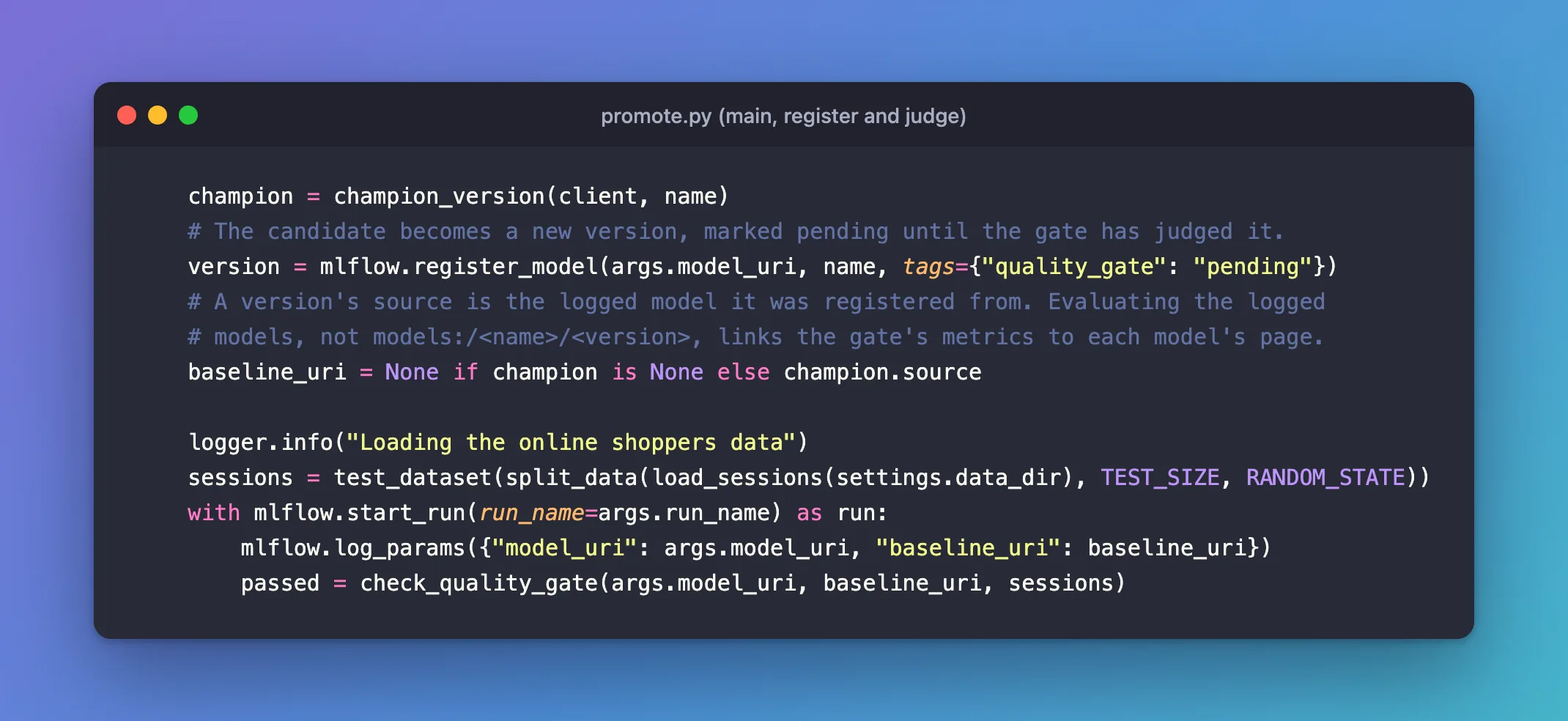
promote is the release process from the diagram above, in one command. It takes a candidate's address and does four things: registers it as a new version, judges it against the champion, records the verdict on the version, and moves the alias if it passed.
Register and judge:
    champion = champion_version(client, name)
    # The candidate becomes a new version, marked pending until the gate has judged it.
    version = mlflow.register_model(args.model_uri, name, tags={"quality_gate": "pending"})
    # A version's source is the logged model it was registered from. Evaluating the logged
    # models, not models:/<name>/<version>, links the gate's metrics to each model's page.
    baseline_uri = None if champion is None else champion.source

    logger.info("Loading the online shoppers data")
    sessions = test_dataset(split_data(load_sessions(settings.data_dir), TEST_SIZE, RANDOM_STATE))
    with mlflow.start_run(run_name=args.run_name) as run:
        mlflow.log_params({"model_uri": args.model_uri, "baseline_uri": baseline_uri})
        passed = check_quality_gate(args.model_uri, baseline_uri, sessions)
champion_version(client, name)finds the version in use before anything changes. On a new server there's none, and the candidate is judged on the minimum scores alone.mlflow.register_model(args.model_uri, name, tags=...)registers the candidate as the next version and tags itquality_gate: pending, so the version never exists without a status. How to Register a Model with mlflow.register_model covers the call.log_modelcan register as it logs, too, as How to Register a Model When You Log It in MLflow shows, but these models were logged in Parts 6 and 7, and a model should become a version only when someone decides to try it.champion.sourceis the champion's logged model,models:/m-…, and becomes the baseline. My first version evaluated the champion asmodels:/shopper-purchase-prediction/1. The gate worked, but the champion's model page showed none of the gate's metrics: an open-source MLflow server leaves a version'smodel_idempty, soevaluatecouldn't tell which logged model to link them to. Fixed: MLflow Doesn't Link Evaluation Metrics to the Model When You Evaluate a Registered Model Version tells the whole story, and How to Find the Run and Logged Model Behind a Model Version in MLflow shows what a version records. I reported the emptymodel_idto MLflow as issue #28119.- The run records both addresses as parameters, and
check_quality_gateevaluates both models in it, exactly asevaluatedoes.
Record the verdict and release:
    # The version keeps the verdict, and the run that holds the scores behind it.
    client.set_model_version_tag(
        name, version.version, "quality_gate", "passed" if passed else "failed"
    )
    client.set_model_version_tag(name, version.version, "quality_gate_run_id", run.info.run_id)
    if not passed:
        logger.error(
            "Version %s stays a candidate; the %s is still %s",
            version.version,
            CHAMPION,
            "unset" if champion is None else f"version {champion.version}",
        )
        return 1
    client.set_registered_model_alias(name, CHAMPION, version.version)
    logger.info("Version %s of %s is the new %s", version.version, name, CHAMPION)
    return 0
set_model_version_tagreplacespendingwithpassedorfailed, and adds the ID of the run that holds the scores, so anyone looking at the version can find out why: How to Add Tags to a Model Version in MLflow.- A failed candidate stays registered with its verdict, the alias doesn't move, and the command exits with
1, likeevaluate. set_registered_model_alias(name, CHAMPION, version.version)is the release: the alias moves to the new version, and everything that loads the champion gets it from then on. How to Set an Alias on a Model Version in MLflow with Python covers the call.
The complete file:
"""Register a candidate model as a new version, check it against the champion with the quality
gate, and make it the champion if it passes."""

import argparse
import logging
from collections.abc import Sequence

import mlflow
from mlflow import MlflowClient

from shopper_purchase_prediction.config import get_settings
from shopper_purchase_prediction.data import RANDOM_STATE, TEST_SIZE, load_sessions, split_data
from shopper_purchase_prediction.evaluate import check_quality_gate, test_dataset
from shopper_purchase_prediction.registry import CHAMPION, champion_version

logger = logging.getLogger("shopper_purchase_prediction")


def parse_args(argv: Sequence[str] | None = None) -> argparse.Namespace:
    """Read the candidate model from the command line."""
    parser = argparse.ArgumentParser(
        prog="promote",
        description="Register a model logged in MLflow as a new version of the project's "
        "registered model, and make it the champion if it passes the quality gate.",
    )
    parser.add_argument(
        "--model-uri", required=True, help="the candidate model, such as models:/m-..."
    )
    parser.add_argument(
        "--run-name",
        default=None,
        help="name of the evaluation run in the MLflow UI (default: MLflow picks one)",
    )
    return parser.parse_args(argv)


def main(argv: Sequence[str] | None = None) -> int:
    """Register the candidate, judge it against the champion, and move the alias if it passes."""
    logging.basicConfig(
        level=logging.INFO,
        format="%(asctime)s %(levelname)s %(name)s: %(message)s",
        datefmt="%Y/%m/%d %H:%M:%S",
    )
    args = parse_args(argv)
    settings = get_settings()

    mlflow.set_tracking_uri(settings.mlflow_tracking_uri)
    mlflow.set_experiment(settings.mlflow_experiment_name)
    client = MlflowClient()
    name = settings.registered_model_name

    champion = champion_version(client, name)
    # The candidate becomes a new version, marked pending until the gate has judged it.
    version = mlflow.register_model(args.model_uri, name, tags={"quality_gate": "pending"})
    # A version's source is the logged model it was registered from. Evaluating the logged
    # models, not models:/<name>/<version>, links the gate's metrics to each model's page.
    baseline_uri = None if champion is None else champion.source

    logger.info("Loading the online shoppers data")
    sessions = test_dataset(split_data(load_sessions(settings.data_dir), TEST_SIZE, RANDOM_STATE))
    with mlflow.start_run(run_name=args.run_name) as run:
        mlflow.log_params({"model_uri": args.model_uri, "baseline_uri": baseline_uri})
        passed = check_quality_gate(args.model_uri, baseline_uri, sessions)

    # The version keeps the verdict, and the run that holds the scores behind it.
    client.set_model_version_tag(
        name, version.version, "quality_gate", "passed" if passed else "failed"
    )
    client.set_model_version_tag(name, version.version, "quality_gate_run_id", run.info.run_id)
    if not passed:
        logger.error(
            "Version %s stays a candidate; the %s is still %s",
            version.version,
            CHAMPION,
            "unset" if champion is None else f"version {champion.version}",
        )
        return 1
    client.set_registered_model_alias(name, CHAMPION, version.version)
    logger.info("Version %s of %s is the new %s", version.version, name, CHAMPION)
    return 0
Then register the command in pyproject.toml, next to the other four:
[project.scripts]
train = "shopper_purchase_prediction.train:main"
predict = "shopper_purchase_prediction.predict:main"
validate = "shopper_purchase_prediction.validate:main"
evaluate = "shopper_purchase_prediction.evaluate:main"
promote = "shopper_purchase_prediction.promote:main"
Step 9: Promote the Model with Balanced Class Weights
Part 7's model with balanced class weights is the first candidate:
uv run promote --model-uri models:/m-1266079ca0a64dd4921d0d6ab2bfdeec --run-name promote-balanced-weights
Uninstalled 1 package in 1ms
Installed 1 package in 4ms
Registered model 'shopper-purchase-prediction' already exists. Creating a new version of this model...
2026/11/25 09:28:08 INFO mlflow.store.model_registry.abstract_store: Waiting up to 300 seconds for model version to finish creation. Model name: shopper-purchase-prediction, version 2
Created version '2' of model 'shopper-purchase-prediction'.
2026/11/25 09:28:08 INFO shopper_purchase_prediction: Loading the online shoppers data
2026/11/25 09:28:08 INFO shopper_purchase_prediction: Evaluating models:/m-1266079ca0a64dd4921d0d6ab2bfdeec on 2466 test sessions
...
2026/11/25 09:28:11 INFO shopper_purchase_prediction: Evaluating models:/m-6e2a8bb07fc44b02843eca07c555586f on 2466 test sessions
...
🏃 View run baseline at: http://127.0.0.1:8080/#/experiments/3/runs/a46c1935040d4be087f61f5cfc44f2c4
🧪 View experiment at: http://127.0.0.1:8080/#/experiments/3
                    model  baseline
roc_auc            0.9258    0.9286
balanced_accuracy  0.8289    0.7790
recall_score       0.7696    0.6021
precision_score    0.5579    0.7143
f1_score           0.6469    0.6534
accuracy_score     0.8698    0.9011
log_loss           0.2865    0.2322
2026/11/25 09:28:11 INFO mlflow.models.evaluation.validation: Validating candidate model metrics against baseline
2026/11/25 09:28:11 INFO mlflow.models.evaluation.validation: Model validation passed!
2026/11/25 09:28:11 INFO shopper_purchase_prediction: models:/m-1266079ca0a64dd4921d0d6ab2bfdeec passed the quality gate
🏃 View run promote-balanced-weights at: http://127.0.0.1:8080/#/experiments/3/runs/938b1c2757c34ff1963eb0e892b41e98
🧪 View experiment at: http://127.0.0.1:8080/#/experiments/3
2026/11/25 09:28:11 INFO shopper_purchase_prediction: Version 2 of shopper-purchase-prediction is the new champion
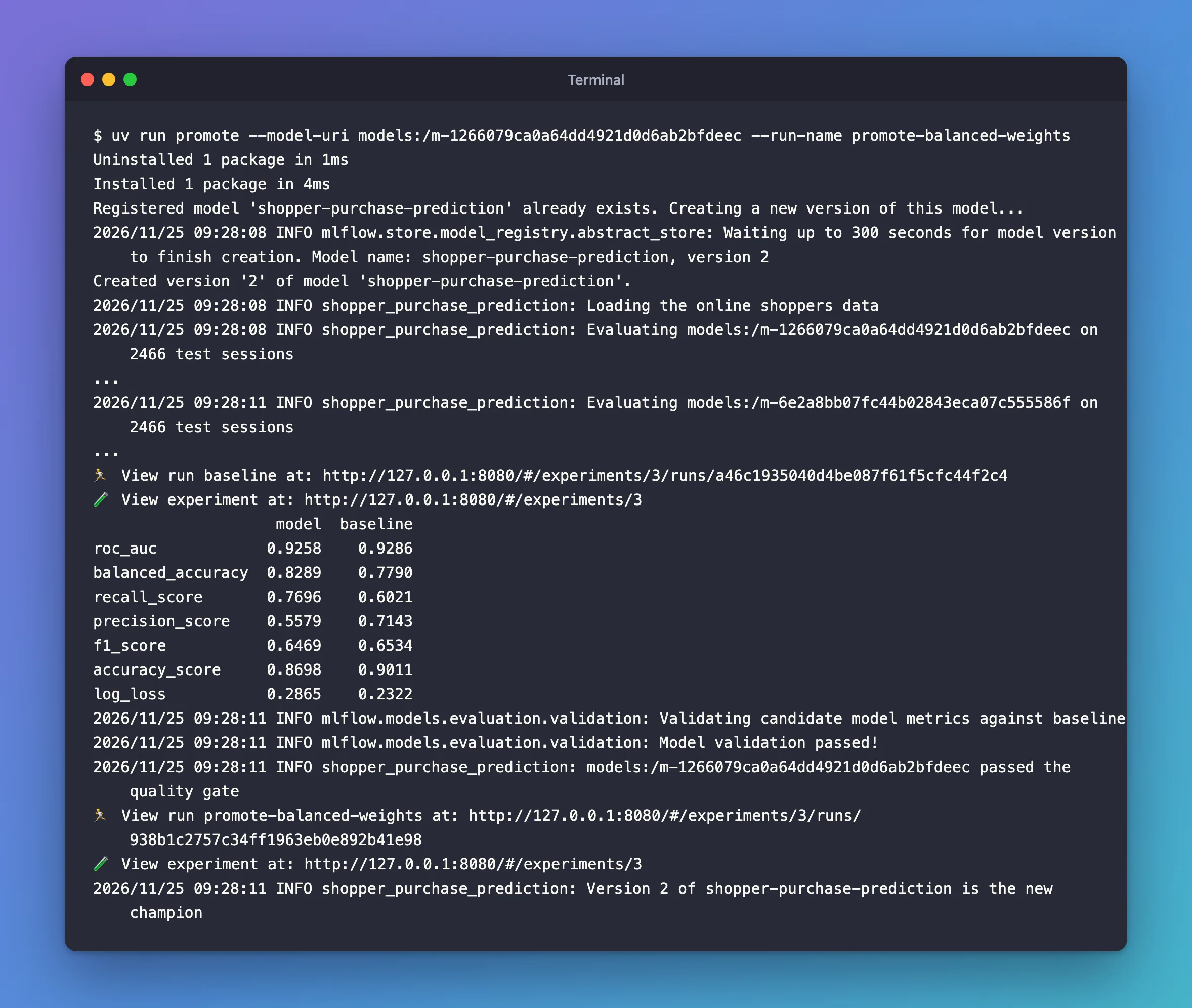
Each ... stands for the evaluation's own messages, as in Part 7, and Step 6's package warning, once per model.
Uninstalled 1 package/Installed 1 package: uv reinstalled the project once, becausepyproject.tomlgained a command.Created version '2': the candidate is registered before anything is judged.Evaluating models:/m-6e2a8bb0…: the baseline is the champion's logged model, version 1'ssource.- The table: the candidate's balanced accuracy, 0.8289, beats the champion's 0.7790 by more than 0.01, as in Part 7.
Version 2 of shopper-purchase-prediction is the new champion: the alias moved.
Step 10: Try a Model the Gate Refuses
Part 7's retrained model is the second candidate. Print the exit code after it:
- macOS / Linux
- Windows (PowerShell)
uv run promote --model-uri models:/m-216dd0523dd248788cac96a1ba86712b --run-name promote-retrain
echo $?
uv run promote --model-uri models:/m-216dd0523dd248788cac96a1ba86712b --run-name promote-retrain
$LASTEXITCODE
Registered model 'shopper-purchase-prediction' already exists. Creating a new version of this model...
2026/11/25 09:28:22 INFO mlflow.store.model_registry.abstract_store: Waiting up to 300 seconds for model version to finish creation. Model name: shopper-purchase-prediction, version 3
Created version '3' of model 'shopper-purchase-prediction'.
...
🏃 View run baseline at: http://127.0.0.1:8080/#/experiments/3/runs/4319d028286b445582bc8f4eaed02b80
🧪 View experiment at: http://127.0.0.1:8080/#/experiments/3
                    model  baseline
roc_auc            0.9286    0.9258
balanced_accuracy  0.7790    0.8289
recall_score       0.6021    0.7696
precision_score    0.7143    0.5579
f1_score           0.6534    0.6469
accuracy_score     0.9011    0.8698
log_loss           0.2322    0.2865
2026/11/25 09:28:26 INFO mlflow.models.evaluation.validation: Validating candidate model metrics against baseline
2026/11/25 09:28:26 ERROR shopper_purchase_prediction: models:/m-216dd0523dd248788cac96a1ba86712b failed the quality gate:
Metric balanced_accuracy minimum absolute change check failed: candidate model balanced_accuracy = 0.7789741837585795, baseline model balanced_accuracy = 0.8289146426023253, balanced_accuracy minimum absolute change threshold = 0.01.
🏃 View run promote-retrain at: http://127.0.0.1:8080/#/experiments/3/runs/eb64943097d64c59a219b669eb186c2d
🧪 View experiment at: http://127.0.0.1:8080/#/experiments/3
2026/11/25 09:28:26 ERROR shopper_purchase_prediction: Version 3 stays a candidate; the champion is still version 2
1
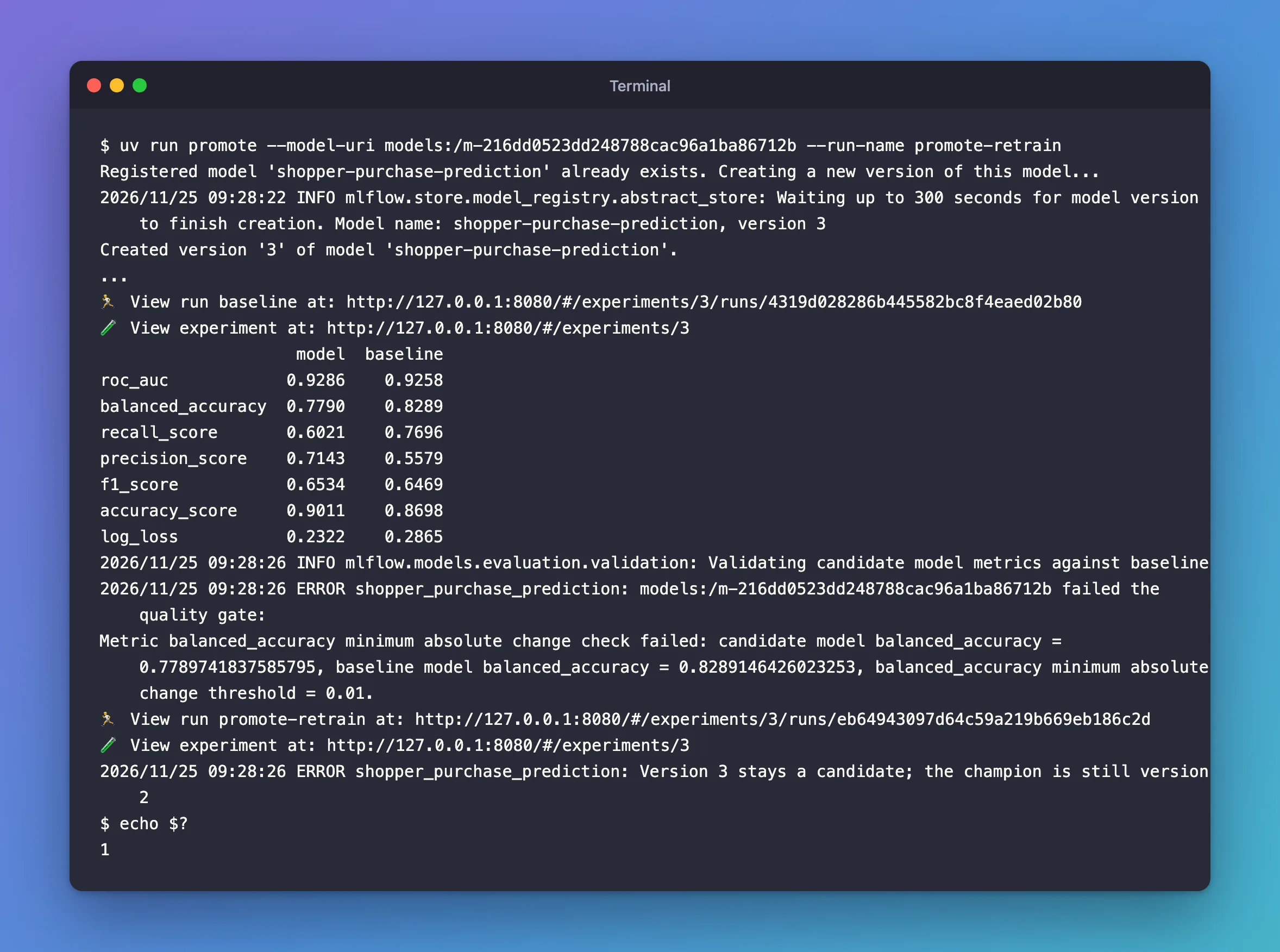
The baseline is now version 2, the new champion, so the retrained model has to beat 0.8289. With 0.7790 it doesn't, and the gate says so. Version 3 exists anyway, tagged quality_gate: failed: the attempt is on record, and the exit code 1 would stop a pipeline.
Step 11: Score with the New Champion
Run exactly the same command as in Step 6:
uv run predict --input examples/sessions.csv
2026/11/25 09:28:33 INFO shopper_purchase_prediction: Scoring with version 2 of shopper-purchase-prediction, the champion
...
 session  purchase_probability
       1                0.8931
       2                0.0009
       3                0.0033
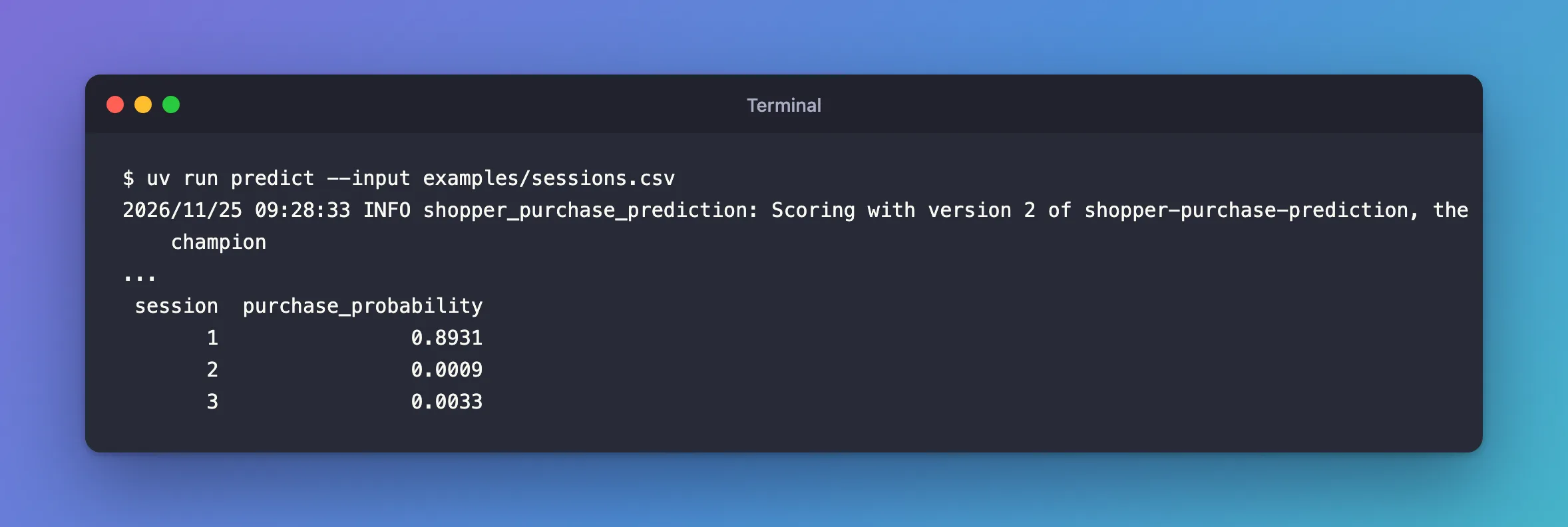
The ... is Step 6's package warning. No code and no command changed, but predict now scores with version 2: the first session's chance of buying went from 0.8179 to 0.8931, because the model with balanced class weights gives higher chances across the board, as its calibration curve in Part 7 showed.
Step 12: See the Versions in the UI
Reload the shopper-purchase-prediction page in the Model Registry. The Versions table shows all three, with their tags and the alias:
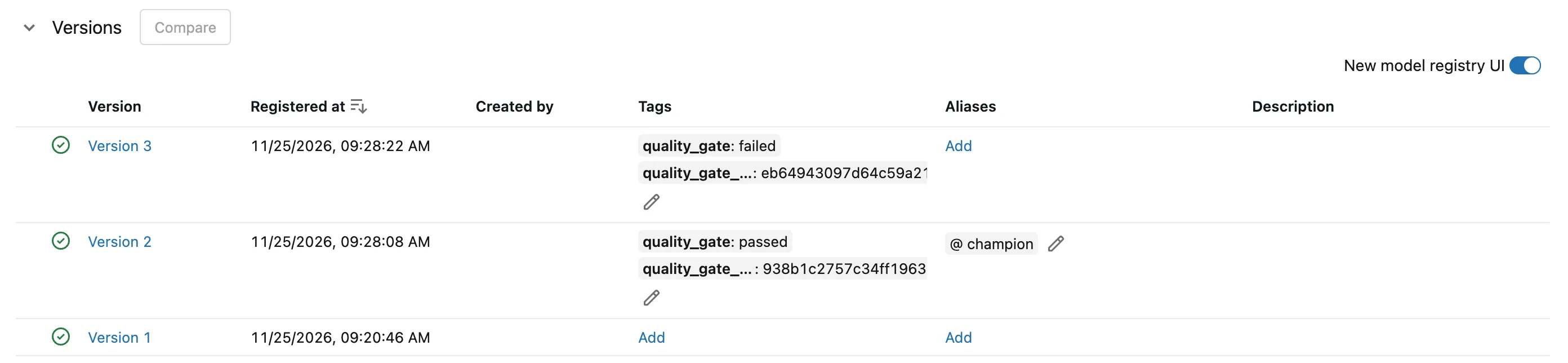
Click Version 2 for its own page:
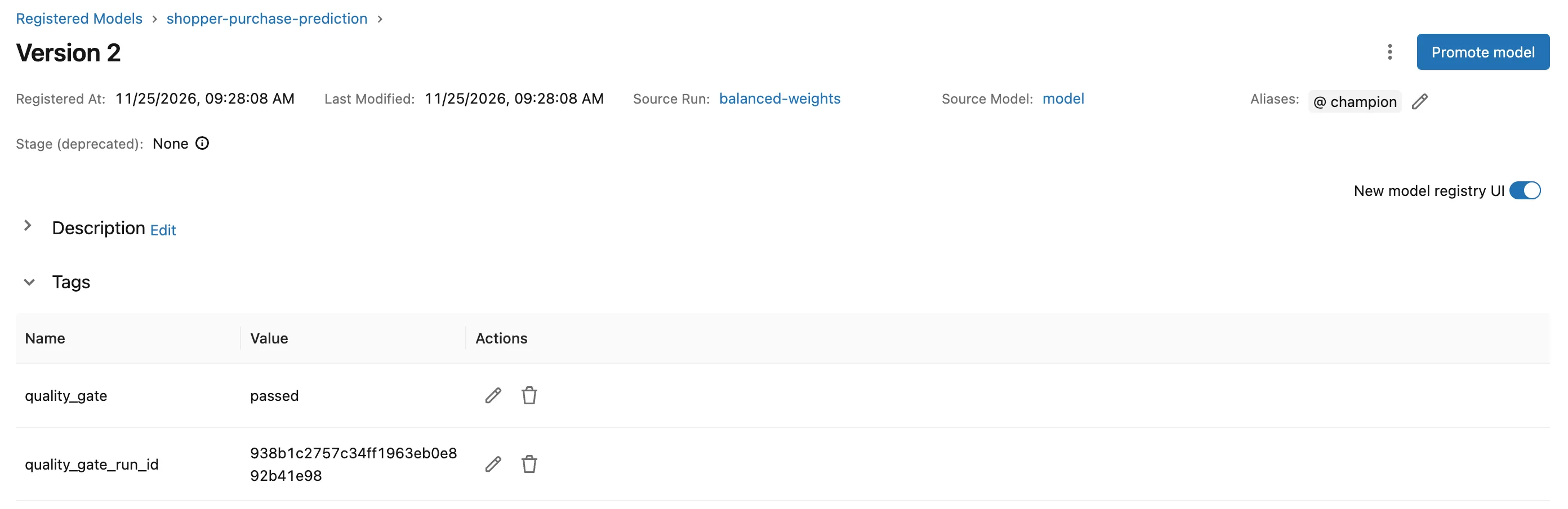
- Source Run and Source Model lead back to the run
balanced-weightsand the logged model this version holds. - The tags are
promote's verdict, andquality_gate_run_idis the run with the scores behind it. - Stage (deprecated) is the old stages field, unused here.
Click Model registry on the left for the list of registered models:

Latest version is Version 3, the newest number, while Aliased versions says the champion is Version 2. The newest version isn't necessarily the one in use, which is why predict follows the alias: How to Get the Latest Version of a Registered Model in MLflow shows the difference from Python.
Step 13: Roll Back by Moving the Alias
Suppose version 2 misbehaves after its release. A rollback is the same move as a release, backwards: point champion at version 1 again. On the registered model's page, click Add in Version 1's Aliases column and type champion. Before you save, the dialog warns that the alias can only be in one place:
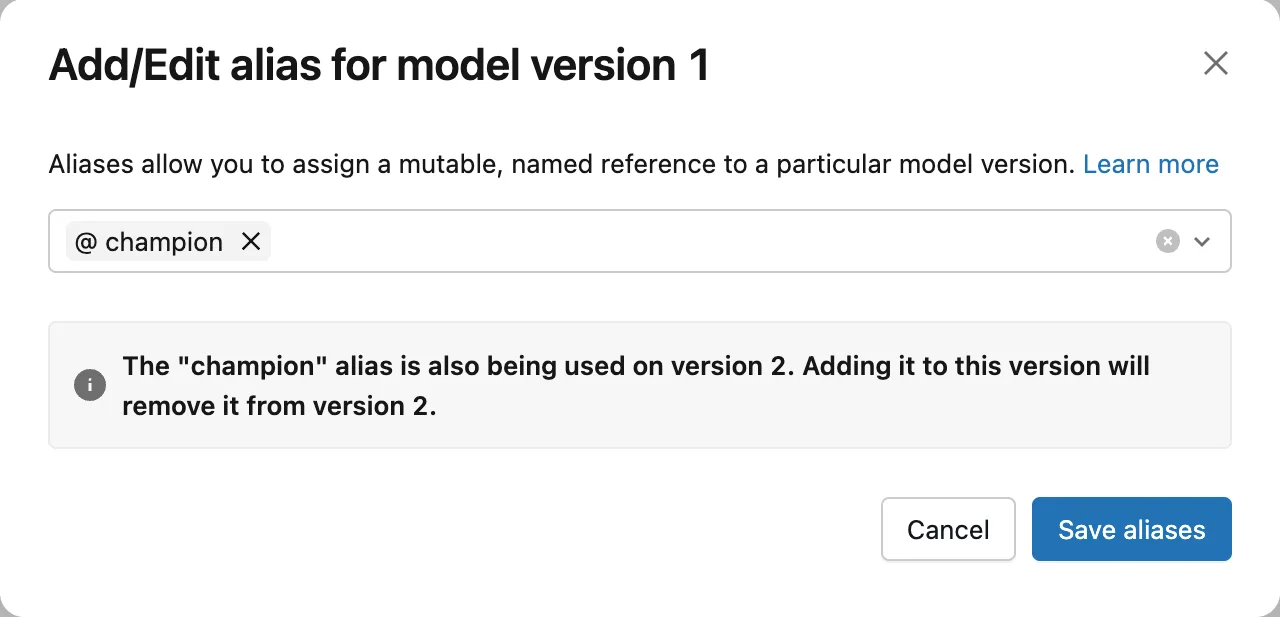
Click Save aliases and reload the page:
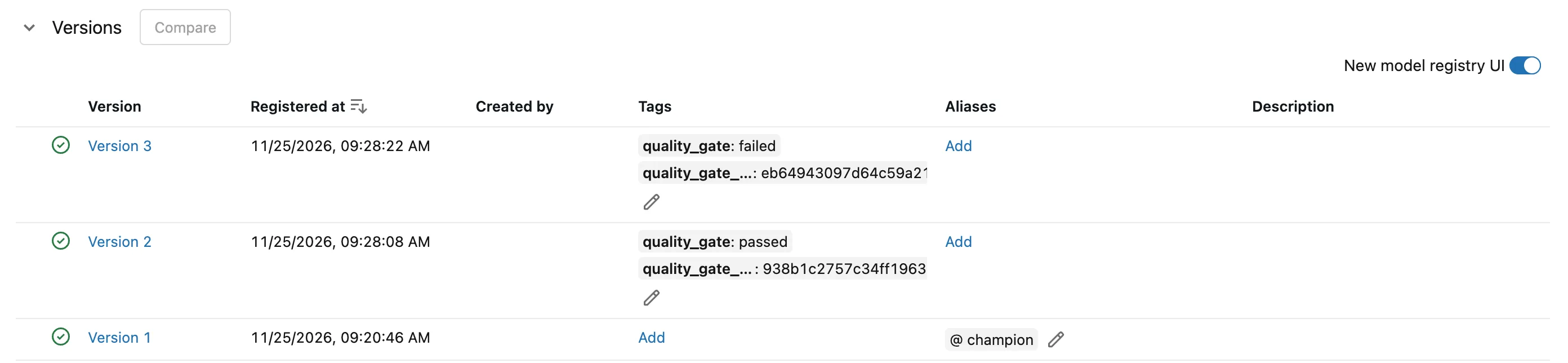
Score again:
uv run predict --input examples/sessions.csv
2026/11/25 09:30:40 INFO shopper_purchase_prediction: Scoring with version 1 of shopper-purchase-prediction, the champion
...
 session  purchase_probability
       1                0.8179
       2                0.0006
       3                0.0014
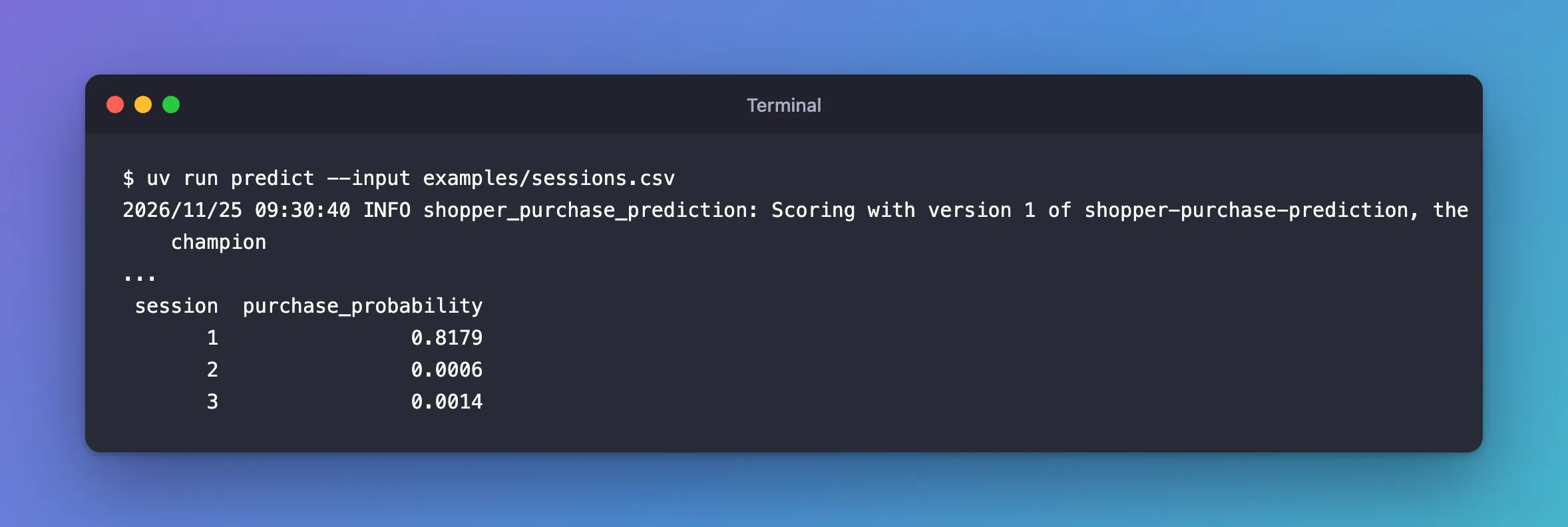
Version 1 is back, with its own scores, and nothing was retrained or redeployed. Moving the alias by hand skips the quality gate. That's fine for a rollback to a version that was in use before, and it's why new releases go through promote.
Now move champion forward again the same way: Add in Version 2's Aliases column, champion, Save aliases, and reload. predict follows it:
2026/11/25 09:31:37 INFO shopper_purchase_prediction: Scoring with version 2 of shopper-purchase-prediction, the champion
...
 session  purchase_probability
       1                0.8931
       2                0.0009
       3                0.0033
Step 14: Score with the Champion from the Command Line
MLflow's command line can score with the champion too: mlflow models predict accepts the alias address. It reads the sessions from a file, and a CSV file doesn't work here: MLflow reads whole numbers in it as integers, and the model's signature wants decimals, so the command fails with Incompatible input types for column Administrative. Can not safely convert int64 to float64. Fixed: Incompatible input types for column … Can not safely convert int64 to float64 explains it. JSON says which numbers are decimals, so save the same three sessions in MLflow's dataframe_split layout, as a new file:
{
  "dataframe_split": {
    "columns": ["Administrative", "Administrative_Duration", "Informational", "Informational_Duration", "ProductRelated", "ProductRelated_Duration", "BounceRates", "ExitRates", "PageValues", "SpecialDay", "Month", "OperatingSystems", "Browser", "Region", "TrafficType", "VisitorType", "Weekend"],
    "data": [
      [3.0, 80.0, 1.0, 30.0, 40.0, 1500.0, 0.0, 0.01, 25.0, 0.0, "Nov", 2.0, 2.0, 1.0, 2.0, "Returning_Visitor", false],
      [0.0, 0.0, 0.0, 0.0, 1.0, 0.0, 0.2, 0.2, 0.0, 0.0, "May", 1.0, 1.0, 1.0, 3.0, "New_Visitor", true],
      [1.0, 20.0, 0.0, 0.0, 12.0, 300.0, 0.01, 0.03, 0.0, 0.0, "Mar", 2.0, 2.0, 3.0, 1.0, "Returning_Visitor", false]
    ]
  }
}
Then score them with the champion. --env-manager uv runs the model in an environment of its own, built from the exact package versions saved with it:
- macOS / Linux
- Windows (PowerShell)
export MLFLOW_TRACKING_URI=http://127.0.0.1:8080
uv run mlflow models predict -m "models:/shopper-purchase-prediction@champion" -i examples/sessions.json -t json --env-manager uv
$env:MLFLOW_TRACKING_URI = "http://127.0.0.1:8080"
uv run mlflow models predict -m "models:/shopper-purchase-prediction@champion" -i examples/sessions.json -t json --env-manager uv
2026/11/25 09:37:26 INFO mlflow.models.flavor_backend_registry: Selected backend for flavor 'python_function'
2026/11/25 09:37:26 INFO mlflow.utils.virtualenv: Creating a new environment in /var/folders/…/T/tmpek84zdlh/envs/virtualenv_envs/mlflow-217dc732b07a188e27ddccb998d5ceea5443dbf8 with python version 3.15.2 using uv
...
Installed 89 packages in 758ms
...
{"predictions": [[0.10694143736565398, 0.893058562634346], [0.999142902134051, 0.0008570978659490101], [0.9966742334522005, 0.0033257665477994395]]}
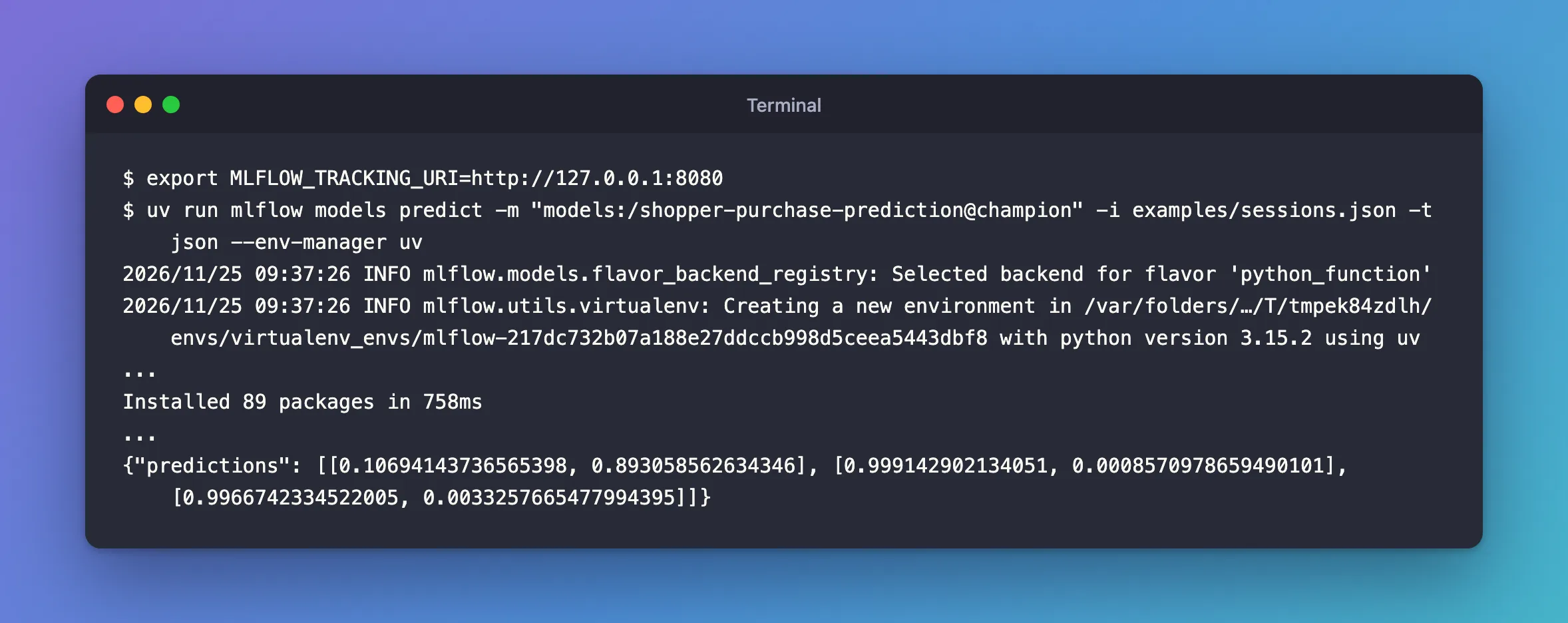
Each pair is the chance of not buying and of buying, so the second numbers, 0.8931, 0.0009 and 0.0033 rounded, are version 2's scores from Step 11. There's no package warning: the model ran with its own packages. How to Predict with an MLflow Model from the Command Line covers the command's options.
Step 15: Save Your Work with Git
In the project terminal:
git status --short --untracked-files=all
 M .env.example
 M pyproject.toml
 M src/shopper_purchase_prediction/config.py
 M src/shopper_purchase_prediction/evaluate.py
 M src/shopper_purchase_prediction/predict.py
?? examples/sessions.json
?? src/shopper_purchase_prediction/promote.py
?? src/shopper_purchase_prediction/registry.py
git add .
git commit -m "Register model versions and promote the champion with the MLflow Model Registry"
[master eb31b82] Register model versions and promote the champion with the MLflow Model Registry
 8 files changed, 169 insertions(+), 25 deletions(-)
 create mode 100644 examples/sessions.json
 create mode 100644 src/shopper_purchase_prediction/promote.py
 create mode 100644 src/shopper_purchase_prediction/registry.py
Your Folders Now Look Like This
source/
├── mlflow-server/
│   ├── .venv/
│   ├── mlartifacts/
│   ├── mlflow.db
│   ├── pyproject.toml
│   └── uv.lock
├── dewiride-house-price-prediction/
│   └── ...
├── dewiride-term-deposit-prediction/
│   └── ...
└── dewiride-shopper-purchase-prediction/
    ├── .venv/
    ├── data/
    │   └── online-shoppers.zip
    ├── examples/
    │   ├── sessions.csv
    │   └── sessions.json
    ├── src/
    │   └── shopper_purchase_prediction/
    │       ├── __init__.py
    │       ├── config.py
    │       ├── data.py
    │       ├── evaluate.py
    │       ├── model.py
    │       ├── predict.py
    │       ├── promote.py
    │       ├── registry.py
    │       ├── train.py
    │       └── validate.py
    ├── .env
    ├── .env.example
    ├── .gitignore
    ├── .python-version
    ├── README.md
    ├── pyproject.toml
    └── uv.lock
The registry itself lives on the tracking server, in mlflow.db: registered models, versions, aliases and tags are rows in its tables, next to the runs.
Do It with the CLI
MLflow 3.18.0's command line has no commands for the registry itself: uv run mlflow --help lists groups for experiments, runs, artifacts and models, and none for registered models, versions or aliases. Registering a model, setting an alias and writing a description happen in the UI, as in Steps 2, 3 and 13, or in Python, as promote does. Each Python call has its own guide: How to Register a Model with mlflow.register_model, How to Set an Alias on a Model Version in MLflow with Python and How to Add Descriptions to Registered Models and Model Versions in MLflow.
The command line can use what's in the registry, though. Step 14's mlflow models predict took models:/shopper-purchase-prediction@champion like any other model address, and MLflow's workflow guide serves the champion the same way, with mlflow models serve.
Stop the Server When You're Done
Go to the first terminal and press Ctrl+C. Your runs, models and the registry stay in mlflow.db and mlartifacts/, and uv run mlflow server --port 8080 in the mlflow-server folder brings them back.
Keep all four folders for Part 9. If you ever want to remove everything the series created, stop the server first, then delete the mlflow-server folder and the three project folders, and the scikit_learn_data folder in your home folder.
Common Mistakes
| Mistake | What happens | Do this instead |
|---|---|---|
Evaluating models:/<name>/<version> in the gate | The metrics stay on the run, and the version's logged model shows none | Evaluate the version's source, as promote does |
Loading models:/<name>@champion and logging only the alias | Later, nobody can tell which version scored | Look the version up first and log its number, as predict does |
| Moving the alias by hand to a version that failed the gate | A worse model goes live without a check | Release through promote; move by hand only to roll back |
| Reading Latest version as the version in use | The newest version may be one the gate refused | Read the alias |
| Taking the unchanged table after Save aliases as a failed save | You add the alias again | Reload the page first |
Asking get_model_version_by_alias and catching RESOURCE_DOES_NOT_EXIST | A missing alias raises INVALID_PARAMETER_VALUE instead, and the error escapes | Read get_registered_model(name).aliases, as registry.py does |
Troubleshooting
| Symptom | Likely cause | Fix |
|---|---|---|
WARNING mlflow.utils.requirements_utils: Detected one or more mismatches between the model's dependencies and the current Python environment | The project's packages changed since the model was logged | Fixed: Detected one or more mismatches |
No version of shopper-purchase-prediction has the champion alias yet | predict without --model-uri before any version has the alias | Set the alias in the UI, or run promote |
minimum absolute change check failed from promote | The candidate doesn't beat the champion by 0.01 | Expected: the version stays a candidate |
| The versions table doesn't show the new alias | MLflow 3.18.0 doesn't redraw it after saving | Fixed: The MLflow Model Registry Doesn't Show a New Alias Until You Reload the Page |
| The champion's model page has no metrics from the gate | The gate evaluated the version's address | Fixed: MLflow Doesn't Link Evaluation Metrics to the Model |
Can not safely convert int64 to float64 from mlflow models predict -t csv | MLflow reads the CSV's whole numbers as integers | Send JSON with -t json |
FAQ
Why does promote register a version that fails?
So every attempt is on record. Version 3's quality_gate: failed tag and its run say it was tried, when, and why it lost. To list such versions later, search on the tag, such as tags.quality_gate = 'failed': How to Search Model Versions in MLflow. If you'd rather not keep them, How to Delete a Model Version in MLflow shows the delete.
How do I take the champion away without naming a new one?
Delete the alias: How to Delete an Alias in MLflow. predict then refuses to guess, with No version of shopper-purchase-prediction has the champion alias yet.
What about separate staging and production models?
Some teams keep one registered model per environment and copy a version from one to the other: How to Copy a Model Version to Another Registered Model in MLflow. One registered model with an alias is simpler, and enough for this project.
Can I rename the registered model later?
Yes, and its versions and aliases go with it: How to Rename a Registered Model in MLflow. Change SHOPPER_REGISTERED_MODEL_NAME at the same time, or predict stops finding the champion.
Can a CI pipeline run promote?
Yes. promote exits with 0 when the candidate becomes the champion and 1 when it doesn't, which is what CI tools read to continue or stop.
Conclusion
The shopper models now live in the Model Registry as versions of shopper-purchase-prediction. The Part 6 model became version 1 in the UI, with a description and the champion alias, and predict scores with whichever version holds the alias. promote registered the model with balanced class weights as version 2, judged it against the champion with Part 7's gate, and moved the alias when it won; the retrained model became version 3, failed, and stayed a candidate with its verdict on record. Rolling back to version 1 and forward again took one alias change each, with no retraining and no change to the code.
In Part 9 you'll serve the champion as a REST API and in a Docker container, so other programs can ask it for predictions.
Additional Resources
- MLflow Model Registry — registered models, versions, aliases and tags.
- Model Registry workflows — the UI and the Python calls, and the deprecation of stages.
- mlflow.register_model — registering a logged model as a new version.
- MlflowClient — every registry call, from aliases to version tags.
← Previous: Part 7: Evaluate Models and Set Quality Gates
Next → Part 9: Serve a Model as a REST API and in Docker (coming soon)
