MLflow Tutorial for Machine Learning in Python — Part 7: Evaluate Models and Set Quality Gates

Part 6 logged the shopper model with one score, its test ROC AUC. That's enough to know it works, not enough to decide whether a new model should replace it. In this part you'll evaluate the model properly with MLflow, in one call that computes the standard metrics and plots and records them on a run and on the model, add a metric of your own, and turn the scores into a quality gate: a check every new model must pass, against fixed minimums and against the model in use, before it goes anywhere.
This is Part 7 of a 10-part series.
- Part 1: Install MLflow and Track Your First Experiment
- Part 2: Log Metrics Over Time and System Metrics
- Part 3: Log Artifacts and Datasets
- Part 4: Search and Filter Runs
- Part 5: Autologging and Hyperparameter Tuning with Nested Runs
- Part 6: Log, Load and Validate Models
- Part 7: Evaluate Models and Set Quality Gates (you are here)
- Part 8: Register, Version and Promote Models with the Model Registry (coming soon)
- Part 9: Serve a Model as a REST API and in Docker (coming soon)
- Part 10: Production Checklist and Recap (coming soon)
Every command and output on this page is real, captured while building the project.
What You'll Build in This Part
- an
evaluatecommand that scores a logged model on the test sessions withmlflow.models.evaluate, and logs its metrics and plots to a run, linked to the model and to a named test dataset; - balanced accuracy, a metric MLflow doesn't compute by itself, added as a custom metric;
- a quality gate: minimum scores every model must reach, plus a margin over the model in use, with a
quality_gatetag on the run and an exit code a pipeline can act on; - a
--class-weightoption fortrain, and a second model that passes the gate; - the evaluation and the gate in the UI, with the new model and the model in use compared side by side.
What Evaluation and a Quality Gate Are
Part 6's test_roc_auc was one number. An evaluation runs the model on labelled test data and records everything you'd want to know about it: the standard metrics for its kind of model, the plots that explain them, and which data they were measured on. MLflow does it with mlflow.models.evaluate, and logs the results to a run and to the model.
A quality gate turns those results into a decision. It's a set of rules, such as "ROC AUC at least 0.90" and "better than the model in use", checked by mlflow.validate_evaluation_results. A model that breaks a rule fails, and the command exits with an error, so an automated pipeline stops before the model goes anywhere:
The Example Project
The shopper project from Part 6 predicts whether an online shopping session ends in a purchase. About 1 session in 6 does. Part 6's split held back 20% of the sessions, 2,466 of them, as the test set, and the model logged then, m-6e2a8bb0…, never trained on them. Its test ROC AUC was 0.9286.
In this part the same model becomes the baseline, the model in use, and a retrained model and a model with balanced class weights compete against it.
What This Part Costs
Nothing. Everything runs on your own computer.
Prerequisites
- Part 6 finished: the
mlflow-serverfolder and its tracking server, and thedewiride-shopper-purchase-predictionproject with the model logged by its runfirst-model, from Part 6.
Step 1: Start the Tracking Server
Open a terminal in the mlflow-server folder and start the server, as before:
uv run mlflow server --port 8080
Wait for Application startup complete and leave it running. Open a second terminal in the dewiride-shopper-purchase-prediction folder for the steps below.
Step 2: Share the Test Split
train.py keeps the size of the test set and the seed that picks it. The evaluation must use exactly the same test sessions, so the two numbers move to data.py, where both commands can import them. Add them below WHOLE_NUMBER_COLUMNS:
# The share of sessions held back for the final test, and the seed that picks them. The split is
# the same every time, so a model is always evaluated on sessions it never trained on.
TEST_SIZE = 0.2
RANDOM_STATE = 42
In train.py, delete the lines TEST_SIZE = 0.2 and RANDOM_STATE = 42, and import them instead:
from shopper_purchase_prediction.data import RANDOM_STATE, TEST_SIZE, load_sessions, split_data
Step 3: Write the evaluate Command
The new command has three parts: a function that builds the evaluation data, one that evaluates a model, and main, which ties them together in a run.
The evaluation data. The test sessions and their outcomes, wrapped as an MLflow dataset:
def test_dataset(data: DataSplit) -> PandasDataset:
    """The held-back test sessions and their outcomes, as an MLflow dataset."""
    # MLflow tells a classifier's labels by their type: True and False are classes, while 1 and 0
    # could be any number.
    sessions = data.X_test.assign(**{TARGET: data.y_test.astype(bool)})
    return mlflow.data.from_pandas(sessions, source=SOURCE_URL, targets=TARGET, name="shopper-test")
data.X_test.assign(...)adds the outcome column,Revenue, next to the session columns in a new DataFrame: How to Add a Column to a pandas DataFrame with assign..astype(bool)turns the outcomes from1and0intoTrueandFalse. My first version passed1and0, and MLflow warned on every evaluation that "the model type looks like None", plus an integer-column hint: Fixed: the model type looks like None explains why booleans fix both. How to Turn 1 and 0 into True and False in pandas covers the conversion.mlflow.data.from_pandas(..., name="shopper-test")names the data, so the run and the model's metrics say which test set they come from, and keeps the UCI address as its source: How to Name the Dataset of an MLflow Evaluation.
The evaluation itself:
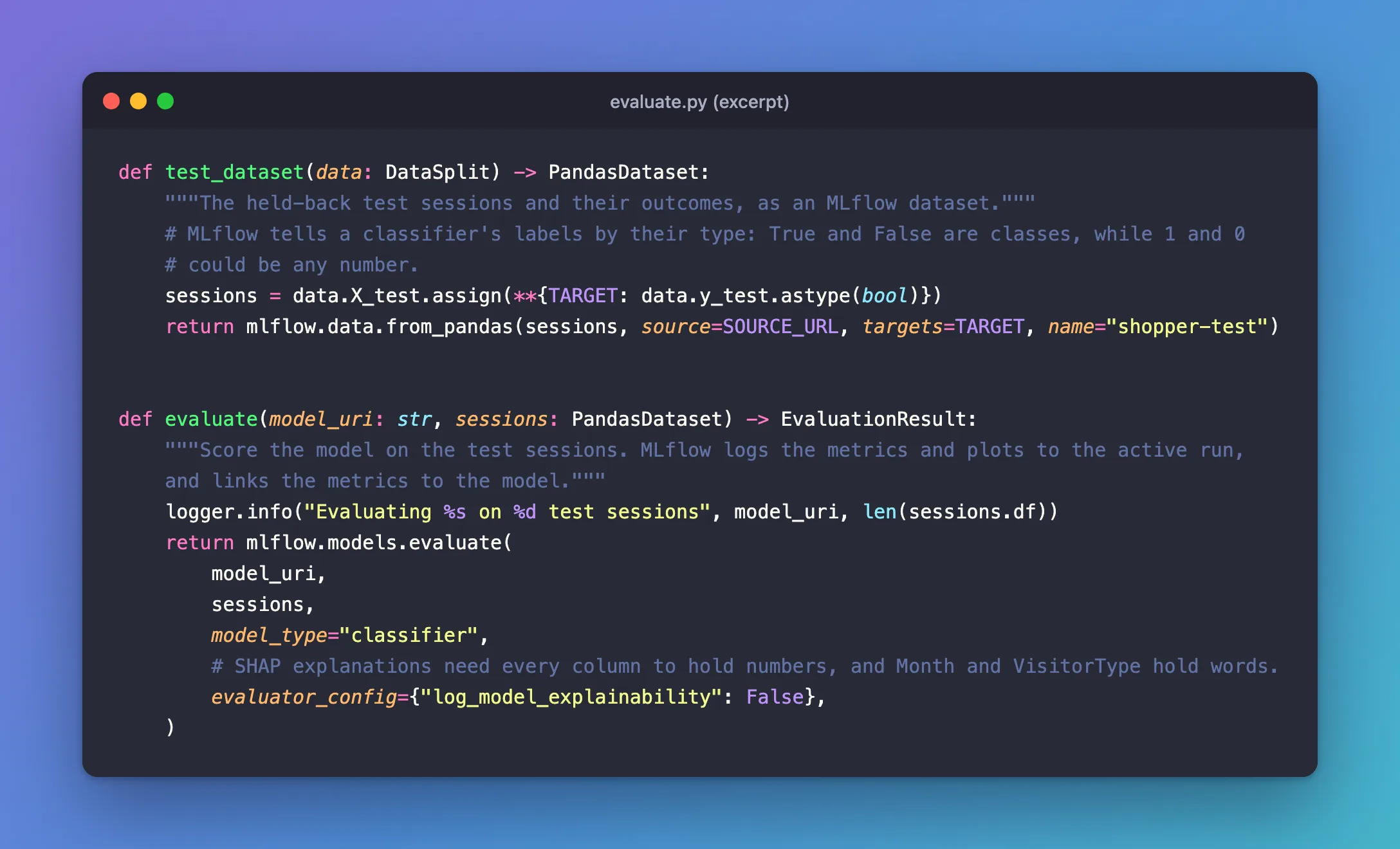
def evaluate(model_uri: str, sessions: PandasDataset) -> EvaluationResult:
    """Score the model on the test sessions. MLflow logs the metrics and plots to the active run,
    and links the metrics to the model."""
    logger.info("Evaluating %s on %d test sessions", model_uri, len(sessions.df))
    return mlflow.models.evaluate(
        model_uri,
        sessions,
        model_type="classifier",
        # SHAP explanations need every column to hold numbers, and Month and VisitorType hold words.
        evaluator_config={"log_model_explainability": False},
    )
mlflow.models.evaluate(model_uri, sessions, model_type="classifier")loads the model by its URI, predicts every test session, and computes the classifier metrics and plots. The dataset already names its target column, so notargetsargument is needed. How to Evaluate a Classification Model with mlflow.models.evaluate covers the call on its own.evaluator_config={"log_model_explainability": False}turns off MLflow's SHAP explanations. My first version left them on, and the evaluation crashed withTypeError: Cannot interpret '<StringDtype(na_value=nan)>' as a data type: MLflow checks every column's type with NumPy, which can't read pandas 3's text columns, and SHAP needs numeric columns anyway. Fixed: Cannot interpret StringDtype as a data type tells the whole story.
The command. main reads the options, builds the test dataset, and evaluates the model inside a run that records the model's URI as a parameter. It keeps each result under its role, model, so that Step 8 can put a second model next to it, and prints the main scores as a table. The complete file:
"""Evaluate a logged model on the held-back test sessions."""

import argparse
import logging
from collections.abc import Sequence

import mlflow
import pandas as pd
from mlflow.data.pandas_dataset import PandasDataset
from mlflow.models import EvaluationResult

from shopper_purchase_prediction.config import get_settings
from shopper_purchase_prediction.data import (
    RANDOM_STATE,
    SOURCE_URL,
    TARGET,
    TEST_SIZE,
    DataSplit,
    load_sessions,
    split_data,
)

logger = logging.getLogger("shopper_purchase_prediction")

# The scores the terminal shows, out of the many that MLflow logs.
SHOWN_METRICS = [
    "roc_auc",
    "recall_score",
    "precision_score",
    "f1_score",
    "accuracy_score",
    "log_loss",
]


def parse_args(argv: Sequence[str] | None = None) -> argparse.Namespace:
    """Read the model to evaluate from the command line."""
    parser = argparse.ArgumentParser(
        prog="evaluate",
        description="Evaluate a model logged in MLflow on the test sessions.",
    )
    parser.add_argument(
        "--model-uri", required=True, help="the model to evaluate, such as models:/m-..."
    )
    parser.add_argument(
        "--run-name", default=None, help="name shown in the MLflow UI (default: MLflow picks one)"
    )
    return parser.parse_args(argv)


def test_dataset(data: DataSplit) -> PandasDataset:
    """The held-back test sessions and their outcomes, as an MLflow dataset."""
    # MLflow tells a classifier's labels by their type: True and False are classes, while 1 and 0
    # could be any number.
    sessions = data.X_test.assign(**{TARGET: data.y_test.astype(bool)})
    return mlflow.data.from_pandas(sessions, source=SOURCE_URL, targets=TARGET, name="shopper-test")


def evaluate(model_uri: str, sessions: PandasDataset) -> EvaluationResult:
    """Score the model on the test sessions. MLflow logs the metrics and plots to the active run,
    and links the metrics to the model."""
    logger.info("Evaluating %s on %d test sessions", model_uri, len(sessions.df))
    return mlflow.models.evaluate(
        model_uri,
        sessions,
        model_type="classifier",
        # SHAP explanations need every column to hold numbers, and Month and VisitorType hold words.
        evaluator_config={"log_model_explainability": False},
    )


def main(argv: Sequence[str] | None = None) -> int:
    """Evaluate the model and show its main scores."""
    logging.basicConfig(
        level=logging.INFO,
        format="%(asctime)s %(levelname)s %(name)s: %(message)s",
        datefmt="%Y/%m/%d %H:%M:%S",
    )
    args = parse_args(argv)
    settings = get_settings()

    mlflow.set_tracking_uri(settings.mlflow_tracking_uri)
    mlflow.set_experiment(settings.mlflow_experiment_name)

    logger.info("Loading the online shoppers data")
    sessions = test_dataset(split_data(load_sessions(settings.data_dir), TEST_SIZE, RANDOM_STATE))

    with mlflow.start_run(run_name=args.run_name):
        mlflow.log_params({"model_uri": args.model_uri})
        # Keyed by role, so the table below shows one column per model.
        results = {"model": evaluate(args.model_uri, sessions)}
        scores = pd.DataFrame({name: result.metrics for name, result in results.items()})
        print(scores.loc[SHOWN_METRICS].round(4).to_string())
    return 0
Then register the command in pyproject.toml, next to the other three:
[project.scripts]
train = "shopper_purchase_prediction.train:main"
predict = "shopper_purchase_prediction.predict:main"
validate = "shopper_purchase_prediction.validate:main"
evaluate = "shopper_purchase_prediction.evaluate:main"
Step 4: Evaluate the Part 6 Model
Evaluate the model Part 6 logged, by its URI:
uv run evaluate --model-uri models:/m-6e2a8bb07fc44b02843eca07c555586f --run-name evaluate-first-model
      Built shopper-purchase-prediction @ file:///Users/you/source/dewiride-shopper-purchase-prediction
Uninstalled 1 package in 2ms
Installed 1 package in 4ms
2026/11/21 17:25:32 INFO shopper_purchase_prediction: Loading the online shoppers data
2026/11/21 17:25:32 INFO shopper_purchase_prediction: Evaluating models:/m-6e2a8bb07fc44b02843eca07c555586f on 2466 test sessions
2026/11/21 17:25:34 INFO mlflow.tracking.fluent: Active model is set to the logged model with ID: m-6e2a8bb07fc44b02843eca07c555586f
2026/11/21 17:25:34 INFO mlflow.tracking.fluent: Use `mlflow.set_active_model` to set the active model to a different one if needed.
2026/11/21 17:25:34 INFO mlflow.models.evaluation.evaluators.classifier: The evaluation dataset is inferred as binary dataset, positive label is 1, negative label is 0.
2026/11/21 17:25:34 INFO mlflow.models.evaluation.default_evaluator: Testing metrics on first row...
                  model
roc_auc          0.9286
recall_score     0.6021
precision_score  0.7143
f1_score         0.6534
accuracy_score   0.9011
log_loss         0.2322
🏃 View run evaluate-first-model at: http://127.0.0.1:8080/#/experiments/3/runs/585f520fa0b34b6990e2f7d01b9f5c25
🧪 View experiment at: http://127.0.0.1:8080/#/experiments/3
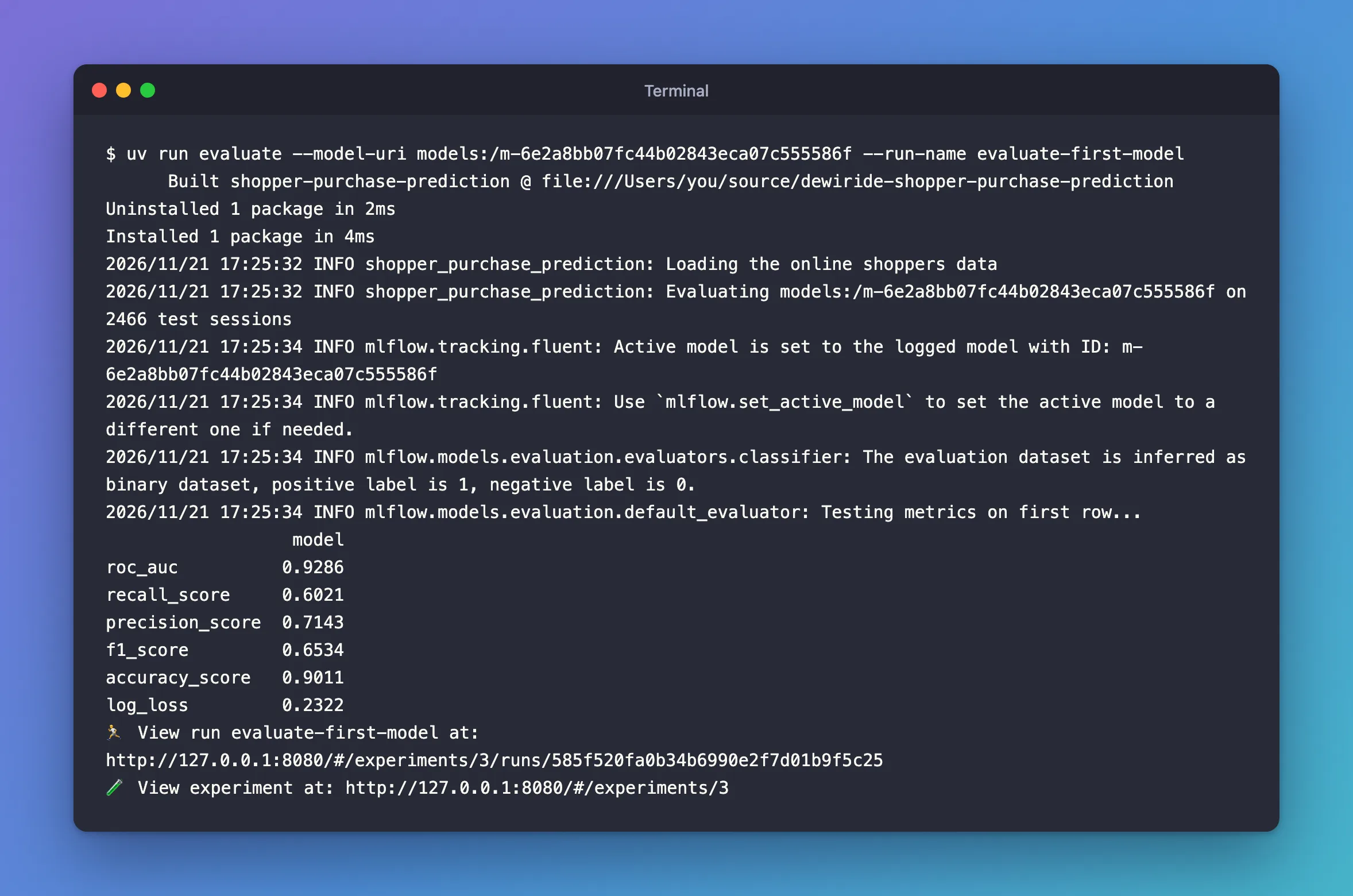
Built shopper-purchase-prediction: uv reinstalled the project once, becausepyproject.tomlgained a command.positive label is 1: MLflow works out the classes from the labels,TrueandFalse, and the model's answers,1and0. Python treatsTrueas1, so both mean "bought".roc_auc0.9286, the same as Part 6'stest_roc_auc: same model, same test sessions.recall_score0.6021: the model spots 6 buyers in 10.precision_score0.7143: 7 in 10 of the sessions it flags do buy.accuracy_score0.9011 sounds better than it is: 2,084 of the 2,466 test sessions didn't buy, so a model that answered "no" every time would score 0.8451. Step 6 adds a score that can't be fooled that way.log_loss0.2322 measures how good the probabilities are: How to Calculate Log Loss in scikit-learn.
Step 5: Read the Evaluation in the UI
Open the View run link. The run's Overview lists 13 metrics, more than the terminal showed:
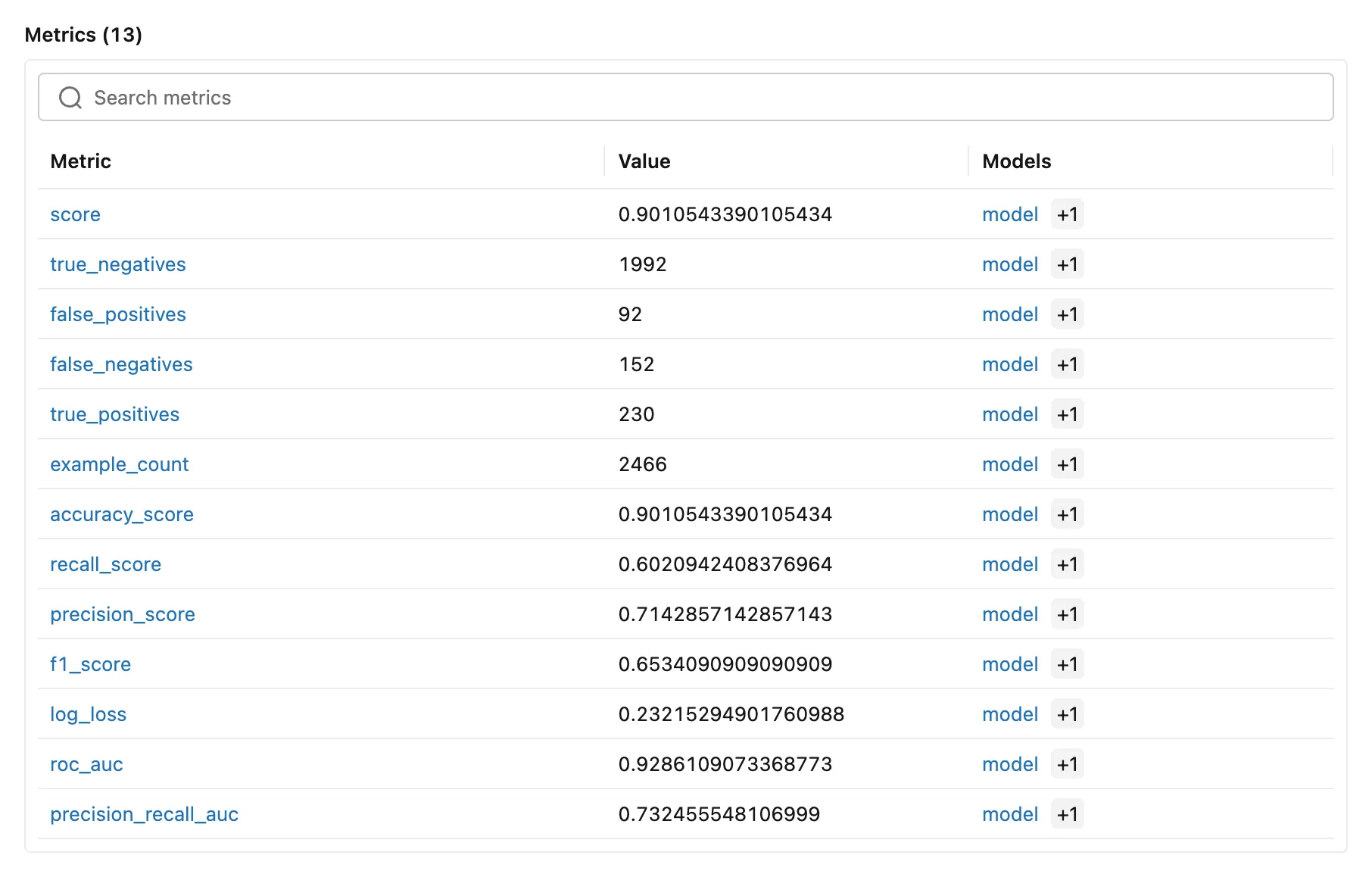
- The confusion counts: of the 2,084 sessions that didn't buy, 1,992 were cleared and 92 flagged; of the 382 buyers, 230 were spotted and 152 missed.
score: scikit-learn's ownmodel.score, the same as the accuracy for a classifier.precision_recall_auc0.7325: like ROC AUC, a ranking score, but one that focuses on the buyers.model +1in the Models column: each metric is linked to the model, and+1opens the same model again. MLflow 3.18.0'sevaluatelogs every metric twice with the model's ID, and the UI counts both. The values are the same. I reported it to MLflow as issue #28013.
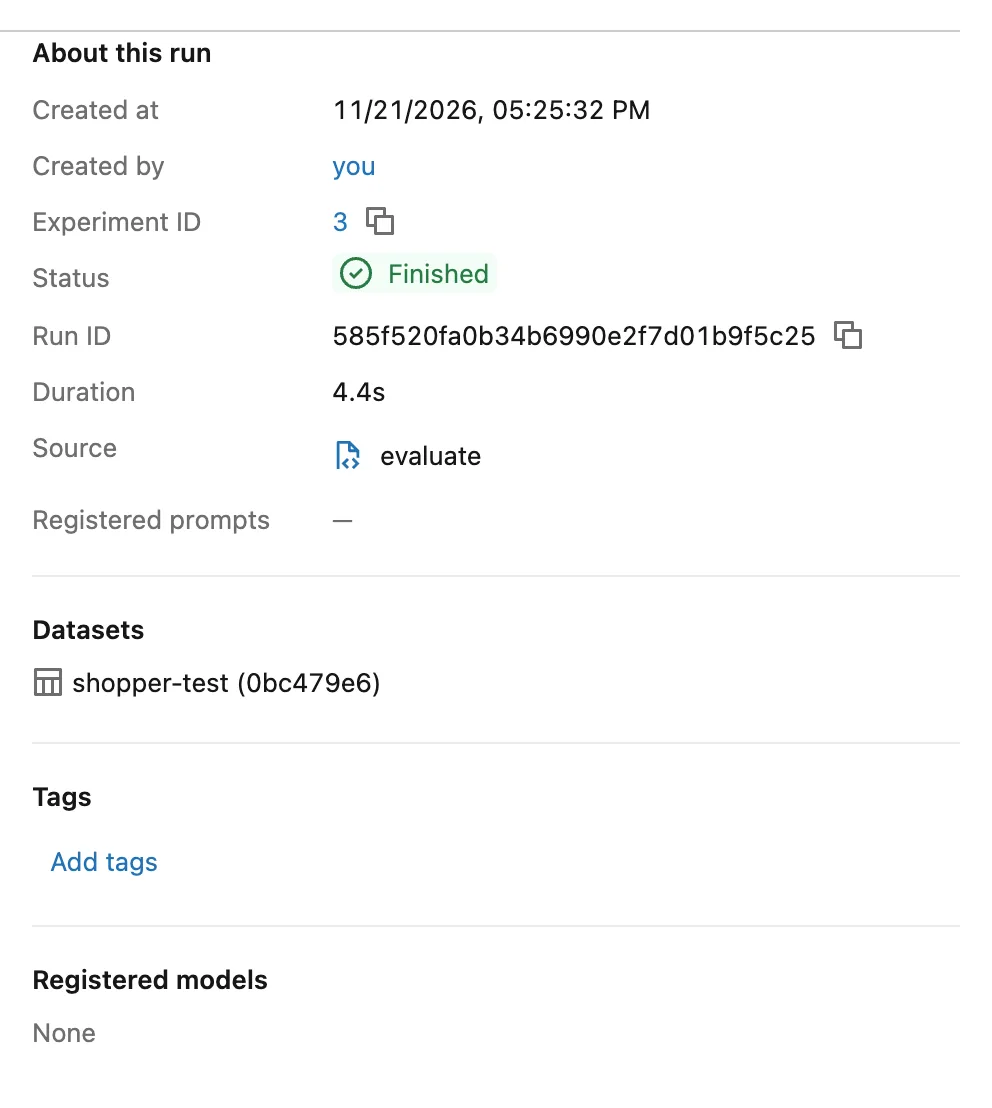
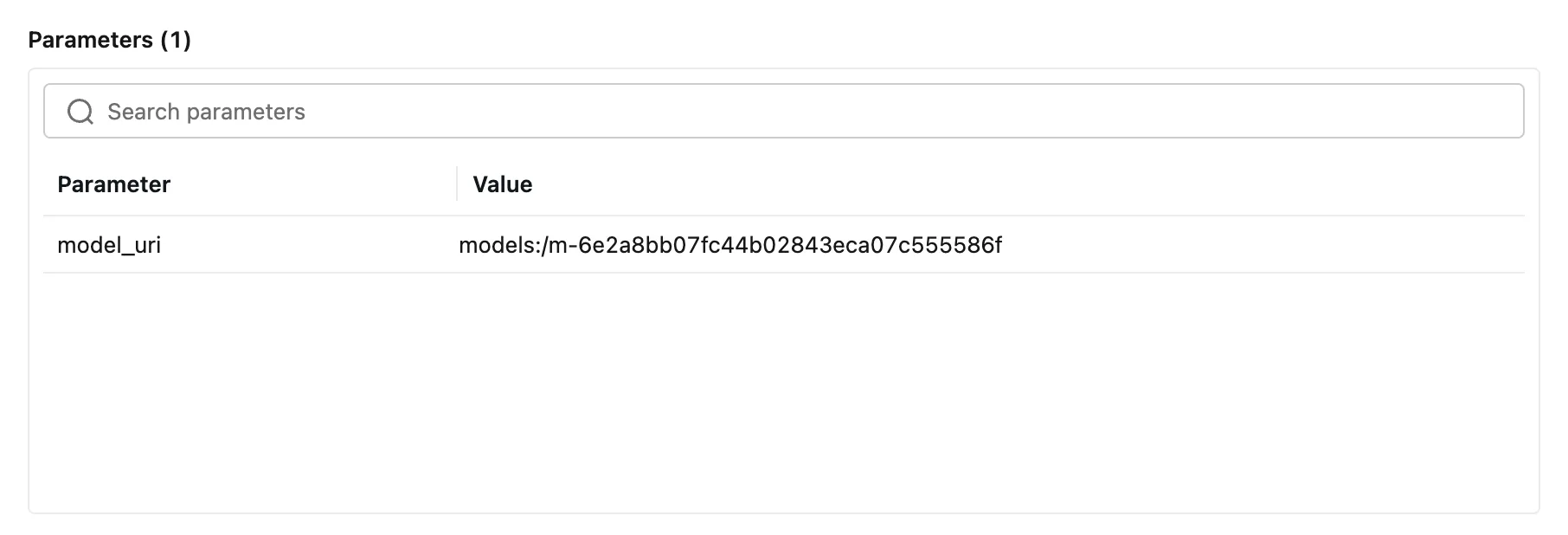
On the right, Datasets names the test data, shopper-test, with its digest, and Parameters holds the model the run evaluated:
Click Artifacts. The evaluation logged five plots; click confusion_matrix.png:
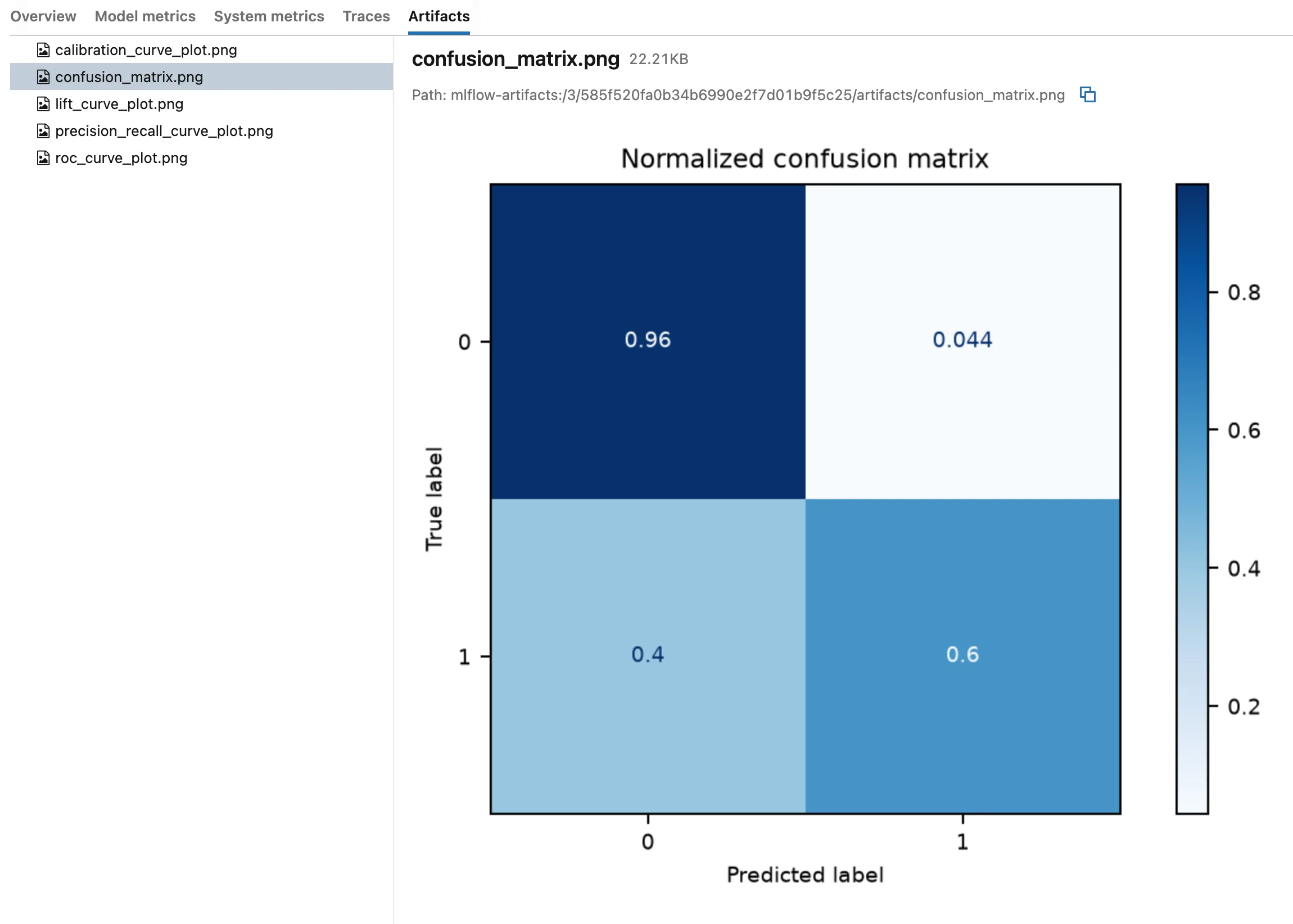
Each row is one true class, normalized to add up to 1: the model clears 0.96 of the sessions that didn't buy, and spots 0.6 of the buyers, the recall. How to Plot a Confusion Matrix in scikit-learn explains how to read one. The other four plots:
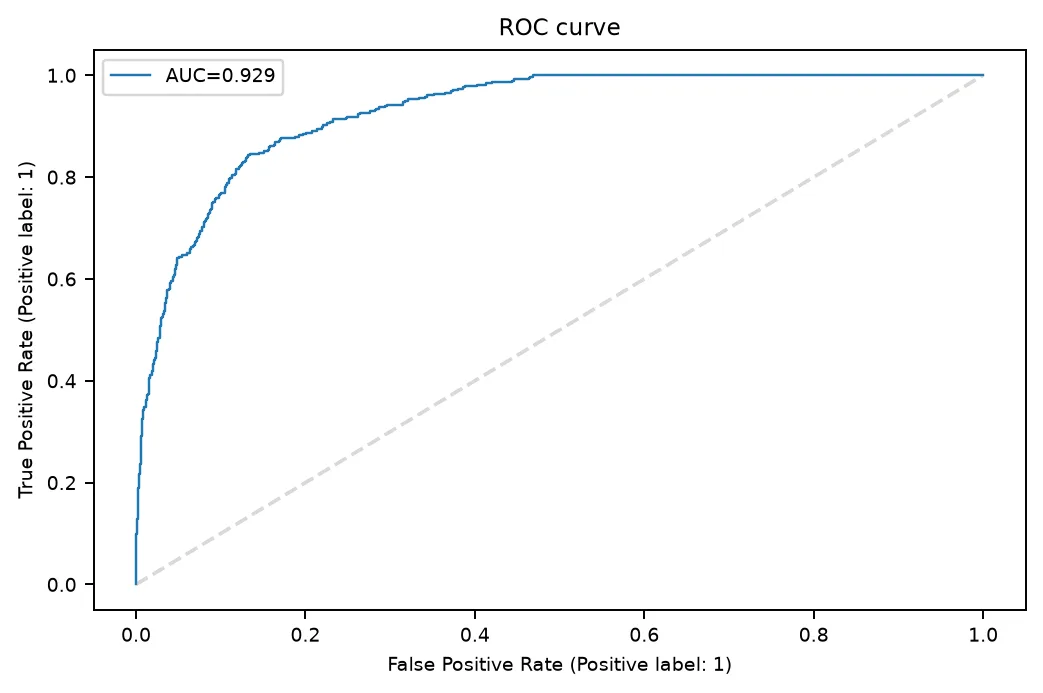
The ROC curve shows every trade-off between finding buyers and flagging non-buyers as the threshold moves; the area under it is the ROC AUC, 0.929.
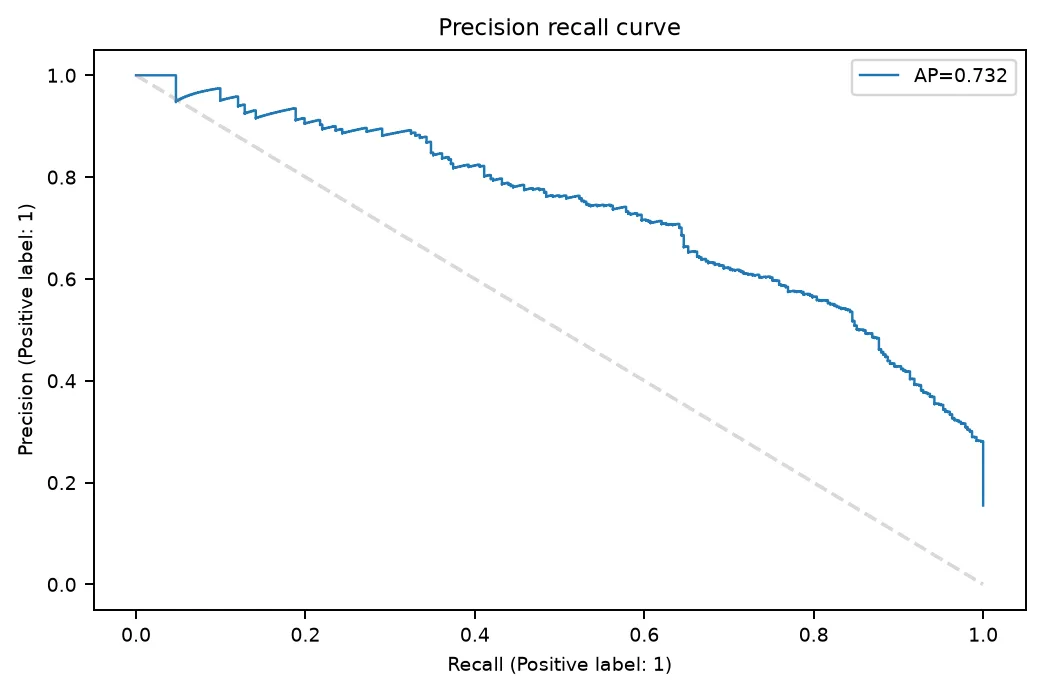
The precision-recall curve: the more buyers the model is asked to find, the more of its flags are wrong. Its area, 0.732, is the precision_recall_auc.
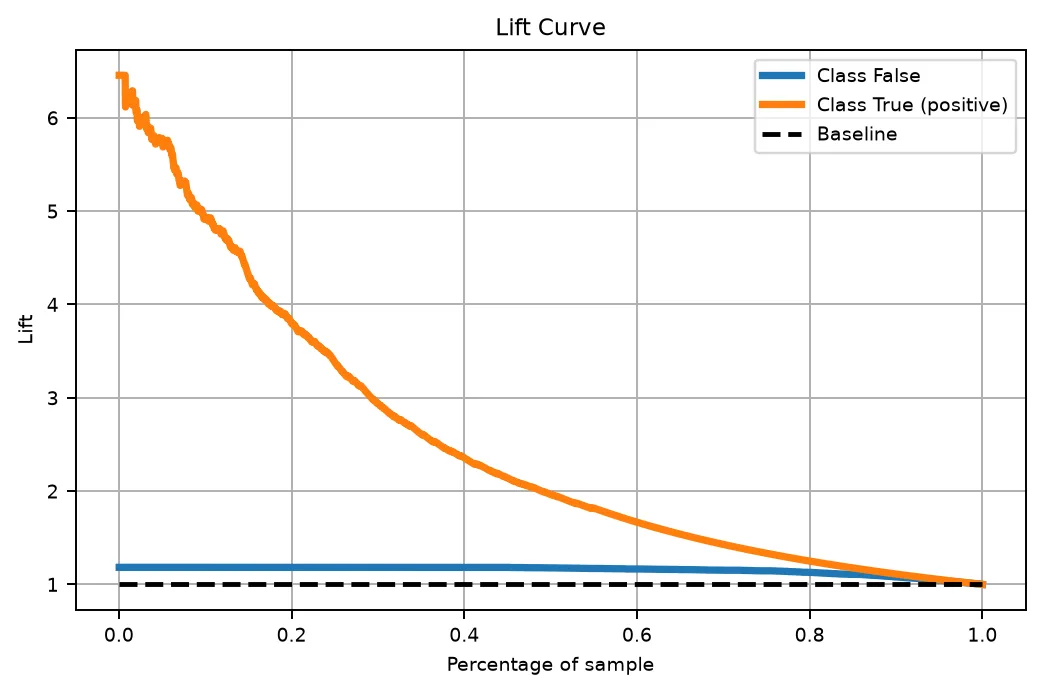
The lift curve: among the 10% of sessions the model scores highest, buyers are about five times as common as among all sessions. That's the plot to show a marketing team.
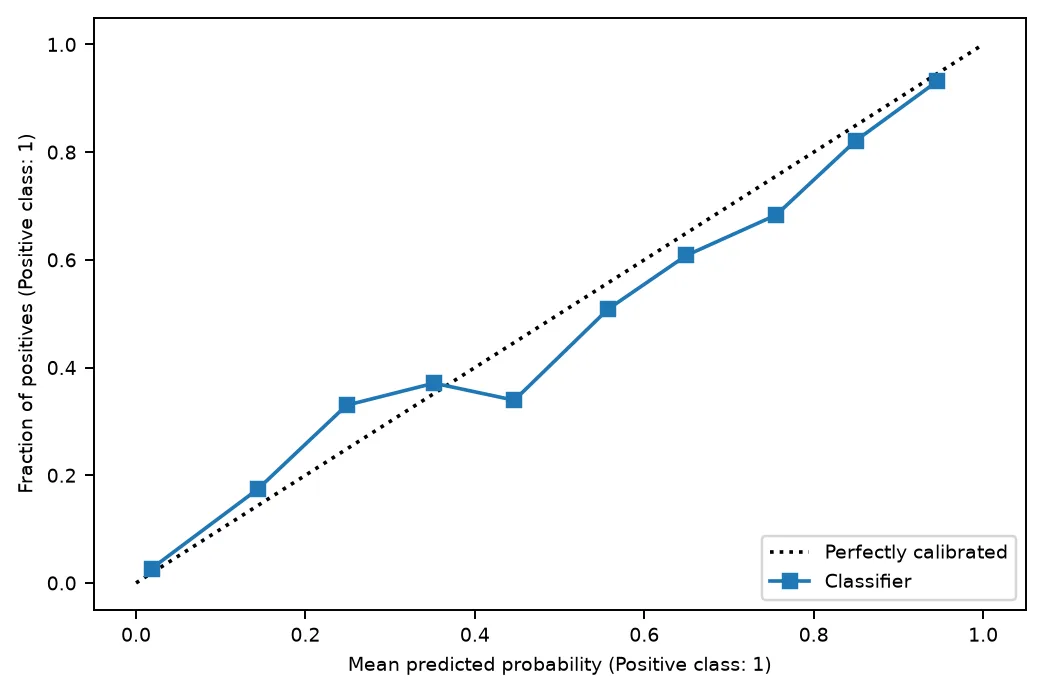
The calibration curve stays close to the diagonal: when this model says 0.8, about 80% of those sessions buy, so its probabilities can be read as chances. How to Plot a Calibration Curve in scikit-learn explains the plot. Step 9 shows a model where they can't.
Last, the model's own page. Click Models in the left menu, then the model:
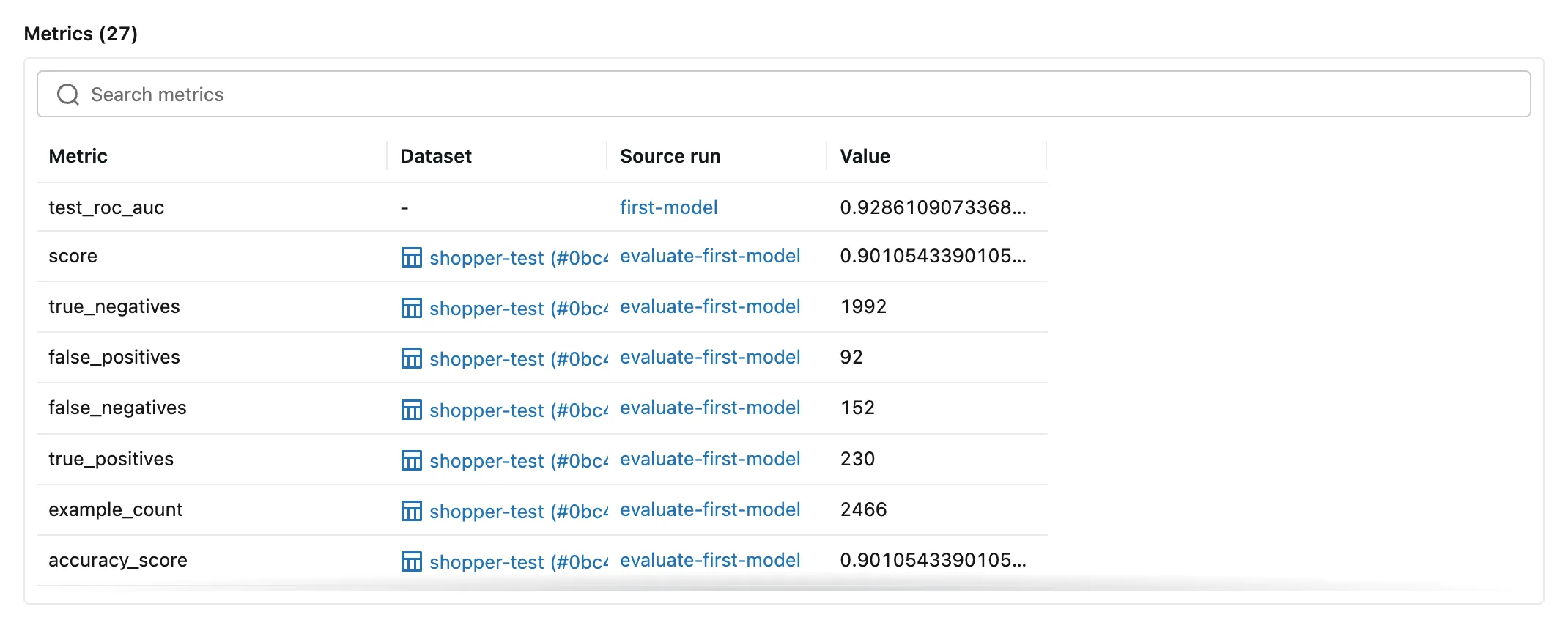
test_roc_auc from Part 6, and the evaluation's metrics with their dataset, shopper-test, and the run that measured them: 27 entries, the 13 metrics twice plus the one from training. How to See an Evaluation's Metrics and Plots in the MLflow UI walks through these pages on their own.
Step 6: Add a Custom Metric
Accuracy rewards a model for the 5 in 6 sessions that don't buy. Balanced accuracy averages two shares instead: the buyers the model spots and the non-buyers it clears. For this model that's (0.6021 + 0.9559) / 2 = 0.779, and a model that always answered "no" would get 0.5. How to Calculate Balanced Accuracy in scikit-learn explains the metric.
MLflow doesn't compute it, so add it with make_metric. In evaluate.py, add the imports:
from mlflow.models import EvaluationResult, make_metric
from sklearn.metrics import recall_score
Add "balanced_accuracy", to SHOWN_METRICS, right after "roc_auc",, then the metric itself, below the list:
def balanced_accuracy(predictions: pd.Series, targets: pd.Series) -> float:
    """The share of buyers the model spots and the share of non-buyers it clears, averaged, so the
    5 in 6 sessions that didn't buy can't hide its mistakes on the ones that did."""
    # Balanced accuracy is the average recall of the two classes. MLflow first tries a metric on a
    # single session, which holds only one class, so name both classes, and score a class with no
    # sessions as 0 instead of warning.
    return recall_score(targets, predictions, labels=[0, 1], average="macro", zero_division=0.0)


BALANCED_ACCURACY = make_metric(
    eval_fn=balanced_accuracy, greater_is_better=True, name="balanced_accuracy"
)
balanced_accuracy(predictions, targets): MLflow passes the model's answers and the true outcomes by these parameter names.recall_score(..., labels=[0, 1], average="macro", zero_division=0.0)is scikit-learn's definition of balanced accuracy, the average recall of the two classes. My first version calledbalanced_accuracy_score, and every evaluation printedUserWarning: A single label was found in 'y_true' and 'y_pred'from MLflow's one-row test of the metric: Fixed: A single label was found.make_metric(..., greater_is_better=True)wraps the function as a metric, and tells the quality gate which way is better: How to Add a Custom Metric to an MLflow Evaluation with make_metric.
Pass it to the evaluation, in evaluate():
    return mlflow.models.evaluate(
        model_uri,
        sessions,
        model_type="classifier",
        extra_metrics=[BALANCED_ACCURACY],
        # SHAP explanations need every column to hold numbers, and Month and VisitorType hold words.
        evaluator_config={"log_model_explainability": False},
    )
Evaluate the model again:
uv run evaluate --model-uri models:/m-6e2a8bb07fc44b02843eca07c555586f --run-name evaluate-balanced-accuracy
2026/11/21 17:31:38 INFO shopper_purchase_prediction: Loading the online shoppers data
2026/11/21 17:31:39 INFO shopper_purchase_prediction: Evaluating models:/m-6e2a8bb07fc44b02843eca07c555586f on 2466 test sessions
2026/11/21 17:31:44 INFO mlflow.tracking.fluent: Active model is set to the logged model with ID: m-6e2a8bb07fc44b02843eca07c555586f
2026/11/21 17:31:44 INFO mlflow.tracking.fluent: Use `mlflow.set_active_model` to set the active model to a different one if needed.
2026/11/21 17:31:45 INFO mlflow.models.evaluation.evaluators.classifier: The evaluation dataset is inferred as binary dataset, positive label is 1, negative label is 0.
2026/11/21 17:31:45 INFO mlflow.models.evaluation.default_evaluator: Testing metrics on first row...
                    model
roc_auc            0.9286
balanced_accuracy  0.7790
recall_score       0.6021
precision_score    0.7143
f1_score           0.6534
accuracy_score     0.9011
log_loss           0.2322
🏃 View run evaluate-balanced-accuracy at: http://127.0.0.1:8080/#/experiments/3/runs/e56fabde98f04b91931b7252a96d44fb
🧪 View experiment at: http://127.0.0.1:8080/#/experiments/3
balanced_accuracy 0.7790, logged to the run and linked to the model like the built-in metrics.
Step 7: Set the Quality Gate
The gate is a set of rules every model must pass. This project's rules:
- ROC AUC at least 0.90: for a random buyer and a random non-buyer, the model gives the buyer the higher score at least 9 times in 10.
- Balanced accuracy at least 0.75: right about buyers and non-buyers alike.
- Compared with a baseline, balanced accuracy at least 0.01 higher: a new model has to be better than the one it would replace, not just as good. Step 8 adds the baseline.
They're this project's choices, made from what the shop needs; pick yours the same way. Add the imports, and change the first line of the file to describe the new job:
"""Evaluate a logged model on the held-back test sessions, and check it against the quality gate
before it replaces the model in use."""
from mlflow.models import EvaluationResult, MetricThreshold, make_metric
from mlflow.models.evaluation.validation import ModelValidationFailedException
Then the rules, below BALANCED_ACCURACY:
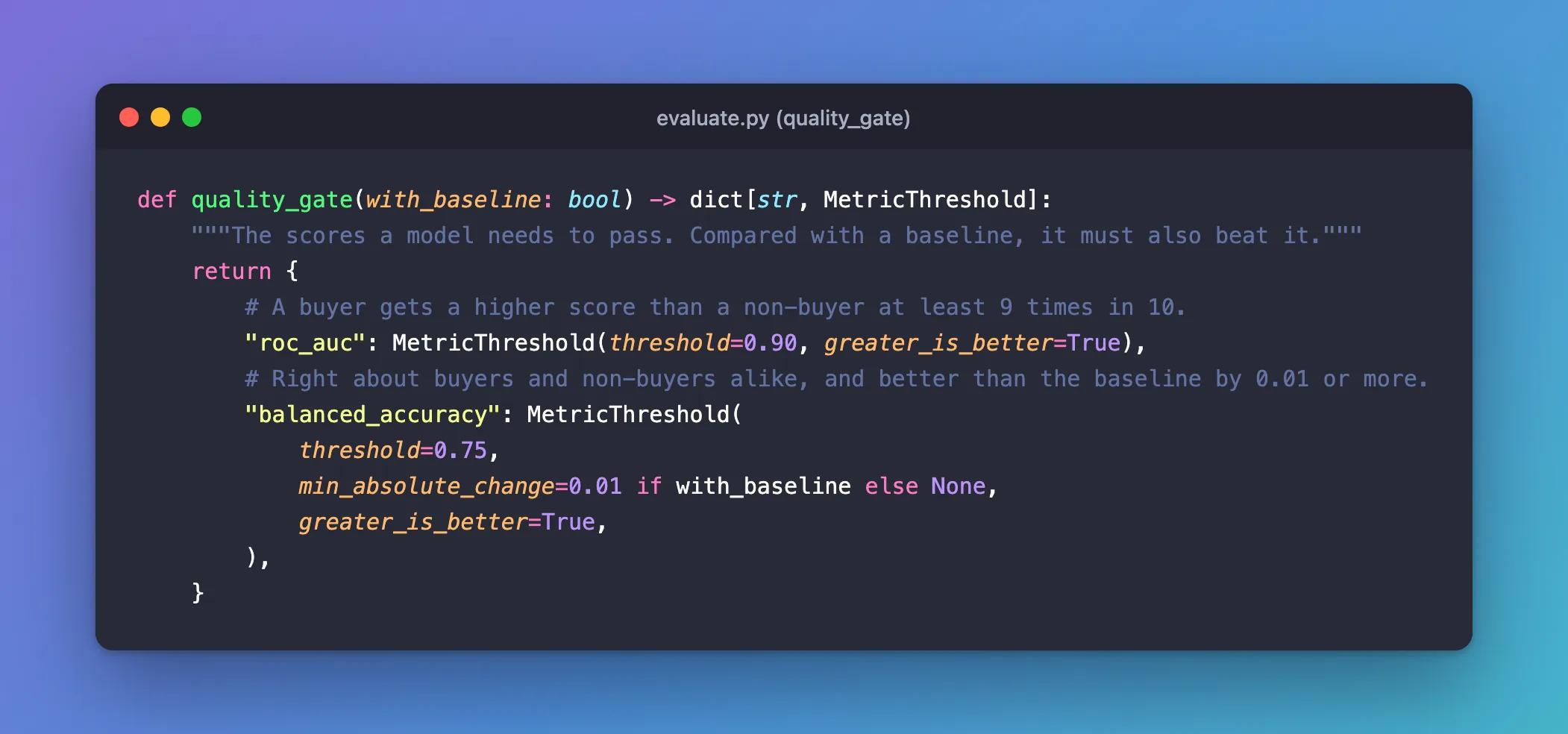
def quality_gate(with_baseline: bool) -> dict[str, MetricThreshold]:
    """The scores a model needs to pass. Compared with a baseline, it must also beat it."""
    return {
        # A buyer gets a higher score than a non-buyer at least 9 times in 10.
        "roc_auc": MetricThreshold(threshold=0.90, greater_is_better=True),
        # Right about buyers and non-buyers alike, and better than the baseline by 0.01 or more.
        "balanced_accuracy": MetricThreshold(
            threshold=0.75,
            min_absolute_change=0.01 if with_baseline else None,
            greater_is_better=True,
        ),
    }
MetricThreshold(threshold=..., greater_is_better=True): the score must be at or abovethreshold. How to Set Minimum Scores for a Model with mlflow.validate_evaluation_results covers it.min_absolute_change=0.01 if with_baseline else None: the margin over a baseline. Without a baseline it has to beNone: MLflow fails a comparison it can't make, with "Model comparison failed: metric balanced_accuracy was missing from the evaluation result of the baseline model."
Change the description in parse_args and the docstring of main, so --help says what the command does now:
        description="Evaluate a model logged in MLflow on the test sessions, and check it "
        "against the quality gate.",
"""Evaluate the model, then apply the quality gate."""
Last, check the results against the rules at the end of the run, after the table is printed:
        try:
            mlflow.validate_evaluation_results(
                quality_gate(with_baseline="baseline" in results),
                results["model"],
                results.get("baseline"),
            )
        except ModelValidationFailedException as error:
            mlflow.set_tag("quality_gate", "failed")
            logger.error("%s failed the quality gate:\n%s", args.model_uri, error.message)
            return 1
        mlflow.set_tag("quality_gate", "passed")
        logger.info("%s passed the quality gate", args.model_uri)
    return 0
mlflow.validate_evaluation_results(...)checks the model's metrics against the rules, and the baseline's when there is one. It raisesModelValidationFailedExceptionwith one line per broken rule.ModelValidationFailedExceptionis imported frommlflow.models.evaluation.validation, where MLflow 3.18.0 defines it. The evaluation guide catchesmlflow.exceptions.ModelValidationFailedException, which raises anAttributeErrorthe first time a model fails: Fixed: module 'mlflow.exceptions' has no attribute 'ModelValidationFailedException'.mlflow.set_tag("quality_gate", ...)records the verdict on the run, so the runs table and searches can show it: How to Add Tags to an MLflow Run.return 1becomes the command's exit code, which stops a CI job or a script: How to Make a Python Script Exit with an Error Code.
Run the gate on the Part 6 model, without a baseline:
uv run evaluate --model-uri models:/m-6e2a8bb07fc44b02843eca07c555586f --run-name gate-first-model
log_loss           0.2322
2026/11/21 17:32:16 INFO mlflow.models.evaluation.validation: Validating candidate model metrics against baseline
2026/11/21 17:32:16 INFO mlflow.models.evaluation.validation: Model validation passed!
2026/11/21 17:32:16 INFO shopper_purchase_prediction: models:/m-6e2a8bb07fc44b02843eca07c555586f passed the quality gate
🏃 View run gate-first-model at: http://127.0.0.1:8080/#/experiments/3/runs/2399282799654b97acda37ef61fd563c
🧪 View experiment at: http://127.0.0.1:8080/#/experiments/3
ROC AUC 0.9286 and balanced accuracy 0.7790 clear both minimums. MLflow's line says "against baseline" even without one; here it checks the minimums only.
Step 8: Compare with the Model in Use
A model that clears the minimums can still be no better than the one already in use. The last rule needs a baseline: a --baseline-uri option, evaluated on the same test sessions in a run of its own, nested inside the gate's run. In parse_args, change the docstring to """Read the models to evaluate from the command line.""" and add the option after --model-uri:
    parser.add_argument(
        "--baseline-uri",
        default=None,
        help="a model it must beat, such as the one in use (default: check the scores only)",
    )
In main, record it as a parameter, and evaluate the baseline in a nested run when there is one:
    with mlflow.start_run(run_name=args.run_name):
        mlflow.log_params({"model_uri": args.model_uri, "baseline_uri": args.baseline_uri})
        # Keyed by role, so the table below shows one column per model.
        results = {"model": evaluate(args.model_uri, sessions)}
        if args.baseline_uri is not None:
            # The baseline's metrics and plots go to a run of their own, inside this one.
            with mlflow.start_run(run_name="baseline", nested=True):
                results["baseline"] = evaluate(args.baseline_uri, sessions)
mlflow.start_run(run_name="baseline", nested=True)starts a child run inside the gate's run, so the baseline's metrics and plots stay apart from the candidate's, under the same parent: How to Create Nested Runs in MLflow.results["baseline"]gives the table a second column andvalidate_evaluation_resultsits baseline, andquality_gate(with_baseline=True)adds the margin.
Change main's docstring to """Evaluate the model, and the baseline if there is one, then apply the quality gate.""". The complete file:
"""Evaluate a logged model on the held-back test sessions, and check it against the quality gate
before it replaces the model in use."""

import argparse
import logging
from collections.abc import Sequence

import mlflow
import pandas as pd
from mlflow.data.pandas_dataset import PandasDataset
from mlflow.models import EvaluationResult, MetricThreshold, make_metric
from mlflow.models.evaluation.validation import ModelValidationFailedException
from sklearn.metrics import recall_score

from shopper_purchase_prediction.config import get_settings
from shopper_purchase_prediction.data import (
    RANDOM_STATE,
    SOURCE_URL,
    TARGET,
    TEST_SIZE,
    DataSplit,
    load_sessions,
    split_data,
)

logger = logging.getLogger("shopper_purchase_prediction")

# The scores the terminal shows, out of the many that MLflow logs.
SHOWN_METRICS = [
    "roc_auc",
    "balanced_accuracy",
    "recall_score",
    "precision_score",
    "f1_score",
    "accuracy_score",
    "log_loss",
]


def balanced_accuracy(predictions: pd.Series, targets: pd.Series) -> float:
    """The share of buyers the model spots and the share of non-buyers it clears, averaged, so the
    5 in 6 sessions that didn't buy can't hide its mistakes on the ones that did."""
    # Balanced accuracy is the average recall of the two classes. MLflow first tries a metric on a
    # single session, which holds only one class, so name both classes, and score a class with no
    # sessions as 0 instead of warning.
    return recall_score(targets, predictions, labels=[0, 1], average="macro", zero_division=0.0)


BALANCED_ACCURACY = make_metric(
    eval_fn=balanced_accuracy, greater_is_better=True, name="balanced_accuracy"
)


def quality_gate(with_baseline: bool) -> dict[str, MetricThreshold]:
    """The scores a model needs to pass. Compared with a baseline, it must also beat it."""
    return {
        # A buyer gets a higher score than a non-buyer at least 9 times in 10.
        "roc_auc": MetricThreshold(threshold=0.90, greater_is_better=True),
        # Right about buyers and non-buyers alike, and better than the baseline by 0.01 or more.
        "balanced_accuracy": MetricThreshold(
            threshold=0.75,
            min_absolute_change=0.01 if with_baseline else None,
            greater_is_better=True,
        ),
    }


def parse_args(argv: Sequence[str] | None = None) -> argparse.Namespace:
    """Read the models to evaluate from the command line."""
    parser = argparse.ArgumentParser(
        prog="evaluate",
        description="Evaluate a model logged in MLflow on the test sessions, and check it "
        "against the quality gate.",
    )
    parser.add_argument(
        "--model-uri", required=True, help="the model to evaluate, such as models:/m-..."
    )
    parser.add_argument(
        "--baseline-uri",
        default=None,
        help="a model it must beat, such as the one in use (default: check the scores only)",
    )
    parser.add_argument(
        "--run-name", default=None, help="name shown in the MLflow UI (default: MLflow picks one)"
    )
    return parser.parse_args(argv)


def test_dataset(data: DataSplit) -> PandasDataset:
    """The held-back test sessions and their outcomes, as an MLflow dataset."""
    # MLflow tells a classifier's labels by their type: True and False are classes, while 1 and 0
    # could be any number.
    sessions = data.X_test.assign(**{TARGET: data.y_test.astype(bool)})
    return mlflow.data.from_pandas(sessions, source=SOURCE_URL, targets=TARGET, name="shopper-test")


def evaluate(model_uri: str, sessions: PandasDataset) -> EvaluationResult:
    """Score the model on the test sessions. MLflow logs the metrics and plots to the active run,
    and links the metrics to the model."""
    logger.info("Evaluating %s on %d test sessions", model_uri, len(sessions.df))
    return mlflow.models.evaluate(
        model_uri,
        sessions,
        model_type="classifier",
        extra_metrics=[BALANCED_ACCURACY],
        # SHAP explanations need every column to hold numbers, and Month and VisitorType hold words.
        evaluator_config={"log_model_explainability": False},
    )


def main(argv: Sequence[str] | None = None) -> int:
    """Evaluate the model, and the baseline if there is one, then apply the quality gate."""
    logging.basicConfig(
        level=logging.INFO,
        format="%(asctime)s %(levelname)s %(name)s: %(message)s",
        datefmt="%Y/%m/%d %H:%M:%S",
    )
    args = parse_args(argv)
    settings = get_settings()

    mlflow.set_tracking_uri(settings.mlflow_tracking_uri)
    mlflow.set_experiment(settings.mlflow_experiment_name)

    logger.info("Loading the online shoppers data")
    sessions = test_dataset(split_data(load_sessions(settings.data_dir), TEST_SIZE, RANDOM_STATE))

    with mlflow.start_run(run_name=args.run_name):
        mlflow.log_params({"model_uri": args.model_uri, "baseline_uri": args.baseline_uri})
        # Keyed by role, so the table below shows one column per model.
        results = {"model": evaluate(args.model_uri, sessions)}
        if args.baseline_uri is not None:
            # The baseline's metrics and plots go to a run of their own, inside this one.
            with mlflow.start_run(run_name="baseline", nested=True):
                results["baseline"] = evaluate(args.baseline_uri, sessions)
        scores = pd.DataFrame({name: result.metrics for name, result in results.items()})
        print(scores.loc[SHOWN_METRICS].round(4).to_string())

        try:
            mlflow.validate_evaluation_results(
                quality_gate(with_baseline="baseline" in results),
                results["model"],
                results.get("baseline"),
            )
        except ModelValidationFailedException as error:
            mlflow.set_tag("quality_gate", "failed")
            logger.error("%s failed the quality gate:\n%s", args.model_uri, error.message)
            return 1
        mlflow.set_tag("quality_gate", "passed")
        logger.info("%s passed the quality gate", args.model_uri)
    return 0
Now a test the gate should fail. Retraining on the same data with the same settings gives the same model, and a scheduled retrain does exactly that when no new data came in. Train it:
uv run train --run-name retrain
2026/11/21 17:32:47 INFO shopper_purchase_prediction: Run retrain logged the model models:/m-216dd0523dd248788cac96a1ba86712b, test ROC AUC 0.9286
🏃 View run retrain at: http://127.0.0.1:8080/#/experiments/3/runs/f4b016a484ea419587144675b2df9576
🧪 View experiment at: http://127.0.0.1:8080/#/experiments/3
Then put it through the gate against the Part 6 model, and ask the shell for the exit code:
- macOS / Linux
- Windows (PowerShell)
uv run evaluate --model-uri models:/m-216dd0523dd248788cac96a1ba86712b --baseline-uri models:/m-6e2a8bb07fc44b02843eca07c555586f --run-name gate-retrain
echo $?
uv run evaluate --model-uri models:/m-216dd0523dd248788cac96a1ba86712b --baseline-uri models:/m-6e2a8bb07fc44b02843eca07c555586f --run-name gate-retrain
$LASTEXITCODE
🏃 View run baseline at: http://127.0.0.1:8080/#/experiments/3/runs/8774f07608774b57a73e3c3b7d837b04
🧪 View experiment at: http://127.0.0.1:8080/#/experiments/3
                    model  baseline
roc_auc            0.9286    0.9286
balanced_accuracy  0.7790    0.7790
recall_score       0.6021    0.6021
precision_score    0.7143    0.7143
f1_score           0.6534    0.6534
accuracy_score     0.9011    0.9011
log_loss           0.2322    0.2322
2026/11/21 17:33:02 INFO mlflow.models.evaluation.validation: Validating candidate model metrics against baseline
2026/11/21 17:33:02 ERROR shopper_purchase_prediction: models:/m-216dd0523dd248788cac96a1ba86712b failed the quality gate:
Metric balanced_accuracy minimum absolute change check failed: candidate model balanced_accuracy = 0.7789741837585795, baseline model balanced_accuracy = 0.7789741837585795, balanced_accuracy minimum absolute change threshold = 0.01.
🏃 View run gate-retrain at: http://127.0.0.1:8080/#/experiments/3/runs/0f365fcf1ec74d2e89db1957f0dc86da
🧪 View experiment at: http://127.0.0.1:8080/#/experiments/3
1
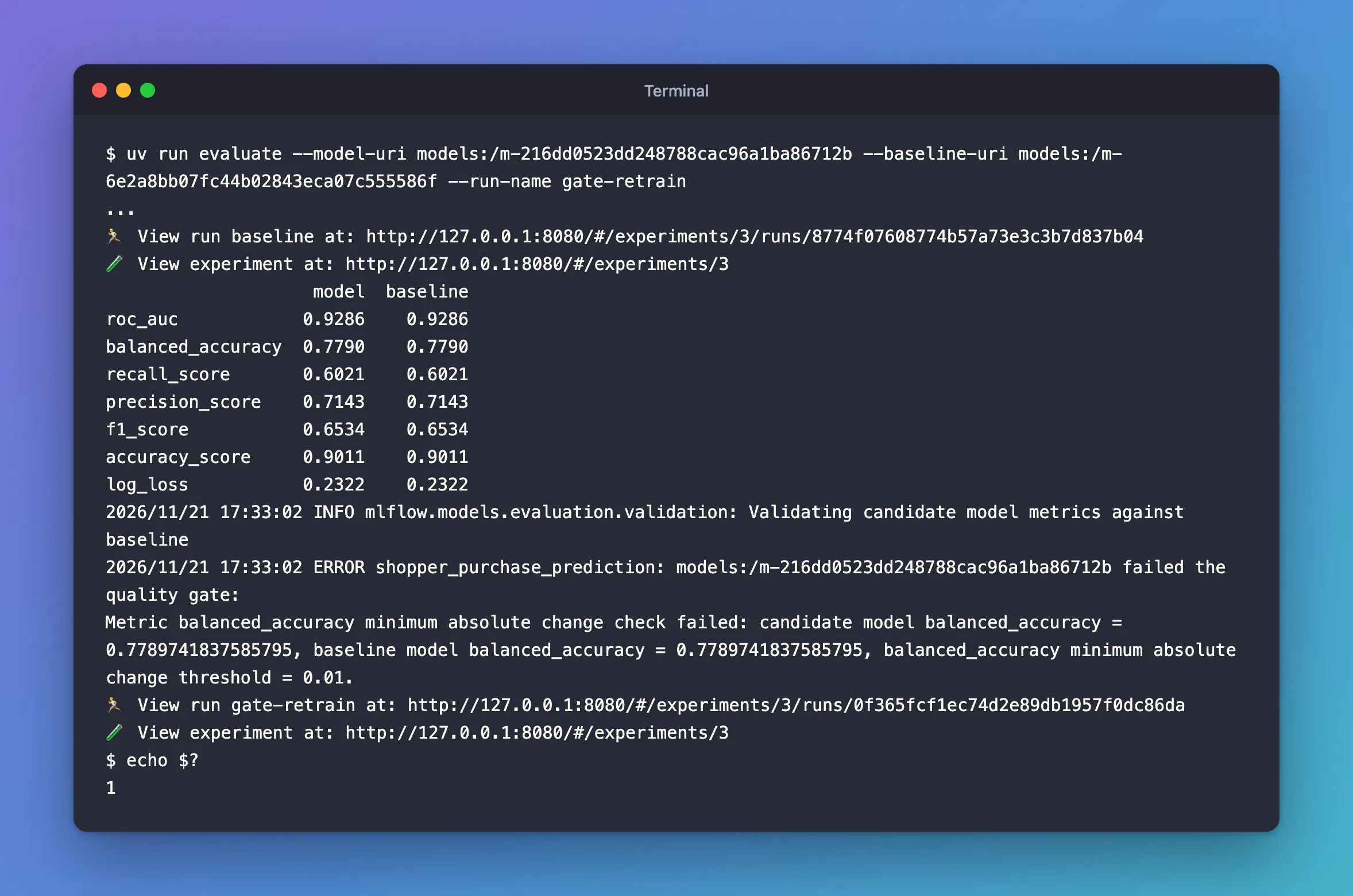
- Two columns, identical: the retrained model is the same model.
minimum absolute change check failed: balanced accuracy 0.779 isn't 0.01 above the baseline's 0.779. Every other rule passed, so the message has one line.1: the exit code. A pipeline running this command would stop here, and the model in use stays. How to Compare a Model with a Baseline in MLflow covers the comparison rules on their own.
Step 9: Train a Model That Catches More Buyers
Only 1 session in 6 buys, so the model learns mostly from sessions that don't, and misses 4 buyers in 10. scikit-learn's class_weight="balanced" makes the buyers count as much, in total, as everyone else during training: How to Use class_weight='balanced' for Imbalanced Classes in scikit-learn. In model.py, let build_pipeline pass it on:
def build_pipeline(random_state: int, class_weight: str | None = None) -> Pipeline:
    """Turn each text column into 0/1 columns, pass the other columns through, then classify.
    With class_weight="balanced", the few sessions that ended in a purchase count as much in
    training as all the others together."""
model = HistGradientBoostingClassifier(random_state=random_state, class_weight=class_weight)
In train.py, add the option after --run-name, and pass it on and log it as a parameter in main:
    parser.add_argument(
        "--class-weight",
        choices=["balanced"],
        default=None,
        help="balanced: the sessions that ended in a purchase count as much, together, as all "
        "the others (default: every session counts the same)",
    )
    pipeline = build_pipeline(RANDOM_STATE, args.class_weight)
    with mlflow.start_run(run_name=args.run_name) as run:
        mlflow.log_param("class_weight", args.class_weight)
Train the candidate:
uv run train --run-name balanced-weights --class-weight balanced
2026/11/21 17:33:38 INFO shopper_purchase_prediction: Run balanced-weights logged the model models:/m-1266079ca0a64dd4921d0d6ab2bfdeec, test ROC AUC 0.9258
🏃 View run balanced-weights at: http://127.0.0.1:8080/#/experiments/3/runs/ece3bb60d2ff478bbc301af17b456301
🧪 View experiment at: http://127.0.0.1:8080/#/experiments/3
Put it through the gate against the Part 6 model:
- macOS / Linux
- Windows (PowerShell)
uv run evaluate --model-uri models:/m-1266079ca0a64dd4921d0d6ab2bfdeec --baseline-uri models:/m-6e2a8bb07fc44b02843eca07c555586f --run-name gate-balanced-weights
echo $?
uv run evaluate --model-uri models:/m-1266079ca0a64dd4921d0d6ab2bfdeec --baseline-uri models:/m-6e2a8bb07fc44b02843eca07c555586f --run-name gate-balanced-weights
$LASTEXITCODE
🏃 View run baseline at: http://127.0.0.1:8080/#/experiments/3/runs/f0ab16985b49463aa43b22994fcf106e
🧪 View experiment at: http://127.0.0.1:8080/#/experiments/3
                    model  baseline
roc_auc            0.9258    0.9286
balanced_accuracy  0.8289    0.7790
recall_score       0.7696    0.6021
precision_score    0.5579    0.7143
f1_score           0.6469    0.6534
accuracy_score     0.8698    0.9011
log_loss           0.2865    0.2322
2026/11/21 17:33:56 INFO mlflow.models.evaluation.validation: Validating candidate model metrics against baseline
2026/11/21 17:33:56 INFO mlflow.models.evaluation.validation: Model validation passed!
2026/11/21 17:33:56 INFO shopper_purchase_prediction: models:/m-1266079ca0a64dd4921d0d6ab2bfdeec passed the quality gate
🏃 View run gate-balanced-weights at: http://127.0.0.1:8080/#/experiments/3/runs/70722f83dfd04a279d6cf4e29fb607bf
🧪 View experiment at: http://127.0.0.1:8080/#/experiments/3
0
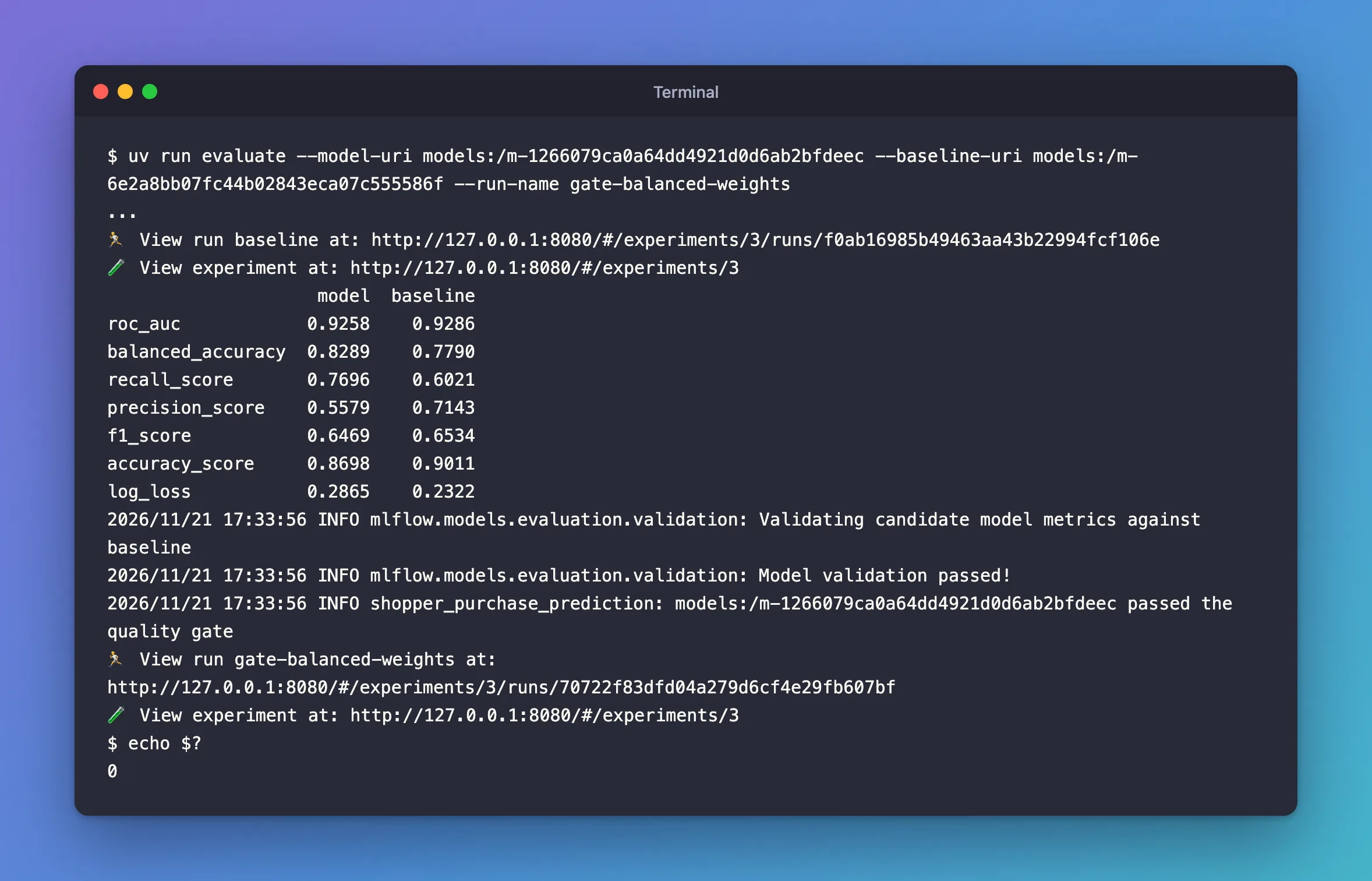
It passed, with exit code 0. The table shows what it gained and what it cost:
- Gained: recall 0.7696 against 0.6021, so it spots 294 of the 382 test buyers instead of 230, and balanced accuracy 0.8289, 0.05 above the baseline.
- Cost: precision 0.5579 against 0.7143, so more of its flags are wrong, and accuracy 0.8698 against 0.9011. ROC AUC dipped to 0.9258, still above 0.90.
- Also worse, and not in the gate: log loss, 0.2865 against 0.2322. Weighting the buyers pushes the model's probabilities up, so they no longer match the real chances. Step 10 shows it on the calibration plot.
A gate checks only what's in it. This one rewards catching buyers; if your product reads the probabilities as chances, add a log_loss rule to it. How to Calculate Precision, Recall and F1 Score in scikit-learn explains the trade-off between the first two.
Step 10: See the Gate in the UI
Open the experiment shopper-purchase-prediction. The Columns button adds metrics and tags to the runs table; with balanced_accuracy, roc_auc and the tag quality_gate, and the two gate runs expanded with the button next to their names:
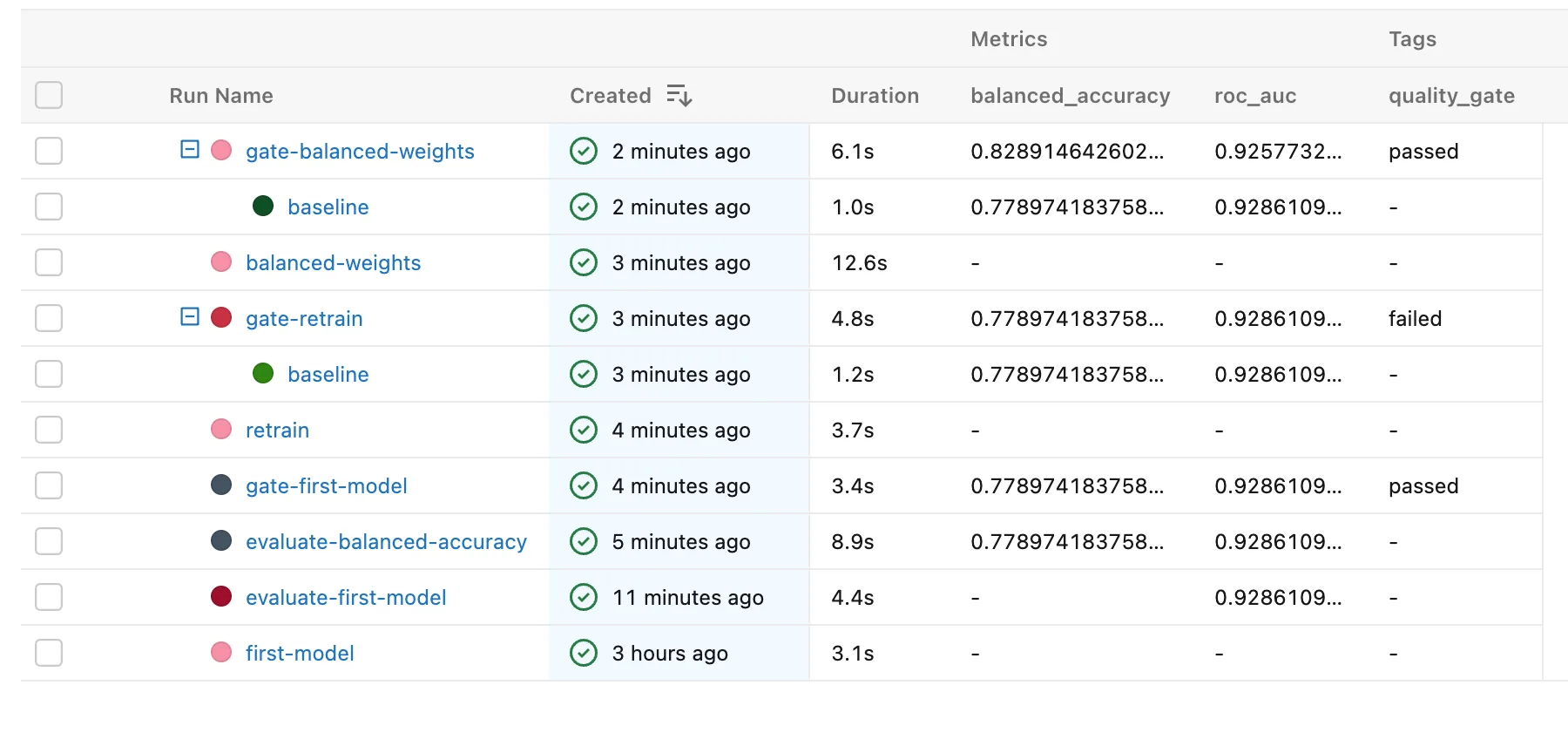
Every gate run carries its verdict, with its baseline's evaluation nested below it. To list only the models that passed, search the runs with tags.quality_gate = 'passed': How to Write a Search Filter for MLflow Runs.
To see what changed between the new model and the model in use, tick gate-balanced-weights and its baseline, and click Compare. The metrics come side by side, the new model first:
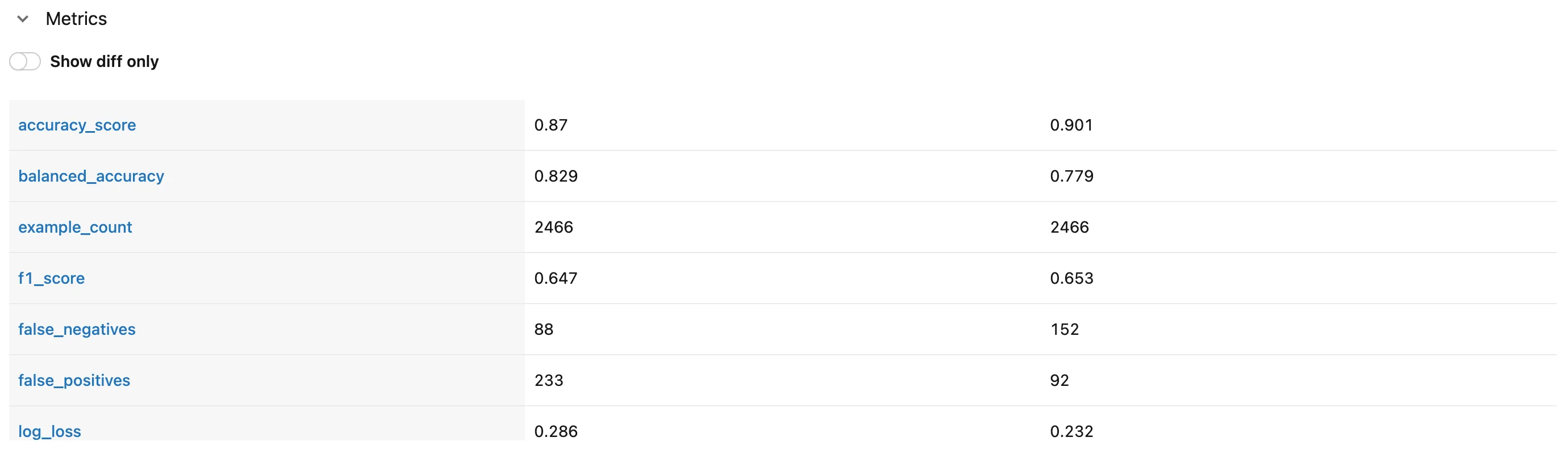
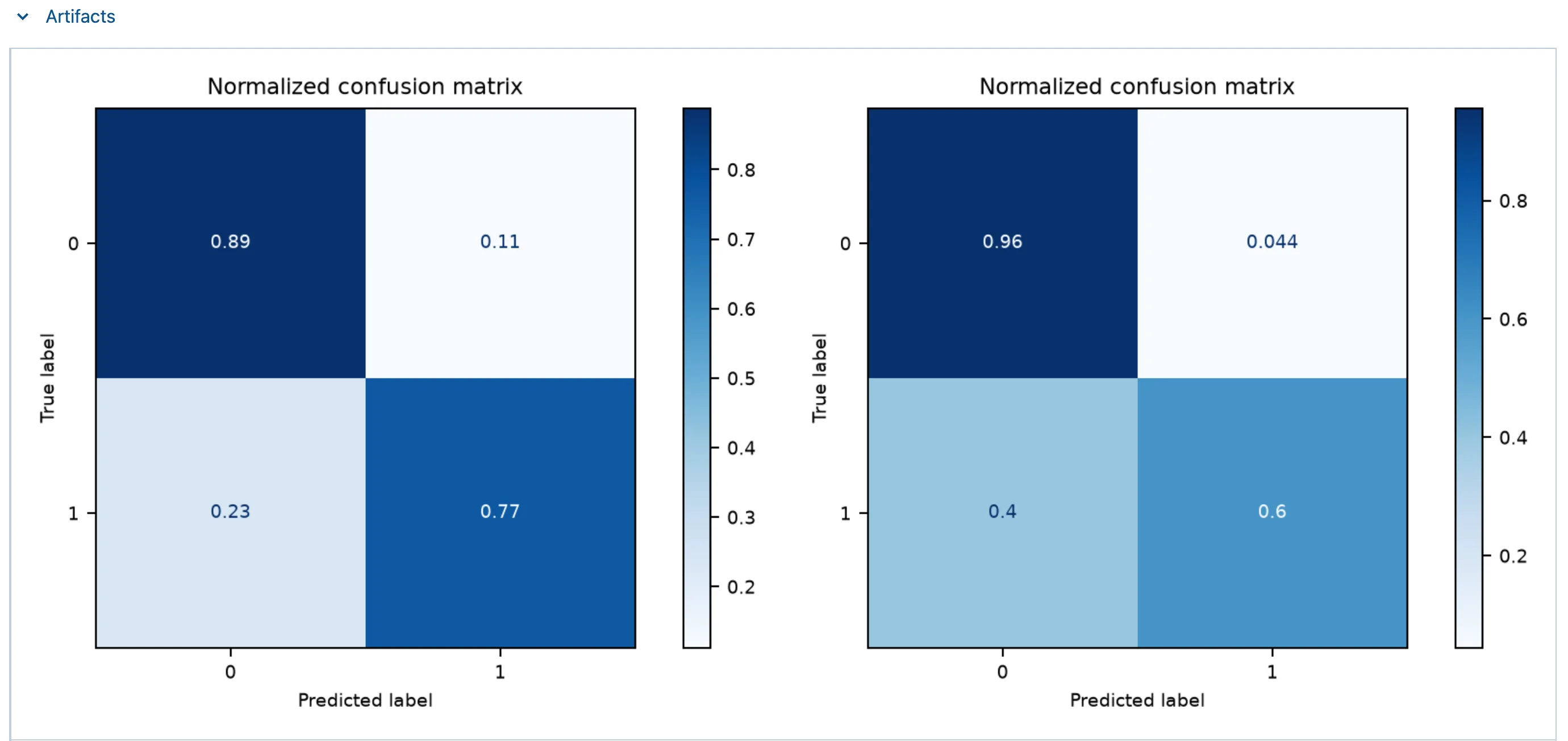
88 buyers missed instead of 152, and 233 false alarms instead of 92. Further down, Artifacts shows each plot of the two runs side by side. The confusion matrices, the new model on the left:
And the calibration curves:
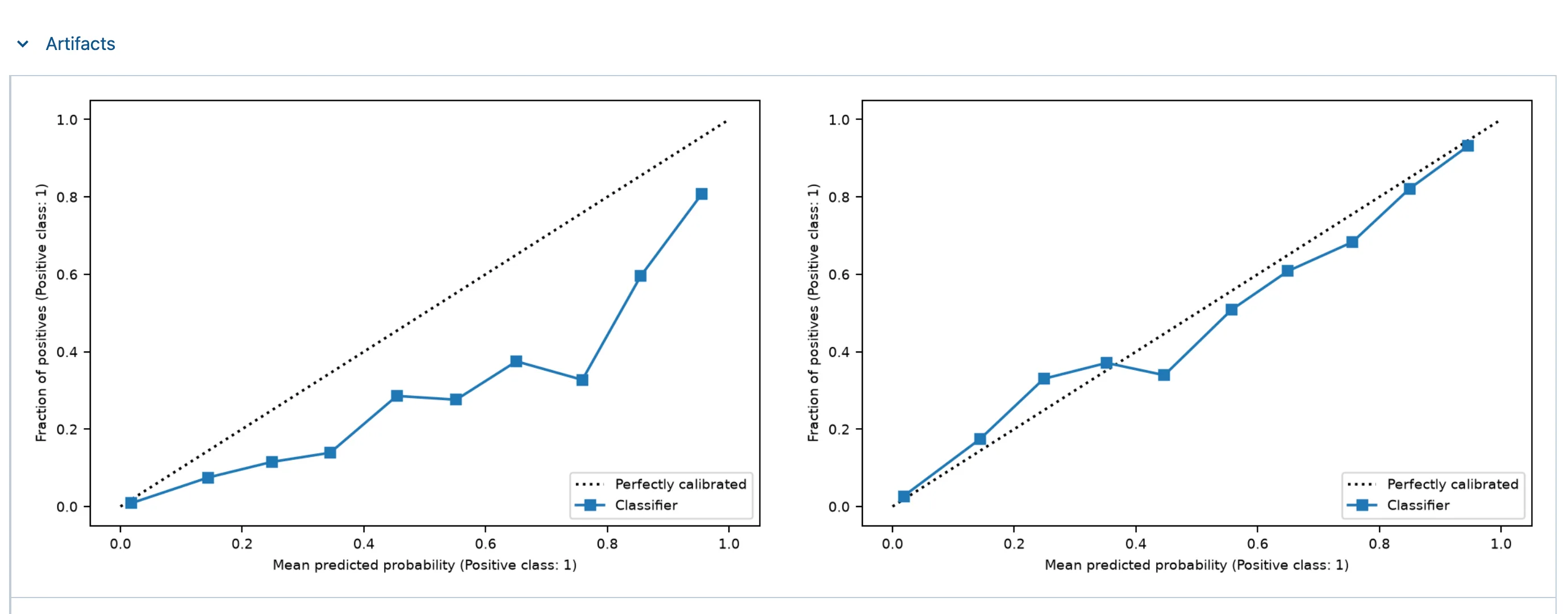
The model in use, on the right, stays on the diagonal. The new model's line runs well below it: sessions it gives about 0.75 bought only about a third of the time. Its probabilities are good for ranking sessions and flagging buyers, not for reading as chances. How to Compare Runs in the MLflow UI covers the Compare page.
Step 11: Save Your Work with Git
In the project terminal:
git status --short --untracked-files=all
 M pyproject.toml
 M src/shopper_purchase_prediction/data.py
 M src/shopper_purchase_prediction/model.py
 M src/shopper_purchase_prediction/train.py
?? src/shopper_purchase_prediction/evaluate.py
git add .
git commit -m "Evaluate models and check them against a quality gate with MLflow"
[master bbe2ef8] Evaluate models and check them against a quality gate with MLflow
 5 files changed, 170 insertions(+), 7 deletions(-)
 create mode 100644 src/shopper_purchase_prediction/evaluate.py
Your Folders Now Look Like This
source/
├── mlflow-server/
│   ├── .venv/
│   ├── mlartifacts/
│   ├── mlflow.db
│   ├── pyproject.toml
│   └── uv.lock
├── dewiride-house-price-prediction/
│   └── ...
├── dewiride-term-deposit-prediction/
│   └── ...
└── dewiride-shopper-purchase-prediction/
    ├── .venv/
    ├── data/
    │   └── online-shoppers.zip
    ├── examples/
    │   └── sessions.csv
    ├── src/
    │   └── shopper_purchase_prediction/
    │       ├── __init__.py
    │       ├── config.py
    │       ├── data.py
    │       ├── evaluate.py
    │       ├── model.py
    │       ├── predict.py
    │       ├── train.py
    │       └── validate.py
    ├── .env
    ├── .env.example
    ├── .gitignore
    ├── .python-version
    ├── README.md
    ├── pyproject.toml
    └── uv.lock
The evaluations' metrics and plots are on the tracking server, under mlflow-server/mlartifacts/ and in mlflow.db, like everything else the runs log.
Do It with the CLI
MLflow's command line downloads an evaluation's plots, using the run's ID from its View run link. The first evaluation's five plots:
uv run mlflow --env-file .env artifacts download -r 585f520fa0b34b6990e2f7d01b9f5c25 -d evaluation-plots
Loaded environment variables from: .env

/Users/you/source/dewiride-shopper-purchase-prediction/evaluation-plots
The folder holds calibration_curve_plot.png, confusion_matrix.png, lift_curve_plot.png, precision_recall_curve_plot.png and roc_curve_plot.png. How to Download Artifacts from an MLflow Run covers the options. evaluation-plots is only a copy, so delete it when you're done.
One command doesn't work on these runs: mlflow runs describe, which prints a run as JSON, fails on every evaluation run in MLflow 3.18.0:
TypeError: Object of type LoggedModelInput is not JSON serializable
when serializing list item 0
when serializing dict item 'model_inputs'
when serializing dict item 'inputs'
An evaluation run records the model it evaluated as an input, and the command can't turn that record into JSON. Training runs, which have no model inputs, print fine. Read evaluation runs in the UI instead. I reported it to MLflow as issue #28011.
Stop the Server When You're Done
Go to the first terminal and press Ctrl+C. Your runs and models stay in mlflow.db and mlartifacts/, and uv run mlflow server --port 8080 in the mlflow-server folder brings them back.
Keep all four folders for Part 8. If you ever want to remove everything the series created, stop the server first, then delete the mlflow-server folder and the three project folders, and the scikit_learn_data folder in your home folder.
Common Mistakes
| Mistake | What happens | Do this instead |
|---|---|---|
Labels of 1 and 0 in the evaluation data | A warning that the model type looks like None on every evaluation | Labels of True and False |
| Leaving SHAP explanations on with columns of words | TypeError: Cannot interpret '<StringDtype(na_value=nan)>' as a data type | log_model_explainability: False |
balanced_accuracy_score as the custom metric | UserWarning: A single label was found from MLflow's one-row test | recall_score with both labels named, as in Step 6 |
except mlflow.exceptions.ModelValidationFailedException | AttributeError the first time a model fails | Import it from mlflow.models.evaluation.validation |
| A margin rule without a baseline | Model comparison failed: metric balanced_accuracy was missing from the evaluation result of the baseline model. | Only add the margin when there's a baseline |
| Gating on metrics that don't matter to your use | A model that passes can be worse where it counts | Put every metric you rely on in the gate |
Troubleshooting
| Symptom | Likely cause | Fix |
|---|---|---|
TypeError: Cannot interpret '<StringDtype(na_value=nan)>' as a data type | SHAP's column check on text columns | Fixed: Cannot interpret StringDtype |
the model type looks like None, but you specified model type 'classifier' | Labels of whole numbers | Fixed: the model type looks like None |
UserWarning: A single label was found in 'y_true' and 'y_pred' | A custom metric tried on one row | Fixed: A single label was found |
AttributeError: module 'mlflow.exceptions' has no attribute 'ModelValidationFailedException' | The exception named through mlflow.exceptions | Fixed: has no attribute ModelValidationFailedException |
minimum absolute change check failed | The new model isn't better than the baseline by the margin | Expected: that's the gate refusing it |
Each metric's model shows +1, and the model page counts every metric twice | MLflow 3.18.0's evaluate logs each metric twice | Nothing to fix: the values are the same |
TypeError: Object of type LoggedModelInput is not JSON serializable from mlflow runs describe | An evaluation run, which has a model input | Read the run in the UI |
FAQ
Why evaluate again when train already logged test_roc_auc?
test_roc_auc is one number from one place. The evaluation adds every standard metric, the plots, the test dataset's name and digest, and a command that scores any model the same way, which is what a comparison needs.
Why did a model with worse precision pass?
Because precision isn't in the gate. The rules ask for ROC AUC, balanced accuracy and a margin over the baseline, and the new model meets all three. Add the metrics your use depends on; the gate enforces exactly what you write.
Why compare with the model in use instead of minimum scores only?
A model can clear every minimum and still be worse than what's already running. The margin makes a replacement earn its place.
Can a CI pipeline run the gate?
Yes: the command exits with 1 when the gate fails and 0 when it passes, which is what CI tools read to stop or continue.
Conclusion
The shopper project can now judge its own models. evaluate scored the Part 6 model on the 2,466 test sessions with mlflow.models.evaluate, 13 built-in metrics plus balanced accuracy and five plots, on a run linked to the model and to the dataset shopper-test. Its quality gate asks for ROC AUC 0.90, balanced accuracy 0.75 and, against the model in use, 0.01 more balanced accuracy. A retrain that changed nothing failed with exit code 1; a model trained with balanced class weights passed by catching 294 buyers instead of 230, at the cost of precision and of probabilities that run high.
In Part 8 you'll register these models in the Model Registry, and let this gate decide which version becomes the champion.
Additional Resources
- MLflow model evaluation — the evaluation guide.
- mlflow.models.evaluate — every option, and the metrics each model type gets.
- mlflow.validate_evaluation_results — the gate's check.
- Online Shoppers Purchasing Intention — the dataset.
← Previous: Part 6: Log, Load and Validate Models
Next → Part 8: Register, Version and Promote Models with the Model Registry (coming soon)
