MLflow Tutorial for Machine Learning in Python — Part 6: Log, Load and Validate Models

Five parts in, MLflow has recorded your settings, scores, files and datasets, but never a trained model. In this part you'll log one, with everything someone needs to use it later: a signature that says what it takes and returns, an example of its input, and its test score. Then you'll load it back by its ID to score new shopping sessions, check a file against its signature before predicting, and prove the model works in a fresh environment built only from what it recorded.
This is Part 6 of a 10-part series.
- Part 1: Install MLflow and Track Your First Experiment
- Part 2: Log Metrics Over Time and System Metrics
- Part 3: Log Artifacts and Datasets
- Part 4: Search and Filter Runs
- Part 5: Autologging and Hyperparameter Tuning with Nested Runs
- Part 6: Log, Load and Validate Models (you are here)
- Part 7: Evaluate Models and Set Quality Gates
- Part 8: Register, Version and Promote Models with the Model Registry (coming soon)
- Part 9: Serve a Model as a REST API and in Docker (coming soon)
- Part 10: Production Checklist and Recap (coming soon)
Every command and output on this page is real, captured while building the project.
What You'll Build in This Part
- a third project,
dewiride-shopper-purchase-prediction, with its settings, its data and its model; - a
traincommand that logs the trained model to MLflow with a signature, an input example and its test score, saved in the safe skops format and answering with probabilities; - the model in the UI: the experiment's Models tab, the model's own page, and the files MLflow saved for it;
- a
predictcommand that loads the model by its ID, checks a CSV file against the model's signature, and scores the sessions in it; - a
validatecommand that has MLflow build a brand-new environment from the model's own requirements and predict in it.
What a Logged Model Is
In MLflow 3, a model is an entity of its own, a logged model. It gets an ID that starts with m-, a page in the UI, its own files and its own metrics, and it remembers the run that created it. Anything that needs the model, today a command on your computer and in Part 9 a web service, loads it by that ID:
MLflow's migration guide puts it as "Models are now first-class entities in MLflow 3."
The Example Project
An online shop recorded 12,330 visits to its website, each one a session. The Online Shoppers Purchasing Intention dataset was put together so that "each session would belong to a different user in a 1-year period":
- What each session records: 17 columns, such as how many pages of three kinds the visitor opened (administrative, informational and product pages) and how long they spent on them, three Google Analytics measures of those pages (bounce rate, exit rate and page value), the month, how close the visit was to a special day such as Mother's Day, whether the visitor was new or returning, and whether it was a weekend.
- The answer, column
Revenue: did the session end in a purchase? 1,908 did, about 1 in 6. - The goal: a model that gives each session the chance that it ends in a purchase.
The model is gradient boosting again, as in Part 5. The dataset is by C. Sakar and Yomi Kastro, donated to the UCI Machine Learning Repository in 2018, under the CC BY 4.0 license.
What This Part Costs
Nothing. Everything runs on your own computer, and the dataset is a free download of about 1 MB.
Prerequisites
- Part 5 finished: the
mlflow-serverfolder and its tracking server from Part 5. This part's project is new, so the other two projects stay as they are.
Step 1: Start the Tracking Server
Open a terminal in the mlflow-server folder and start the server, as before:
uv run mlflow server --port 8080
Wait for Application startup complete and leave it running.
Step 2: Create the Project
Open a second terminal in the folder that holds mlflow-server, and create the project:
uv init --package --name shopper-purchase-prediction --python 3.15 dewiride-shopper-purchase-prediction
cd dewiride-shopper-purchase-prediction
Initialized project `shopper-purchase-prediction` at `/Users/you/source/dewiride-shopper-purchase-prediction`
How to Create a Python Project with uv explains uv init and its options.
Step 3: Add the Packages
uv add mlflow scikit-learn pandas pydantic-settings
Using CPython 3.15.2 interpreter at: /Library/Frameworks/Python.framework/Versions/3.15/bin/python3.15
Creating virtual environment at: .venv
Resolved 93 packages in 988ms
      Built shopper-purchase-prediction @ file:///Users/you/source/dewiride-shopper-purchase-prediction
Prepared 1 package in 16ms
Installed 90 packages in 1.32s
...
 + mlflow==3.18.0
...
 + pandas==3.1.1
...
 + pydantic-settings==2.16.3
...
 + scikit-learn==1.9.1
...
 + skops==0.16.0
...
The same four packages as Part 5. skops, the library that saves this part's model safely, comes with MLflow, which depends on it.
MLflow writes the version of pip into every model's environment files, and environments made by uv don't have pip, so saving a model makes MLflow warn that it can't find one: Fixed: "Failed to resolve installed pip version" When MLflow Saves a Model. Add pip as a development tool, so MLflow has a version to record:
uv add --dev pip
Resolved 94 packages in 32ms
      Built shopper-purchase-prediction @ file:///Users/you/source/dewiride-shopper-purchase-prediction
Prepared 1 package in 5ms
Uninstalled 1 package in 1ms
Installed 2 packages in 14ms
 + pip==26.3
 ~ shopper-purchase-prediction==0.1.0 (from file:///Users/you/source/dewiride-shopper-purchase-prediction)
Step 4: Add the Settings
The project needs the same three settings as the others: the server's address, the experiment's name, and a folder for the downloaded data. Create .env.example:
# The MLflow tracking server this project sends its runs and models to.
MLFLOW_TRACKING_URI=http://127.0.0.1:8080
# The MLflow experiment that groups this project's runs and models.
MLFLOW_EXPERIMENT_NAME=shopper-purchase-prediction
# The folder that keeps the downloaded dataset, relative to the project folder.
SHOPPER_DATA_DIR=data
Copy it to .env:
- macOS / Linux
- Windows (PowerShell)
cp .env.example .env
Copy-Item .env.example .env
Then create src/shopper_purchase_prediction/config.py, which reads them:
"""Settings, read from environment variables and the .env file."""

from functools import lru_cache
from pathlib import Path

from pydantic import Field
from pydantic_settings import BaseSettings, SettingsConfigDict


class Settings(BaseSettings):
    """Where the project sends its runs and models, and where it keeps the downloaded data."""

    model_config = SettingsConfigDict(
        env_prefix="SHOPPER_",
        env_file=".env",
        env_file_encoding="utf-8",
        extra="ignore",
    )

    mlflow_tracking_uri: str = Field(
        default="http://127.0.0.1:8080",
        validation_alias="MLFLOW_TRACKING_URI",
        description="The address of the MLflow tracking server.",
    )
    mlflow_experiment_name: str = Field(
        default="shopper-purchase-prediction",
        min_length=1,
        validation_alias="MLFLOW_EXPERIMENT_NAME",
        description="The MLflow experiment that groups this project's runs and models.",
    )
    data_dir: Path = Field(
        default=Path("data"),
        description="The folder that keeps the downloaded dataset, so it's fetched only once.",
    )


@lru_cache
def get_settings() -> Settings:
    """Read the settings once, then reuse the same object everywhere."""
    return Settings()
How to Load Settings from Environment Variables and a .env File with pydantic-settings explains the prefix and the aliases.
Step 5: Add the Data
src/shopper_purchase_prediction/data.py downloads the dataset once, checks it, reads the table and splits it. Two parts of it matter for the model you'll log.
The column types. The signature you'll log in Step 7 records the type of every column, and the model will then accept only those types. Seven columns hold whole numbers, such as the number of pages a visitor opened, and data.py reads them as decimals:
    return pd.read_csv(
        download_dataset(data_dir),
        dtype={column: "float64" for column in WHOLE_NUMBER_COLUMNS},
    )
My first version read them as pandas chose, as whole numbers, and logging the model then warned:
/Users/you/source/dewiride-shopper-purchase-prediction/.venv/lib/python3.15/site-packages/mlflow/types/utils.py:440: UserWarning: Hint: Inferred schema contains integer column(s). Integer columns in Python cannot represent missing values. If your input data contains missing values at inference time, it will be encoded as floats and will cause a schema enforcement error. The best way to avoid this problem is to infer the model schema based on a realistic data sample (training dataset) that includes missing values. Alternatively, you can declare integer columns as doubles (float64) whenever these columns may have missing values. See `Handling Integers With Missing Values <https://www.mlflow.org/docs/latest/models.html#handling-integers-with-missing-values>`_ for more details.
A signature with integer columns would refuse a session with a gap in one of them, which the model itself copes with. Decimals can hold a gap: Fixed: "UserWarning: Hint: Inferred schema contains integer column(s)" When You Infer an MLflow Model Signature.
The answer as 1 and 0. Revenue holds True or False; astype(int) turns them into the 1 and 0 the model learns from: How to Turn True and False into 1 and 0 in pandas.
What the rest of the file does, each with a guide of its own:
- Downloads the zip once into
data/, as a.partfile renamed when complete: How to Download a File in Python with urllib. - Checks its SHA-256 fingerprint on every run, against the published file's: How to Check a File's SHA-256 Hash in Python.
- Reads the CSV file straight from the zip, without extracting it: How to Read a CSV File from a Zip File with pandas.
- Holds back 20% of the sessions for a final test, with the same share of purchases in both parts: How to Keep the Class Balance in a Train-Test Split with stratify.
The complete file:
"""Download the online shoppers data once, check it, and split it for training and testing."""

import hashlib
import logging
import shutil
import urllib.request
from dataclasses import dataclass
from pathlib import Path

import pandas as pd
from sklearn.model_selection import train_test_split

logger = logging.getLogger(__name__)

# The UCI Machine Learning Repository's download of the Online Shoppers Purchasing Intention
# dataset (CC BY 4.0): a zip that holds a single CSV file.
SOURCE_URL = (
    "https://archive.ics.uci.edu/static/public/468/online+shoppers+purchasing+intention+dataset.zip"
)
# The published file's SHA-256 fingerprint. A file that doesn't match it is never read.
SOURCE_SHA256 = "2972e6184d3ad7beaaa831d9fc2b059dc3ee29df69d1ec593c466a5cd8485d14"
# True when the session ended in a purchase.
TARGET = "Revenue"
# Whole numbers, read as decimals: only a decimal column can hold a missing value, so the
# model's signature then accepts a session with a gap, which the model copes with.
WHOLE_NUMBER_COLUMNS = [
    "Administrative",
    "Informational",
    "ProductRelated",
    "OperatingSystems",
    "Browser",
    "Region",
    "TrafficType",
]


@dataclass(frozen=True)
class DataSplit:
    """The sessions and their outcomes, for training and for the final test."""

    X_train: pd.DataFrame
    X_test: pd.DataFrame
    y_train: pd.Series
    y_test: pd.Series


def sha256_of(path: Path) -> str:
    """Return the file's SHA-256 fingerprint as 64 hexadecimal characters."""
    with path.open("rb") as file:
        return hashlib.file_digest(file, "sha256").hexdigest()


def download_dataset(data_dir: Path) -> Path:
    """Return the dataset's zip in `data_dir`, downloading it the first time. Either way, its
    fingerprint must match the published file's before anything is read from it."""
    path = data_dir / "online-shoppers.zip"
    if not path.exists():
        data_dir.mkdir(parents=True, exist_ok=True)
        logger.info("Downloading the online shoppers data from %s", SOURCE_URL)
        partial = path.with_name(path.name + ".part")
        with urllib.request.urlopen(SOURCE_URL, timeout=60) as response, partial.open("wb") as file:
            shutil.copyfileobj(response, file)
        partial.replace(path)
    digest = sha256_of(path)
    if digest != SOURCE_SHA256:
        raise RuntimeError(
            f"{path} has the SHA-256 fingerprint {digest}, not {SOURCE_SHA256}. "
            "Delete the file and run the command again to download it afresh."
        )
    return path


def load_sessions(data_dir: Path) -> pd.DataFrame:
    """Return the 12,330 sessions as one table. The zip holds a single CSV file, so pandas
    reads it straight from the zip."""
    return pd.read_csv(
        download_dataset(data_dir),
        dtype={column: "float64" for column in WHOLE_NUMBER_COLUMNS},
    )


def split_data(frame: pd.DataFrame, test_size: float, random_state: int) -> DataSplit:
    """Hold back `test_size` of the sessions for the final test. Both parts keep the same share
    of sessions that ended in a purchase, about 1 in 6."""
    features = frame.drop(columns=TARGET)
    target = frame[TARGET].astype(int)  # 1 = bought, 0 = didn't
    X_train, X_test, y_train, y_test = train_test_split(
        features, target, test_size=test_size, random_state=random_state, stratify=target
    )
    return DataSplit(X_train, X_test, y_train, y_test)
Add .env and the data folder to .gitignore:
# Local settings (copy .env.example to .env)
.env

# The downloaded dataset (the code downloads it again when it's missing)
data/
Step 6: Add the Model
Two columns hold words: Month, such as Nov, and VisitorType, such as Returning_Visitor. As in Part 5, a ColumnTransformer one-hot encodes them and passes the other columns through, and a Pipeline joins that step and the model. Logging the whole pipeline in Step 7 means the encoding travels with the model, so whoever loads it sends sessions exactly as they appear in the data. Create src/shopper_purchase_prediction/model.py:
"""The model: one-hot encode the text columns, then a gradient-boosted tree classifier."""

from sklearn.compose import ColumnTransformer
from sklearn.ensemble import HistGradientBoostingClassifier
from sklearn.pipeline import Pipeline
from sklearn.preprocessing import OneHotEncoder

# The columns that hold words: the month of the visit, and whether the visitor is new.
TEXT_COLUMNS = ["Month", "VisitorType"]


def build_pipeline(random_state: int) -> Pipeline:
    """Turn each text column into 0/1 columns, pass the other columns through, then classify."""
    prepare = ColumnTransformer(
        [
            (
                "categories",
                OneHotEncoder(handle_unknown="ignore", sparse_output=False),
                TEXT_COLUMNS,
            )
        ],
        remainder="passthrough",
    )
    model = HistGradientBoostingClassifier(random_state=random_state)
    return Pipeline([("prepare", prepare), ("model", model)])
The building blocks, each explained in its own guide: OneHotEncoder, ColumnTransformer, Pipeline and HistGradientBoostingClassifier.
Step 7: Log the Model
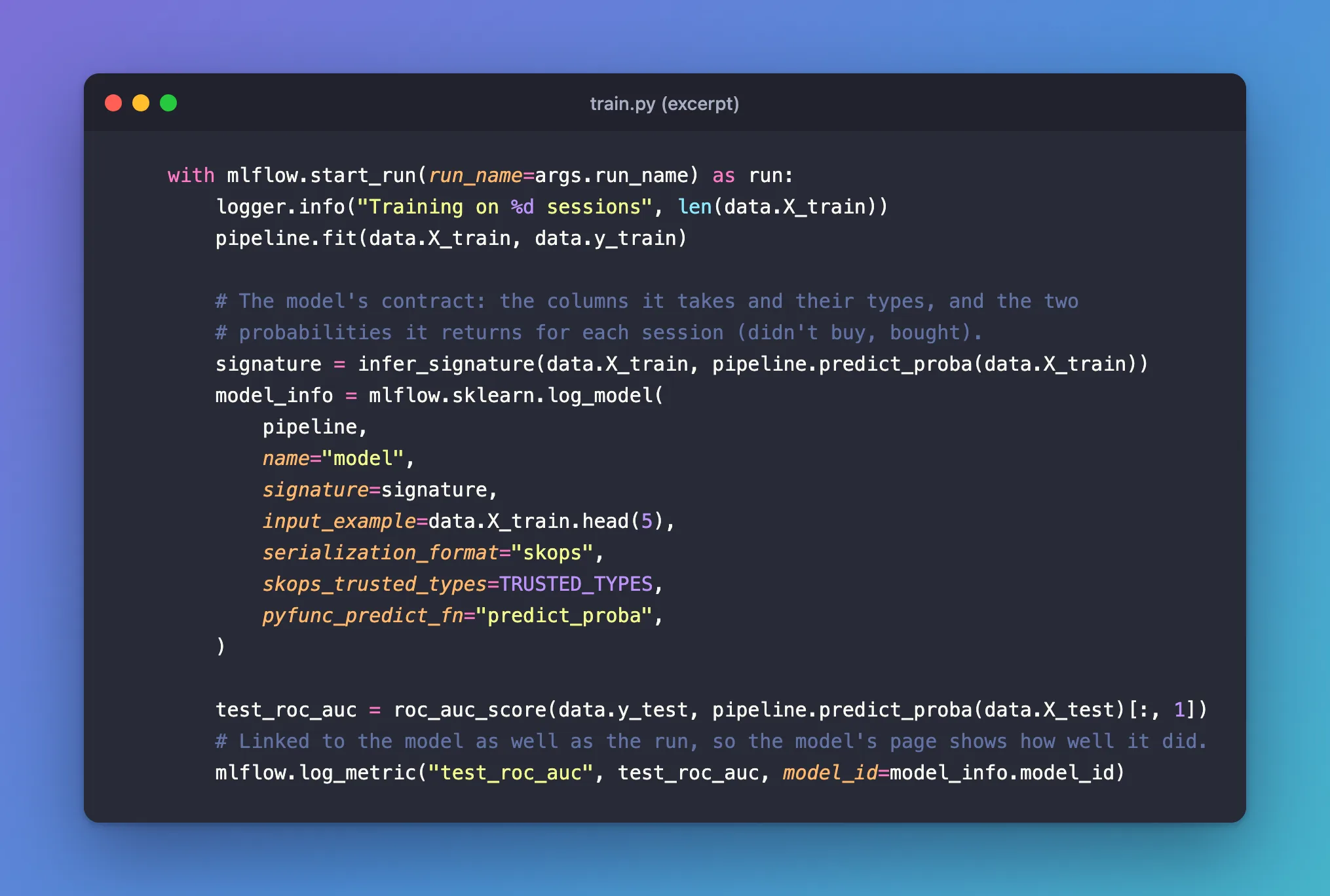
Create src/shopper_purchase_prediction/train.py, the command that trains the model and logs it. Training is one line, pipeline.fit(data.X_train, data.y_train), inside a run. Logging the model takes four pieces.
The signature, the model's contract: the columns it takes with their types, and what it returns.
        # The model's contract: the columns it takes and their types, and the two
        # probabilities it returns for each session (didn't buy, bought).
        signature = infer_signature(data.X_train, pipeline.predict_proba(data.X_train))
infer_signature reads the types from the training sessions, and the outputs from what the model will return: predict_proba, a probability for each answer. Leaving it to MLflow would describe the wrong thing, since MLflow infers a scikit-learn model's outputs from predict, the labels: Fixed: MLflow Signature Says long for a predict_proba Model. More on signatures: How to Add a Signature to an MLflow Model.
The call that logs it:
        model_info = mlflow.sklearn.log_model(
            pipeline,
            name="model",
            signature=signature,
            input_example=data.X_train.head(5),
            serialization_format="skops",
            skops_trusted_types=TRUSTED_TYPES,
            pyfunc_predict_fn="predict_proba",
        )
pipelineis the whole trained pipeline, encoding included; How to Log a scikit-learn Model in MLflow shows the call on its own.name="model"names the logged model. It replacesartifact_path, which MLflow 3 deprecated.input_examplesaves five real training sessions with the model, an example of what it takes: How to Add an Input Example to an MLflow Model.serialization_format="skops"saves the model with skops, which loads only types it trusts, instead of pickle, which can run any code it's handed. skops is already MLflow's default outside Databricks; naming it keeps that choice in the code.pyfunc_predict_fn="predict_proba"makes the loaded model answer with probabilities instead of yes/no labels: How to Make an MLflow Model Return Probabilities.
The trusted types. skops refuses to save a type it doesn't trust unless you list it, and every tree of this model is stored in one, TreePredictor:
# skops loads only the types it trusts. The gradient-boosted trees keep each tree in a
# TreePredictor, which skops doesn't trust by default; it's the one type reviewed and added.
TRUSTED_TYPES = ["sklearn.ensemble._hist_gradient_boosting.predictor.TreePredictor"]
Without the list, log_model fails with MlflowException: The saved sklearn model references untrusted types: Fixed: "MlflowException: The saved sklearn model references untrusted types". The list is saved with the model, so loading it later needs nothing more: How to Save a scikit-learn Model in the skops Format with MLflow.
The test score, linked to the model:
        test_roc_auc = roc_auc_score(data.y_test, pipeline.predict_proba(data.X_test)[:, 1])
        # Linked to the model as well as the run, so the model's page shows how well it did.
        mlflow.log_metric("test_roc_auc", test_roc_auc, model_id=model_info.model_id)
model_info is what log_model returns: the model's ID, its URI and its signature. Passing model_id= to log_metric puts the score on the model's own page as well as the run's: How to Link a Metric to a Logged Model in MLflow. ROC AUC is the chance the model scores a session that bought above one that didn't: How to Calculate ROC AUC in scikit-learn.
The complete file:
"""Train the purchase model, then log it to MLflow with its signature, an input example and its
test score."""

import argparse
import logging
from collections.abc import Sequence

import mlflow
from mlflow.models import infer_signature
from sklearn.metrics import roc_auc_score

from shopper_purchase_prediction.config import get_settings
from shopper_purchase_prediction.data import load_sessions, split_data
from shopper_purchase_prediction.model import build_pipeline

logger = logging.getLogger("shopper_purchase_prediction")

TEST_SIZE = 0.2
RANDOM_STATE = 42
# skops loads only the types it trusts. The gradient-boosted trees keep each tree in a
# TreePredictor, which skops doesn't trust by default; it's the one type reviewed and added.
TRUSTED_TYPES = ["sklearn.ensemble._hist_gradient_boosting.predictor.TreePredictor"]


def parse_args(argv: Sequence[str] | None = None) -> argparse.Namespace:
    """Read the training options from the command line."""
    parser = argparse.ArgumentParser(
        prog="train",
        description="Train a model that predicts which online shoppers will buy, "
        "and log it to MLflow.",
    )
    parser.add_argument(
        "--run-name", default=None, help="name shown in the MLflow UI (default: MLflow picks one)"
    )
    return parser.parse_args(argv)


def main(argv: Sequence[str] | None = None) -> int:
    """Train on the training sessions, log the model, and score it on the test sessions."""
    logging.basicConfig(
        level=logging.INFO,
        format="%(asctime)s %(levelname)s %(name)s: %(message)s",
        datefmt="%Y/%m/%d %H:%M:%S",
    )
    args = parse_args(argv)
    settings = get_settings()

    mlflow.set_tracking_uri(settings.mlflow_tracking_uri)
    mlflow.set_experiment(settings.mlflow_experiment_name)

    logger.info("Loading the online shoppers data")
    data = split_data(load_sessions(settings.data_dir), TEST_SIZE, RANDOM_STATE)

    pipeline = build_pipeline(RANDOM_STATE)
    with mlflow.start_run(run_name=args.run_name) as run:
        logger.info("Training on %d sessions", len(data.X_train))
        pipeline.fit(data.X_train, data.y_train)

        # The model's contract: the columns it takes and their types, and the two
        # probabilities it returns for each session (didn't buy, bought).
        signature = infer_signature(data.X_train, pipeline.predict_proba(data.X_train))
        model_info = mlflow.sklearn.log_model(
            pipeline,
            name="model",
            signature=signature,
            input_example=data.X_train.head(5),
            serialization_format="skops",
            skops_trusted_types=TRUSTED_TYPES,
            pyfunc_predict_fn="predict_proba",
        )

        test_roc_auc = roc_auc_score(data.y_test, pipeline.predict_proba(data.X_test)[:, 1])
        # Linked to the model as well as the run, so the model's page shows how well it did.
        mlflow.log_metric("test_roc_auc", test_roc_auc, model_id=model_info.model_id)
        logger.info(
            "Run %s logged the model %s, test ROC AUC %.4f",
            run.info.run_name,
            model_info.model_uri,
            test_roc_auc,
        )
    return 0
The project gets three commands in all: train, and the predict and validate you'll write in Steps 11 and 12. In pyproject.toml, replace the [project.scripts] line uv created with all three, and replace the contents of src/shopper_purchase_prediction/__init__.py, which held a main for it, with a one-line description:
[project.scripts]
train = "shopper_purchase_prediction.train:main"
predict = "shopper_purchase_prediction.predict:main"
validate = "shopper_purchase_prediction.validate:main"
"""Predict which online shoppers will buy, and log, load and validate the model with MLflow."""
Step 8: Train and Log the Model
uv run train --run-name first-model
      Built shopper-purchase-prediction @ file:///Users/you/source/dewiride-shopper-purchase-prediction
Uninstalled 1 package in 0.74ms
Installed 1 package in 3ms
2026/11/21 13:54:04 INFO mlflow.tracking.fluent: Experiment with name 'shopper-purchase-prediction' does not exist. Creating a new experiment.
2026/11/21 13:54:04 INFO shopper_purchase_prediction: Loading the online shoppers data
2026/11/21 13:54:04 INFO shopper_purchase_prediction.data: Downloading the online shoppers data from https://archive.ics.uci.edu/static/public/468/online+shoppers+purchasing+intention+dataset.zip
2026/11/21 13:54:07 INFO shopper_purchase_prediction: Training on 9864 sessions
2026/11/21 13:54:09 INFO mlflow.utils.uv_utils: Detected uv project: found uv.lock and pyproject.toml in /Users/you/source/dewiride-shopper-purchase-prediction
2026/11/21 13:54:09 INFO mlflow.utils.uv_utils: Detected uv project: found uv.lock and pyproject.toml in /Users/you/source/dewiride-shopper-purchase-prediction
2026/11/21 13:54:09 INFO mlflow.utils.environment: Detected uv project at /Users/you/source/dewiride-shopper-purchase-prediction. Attempting to export requirements via 'uv export'.
2026/11/21 13:54:09 INFO mlflow.utils.uv_utils: Exported 92 dependencies via uv
2026/11/21 13:54:09 INFO mlflow.utils.environment: Successfully exported 92 requirements from uv project. Skipping package capture based inference.
2026/11/21 13:54:10 INFO shopper_purchase_prediction: Run first-model logged the model models:/m-6e2a8bb07fc44b02843eca07c555586f, test ROC AUC 0.9286
🏃 View run first-model at: http://127.0.0.1:8080/#/experiments/3/runs/2fa85da030544aed98725cc12e1fa4d0
🧪 View experiment at: http://127.0.0.1:8080/#/experiments/3
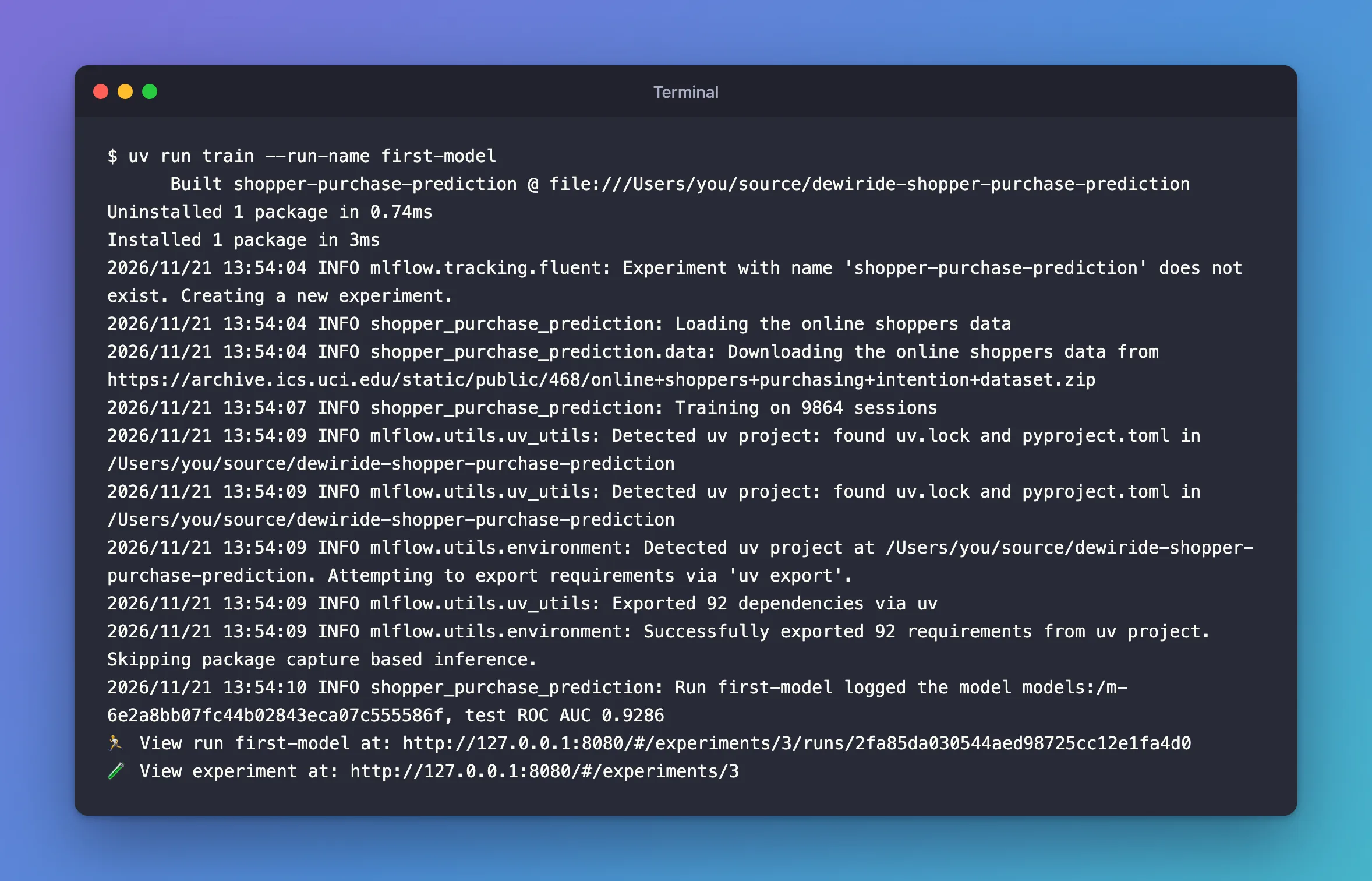
Line by line:
Built …,Installed 1 package: uv reinstalled the project, becausepyproject.tomlchanged.Downloading the online shoppers data: the first run only.Training on 9864 sessions: the 80% of the 12,330 sessions the model learns from. The other 2,466 are the test sessions.Detected uv project…Exported 92 dependencies via uv: MLflow found the project'suv.lockand wrote the model's requirements from it, every package at its exact version. That's what a fresh environment is built from in Step 12.logged the model models:/m-6e2a8bb0…: the model's URI,models:/and its ID. Every later step loads the model with it; yours has a different ID.test ROC AUC 0.9286: on sessions it never saw, the model ranks a session that bought above one that didn't about 93 times in 100.
Step 9: Find the Model in the UI
Open the experiment shopper-purchase-prediction in the UI and click its Models tab:

One row per logged model: its name, model, its status, Ready, the command it was logged from, the run that logged it, and its linked metric, test_roc_auc. The tab also has Registered models and Dataset columns, empty for this model; I hid them with Columns to make room. How to Find Logged Models in the MLflow UI covers the tab's other views.
Click model to open its page:
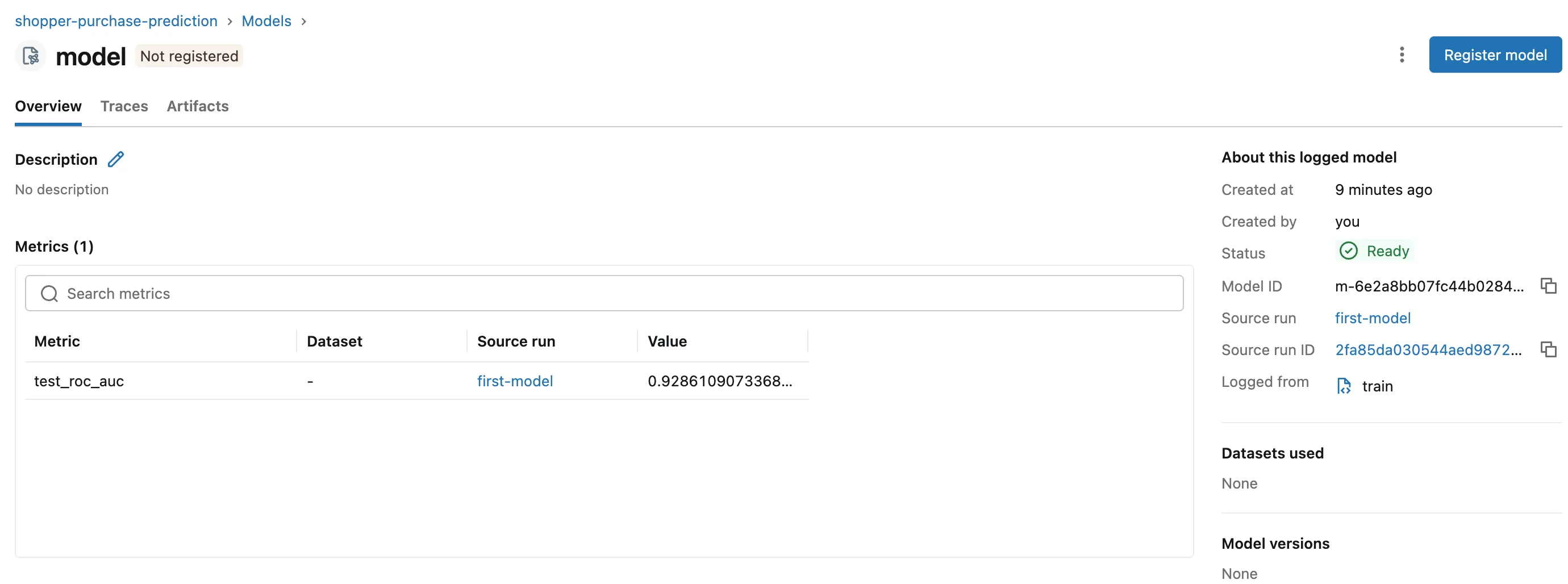
- Metrics (1): the test score, linked by
model_id, with the run that logged it. - About this logged model: the model's ID with a copy button, the run that logged it and the command it came from.
- Model versions: None: the model isn't in the Model Registry; that's Part 8.
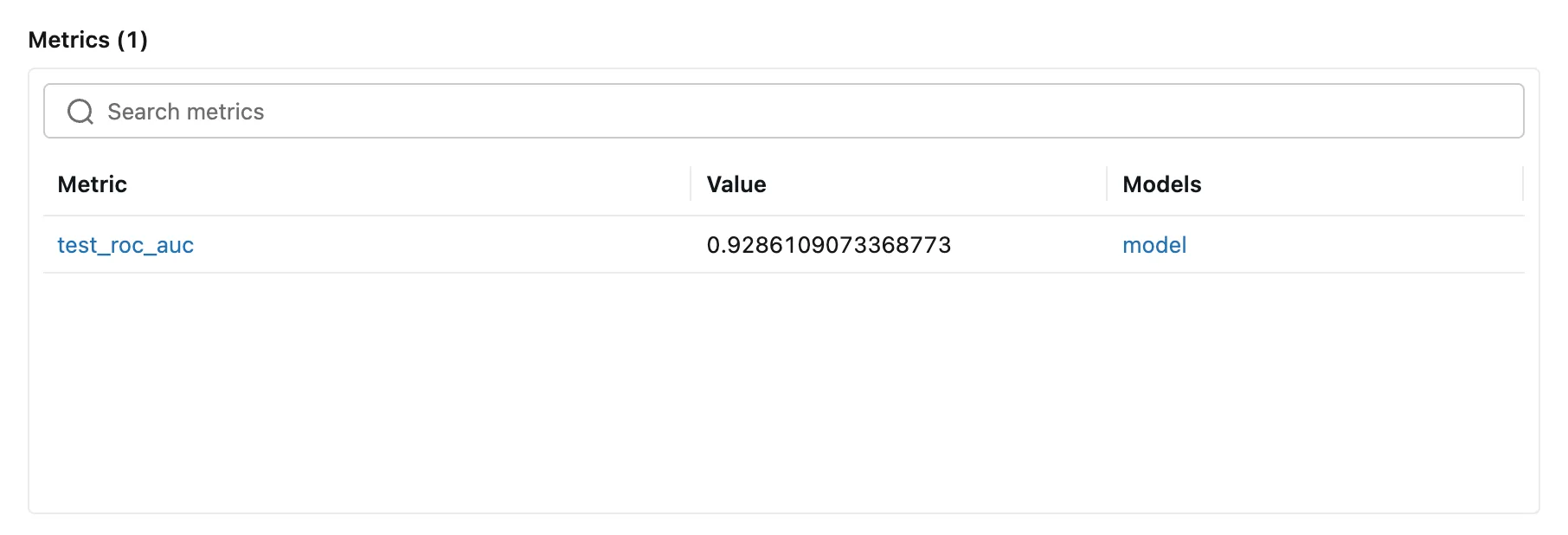
The run keeps the score too. Open first-model from the experiment's runs, and its Metrics table shows a Models column naming the model the score is linked to:
Step 10: Read the Model's Files
On the model's page, click Artifacts. MLflow 3 keeps a model's files with the model, not with its run: the run's own Artifacts tab doesn't list them.
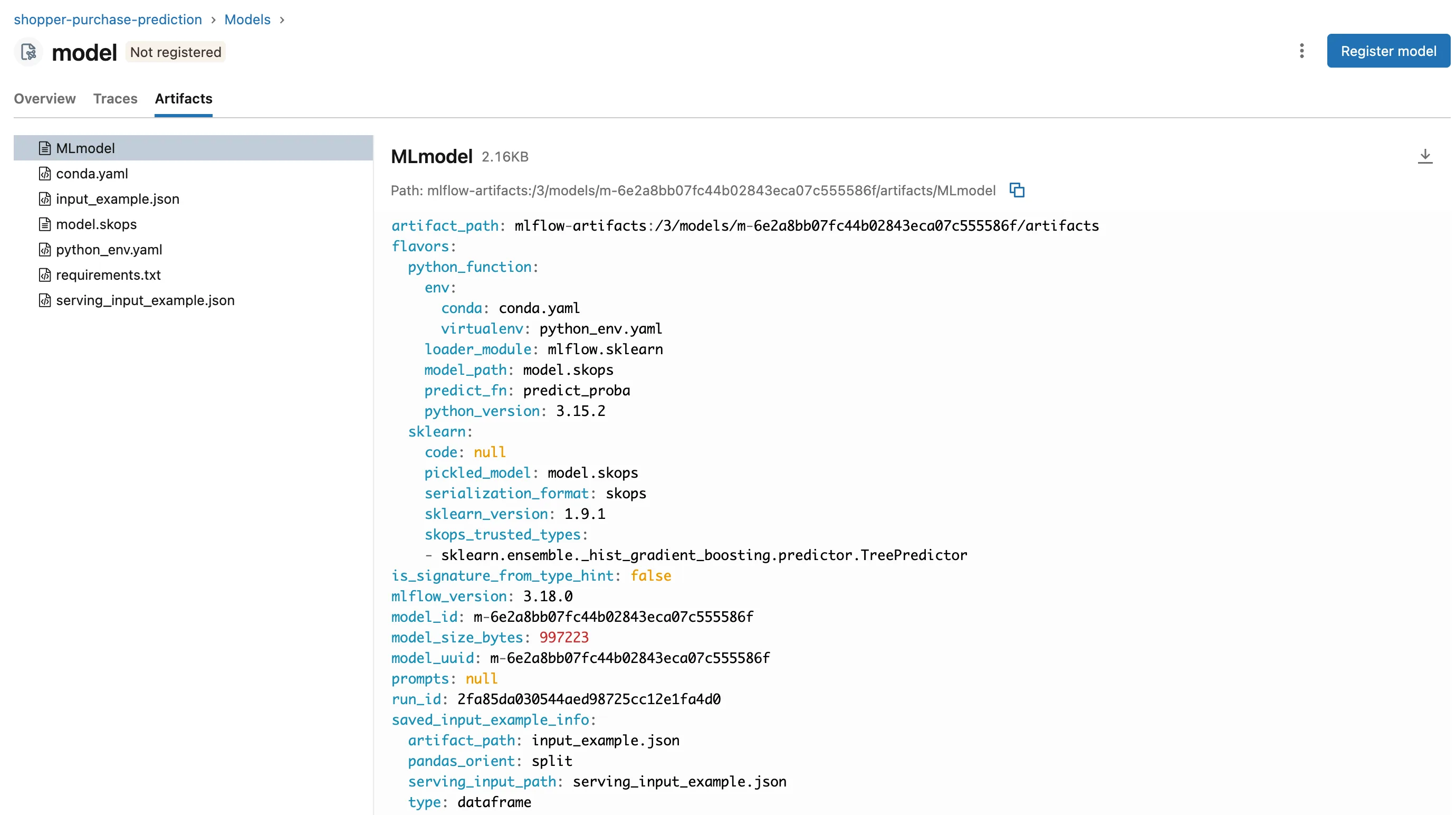
Seven files:
model.skops: the trained pipeline itself, about 1 MB.MLmodel: the description of everything else, below.input_example.json: the five training sessions frominput_example, andserving_input_example.json, the same five as a request to a model web service, which Part 9 sends.requirements.txt: the 92 packages from the project's lock, such asmlflow==3.18.0,scikit-learn==1.9.1andskops==0.16.0.python_env.yamladds the Python version, 3.15.2, and the pip that installs them,pip==26.3.conda.yamlsays the same for conda users.
The whole MLmodel file:
artifact_path: mlflow-artifacts:/3/models/m-6e2a8bb07fc44b02843eca07c555586f/artifacts
flavors:
  python_function:
    env:
      conda: conda.yaml
      virtualenv: python_env.yaml
    loader_module: mlflow.sklearn
    model_path: model.skops
    predict_fn: predict_proba
    python_version: 3.15.2
  sklearn:
    code: null
    pickled_model: model.skops
    serialization_format: skops
    sklearn_version: 1.9.1
    skops_trusted_types:
    - sklearn.ensemble._hist_gradient_boosting.predictor.TreePredictor
is_signature_from_type_hint: false
mlflow_version: 3.18.0
model_id: m-6e2a8bb07fc44b02843eca07c555586f
model_size_bytes: 997223
model_uuid: m-6e2a8bb07fc44b02843eca07c555586f
prompts: null
run_id: 2fa85da030544aed98725cc12e1fa4d0
saved_input_example_info:
  artifact_path: input_example.json
  pandas_orient: split
  serving_input_path: serving_input_example.json
  type: dataframe
signature:
  inputs: '[{"type": "double", "name": "Administrative", "required": true}, {"type":
    "double", "name": "Administrative_Duration", "required": true}, {"type": "double",
    "name": "Informational", "required": true}, {"type": "double", "name": "Informational_Duration",
    "required": true}, {"type": "double", "name": "ProductRelated", "required": true},
    {"type": "double", "name": "ProductRelated_Duration", "required": true}, {"type":
    "double", "name": "BounceRates", "required": true}, {"type": "double", "name":
    "ExitRates", "required": true}, {"type": "double", "name": "PageValues", "required":
    true}, {"type": "double", "name": "SpecialDay", "required": true}, {"type": "string",
    "name": "Month", "required": true}, {"type": "double", "name": "OperatingSystems",
    "required": true}, {"type": "double", "name": "Browser", "required": true}, {"type":
    "double", "name": "Region", "required": true}, {"type": "double", "name": "TrafficType",
    "required": true}, {"type": "string", "name": "VisitorType", "required": true},
    {"type": "boolean", "name": "Weekend", "required": true}]'
  outputs: '[{"type": "tensor", "tensor-spec": {"dtype": "float64", "shape": [-1,
    2]}}]'
  params: null
type_hint_from_example: false
utc_time_created: '2026-11-21 08:24:09.318752'
flavorsare the ways to load the model.python_functionis MLflow's generic one, which Step 11 uses: it loads throughmlflow.sklearnand predicts withpredict_proba.sklearnloads it as the scikit-learn pipeline it is, frommodel.skops, with the trusted types.model_idandrun_idtie the model to its run.signature: 17 inputs, every number adouble,MonthandVisitorTypestrings andWeekenda boolean, all required; the output is a table of decimals (float64) with any number of rows (-1) and 2 columns, the two probabilities.
How to Read the MLmodel File of an MLflow Model goes through every field.
Step 11: Load the Model and Score Sessions
Create src/shopper_purchase_prediction/predict.py, the command that scores sessions from a CSV file. Three pieces.
Load the model by its URI:
model = mlflow.pyfunc.load_model(args.model_uri)
mlflow.pyfunc.load_model loads any MLflow model, whatever library made it, behind one predict method. For this model, predict runs predict_proba, as MLmodel says: How to Load an MLflow Model with mlflow.pyfunc.load_model. To get the scikit-learn pipeline itself instead, there's mlflow.sklearn.load_model.
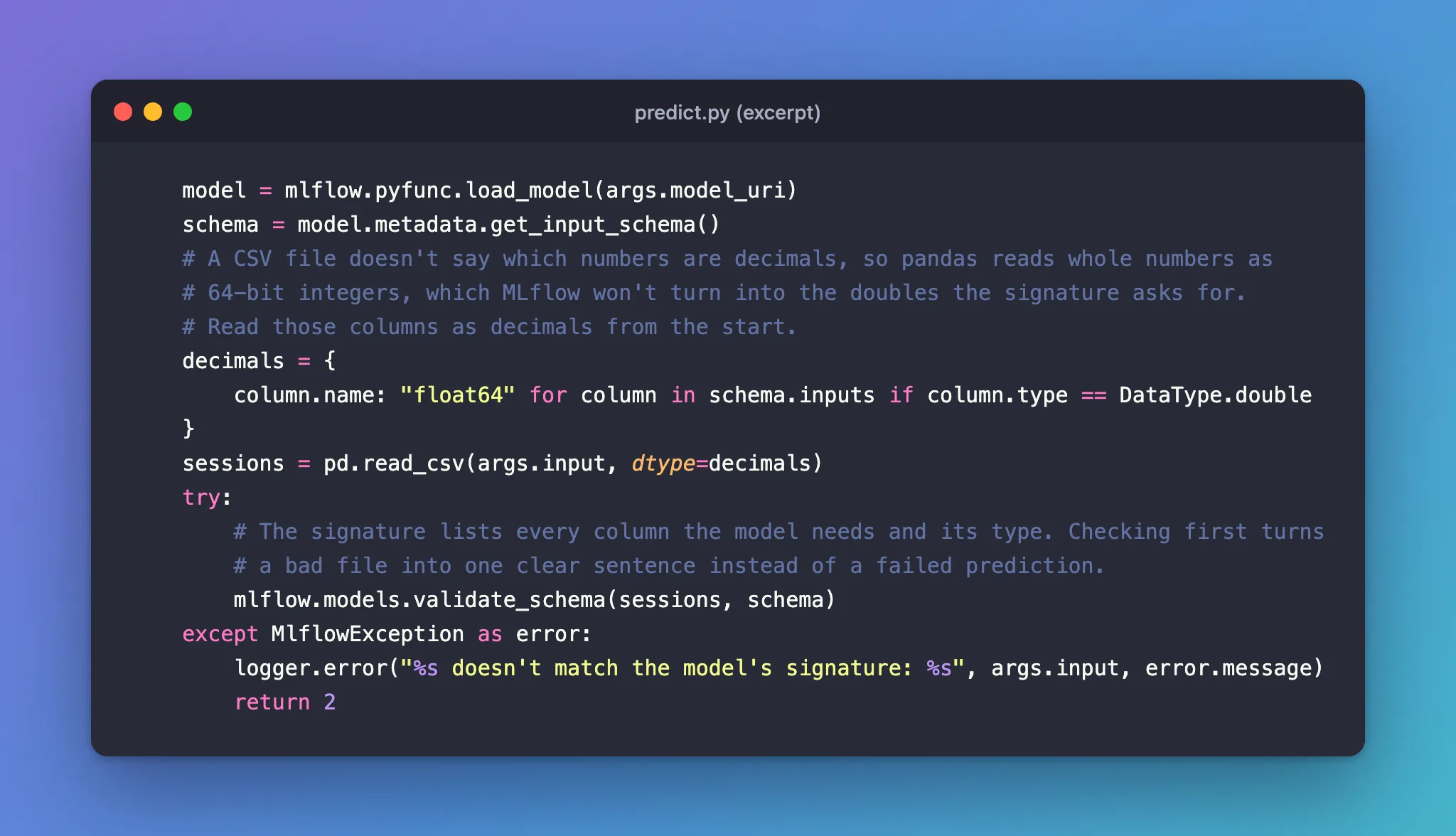
Read the file the way the signature expects:
    schema = model.metadata.get_input_schema()
    # A CSV file doesn't say which numbers are decimals, so pandas reads whole numbers as
    # 64-bit integers, which MLflow won't turn into the doubles the signature asks for.
    # Read those columns as decimals from the start.
    decimals = {
        column.name: "float64" for column in schema.inputs if column.type == DataType.double
    }
    sessions = pd.read_csv(args.input, dtype=decimals)
My first version read the file plainly, and the model refused it: Incompatible input types for column Administrative. Can not safely convert int64 to float64. A CSV file doesn't say that 3 is a decimal, so pandas reads it as an integer, and MLflow won't convert 64-bit integers to doubles. Taking the list of double columns from the model's own signature fixed it: Fixed: "Incompatible input types for column … Can not safely convert int64 to float64" in MLflow.
Check the sessions against the signature before predicting:
    try:
        # The signature lists every column the model needs and its type. Checking first turns
        # a bad file into one clear sentence instead of a failed prediction.
        mlflow.models.validate_schema(sessions, schema)
    except MlflowException as error:
        logger.error("%s doesn't match the model's signature: %s", args.input, error.message)
        return 2
mlflow.models.validate_schema raises an error that names the problem, such as a missing column or a wrong type: How to Check Data Against an MLflow Model's Signature. Then model.predict(sessions) returns two probabilities per session, and the command keeps the second, the chance of a purchase.
The complete file:
"""Load a model logged in MLflow and score online shopping sessions from a CSV file."""

import argparse
import logging
from collections.abc import Sequence
from pathlib import Path

import mlflow
import pandas as pd
from mlflow.exceptions import MlflowException
from mlflow.types import DataType

from shopper_purchase_prediction.config import get_settings

logger = logging.getLogger("shopper_purchase_prediction")


def parse_args(argv: Sequence[str] | None = None) -> argparse.Namespace:
    """Read the model and the files from the command line."""
    parser = argparse.ArgumentParser(
        prog="predict",
        description="Score online shopping sessions with a model logged in MLflow.",
    )
    parser.add_argument(
        "--model-uri", required=True, help="the model to load, such as models:/m-..."
    )
    parser.add_argument(
        "--input", type=Path, required=True, help="CSV file of sessions, one per row"
    )
    parser.add_argument(
        "--output",
        type=Path,
        default=None,
        help="CSV file for the sessions and their purchase probability "
        "(default: print each session's probability)",
    )
    return parser.parse_args(argv)


def main(argv: Sequence[str] | None = None) -> int:
    """Check the sessions against the model's signature, then predict who will buy."""
    logging.basicConfig(
        level=logging.INFO,
        format="%(asctime)s %(levelname)s %(name)s: %(message)s",
        datefmt="%Y/%m/%d %H:%M:%S",
    )
    args = parse_args(argv)
    mlflow.set_tracking_uri(get_settings().mlflow_tracking_uri)

    model = mlflow.pyfunc.load_model(args.model_uri)
    schema = model.metadata.get_input_schema()
    # A CSV file doesn't say which numbers are decimals, so pandas reads whole numbers as
    # 64-bit integers, which MLflow won't turn into the doubles the signature asks for.
    # Read those columns as decimals from the start.
    decimals = {
        column.name: "float64" for column in schema.inputs if column.type == DataType.double
    }
    sessions = pd.read_csv(args.input, dtype=decimals)
    try:
        # The signature lists every column the model needs and its type. Checking first turns
        # a bad file into one clear sentence instead of a failed prediction.
        mlflow.models.validate_schema(sessions, schema)
    except MlflowException as error:
        logger.error("%s doesn't match the model's signature: %s", args.input, error.message)
        return 2

    probabilities = model.predict(sessions)  # one row per session: (didn't buy, bought)
    scored = sessions.assign(purchase_probability=probabilities[:, 1].round(4))
    if args.output is None:
        # One line per session, numbered in the file's order.
        summary = pd.DataFrame(
            {
                "session": range(1, len(scored) + 1),
                "purchase_probability": scored.purchase_probability,
            }
        )
        print(summary.to_string(index=False))
    else:
        scored.to_csv(args.output, index=False)
        logger.info("Wrote %d scored sessions to %s", len(scored), args.output)
    return 0
To try it, create examples/sessions.csv with three sessions I made up, not taken from the dataset: a returning visitor who opened 40 product pages in November, a new visitor who left after one page, and a visitor who browsed a little in March:
Administrative,Administrative_Duration,Informational,Informational_Duration,ProductRelated,ProductRelated_Duration,BounceRates,ExitRates,PageValues,SpecialDay,Month,OperatingSystems,Browser,Region,TrafficType,VisitorType,Weekend
3,80.0,1,30.0,40,1500.0,0.0,0.01,25.0,0.0,Nov,2,2,1,2,Returning_Visitor,False
0,0.0,0,0.0,1,0.0,0.2,0.2,0.0,0.0,May,1,1,1,3,New_Visitor,True
1,20.0,0,0.0,12,300.0,0.01,0.03,0.0,0.0,Mar,2,2,3,1,Returning_Visitor,False
Score them with the model's URI from Step 8, your own ID in place of mine:
uv run predict --model-uri models:/m-6e2a8bb07fc44b02843eca07c555586f --input examples/sessions.csv
 session  purchase_probability
       1                0.8179
       2                0.0006
       3                0.0014
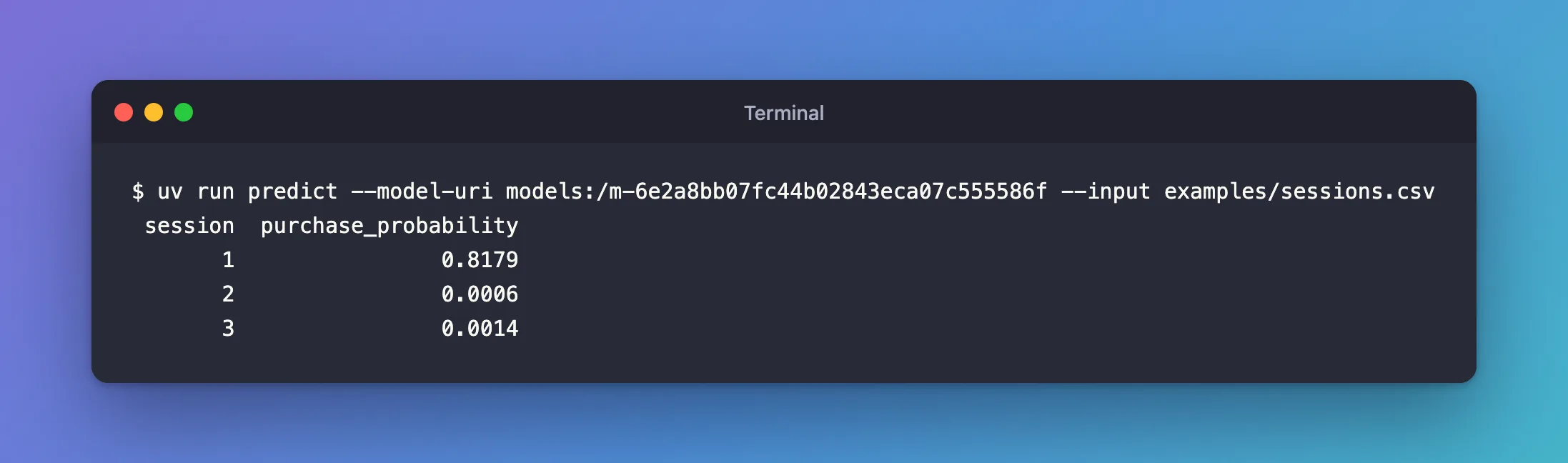
The busy November visitor gets 0.8179, an 82% chance of buying; the other two are close to zero. With --output scored.csv, the command writes every column plus purchase_probability to a file instead.
Now a file the model can't take. weekend-as-text.csv holds the same three sessions with no and yes in the Weekend column, where the signature asks for a boolean:
Administrative,Administrative_Duration,Informational,Informational_Duration,ProductRelated,ProductRelated_Duration,BounceRates,ExitRates,PageValues,SpecialDay,Month,OperatingSystems,Browser,Region,TrafficType,VisitorType,Weekend
3,80.0,1,30.0,40,1500.0,0.0,0.01,25.0,0.0,Nov,2,2,1,2,Returning_Visitor,no
0,0.0,0,0.0,1,0.0,0.2,0.2,0.0,0.0,May,1,1,1,3,New_Visitor,yes
1,20.0,0,0.0,12,300.0,0.01,0.03,0.0,0.0,Mar,2,2,3,1,Returning_Visitor,no
uv run predict --model-uri models:/m-6e2a8bb07fc44b02843eca07c555586f --input weekend-as-text.csv
2026/11/21 15:17:40 ERROR shopper_purchase_prediction: weekend-as-text.csv doesn't match the model's signature: Incompatible input types for column Weekend. Can not safely convert str to bool.
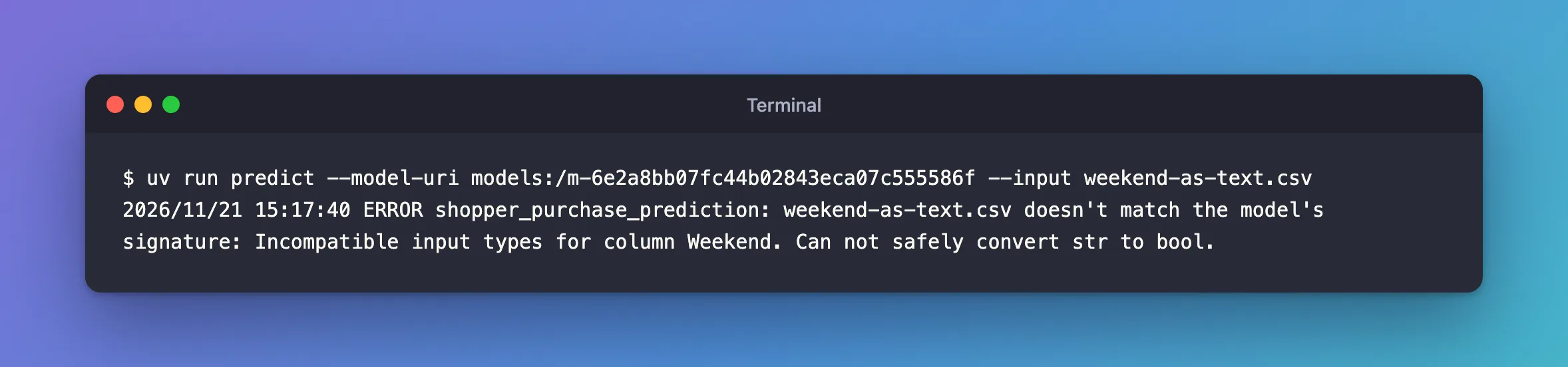
One sentence that names the column, no prediction, and the command ends with exit code 2, so a script that calls it can tell. That's the signature at work: it turns "the model got bad data" into an error before the model sees anything. Delete weekend-as-text.csv now: it was only for this test.
Step 12: Check the Model in a Fresh Environment
The model loads on your computer, in the project's environment. Will it load anywhere else? A model whose requirements.txt misses a package works here and fails on the next machine. mlflow.models.predict checks that: it builds a new environment from the model's own requirements, loads the model there and predicts.
Create src/shopper_purchase_prediction/validate.py. Its core:
    example = mlflow.models.Model.load(args.model_uri).load_input_example(args.model_uri)
    ...
        # uv builds a new virtual environment from the model's requirements.txt, so the model
        # has to load and predict with only the packages it recorded.
        mlflow.models.predict(model_uri=args.model_uri, input_data=example, env_manager="uv")
        print()  # MLflow prints the predictions without ending the line
Model.load(...).load_input_example(...)reads the model'sMLmodeland returns the five sessions saved with it, so the check uses data the model is known to take.mlflow.models.predict(..., env_manager="uv")builds the environment with uv and prints the predictions: How to Test an MLflow Model in a Fresh Environment with mlflow.models.predict. It replacesvalidate_serving_input, which MLflow deprecated in 3.13.0: Fixed: "FutureWarning: mlflow.models.utils.validate_serving_input is deprecated since 3.13.0".print(): MLflow prints the predictions without a line break, and my first version glued the next log line onto them:…0.9828543380155398]]}2026/11/21 13:52:08 INFO shopper_purchase_prediction: The model works in a fresh environment.
The complete file:
"""Check that a logged model predicts in a fresh environment built from its own requirements,
before anyone deploys it."""

import argparse
import logging
from collections.abc import Sequence

import mlflow
from mlflow.exceptions import MlflowException

from shopper_purchase_prediction.config import get_settings

logger = logging.getLogger("shopper_purchase_prediction")


def parse_args(argv: Sequence[str] | None = None) -> argparse.Namespace:
    """Read the model to check from the command line."""
    parser = argparse.ArgumentParser(
        prog="validate",
        description="Check that a model logged in MLflow predicts in a fresh environment "
        "built from its own requirements.",
    )
    parser.add_argument(
        "--model-uri", required=True, help="the model to check, such as models:/m-..."
    )
    return parser.parse_args(argv)


def main(argv: Sequence[str] | None = None) -> int:
    """Predict the model's own input example in a new virtual environment."""
    logging.basicConfig(
        level=logging.INFO,
        format="%(asctime)s %(levelname)s %(name)s: %(message)s",
        datefmt="%Y/%m/%d %H:%M:%S",
    )
    args = parse_args(argv)
    mlflow.set_tracking_uri(get_settings().mlflow_tracking_uri)

    example = mlflow.models.Model.load(args.model_uri).load_input_example(args.model_uri)
    if example is None:
        logger.error("%s was logged without an input example to check it with", args.model_uri)
        return 2

    logger.info("Predicting the model's %d example sessions in a fresh environment", len(example))
    try:
        # uv builds a new virtual environment from the model's requirements.txt, so the model
        # has to load and predict with only the packages it recorded.
        mlflow.models.predict(model_uri=args.model_uri, input_data=example, env_manager="uv")
        print()  # MLflow prints the predictions without ending the line
    except MlflowException as error:
        logger.error("The model failed in a fresh environment: %s", error.message)
        return 1
    logger.info("The model works in a fresh environment")
    return 0
Run it:
uv run validate --model-uri models:/m-6e2a8bb07fc44b02843eca07c555586f
2026/11/21 13:55:00 INFO shopper_purchase_prediction: Predicting the model's 5 example sessions in a fresh environment
2026/11/21 13:55:00 INFO mlflow.models.flavor_backend_registry: Selected backend for flavor 'python_function'
2026/11/21 13:55:00 INFO mlflow.utils.virtualenv: Creating a new environment in /var/folders/…/T/tmpw0xvxbxd/envs/virtualenv_envs/mlflow-217dc732b07a188e27ddccb998d5ceea5443dbf8 with python version 3.15.2 using uv
Using CPython 3.15.2 interpreter at: /Library/Frameworks/Python.framework/Versions/3.15/bin/python3.15
Creating virtual environment at: /var/folders/…/T/tmpw0xvxbxd/envs/virtualenv_envs/mlflow-217dc732b07a188e27ddccb998d5ceea5443dbf8
Activate with: source /var/folders/…/T/tmpw0xvxbxd/envs/virtualenv_envs/mlflow-217dc732b07a188e27ddccb998d5ceea5443dbf8/bin/activate
2026/11/21 13:55:00 INFO mlflow.utils.virtualenv: Installing dependencies
Using Python 3.15.2 environment at: /private/var/folders/…/T/tmpw0xvxbxd/envs/virtualenv_envs/mlflow-217dc732b07a188e27ddccb998d5ceea5443dbf8
Resolved 4 packages in 3ms
Installed 4 packages in 22ms
...
Using Python 3.15.2 environment at: /private/var/folders/…/T/tmpw0xvxbxd/envs/virtualenv_envs/mlflow-217dc732b07a188e27ddccb998d5ceea5443dbf8
Resolved 89 packages in 20ms
Installed 88 packages in 996ms
...
{"predictions": [[0.7059708826630948, 0.2940291173369052], [0.9973547515988656, 0.0026452484011344054], [0.9869241335497345, 0.013075866450265454], [0.23646519358760187, 0.7635348064123981], [0.017145661984460214, 0.9828543380155398]]}
2026/11/21 13:56:18 INFO shopper_purchase_prediction: The model works in a fresh environment
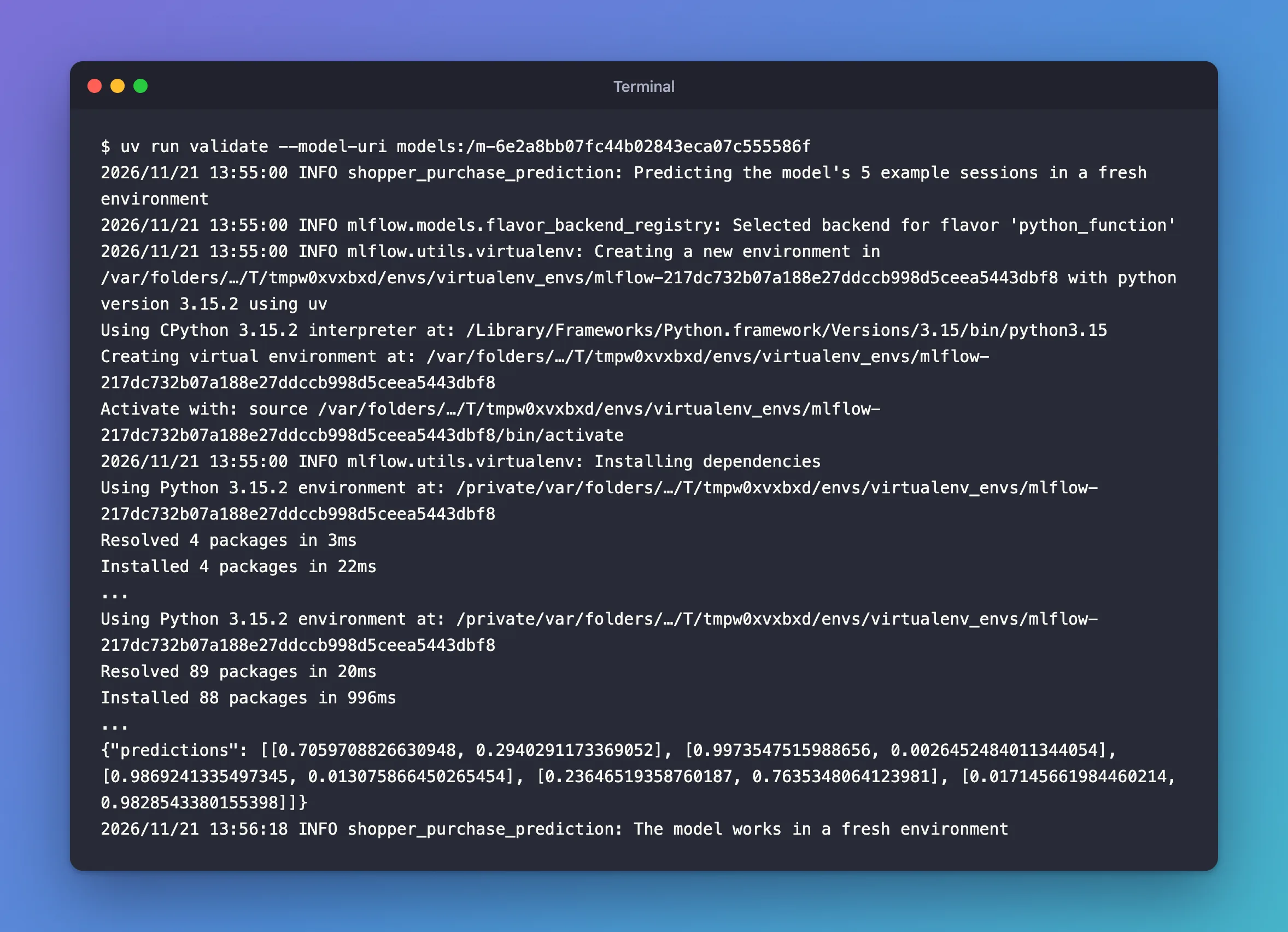
The first ... stands for the four packages that set up the environment, such as pip; the second for the 88 packages it installed from requirements.txt and the commands MLflow ran in the new environment. The new environment lives in a temporary folder, /var/folders/… on macOS, and is gone afterwards. Five pairs of probabilities came back, one per example session, so the model loads and predicts with only what it recorded. It took 78 seconds, nearly all of it Python preparing the new environment's packages the first time they're imported.
Step 13: Save Your Work with Git
uv made the project a Git repository. In the project terminal:
git status --short --untracked-files=all
?? .env.example
?? .gitignore
?? .python-version
?? README.md
?? examples/sessions.csv
?? pyproject.toml
?? src/shopper_purchase_prediction/__init__.py
?? src/shopper_purchase_prediction/config.py
?? src/shopper_purchase_prediction/data.py
?? src/shopper_purchase_prediction/model.py
?? src/shopper_purchase_prediction/predict.py
?? src/shopper_purchase_prediction/train.py
?? src/shopper_purchase_prediction/validate.py
?? uv.lock
.env, .venv and data/ aren't listed: .gitignore keeps them out. Commit the rest:
git add .
git commit -m "Log, load and validate a shopper purchase model with MLflow"
[master (root-commit) b333d24] Log, load and validate a shopper purchase model with MLflow
 14 files changed, 2119 insertions(+)
 create mode 100644 .env.example
 create mode 100644 .gitignore
 create mode 100644 .python-version
 create mode 100644 README.md
 create mode 100644 examples/sessions.csv
 create mode 100644 pyproject.toml
 create mode 100644 src/shopper_purchase_prediction/__init__.py
 create mode 100644 src/shopper_purchase_prediction/config.py
 create mode 100644 src/shopper_purchase_prediction/data.py
 create mode 100644 src/shopper_purchase_prediction/model.py
 create mode 100644 src/shopper_purchase_prediction/predict.py
 create mode 100644 src/shopper_purchase_prediction/train.py
 create mode 100644 src/shopper_purchase_prediction/validate.py
 create mode 100644 uv.lock
New to Git? How to Create a Git Repository and Make Your First Commit explains these commands.
Your Folders Now Look Like This
source/
├── mlflow-server/
│   ├── .venv/
│   ├── mlartifacts/
│   ├── mlflow.db
│   ├── pyproject.toml
│   └── uv.lock
├── dewiride-house-price-prediction/
│   └── ...
├── dewiride-term-deposit-prediction/
│   └── ...
└── dewiride-shopper-purchase-prediction/
    ├── .venv/
    ├── data/
    │   └── online-shoppers.zip
    ├── examples/
    │   └── sessions.csv
    ├── src/
    │   └── shopper_purchase_prediction/
    │       ├── __init__.py
    │       ├── config.py
    │       ├── data.py
    │       ├── model.py
    │       ├── predict.py
    │       ├── train.py
    │       └── validate.py
    ├── .env
    ├── .env.example
    ├── .gitignore
    ├── .python-version
    ├── README.md
    ├── pyproject.toml
    └── uv.lock
The model's files aren't in the project: they're on the tracking server, under mlflow-server/mlartifacts/, and every command fetches them by the model's URI.
Do It with the CLI
MLflow's command line can fetch a model's files and predict with it, using the server's address from your .env. Download all seven files:
uv run mlflow --env-file .env artifacts download -u models:/m-6e2a8bb07fc44b02843eca07c555586f -d downloaded-model
Loaded environment variables from: .env

/Users/you/source/dewiride-shopper-purchase-prediction/downloaded-model
How to Download an MLflow Model's Files covers the options. A single file needs the model's artifact location rather than its models:/ URI: Fixed: "RESOURCE_DOES_NOT_EXIST: Registered Model with name=m-… not found" When You Download an MLflow Model File.
Then predict the downloaded serving_input_example.json in a fresh environment, as validate does:
uv run mlflow --env-file .env models predict -m models:/m-6e2a8bb07fc44b02843eca07c555586f -i downloaded-model/serving_input_example.json -t json --env-manager uv
Loaded environment variables from: .env
2026/11/21 13:57:31 INFO mlflow.models.flavor_backend_registry: Selected backend for flavor 'python_function'
2026/11/21 13:57:31 INFO mlflow.utils.virtualenv: Creating a new environment in /var/folders/…/T/tmpmpug_2v4/envs/virtualenv_envs/mlflow-217dc732b07a188e27ddccb998d5ceea5443dbf8 with python version 3.15.2 using uv
...
{"predictions": [[0.7059708826630948, 0.2940291173369052], [0.9973547515988656, 0.0026452484011344054], [0.9869241335497345, 0.013075866450265454], [0.23646519358760187, 0.7635348064123981], [0.017145661984460214, 0.9828543380155398]]}
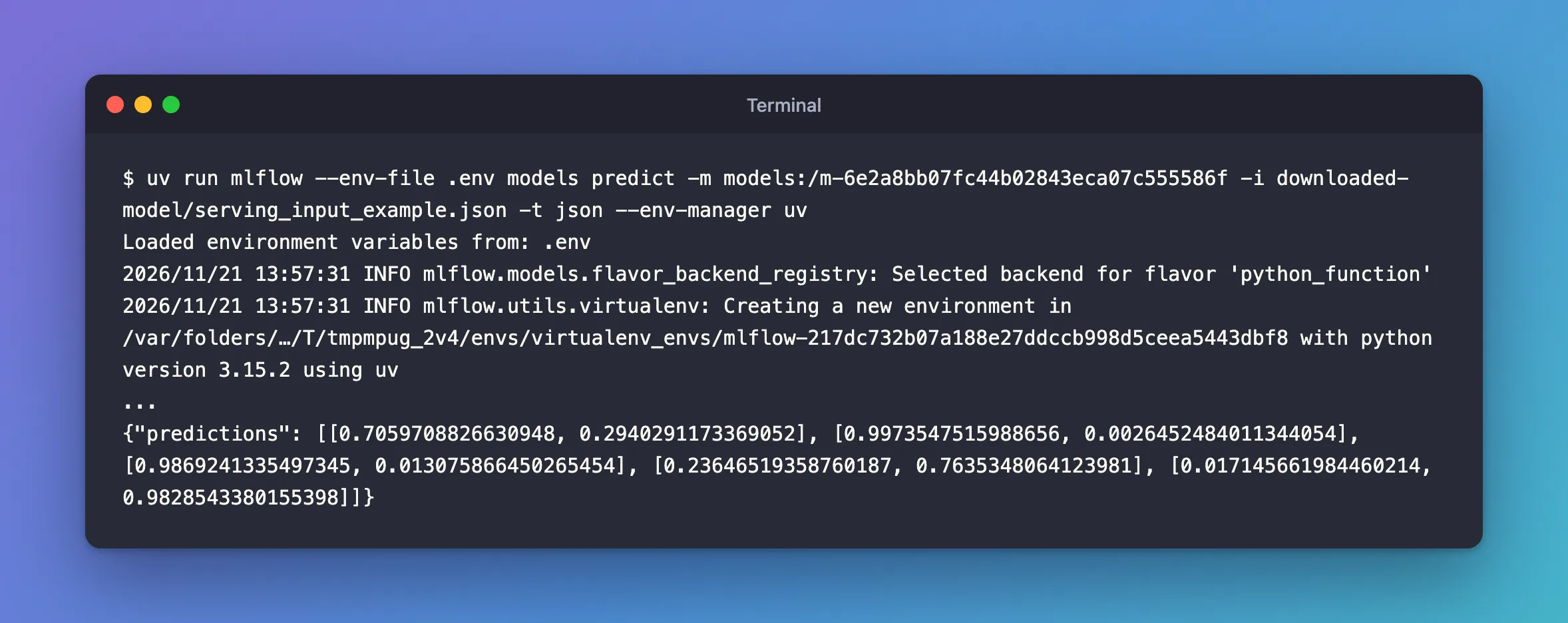
The same five predictions as Step 12. Send JSON, not CSV: the command line reads a CSV file without the signature's types, and fails on the whole numbers as predict did at first. How to Predict with an MLflow Model from the Command Line shows both formats. downloaded-model is only a copy, so delete it when you're done.
Stop the Server When You're Done
Go to the first terminal and press Ctrl+C. Your runs and models stay in mlflow.db and mlartifacts/, and uv run mlflow server --port 8080 in the mlflow-server folder brings them back.
Keep all four folders for Part 7. If you ever want to remove everything the series created, stop the server first, then delete the mlflow-server folder and the three project folders, and the scikit_learn_data folder in your home folder. To remove only a model, How to Delete a Logged Model in MLflow shows how.
Common Mistakes
| Mistake | What happens | Do this instead |
|---|---|---|
Letting MLflow infer the signature of a predict_proba model | The output says long, one label per session | infer_signature(X, model.predict_proba(X)) |
| Reading whole-number columns as integers for training | The integer-column warning, and a signature that refuses gaps | Read them as float64 |
| Reading a CSV file without the signature's types | Can not safely convert int64 to float64 | Read the signature's double columns as float64 |
| Trusting every type skops reports, unread | The protection skops gives is gone | Review each type and list only those |
| Logging a second model in the same run after the first one's score | The second model gets the first one's score too | One model per run, as here: Fixed: An MLflow Logged Model Shows Another Model's Metric |
Troubleshooting
| Symptom | Likely cause | Fix |
|---|---|---|
MlflowException: The saved sklearn model references untrusted types | No skops_trusted_types for a gradient-boosted model | Fixed: The saved sklearn model references untrusted types |
UserWarning: Hint: Inferred schema contains integer column(s) | Whole-number columns read as integers, or a signature inferred from predict | Fixed: Hint: Inferred schema contains integer column(s) |
Incompatible input types for column … Can not safely convert int64 to float64 | A CSV file read without the signature's types | Fixed: Can not safely convert int64 to float64 |
Failed to resolve installed pip version | No pip in the uv environment | uv add --dev pip, as in Step 3 |
Loading PyFunc models is disallowed or Deserializing this model is disallowed | MLFLOW_ALLOW_MODEL_CODE_EXECUTION is set to false | How to Refuse to Load Untrusted Models in MLflow |
validate seems stuck after Installed 88 packages | Python prepares the new environment's packages on first import | Wait; it took 78 seconds here |
RuntimeError: data/online-shoppers.zip has the SHA-256 fingerprint … | The download is damaged, or the file was changed | Delete the file and run train again |
FAQ
Why a third project?
To log a model whose input mixes three kinds of columns, numbers, words and a true/false value, each of which the signature records with its own type. The other two projects stay as Parts 4 and 5 left them.
Why load with mlflow.pyfunc instead of mlflow.sklearn?
mlflow.pyfunc.load_model loads any MLflow model behind the same predict, whatever library made it, and checks the input against the signature on every call. mlflow.sklearn.load_model gives back the scikit-learn pipeline itself, for when you need its own methods.
Is the model's file safe to load?
It's in the skops format, which loads only the types skops trusts plus the one listed, TreePredictor, reviewed because this project trained the model itself. To refuse every model load on a machine that shouldn't load any, there's MLFLOW_ALLOW_MODEL_CODE_EXECUTION=false: How to Refuse to Load Untrusted Models in MLflow.
Where is the model stored?
On the tracking server: its files under mlflow-server/mlartifacts/<experiment ID>/models/<model ID>/artifacts, and its record in mlflow.db. The address in MLmodel, mlflow-artifacts:/3/models/… here, is that folder as the server shares it.
Conclusion
The shopper project logs a real model. mlflow.sklearn.log_model saved the trained pipeline in the skops format with its trusted type, a signature inferred from predict_proba, five example sessions and the 92 requirements of the project's lock, as the logged model m-6e2a8bb0…, with test_roc_auc 0.9286 linked to it. The UI showed it on the experiment's Models tab, on its own page and in its files. predict loaded it by its URI, read a CSV file the way its signature expects, refused a file with a text Weekend in one sentence, and scored three sessions; validate proved it predicts in a fresh environment built from its own requirements.
In Part 7 you'll evaluate this model with MLflow and set the quality gate a model has to pass.
Additional Resources
- MLflow Models — flavors, the
MLmodelfile and checking a model before deployment. - Model Signatures and Input Examples — how signatures are inferred and enforced.
- mlflow.sklearn —
log_modeland every option used here. - Online Shoppers Purchasing Intention — the dataset, its columns and its license.
← Previous: Part 5: Autologging and Hyperparameter Tuning with Nested Runs
