MLflow Tutorial for Machine Learning in Python — Part 5: Autologging and Hyperparameter Tuning with Nested Runs

So far you've logged every setting and score by hand. MLflow can do most of that logging itself: turn on autologging, and every fit records its settings, scores and charts. It also records a whole hyperparameter search as one parent run, with a child run for each set of settings it tried. In this part you'll start the series' second project, a model that predicts which bank customers sign up for a term deposit, and let MLflow record its search for the best settings.
This is Part 5 of a 10-part series.
- Part 1: Install MLflow and Track Your First Experiment
- Part 2: Log Metrics Over Time and System Metrics
- Part 3: Log Artifacts and Datasets
- Part 4: Search and Filter Runs
- Part 5: Autologging and Hyperparameter Tuning with Nested Runs (you are here)
- Part 6: Log, Load and Validate Models
- Part 7: Evaluate Models and Set Quality Gates
- Part 8: Register, Version and Promote Models with the Model Registry (coming soon)
- Part 9: Serve a Model as a REST API and in Docker (coming soon)
- Part 10: Production Checklist and Recap (coming soon)
Every command and output on this page is real, captured while building the project.
What You'll Build in This Part
- a second project,
dewiride-term-deposit-prediction, next to the house price one, with its settings, its data and its model; - a
tunecommand that searches nine combinations of the model's settings withGridSearchCV, with MLflow's autologging turned on; - one parent run with five child runs, the five best candidates, which you'll read in the UI along with the files autologging saved;
- a second search that logs every candidate, and a chart that compares them all at once.
The Example Project
A Portuguese bank phoned its customers to offer a term deposit, savings locked away for a fixed time. The Bank Marketing dataset records 41,188 of those calls, from May 2008 to November 2010:
- The details of each call: 20 columns about the customer and the call, such as age, job, whether they have a loan, the month of the call and how many times they'd been called before.
- The answer, column
y: did they sign up? Only 4,640 calls, about 1 in 9, ended in a yes. - The goal: a model that ranks customers by how likely they are to say yes, so the bank calls the likeliest first.
One column is left out: duration, the length of the call. The dataset's own notes say it "highly affects the output target" but "is not known before a call is performed", so a model meant to choose whom to call can't use it.
The model is gradient boosting, a chain of small decision trees, each one correcting the trees before it. The dataset is by Moro, Rita and Cortez (2014), from the UCI Machine Learning Repository, under the CC BY 4.0 license.
What This Part Costs
Nothing. Everything runs on your own computer, and the dataset is a free download of about 1 MB.
Prerequisites
- Part 4 finished: the
mlflow-serverfolder and its tracking server from Part 4. This part's project is new, so the house price project stays as it is.
Step 1: Start the Tracking Server
Open a terminal in the mlflow-server folder and start the server, as before:
uv run mlflow server --port 8080
Wait for Application startup complete and leave it running.
Step 2: Create the Project
Open a second terminal in the folder that holds mlflow-server, and create the project the same way as the house price one:
uv init --package --name term-deposit-prediction --python 3.15 dewiride-term-deposit-prediction
cd dewiride-term-deposit-prediction
Initialized project `term-deposit-prediction` at `/Users/you/source/dewiride-term-deposit-prediction`
How to Create a Python Project with uv explains uv init and its options.
Step 3: Add the Packages
uv add mlflow scikit-learn pandas pydantic-settings
Using CPython 3.15.2 interpreter at: /Library/Frameworks/Python.framework/Versions/3.15/bin/python3.15
Creating virtual environment at: .venv
Resolved 93 packages in 541ms
      Built term-deposit-prediction @ file:///Users/you/source/dewiride-term-deposit-prediction
Prepared 4 packages in 424ms
Installed 90 packages in 2.21s
...
 + mlflow==3.18.0
...
 + pandas==3.1.1
...
 + pydantic-settings==2.16.3
...
 + scikit-learn==1.9.1
...
uv prepared only 4 packages: the rest came from its cache, filled by the house price project. These are the packages of Part 1 except matplotlib, since this project draws no charts of its own.
Step 4: Add the Settings
The project needs three settings: the server's address, the experiment's name, and a folder for the downloaded data. Create .env.example:
# The MLflow tracking server this project sends its runs to.
MLFLOW_TRACKING_URI=http://127.0.0.1:8080
# The MLflow experiment that groups this project's runs.
MLFLOW_EXPERIMENT_NAME=term-deposit-prediction
# The folder that keeps the downloaded dataset, relative to the project folder.
TERM_DEPOSIT_DATA_DIR=data
Copy it to .env:
- macOS / Linux
- Windows (PowerShell)
cp .env.example .env
Copy-Item .env.example .env
Then create src/term_deposit_prediction/config.py, which reads them, as the house price project's does:
"""Settings, read from environment variables and the .env file."""

from functools import lru_cache
from pathlib import Path

from pydantic import Field
from pydantic_settings import BaseSettings, SettingsConfigDict


class Settings(BaseSettings):
    """Where the project sends its MLflow runs, and where it keeps the downloaded data."""

    model_config = SettingsConfigDict(
        env_prefix="TERM_DEPOSIT_",
        env_file=".env",
        env_file_encoding="utf-8",
        extra="ignore",
    )

    mlflow_tracking_uri: str = Field(
        default="http://127.0.0.1:8080",
        validation_alias="MLFLOW_TRACKING_URI",
        description="The address of the MLflow tracking server.",
    )
    mlflow_experiment_name: str = Field(
        default="term-deposit-prediction",
        min_length=1,
        validation_alias="MLFLOW_EXPERIMENT_NAME",
        description="The MLflow experiment that groups this project's runs.",
    )
    data_dir: Path = Field(
        default=Path("data"),
        description="The folder that keeps the downloaded dataset, so it's fetched only once.",
    )


@lru_cache
def get_settings() -> Settings:
    """Read the settings once, then reuse the same object everywhere."""
    return Settings()
How to Load Settings from Environment Variables and a .env File with pydantic-settings explains the prefix and the aliases.
Step 5: Add the Data
src/term_deposit_prediction/data.py downloads the dataset once, checks it, reads the table and splits it. The part that matters most for MLflow is how it reads the table:
        frame = pd.read_csv(
            csv_file, sep=";", dtype={column: "float64" for column in WHOLE_NUMBER_COLUMNS}
        )
    return frame.drop(columns=AFTER_THE_CALL)
Autologging records the type of every column the model is trained on. Four columns, such as age, hold whole numbers, and left as integers they make MLflow warn, for every dataset and model it records, that an integer column can't hold a missing value: Fixed: MLflow Autologging Encountered a Warning: "Hint: Inferred schema contains integer column(s)". Reading them as decimals from the start prevents it.
What the rest of the file does, each with a guide of its own:
- Downloads the zip once into
data/withurllib.request: How to Download a File in Python with urllib. - Checks its SHA-256 fingerprint on every run, against the published file's, and refuses a damaged or changed file: How to Check a File's SHA-256 Hash in Python.
- Reads the table from a zip inside the zip, without extracting anything: How to Read a Zip File Inside Another Zip File in Python.
- Reads the semicolon-separated table: How to Read a Semicolon-Separated CSV File with pandas, with the types from How to Set Column Types When Reading a CSV File with pandas.
- Drops
duration: How to Drop a Column from a pandas DataFrame. - Turns the answers into 1 and 0: How to Turn yes and no into 1 and 0 in pandas.
- Holds back 20% of the calls for a final test, with the same share of yeses in both parts: How to Keep the Class Balance in a Train-Test Split with stratify.
The complete file:
"""Download the Bank Marketing data once, check it, and split it for training and testing."""

import hashlib
import io
import logging
import shutil
import urllib.request
import zipfile
from dataclasses import dataclass
from pathlib import Path

import pandas as pd
from sklearn.model_selection import train_test_split

logger = logging.getLogger(__name__)

# The UCI Machine Learning Repository's download of the Bank Marketing dataset (CC BY 4.0).
SOURCE_URL = "https://archive.ics.uci.edu/static/public/222/bank+marketing.zip"
# The published file's SHA-256 fingerprint. A file that doesn't match it is never read.
SOURCE_SHA256 = "e0bf5f5de5b846e2f18e9d90606637267d46dfa260e0f17bb12e605db5efbeb4"
# The download is a zip of zips. The full table of calls is inside this one.
INNER_ZIP = "bank-additional.zip"
CSV_NAME = "bank-additional/bank-additional-full.csv"
TARGET = "y"
# Known only once a call has ended, so a model that picks who to call can't use it.
AFTER_THE_CALL = ["duration"]
# Whole numbers, read as decimals: only a decimal column can hold a missing value, and a
# customer's record may one day arrive with a gap. The model copes with missing values.
WHOLE_NUMBER_COLUMNS = ["age", "campaign", "pdays", "previous"]


@dataclass(frozen=True)
class DataSplit:
    """The customers' details and answers, for training and for the final test."""

    X_train: pd.DataFrame
    X_test: pd.DataFrame
    y_train: pd.Series
    y_test: pd.Series


def sha256_of(path: Path) -> str:
    """Return the file's SHA-256 fingerprint as 64 hexadecimal characters."""
    with path.open("rb") as file:
        return hashlib.file_digest(file, "sha256").hexdigest()


def download_dataset(data_dir: Path) -> Path:
    """Return the dataset's zip in `data_dir`, downloading it the first time. Either way, its
    fingerprint must match the published file's before anything is read from it."""
    path = data_dir / "bank-marketing.zip"
    if not path.exists():
        data_dir.mkdir(parents=True, exist_ok=True)
        logger.info("Downloading the Bank Marketing data from %s", SOURCE_URL)
        partial = path.with_name(path.name + ".part")
        with urllib.request.urlopen(SOURCE_URL, timeout=60) as response, partial.open("wb") as file:
            shutil.copyfileobj(response, file)
        partial.replace(path)
    digest = sha256_of(path)
    if digest != SOURCE_SHA256:
        raise RuntimeError(
            f"{path} has the SHA-256 fingerprint {digest}, not {SOURCE_SHA256}. "
            "Delete the file and run the command again to download it afresh."
        )
    return path


def load_bank_marketing(data_dir: Path) -> pd.DataFrame:
    """Return the 41,188 calls as one table, without the columns known only after a call."""
    with zipfile.ZipFile(download_dataset(data_dir)) as outer:
        inner_zip = outer.read(INNER_ZIP)
    with zipfile.ZipFile(io.BytesIO(inner_zip)) as inner, inner.open(CSV_NAME) as csv_file:
        frame = pd.read_csv(
            csv_file, sep=";", dtype={column: "float64" for column in WHOLE_NUMBER_COLUMNS}
        )
    return frame.drop(columns=AFTER_THE_CALL)


def split_data(frame: pd.DataFrame, test_size: float, random_state: int) -> DataSplit:
    """Hold back `test_size` of the calls for the final test. Both parts keep the same share of
    customers who signed up, which matters when only about 1 in 9 did."""
    features = frame.drop(columns=TARGET)
    target = frame[TARGET].eq("yes").astype(int)  # 1 = signed up, 0 = didn't
    X_train, X_test, y_train, y_test = train_test_split(
        features, target, test_size=test_size, random_state=random_state, stratify=target
    )
    return DataSplit(X_train, X_test, y_train, y_test)
The download is a .part file until it's complete, then renamed, so a cut-off download never looks finished. Add the data folder to .gitignore, along with .env:
# Local settings (copy .env.example to .env)
.env

# The downloaded dataset (the code downloads it again when it's missing)
data/
Step 6: Add the Model
Ten of the columns hold words, such as the job or the month. The model needs numbers, so a ColumnTransformer one-hot encodes those ten columns, a 0/1 column per word, and passes the number columns through. A Pipeline joins that step and the model, so training and every later prediction prepare the data the same way. Create src/term_deposit_prediction/model.py:
"""The model: one-hot encode the text columns, then a gradient-boosted tree classifier."""

from sklearn.compose import ColumnTransformer
from sklearn.ensemble import HistGradientBoostingClassifier
from sklearn.pipeline import Pipeline
from sklearn.preprocessing import OneHotEncoder

# The columns that hold words, such as the customer's job or the month of the call.
TEXT_COLUMNS = [
    "job",
    "marital",
    "education",
    "default",
    "housing",
    "loan",
    "contact",
    "month",
    "day_of_week",
    "poutcome",
]


def build_pipeline(random_state: int) -> Pipeline:
    """Turn each text column into 0/1 columns, pass the number columns through, then classify."""
    prepare = ColumnTransformer(
        [
            (
                "categories",
                OneHotEncoder(handle_unknown="ignore", sparse_output=False),
                TEXT_COLUMNS,
            )
        ],
        remainder="passthrough",
    )
    model = HistGradientBoostingClassifier(random_state=random_state)
    return Pipeline([("prepare", prepare), ("model", model)])
handle_unknown="ignore"encodes a word the model never saw, such as a new job title, as all zeros instead of failing: How to One-Hot Encode a Column with OneHotEncoder in scikit-learn.sparse_output=Falsereturns a plain table: the model refuses the encoder's default sparse output.remainder="passthrough"keeps the number columns: How to Transform Only Some Columns with ColumnTransformer in scikit-learn and How to Chain Preprocessing and a Model with a Pipeline in scikit-learn.HistGradientBoostingClassifieris scikit-learn's fast gradient boosting: How to Train a Gradient Boosting Classifier with HistGradientBoostingClassifier.
Step 7: Turn On Autologging and Tune
Create src/term_deposit_prediction/tune.py, the command that runs the search. Three pieces do the work.
The candidates. Two of the model's settings, three values each: 9 combinations, each one a candidate:
# Every combination of these values is one candidate: 3 x 3 = 9.
PARAM_GRID = {
    "model__learning_rate": [0.05, 0.1, 0.2],
    "model__max_leaf_nodes": [15, 31, 63],
}
learning_rate is how much each new tree corrects the ones before it, and max_leaf_nodes how detailed each tree may get. The model__ in front reaches into the pipeline's step named model: How to Set the Parameters of a Pipeline Step in scikit-learn.
Autologging. One call, before any training:
    # Let MLflow record the search: a child run for each of the best candidates, and the
    # precision, recall and F1 of the "yes" answers (1). The search only picks the settings,
    # so it doesn't save the models it tries.
    mlflow.sklearn.autolog(max_tuning_runs=args.max_tuning_runs, pos_label=1, log_models=False)
mlflow.sklearn.autolog()turns autologging on for scikit-learn: from now on,fitlogs by itself. How to Turn On Autologging in MLflow shows what it records for a single model.max_tuning_runsis how many candidates get a child run of their own, the best ones first: 5 unless you say otherwise.pos_label=1makes the logged precision, recall and F1 those of the "yes" answers. Without it, MLflow averages them over yes and no, and on data with 8 noes for every yes, those averages look far better than the model is: Fixed: MLflow Autolog's training_recall_score Is the Same as training_accuracy_score.log_models=Falsekeeps autologging from saving the trained models. A search exists to pick settings, and saving models is what Part 6 is about: How to Stop MLflow Autologging from Saving Models.
The search, inside a run of your own:
    search = GridSearchCV(
        build_pipeline(RANDOM_STATE), PARAM_GRID, scoring="roc_auc", cv=CV_FOLDS, n_jobs=-1
    )
    with mlflow.start_run(run_name=args.run_name) as run:
        ...
        search.fit(data.X_train, data.y_train)

        test_roc_auc = roc_auc_score(data.y_test, search.predict_proba(data.X_test)[:, 1])
        mlflow.log_metric("test_roc_auc", test_roc_auc)
GridSearchCVtrains every candidate 5 times, each time on four fifths of the training calls, and scores it on the fifth: How to Tune Hyperparameters with GridSearchCV in scikit-learn.n_jobs=-1uses every CPU core.scoring="roc_auc"ranks candidates by ROC AUC, the chance the model scores a customer who said yes above one who said no: How to Calculate ROC AUC in scikit-learn.with mlflow.start_run(run_name=...)opens the parent run yourself, so it gets your name, and autologging logs into it and puts the child runs under it.test_roc_aucis the best model's score on the test calls, which the search never saw. Autologging doesn't compute it, so the code logs it into the same run: How to Log Your Own Metrics in an MLflow Autologged Run.
The --max-tuning-runs option uses the positive_int check from How to Accept Only Positive Integers in argparse. The complete file:
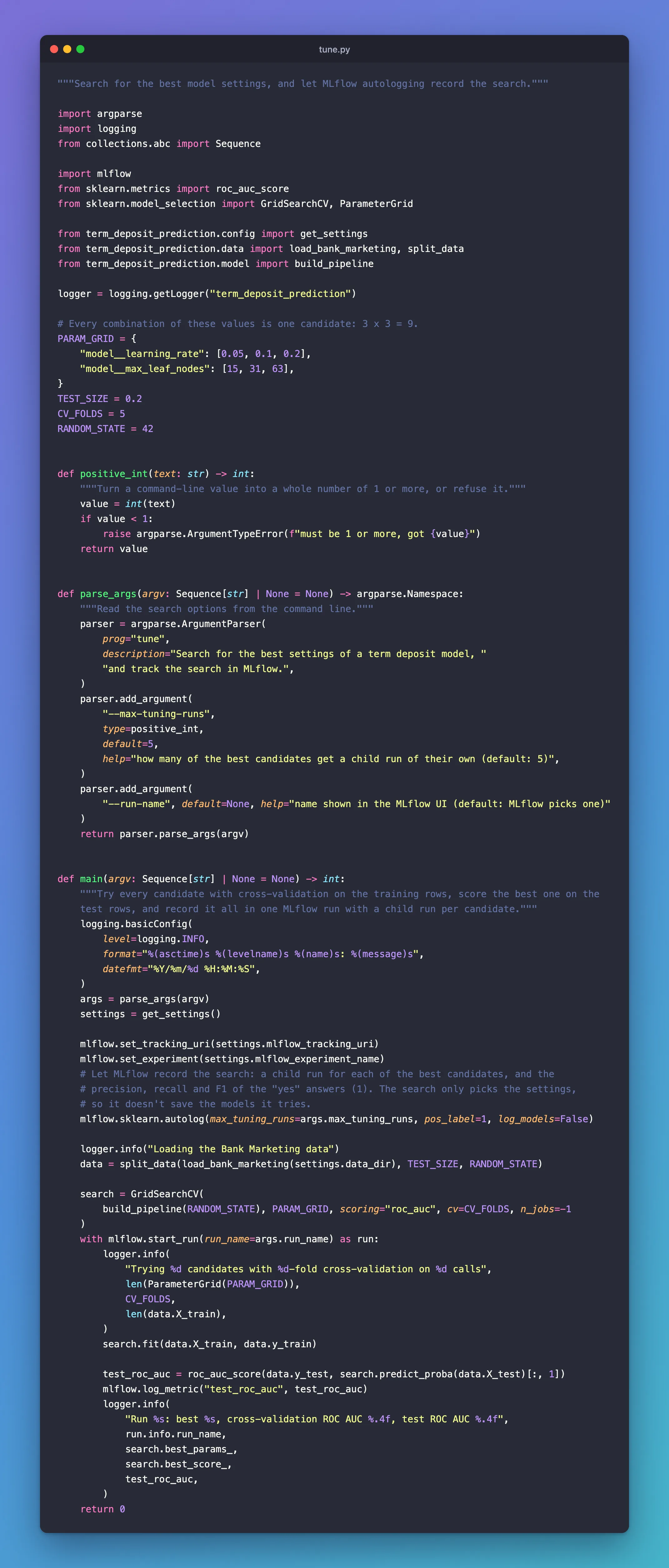
"""Search for the best model settings, and let MLflow autologging record the search."""

import argparse
import logging
from collections.abc import Sequence

import mlflow
from sklearn.metrics import roc_auc_score
from sklearn.model_selection import GridSearchCV, ParameterGrid

from term_deposit_prediction.config import get_settings
from term_deposit_prediction.data import load_bank_marketing, split_data
from term_deposit_prediction.model import build_pipeline

logger = logging.getLogger("term_deposit_prediction")

# Every combination of these values is one candidate: 3 x 3 = 9.
PARAM_GRID = {
    "model__learning_rate": [0.05, 0.1, 0.2],
    "model__max_leaf_nodes": [15, 31, 63],
}
TEST_SIZE = 0.2
CV_FOLDS = 5
RANDOM_STATE = 42


def positive_int(text: str) -> int:
    """Turn a command-line value into a whole number of 1 or more, or refuse it."""
    value = int(text)
    if value < 1:
        raise argparse.ArgumentTypeError(f"must be 1 or more, got {value}")
    return value


def parse_args(argv: Sequence[str] | None = None) -> argparse.Namespace:
    """Read the search options from the command line."""
    parser = argparse.ArgumentParser(
        prog="tune",
        description="Search for the best settings of a term deposit model, "
        "and track the search in MLflow.",
    )
    parser.add_argument(
        "--max-tuning-runs",
        type=positive_int,
        default=5,
        help="how many of the best candidates get a child run of their own (default: 5)",
    )
    parser.add_argument(
        "--run-name", default=None, help="name shown in the MLflow UI (default: MLflow picks one)"
    )
    return parser.parse_args(argv)


def main(argv: Sequence[str] | None = None) -> int:
    """Try every candidate with cross-validation on the training rows, score the best one on the
    test rows, and record it all in one MLflow run with a child run per candidate."""
    logging.basicConfig(
        level=logging.INFO,
        format="%(asctime)s %(levelname)s %(name)s: %(message)s",
        datefmt="%Y/%m/%d %H:%M:%S",
    )
    args = parse_args(argv)
    settings = get_settings()

    mlflow.set_tracking_uri(settings.mlflow_tracking_uri)
    mlflow.set_experiment(settings.mlflow_experiment_name)
    # Let MLflow record the search: a child run for each of the best candidates, and the
    # precision, recall and F1 of the "yes" answers (1). The search only picks the settings,
    # so it doesn't save the models it tries.
    mlflow.sklearn.autolog(max_tuning_runs=args.max_tuning_runs, pos_label=1, log_models=False)

    logger.info("Loading the Bank Marketing data")
    data = split_data(load_bank_marketing(settings.data_dir), TEST_SIZE, RANDOM_STATE)

    search = GridSearchCV(
        build_pipeline(RANDOM_STATE), PARAM_GRID, scoring="roc_auc", cv=CV_FOLDS, n_jobs=-1
    )
    with mlflow.start_run(run_name=args.run_name) as run:
        logger.info(
            "Trying %d candidates with %d-fold cross-validation on %d calls",
            len(ParameterGrid(PARAM_GRID)),
            CV_FOLDS,
            len(data.X_train),
        )
        search.fit(data.X_train, data.y_train)

        test_roc_auc = roc_auc_score(data.y_test, search.predict_proba(data.X_test)[:, 1])
        mlflow.log_metric("test_roc_auc", test_roc_auc)
        logger.info(
            "Run %s: best %s, cross-validation ROC AUC %.4f, test ROC AUC %.4f",
            run.info.run_name,
            search.best_params_,
            search.best_score_,
            test_roc_auc,
        )
    return 0
Finally, make tune a command. In pyproject.toml, replace the [project.scripts] line uv created, and replace the contents of src/term_deposit_prediction/__init__.py, which held a main for it, with a one-line description:
[project.scripts]
tune = "term_deposit_prediction.tune:main"
"""Predict which bank customers sign up for a term deposit, and track every search with MLflow."""
Step 8: Run the Search
uv run tune --run-name grid-search
      Built term-deposit-prediction @ file:///Users/you/source/dewiride-term-deposit-prediction
Uninstalled 1 package in 2ms
Installed 1 package in 2ms
2026/11/21 10:40:13 INFO mlflow.tracking.fluent: Experiment with name 'term-deposit-prediction' does not exist. Creating a new experiment.
2026/11/21 10:40:13 INFO term_deposit_prediction: Loading the Bank Marketing data
2026/11/21 10:40:13 INFO term_deposit_prediction.data: Downloading the Bank Marketing data from https://archive.ics.uci.edu/static/public/222/bank+marketing.zip
2026/11/21 10:40:16 INFO term_deposit_prediction: Trying 9 candidates with 5-fold cross-validation on 32950 calls
/Users/you/source/dewiride-term-deposit-prediction/.venv/lib/python3.15/site-packages/sklearn/metrics/_classification.py:3424: FutureWarning: `y_pred` was renamed to `y_proba` in version 1.9 and will be removed in 1.11. Use `y_proba` instead.
  warnings.warn(
2026/11/21 10:40:38 INFO mlflow.sklearn.utils: Logging the 5 best runs, 4 runs will be omitted.
🏃 View run blushing-calf-968 at: http://127.0.0.1:8080/#/experiments/2/runs/8f144c8f63c340cca8562410e69e8e74
🧪 View experiment at: http://127.0.0.1:8080/#/experiments/2
🏃 View run zealous-mule-439 at: http://127.0.0.1:8080/#/experiments/2/runs/9f6e2e73711048249bc856dd8d60492a
🧪 View experiment at: http://127.0.0.1:8080/#/experiments/2
🏃 View run grandiose-grub-798 at: http://127.0.0.1:8080/#/experiments/2/runs/8a8ab8422a454ce7a0e90faeadeebdd5
🧪 View experiment at: http://127.0.0.1:8080/#/experiments/2
🏃 View run rare-stork-69 at: http://127.0.0.1:8080/#/experiments/2/runs/4ddb4aeeeff4499d80b932006f878a95
🧪 View experiment at: http://127.0.0.1:8080/#/experiments/2
🏃 View run adaptable-foal-869 at: http://127.0.0.1:8080/#/experiments/2/runs/9ab26e4b8bcd46d29eb6b9d6c24b8331
🧪 View experiment at: http://127.0.0.1:8080/#/experiments/2
2026/11/21 10:40:39 INFO term_deposit_prediction: Run grid-search: best {'model__learning_rate': 0.1, 'model__max_leaf_nodes': 15}, cross-validation ROC AUC 0.7998, test ROC AUC 0.8145
🏃 View run grid-search at: http://127.0.0.1:8080/#/experiments/2/runs/baaabe86e81447538ed7824c0b2d0b74
🧪 View experiment at: http://127.0.0.1:8080/#/experiments/2
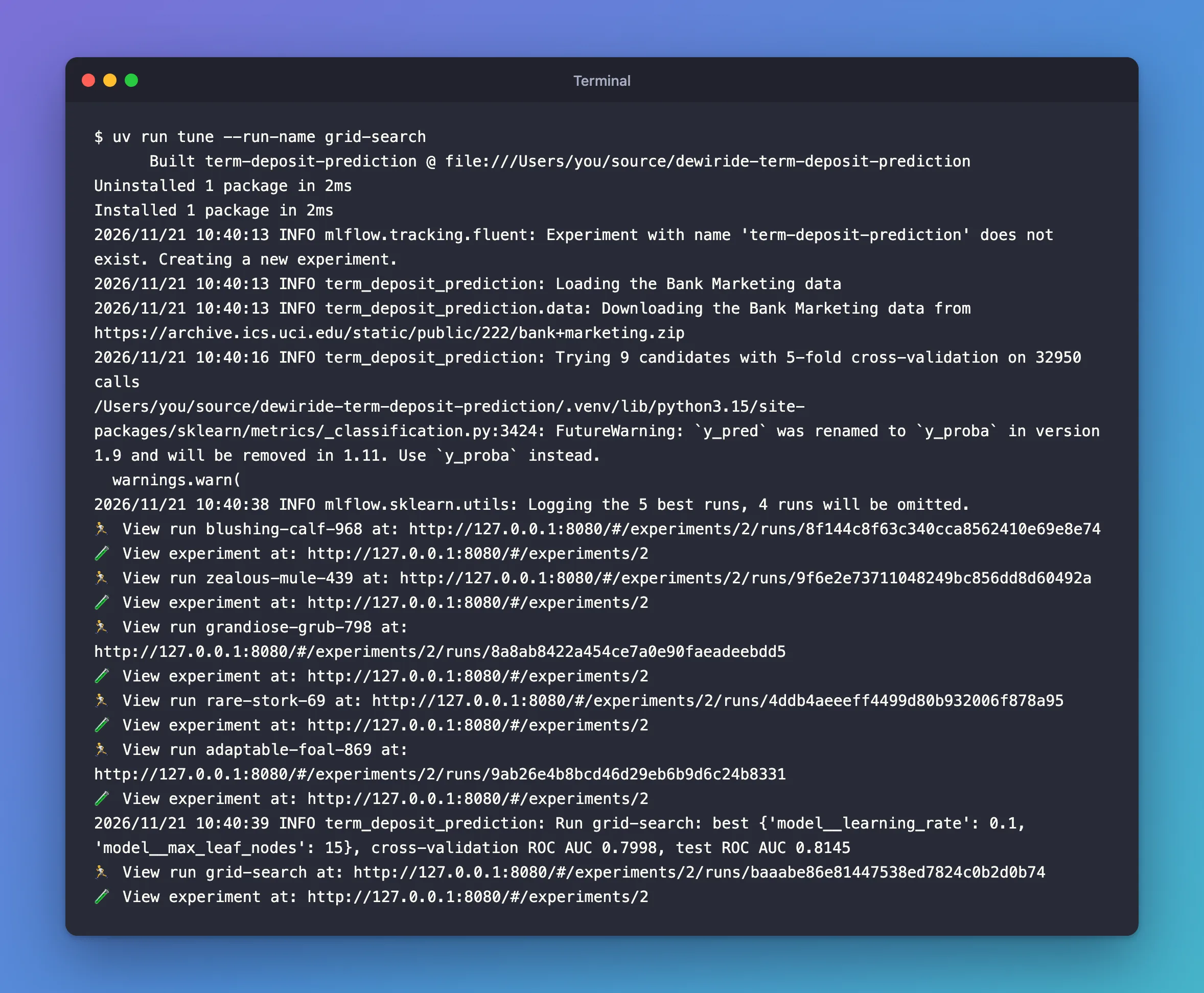
It took about half a minute. Line by line:
Built …,Installed 1 package: uv reinstalled the project, becausepyproject.tomlchanged.Downloading the Bank Marketing data: the first run only. After this,data/bank-marketing.zipis checked and read from disk.32950 calls: the 80% of the 41,188 calls the search trains on. The other 8,238 are the test calls.- The
FutureWarningcomes from MLflow itself, not from your code: MLflow 3.18 computes one of its training metrics, the log loss, with an argument name scikit-learn 1.9 renamed. It changes nothing in the results. I reported it to MLflow as issue #28012. Logging the 5 best runs, 4 runs will be omitted.: of the 9 candidates, the best 5 get child runs.- Six
View runlinks: the five child runs, with names MLflow picked, then your parent run,grid-search. - The result: a learning rate of 0.1 and 15 leaves per tree won, with a cross-validation ROC AUC of 0.7998 and 0.8145 on the test calls.
Step 9: Look at the Parent Run
Open the experiment term-deposit-prediction in the UI. It holds one run, grid-search, with a + before its name:
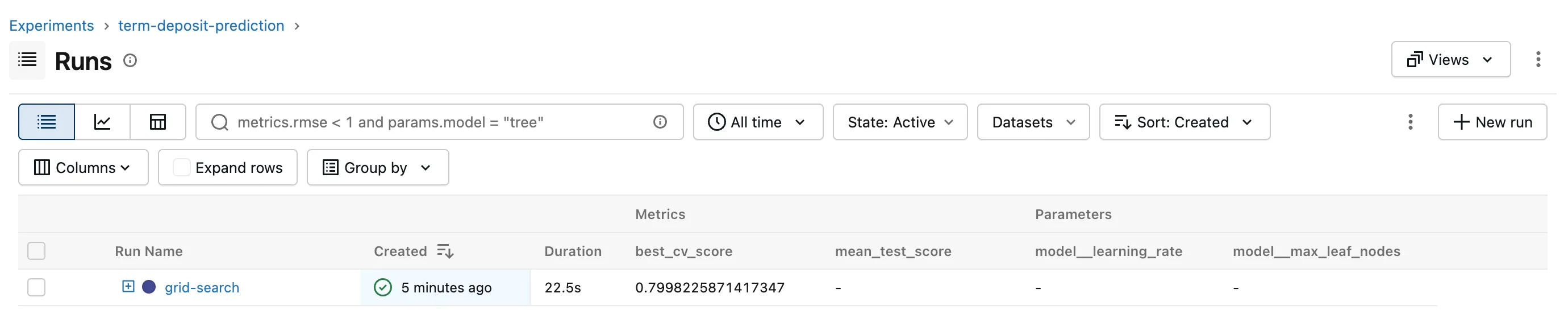
The table shows the columns best_cv_score, mean_test_score, model__learning_rate and model__max_leaf_nodes, chosen with the Columns button; Dataset, Source and Models are hidden. Click grid-search. Its Metrics:
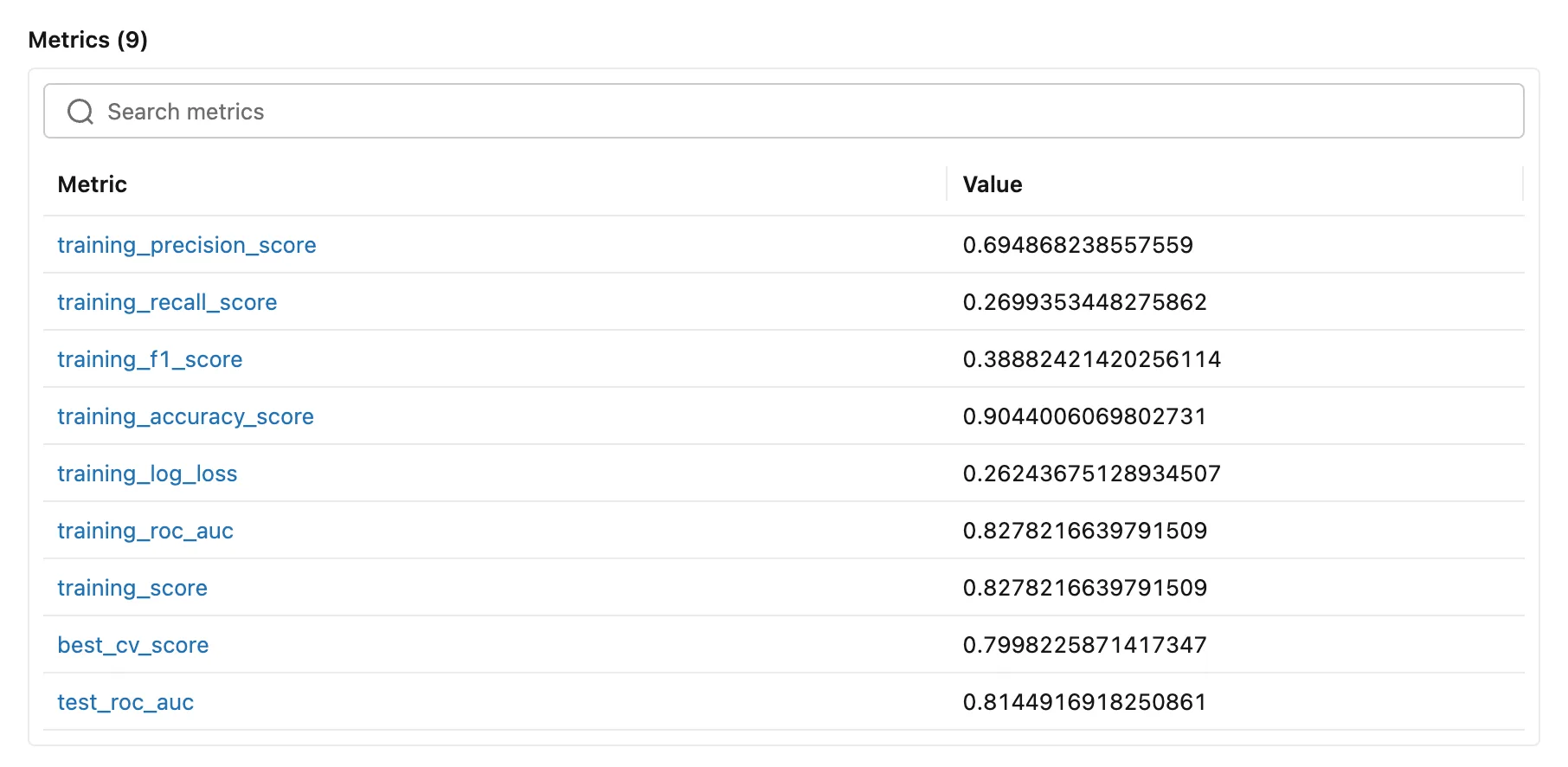
training_…are autologging's scores of the winning model, retrained on all the training calls, on those same calls.training_scoreis the search's own score, ROC AUC.best_cv_score, 0.7998, is the winner's average cross-validation score: the number the search ranked by.test_roc_auc, 0.8145, is the one your code logged, on calls the search never saw.
The training scores are a reality check. Precision 0.69 and recall 0.27 say that at the default cut-off, a 50% chance, the model says yes to only 27% of the customers who did sign up, and is right 69% of the time when it does. A ranking model is used by calling customers in order of their score, and its ROC AUC around 0.8 says that order is useful, but those numbers show why accuracy, 0.90, would flatter it.
Its Parameters are the search's own settings, plus the winner's:
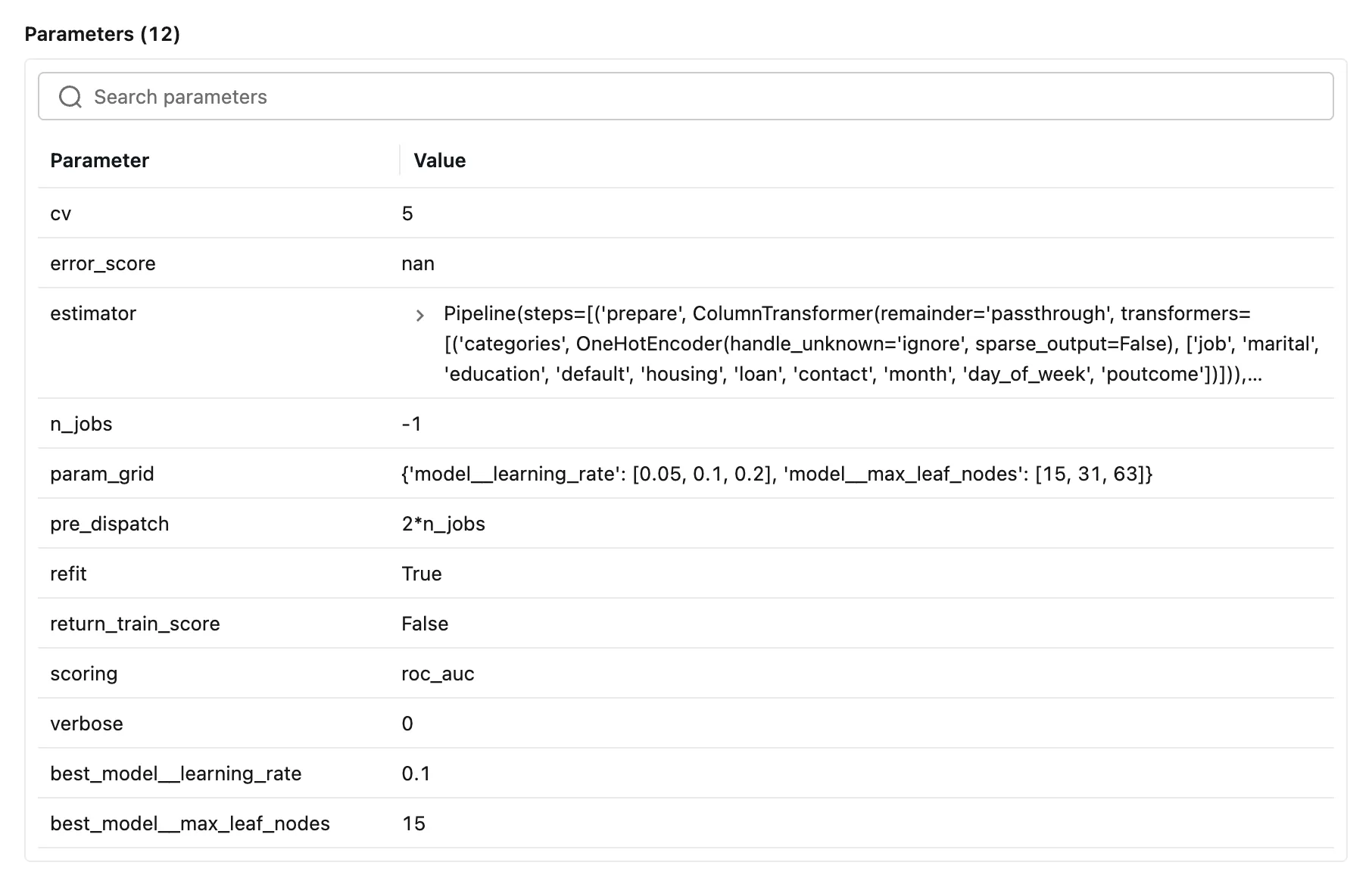
The best_ prefix marks the winning candidate's settings. And on the right, About this run lists the five child runs, the two datasets and the tags:
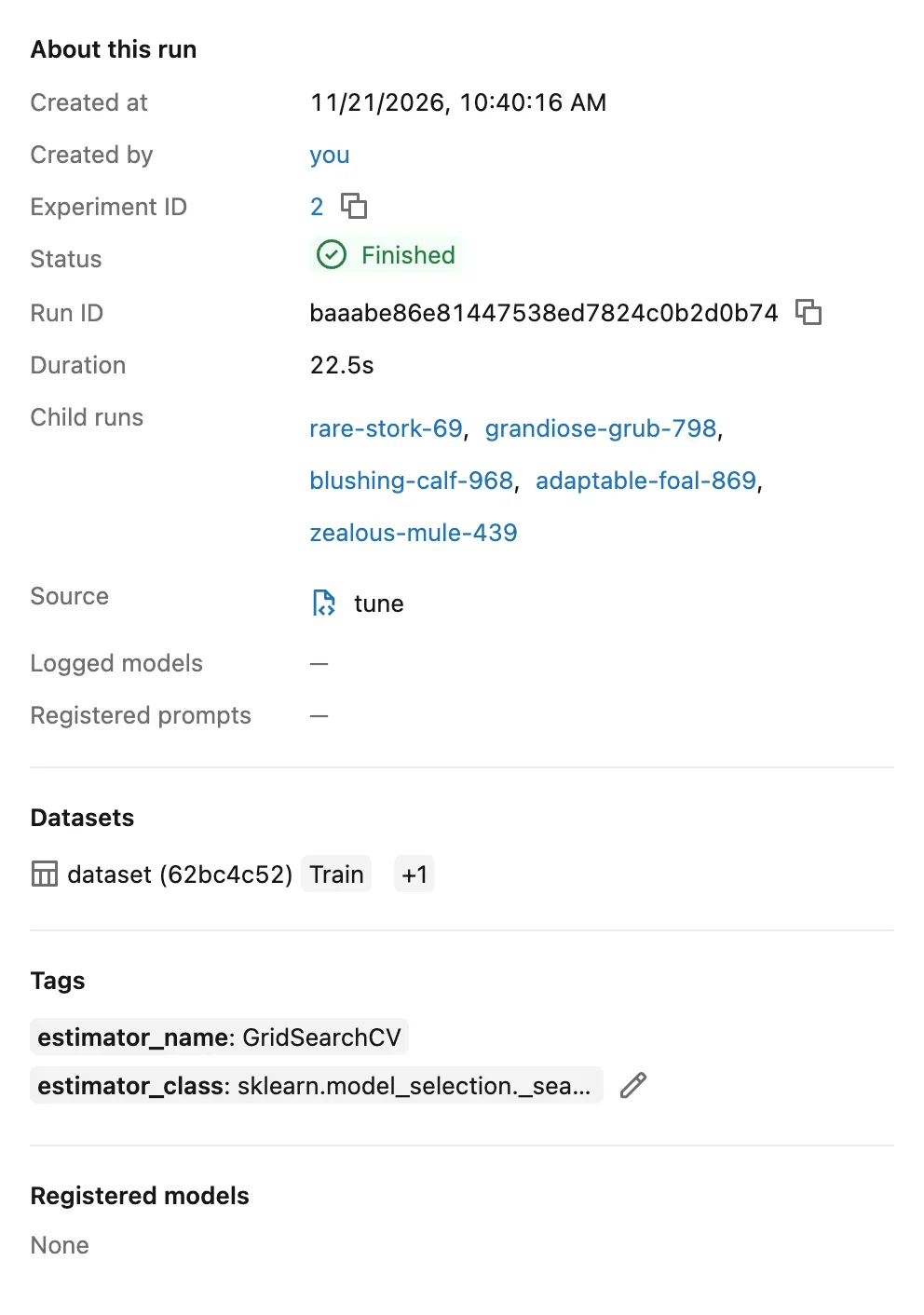
The datasets are the training calls, Train, and, behind +1, the test calls the code asked the model to score. Autologging logged both, with their digests, as in Part 3.
Then the Artifacts tab. Autologging saved five files. training_confusion_matrix.png shows the cut-off problem at a glance:
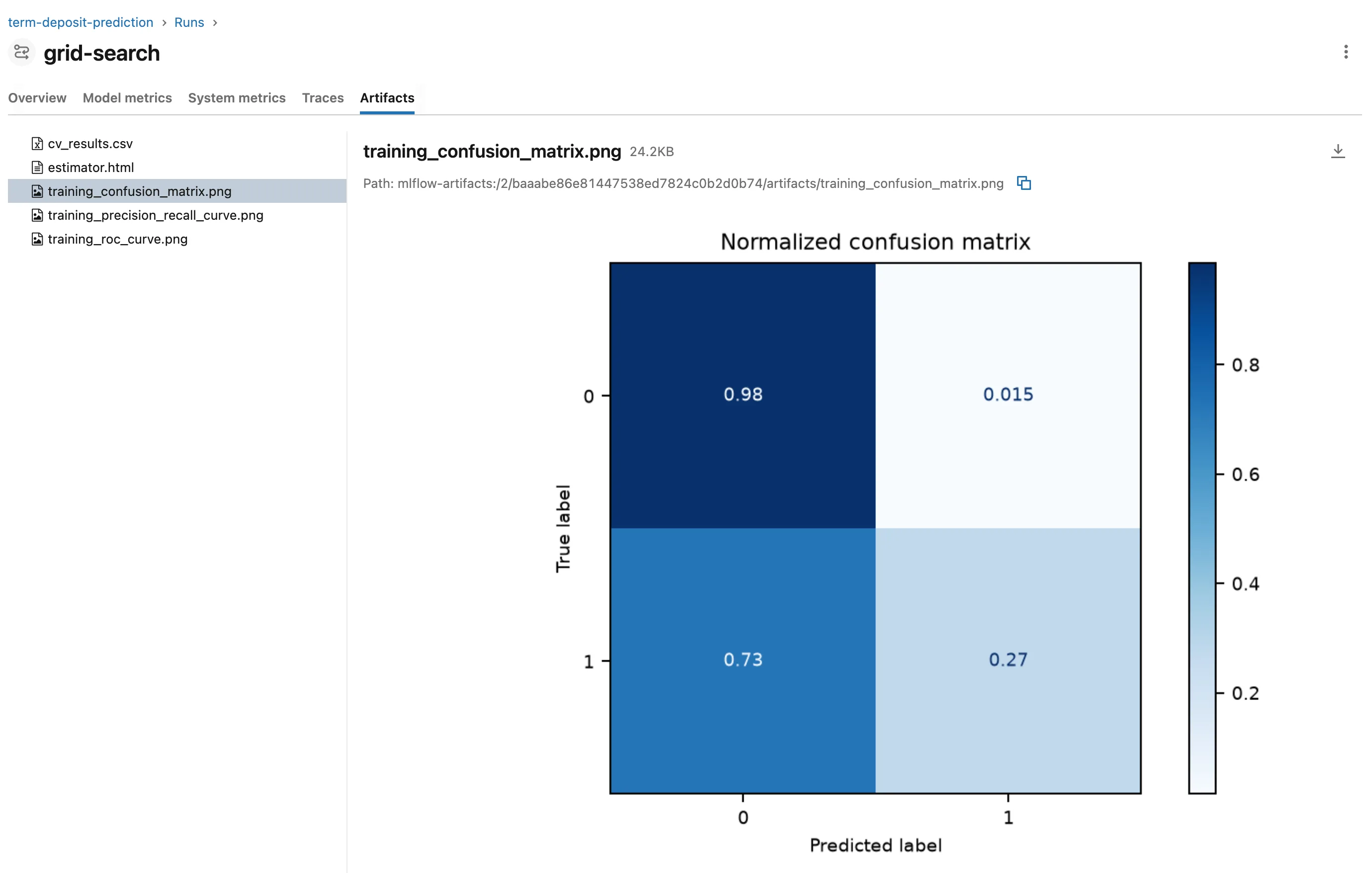
estimator.html draws the whole search as a diagram:
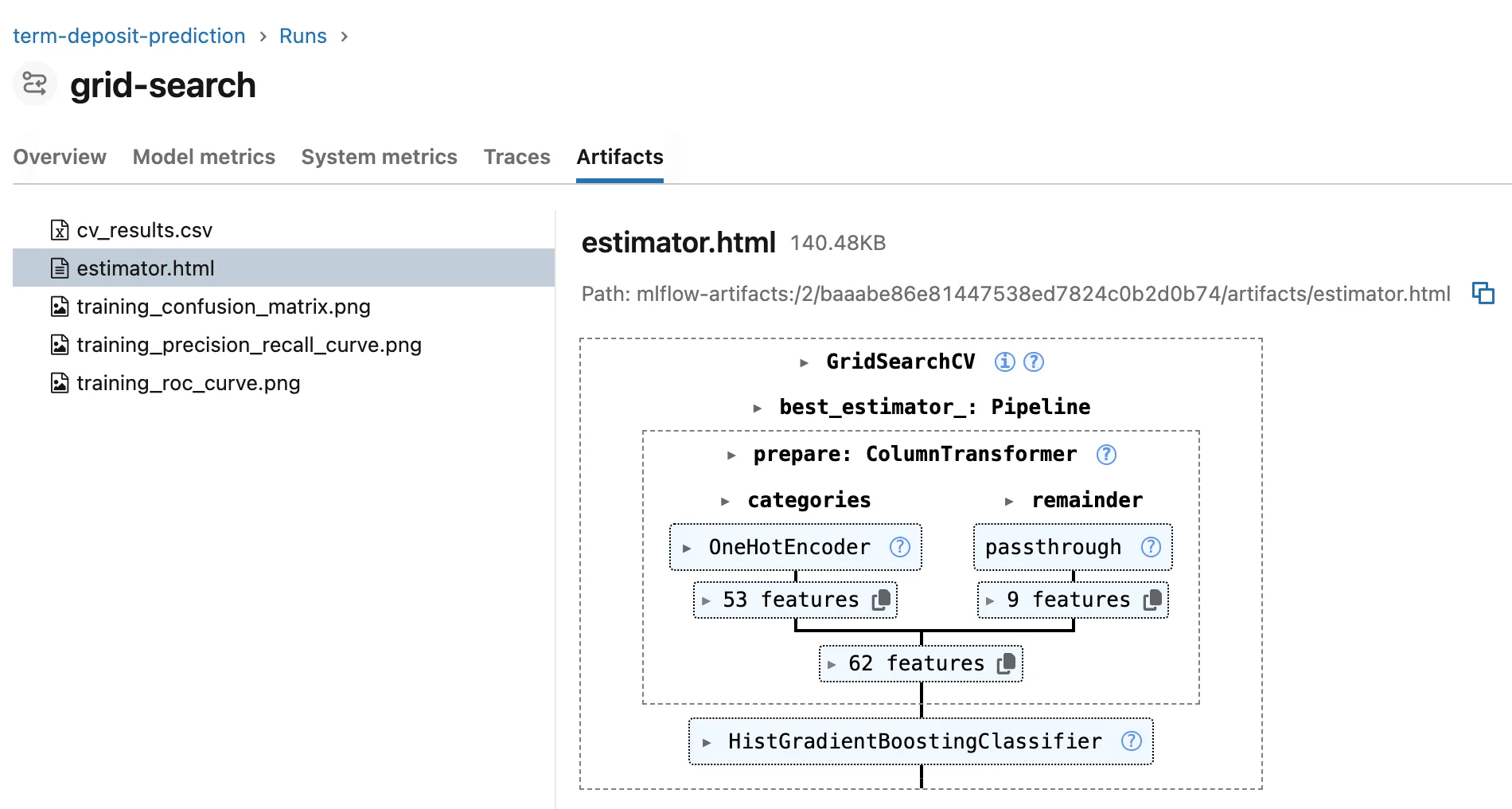
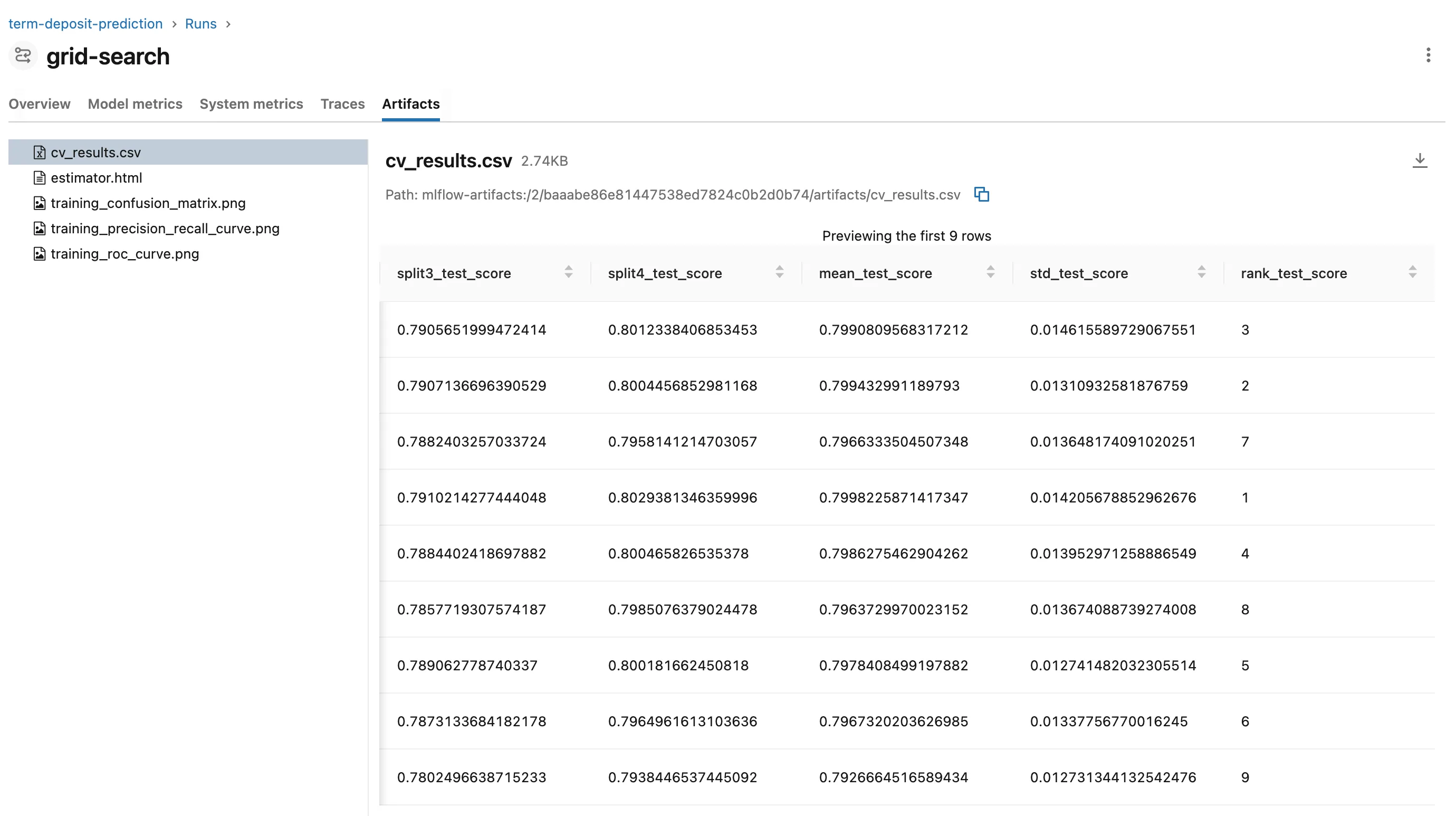
The ten text columns became 53 one-hot columns, and with the 9 number columns the model sees 62. And cv_results.csv is scikit-learn's own results table, with a row for every candidate, the four without a child run included:
Step 10: Look at the Child Runs
Back in the runs table, click the + before grid-search. Its five child runs unfold under it:
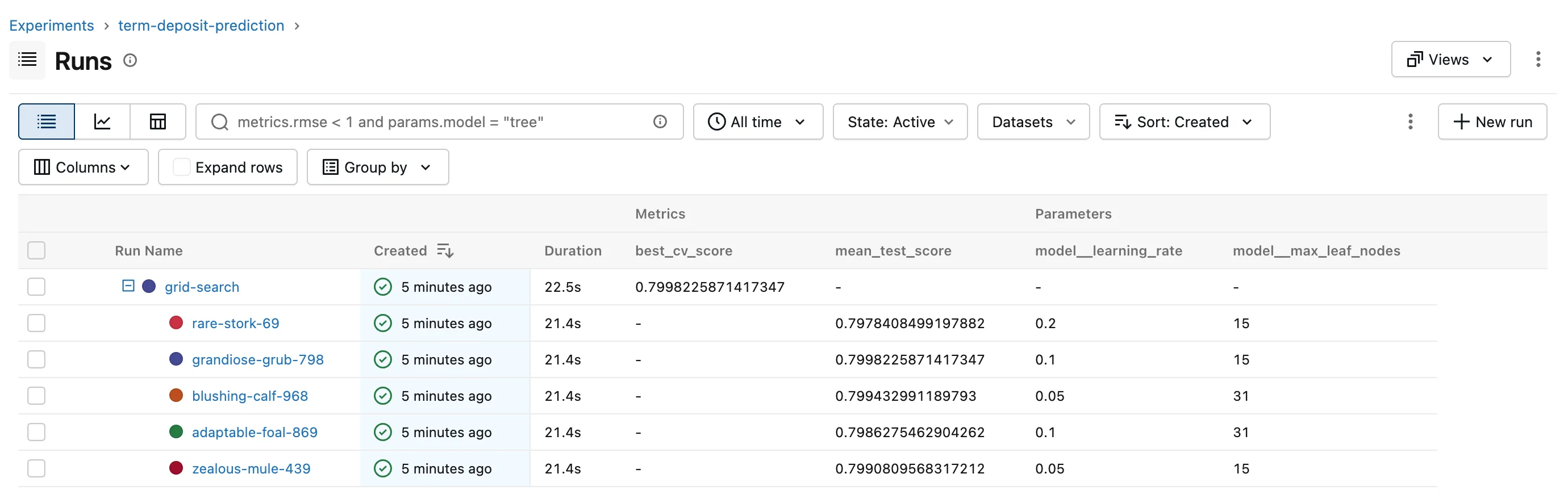
Each child is one candidate: its two settings, and mean_test_score, its average cross-validation ROC AUC. grandiose-grub-798, with 0.7998, is the winner, the same score as the parent's best_cv_score. Click it:
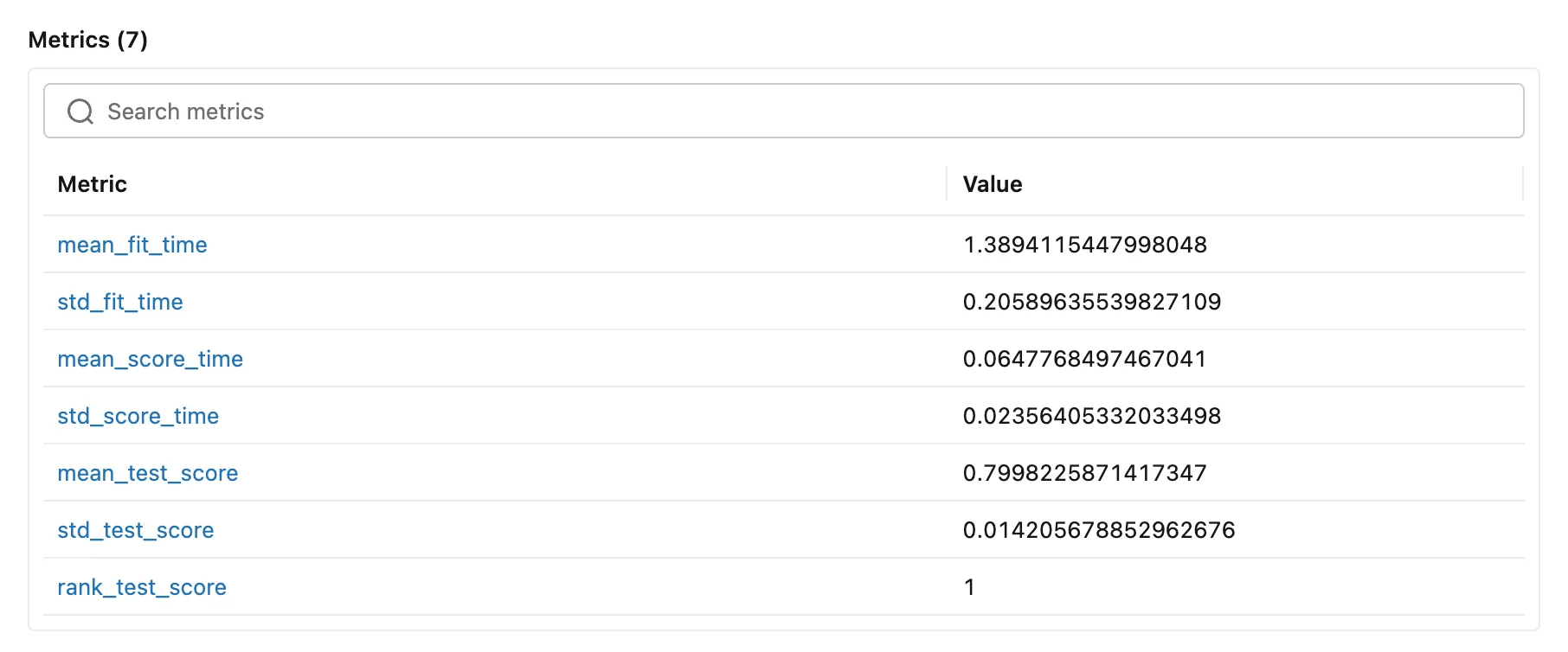
A child's metrics come from the candidate's row in cv_results.csv: the averages, rank_test_score and the times, without the per-fold scores. Its parameters, 43 of them, are every setting of the pipeline with this candidate's values. And its About this run links back to the parent:
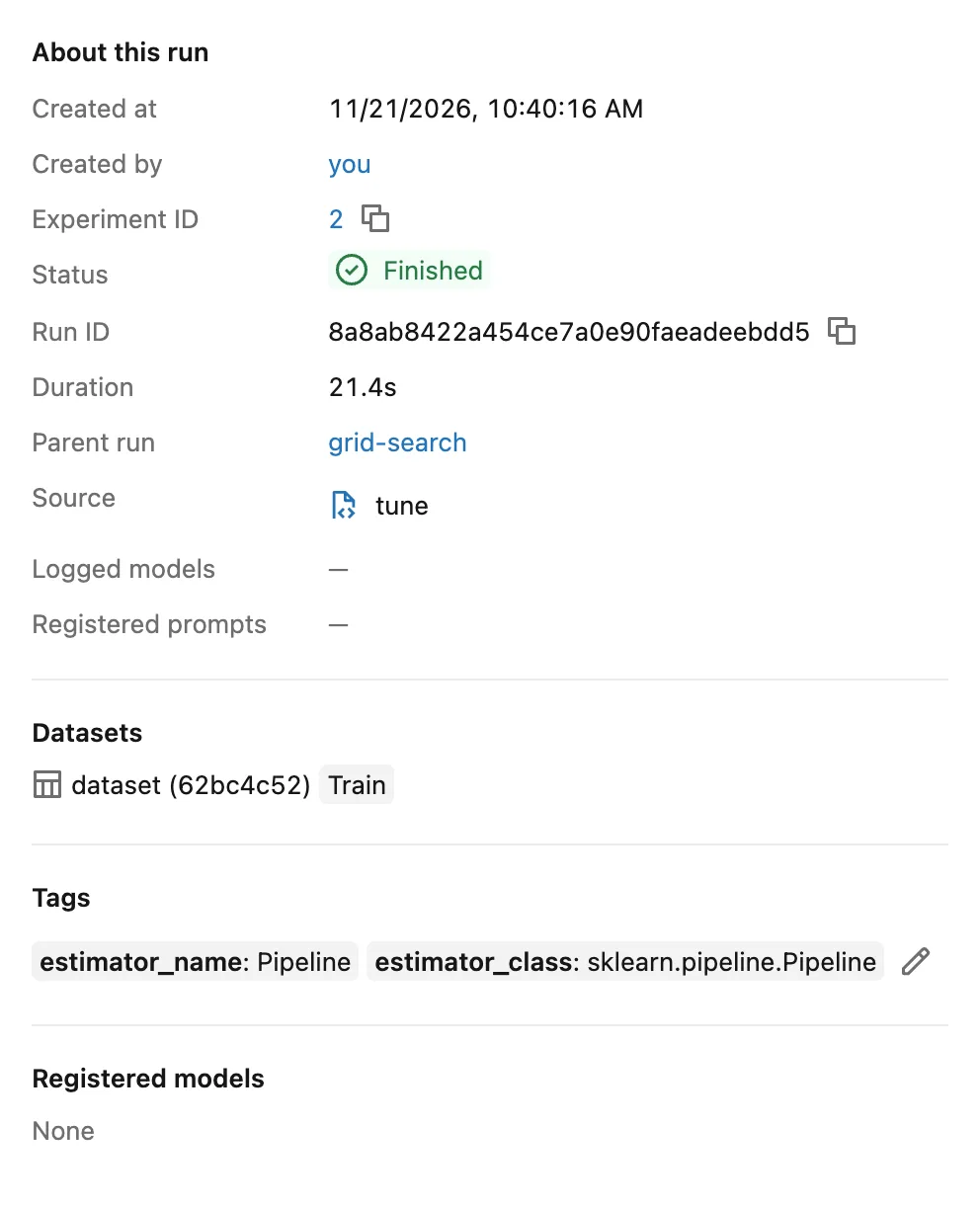
Every child shows the same start time and Duration: MLflow creates the child runs after the search ends, from its results, and gives them the parent's start time, since it can't know when each candidate ran. What links a child to its parent is a tag on the child, mlflow.parentRunId: How to Find the Child Runs of a Parent Run in MLflow searches by it, and How to See Nested Runs in the MLflow UI covers the views.
Step 11: Log Every Candidate
Four candidates have no child run. To see all nine as runs, raise the limit with the command's option:
uv run tune --help
usage: tune [-h] [--max-tuning-runs MAX_TUNING_RUNS] [--run-name RUN_NAME]

Search for the best settings of a term deposit model, and track the search in MLflow.

options:
  -h, --help            show this help message and exit
  --max-tuning-runs MAX_TUNING_RUNS
                        how many of the best candidates get a child run of their own (default: 5)
  --run-name RUN_NAME   name shown in the MLflow UI (default: MLflow picks one)
uv run tune --max-tuning-runs 9 --run-name grid-search-all
2026/11/21 10:50:02 INFO term_deposit_prediction: Loading the Bank Marketing data
2026/11/21 10:50:03 INFO term_deposit_prediction: Trying 9 candidates with 5-fold cross-validation on 32950 calls
/Users/you/source/dewiride-term-deposit-prediction/.venv/lib/python3.15/site-packages/sklearn/metrics/_classification.py:3424: FutureWarning: `y_pred` was renamed to `y_proba` in version 1.9 and will be removed in 1.11. Use `y_proba` instead.
  warnings.warn(
2026/11/21 10:50:34 INFO mlflow.sklearn.utils: Logging the 9 best runs, no runs will be omitted.
🏃 View run enthused-snipe-691 at: http://127.0.0.1:8080/#/experiments/2/runs/ede3afdb9e4641ddb67b3373979b5672
🧪 View experiment at: http://127.0.0.1:8080/#/experiments/2
🏃 View run classy-cod-860 at: http://127.0.0.1:8080/#/experiments/2/runs/9072e92dd80d49f8a8befc33f5162d6f
🧪 View experiment at: http://127.0.0.1:8080/#/experiments/2
🏃 View run efficient-wren-77 at: http://127.0.0.1:8080/#/experiments/2/runs/40a688674c63459e851d3907407bee98
🧪 View experiment at: http://127.0.0.1:8080/#/experiments/2
🏃 View run rebellious-bass-815 at: http://127.0.0.1:8080/#/experiments/2/runs/dd6aaf63c41749d8b4a4a575a349d6be
🧪 View experiment at: http://127.0.0.1:8080/#/experiments/2
🏃 View run valuable-skunk-1 at: http://127.0.0.1:8080/#/experiments/2/runs/1e75c688c5e24f839bab16c4d817567c
🧪 View experiment at: http://127.0.0.1:8080/#/experiments/2
🏃 View run righteous-snake-172 at: http://127.0.0.1:8080/#/experiments/2/runs/109b2fd08292414f80d45e404a654d17
🧪 View experiment at: http://127.0.0.1:8080/#/experiments/2
🏃 View run redolent-wren-878 at: http://127.0.0.1:8080/#/experiments/2/runs/3e0a67b2247440e799d9fc0d5063ee67
🧪 View experiment at: http://127.0.0.1:8080/#/experiments/2
🏃 View run funny-zebra-968 at: http://127.0.0.1:8080/#/experiments/2/runs/570983a154eb4984bb69faf3c24e232e
🧪 View experiment at: http://127.0.0.1:8080/#/experiments/2
🏃 View run upbeat-eel-465 at: http://127.0.0.1:8080/#/experiments/2/runs/c6e60564a02c438f980b9a50279e2b76
🧪 View experiment at: http://127.0.0.1:8080/#/experiments/2
2026/11/21 10:50:36 INFO term_deposit_prediction: Run grid-search-all: best {'model__learning_rate': 0.1, 'model__max_leaf_nodes': 15}, cross-validation ROC AUC 0.7998, test ROC AUC 0.8145
🏃 View run grid-search-all at: http://127.0.0.1:8080/#/experiments/2/runs/14ee987bb8d0412f9fcee72f6bcd8b90
🧪 View experiment at: http://127.0.0.1:8080/#/experiments/2
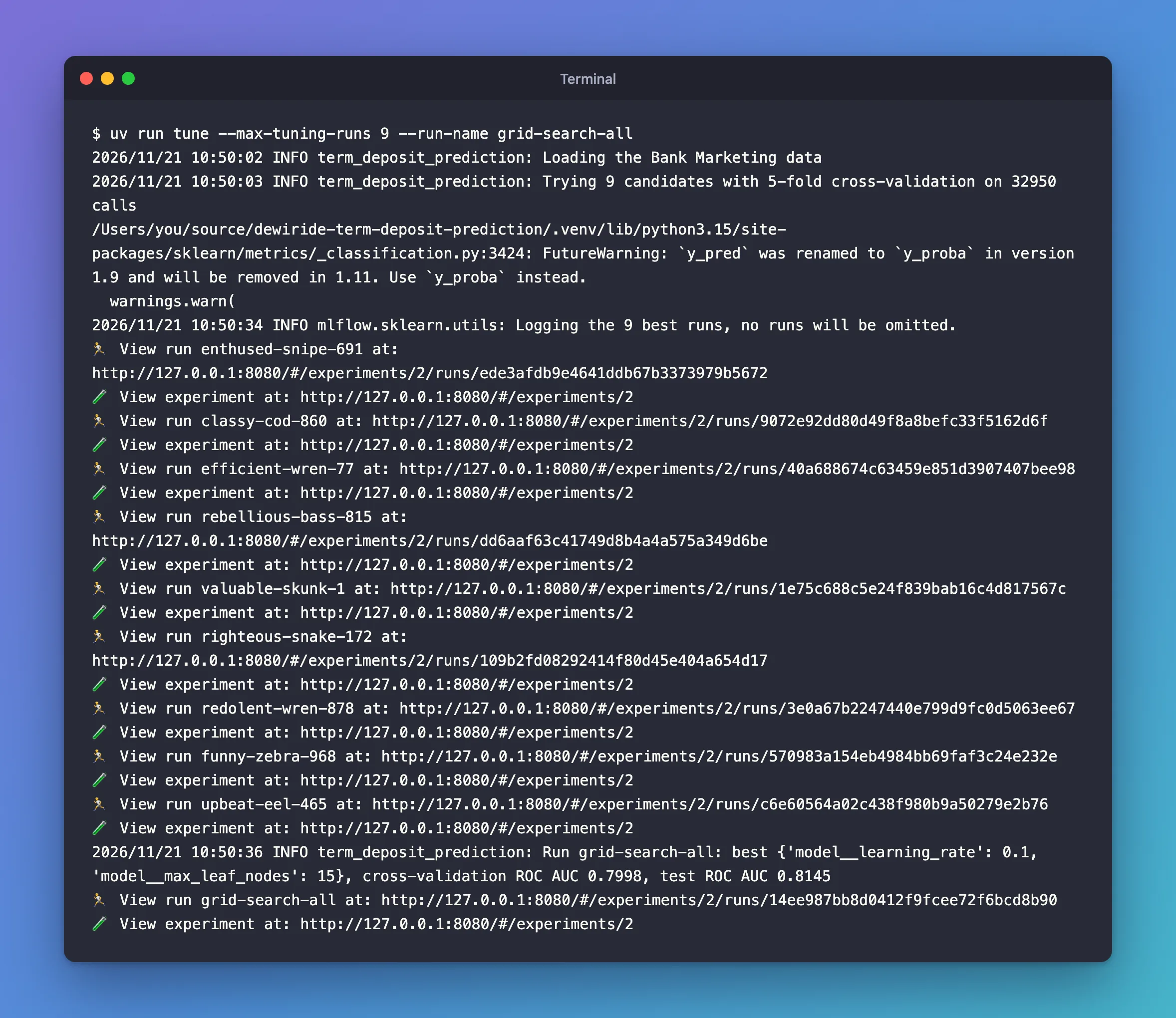
No download this time: the zip was already in data/. The same candidates gave the same scores, and Logging the 9 best runs, no runs will be omitted. In the runs table, unfold grid-search-all:
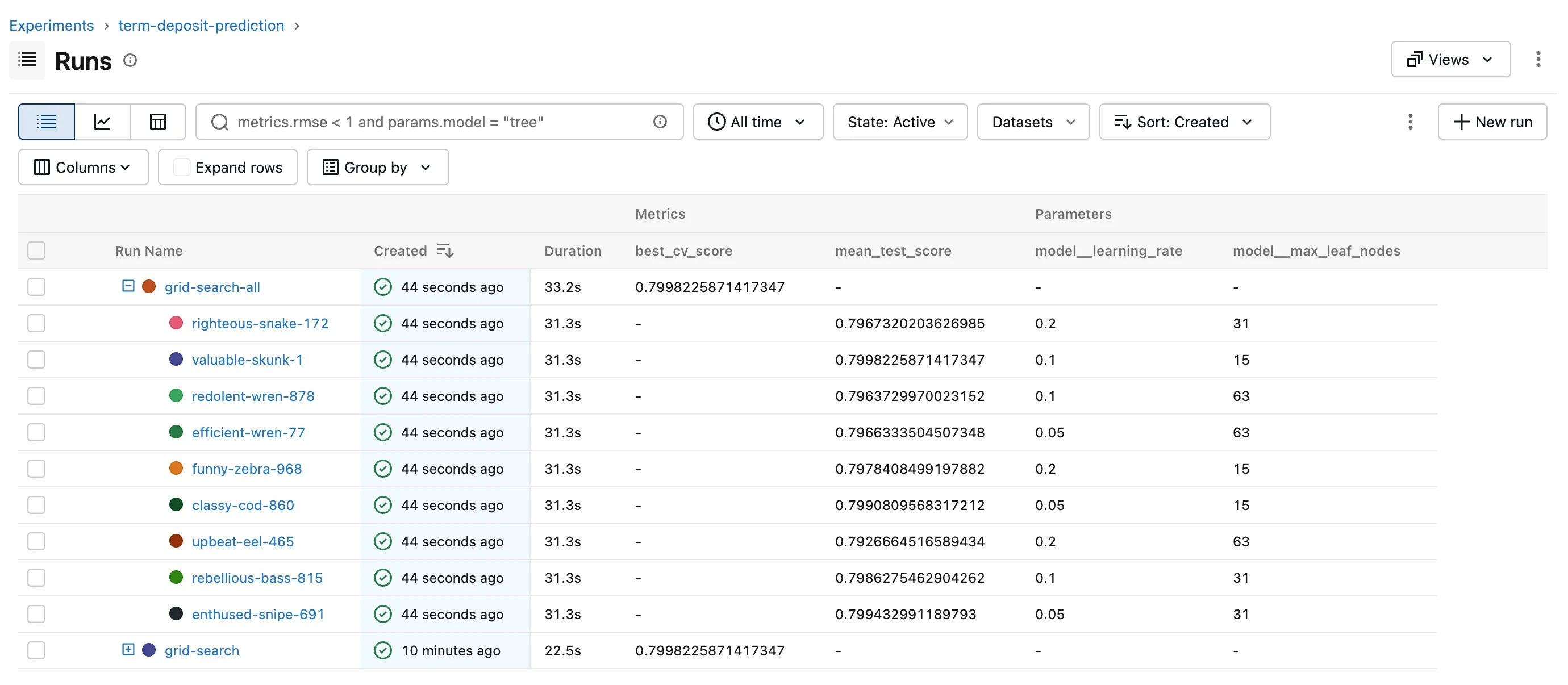
How to Log Every Candidate of a Grid Search in MLflow with max_tuning_runs covers the option, including how to remove the limit altogether.
Step 12: Compare the Candidates
Nine rows of numbers are hard to read. Tick the boxes of the nine children of grid-search-all; the toolbar shows a Compare button:
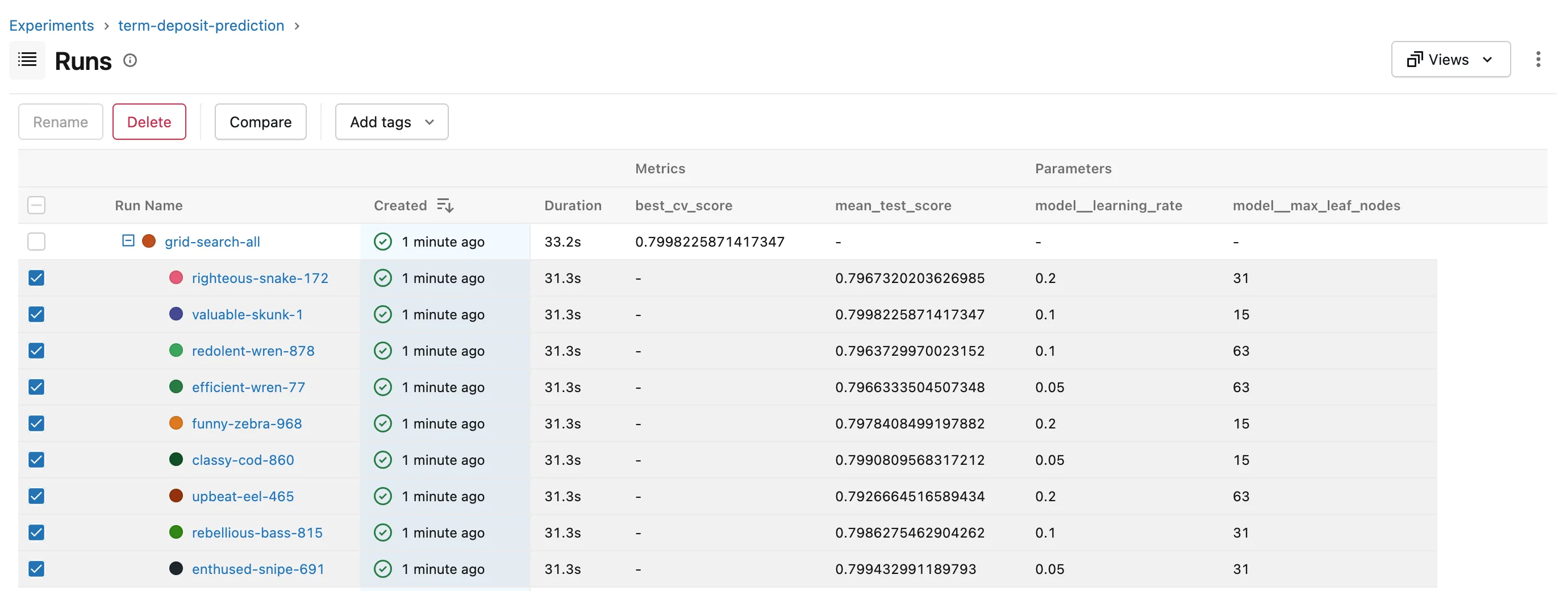
Click Compare. The page opens on Parallel Coordinates Plot with the two settings already chosen. In Metrics, remove mean_fit_time and choose mean_test_score:
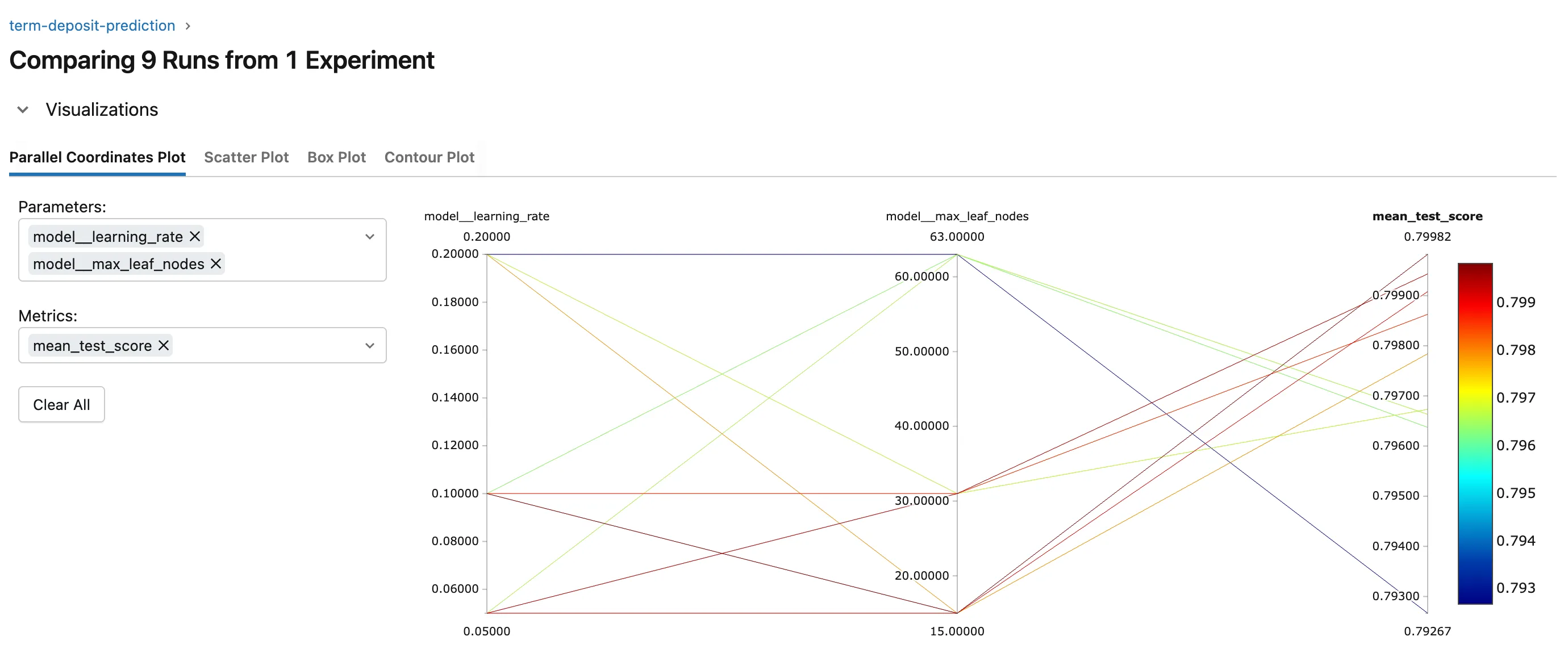
Every candidate is a line, colored by its score. The red, best lines come from 15 or 31 leaves with a learning rate of 0.05 or 0.1. The three candidates with the biggest trees, 63 leaves, ranked last, at every learning rate, and the one dark blue line, the worst at 0.7927, combines them with the biggest steps, 0.2. The spread is narrow, 0.7927 to 0.7998, so for this data the settings matter less than you might expect. How to Compare Runs with a Parallel Coordinates Plot in the MLflow UI explains the chart.
Step 13: Save Your Work with Git
uv made the project a Git repository. In the project terminal:
git status --short --untracked-files=all
?? .env.example
?? .gitignore
?? .python-version
?? README.md
?? pyproject.toml
?? src/term_deposit_prediction/__init__.py
?? src/term_deposit_prediction/config.py
?? src/term_deposit_prediction/data.py
?? src/term_deposit_prediction/model.py
?? src/term_deposit_prediction/tune.py
?? uv.lock
.env, .venv and data/ aren't listed: .gitignore keeps them out. Commit the rest:
git add .
git commit -m "Tune a term deposit model with MLflow autologging"
[master (root-commit) 8cd135f] Tune a term deposit model with MLflow autologging
 11 files changed, 1979 insertions(+)
 create mode 100644 .env.example
 create mode 100644 .gitignore
 create mode 100644 .python-version
 create mode 100644 README.md
 create mode 100644 pyproject.toml
 create mode 100644 src/term_deposit_prediction/__init__.py
 create mode 100644 src/term_deposit_prediction/config.py
 create mode 100644 src/term_deposit_prediction/data.py
 create mode 100644 src/term_deposit_prediction/model.py
 create mode 100644 src/term_deposit_prediction/tune.py
 create mode 100644 uv.lock
New to Git? How to Create a Git Repository and Make Your First Commit explains these commands.
Your Folders Now Look Like This
source/
├── mlflow-server/
│   ├── .venv/
│   ├── mlartifacts/
│   ├── mlflow.db
│   ├── pyproject.toml
│   └── uv.lock
├── dewiride-house-price-prediction/
│   └── ...
└── dewiride-term-deposit-prediction/
    ├── .venv/
    ├── data/
    │   └── bank-marketing.zip
    ├── src/
    │   └── term_deposit_prediction/
    │       ├── __init__.py
    │       ├── config.py
    │       ├── data.py
    │       ├── model.py
    │       └── tune.py
    ├── .env
    ├── .env.example
    ├── .gitignore
    ├── .python-version
    ├── README.md
    ├── pyproject.toml
    └── uv.lock
Do It with the CLI
The terminal can list the runs and a run's files, using the server's address from your .env:
uv run mlflow --env-file .env runs list --experiment-id 2
uv run mlflow --env-file .env artifacts list --run-id baaabe86e81447538ed7824c0b2d0b74
Loaded environment variables from: .env
Date                     Name                 ID
-----------------------  -------------------  --------------------------------
2026-11-21 10:50:03 IST  valuable-skunk-1     1e75c688c5e24f839bab16c4d817567c
2026-11-21 10:50:03 IST  upbeat-eel-465       c6e60564a02c438f980b9a50279e2b76
2026-11-21 10:50:03 IST  righteous-snake-172  109b2fd08292414f80d45e404a654d17
2026-11-21 10:50:03 IST  redolent-wren-878    3e0a67b2247440e799d9fc0d5063ee67
2026-11-21 10:50:03 IST  rebellious-bass-815  dd6aaf63c41749d8b4a4a575a349d6be
2026-11-21 10:50:03 IST  grid-search-all      14ee987bb8d0412f9fcee72f6bcd8b90
2026-11-21 10:50:03 IST  funny-zebra-968      570983a154eb4984bb69faf3c24e232e
2026-11-21 10:50:03 IST  enthused-snipe-691   ede3afdb9e4641ddb67b3373979b5672
2026-11-21 10:50:03 IST  efficient-wren-77    40a688674c63459e851d3907407bee98
2026-11-21 10:50:03 IST  classy-cod-860       9072e92dd80d49f8a8befc33f5162d6f
2026-11-21 10:40:16 IST  zealous-mule-439     9f6e2e73711048249bc856dd8d60492a
2026-11-21 10:40:16 IST  rare-stork-69        4ddb4aeeeff4499d80b932006f878a95
2026-11-21 10:40:16 IST  grid-search          baaabe86e81447538ed7824c0b2d0b74
2026-11-21 10:40:16 IST  grandiose-grub-798   8a8ab8422a454ce7a0e90faeadeebdd5
2026-11-21 10:40:16 IST  blushing-calf-968    8f144c8f63c340cca8562410e69e8e74
2026-11-21 10:40:16 IST  adaptable-foal-869   9ab26e4b8bcd46d29eb6b9d6c24b8331
Loaded environment variables from: .env
[{
  "path": "cv_results.csv",
  "is_dir": false,
  "file_size": 2808
}, {
  "path": "estimator.html",
  "is_dir": false,
  "file_size": 143850
}, {
  "path": "training_confusion_matrix.png",
  "is_dir": false,
  "file_size": 24781
}, {
  "path": "training_precision_recall_curve.png",
  "is_dir": false,
  "file_size": 45768
}, {
  "path": "training_roc_curve.png",
  "is_dir": false,
  "file_size": 46971
}]
runs list shows all 16 runs, the two parents among their children, each child with its parent's start time; it doesn't show who belongs to whom. Use your own experiment ID, the number in its address in the UI, and your own run ID. artifacts list lists the parent's five files; How to Download Artifacts from an MLflow Run fetches them.
Stop the Server When You're Done
Go to the first terminal and press Ctrl+C. Your runs stay in mlflow.db and mlartifacts/, and uv run mlflow server --port 8080 in the mlflow-server folder brings them back.
Keep all three folders for Part 6. If you ever want to remove everything the series created, stop the server first, then delete the mlflow-server, dewiride-house-price-prediction and dewiride-term-deposit-prediction folders, and the scikit_learn_data folder in your home folder.
Common Mistakes
| Mistake | What happens | Do this instead |
|---|---|---|
Calling mlflow.sklearn.autolog() after fit | Nothing is autologged | Turn it on before any training |
Calling search.fit outside mlflow.start_run | The parent gets a random name, and test_roc_auc lands in a separate run | Fit inside your with mlflow.start_run(...) block |
Leaving out pos_label=1 | training_recall_score equals training_accuracy_score, and the yes class's weakness is hidden | pos_label=1 |
Judging the model by the training_… metrics | They're scores on the calls it learned from | Use best_cv_score and test_roc_auc |
Keeping the duration column | The model learns from a value the bank only knows after the call | Drop it, as data.py does |
Troubleshooting
| Symptom | Likely cause | Fix |
|---|---|---|
FutureWarning: `y_pred` was renamed to `y_proba`... from _classification.py | MLflow 3.18's own call to scikit-learn's log_loss | Nothing to change; the results are correct |
MLflow autologging encountered a warning: ... Hint: Inferred schema contains integer column(s) | Whole-number columns read as integers | Fixed: Hint: Inferred schema contains integer column(s) |
Saving scikit-learn models in the pickle or cloudpickle format requires exercising caution | Autologging saves models, here without log_models=False | Fixed: the pickle or cloudpickle caution |
Failed to resolve installed pip version | Saving models in a uv environment without pip | Fixed: Failed to resolve installed pip version |
RuntimeError: data/bank-marketing.zip has the SHA-256 fingerprint … | The download is damaged, or the file was changed | Delete the file and run tune again |
[SSL: CERTIFICATE_VERIFY_FAILED] during the download, on macOS | Python can't find trusted certificates | Fixed: CERTIFICATE_VERIFY_FAILED in Python on macOS |
FAQ
Why a second project instead of tuning the house price model?
To see MLflow on a different problem: a yes/no question, where autologging records other metrics and charts, such as the confusion matrix. The house price project stays as Part 4 left it.
Why does every child run have the same duration?
MLflow creates the child runs after the search finishes, from its results table, and gives them the parent's start time: it can't know when each candidate ran. Compare candidates by their mean_fit_time instead.
Why is the test score higher than the cross-validation score?
They're measured on different calls: best_cv_score averages five folds of the training calls, each scored by a model trained on four fifths of them, while test_roc_auc scores the winner, retrained on all the training calls, on the 8,238 test calls. A gap of this size between two samples of the same data is normal; what matters is that the test score didn't collapse.
Could autologging log the test score itself?
Sometimes, when you compute a sklearn.metrics score on the model's predictions: How to Log Test Metrics Automatically with MLflow Autologging. Here the score is computed on a slice of predict_proba's result, which autologging doesn't track, so the code logs it.
Conclusion
The term deposit project is running. mlflow.sklearn.autolog() recorded its GridSearchCV search as one parent run, grid-search, with the winning settings, its scores, five charts and tables, and a child run for each of the five best candidates; --max-tuning-runs 9 logged all nine. pos_label=1 made the logged precision and recall those of the customers who said yes, the code added test_roc_auc to the same run, and the parallel coordinates plot showed that the biggest trees, 63 leaves, did worst.
In Part 6 you'll log a trained model with its signature, an input example and its requirements, load it back by its ID, and check it in a fresh environment.
Additional Resources
- Automatic Logging with MLflow Tracking — MLflow's guide, with what the parent and child runs of a search hold.
- mlflow.sklearn.autolog — every option, including
max_tuning_runs,pos_labelandlog_models. - Bank Marketing — the dataset, its columns and its license.
← Previous: Part 4: Search and Filter Runs
