MLflow Tutorial for Machine Learning in Python — Part 4: Search and Filter Runs

After three parts, the house price experiment holds a dozen runs, and the questions change from "did it log?" to "which one is best, and why?". MLflow answers them with search: filters on metrics, parameters, status and datasets, in the UI and from Python. In this part you'll search the experiment's runs, add a command that ranks the finished runs by validation error, let the server find runs by name, and clear out a run that never finished.
This is Part 4 of a 10-part series.
- Part 1: Install MLflow and Track Your First Experiment
- Part 2: Log Metrics Over Time and System Metrics
- Part 3: Log Artifacts and Datasets
- Part 4: Search and Filter Runs (you are here)
- Part 5: Autologging and Hyperparameter Tuning with Nested Runs (coming soon)
- Part 6: Log, Load and Validate Models (coming soon)
- Part 7: Evaluate Models and Set Quality Gates (coming soon)
- Part 8: Register, Version and Promote Models with the Model Registry (coming soon)
- Part 9: Serve a Model as a REST API and in Docker (coming soon)
- Part 10: Production Checklist and Recap (coming soon)
Every command and output on this page is real, captured while building the project.
What You'll Build in This Part
You'll keep working on the house price project and:
- stop a run halfway, so the experiment has a run that never finished, like real experiments do;
- search the runs table in the MLflow UI by validation error, status, a setting and the data used, and sort it;
- add a
leaderboardcommand that ranks the finished runs by validation RMSE withmlflow.search_runs(), and can compare only runs scored on the same validation rows; - change the
curvecommand from Part 2 so the tracking server finds a run by name, instead of the command reading every run; - delete the stopped run, then remove it for good with
mlflow gc.
What This Part Costs
Nothing. Everything runs on your own computer, and there are no new packages.
Prerequisites
- Part 3 finished: the
mlflow-serverfolder with its runs, and thedewiride-house-price-predictionproject, committed to Git. Part 3 builds on Parts 1 and 2 for both.
Step 1: Start the Tracking Server
Open a terminal in the mlflow-server folder and start the server, as before:
uv run mlflow server --port 8080
Wait for Application startup complete, leave it running, and open a second terminal in the dewiride-house-price-prediction folder for everything else.
Step 2: Stop a Run That Takes Too Long
Sooner or later a run doesn't finish: the code crashes, the laptop sleeps, or you stop a run that's taking too long. Start a forest of 1,000 trees, and once it has logged a few validation scores, press Ctrl+C:
uv run train --n-estimators 1000 --run-name 1000-trees
2026/11/20 14:35:21 INFO house_price_prediction: Loading the California Housing data
2026/11/20 14:35:21 INFO mlflow.system_metrics.system_metrics_monitor: Skip logging GPU metrics. Set logger level to DEBUG for more details.
2026/11/20 14:35:21 INFO mlflow.system_metrics.system_metrics_monitor: Started monitoring system metrics.
2026/11/20 14:35:21 INFO house_price_prediction: Training on 13209 rows, scoring on 3303 validation rows
2026/11/20 14:35:21 INFO house_price_prediction:   10 trees: validation RMSE 0.5490
2026/11/20 14:35:22 INFO house_price_prediction:   20 trees: validation RMSE 0.5417
2026/11/20 14:35:22 INFO house_price_prediction:   30 trees: validation RMSE 0.5363
2026/11/20 14:35:22 INFO house_price_prediction:   40 trees: validation RMSE 0.5320
2026/11/20 14:35:22 INFO house_price_prediction:   50 trees: validation RMSE 0.5308
^C🏃 View run 1000-trees at: http://127.0.0.1:8080/#/experiments/1/runs/9911669575874a48a9b971e8b1d29885
🧪 View experiment at: http://127.0.0.1:8080/#/experiments/1
2026/11/20 14:35:22 INFO mlflow.system_metrics.system_metrics_monitor: Stopping system metrics monitoring...
2026/11/20 14:35:22 INFO mlflow.system_metrics.system_metrics_monitor: Successfully terminated system metrics monitoring!
Traceback (most recent call last):
  ...
KeyboardInterrupt
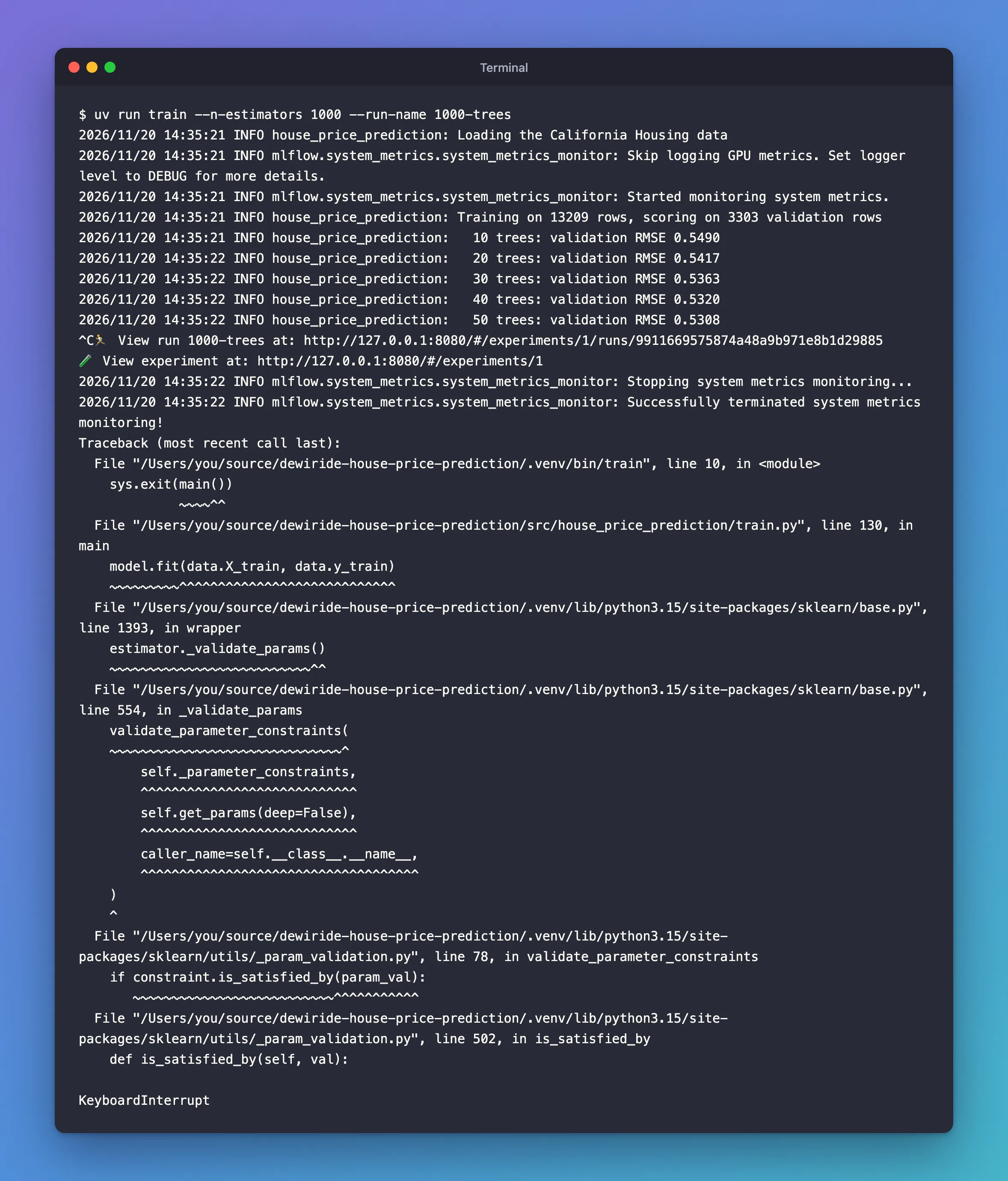
Ctrl+C raises an exception inside train. MLflow's with mlflow.start_run(): block ends the run before Python prints the traceback, and marks it FAILED.
Open the experiment in the UI (http://127.0.0.1:8080, Experiments, house-price-prediction). If Expand rows is still on from Part 3, turn it off. Then click Columns and leave ticked only what this part uses: rmse (the test score) and val_rmse under Metrics, and max_depth, n_estimators and random_state under Parameters, with Dataset, Source and Models unticked:
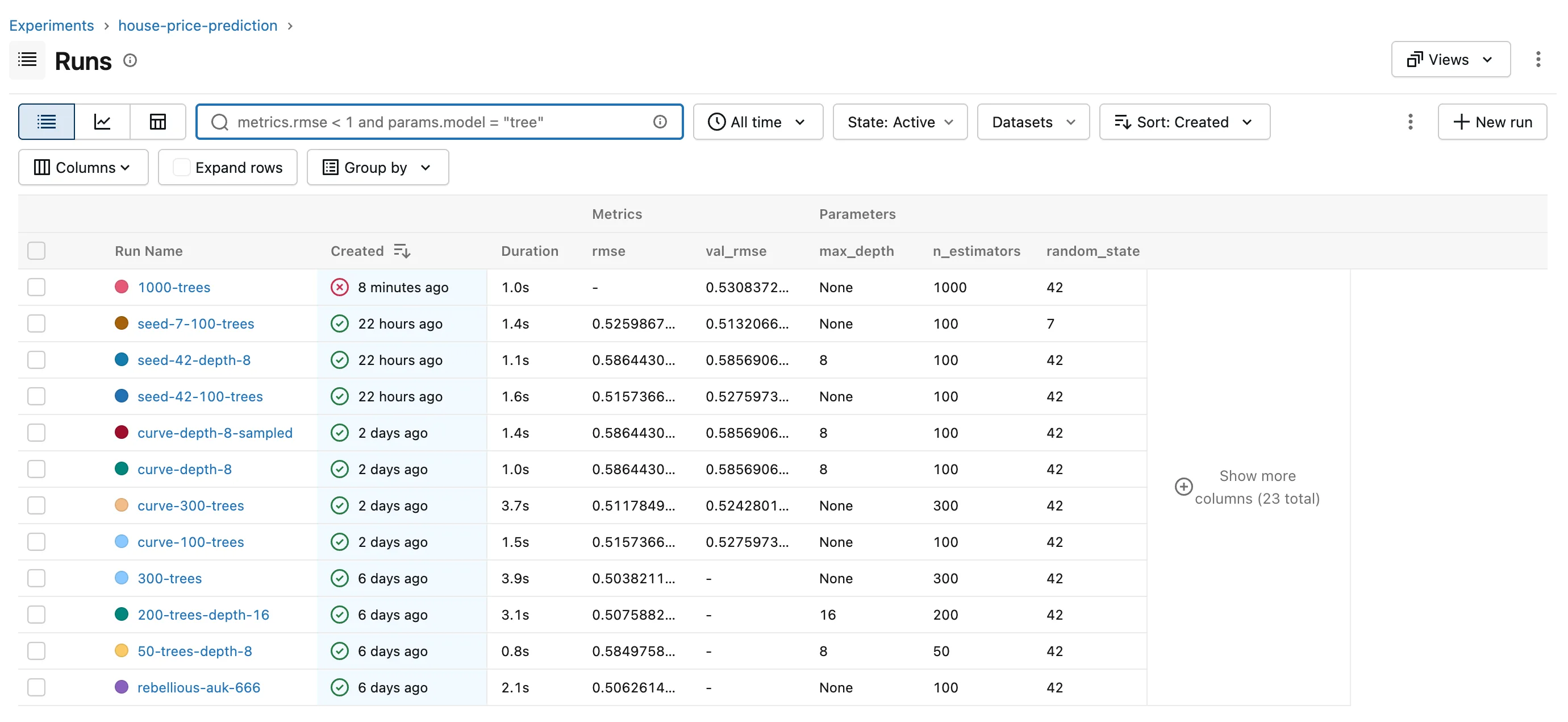
1000-trees has a red cross, no test score, and a validation RMSE of 0.5308 from just 50 trees. It looks like a result, and that's the problem the rest of this part has to handle. How to Find Failed Runs in MLflow explains run statuses.
Step 3: Filter Runs by Validation Error
Click the search box above the table, type the filter below, press Esc to close the list of suggestions, then Enter:
metrics.val_rmse < 0.54
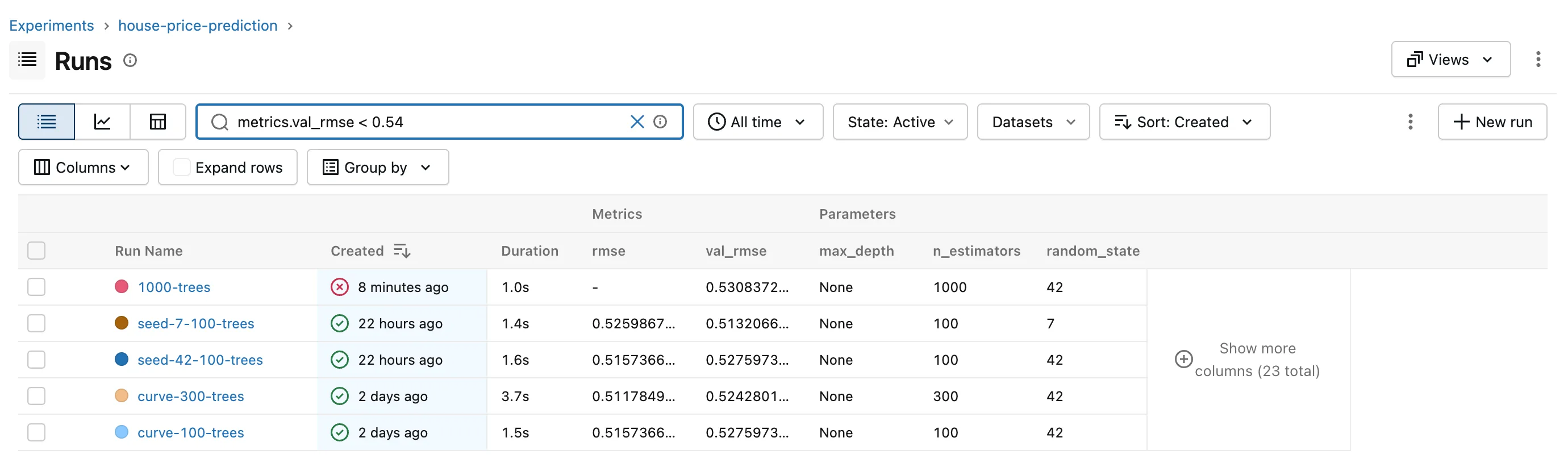
Five runs have a validation RMSE below 0.54, and the stopped 1000-trees is one of them. Part 1's runs have no val_rmse at all, so no comparison can match them. How to Search Runs in the MLflow UI covers the search box, and How to Write a Search Filter for MLflow Runs the filter language. If Enter adds backticks instead of searching, see Fixed: MLflow Search Box Adds Backticks and Doesn't Search When You Press Enter.
Step 4: Keep Only Finished Runs
A score from a run that never finished doesn't belong next to finished ones. Add a condition on the run's status:
metrics.val_rmse < 0.54 AND attributes.status = 'FINISHED'
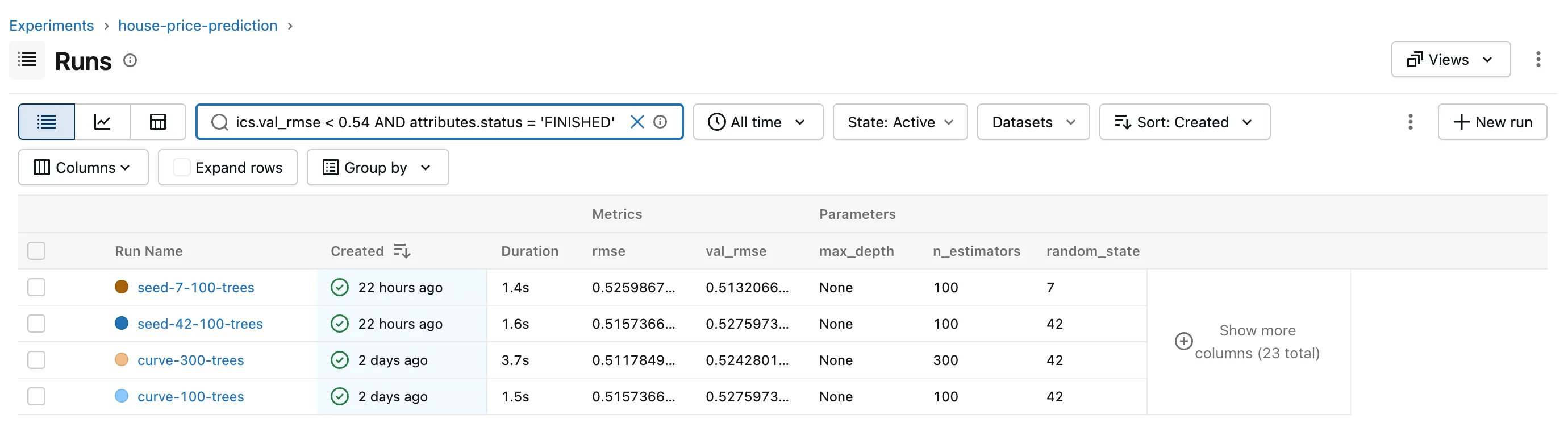
The query is longer than the box, so the box scrolls; the stopped run is gone, and four runs are left.
Step 5: Sort by Validation RMSE
Lower RMSE is better, so the best run belongs on top. Click Sort: Created, click ↑, then open Sort again and choose val_rmse:
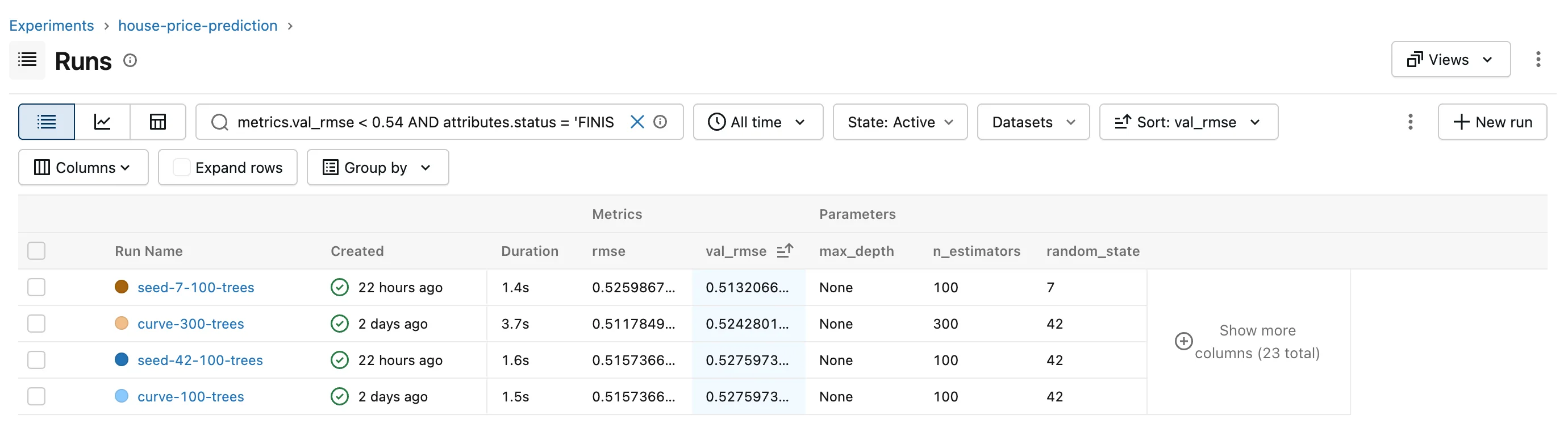
seed-7-100-trees is on top with 0.5132. Keep that in mind for Step 9: its validation rows aren't the same as the others'. How to Sort Runs in the MLflow UI covers sorting.
Step 6: Find the Runs with a Setting
Which runs limited the trees to depth 8? Parameters are stored as text, so the value goes in quotes:
params.max_depth = '8'
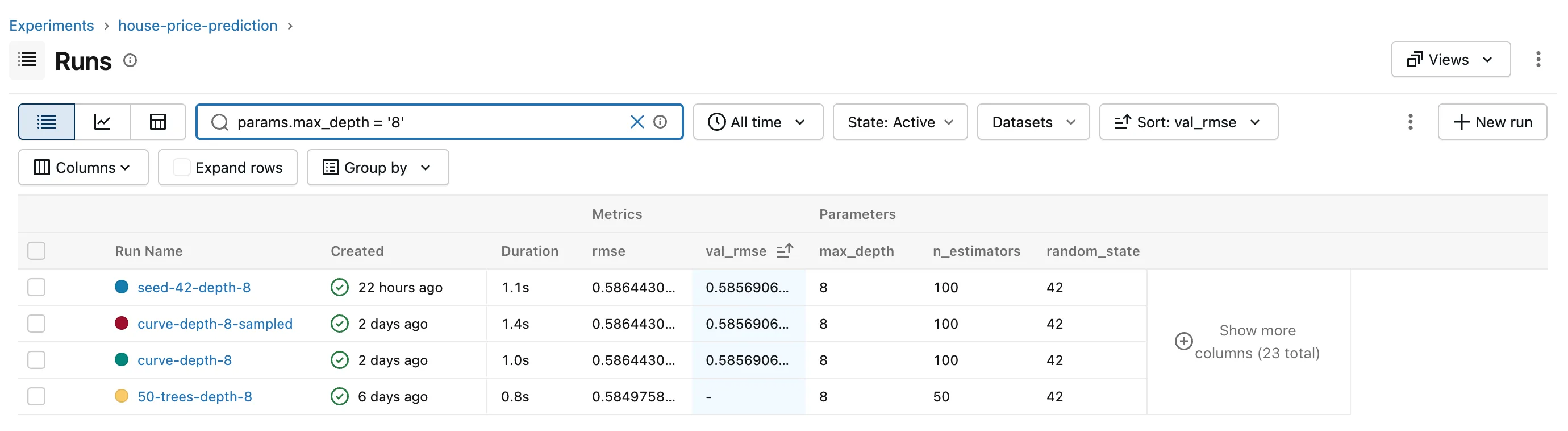
Four runs. The three with a val_rmse have identical scores: they used the same settings and the same seed, so they trained the same forest on the same rows. The table keeps Step 5's sort, so 50-trees-depth-8 from Part 1, with no validation score, comes last. The runs without a depth limit logged max_depth as the text 'None'. How to Search MLflow Runs by Parameter Value shows what that means for searches.
Step 7: Find the Runs Trained on the Same Data
Since Part 3, every run logs its datasets, each with a digest. In Part 3, the two seed-42 runs showed california-housing-validation with the digest eba3edbe, so this finds every run scored on exactly those rows:
datasets.digest = 'eba3edbe'
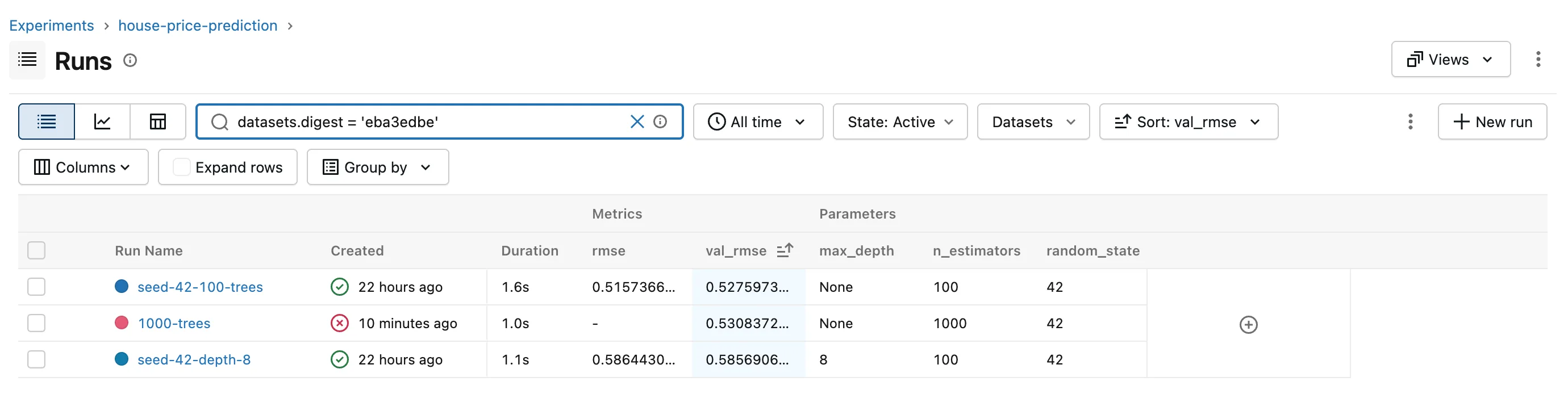
Three runs, including the stopped one, which logged its datasets before training began. The Part 2 runs used the same rows but predate dataset logging, so they can't be found this way. How to Search MLflow Runs by Dataset covers names, digests and contexts.
Step 8: Rank the Finished Runs from Python
The UI is for looking; code needs the same search in Python. Create src/house_price_prediction/leaderboard.py, a command that prints the best finished runs.
The search keeps only runs that finished and have a validation score:
RANKABLE = "attributes.status = 'FINISHED' AND metrics.val_rmse >= 0"
ORDER_BY = ["metrics.val_rmse ASC", "attributes.start_time DESC"]
attributes.status = 'FINISHED'leaves out runs like1000-trees.metrics.val_rmse >= 0keeps only runs that logged a validation RMSE: an RMSE is never negative, and a run without the metric never passes a comparison.ORDER_BYputs the lowest validation RMSE first, and the newest run first among equal scores.
The search itself, which also keeps only the columns listed in COLUMNS:
def top_runs(experiment_name: str, top: int, extra_filter: str = "") -> pd.DataFrame:
    """The experiment's `top` best runs, as a table with one row per run."""
    runs = mlflow.search_runs(
        experiment_names=[experiment_name],
        filter_string=search_filter(extra_filter),
        order_by=ORDER_BY,
        max_results=top,
    )
    return runs.reindex(columns=list(COLUMNS)).rename(columns=COLUMNS)
mlflow.search_runs()returns a pandas DataFrame with a column for every metric, parameter and tag: How to Search MLflow Runs in Python with search_runs.reindex(columns=...)keeps the columns inCOLUMNS, in that order, and adds an empty one when no run in the result has that value, instead of failing: How to Choose the Columns of a pandas DataFrame with reindex.renamegives them short names: How to Rename Columns in a pandas DataFrame.
The rest of the file reads the options and prints the result:
--topsets how many runs to show. Itspositive_inttype function refuses0and text: How to Accept Only Positive Integers in argparse.--filteradds your own condition withAND. When MLflow rejects a filter,main()prints MLflow's reason instead of a traceback.to_string(index=False, float_format=...)prints the table without pandas' row numbers, with four decimals: How to Print a pandas DataFrame Without the Index.
The complete file:
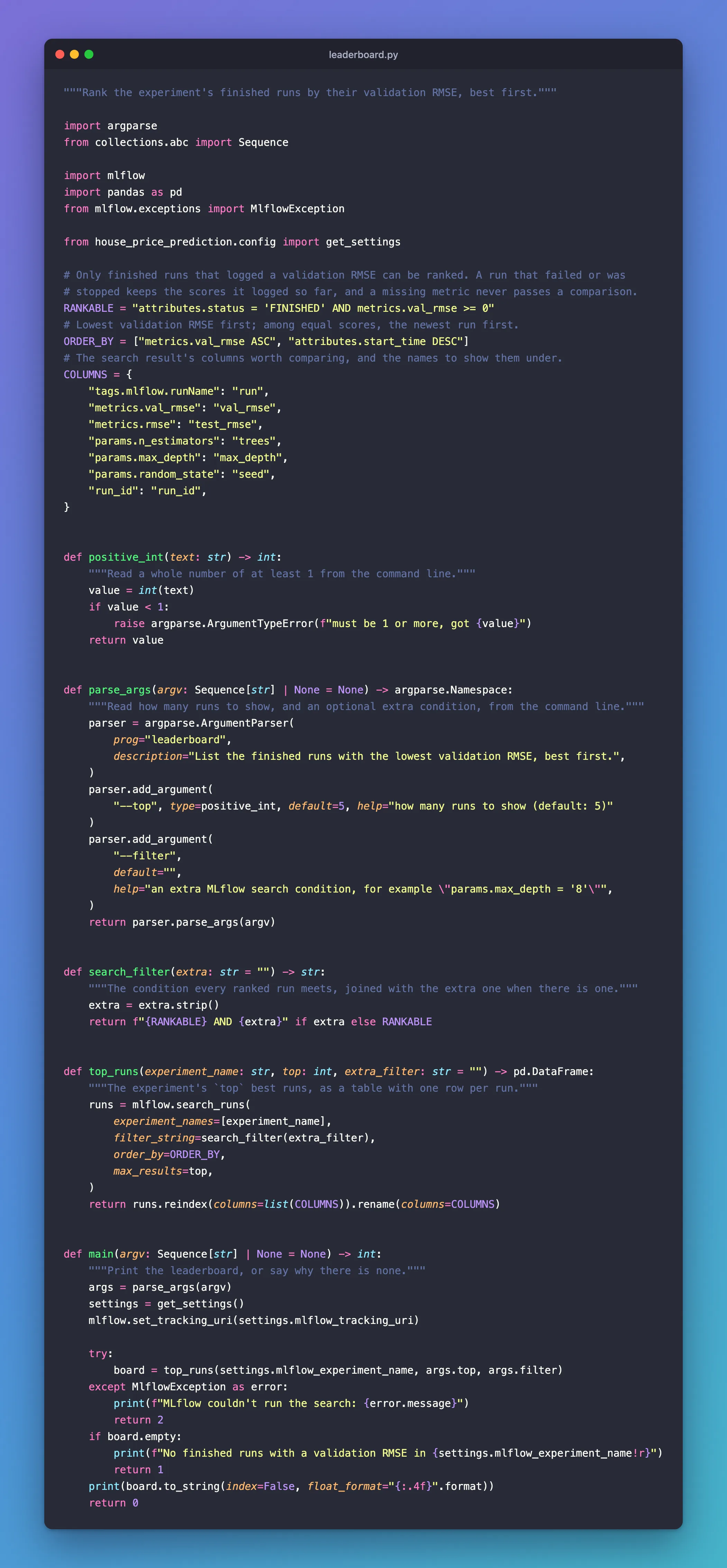
"""Rank the experiment's finished runs by their validation RMSE, best first."""

import argparse
from collections.abc import Sequence

import mlflow
import pandas as pd
from mlflow.exceptions import MlflowException

from house_price_prediction.config import get_settings

# Only finished runs that logged a validation RMSE can be ranked. A run that failed or was
# stopped keeps the scores it logged so far, and a missing metric never passes a comparison.
RANKABLE = "attributes.status = 'FINISHED' AND metrics.val_rmse >= 0"
# Lowest validation RMSE first; among equal scores, the newest run first.
ORDER_BY = ["metrics.val_rmse ASC", "attributes.start_time DESC"]
# The search result's columns worth comparing, and the names to show them under.
COLUMNS = {
    "tags.mlflow.runName": "run",
    "metrics.val_rmse": "val_rmse",
    "metrics.rmse": "test_rmse",
    "params.n_estimators": "trees",
    "params.max_depth": "max_depth",
    "params.random_state": "seed",
    "run_id": "run_id",
}


def positive_int(text: str) -> int:
    """Read a whole number of at least 1 from the command line."""
    value = int(text)
    if value < 1:
        raise argparse.ArgumentTypeError(f"must be 1 or more, got {value}")
    return value


def parse_args(argv: Sequence[str] | None = None) -> argparse.Namespace:
    """Read how many runs to show, and an optional extra condition, from the command line."""
    parser = argparse.ArgumentParser(
        prog="leaderboard",
        description="List the finished runs with the lowest validation RMSE, best first.",
    )
    parser.add_argument(
        "--top", type=positive_int, default=5, help="how many runs to show (default: 5)"
    )
    parser.add_argument(
        "--filter",
        default="",
        help="an extra MLflow search condition, for example \"params.max_depth = '8'\"",
    )
    return parser.parse_args(argv)


def search_filter(extra: str = "") -> str:
    """The condition every ranked run meets, joined with the extra one when there is one."""
    extra = extra.strip()
    return f"{RANKABLE} AND {extra}" if extra else RANKABLE


def top_runs(experiment_name: str, top: int, extra_filter: str = "") -> pd.DataFrame:
    """The experiment's `top` best runs, as a table with one row per run."""
    runs = mlflow.search_runs(
        experiment_names=[experiment_name],
        filter_string=search_filter(extra_filter),
        order_by=ORDER_BY,
        max_results=top,
    )
    return runs.reindex(columns=list(COLUMNS)).rename(columns=COLUMNS)


def main(argv: Sequence[str] | None = None) -> int:
    """Print the leaderboard, or say why there is none."""
    args = parse_args(argv)
    settings = get_settings()
    mlflow.set_tracking_uri(settings.mlflow_tracking_uri)

    try:
        board = top_runs(settings.mlflow_experiment_name, args.top, args.filter)
    except MlflowException as error:
        print(f"MLflow couldn't run the search: {error.message}")
        return 2
    if board.empty:
        print(f"No finished runs with a validation RMSE in {settings.mlflow_experiment_name!r}")
        return 1
    print(board.to_string(index=False, float_format="{:.4f}".format))
    return 0
Register the command in pyproject.toml, under the two from earlier parts:
[project.scripts]
train = "house_price_prediction.train:main"
curve = "house_price_prediction.curve:main"
leaderboard = "house_price_prediction.leaderboard:main"
Run it:
uv run leaderboard
      Built house-price-prediction @ file:///Users/you/source/dewiride-house-price-prediction
Uninstalled 1 package in 1ms
Installed 1 package in 2ms
              run  val_rmse  test_rmse trees max_depth seed                           run_id
 seed-7-100-trees    0.5132     0.5260   100      None    7 71fd7f2ea29145f6adf4d43e99c46a9d
  curve-300-trees    0.5243     0.5118   300      None   42 66d6ec9ec6ad4f10bb337e57549c3d4f
seed-42-100-trees    0.5276     0.5157   100      None   42 175b697b4d2c4370b6d9f210d64e20be
  curve-100-trees    0.5276     0.5157   100      None   42 3f7155effd274ec884c35e62025969a8
  seed-42-depth-8    0.5857     0.5864   100         8   42 1bc28a52be544b08a01bd133014a36cb
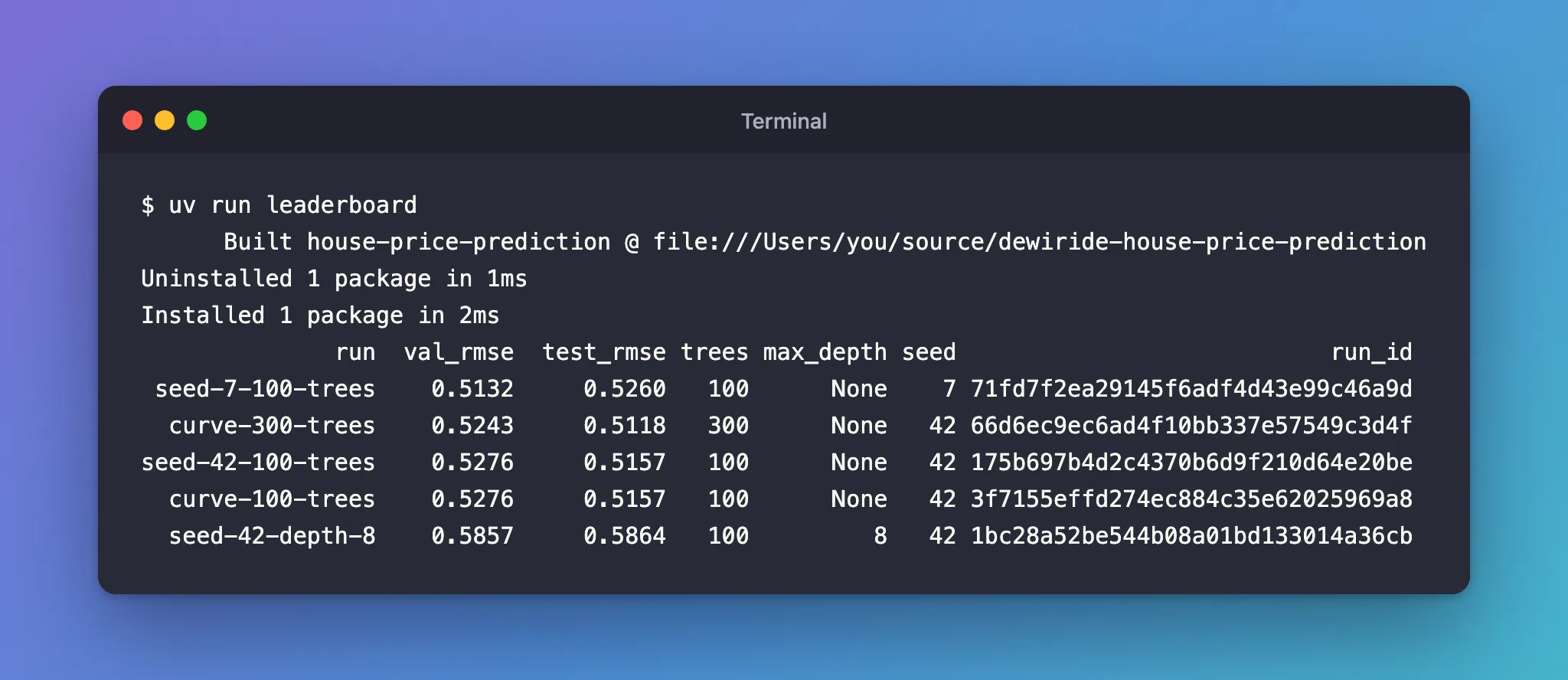
The first three lines are uv rebuilding and reinstalling your project, because pyproject.toml gained a command; they don't appear again. The stopped run would have ranked fifth with its 0.5308; the status condition kept it out. Among the two runs tied at 0.5276, the newer one, seed-42-100-trees, comes first. How to Find the Best Run in MLflow covers the ideas behind the search.
--help lists the two options:
uv run leaderboard --help
usage: leaderboard [-h] [--top TOP] [--filter FILTER]

List the finished runs with the lowest validation RMSE, best first.

options:
  -h, --help       show this help message and exit
  --top TOP        how many runs to show (default: 5)
  --filter FILTER  an extra MLflow search condition, for example "params.max_depth = '8'"
--top changes how many runs it shows:
uv run leaderboard --top 3
              run  val_rmse  test_rmse trees max_depth seed                           run_id
 seed-7-100-trees    0.5132     0.5260   100      None    7 71fd7f2ea29145f6adf4d43e99c46a9d
  curve-300-trees    0.5243     0.5118   300      None   42 66d6ec9ec6ad4f10bb337e57549c3d4f
seed-42-100-trees    0.5276     0.5157   100      None   42 175b697b4d2c4370b6d9f210d64e20be
Step 9: Compare Like with Like
seed-7-100-trees leads, but its validation score comes from different rows: the seed decides how the data is split. A fair ranking compares runs scored on the same validation set. Add the digest from Step 7 as an extra condition:
uv run leaderboard --filter "datasets.digest = 'eba3edbe'"
              run  val_rmse  test_rmse trees max_depth seed                           run_id
seed-42-100-trees    0.5276     0.5157   100      None   42 175b697b4d2c4370b6d9f210d64e20be
  seed-42-depth-8    0.5857     0.5864   100         8   42 1bc28a52be544b08a01bd133014a36cb
Two finished runs share those validation rows, and on them, the unlimited-depth forest beats depth 8. Choose the best model by the validation score, and report the test score only for the one you choose: picking by test score would make the test set part of the selection.
Step 10: Let the Server Find a Run by Name
Part 2's curve command found a run by asking for the experiment's runs and checking each name in Python:
    runs = client.search_runs([experiment.experiment_id], order_by=["attributes.start_time DESC"])
    run = next((r for r in runs if r.info.run_name == args.run_name), None)
    if run is None:
        print(f"No run called {args.run_name!r} in {experiment.name!r}")
        return 1
MlflowClient().search_runs() returns at most 1,000 runs per call, so in a bigger experiment an older run would never be found. A filter lets the server do the matching and send back only the newest run with that name. Add this function above main():
def run_name_filter(name: str) -> str:
    """A search condition that matches runs with exactly this name.

    MLflow reads a value between single or double quotes and has no way to escape a quote
    inside it, so a name can contain one kind of quote but not both."""
    if "'" not in name:
        return f"attributes.run_name = '{name}'"
    if '"' not in name:
        return f'attributes.run_name = "{name}"'
    raise ValueError("a name with both ' and \" can't be searched for")
A name like bob's run can't sit inside single quotes, so the function uses double quotes for it. Then replace those five lines from Part 2 with the search:
    try:
        name_filter = run_name_filter(args.run_name)
    except ValueError as error:
        print(f"Can't look up {args.run_name!r}: {error}")
        return 1
    runs = client.search_runs(
        [experiment.experiment_id],
        filter_string=name_filter,
        order_by=["attributes.start_time DESC"],
        max_results=1,
    )
    if not runs:
        print(f"No run called {args.run_name!r} in {experiment.name!r}")
        return 1
    run = runs[0]
The complete file:
"""Show how a run's validation score changed as its forest grew, read back from MLflow."""

import argparse
from collections.abc import Sequence

from mlflow import MlflowClient

from house_price_prediction.config import get_settings

LOWER_IS_BETTER = {"val_mae", "val_rmse"}


def parse_args(argv: Sequence[str] | None = None) -> argparse.Namespace:
    """Read the run's name and the score to show from the command line."""
    parser = argparse.ArgumentParser(
        prog="curve",
        description="Print a run's validation score after each training step, and the best step.",
    )
    parser.add_argument("run_name", help="the run's name, as shown in the MLflow UI")
    parser.add_argument(
        "--metric",
        default="val_rmse",
        choices=["val_rmse", "val_mae", "val_r2"],
        help="the score to show (default: val_rmse)",
    )
    return parser.parse_args(argv)


def run_name_filter(name: str) -> str:
    """A search condition that matches runs with exactly this name.

    MLflow reads a value between single or double quotes and has no way to escape a quote
    inside it, so a name can contain one kind of quote but not both."""
    if "'" not in name:
        return f"attributes.run_name = '{name}'"
    if '"' not in name:
        return f'attributes.run_name = "{name}"'
    raise ValueError("a name with both ' and \" can't be searched for")


def main(argv: Sequence[str] | None = None) -> int:
    """Find the newest run with the given name and print its metric history, step by step."""
    args = parse_args(argv)
    settings = get_settings()
    client = MlflowClient(tracking_uri=settings.mlflow_tracking_uri)

    experiment = client.get_experiment_by_name(settings.mlflow_experiment_name)
    if experiment is None:
        print(f"No experiment called {settings.mlflow_experiment_name!r}")
        return 1
    try:
        name_filter = run_name_filter(args.run_name)
    except ValueError as error:
        print(f"Can't look up {args.run_name!r}: {error}")
        return 1
    runs = client.search_runs(
        [experiment.experiment_id],
        filter_string=name_filter,
        order_by=["attributes.start_time DESC"],
        max_results=1,
    )
    if not runs:
        print(f"No run called {args.run_name!r} in {experiment.name!r}")
        return 1
    run = runs[0]

    history = sorted(client.get_metric_history(run.info.run_id, args.metric), key=lambda m: m.step)
    if not history:
        print(f"Run {args.run_name!r} has no {args.metric!r} history")
        return 1
    for point in history:
        print(f"{point.step:5d} trees  {args.metric} {point.value:.4f}")
    pick = min if args.metric in LOWER_IS_BETTER else max
    best = pick(history, key=lambda m: m.value)
    print(f"Best {args.metric}: {best.value:.4f} at {best.step} trees")
    return 0
Check that it still finds runs:
uv run curve seed-7-100-trees
   10 trees  val_rmse 0.5359
   20 trees  val_rmse 0.5206
   30 trees  val_rmse 0.5182
   40 trees  val_rmse 0.5151
   50 trees  val_rmse 0.5157
   60 trees  val_rmse 0.5153
   70 trees  val_rmse 0.5148
   80 trees  val_rmse 0.5144
   90 trees  val_rmse 0.5142
  100 trees  val_rmse 0.5132
Best val_rmse: 0.5132 at 100 trees
curve finds the run as before, with the server doing the matching. How to Find an MLflow Run by Name shows the name filters on their own.
Step 11: Delete the Stopped Run
1000-trees has served its purpose. In the UI, search attributes.status = 'FAILED', tick the run, and click Delete:

Confirm with Delete selected. The run leaves the table but isn't erased: click State: Active, choose Deleted, and it's there, ready to be restored if you change your mind:
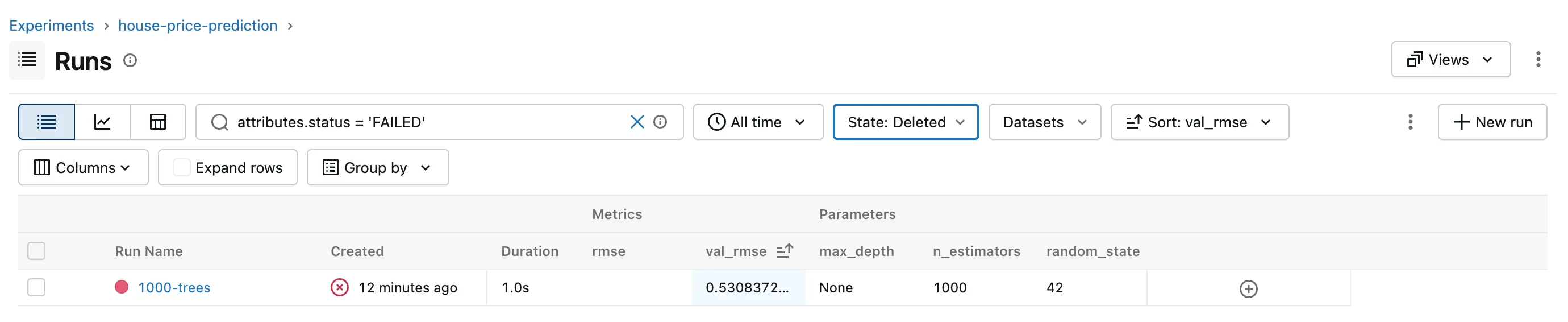
How to Delete a Run in MLflow and How to Restore a Deleted Run in MLflow cover both directions. To remove the run for good, run mlflow gc in the server's folder, with your own run ID from Step 2:
cd ../mlflow-server
uv run mlflow gc --run-ids 9911669575874a48a9b971e8b1d29885 --tracking-uri http://127.0.0.1:8080
cd ../dewiride-house-price-prediction
Run with ID 9911669575874a48a9b971e8b1d29885 has been permanently deleted.
How to Permanently Delete MLflow Runs with mlflow gc explains the options. The experiment is back to the 11 runs it had after Part 3.
Step 12: Save Your Work with Git
git status --short --untracked-files=all
 M pyproject.toml
 M src/house_price_prediction/curve.py
?? src/house_price_prediction/leaderboard.py
git add .
git commit -m "Rank runs with a search and find runs by name on the server"
[master 139680a] Rank runs with a search and find runs by name on the server
 3 files changed, 112 insertions(+), 3 deletions(-)
 create mode 100644 src/house_price_prediction/leaderboard.py
Your commit ID will differ.
Your Folders Now Look Like This
source/
├── mlflow-server/
│   ├── .venv/
│   ├── mlartifacts/
│   ├── mlflow.db
│   ├── pyproject.toml
│   └── uv.lock
└── dewiride-house-price-prediction/
    ├── .venv/
    ├── src/
    │   └── house_price_prediction/
    │       ├── __init__.py
    │       ├── config.py
    │       ├── curve.py
    │       ├── data.py
    │       ├── datasets.py
    │       ├── leaderboard.py
    │       ├── plots.py
    │       ├── reports.py
    │       └── train.py
    ├── .env
    ├── .env.example
    ├── .gitignore
    ├── .python-version
    ├── README.md
    ├── pyproject.toml
    └── uv.lock
Do It with the CLI
Step 11's clicks also work from the terminal, before mlflow gc removes the run for good. These commands delete the stopped run, list the experiment's deleted runs, and restore the run, using your own run ID. --env-file .env loads the server's address from your project's .env, the same way in every shell:
uv run mlflow --env-file .env runs delete --run-id 9911669575874a48a9b971e8b1d29885
uv run mlflow --env-file .env runs list --experiment-id 1 --view deleted_only
uv run mlflow --env-file .env runs restore --run-id 9911669575874a48a9b971e8b1d29885
Loaded environment variables from: .env
Run with ID 9911669575874a48a9b971e8b1d29885 has been deleted.
Loaded environment variables from: .env
Date                     Name        ID
-----------------------  ----------  --------------------------------
2026-11-20 14:35:21 IST  1000-trees  9911669575874a48a9b971e8b1d29885
Loaded environment variables from: .env
Run with id 9911669575874a48a9b971e8b1d29885 has been restored.
The experiment's ID is 1, the number in its address in the UI. A restored run is active again, so delete it once more before mlflow gc, which removes only deleted runs. How to List MLflow Runs from the Command Line covers mlflow runs list. The terminal has no search; for filters, use mlflow.search_runs() in Python, as leaderboard does.
Stop the Server When You're Done
Go to the first terminal and press Ctrl+C. Your runs stay in mlflow.db and mlartifacts/, and uv run mlflow server --port 8080 in the mlflow-server folder brings them back.
Keep both folders for Part 5. If you ever want to remove everything the series created, stop the server first, then delete the mlflow-server and dewiride-house-price-prediction folders, and the scikit_learn_data folder in your home folder.
Common Mistakes
| Mistake | What happens | Do this instead |
|---|---|---|
| Ranking runs without a status condition | A stopped run's partial score ranks among finished ones: 1000-trees would have been fifth | Add attributes.status = 'FINISHED' |
| Comparing validation scores from different splits | seed-7-100-trees looks best, but it was scored on other rows | Compare runs with the same validation digest, as in Step 9 |
uv run leaderboard --filter "params.max_depth > 8" | MLflow couldn't run the search: INVALID_PARAMETER_VALUE: Expected a quoted string value for parameter (e.g. 'my-value'). Got value 8 | Compare parameters as text: params.max_depth = '8' |
| Picking the final model by test score | The test set stops being a fair final check | Pick by validation score, report the test score |
Troubleshooting
| Symptom | Likely cause | Fix |
|---|---|---|
No finished runs with a validation RMSE in 'house-price-prediction' | No finished run matches: none has logged val_rmse yet, or your --filter matches none of them | Train a run with Part 2's code, or loosen the filter |
WARNING mlflow.tracking.fluent: Cannot retrieve experiment by name house-prices, then No finished runs ... | MLFLOW_EXPERIMENT_NAME in .env names an experiment that doesn't exist | Use the name the UI shows, house-price-prediction |
| The search box adds backticks and nothing happens | The first Enter picked a suggestion | Press Esc, then Enter: the fix |
error: Failed to spawn: leaderboard | The leaderboard line is missing from [project.scripts] in pyproject.toml | Add it, as in Step 8 |
mlflow gc ends with MlflowException: Run with id=... not found | It ran in another folder, so it created a new mlflow.db with no runs there and looked in that | Delete the new mlflow.db so Git doesn't pick it up, and run gc in mlflow-server, as in Step 11 |
FAQ
Why rank by validation RMSE and not test RMSE?
The validation rows exist to choose between models; the test rows exist to measure the chosen one once, on data that played no part in the choice. Using the test score to pick the winner turns it into one more validation score.
Do I need the UI's search if I have the leaderboard?
They answer different questions. The UI is quick for looking around and checking a hunch; leaderboard is a repeatable answer you can run after every training session, and its search works the same in any Python code.
Can I get a run back after mlflow gc?
No. gc removes the run from the server's records and its files from mlartifacts/, and restoring it afterwards fails with RESOURCE_DOES_NOT_EXIST: Run with id=... not found. Until you run gc, a deleted run can always be restored.
Conclusion
The house price experiment is now searchable. In the UI, filters on metrics.val_rmse, attributes.status, params.max_depth and datasets.digest found the stopped run, the depth-8 forests and the runs scored on the same rows, and sorting put the best run on top. The new leaderboard command runs the same kind of search with mlflow.search_runs(), ranking only finished runs by validation RMSE and comparing like with like through the digest. curve now lets the server find a run by name, and the stopped run was deleted and removed for good with mlflow gc.
In Part 5 you'll let MLflow log the training for you with autologging, and tune the forest's settings with nested runs.
Additional Resources
- Search Runs — MLflow's guide to searching runs, in the UI and in Python.
- mlflow.search_runs and MlflowClient.search_runs — the two search functions.
- mlflow gc — permanently deleting runs.
← Previous: Part 3: Log Artifacts and Datasets
Next → Part 5: Autologging and Hyperparameter Tuning with Nested Runs (coming soon)
