How to Write Git Conventional Commits (feat, fix and BREAKING CHANGE)

Conventional Commits is a simple format for Git commit messages: each one starts with a type such as feat or fix, so people and tools can tell what a commit does from its first line. This guide explains the format, then writes every kind of commit in a small practice repository, with Git's real output.
Syntax
A conventional commit message has a header, an optional body and optional footers, with a blank line between them. This is its general form, from the Conventional Commits 1.0.0 specification:
<type>(<scope>)!: <description>
<body>
<footer-value>
| Part | Required | What goes there |
|---|---|---|
<type> | Yes | A word that says what kind of change this is, such as feat or fix. The common types are in the next table. |
(<scope>) | No | The part of the project the change touches, in parentheses, such as (parser) or (api). |
! | No | Marks a breaking change: a change that stops something working for the people who use the project. It goes right before the colon. |
: | Yes | A colon and a space. Without the space, the message doesn't follow the format. |
<description> | Yes | A short summary of the change. |
<body> | No | More detail: what changed and why. It starts one blank line after the header and can have several paragraphs. |
<footer-token>: <footer-value> | No | Extra information, one blank line after the body, such as Refs: #123. A token uses - instead of spaces (Reviewed-by), and Fixes #123, with a space and #, works too. |
BREAKING CHANGE: <what breaks> | No | The footer that marks a breaking change and says what breaks. It must be in capitals, and BREAKING-CHANGE means the same. |
The specification defines two types, feat and fix, and allows any others. For the others, it points to the list in @commitlint/config-conventional, which comes from Angular's commit guidelines. The descriptions below are commitlint's, shortened:
| Type | What it's for | Example header | Version change |
|---|---|---|---|
feat | A new feature | feat: add a dark theme | Minor (1.4.0 → 1.5.0) |
fix | A bug fix | fix: stop the menu closing on scroll | Patch (1.4.0 → 1.4.1) |
docs | Documentation only changes | docs: explain the install steps | None |
style | Changes that do not affect the meaning of the code (white-space, formatting, missing semi-colons) | style: indent with two spaces | None |
refactor | A code change that neither fixes a bug nor adds a feature | refactor: split the parser into two files | None |
perf | A code change that improves performance | perf: cache the price list | None |
test | Adding missing tests or correcting existing tests | test: cover an empty cart | None |
build | Changes that affect the build system or external dependencies | build: update the image library | None |
ci | Changes to CI configuration files and scripts | ci: run checks on every pull request | None |
chore | Other changes that don't modify source or test files | chore: ignore log files | None |
revert | Reverts a previous commit | revert: let us never again speak of the noodle incident | None |
Any type with ! or a BREAKING CHANGE footer | A breaking change | feat!: drop support for Node 6 | Major (1.4.0 → 2.0.0) |
The last column follows the specification, which matches commits to Semantic Versioning: a fix means a patch release, a feat a minor release and a breaking change a major release. The other types don't change the version on their own.
The forms you'll type most often:
feat: <description>for a new featurefix(<scope>): <description>for a bug fix in one part of the project<type>!: <description>, often with aBREAKING CHANGE: <what breaks>footer, for a breaking change
Prerequisites
- Git. Check it in a terminal:
git --version
git version 2.56.1
- Your name and email set in Git, because every commit records them. Git's First-Time Git Setup page shows the two
git configcommands.
Every command in this guide works unchanged in bash, zsh and PowerShell.
Step 1: Create a Practice Repository
The example is a tiny project called greeter: one script that prints a greeting. Each step changes it a little, so every kind of commit has something real to describe.
Open a terminal in the folder where you keep your projects and run:
mkdir greeter
cd greeter
git init -b main
Initialized empty Git repository in /Users/you/projects/greeter/.git/
mkdir creates the folder, cd moves into it, and git init -b main turns it into a Git repository with a branch called main. How to Create a Git Repository and Make Your First Commit explains git init in detail.
In any text editor, create a file named greet.sh in the greeter folder, with these two lines:
#!/bin/sh
echo "Helo, World!"
The greeting has a spelling mistake: Helo. Leave it there for now. Step 4 fixes it with a fix commit.
Step 2: Commit a New Feature with feat
Stage the script and commit it with a feat message:
git add greet.sh
git commit -m 'feat: add a script that prints a greeting'
[main (root-commit) e40d909] feat: add a script that prints a greeting
 1 file changed, 2 insertions(+)
 create mode 100644 greet.sh
git addstages the file: it goes into the next commit.git commit -msaves the commit with the message that follows.featsays the commit adds a feature: here, the whole script. Then come a colon, a space and the description.e40d909is the commit's short ID. Yours will be different.
The description starts with a lowercase verb in the present tense: "add", not "Added" or "adds". The specification doesn't require that, but Angular's guidelines, where the common types come from, ask for "the imperative, present tense", no capital first letter and no full stop at the end. commitlint's default rules also reject a description in sentence case, such as "Add a script", and one that ends with a full stop.
The message is in single quotes. Single quotes work the same way in bash, zsh and PowerShell, and Step 6 shows why they matter.
Step 3: Commit Documentation with docs
Create a second file, README.md, in the same folder:
# greeter

A script that prints a greeting. Run it with `sh greet.sh`.
Then commit it as documentation:
git add README.md
git commit -m 'docs: explain how to run the script'
[main faad9a8] docs: explain how to run the script
 1 file changed, 3 insertions(+)
 create mode 100644 README.md
docs is for changes to documentation only. Nothing about how the project works has changed, so a docs commit never changes the version number.
Step 4: Commit a Bug Fix with a Body and a Footer
Fix the spelling in greet.sh, so the file reads:
#!/bin/sh
echo "Hello, World!"
This commit gets a body that explains the fix, and a footer that links it to an issue. Each -m adds one paragraph:
git add greet.sh
git commit -m 'fix: correct the spelling of Hello' -m 'The greeting said Helo instead of Hello.' -m 'Refs: #1'
[main b221545] fix: correct the spelling of Hello
 1 file changed, 1 insertion(+), 1 deletion(-)
Git's own documentation for -m says: "If multiple -m options are given, their values are concatenated as separate paragraphs." That's exactly the layout the format needs: the header, a blank line, the body, a blank line, the footers. git log -1 shows the last commit with its whole message:
git log -1
commit b221545252cded070b36abc007ececd01f735002 (HEAD -> main)
Author: Your Name <you@example.com>
Date:   Tue Nov 24 06:54:03 2026 +0000

    fix: correct the spelling of Hello

    The greeting said Helo instead of Hello.

    Refs: #1
- The header is the short summary that every one-line view of the history shows.
- The body says why the change was needed.
Refs: #1points to issue 1 in your issue tracker. In a real project, use the number of the issue the commit fixes.
If you'd rather write a long message in an editor, run git commit without -m. Git opens your editor, and you type the same paragraphs there, with a blank line between them.
Step 5: Add a Scope
Add a second line to greet.sh:
#!/bin/sh
echo "Hello, World!"
echo "Have a nice day."
Commit it as a feature, with the scope in parentheses:
git add greet.sh
git commit -m 'feat(greet): wish the reader a nice day'
[main e372f43] feat(greet): wish the reader a nice day
 1 file changed, 1 insertion(+)
The scope, greet, names the part of the project that changed: here, the greet script. In a bigger project, scopes are names like api, parser or ui. Agree on a short list as a team, so the same part always gets the same scope.
Step 6: Mark a Breaking Change
A breaking change stops something working for the people who use your project. Renaming the script is one: anyone who runs sh greet.sh has to switch to the new name.
Rename the file with Git:
git mv greet.sh hello.sh
git mv renames the file and stages the rename in one go. It prints nothing.
The README still names the old file. Change it to the new name:
# greeter

A script that prints a greeting. Run it with `sh hello.sh`.
Then commit both changes together, with a ! in the header and a BREAKING CHANGE footer:
git add README.md
git commit -m 'refactor(greet)!: rename greet.sh to hello.sh' -m 'The new name matches the greeting the script prints.' -m 'BREAKING CHANGE: greet.sh no longer exists. Run hello.sh instead.'
[main 0167d9d] refactor(greet)!: rename greet.sh to hello.sh
 2 files changed, 1 insertion(+), 1 deletion(-)
 rename greet.sh => hello.sh (100%)
The three -m options built this message, with every part of the format in it:
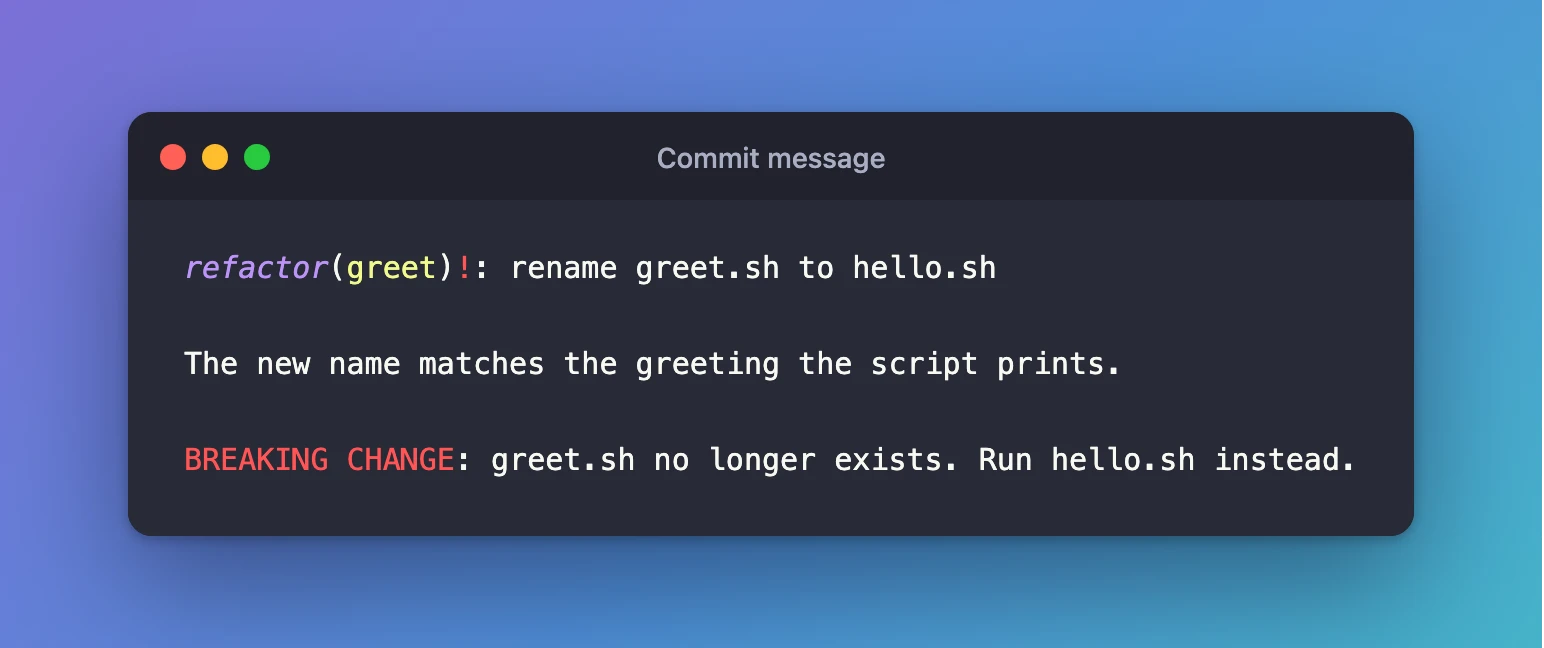
refactor(greet)!: rename greet.sh to hello.sh
The new name matches the greeting the script prints.
greet.sh no longer exists. Run hello.sh instead.
refactoris the type: the code changed without a new feature or a bug fix. A breaking change can have any type.!right before the colon marks the commit as breaking, so the header alone says so.- The
BREAKING CHANGE:footer says what breaks and what to do instead. Either the!or the footer is enough, and the specification's own examples use both together.
In bash and zsh, an exclamation mark inside double quotes starts history expansion, which reuses words from earlier commands. With "refactor(greet)!: …", zsh stops with zsh: illegal modifier: and bash with bash: : unrecognized history modifier, and nothing is committed. Single quotes pass the ! to Git as it is. Fixed: "zsh: illegal modifier" in git commit -m with an Exclamation Mark shows the error and why it happens.
Step 7: Fix a Message That Doesn't Follow the Format
Create a .gitignore file that keeps log files out of the repository:
*.log
Here it's committed out of habit, with a plain message:
git add .gitignore
git commit -m 'Add gitignore'
[main 0f19381] Add gitignore
 1 file changed, 1 insertion(+)
 create mode 100644 .gitignore
That message has no type, so tools that read Conventional Commits skip it. As long as you haven't pushed the commit, give it a new message with --amend:
git commit --amend -m 'chore: ignore log files'
[main a926b38] chore: ignore log files
 Date: Tue Nov 24 06:54:08 2026 +0000
 1 file changed, 1 insertion(+)
 create mode 100644 .gitignore
--amend replaces the last commit with a new one: the same changes, author and date, but the new message and a new ID (a926b38 instead of 0f19381). chore fits a change that touches neither the script nor its tests.
Amend only commits you haven't pushed. Other people may already have a pushed commit, and Git's documentation warns: "You should understand the implications of rewriting history if you amend a commit that has already been published."
Step 8: Find Commits by Type
Now look at the whole history, one commit per line:
git log --oneline
a926b38 (HEAD -> main) chore: ignore log files
0167d9d refactor(greet)!: rename greet.sh to hello.sh
e372f43 feat(greet): wish the reader a nice day
b221545 fix: correct the spelling of Hello
faad9a8 docs: explain how to run the script
e40d909 feat: add a script that prints a greeting
Every line starts with a type, so the history reads like a list of changes. --grep keeps only the commits whose message matches a pattern. This finds the features:
git log --oneline --grep '^feat'
e372f43 feat(greet): wish the reader a nice day
e40d909 feat: add a script that prints a greeting
^feat means "a line that starts with feat", so it matches feat: and feat(greet):. This finds the breaking changes:
git log --oneline --grep '!:' --grep 'BREAKING[ -]CHANGE'
0167d9d refactor(greet)!: rename greet.sh to hello.sh
With two --grep options, Git lists the commits that match either one: a ! right before a colon, or a BREAKING CHANGE footer. [ -] matches a space or a hyphen, because the footer may also be written BREAKING-CHANGE.
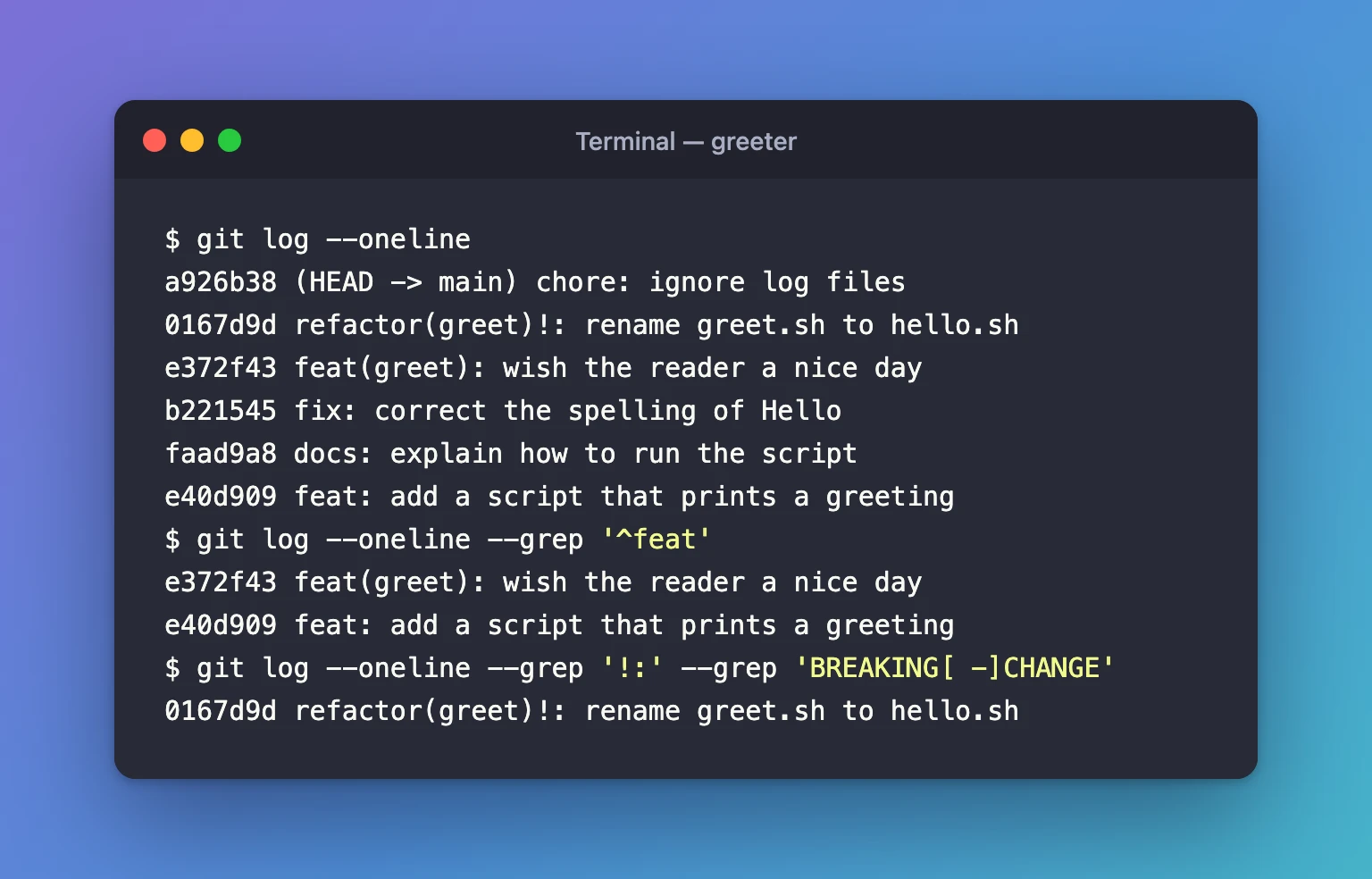
This is where the format pays off. Say version 1.0.0 was released before these commits. They include features, a fix and a breaking change, and the biggest of those decides the next version: 2.0.0. Without the breaking change, the features would make it 1.1.0, and a fix alone would make it 1.0.1. Release tools such as semantic-release and release-please read commit headers this way to choose version numbers and write changelogs.
Common Mistakes
| Mistake | What happens | Do this instead |
|---|---|---|
No space after the colon: feat:add a theme | The message doesn't follow the format, so tools that read it skip the commit | Always type a colon and a space: feat: add a theme |
A message with ! in double quotes, in bash or zsh | The shell stops with an error and nothing is committed | Use single quotes |
breaking change: in lowercase | The specification says the token must be uppercase, so tools miss the breaking change | Write BREAKING CHANGE: in capitals |
A header that starts with BREAKING CHANGE: | commitlint's default rules reject it (header-breaking-change) | Put BREAKING CHANGE: in a footer, or add ! after the type |
| One commit with several unrelated changes | No single type describes it | Make one commit per change, as the specification's FAQ suggests |
| Amending a commit you already pushed | Your history no longer matches what others have | Amend only commits you haven't pushed |
Troubleshooting
| Symptom | Likely cause | Fix |
|---|---|---|
zsh: illegal modifier: or zsh: no such event: 0 | A ! inside double quotes in zsh | Put the message in single quotes |
bash: : unrecognized history modifier or bash: !: event not found | A ! inside double quotes in bash | Put the message in single quotes |
error: pathspec '…' did not match any file(s) known to git | The message wasn't in quotes, so Git read its words as file names | Put the whole message in quotes |
FAQ
Which commit types can I use?
Any. The specification defines only feat and fix and allows others. The list it points to is commitlint's, in the table above: build, chore, ci, docs, feat, fix, perf, refactor, revert, style and test. What matters is that everyone on the team uses the same list.
Do types have to be lowercase?
No. The specification says tools must not treat the parts of a message as case-sensitive, except BREAKING CHANGE, which must be uppercase. Its FAQ adds: "Any casing may be used, but it's best to be consistent." The specification's own examples are all lowercase, and commitlint's default rules require lowercase types.
What if a commit fits more than one type?
The specification's answer: "Go back and make multiple commits whenever possible." A commit that adds a feature and fixes an unrelated bug is easier to understand, and to undo, as two commits.
How do I write a revert commit?
The specification leaves reverts to tools, and recommends the revert type with a footer that lists the IDs of the commits being reverted:
revert: let us never again speak of the noodle incident
676104e, a215868
I used the wrong type in an older commit. Can I change it?
git commit --amend only changes the last commit. For an older one, the specification recommends git rebase -i before the commit is merged or released. After a release, it depends on the tools you use.
Can Git reject messages that don't follow the format?
Yes. Git runs a commit-msg hook before saving a commit, and its documentation says the hook "can also be used to refuse the commit after inspecting the message file". commitlint is a tool built for that check.
Conclusion
A conventional commit starts with a type, an optional scope and !, a colon and a space, and a short description. A body and footers can follow, each after a blank line. In the practice repository, each -m added one paragraph, single quotes kept the ! safe in every shell, and --amend fixed a message that didn't follow the format. In return, git log --grep can pick out features, fixes and breaking changes, and the history itself says what the next version number should be.
Additional Resources
- Conventional Commits 1.0.0: the specification, with examples and an FAQ.
- git commit:
-m,--amendand the other options. - git log:
--grep,--onelineand--all-match. - Semantic Versioning 2.0.0: what major, minor and patch versions mean.
- @commitlint/config-conventional: the common list of types.
- githooks: the
commit-msghook.
