How to Write a MySQL Connection String for .NET C#

Every .NET C# app that talks to MySQL starts with a connection string: one line that says where the server is, which database to use, who you are, and how to protect the connection. This guide builds one for Oracle's MySql.Data driver, which EF Core's MySql.EntityFrameworkCore provider also uses, explains each key with its documented default, and tests it with a small C# program that tells you exactly how it connected.
What a Connection String Is
Oracle's Connector/NET guide defines it: "A connection string contains several key-value pairs, separated by semicolons. In each key-value pair, the option name and its corresponding value are joined by an equal sign." Spelling doesn't matter much: "Connector/NET option names and synonyms are not case sensitive."
The one this guide builds:
Server=127.0.0.1;Port=3306;Database=inventory;User ID=inventory_app;Password=…;SslMode=Required
Prerequisites
- The .NET 10 SDK. Check with
dotnet --version. - A MySQL server and an account. The examples use MySQL 9.7 in Docker from How to Run MySQL in Docker with Docker Compose: database
inventory, accountinventory_app, published on127.0.0.1:3306, with the password in a.envfile next tocompose.yaml.
Step 1: The Keys, One by One
Each key, with the default from Oracle's connection options reference for when you leave it out:
| Key | Value here | Default | What it is |
|---|---|---|---|
Server | 127.0.0.1 | localhost | "The name or network address of one or more host computers." |
Port | 3306 | 3306 | "The port MySQL is using to listen for connections." |
Database | inventory | mysql | "The case-sensitive name of the database to use initially." |
User ID | inventory_app | none | "The MySQL login account being used." |
Password | the account's password | empty | The password for that account |
SslMode | Required | Preferred | Whether and how to encrypt the connection: Step 2 |
Two of those defaults are worth overriding even when they'd work:
Server=127.0.0.1instead oflocalhost. It's the address the Docker port is published on, and it can't be mistaken for anything else.Database: the default,mysql, is MySQL's own system database. Always name yours. Database names are case-sensitive on Linux and in Docker.
Each key has synonyms, which is why you'll see other spellings in other guides: Host or Data Source for Server, Uid or User for User ID, Pwd for Password, Initial Catalog for Database.
Step 2: Choose SslMode
SslMode decides whether the connection is encrypted with TLS, and how much the driver checks the server. The reference lists the values:
| Value | Meaning, from the reference |
|---|---|
Disabled | "Do not use SSL." |
Preferred | "Use SSL if the server supports it, but allow connection in all cases." |
Required | "Always use SSL. Deny connection if server does not support SSL." |
VerifyCA | "Always use SSL. Validate the certificate authorities (CA), but tolerate a name mismatch." |
VerifyFull | "Always use SSL. Fail if the host name is not correct." |
- On your development machine, use
Required. The official MySQL Docker image creates its own self-signed certificate, so the encryption works, but there's no trusted certificate authority to verify. - In production, use
VerifyCAorVerifyFullwith the server's real CA certificate. Only those check that you're talking to your server. - Avoid
Disabled. Without TLS, MySQL's default sign-in method needs extra steps and can fail with "Retrieval of the RSA public key is not enabled for insecure connections"; that error has its own post. - Don't use
None. It was an old name forDisabled, and the Connector/NET 9.6.0 release notes say: "Removed the deprecated option, None, from MySqlSslMode."
Why not keep the default, Preferred? It allows an unencrypted connection when TLS isn't available, and you wouldn't notice. Required fails loudly instead.
Step 3: Test It with a One-File Program
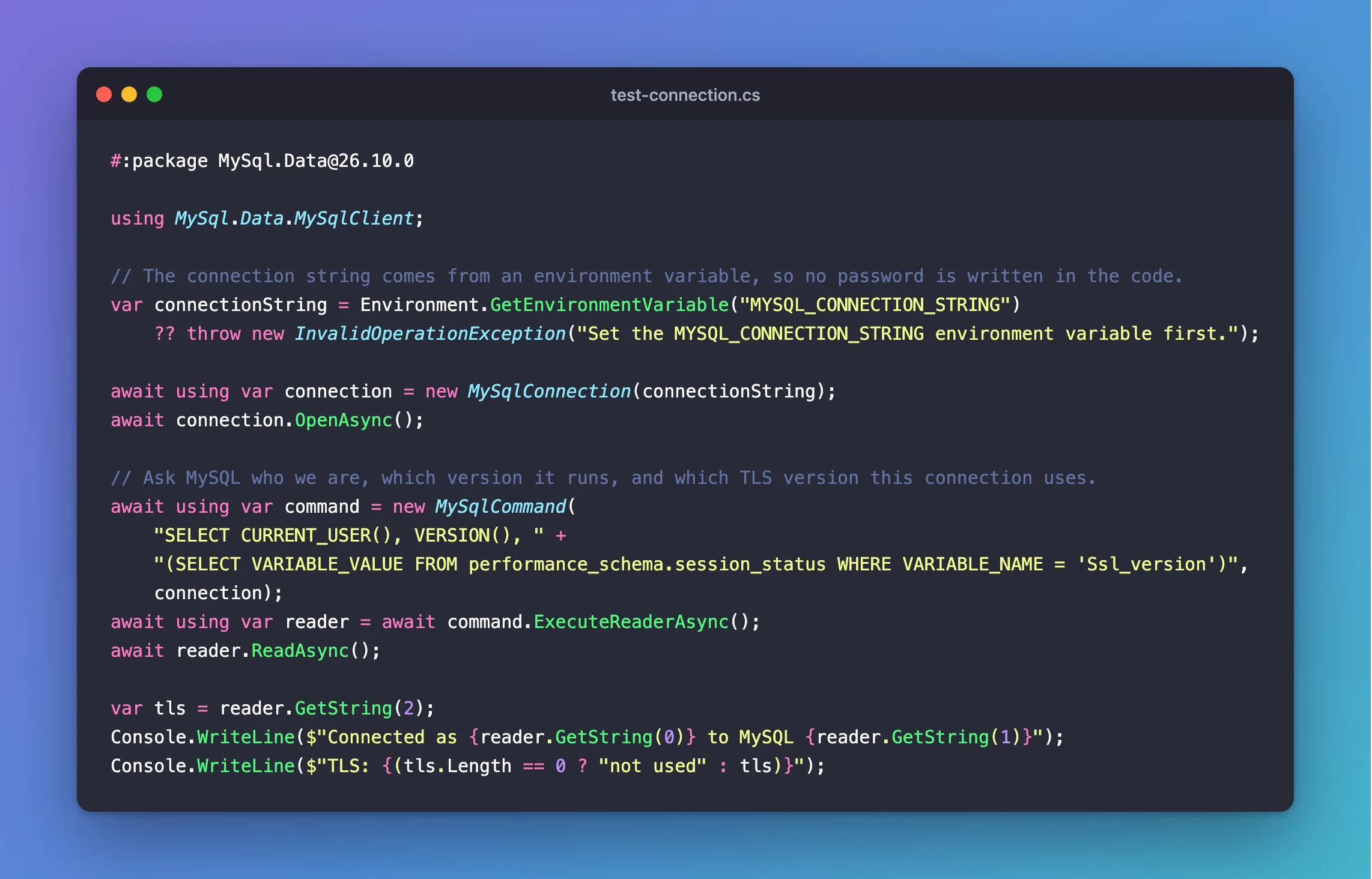
Before you put the string into an app, prove it works. .NET 10 can run a single C# file without a project, and a file can name the NuGet packages it needs with a #:package line. Create a folder next to your project, called mysql-connection-test, and in it this file:
#:package MySql.Data@26.10.0

using MySql.Data.MySqlClient;

// The connection string comes from an environment variable, so no password is written in the code.
var connectionString = Environment.GetEnvironmentVariable("MYSQL_CONNECTION_STRING")
    ?? throw new InvalidOperationException("Set the MYSQL_CONNECTION_STRING environment variable first.");

await using var connection = new MySqlConnection(connectionString);
await connection.OpenAsync();

// Ask MySQL who we are, which version it runs, and which TLS version this connection uses.
await using var command = new MySqlCommand(
    "SELECT CURRENT_USER(), VERSION(), " +
    "(SELECT VARIABLE_VALUE FROM performance_schema.session_status WHERE VARIABLE_NAME = 'Ssl_version')",
    connection);
await using var reader = await command.ExecuteReaderAsync();
await reader.ReadAsync();

var tls = reader.GetString(2);
Console.WriteLine($"Connected as {reader.GetString(0)} to MySQL {reader.GetString(1)}");
Console.WriteLine($"TLS: {(tls.Length == 0 ? "not used" : tls)}");
What it does:
#:package MySql.Data@26.10.0adds Oracle's driver, the same one EF Core's MySQL provider uses.MYSQL_CONNECTION_STRINGis read from the environment, so the password is never in the file.- The query asks MySQL three things: which account it signed you in as, its version, and the TLS version of this connection, empty when there's none.
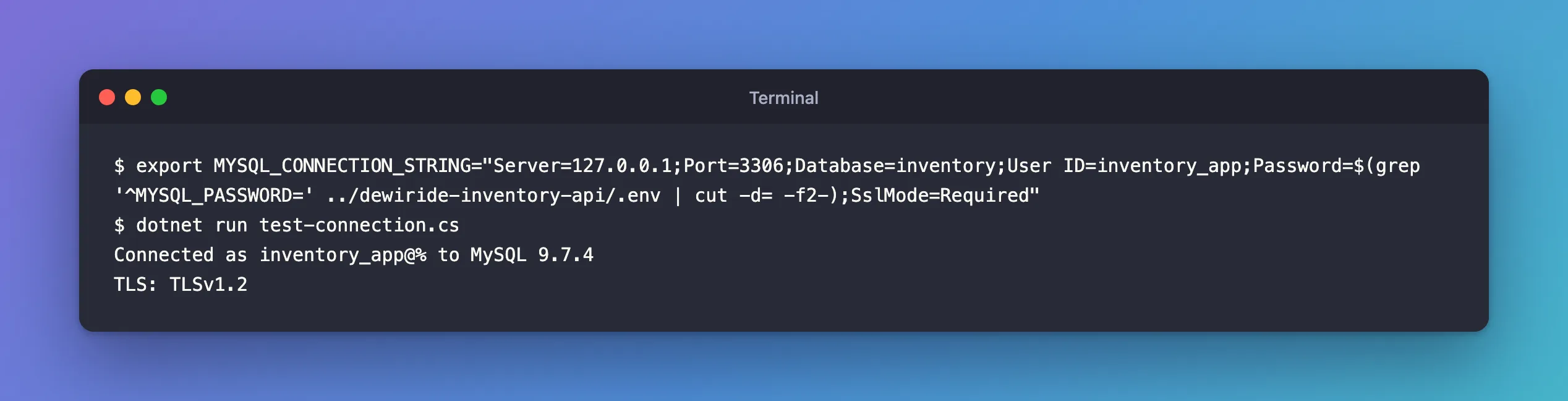
Set the variable and run the file. The commands read the password from the .env file in the project folder next door, so it never appears on screen or in your shell history:
- macOS / Linux
- Windows (PowerShell)
export MYSQL_CONNECTION_STRING="Server=127.0.0.1;Port=3306;Database=inventory;User ID=inventory_app;Password=$(grep '^MYSQL_PASSWORD=' ../dewiride-inventory-api/.env | cut -d= -f2-);SslMode=Required"
dotnet run test-connection.cs
$password = (Get-Content ../dewiride-inventory-api/.env | Where-Object { $_ -like 'MYSQL_PASSWORD=*' }).Substring('MYSQL_PASSWORD='.Length)
$env:MYSQL_CONNECTION_STRING = "Server=127.0.0.1;Port=3306;Database=inventory;User ID=inventory_app;Password=$password;SslMode=Required"
dotnet run test-connection.cs
Connected as inventory_app@% to MySQL 9.7.4
TLS: TLSv1.2
Both lines matter:
inventory_app@%is the account MySQL matched: userinventory_app, from any host (%).TLS: TLSv1.2provesSslMode=Requireddid its job. .NET on macOS negotiates TLS 1.2 here; How to Check if a MySQL Connection Uses TLS checks the same thing from MySQL's side.
The first run takes a few seconds longer, because .NET downloads the package and builds the file once; later runs reuse that build.
Step 4: Options Worth Knowing
The string above is complete for most apps. These options have sensible defaults, so add them only when you need a different value:
| Option | Default | Meaning, from the reference |
|---|---|---|
Connection Timeout | 15 | "The length of time (in seconds) to wait for a connection to the server before terminating the attempt and generating an error." |
Default Command Timeout | 30 | The command timeout, in seconds, used when a command doesn't set its own |
Pooling | true | Reuse connections from a pool instead of opening a new one each time |
Maximum Pool Size | 100 | "The maximum number of connections allowed in the pool." |
Connection Lifetime | 0 | Seconds a pooled connection may live: older ones are closed when returned to the pool. The reference: "A value of zero (0) sets pooled connections to the maximum connection timeout." |
Leave AllowPublicKeyRetrieval at its default, false. The reference warns that it "is prone to man-in-the-middle attacks". With SslMode=Required you don't need it.
Step 5: Keep the Password Out of Your Code
A connection string with a password must never be written into appsettings.json or your code, where it ends up in Git. ASP.NET Core reads connection strings from configuration, so put it where configuration looks:
- On your development machine: .NET's Secret Manager. How to Store a Connection String in .NET C# with dotnet user-secrets shows how.
- Everywhere else: an environment variable named
ConnectionStrings__Inventory. Microsoft's configuration docs explain the double underscore: "A double underscore (__) is supported by all platforms and is automatically converted into a colon (:) when the configuration is read by the app." And environment variables win: "key values read from the environment override values read fromappsettings.json,appsettings.{ENVIRONMENT}.json, and user secrets."
Common Mistakes
| Mistake | What happens | Do this instead |
|---|---|---|
Leaving out Database | You're connected to mysql, MySQL's system database | Always name your database |
SslMode=Preferred (the default) in production | A failed TLS setup falls back to plain text, silently | Required at least; VerifyCA or VerifyFull in production |
SslMode=None | Not a valid value in current MySql.Data | Disabled, if you really mean no TLS |
localhost inside a container | It points at the app's own container | Use the Compose service name |
Troubleshooting
| Error | Meaning | Where to look |
|---|---|---|
Unable to connect to any of the specified MySQL hosts | Nothing reached MySQL at that address and port | The fixes post |
Access denied for user 'inventory_app'@'…' | MySQL was reached; the account or password is wrong | The password, and the 1045 fixes post |
Retrieval of the RSA public key is not enabled for insecure connections | TLS is off and the sign-in needs it | Use SslMode=Required |
FAQ
Does EF Core use the same connection string?
Yes. Oracle's MySql.EntityFrameworkCore hands it to MySql.Data, so everything here applies to UseMySQL(connectionString).
Can I build the string in code instead?
Yes, with MySqlConnectionStringBuilder from MySql.Data, which builds the string from properties such as Server and Database. Keep the password coming from configuration, not from the code.
Conclusion
A MySQL connection string for .NET C# is Server, Port, Database, User ID, Password and SslMode, separated by semicolons. Name your database, use SslMode=Required on your machine and VerifyCA or VerifyFull in production, and keep the password in user-secrets or an environment variable. A one-file program run with dotnet run test-connection.cs proves the string works and shows the account and TLS version you got.
Additional Resources
- Connector/NET Connection Options — every option and its default.
- Creating a Connector/NET Connection String — the format.
- Configuration in ASP.NET Core — where apps read connection strings from.
