How to Write a Custom Execution Strategy in EF Core for MySQL

EnableRetryOnFailure takes a list of numbers, and that's all it takes. With MySQL I needed two more things: to tell a dropped connection from a full pool, which share one number, and to close a broken connection before retrying. A class of your own does both, in about 20 lines.
Prerequisites
- A .NET C# project using EF Core and
MySql.EntityFrameworkCore. I used EF Core 10.0.14,MySql.EntityFrameworkCore10.0.12 and MySQL 9.7.4.
Step 1: Write the Class
Inherit from EF Core's ExecutionStrategy. Its constructor takes the dependencies, how many times to retry, and the longest delay:
using System.Data;
using Microsoft.EntityFrameworkCore;
using Microsoft.EntityFrameworkCore.Storage;
using MySql.Data.MySqlClient;

namespace Dewiride.Inventory.Data;

/// <summary>
/// Decides which MySQL errors are worth repeating an operation for. Oracle's provider has its own
/// strategy, but it treats no MySQL error as temporary unless it's listed, and it can retry on a
/// connection the driver has left broken. This one lists the errors and starts each retry clean.
/// </summary>
public sealed class MySqlRetryStrategy(
    ExecutionStrategyDependencies dependencies,
    int maxRetryCount,
    TimeSpan maxRetryDelay)
    : ExecutionStrategy(dependencies, maxRetryCount, maxRetryDelay)
{
    // Number 0 is the driver's own error. It's a dropped connection when an inner exception says
    // why, and a full connection pool when there's none: a retry would only wait for the pool again.
    protected override bool ShouldRetryOn(Exception exception) =>
        exception is MySqlException { Number: 0, InnerException: not null }
            or MySqlException
            {
                Number:
                    1040 or // Too many connections.
                    1042 or // Unable to connect to any of the specified MySQL hosts.
                    1053 or // Server shutdown in progress.
                    1213    // Deadlock found: MySQL rolled the transaction back.
            };

    protected override void OnRetry()
    {
        // When a connection fails while it's being opened, MySql.Data can leave it marked as open.
        // The next attempt would then use it and fail with a NullReferenceException.
        var connection = Dependencies.CurrentContext.Context.Database.GetDbConnection();

        if (connection.State != ConnectionState.Closed)
        {
            connection.Close();
        }
    }
}
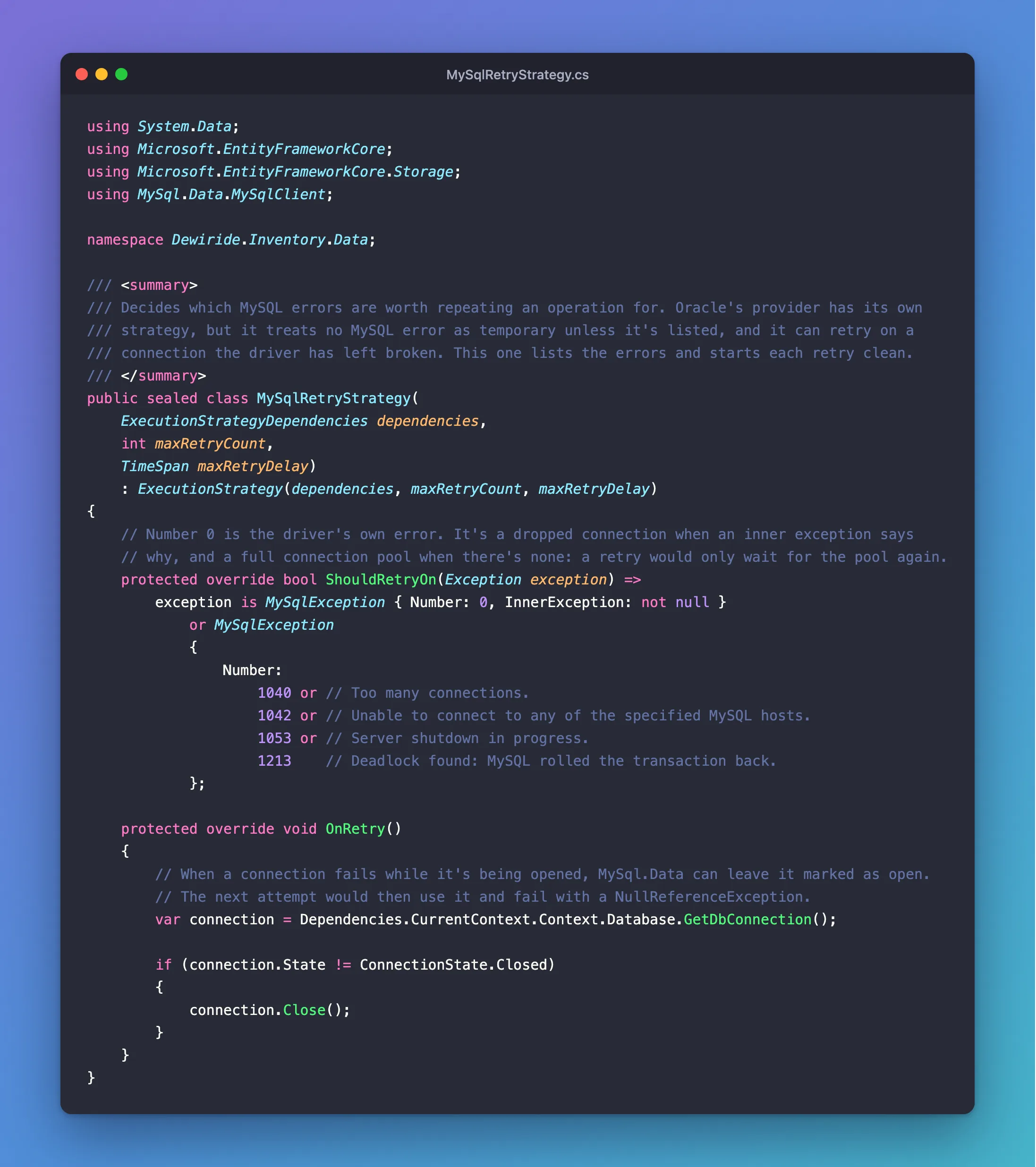
ShouldRetryOn answers one question: is this error worth another try? Two patterns cover it:
{ Number: 0, InnerException: not null }is a dropped connection. The driver gives it no number, and its inner exception says what happened. A full connection pool is also number0, with no inner exception, and retrying that means waiting for the pool again.- The listed numbers are MySQL's own errors for a deadlock, a server that's unreachable or stopping, and no free connections.
OnRetry runs before each new attempt. A connection that failed while opening can stay marked as open, so this closes it, and EF Core opens a fresh one.
Step 2: Register It
Replace EnableRetryOnFailure with this, in UseMySQL:
// Repeat an operation that failed with a temporary error, such as a deadlock
// or a dropped connection.
mySql.ExecutionStrategy(dependencies => new MySqlRetryStrategy(
    dependencies,
    database.MaxRetryCount,
    TimeSpan.FromSeconds(database.MaxRetryDelaySeconds)));
ExecutionStrategy takes a factory, because EF Core creates a new instance for each operation.
Step 3: Restart MySQL Under Load
Before this class, with EnableRetryOnFailure and the same numbers, restarting MySQL while 96 orders arrived gave:
  88 201
   8 500
The same run, with the class:
96 201
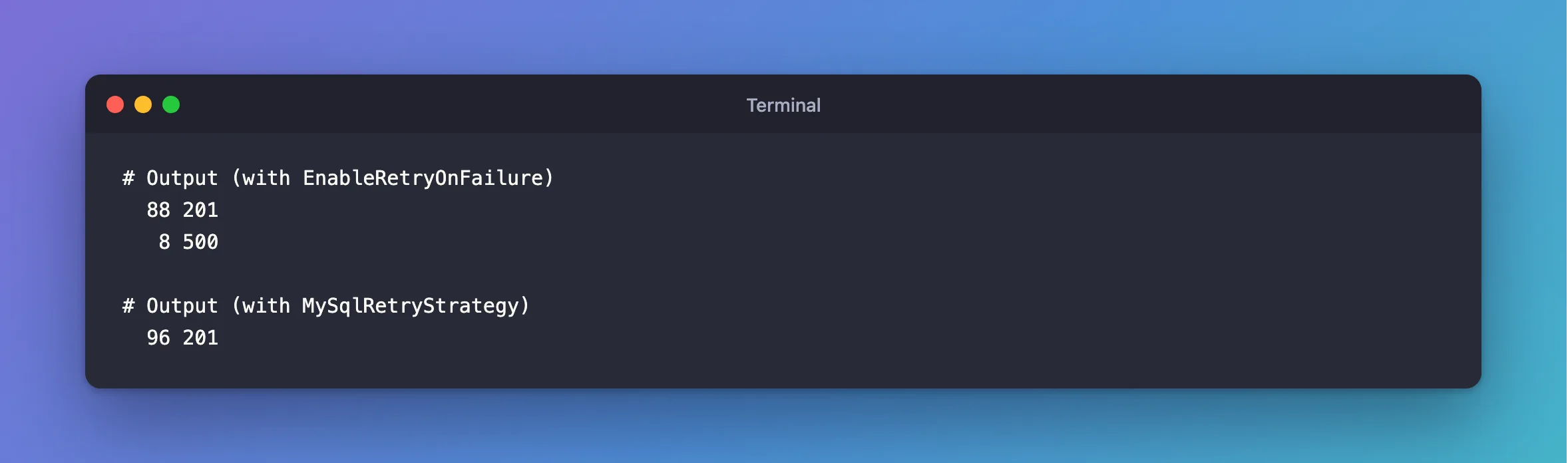
All 96 got through, with 27 retries in the log.
Step 4: Fill a Pool
When every connection is taken, the request now fails after one wait, instead of over a minute:
HTTP/1.1 503 Service Unavailable
Retry-After: 5
curl exit 0, 15.127497 s, status 503
Common Mistakes
| Mistake | What happens | Do this instead |
|---|---|---|
Retrying every MySqlException | Bad SQL and duplicate keys get retried too | Name the errors |
Forgetting to close in OnRetry | Requests can fail during a restart | Close it |
Retrying TimeoutException | The default strategy does, and a hung read never gets here | Set limits on the server |
Troubleshooting
| Symptom | Likely cause | Fix |
|---|---|---|
does not support user-initiated transactions names your class | A transaction outside the strategy | The fix |
It doesn't retry a deadlock from SaveChanges | It should: EF Core unwraps DbUpdateException | Check the error number in the log |
Conclusion
A subclass of ExecutionStrategy gives you ShouldRetryOn, to choose exactly which errors to retry, and OnRetry, to clean up before each attempt. That's what it took for a MySQL restart to cost no requests here.
Additional Resources
- Connection Resiliency — execution strategies.
- ExecutionStrategy Class — the methods.
