How to Work Out the Hours Between Two Times in Power Automate

To get the hours between two date-times as a number in Power Automate, subtract their ticks(): divide the difference by 600,000,000 for minutes, and the minutes by 60.0 for hours. A shift from 08:00 to 12:00 with a 15-minute unpaid break came out at 3.75 hours.
Microsoft's expression cookbook works out the days between two dates the same way, and says: There's no built-in dateDiff() function. You must use the ticks approach. The functions reference does list dateDifference(), but it returns the difference as a timespan in text, such as 1268.00:00:00, not as a number to subtract a break from or divide into hours.
The example is the approval flow of the Overtime Timesheet app. The app works out each shift's hours when it saves the entry; the flow works them out again from the start and finish times, so the approver sees the right number even if someone changed Hours by hand.
Prerequisites
- Two date-times in the flow. Here, the trigger's StartTime and EndTime, and the unpaid break in minutes, BreakMinutes (How to Run a Flow When a SharePoint Item Is Created or Modified in Power Automate).
How Ticks Work
The functions reference says ticks() Returns the number of ticks, which are 100-nanosecond intervals, since January 1, 0001 12:00:00 midnight. A second is 10,000,000 ticks, so a minute is 600,000,000.
Step 1: Subtract the Ticks
sub(ticks(triggerOutputs()?['body/EndTime']), ticks(triggerOutputs()?['body/StartTime']))
sub() will Return the result from subtracting the second number from the first number.
Step 2: Turn Them into Minutes, Then Take Off the Break
Divide by 600,000,000 for minutes, and subtract the break:
sub(div(sub(ticks(triggerOutputs()?['body/EndTime']), ticks(triggerOutputs()?['body/StartTime'])), 600000000), coalesce(triggerOutputs()?['body/BreakMinutes'], 0))
- Both numbers in that
div()are whole numbers, so the result is a whole number of minutes. The reference's examples saydiv(11,5)returns 2, with Integer type. Shift times in this app are whole minutes, so nothing is lost. coalesce(..., 0)uses 0 when the break is empty; it will Return the first non-null value from one or more parameters.
Step 3: Turn Minutes into Hours
Divide by 60.0, not 60:
div(sub(div(sub(ticks(triggerOutputs()?['body/EndTime']), ticks(triggerOutputs()?['body/StartTime'])), 600000000), coalesce(triggerOutputs()?['body/BreakMinutes'], 0)), 60.0)
The reference says: If either the dividend or divisor has Float type, the result has Float type. With 60, 225 minutes would be 3 hours; with 60.0, they're 3.75.
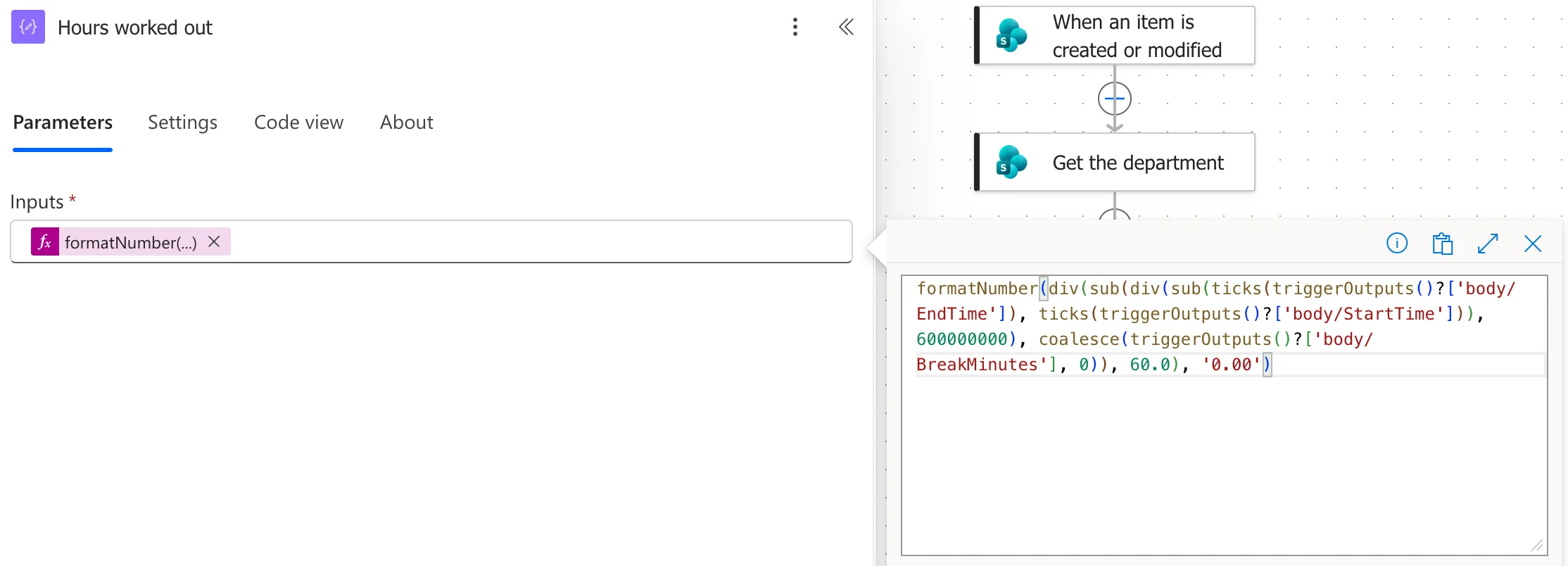
In the flow, a Compose named Hours worked out also formats the result with two decimal places (How to Format a Number with Two Decimal Places in Power Automate):
formatNumber(div(sub(div(sub(ticks(triggerOutputs()?['body/EndTime']), ticks(triggerOutputs()?['body/StartTime'])), 600000000), coalesce(triggerOutputs()?['body/BreakMinutes'], 0)), 60.0), '0.00')
The Result
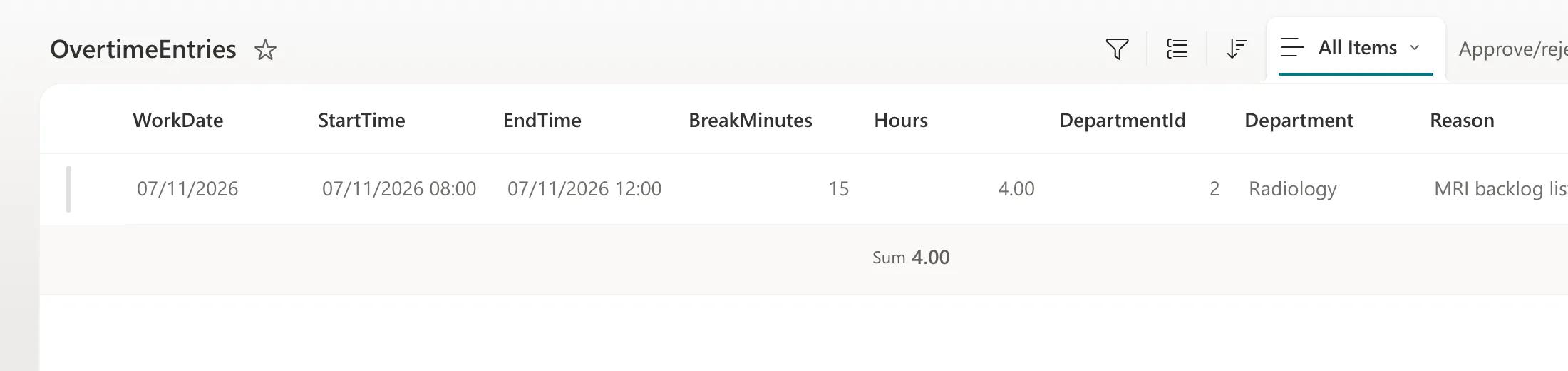
Maya Patel's shift on 7 November 2026 ran from 08:00 to 12:00 with a 15-minute break. She had changed Hours to 4.00 in SharePoint:
The flow worked it out from the times: 240 minutes, minus 15, is 225 minutes, or 3.75 hours:
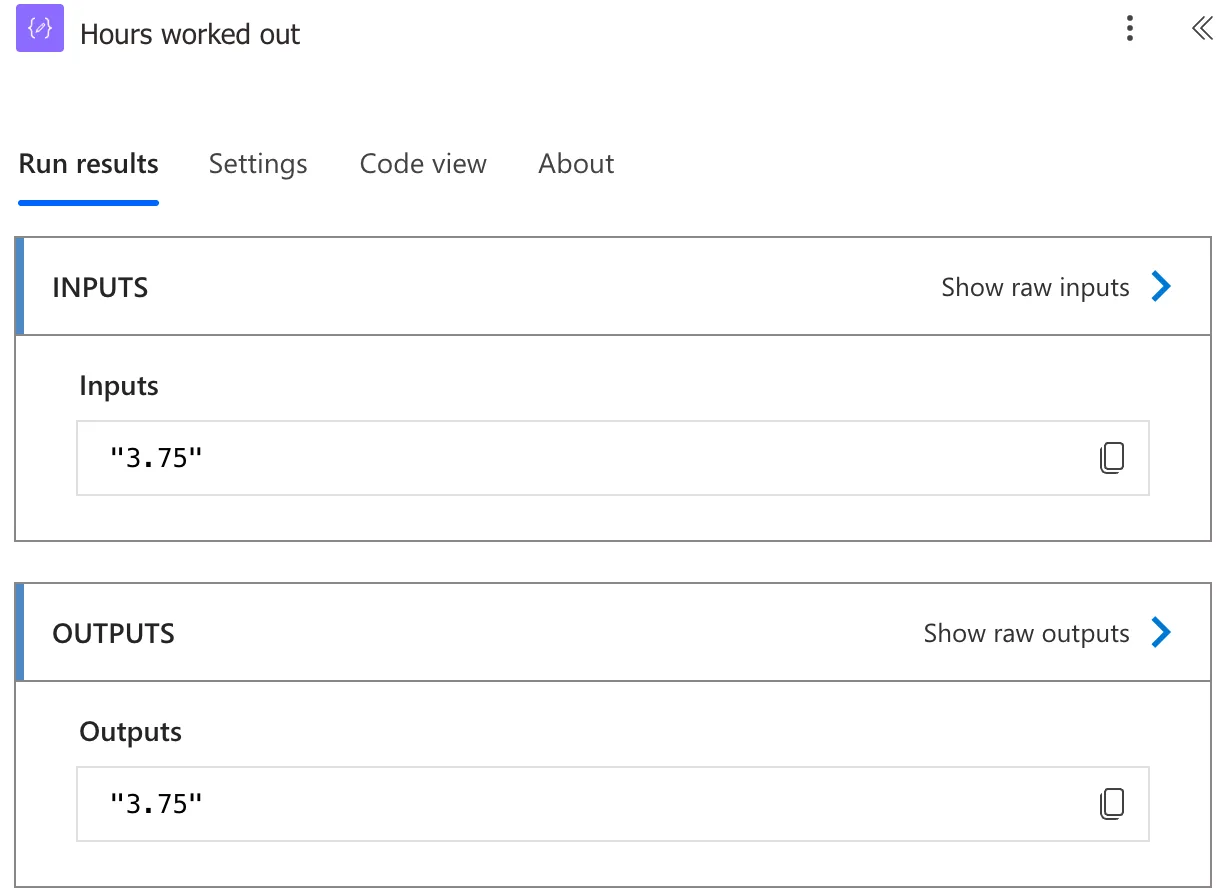
The approver saw 3.75 hours, and the flow saved 3.75 with the decision.
Clock Changes
Both times come from SharePoint in UTC, which has no summer time, so the difference between them is the time that really passed, on the nights the clocks change too. Show the times in local time only for people (How to Convert UTC to Local Time in Power Automate with convertFromUtc).
Common Mistakes
| Mistake | What happens | Do this instead |
|---|---|---|
Dividing by 60 | Whole hours: 3 instead of 3.75 | 60.0 |
Subtracting the times without ticks() | sub() works on numbers, not timestamps | ticks() both first |
No coalesce() on the break | An empty break column gives the arithmetic no number to subtract | coalesce(..., 0) |
| Converting to local time before subtracting | The result can be an hour out on clock-change nights | Subtract the UTC times |
Troubleshooting
| Symptom | Likely cause | Fix |
|---|---|---|
| A whole number of hours | Integer division | Divide by 60.0 |
| A huge number | The ticks weren't divided | Divide by 600,000,000 for minutes |
| A negative number | The times are the wrong way round | Subtract the start from the finish |
FAQ
How do I get days instead?
Divide the ticks by 864,000,000,000, as Microsoft's cookbook does for the days between two dates.
Why not trust the Hours the app saved?
Anyone who can edit the item can change it, as this example shows. Working it out from the times gives the approver the real number.
Conclusion
sub(ticks(end), ticks(start)) is the time between two date-times in ticks; divide by 600,000,000 for minutes, take off the break with coalesce(), and divide by 60.0 for hours. Subtract in UTC, and show the result with two decimal places.
Additional Resources
- Reference guide to functions in expressions:
ticks(),sub(),div()andcoalesce(). - Expression cookbook: calculate the difference between two dates: the ticks approach.
