How to Verify a MySQL Server Certificate in .NET C# with VerifyCA

SslMode=Required encrypts the connection, and doesn't check who's at the other end. VerifyCA adds that check: your app only connects to a server whose certificate was signed by a CA you trust. It takes one file, and two options.
What You Need
- MySQL with TLS, which is the default. These examples use MySQL in Docker.
MySql.Dataor Oracle's EF Core provider. To test it quickly, use the one-file tester from How to Write a MySQL Connection String for .NET C#.
Step 1: Get the CA File
For MySQL in Docker, it's in the data folder. Run this from your project folder, and add certs/ to .gitignore first:
mkdir certs
docker compose cp mysql:/var/lib/mysql/ca.pem certs/ca.pem
A managed MySQL server's provider publishes its CA file. If it holds several certificates, keep only the one you need, because this driver reads only the first.
The CA file isn't secret, so it's safe to ship with your app.
Step 2: Add Two Options
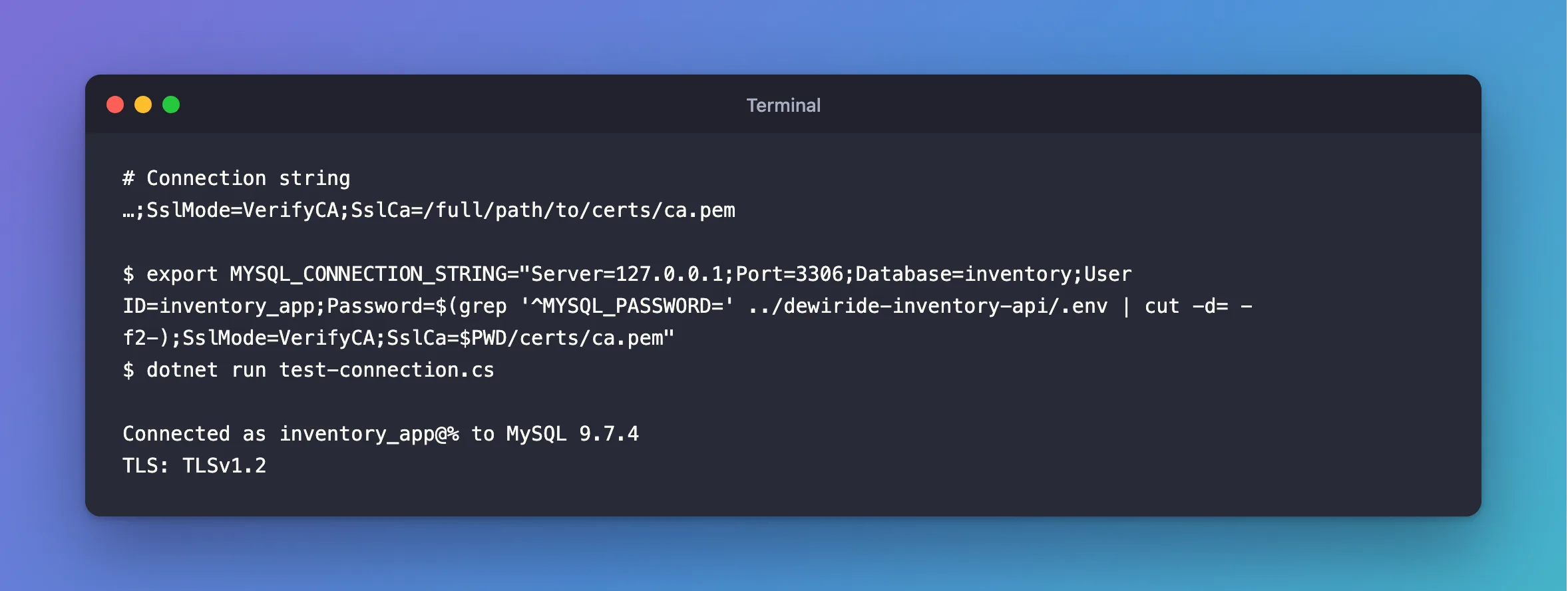
…;SslMode=VerifyCA;SslCa=/full/path/to/certs/ca.pem
Use a full path, because a relative one depends on where the app starts. Here, $PWD fills it in from your current folder:
- macOS / Linux
- Windows (PowerShell)
export MYSQL_CONNECTION_STRING="Server=127.0.0.1;Port=3306;Database=inventory;User ID=inventory_app;Password=$(grep '^MYSQL_PASSWORD=' ../dewiride-inventory-api/.env | cut -d= -f2-);SslMode=VerifyCA;SslCa=$PWD/certs/ca.pem"
dotnet run test-connection.cs
$password = (Get-Content ../dewiride-inventory-api/.env | Where-Object { $_ -like 'MYSQL_PASSWORD=*' }).Substring('MYSQL_PASSWORD='.Length)
$env:MYSQL_CONNECTION_STRING = "Server=127.0.0.1;Port=3306;Database=inventory;User ID=inventory_app;Password=$password;SslMode=VerifyCA;SslCa=$PWD/certs/ca.pem"
dotnet run test-connection.cs
Connected as inventory_app@% to MySQL 9.7.4
TLS: TLSv1.2
In an ASP.NET Core app, it's the same options in the same connection string. With user-secrets, run this from the solution folder:
- macOS / Linux
- Windows (PowerShell)
dotnet user-secrets set "ConnectionStrings:Inventory" "Server=127.0.0.1;Port=3306;Database=inventory;User ID=inventory_app;Password=$(grep '^MYSQL_PASSWORD=' .env | cut -d= -f2-);SslMode=VerifyCA;SslCa=$PWD/certs/ca.pem" --project src/Dewiride.Inventory.Api
$password = (Get-Content .env | Where-Object { $_ -like 'MYSQL_PASSWORD=*' }).Substring('MYSQL_PASSWORD='.Length)
dotnet user-secrets set "ConnectionStrings:Inventory" "Server=127.0.0.1;Port=3306;Database=inventory;User ID=inventory_app;Password=$password;SslMode=VerifyCA;SslCa=$PWD/certs/ca.pem" --project src/Dewiride.Inventory.Api
Step 3: Prove It Refuses the Wrong Server
A check you haven't seen fail isn't proven. Start a second MySQL with the same password, on another port:
docker run -d --name inventory-other-mysql --env-file .env -e MYSQL_DATABASE=inventory -e MYSQL_USER=inventory_app -p 127.0.0.1:3307:3306 mysql:9.7
Give it about 30 seconds, then point the tester at port 3307, with the first server's CA:
Unhandled exception. System.Exception: The provided key is invalid
 ---> Org.BouncyCastle.Security.InvalidKeyException: Public key presented not for certificate signature
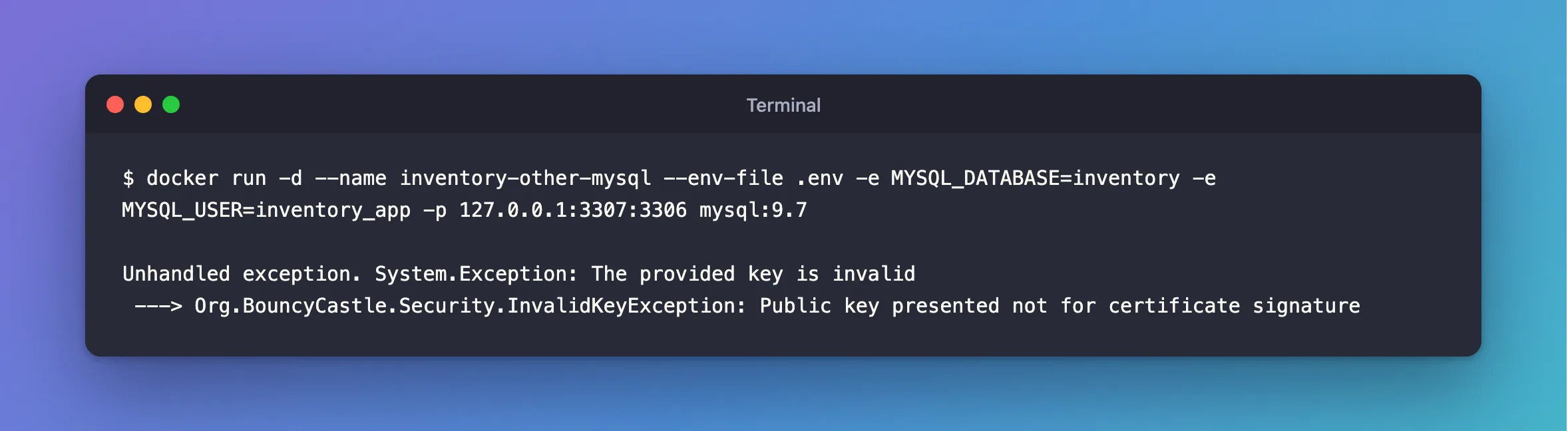
Refused. The same server with SslMode=Required connected. Stop it when you're done, with docker stop inventory-other-mysql, and docker rm inventory-other-mysql removes it.
What VerifyCA Doesn't Check
It proves your CA signed the certificate, and not that it was issued to this server. If your CA signs only this server's certificate, as MySQL's automatic one does, that's enough. If it signs for many, as a cloud provider's does, use VerifyFull.
It also checks the certificate's dates: an expired one is refused, with certificate expired on.
When the CA Changes
docker compose down -v deletes the data volume, so the next start makes a new CA, with the same name. Your copy no longer matches, and you get The provided key is invalid. Copy it again.
Common Mistakes
| Mistake | What happens | Do this instead |
|---|---|---|
Copying server-cert.pem as the CA | The check fails | Copy ca.pem |
A relative path in SslCa | It fails when the app starts somewhere else | Use a full path |
| Copying the CA's key as well | You've spread the key that can sign anything | Copy only ca.pem |
Setting SslCa and leaving SslMode=Required | PEM certificates are only checked with VerifyCA or VerifyFull | Change SslMode too |
Troubleshooting
| Symptom | Likely cause | Fix |
|---|---|---|
No file path has been provided … SslCa | SslCa is missing | The fix |
Failed to read file at the specified location | The path is wrong | The fix |
The certificate authority (CA) does not match | A different CA, or a file with several | The fix |
The provided key is invalid | A different CA with the same name | The fix |
The remote certificate was rejected… | A .pfx file | The fix |
Conclusion
Copy the server's CA, add SslMode=VerifyCA;SslCa=… with a full path, and test it against a server it should refuse.
Additional Resources
- Using PEM Certificates in Connector/NET —
SslCa. - Connector/NET Connection Options —
SslMode.
