How to Validate a List Inside a Minimal API Request
· 4 min read

An order has a list of lines, and two things can be wrong with it: the list itself, and any one of its items. AddValidation in .NET 10 checks both, and it tells the client exactly which item is wrong.
Prerequisites
- Validation turned on. How to Validate Minimal API Requests in .NET 10 with AddValidation. I used ASP.NET Core 10.
Step 1: Put Attributes on the List and Its Items
src/Dewiride.Inventory.Api/Features/Orders/OrderContracts.cs (excerpt)
public sealed record PlaceOrderRequest(
    [Required, StringLength(200)] string CustomerName,
    [Required, EmailAddress, StringLength(254)] string CustomerEmail,
    [Required, MinLength(1), MaxLength(50)] IReadOnlyList<PlaceOrderLine> Lines);

public sealed record PlaceOrderLine(
    [Range(1, int.MaxValue)] int ProductId,
    [Range(1, 10_000)] int Quantity);
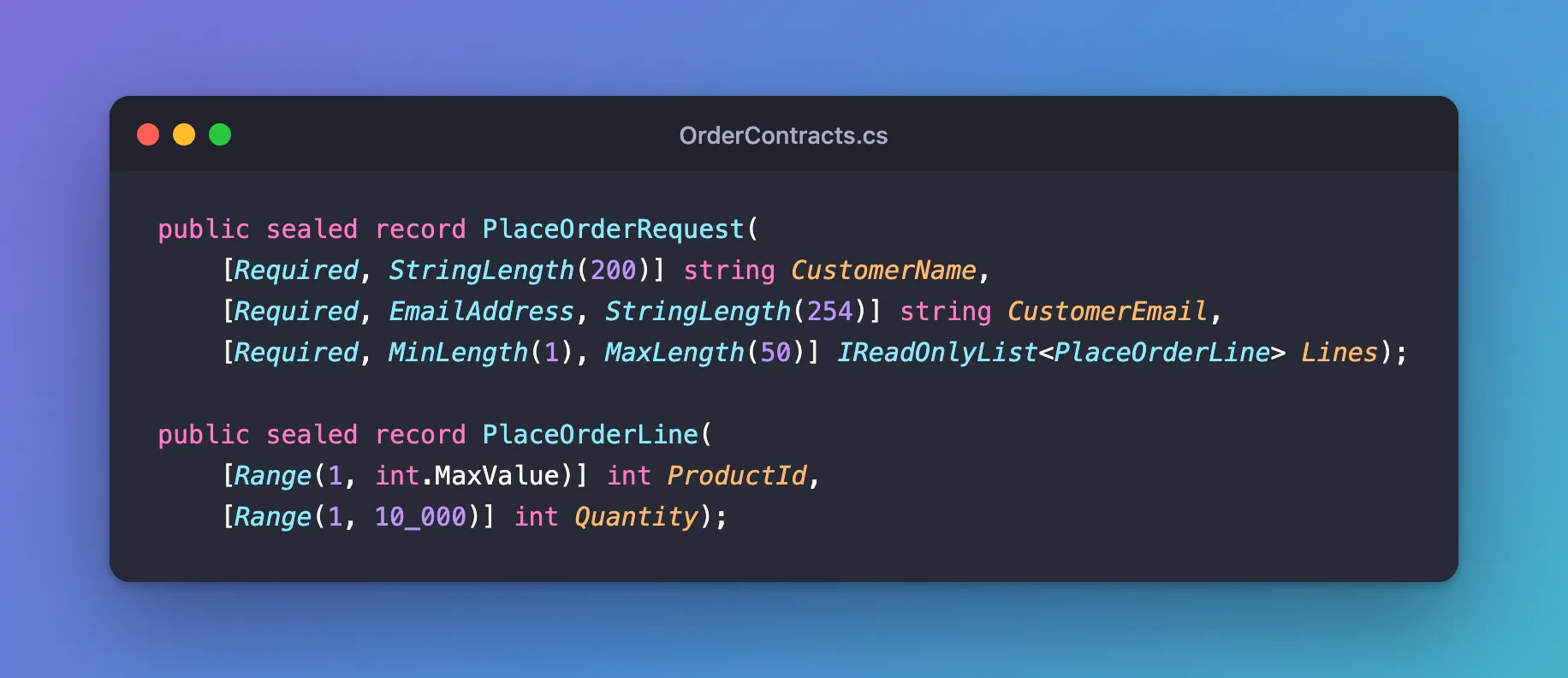
Requiredrefuses a missing list.MinLength(1)refuses an empty one.MaxLength(50)stops a request asking for thousands of lines, each of which is a statement against your database.- The item's own attributes are checked for every item.
Step 2: Send an Empty List
Response
HTTP/1.1 400 Bad Request
Content-Type: application/problem+json

{
  "type": "https://tools.ietf.org/html/rfc9110#section-15.5.1",
  "title": "One or more validation errors occurred.",
  "status": 400,
  "errors": {
    "Lines": [
      "The field Lines must be a string or array type with a minimum length of '1'."
    ]
  },
  "traceId": "00-968df686e57f6d53cab65581b83f9384-e1c2169d46103195-00"
}
Step 3: Send Bad Items
Request
POST http://localhost:5190/api/v1/orders
Content-Type: application/json

{"customerName":"Ana Costa","customerEmail":"ana@example.com","lines":[{"productId":0,"quantity":1},{"productId":9,"quantity":20000}]}
Response
HTTP/1.1 400 Bad Request
Content-Type: application/problem+json

{
  "type": "https://tools.ietf.org/html/rfc9110#section-15.5.1",
  "title": "One or more validation errors occurred.",
  "status": 400,
  "errors": {
    "Lines[0].ProductId": [
      "The field ProductId must be between 1 and 2147483647."
    ],
    "Lines[1].Quantity": [
      "The field Quantity must be between 1 and 10000."
    ]
  },
  "traceId": "00-6a804c88a6756f862026e6fd6f26d53d-8afd2e46410de949-00"
}
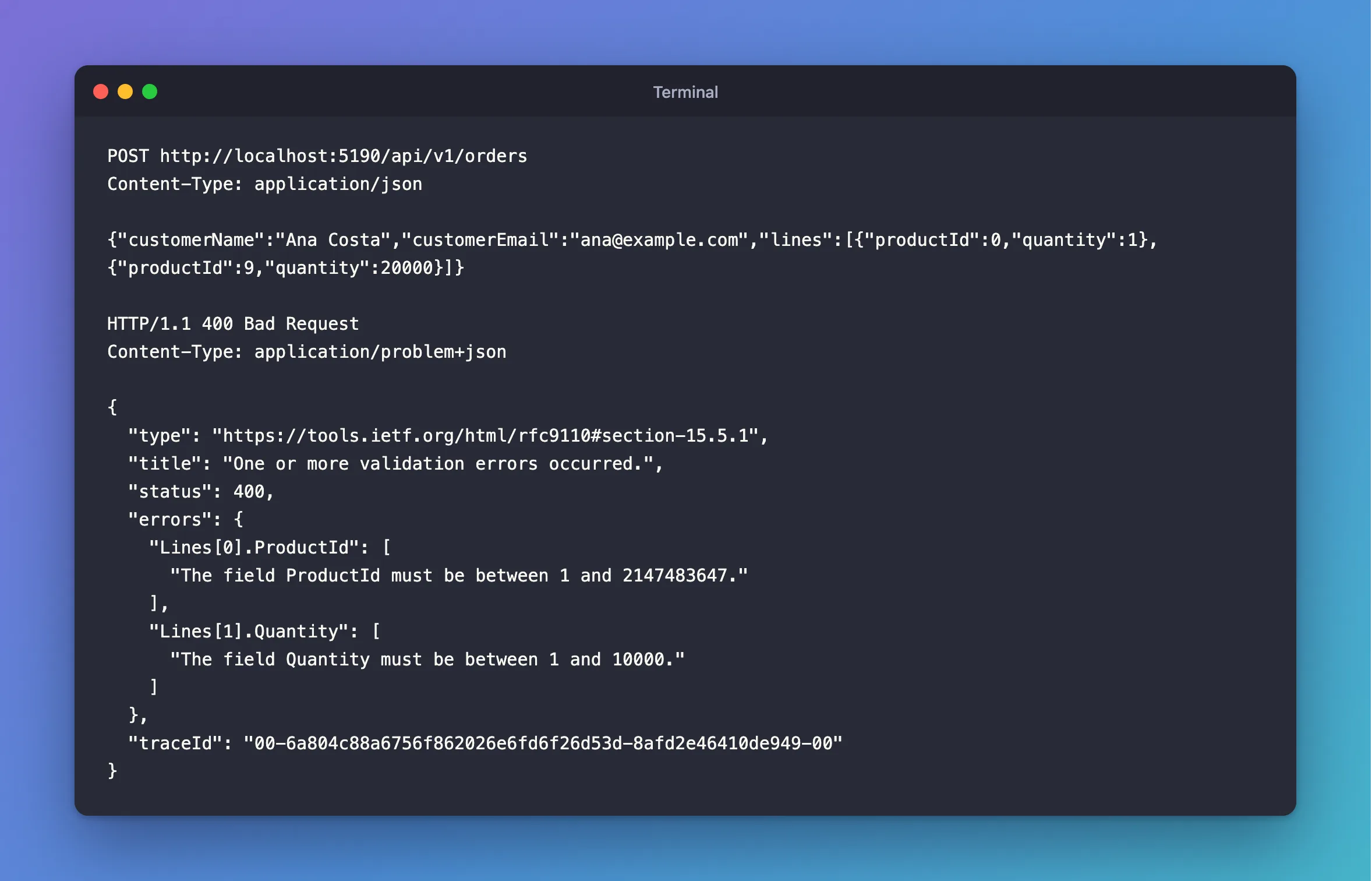
The keys say which item: Lines[0].ProductId, then Lines[1].Quantity.
Step 4: Combine It with the Rest
Errors on the outer record and on items come back together:
Response
HTTP/1.1 400 Bad Request
Content-Type: application/problem+json

{
  "type": "https://tools.ietf.org/html/rfc9110#section-15.5.1",
  "title": "One or more validation errors occurred.",
  "status": 400,
  "errors": {
    "CustomerName": [
      "The CustomerName field is required."
    ],
    "CustomerEmail": [
      "The CustomerEmail field is not a valid e-mail address."
    ],
    "Lines[0].Quantity": [
      "The field Quantity must be between 1 and 10000."
    ]
  },
  "traceId": "00-9346bfd4c7fe52e0b8b5101809810420-c2f308f6babb24b9-00"
}
For rules that compare items, such as "each product once", use IValidatableObject.
Common Mistakes
| Mistake | What happens | Do this instead |
|---|---|---|
| No upper limit on the list | One request can do a huge amount of work | Add MaxLength |
Only Required on the list | An empty list passes | Add MinLength(1) |
| Checking items in the endpoint | Errors look different | Use attributes |
Troubleshooting
| Symptom | Likely cause | Fix |
|---|---|---|
| Items aren't validated | AddValidation() is missing | Add it |
A duplicate-key 500 | Items are valid alone, but not together | The fix |
Conclusion
Attributes on a list check the list, attributes on its item type check each item, and the error keys point at the exact one that's wrong. Always give a list an upper limit.
Additional Resources
- Validation in minimal APIs —
AddValidation.
