How to Validate a Function Tool's Arguments in C# with Microsoft Agent Framework

The model chooses a tool's arguments, and some are wrong in ways only your code can see: a meeting room that's already taken, an hour outside office hours. Check them in the tool, and when one is wrong, return a message that says what's wrong and what would work, instead of throwing an exception. This guide shows why with a small meeting-room agent and a real model: after an exception, the model can only say that something failed; after a clear message, it offers another room, or books one.
The Example
A console app runs an agent that books meeting rooms for today. There are three rooms: Everest is taken at 9 and 10, Denali at 14, and K2 is free all day. The agent's tool, book_room, takes a room and a start hour, and checks three things before it books: that the room exists, that the hour is between 8 and 17, and that the room is free then. The model can read the first two rules in the tool's description. It can't know the third: which rooms are free is in your data, not in the model.
Prerequisites
- A model deployment in a Microsoft Foundry project, and the Foundry User role on the Foundry resource for your account. The app calls the model as you.
- The .NET 10 SDK (
dotnet --versionprints a version that starts with10.0) and the Azure CLI, signed in withaz login.
Step 1: Create a Console App
In a terminal, in the folder where you keep your projects, create a console app, move into it and add two packages:
dotnet new console -n RoomAgent
cd RoomAgent
dotnet add package Microsoft.Agents.AI.Foundry --version 1.28.0-preview.261106.1
dotnet add package Azure.Identity --version 1.21.0
The template "Console App" was created successfully.

Processing post-creation actions...
Restoring /Users/you/source/RoomAgent/RoomAgent.csproj:
Restore succeeded.
Microsoft.Agents.AI.Foundry turns a model in a Foundry project into an agent and brings AIFunctionFactory, which turns a method into a tool. Azure.Identity signs the app in with your Azure CLI sign-in. Microsoft Agent Framework 1.28.0 is generally available, but its Foundry package ships only as a preview of the same release, so it needs its exact --version. Open the RoomAgent folder in VS Code, or RoomAgent.csproj in Visual Studio.
Step 2: Check the Arguments by Throwing Exceptions
Throwing is the usual way to reject bad input in C#, so start there. Replace everything in Program.cs with:
using System.ComponentModel;
using Azure.AI.Projects;
using Azure.Identity;
using Microsoft.Agents.AI;
using Microsoft.Extensions.AI;

// Today's bookings: each room and the hours that are already taken.
Dictionary<string, HashSet<int>> bookings = new(StringComparer.OrdinalIgnoreCase)
{
    ["Everest"] = [9, 10],
    ["K2"] = [],
    ["Denali"] = [14],
};

AIFunction bookRoom = AIFunctionFactory.Create(BookRoom, name: "book_room");

AIAgent agent = new AIProjectClient(
        new Uri("https://foundry-devblogs-exp.services.ai.azure.com/api/projects/proj-devblogs-exp"),
        new AzureCliCredential())
    .AsAIAgent(
        model: "gpt-5.6-luna",
        instructions: "You book meeting rooms for today. Answer in one or two sentences.",
        tools: [bookRoom]);

var response = await agent.RunAsync("Book the Everest room at 10, please.");

// What each tool call sent back to the model, then the agent's answer.
foreach (FunctionResultContent result in response.Messages.SelectMany(m => m.Contents).OfType<FunctionResultContent>())
{
    Console.WriteLine($"(the model received: {result.Result})");
}

Console.WriteLine(response);

[Description("Books a meeting room for one hour today.")]
string BookRoom(
    [Description("The name of the room: Everest, K2 or Denali.")] string room,
    [Description("The hour the meeting starts, from 8 to 17.")] int startHour)
{
    Console.WriteLine($"(book_room was called with room = {room}, startHour = {startHour})");

    if (!bookings.TryGetValue(room, out HashSet<int>? taken))
    {
        throw new ArgumentException($"There is no room called {room}.");
    }

    if (startHour is < 8 or > 17)
    {
        throw new ArgumentOutOfRangeException(nameof(startHour), "Rooms can be booked from 8 to 17.");
    }

    if (!taken.Add(startHour))
    {
        throw new InvalidOperationException($"{room} is already booked at {startHour}:00.");
    }

    return $"{room} is booked at {startHour}:00.";
}
| Piece | What it does |
|---|---|
bookings | Today's bookings, kept in memory: each room's name and the hours that are taken. StringComparer.OrdinalIgnoreCase makes everest find Everest |
BookRoom | The tool. It isn't static, because it reads and changes bookings. taken.Add(startHour) books the hour, and returns false when the hour was taken already |
response.Messages | Every message of the run, including the result of each tool call. The loop prints those results: exactly what the model received |
The URI and gpt-5.6-luna | My Foundry project's endpoint and model deployment. Use your own; How to Create a Microsoft Foundry Resource and Deploy a Model shows where to find them |
Run the app:
- VS Code
- Visual Studio
In the terminal, in the RoomAgent folder, run:
dotnet run
Press Ctrl+F5 (Debug > Start Without Debugging). The output appears in a console window.
(book_room was called with room = Everest, startHour = 10)
(the model received: Error: Function failed.)
I couldn’t book the Everest room at 10:00 because the booking system returned an error.
The check worked: Everest is taken at 10, and the tool refused. But the model received only Error: Function failed., so it could tell the user that something went wrong, not what, and not that two other rooms are free. That generic message is deliberate. Microsoft's reference for FunctionInvokingChatClient.IncludeDetailedErrors, the setting behind it, says it is false by default, which prevents the underlying language model from disclosing raw exception details to the end user, since it doesn't receive that information.
Step 3: Return What's Wrong Instead
For mistakes the model can do something about, say what's wrong in the tool's result. Microsoft's guide to adding tools lists the opposite as a common pitfall: Tools can fail (network errors, invalid input). Return clear error messages so the model can reason about what went wrong and try again or inform the user. Replace the body of BookRoom, below its Console.WriteLine line, with:
    // The model chose these arguments, so check them. When one is wrong, say what's wrong
    // and what would work, so the model can try again or ask the user.
    if (!bookings.TryGetValue(room, out HashSet<int>? taken))
    {
        return $"There is no room called {room}. The rooms are {string.Join(", ", bookings.Keys)}.";
    }

    if (startHour is < 8 or > 17)
    {
        return $"Rooms can be booked from 8 to 17, not at {startHour}.";
    }

    if (!taken.Add(startHour))
    {
        string free = string.Join(", ", bookings.Where(b => !b.Value.Contains(startHour)).Select(b => b.Key));
        return $"{room} is already booked at {startHour}:00. Free at {startHour}:00: {free}.";
    }

    return $"Done: {room} is now reserved for you at {startHour}:00.";
Each message names what's wrong and, where it can, what would work: the rooms that exist, the hours that are allowed, the rooms that are free at that hour. The success message is just as clear, and that matters as much: Done, and reserved for you. My first version said K2 is booked at 10:00. when a booking worked, and the model read it as K2 is taken. The whole story is in Fixed: Microsoft Agent Framework Agent Calls a Tool Again After It Succeeded.
Run the app again, with the same question:
(book_room was called with room = Everest, startHour = 10)
(the model received: Everest is already booked at 10:00. Free at 10:00: K2, Denali.)
Everest is already booked at 10:00. K2 and Denali are available at that time.
The same refusal, but now the model knows why and what the options are. The employee asked for Everest, so it didn't pick another room on its own: it told them which rooms are free.
Step 4: Let the Model Try Again
When the question leaves room for another choice, the model can fix its own call. Change the question on the RunAsync line to I need a meeting room at 10. Everest if it is free, otherwise any room. The complete file:
using System.ComponentModel;
using Azure.AI.Projects;
using Azure.Identity;
using Microsoft.Agents.AI;
using Microsoft.Extensions.AI;

// Today's bookings: each room and the hours that are already taken.
Dictionary<string, HashSet<int>> bookings = new(StringComparer.OrdinalIgnoreCase)
{
    ["Everest"] = [9, 10],
    ["K2"] = [],
    ["Denali"] = [14],
};

AIFunction bookRoom = AIFunctionFactory.Create(BookRoom, name: "book_room");

AIAgent agent = new AIProjectClient(
        new Uri("https://foundry-devblogs-exp.services.ai.azure.com/api/projects/proj-devblogs-exp"),
        new AzureCliCredential())
    .AsAIAgent(
        model: "gpt-5.6-luna",
        instructions: "You book meeting rooms for today. Answer in one or two sentences.",
        tools: [bookRoom]);

var response = await agent.RunAsync("I need a meeting room at 10. Everest if it is free, otherwise any room.");

// What each tool call sent back to the model, then the agent's answer.
foreach (FunctionResultContent result in response.Messages.SelectMany(m => m.Contents).OfType<FunctionResultContent>())
{
    Console.WriteLine($"(the model received: {result.Result})");
}

Console.WriteLine(response);

[Description("Books a meeting room for one hour today.")]
string BookRoom(
    [Description("The name of the room: Everest, K2 or Denali.")] string room,
    [Description("The hour the meeting starts, from 8 to 17.")] int startHour)
{
    Console.WriteLine($"(book_room was called with room = {room}, startHour = {startHour})");

    // The model chose these arguments, so check them. When one is wrong, say what's wrong
    // and what would work, so the model can try again or ask the user.
    if (!bookings.TryGetValue(room, out HashSet<int>? taken))
    {
        return $"There is no room called {room}. The rooms are {string.Join(", ", bookings.Keys)}.";
    }

    if (startHour is < 8 or > 17)
    {
        return $"Rooms can be booked from 8 to 17, not at {startHour}.";
    }

    if (!taken.Add(startHour))
    {
        string free = string.Join(", ", bookings.Where(b => !b.Value.Contains(startHour)).Select(b => b.Key));
        return $"{room} is already booked at {startHour}:00. Free at {startHour}:00: {free}.";
    }

    return $"Done: {room} is now reserved for you at {startHour}:00.";
}
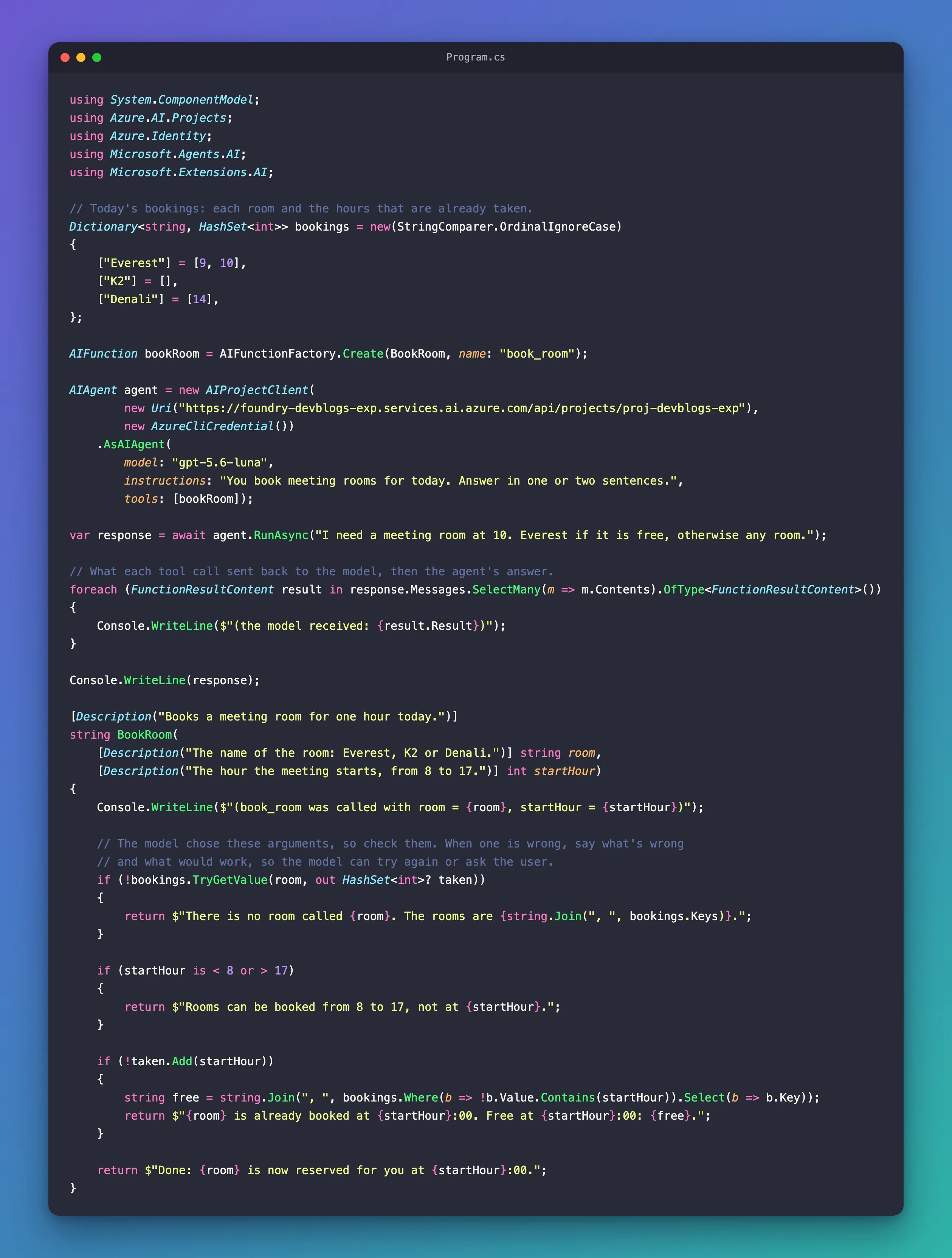
Run it:
(book_room was called with room = Everest, startHour = 10)
(book_room was called with room = K2, startHour = 10)
(the model received: Everest is already booked at 10:00. Free at 10:00: K2, Denali.)
(the model received: Done: K2 is now reserved for you at 10:00.)
Everest was unavailable, so I booked K2 for you at 10:00 today.
Two calls this time. The first was refused with the list of free rooms; the model took the first one, K2, called the tool again, and read Done in the result. The (book_room was called …) lines come first because the tool prints them while the run is going; the loop prints the results after the run has finished.
Why Not Turn On Detailed Errors?
IncludeDetailedErrors = true would send the exception's message to the model, so Step 2 would have worked too. Microsoft's reference explains the cost: it can help the underlying IChatClient bypass problems on its own, for example by retrying the function call with different arguments. However it might result in disclosing the raw exception information to external users. An exception from a database driver or an HTTP client can contain server names, queries or personal data. A message you write on purpose contains only what the model should know, so keep the default, and keep exceptions for failures the model can't fix, such as the booking system being down.
Common Mistakes
| Mistake | What happens | Do this instead |
|---|---|---|
| Throwing an exception for a wrong argument | The model gets Error: Function failed. and can't say why or offer another choice | Return a message that says what's wrong and what would work |
A success message that can be read as a failure, such as K2 is booked at 10:00. | The model may treat the booking as refused and call the tool again | Make success unmistakable: Done: K2 is now reserved for you at 10:00. |
| Checking only what the description says | Rules that depend on your data, such as which rooms are free, go unchecked | Check every rule in the tool, whatever the description says |
Turning on IncludeDetailedErrors | Exception messages reach the model, and through it the user | Write the messages the model needs yourself |
FAQ
Should the tool's description state the limits too?
Yes: the model reads the description before it calls the tool, so it can avoid a bad call entirely. Before this example, I tried a reminder tool whose description said from 1 to 1,440 minutes, and asked for a reminder in 2,880 minutes. The model didn't call the tool at all: I can only set reminders up to 1,440 minutes (24 hours) in advance, so I can’t schedule this for 2,880 minutes. Descriptions prevent many bad calls; the checks in your code catch the rest, including every rule a description can't hold.
Does the model always try again?
No, it decides. In Step 3 the employee asked for Everest, so the model reported the free rooms and let the employee choose. In Step 4 any room would do, so it booked K2 itself. Either way, it could only decide well because the message said what was wrong.
Should a tool return text or an object?
Either works: a tool's return value reaches the model as JSON. Text is the simplest, as here. An object with a field such as "created": true or "problem": "…" makes success and failure impossible to confuse, and suits a tool that returns data, such as the record it created.
Conclusion
Check every argument the model sends to a tool, and when one is wrong, return a message that says what's wrong and what would work. In this agent, an exception left the model with Error: Function failed. and nothing to offer; a clear message let it list the free rooms, or book one on its own. Make success messages just as clear, and keep exceptions for failures the model can't fix.
Additional Resources
- Adding Tools — common pitfalls, including error messages the model can reason about.
- FunctionInvokingChatClient.IncludeDetailedErrors — why the model gets a generic error when a tool throws.
- AIFunctionFactory.Create — how arguments reach your method, and why they are untrusted.
- Tools Overview — validating and authorizing tool calls before side effects.
