How to Use TransactionScope with EF Core and MySQL

TransactionScope wraps code in a transaction without passing anything around: everything on the connection inside it joins in, and it commits only if you call Complete(). It works with EF Core and MySql.Data, with three things to get right. If you don't need its ambient behaviour, BeginTransactionAsync is simpler.
Prerequisites
- A .NET C# project using EF Core. I used .NET 10, EF Core 10.0.14,
MySql.Data26.10.0 and MySQL 9.7.4.
Step 1: Write It
g.MapPost("/scope-rr", async (InventoryDbContext db, TimeProvider clock, CancellationToken cancellationToken) =>
{
    var strategy = db.Database.CreateExecutionStrategy();

    await strategy.ExecuteAsync(
        async ct =>
        {
            db.ChangeTracker.Clear();

            using var scope = new TransactionScope(
                TransactionScopeOption.Required,
                new TransactionOptions { IsolationLevel = System.Transactions.IsolationLevel.RepeatableRead },
                TransactionScopeAsyncFlowOption.Enabled);

            await db.Products.Where(p => p.Id == 1)
                .ExecuteUpdateAsync(s => s.SetProperty(p => p.ReorderLevel, p => p.ReorderLevel + 1), ct);

            scope.Complete();
        },
        cancellationToken);

    return Results.Ok();
});
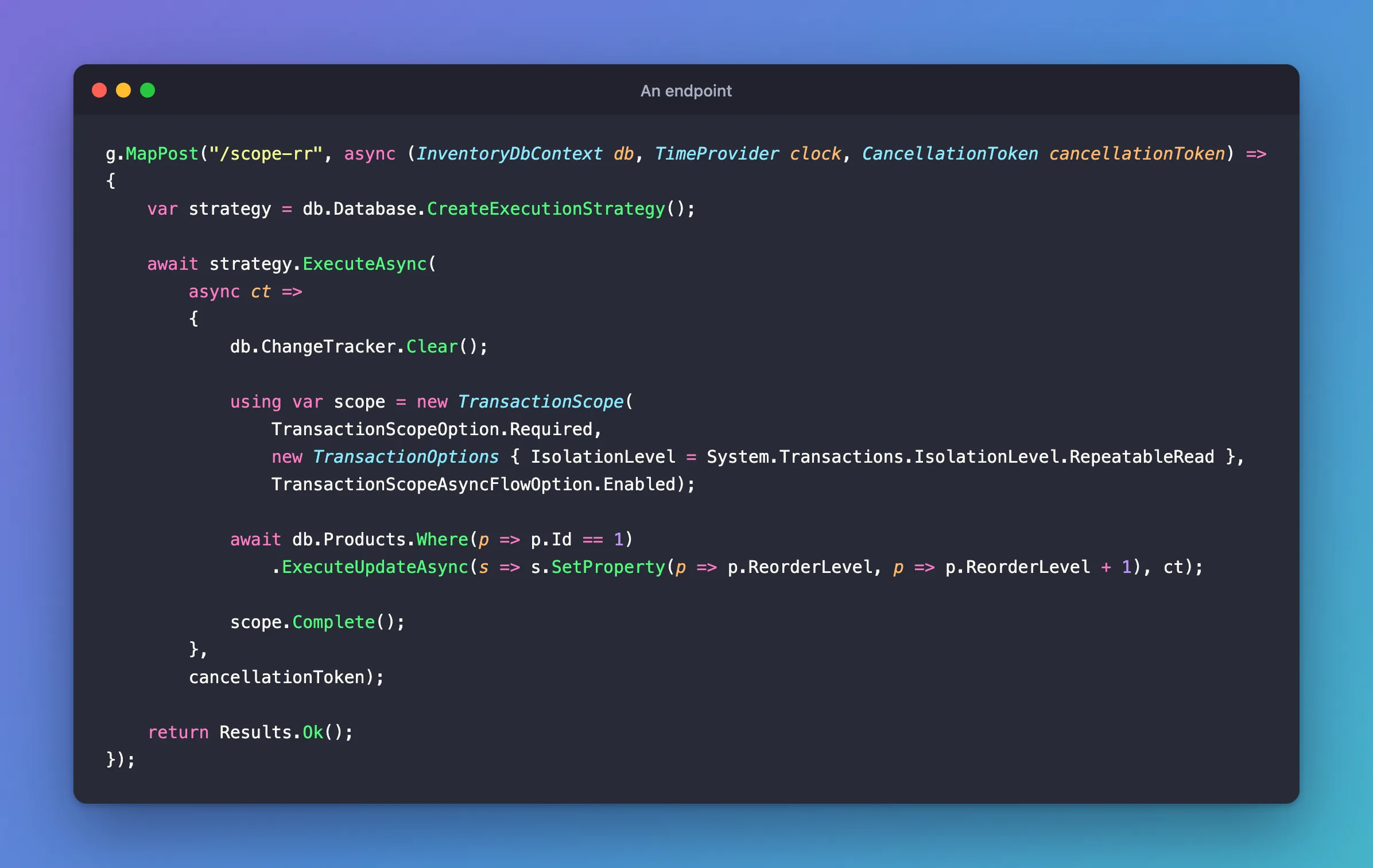
Step 2: Get the Three Things Right
Turn on async flow. TransactionScopeAsyncFlowOption.Enabled lets the ambient transaction follow await. The TransactionScope page lists it among the constructor options, and async code needs it.
Put it inside the execution strategy. Outside, you get the same error as for any other transaction:
System.InvalidOperationException: The configured execution strategy 'MySQLRetryingExecutionStrategy' does not support user-initiated transactions. Use the execution strategy returned by 'DbContext.Database.CreateExecutionStrategy()' to execute all the operations in the transaction as a retriable unit.
Pass an isolation level. The default is Serializable, and the driver leaves that on the pooled connection.
Step 3: Complete It
scope.Complete() is what commits. Here's MySQL's log for a scope that called it:
+--------------+------------------------------------------------------------------------+
| command_type | statement                                                              |
+--------------+------------------------------------------------------------------------+
| Init DB      | inventory                                                              |
| Query        | SET SESSION TRANSACTION ISOLATION LEVEL REPEATABLE READ                |
| Query        | BEGIN                                                                  |
| Query        | UPDATE `products` AS `p` SET `ReorderLevel` = `p`.`ReorderLevel` + 1 W |
| Query        | COMMIT                                                                 |
+--------------+------------------------------------------------------------------------+
And for one that didn't, with the default options:
+--------------+------------------------------------------------------------------------+
| command_type | statement                                                              |
+--------------+------------------------------------------------------------------------+
| Init DB      | inventory                                                              |
| Query        | SET SESSION TRANSACTION ISOLATION LEVEL SERIALIZABLE                   |
| Query        | BEGIN                                                                  |
| Query        | INSERT INTO `categories` (`CreatedAtUtc`, `Name`) VALUES (timestamp('2 |
| Query        | SELECT `Id` FROM `categories` WHERE ROW_COUNT() = 1 AND `Id` = LAST_IN |
| Init DB      | inventory                                                              |
| Query        | UPDATE `products` AS `p` SET `ReorderLevel` = `p`.`ReorderLevel` + 1 W |
| Query        | ROLLBACK                                                               |
+--------------+------------------------------------------------------------------------+
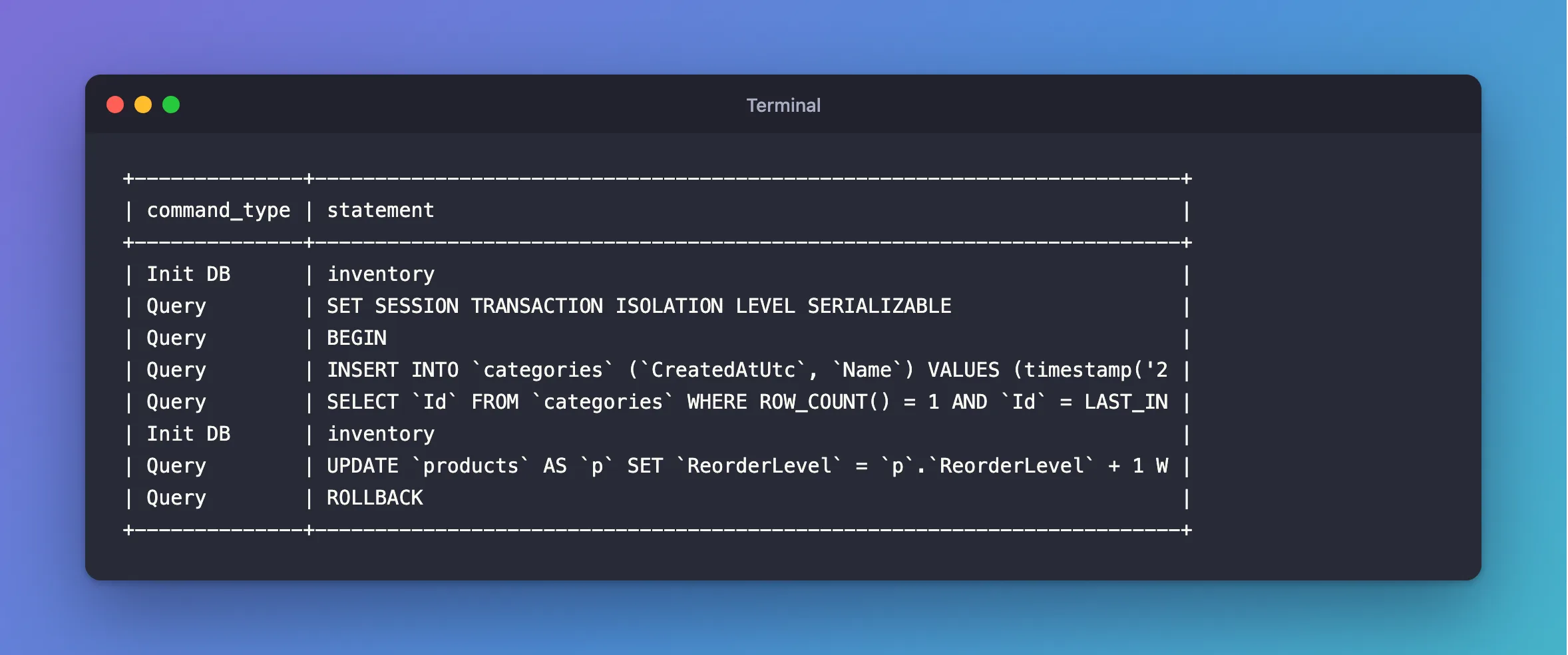
Leaving the block without Complete() rolls it back, and that's also what any exception does. In the log, the driver's own BEGIN comes from enlisting in the scope:
Enlisted in an ambient transaction with isolation level 'Serializable'.
Step 4: Choose Between the Two
BeginTransactionAsync | TransactionScope | |
|---|---|---|
| How code joins it | The same DbContext | Anything that opens a connection inside the block |
| How it commits | CommitAsync | Complete() and leaving the block |
| Isolation level | Sent for each transaction | Set on the session |
| Async | Built in | Needs the flow option |
I use BeginTransactionAsync unless something needs to join in without being told.
Common Mistakes
| Mistake | What happens | Do this instead |
|---|---|---|
| Leaving out the async flow option | The transaction doesn't follow await | Pass TransactionScopeAsyncFlowOption.Enabled |
Forgetting Complete() | Nothing's saved, and there's no error | Call it last |
Doing work after Complete() | It's not safe to continue in the scope | Call it last |
Troubleshooting
| Symptom | Likely cause | Fix |
|---|---|---|
does not support user-initiated transactions | The scope is outside the strategy | Move it inside |
The level is SERIALIZABLE afterwards | The default options | The fix |
| Nothing's saved | No Complete() | Add it |
Conclusion
Inside the strategy, with the async flow option, an explicit level, and Complete() as the last line, TransactionScope does its job with MySQL. Use it when work needs to join a transaction it wasn't handed.
Additional Resources
- TransactionScope Class — the constructors.
- Using Transactions — EF Core's page.
