How to Use ThisItem in a Power Apps Gallery

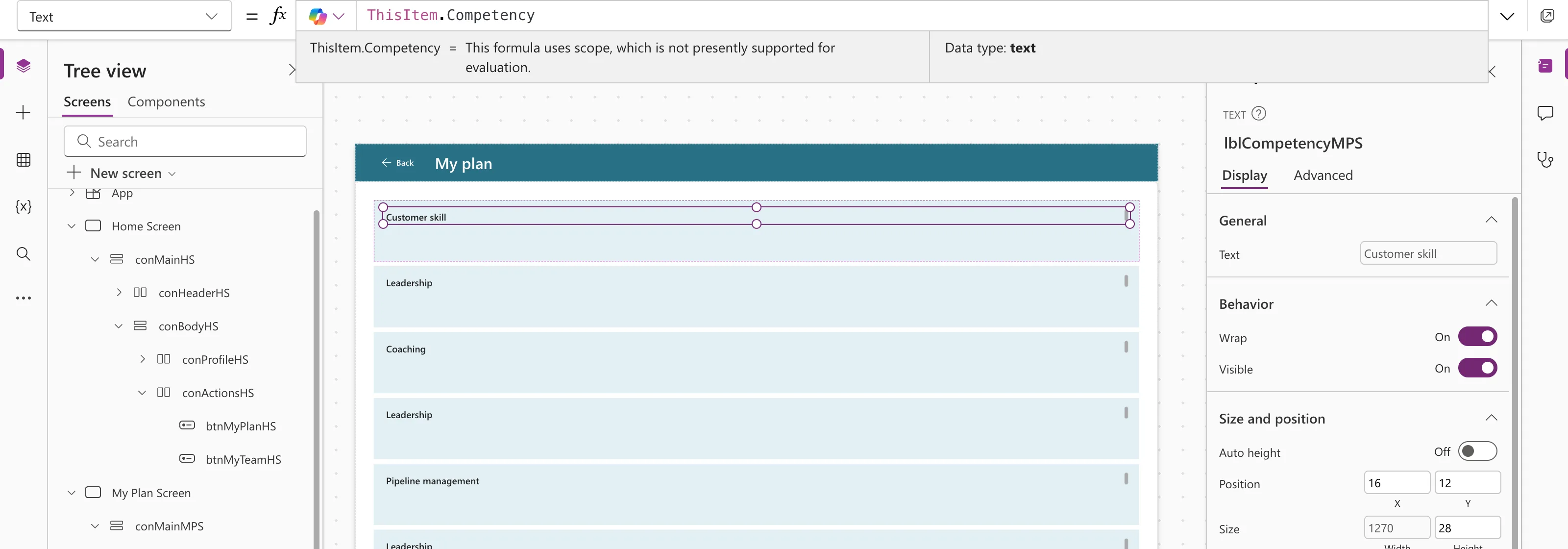
Inside a gallery, each control in the template needs to show its own row's data. ThisItem is the row: ThisItem.Competency shows the Competency of whichever record that copy of the template is displaying.
What ThisItem Refers To
ThisItem is the current record in a Gallery, Edit form or Display form control (ThisItem, ThisRecord, and As operators). The gallery repeats its template once per record of its Items, and in each copy ThisItem is that copy's record.
Microsoft notes that ThisItem is always required in a gallery, unlike ThisRecord, which you can usually leave out inside functions such as Filter.
Prerequisites
- A gallery with a control in its template (How to Add a Vertical Gallery in Power Apps). The example uses a Text control,
lblCompetencyMPS, in a gallery of theRoleCompetenciesSharePoint list.
Step 1: Show a Column
Select the control in the template, choose Text in the property list, and type ThisItem. followed by the column name. The suggestions list the row's columns as you type.
ThisItem.Competency
Each row now shows its own competency:
Why the Preview Strip Doesn't Show a Value
Under the formula bar, the preview strip usually shows a formula's result. For ThisItem it says This formula uses scope, which is not presently supported for evaluation: the formula has a different value on each row, so there's no single result to show. The Data type is still there (text here), and the rows on the canvas show the values.
Columns That Aren't Plain Text
Some SharePoint columns are records, not text. A Choice column, such as Level, needs .Value:
"Level: " & ThisItem.Level.Value
Without .Value you get Expected Text value. See How to Show a SharePoint Choice Column's Value in Power Apps.
Common Mistakes
| Mistake | What happens | Do this instead |
|---|---|---|
| Using ThisItem in a control outside the gallery | A formula error: only controls inside the gallery can use it | Use it only inside the template |
| Leaving out ThisItem in a gallery | A formula error: Microsoft says it's always required | Write ThisItem.Column |
| Using a Choice column directly as text | Expected Text value | Add .Value |
Troubleshooting
| Symptom | Likely cause | Fix |
|---|---|---|
| The strip says This formula uses scope... | That's normal for ThisItem | Check the rows on the canvas |
| A column is missing from the suggestions | It isn't in the gallery's Items | Check Items, or add it with AddColumns |
FAQ
What's the difference between ThisItem and ThisRecord?
ThisItem is the current record in a gallery or form. ThisRecord is the current record inside functions that go through a table, such as Filter and AddColumns.
Can I give the row another name?
Yes, with the As operator. See How to Use the As Operator in Power Apps.
Conclusion
In a gallery's template, ThisItem.Column is that row's value. The preview strip can't evaluate it, so check the canvas, and add .Value for Choice columns.
