How to Use the Select Function in Power Apps

Select runs another control's OnSelect, as if someone had selected it. Its everyday use is Select(Parent) inside a gallery: a button in a row does whatever the row does.
Syntax
Select( Control )
Select( Control, RowOrColumn, ChildControl )
- Control: the control whose OnSelect should run.
- RowOrColumn and ChildControl (optional): for a gallery, which row to select, and which control inside it.
Microsoft's reference lists the rules: Select works only in behavior formulas, only with controls that have OnSelect, not across screens, and a control can't select itself (Select function).
Prerequisites
- A gallery with a control in its rows (How to Add a Vertical Gallery in Power Apps).
Example: Select(Parent) in a Gallery Row
In the Career Development Plan app, the My Plan gallery opens the Response screen from its own OnSelect. Each row also has an Open button. When the button was inserted into the row, its OnSelect was already:
Select(Parent)
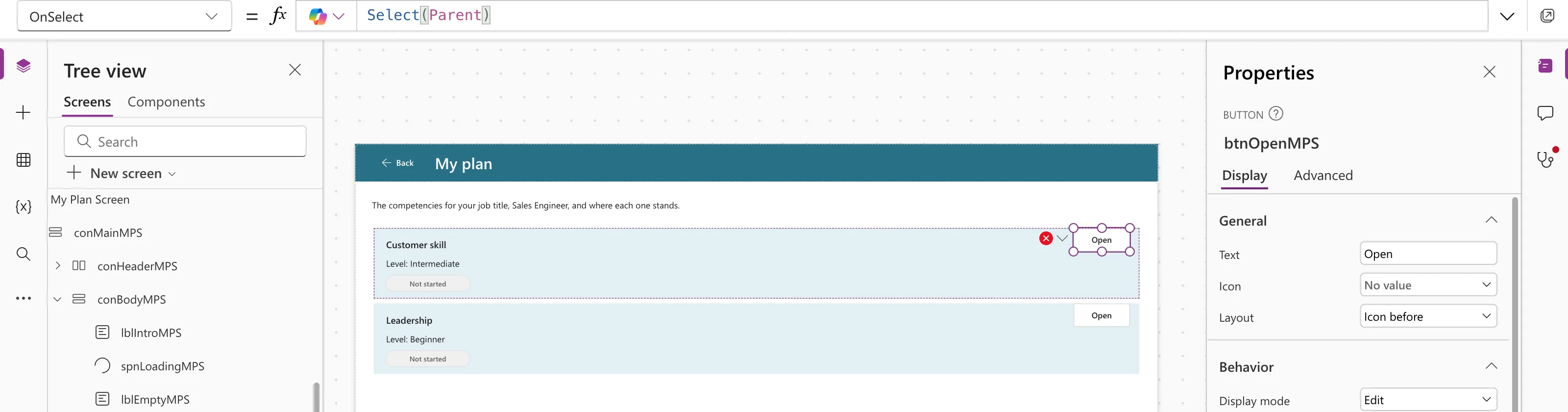
That matches Microsoft's description: "By default, the OnSelect property of any control in a Gallery control is set to Select( Parent )". Parent is the gallery (How to Use Self and Parent in Power Apps), so pressing the button runs the gallery's OnSelect for that row. In preview, the Open button on Customer skill opened the Response screen with Customer skill.
When Not to Use It
Give a control in the row its own formula when it should do something different from the row, such as a delete icon. Its OnSelect then replaces Select(Parent).
It Runs Later, Not Right Away
Select "queues the target OnSelect for later processing, which may happen after the current formula has finished being evaluated". Don't write formulas that depend on the other control's OnSelect having finished on the next line.
Common Mistakes
| Mistake | What happens | Do this instead |
|---|---|---|
| Copying the gallery's formula into the button | Two formulas to keep in step | Use Select(Parent) |
| Using Select for a control on another screen | Not supported | Navigate first, or move the logic |
| Expecting the result on the next line | The target runs later | Don't depend on it in the same formula |
Troubleshooting
| Symptom | Likely cause | Fix |
|---|---|---|
| The button does nothing | The gallery's OnSelect is empty or false | Put the action in the gallery's OnSelect |
| The wrong row's data is used | The formula reads Gallery.Selected elsewhere | Pass ThisItem from the gallery's OnSelect |
FAQ
Can I select a specific row from outside the gallery?
Yes: Select(Gallery1, 2) selects row 2, and Select(Gallery1, 2, Image1) selects a control in it. Microsoft's reference shows both.
Does Select work in App.Formulas?
No. It's a behavior function, for properties like OnSelect.
Conclusion
Select(Parent) lets a button in a gallery row do exactly what the row does, from one formula in the gallery's OnSelect. Remember the limits: behavior formulas only, the same screen only, and it runs after the current formula.
Additional Resources
- Select function: syntax, rules and gallery examples.
