How to Use the less() Function in Power Automate

Is this total under the limit? Did the shift end earlier in the day than it started? less() compares two values and returns true when the first one is smaller.
Syntax
less(<value>, <compareTo>)
From Microsoft's functions reference:
<value>(required): the value to check, a whole number, a decimal number or a text.<compareTo>(required): the value to compare it with, of the same kind.- The result is
truewhen<value>is less than<compareTo>, andfalsewhen it's equal or greater.
Microsoft's examples: less(5, 10) is true, and less('banana', 'apple') is false, because text is compared in alphabetical order.
Three functions work the same way: lessOrEquals() is also true when the two values are equal, and greater() and greaterOrEquals() check the other way round (How to Use the greater() Function in Power Automate).
The example is Import Old Overtime Timesheet, a flow of the Overtime Timesheet app. It reads an old Excel timesheet in which each shift has one date, a start time and a finish time. A shift whose finish is earlier in the day than its start ran past midnight, such as 20:00 to 01:30.
Step 1: Turn Both Times into Text
The times reach the flow as 1899-12-30T20:00:00.000Z and 1899-12-30T01:30:00.000Z, because the cells hold only a time (How to Get Excel Dates as Dates, Not Numbers, in Power Automate). formatDateTime with 'HH:mm' turns each into a five-character time from 00:00 to 23:59 (How to Format a Date in Power Automate with formatDateTime):
formatDateTime(items('For_each_old_row')?['Finish'], 'HH:mm')
formatDateTime(items('For_each_old_row')?['Start'], 'HH:mm')
Text like this sorts in time order: every value has two digits for the hour, a colon and two digits for the minutes, so 01:30 comes before 20:00 alphabetically too.
Step 2: Compare Them
less() with the finish first is true when the shift ended earlier in the day than it started:
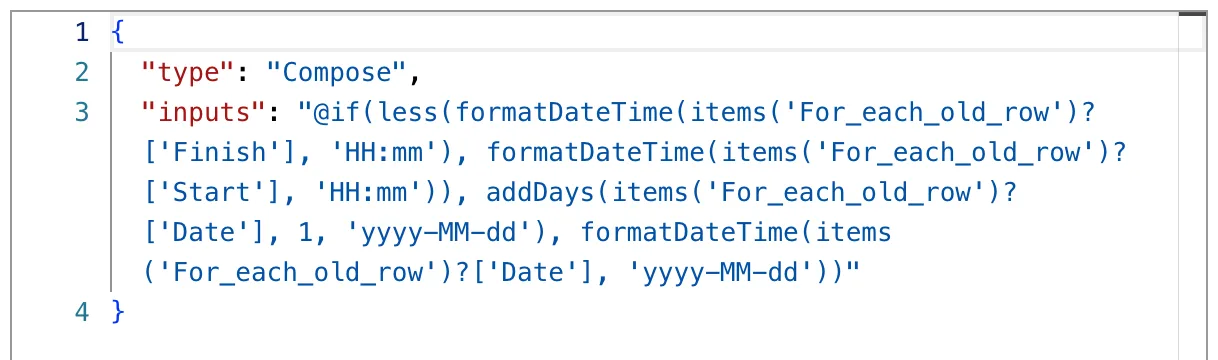
less(formatDateTime(items('For_each_old_row')?['Finish'], 'HH:mm'), formatDateTime(items('For_each_old_row')?['Start'], 'HH:mm'))
In the flow, the comparison chooses the finish date inside if(): the next day when it's true, the same day when it's false (How to Add Days to a Date in Power Automate with addDays, How to Use the if() Function in Power Automate). The Compose named Finish date, in Code view:
The Result
For the shift of 2 October, 19:00 to 23:00, less('23:00', '19:00') was false, so Finish date kept the same day:

For the shift of 10 October, 20:00 to 01:30, less('01:30', '20:00') was true, so it got the next day:

Common Mistakes
| Mistake | What happens | Do this instead |
|---|---|---|
Times as 'H:mm', without the leading zero | 9:00 sorts after 20:00 as text | 'HH:mm' |
'hh:mm' | hh is the 12-hour clock, so 13:00 becomes 01:00 | 'HH:mm' |
less() where equal should count too | Equal values give false | lessOrEquals() |
| A number on one side and a text on the other | The reference expects the same kind of value on both sides | Convert first with int(), float() or string() |
Troubleshooting
| Symptom | Likely cause | Fix |
|---|---|---|
Always false | The values are the other way round | Put the value you expect to be smaller first |
| Wrong for morning times | Times without leading zeros | Format them with 'HH:mm' |
| This expression has a problem when you add it | The designer showed it for correct expressions too | Select Add again (Fixed: "This expression has a problem" in Power Automate) |
FAQ
Can less() compare two dates?
The reference lists whole numbers, decimal numbers and text. Dates formatted the same way, such as 'yyyy-MM-dd', sort in date order as text. To compare full times as numbers, turn each into ticks first, as in How to Work Out the Hours Between Two Times in Power Automate.
What about a shift that starts and ends at the same time?
less() is false for equal values, so it keeps the same day. The example has no such shift.
Is there a "not less" function?
greaterOrEquals() is true when the first value isn't smaller. Wrapping less() in not() gives the same result.
Conclusion
less(value, compareTo) is true when the first value is smaller, for numbers and for text. Two times formatted as 'HH:mm' compare correctly as text, which is enough to tell a shift that crossed midnight from one that didn't.
Additional Resources
- Reference guide to functions in expressions: less
- Logical comparison functions
- Custom date and time format strings:
HH,hhandmm
