How to Use the if() Function in Power Automate

Sometimes you don't need a whole Condition with two branches, just one value or another. if() does that inside an expression: give it something true or false, and the two values to choose between. This guide uses it to write a Boolean into a JSON body correctly.
What It Does
Microsoft's functions reference says if() checks whether an expression is true or false and returns one of two values based on the result:
if(<expression>, <valueIfTrue>, <valueIfFalse>)
Prerequisites
- Somewhere to use it: any field that takes an expression (How to Add an Expression). The example is the body of Update the list settings, a SharePoint REST request in the setup flow from Part 11 of the Career Development Plan series.
Example: A Boolean in a JSON Body
Each list definition in the setup flow has a noCrawl value, false or true. The body sends it to SharePoint as NoCrawl, which hides a list from search when it's true.
Writing the value straight into the body with @{...} doesn't work. An expression inside text always becomes text, and a Boolean becomes False or True, with a capital letter, which isn't JSON. SharePoint answered Invalid JSON. A token was not recognized in the JSON content. (the fixes post shows the whole story).
if() writes the text yourself, in lowercase:
if(items('For_each_list')?['noCrawl'], 'true', 'false')
In the body, it goes where the value goes, without quotes around it:
  "OnQuickLaunch": true,
  "NoCrawl": @{if(items('For_each_list')?['noCrawl'], 'true', 'false')}
}
The designer shows the expression as an if(...) token:
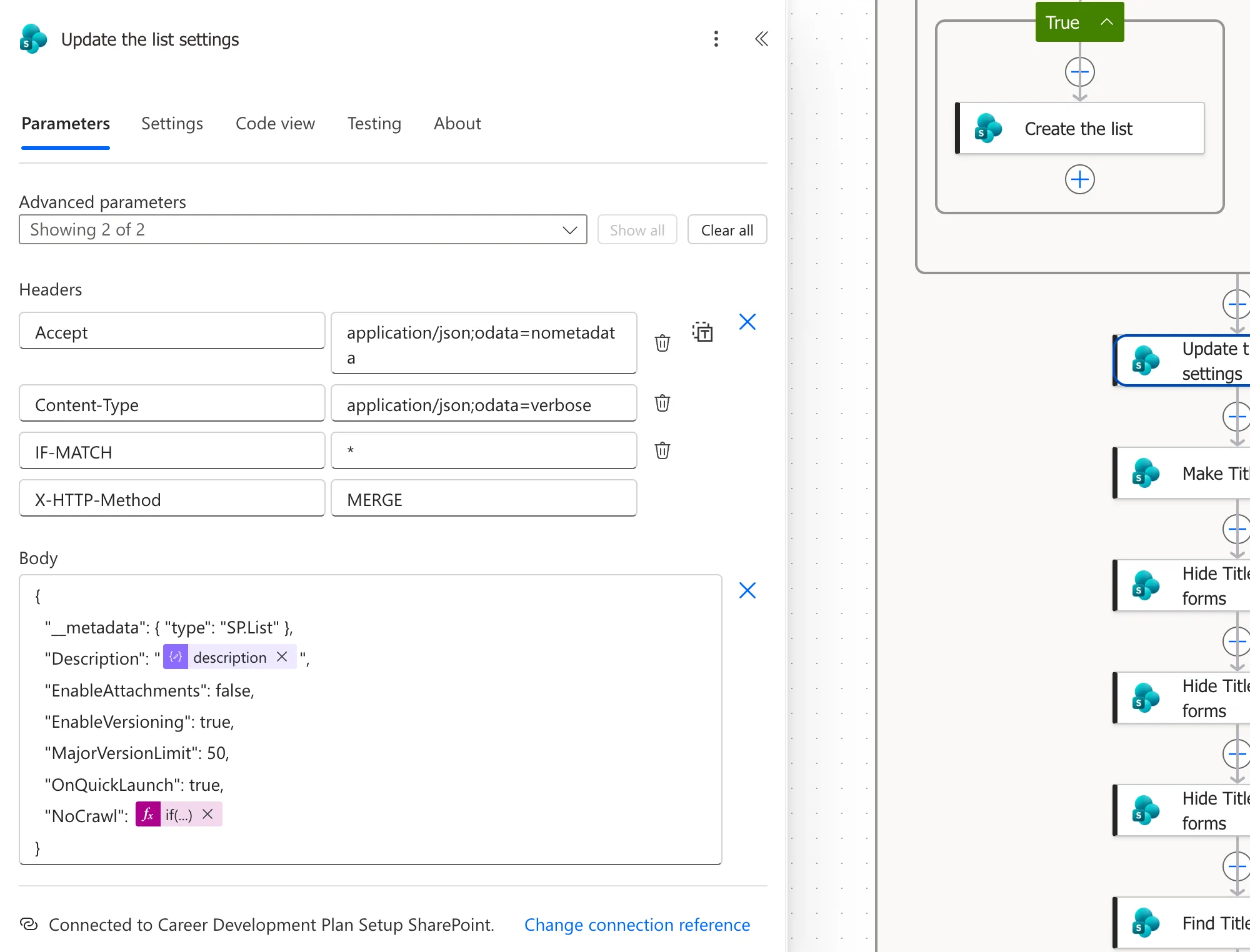
For RoleCompetencies, noCrawl is false, so the body says "NoCrawl": false. For CompetencyResponses, it says "NoCrawl": true, and that list was hidden from search after the run.
The First Argument Is a Boolean
The first value must be true or false. It can be a Boolean from your data, as here, or any expression that returns one:
if(equals(items('For_each_list')?['title'], 'CompetencyResponses'), 'hidden', 'searchable')
if() or a Condition?
| Use | When |
|---|---|
if() | You need one of two values in a field |
| Condition | You need to run different steps (How to Add a Condition) |
Common Mistakes
| Mistake | What happens | Do this instead |
|---|---|---|
| A Boolean straight into a JSON body | It arrives as True or False | Use if(value, 'true', 'false') |
Quotes around the @{...} in the body | The value is sent as a string | Leave it unquoted for a Boolean |
| Text as the first argument | The expression fails | Pass a true-or-false value |
Troubleshooting
| Symptom | Likely cause | Fix |
|---|---|---|
| Invalid JSON from SharePoint | A Boolean became True or False | Wrap it in if() |
| Always the same result | The first argument is never true | Check what it returns in the run |
FAQ
Can I nest if()?
Yes. The second or third value can be another if(), but past two levels a Condition or a Switch is easier to read.
Do the two values have to be text?
No. They can be numbers, Booleans or anything else. Here they're text, because the body is text.
Conclusion
if(test, valueIfTrue, valueIfFalse) picks one of two values inside an expression. In a JSON body, if(value, 'true', 'false') turns a Boolean into the lowercase true or false that JSON needs.
Additional Resources
- Reference guide to functions in expressions:
if()and the comparison functions. - Schema reference guide for the Workflow Definition Language: why
@{...}turns values into text.
