How to Use the Defaults Function in Power Apps

Defaults gives you a data source's default values as a record. Its main job is to tell Patch "create a new item" rather than "update this one".
Syntax
Defaults( DataSource )
Microsoft's reference: it "returns a record that contains the default values for the data source. If a column within the data source doesn't have a default value, that property isn't present." For a collection, it returns an empty record (Defaults function).
Prerequisites
- A data source in the app, such as a SharePoint list.
Example: Create an Item with Patch
In the Career Development Plan app, the Send button creates a response the first time and updates it afterwards. Defaults is the "first time" part:
Patch(
    CompetencyResponses,
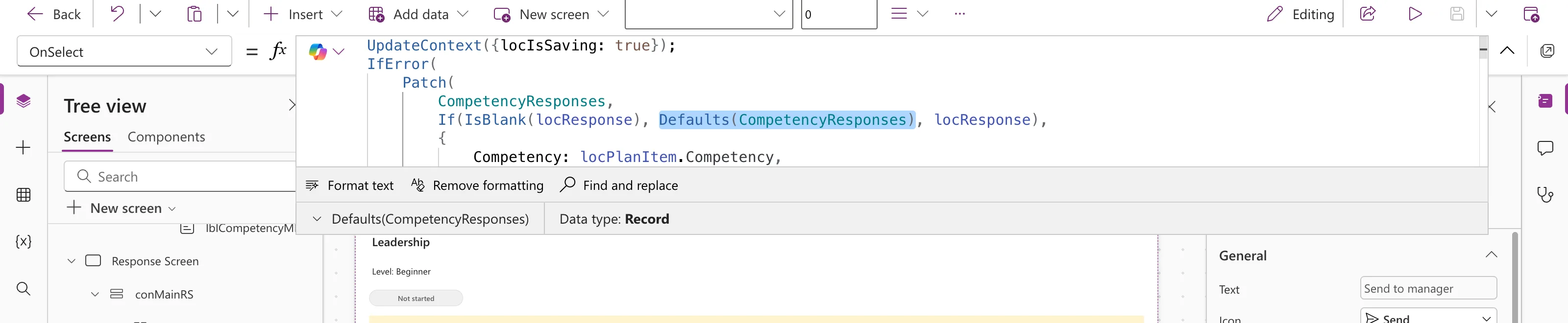
    If(IsBlank(locResponse), Defaults(CompetencyResponses), locResponse),
    { ... }
)
With Defaults(CompetencyResponses) selected in the formula bar, the preview strip shows it's a Record:
In preview, the first Send to manager created a new item in the list (How to Create or Update a SharePoint List Item with Patch).
Don't Rely on What's Inside
In Studio, expanding the strip for Defaults(CompetencyResponses) showed We didn't find any data. A test formula reading Defaults(CompetencyResponses).Status.Value showed nothing either, although the list's Status column has Pending as its default in SharePoint.
So set every value your app depends on in the Patch itself. The example sets Status: {Value: StatusPending} explicitly, and the new item was saved as Pending.
Common Mistakes
| Mistake | What happens | Do this instead |
|---|---|---|
Defaults(ListA) in a Patch to ListB | No item is created | Microsoft: the two data sources must match |
| Relying on a column's default | The app's behavior depends on list settings | Set the value in the Patch |
| Using Defaults to update | A new item every time | Use the loaded record for updates |
Troubleshooting
| Symptom | Likely cause | Fix |
|---|---|---|
| Duplicates instead of updates | Defaults was used although an item existed | Check how the existing item is loaded |
| A required column error on create | Defaults don't cover every required column | Set those columns in the change record |
FAQ
Can I prefill a form with Defaults?
Yes, that's the other use Microsoft mentions: "to prepopulate a data entry form".
What does it return for a collection?
An empty record, because collections have no defaults.
Conclusion
Defaults(DataSource) is the base record that makes Patch create a new item. Treat its contents as unknown and set every value your app needs yourself.
