How to Use Temp State in the Microsoft 365 Agents SDK in C#

Sometimes a value only matters while one turn runs: something a before-turn handler works out once, for the route and the after-turn handler to use. In the Microsoft 365 Agents SDK that value goes in temp state, which every handler of the turn can reach and nothing ever saves.
Syntax
turnState.Temp.SetValue(name, value);

T value = turnState.Temp.GetValue<T>(name, defaultValueFactory);
turnStateis theITurnStateevery handler receives: before-turn handlers, routes and after-turn handlers all get the same one during a turn.Tempis the temp scope. It starts empty in every turn and is thrown away when the turn ends. It's never loaded from storage or saved to it.nameis the value's name, a string you choose.valueis any object: unlike the other scopes, temp state is never turned into JSON, so it can hold anything.defaultValueFactoryis optional: a function that returns the value to use when there isn't one yet.
The Example
The agent for this post takes problem reports. A before-turn handler gives every turn a reference number; the route quotes it in its answer, and an after-turn handler writes it to the log, so a person's reference leads straight to the log lines of their turn:
using System.Text.RegularExpressions;
using Microsoft.Agents.Builder;
using Microsoft.Agents.Builder.App;
using Microsoft.Agents.Builder.State;
using Microsoft.Agents.Core.Models;

namespace TempStateDemo;

public class ReportAgent : AgentApplication
{
    private const string ReferenceKey = "reference";

    private static readonly Regex ReportPattern = new(@"^report\s+(.{1,200})$", RegexOptions.IgnoreCase);

    private readonly ILogger<ReportAgent> _logger;

    public ReportAgent(AgentApplicationOptions options, ILogger<ReportAgent> logger) : base(options)
    {
        _logger = logger;

        OnBeforeTurn(CreateReferenceAsync);
        OnAfterTurn(LogReferenceAsync);

        OnMessage(ReportPattern, ReportAsync);
        OnActivity(ActivityTypes.Message, HelpAsync, rank: RouteRank.Last);
    }

    private Task<bool> CreateReferenceAsync(ITurnContext turnContext, ITurnState turnState, CancellationToken cancellationToken)
    {
        string reference = "REF-" + Guid.NewGuid().ToString("N")[..8].ToUpperInvariant();

        turnState.Temp.SetValue(ReferenceKey, reference);
        return Task.FromResult(true);
    }

    private async Task ReportAsync(ITurnContext turnContext, ITurnState turnState, CancellationToken cancellationToken)
    {
        string reference = turnState.Temp.GetValue<string>(ReferenceKey);

        await turnContext.SendActivityAsync($"Thanks. Your report is logged as **{reference}**.", cancellationToken: cancellationToken);
    }

    private async Task HelpAsync(ITurnContext turnContext, ITurnState turnState, CancellationToken cancellationToken)
    {
        await turnContext.SendActivityAsync("Send **report** and what went wrong, such as **report the printer is jammed**.", cancellationToken: cancellationToken);
    }

    private Task<bool> LogReferenceAsync(ITurnContext turnContext, ITurnState turnState, CancellationToken cancellationToken)
    {
        string reference = turnState.Temp.GetValue<string>(ReferenceKey);

        _logger.LogInformation("Turn {Reference} finished: {ActivityType}", reference, turnContext.Activity.Type);
        return Task.FromResult(true);
    }
}
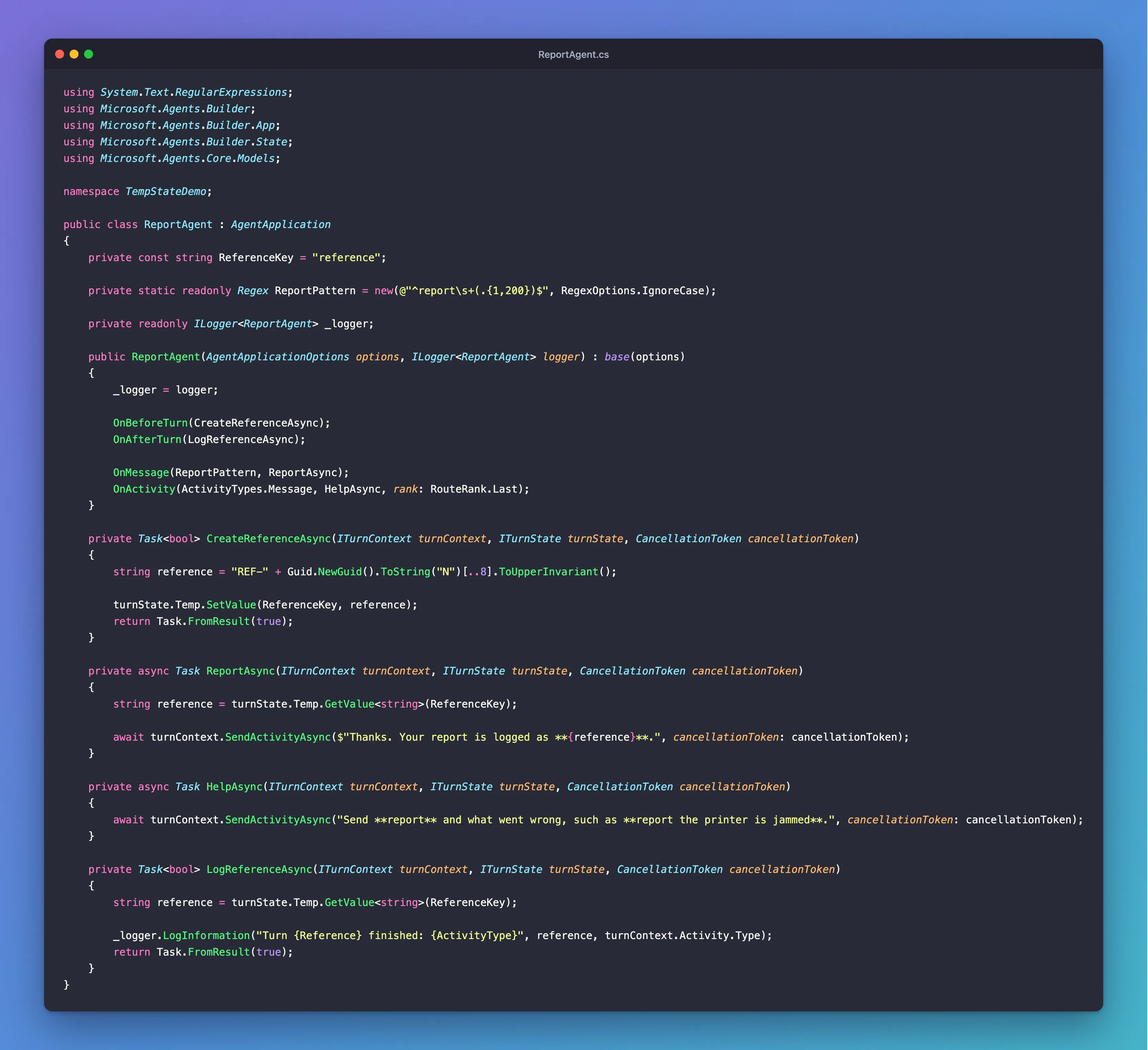
It's one class in an ASP.NET Core project with the Agents SDK, hosted with AddAgent<ReportAgent>() and listening on port 3978.
Prerequisites
- The Microsoft 365 Agents Playground, to chat with the agent on your own machine.
agentsplayground --versionshould print0.2.30; if the command isn't found, install it withnpm install -g @microsoft/m365agentsplayground.
Step 1: Set the Value Before the Routes Run
        string reference = "REF-" + Guid.NewGuid().ToString("N")[..8].ToUpperInvariant();

        turnState.Temp.SetValue(ReferenceKey, reference);
        return Task.FromResult(true);
OnBeforeTurn runs this handler at the start of every turn, before any route. Guid.NewGuid().ToString("N") gives 32 random hexadecimal characters, and [..8] keeps the first eight, which is plenty to tell turns apart in a log. return Task.FromResult(true) lets the turn carry on.
Step 2: Read It in the Route and After the Turn
ReportAsync and LogReferenceAsync both read it the same way:
string reference = turnState.Temp.GetValue<string>(ReferenceKey);
There's no default here: the before-turn handler always sets the value first. ReferenceKey is a constant, so all three handlers use the same name.
Step 3: Try It
Run the agent with dotnet run, then start the Agents Playground in a second terminal:
agentsplayground -e http://localhost:3978/api/messages -c emulator
Send two reports, such as report the printer on floor 2 is jammed and report the meeting room screen is blank:
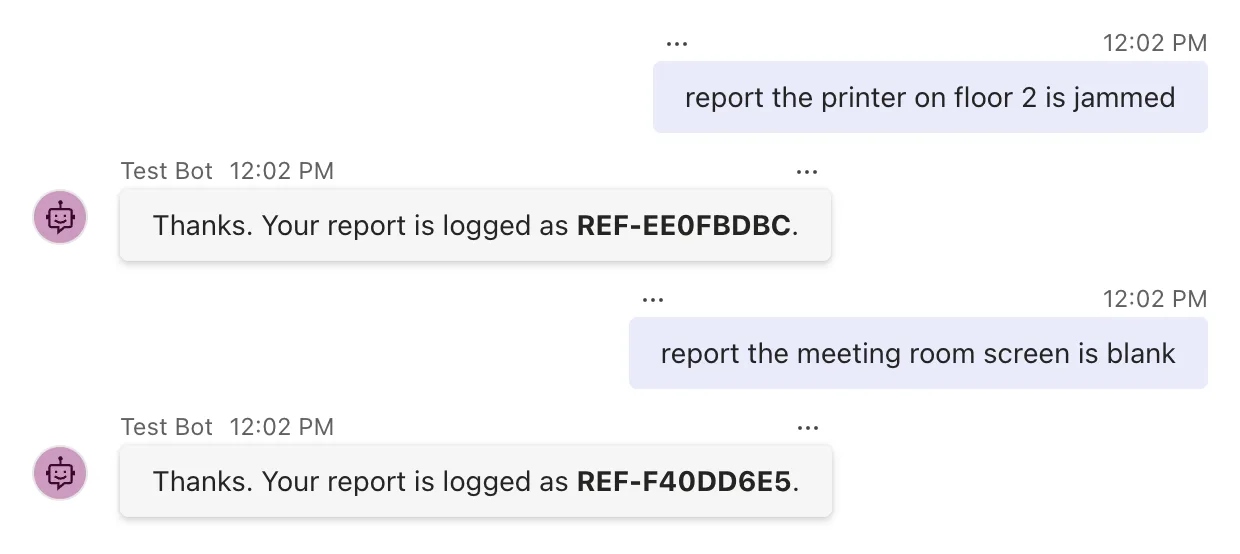
The agent's terminal logs the same references, one per turn:
info: TempStateDemo.ReportAgent[0]
      Turn REF-AF4548B0 finished: conversationUpdate
info: TempStateDemo.ReportAgent[0]
      Turn REF-EE0FBDBC finished: message
info: TempStateDemo.ReportAgent[0]
      Turn REF-F40DD6E5 finished: message
The first line is the conversationUpdate the Playground sends when it connects: every turn gets a reference, even one no route answers. Each value lived for exactly one turn, from the before-turn handler to the after-turn handler, and the next turn started with an empty temp state and made its own.
Common Mistakes
| Mistake | What happens | Do this instead |
|---|---|---|
| Expecting temp state in the next turn | It's empty at the start of every turn | Keep values for later turns in conversation or user state |
turnState.SetValue("count", 1) meant for conversation state | A name without a scope goes to temp state, so the value disappears after the turn | Use turnState.Conversation, or the path "conversation.count" |
Troubleshooting
| Symptom | Likely cause | Fix |
|---|---|---|
The route reads null | The before-turn handler didn't run or didn't set the value | Register it with OnBeforeTurn, and check the name |
| The after-turn handler doesn't log | A before-turn handler returned false, or the turn threw | Those turns skip the after-turn handlers |
| A value from the previous message is missing | Temp state is per turn | Move it to conversation or user state |
FAQ
What does the SDK keep in temp state?
Files that people attach to a message, when the agent is set up with file downloaders: the SDK downloads the files before your before-turn handlers and routes run, and adds them to turnState.Temp.InputFiles. That's the same idea as this post: something prepared once at the start of the turn, for the handlers to use.
Is temp state saved anywhere?
No. It's never loaded from storage and never saved to it, so it can hold objects that couldn't be turned into JSON, and nothing in it survives the turn.
Why not just use a field of the agent class?
Within one turn a field works too, because the SDK creates a new agent instance for every activity. Temp state is the SDK's own place for per-turn values: any code you pass the turnState to can read them, and the SDK keeps its per-turn data there as well.
Conclusion
Temp state is the turn's scratch pad: turnState.Temp.SetValue(name, value) in one handler, turnState.Temp.GetValue<T>(name) in the next, and nothing left over when the turn ends. Use it for values that a before-turn handler prepares for the rest of the turn, such as a reference number that ties a reply to its log lines.
Additional Resources
- AgentApplication in Microsoft 365 Agents SDK: Use turn state — the temp scope next to the conversation and user scopes.
- AgentApplication in Microsoft 365 Agents SDK: Turn lifecycle hooks — before-turn and after-turn handlers.
- TempState class — the API reference for the temp scope.
