How to Use Single and Double Quotes in PowerShell

PowerShell has two kinds of quotes, and they do different things. In double quotes, $name is replaced with the variable's value; in single quotes, the text stays exactly as you typed it. This guide prints the same greeting both ways, with real output from PowerShell 7.6.10.
Syntax
"<text with $<variable> or $(<expression>)>"
'<text exactly as typed>'
| Part | What it means |
|---|---|
"<text>" | An expandable string. Each $<variable> is replaced with the variable's value, and each $(<expression>) with the expression's result |
'<text>' | A verbatim string. Every character, $ included, stays as typed |
The about_Quoting_Rules page: "A string enclosed in double quotation marks is an expandable string. Variable names preceded by a dollar sign ($) are replaced with the variable's value before the string is passed to the command for processing." And: "A string enclosed in single quotation marks is a verbatim string. The string is passed to the command exactly as you type it. No substitution is performed."
The Example
The example keeps the name Ada in a variable, $name, and prints a greeting with each kind of quote. Then it puts an expression into a string, and quotes inside strings. A string typed on its own line is printed as it is, so each output line shows what PowerShell made of the string. The commands run in the PowerShell 7.6.10 console.
Prerequisites
- PowerShell 7. This guide uses PowerShell 7.6.10.
Step 1: Print a Greeting with Each Kind of Quote
$name = "Ada"
"Hello, $name"
'Hello, $name'
Hello, Ada
Hello, $name
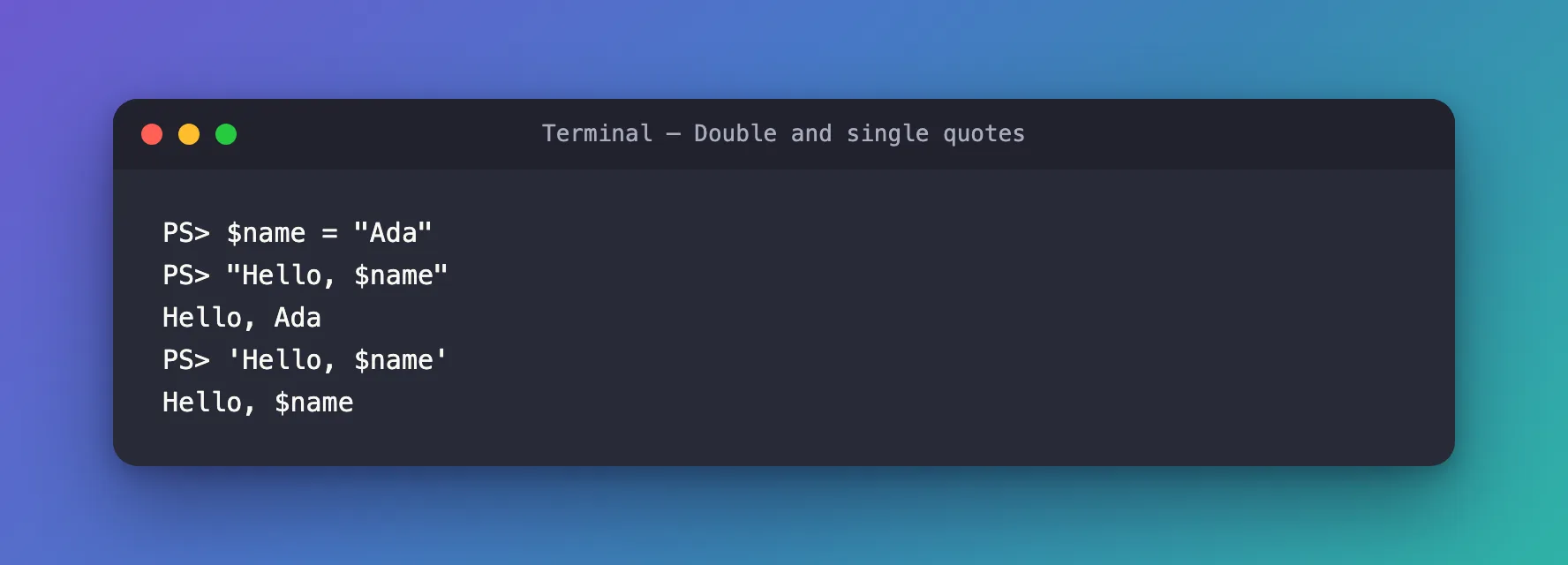
In double quotes, PowerShell replaced $name with Ada. In single quotes, it left $name exactly as typed.
Step 2: Put an Expression in a Double-Quoted String
$( ) puts the result of an expression into a double-quoted string. Here the expression is $name.Length, the number of letters in the name:
"$name has $($name.Length) letters"
'$name has $($name.Length) letters'
Ada has 3 letters
$name has $($name.Length) letters
The double-quoted string worked out $name.Length as 3, while the single-quoted one kept every character. The $( ) is needed because, in about_Quoting_Rules' words, "Only basic variable references can be directly embedded in an expandable string." Without it, "$name has $name.Length letters" printed Ada has Ada.Length letters.
Step 3: Put Quotes inside a String
The easiest way is to wrap the text in the other kind of quote:
"It's done"
'She said "hello"'
It's done
She said "hello"
To use the same kind of quote inside, type it twice:
'It''s done'
"She said ""hello"""
It's done
She said "hello"
The about_Quoting_Rules page: "To include a single quotation mark in a single-quoted string, use a second consecutive single quote." Doubling works inside double quotes too, as the second line shows.
Common Mistakes
| Mistake | What happens | Do this instead |
|---|---|---|
A dollar amount in double quotes: "Cost: $5" | $5 is read as a variable, which doesn't exist, so it printed only Cost: | Use single quotes, 'Cost: $5', or put a backtick before the $: "Cost: `$5" printed Cost: $5 |
A property in double quotes without $( ): "$name has $name.Length letters" | Only $name is replaced: Ada has Ada.Length letters | Wrap it: $($name.Length) |
An apostrophe inside single quotes: 'It's done' | The string ends at the apostrophe, and PowerShell shows >>, waiting for a closing quote | Type it twice, 'It''s done', or use double quotes |
A colon right after a variable: "$name: welcome" | ParserError: Variable reference is not valid. ':' was not followed by a valid variable name character. Consider using ${} to delimit the name. | Put the name in braces: "${name}: welcome" printed Ada: welcome |
Troubleshooting
| Symptom | Likely cause | Fix |
|---|---|---|
>> appears after you press Enter on a string | A quote is still open, such as an apostrophe inside single quotes | Press Ctrl+C, which cancelled the line, and fix the quotes |
Part of a string disappears where it had a $, as $5 did | Double quotes treated $ and what follows as a variable | Use single quotes |
FAQ
Which quotes should I use?
Single quotes for text that must stay exactly as typed, such as a search pattern. Double quotes when the text should include a variable's value, as in "Hello, $name".
Can a backtick put a quote inside a string?
Inside double quotes, yes: "She said `"hello`"" printed She said "hello". The about_Quoting_Rules page: "To force PowerShell to interpret a double quotation mark literally, use a backtick character." Inside single quotes, a backtick is just a character: 'She said `"hello`"' printed the backticks as well.
Conclusion
"Hello, $name" printed Hello, Ada, and 'Hello, $name' printed Hello, $name. Use double quotes when you want a variable's value in the text, and single quotes when every character must stay as typed.
Additional Resources
- about_Quoting_Rules — single and double quotes, and quotes inside strings.
- about_Special_Characters — the backtick and the special characters it starts.
