How to Use Private Conversation State in the Microsoft 365 Agents SDK in C#

Conversation state is shared by everyone in a chat, and user state follows a person into every chat. When you need something in between, kept for one person in one conversation, the Microsoft 365 Agents SDK has private conversation state. It isn't switched on by default, so this post adds it first, then uses it.
Syntax
Add the scope once, in Program.cs, by giving AgentApplicationOptions a turn state factory that includes it:
builder.Services.AddSingleton(sp =>
{
    IStorage storage = sp.GetRequiredService<IStorage>();

    return new AgentApplicationOptions(sp, sp.GetRequiredService<IConfiguration>(), sp.GetRequiredService<IChannelAdapter>(), storage)
    {
        TurnStateFactory = () => new TurnState(storage, new PrivateConversationState(storage))
    };
});
Then use it in any handler, like the other scopes:
T value = turnState.Private.GetValue<T>(name, defaultValueFactory);

turnState.Private.SetValue(name, value);
AgentApplicationOptionsholds the settings of everyAgentApplication.AddAgent<T>()registers it only when you haven't, so registering it yourself, beforeAddAgent<T>(), replaces the SDK's default.new AgentApplicationOptions(sp, configuration, adapter, storage)is the constructor the SDK uses itself, so the settings it reads from configuration and from the app's services stay as they were.TurnStateFactoryis how the SDK creates the state for each turn.new TurnState(storage, ...)creates the default conversation, user and temp scopes, plus every scope you pass in afterstorage.PrivateConversationStateis the private conversation scope. Give it the sameIStorageas the rest.turnState.Privateis that scope in your handlers, with the sameGetValueandSetValueasturnState.ConversationandturnState.User.
The Example
The agent for this post counts each person's messages in each chat: the same person has a separate count in every conversation, and two people in one chat each have their own:
using Microsoft.Agents.Builder;
using Microsoft.Agents.Builder.App;
using Microsoft.Agents.Builder.State;
using Microsoft.Agents.Core.Models;

namespace PrivateStateDemo;

public class MessageCounterAgent : AgentApplication
{
    public MessageCounterAgent(AgentApplicationOptions options) : base(options)
    {
        OnActivity(ActivityTypes.Message, CountAsync);
    }

    private async Task CountAsync(ITurnContext turnContext, ITurnState turnState, CancellationToken cancellationToken)
    {
        int count = turnState.Private.GetValue<int>("messageCount", () => 0) + 1;
        turnState.Private.SetValue("messageCount", count);

        string name = turnContext.Activity.From.Name ?? "You";
        await turnContext.SendActivityAsync($"{name}, that's message **{count}** from you in this chat.", cancellationToken: cancellationToken);
    }
}
It's one class in an ASP.NET Core project with the Agents SDK, listening on port 3978.
Prerequisites
- The Microsoft 365 Agents Playground, to chat with the agent on your own machine.
agentsplayground --versionshould print0.2.30; if the command isn't found, install it withnpm install -g @microsoft/m365agentsplayground.
Step 1: Add the Private Scope
Without this step, the first use of turnState.Private fails with Scope 'T' not found: the turn state the SDK creates by default has only the conversation, user and temp scopes. Fixed: System.ArgumentException: Scope 'T' not found in the Microsoft 365 Agents SDK shows that error and where it comes from.
Replace everything in Program.cs with this:
using Microsoft.Agents.Builder;
using Microsoft.Agents.Builder.App;
using Microsoft.Agents.Builder.State;
using Microsoft.Agents.Hosting.AspNetCore;
using Microsoft.Agents.Storage;
using PrivateStateDemo;

var builder = WebApplication.CreateBuilder(args);

builder.Services.AddSingleton<IStorage, MemoryStorage>();
builder.Services.AddSingleton(sp =>
{
    IStorage storage = sp.GetRequiredService<IStorage>();

    return new AgentApplicationOptions(sp, sp.GetRequiredService<IConfiguration>(), sp.GetRequiredService<IChannelAdapter>(), storage)
    {
        TurnStateFactory = () => new TurnState(storage, new PrivateConversationState(storage))
    };
});

builder.AddAgentDefaults()
    .AddAgent<MessageCounterAgent>();

var app = builder.Build();

app.UseAgents();
app.MapDefaultAgentEndpoints();

app.Run();
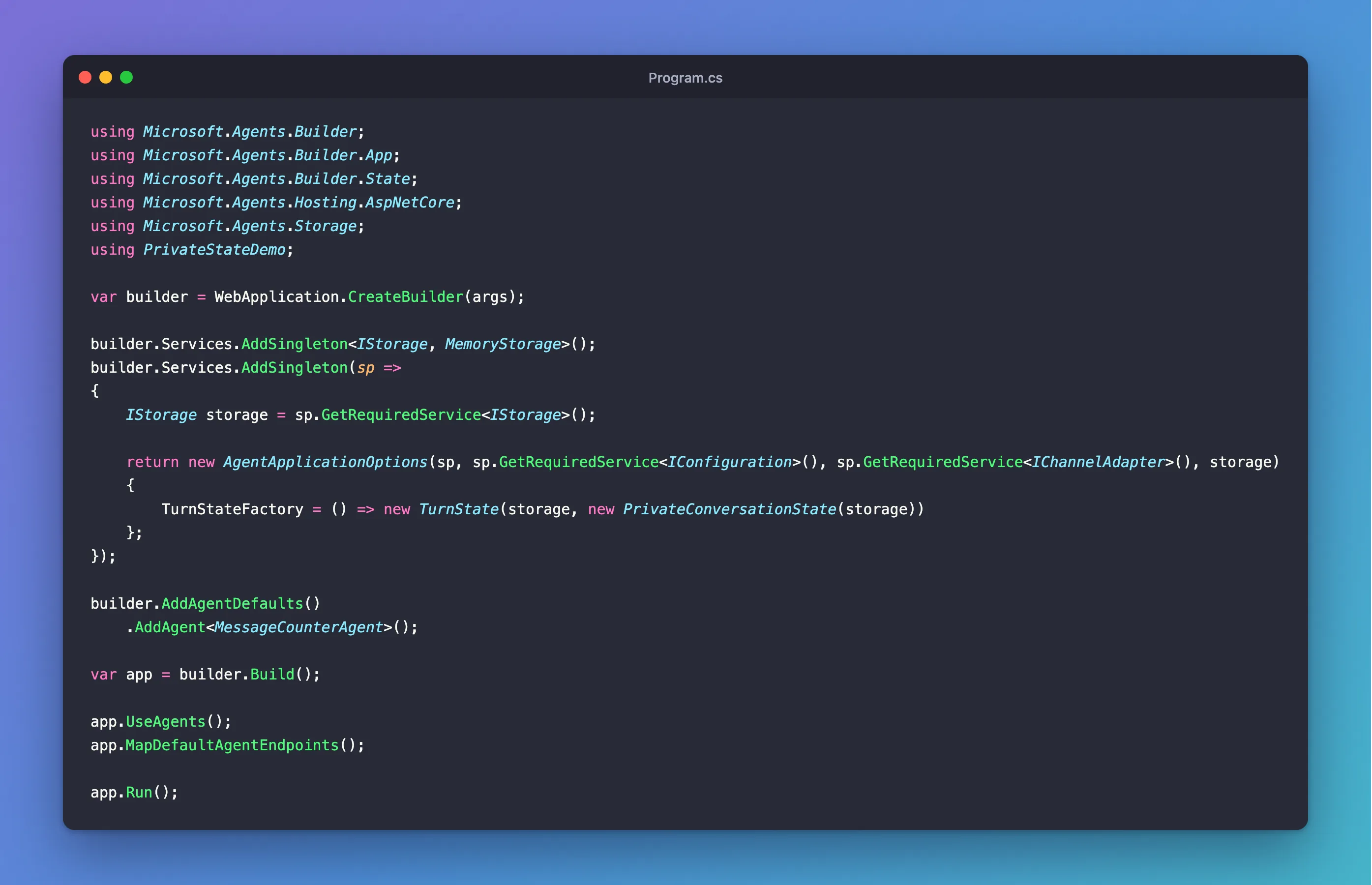
The registration is a factory, AddSingleton(sp => ...), so it runs the first time the options are needed, when the SDK's own services, such as the adapter, are already registered.
Step 2: Read and Write the Value
        int count = turnState.Private.GetValue<int>("messageCount", () => 0) + 1;
        turnState.Private.SetValue("messageCount", count);
The SDK keeps private conversation state under a key made of the channel, the conversation and the sender, so turnState.Private always means this person, in this conversation.
Step 3: Try It with Two People in a Group Chat
Run the agent with dotnet run, then start the Agents Playground in a second terminal:
agentsplayground -e http://localhost:3978/api/messages -c emulator
Send two messages in the personal chat, then select Group Chat in the list on the left. There, the agent only receives messages that mention it: type @, choose Test Bot, and send hi.
Next, a second person. The Playground sends what you type as its made-up user, Alex Wilber, but its custom activity can send a message as another of its built-in people, Megan Bowen, whose ID is user-id-1. Select Mock an Activity, then Custom activity, and change the from lines and the last line:
  "from": {
    "id": "user-id-1",
    "name": "Megan Bowen"
  },
  "type": "message",
  "text": "hi"
Select Send activity. How to Send a Custom Activity from the Microsoft 365 Agents Playground walks through that dialog in full. Finally, as Alex, send hi again to the agent:
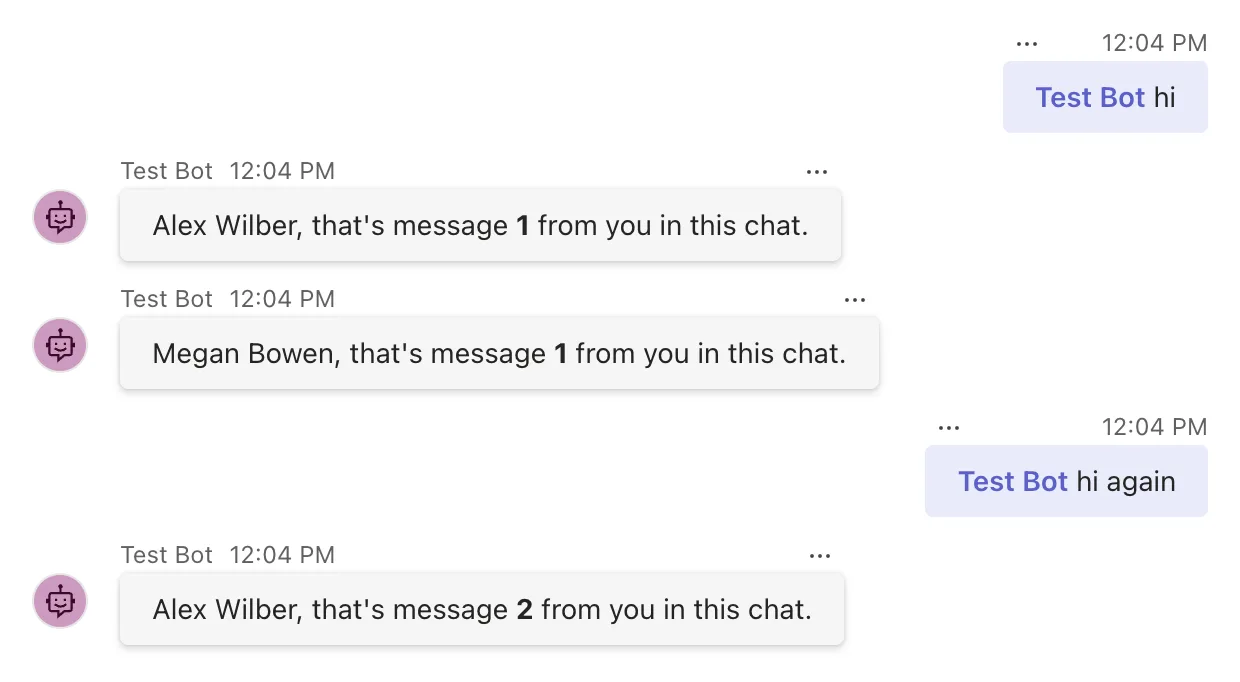
A custom activity doesn't show in the chat as a message, only the agent's answer does. Alex starts again at 1, after two messages in the personal chat, and Megan has a separate count in the same chat.
Step 4: Go Back to the First Chat
Select Personal Chat again and send back again:
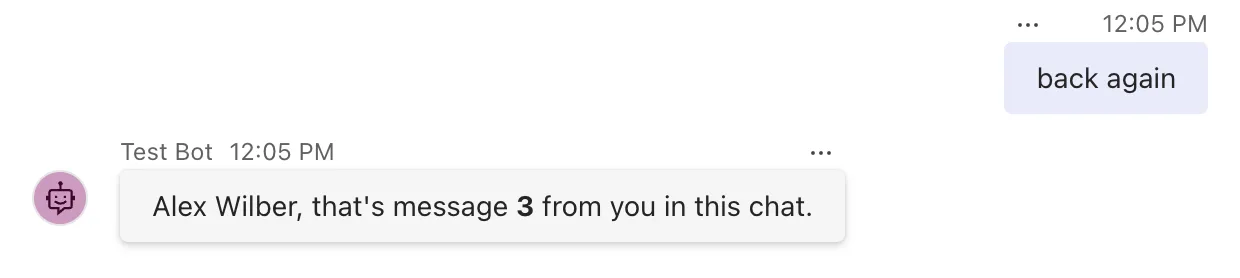
Message 3: the personal chat's count carried on where it left off, untouched by the group chat. That's the difference from the other two scopes. User state would have counted Alex's messages from both chats together, and conversation state would have counted Alex's and Megan's together.
Common Mistakes
| Mistake | What happens | Do this instead |
|---|---|---|
Using turnState.Private without adding the scope | Scope 'T' not found on the first message | Add PrivateConversationState in a TurnStateFactory, as in Step 1 |
Creating the options with new AgentApplicationOptions(storage) | The settings the SDK reads from configuration and the app's services are left out | Use the constructor that takes the service provider |
| Thinking private hides anything from the chat | The agent's answers in a group chat are seen by everyone in it | Private only means the state is kept per person |
Clearing a group chat's data with turnState.Private.ClearState() | Only the sender's private state is cleared; everyone else's stays | Through turnState, a person's private state can only be changed in a turn from that person |
Troubleshooting
| Symptom | Likely cause | Fix |
|---|---|---|
Scope 'T' not found | The private scope isn't in the turn state | Add it, as in Step 1 |
| The count is shared by everyone in a group chat | The value is in conversation state | Use turnState.Private |
| The count follows a person into every chat | The value is in user state | Use turnState.Private |
| The counts reset when the agent restarts | MemoryStorage keeps state only in memory | Expected; use durable storage in production |
FAQ
When should I use private conversation state?
When a value is about one person, but only within one conversation: their progress through something the group is doing together, their own setting for one chat, or anything you'd otherwise keep in conversation state in a dictionary keyed by user ID.
Does adding the scope cost anything?
The SDK loads every scope in the turn state at the start of each turn, so the private scope adds one storage read per turn, and one stored record for each person in each conversation.
Can I add other scopes the same way?
Yes. Microsoft's state documentation says the built-in scopes are subclasses of the agent state class, which can be derived to define other types of buckets with different scopes. Pass an instance of your own scope to the TurnState constructor, as with PrivateConversationState here, and read it with turnState.GetScope<T>().
Conclusion
Private conversation state keeps a value for one person in one conversation. The SDK doesn't create the scope by default: register AgentApplicationOptions with a TurnStateFactory that passes a PrivateConversationState to TurnState, and turnState.Private works like the other scopes, with every person in every chat getting their own values.
Additional Resources
- PrivateConversationState class — the private conversation scope.
- TurnStateFactory delegate — how the SDK creates the state for each turn.
- Manage state — state scopes, and deriving your own.
