How to Use One Screen to Add and Edit Items in Power Apps

Adding an item and editing one need almost the same screen. Instead of building two, build one and open it in two ways: with the item's ID to edit it, or with a blank ID to add a new one. Each formula that differs asks one question, IsBlank(locCompetencyId).
Prerequisites
- A SharePoint list and a screen with the item's fields. The example is the Competency screen of the Career Development Plan app (Part 9), which adds and edits competencies in the RoleCompetencies list.
Step 1: Open the Screen in Two Ways
The screen that lists the items opens it with Navigate (How to Go to Another Screen with Navigate). To edit, each row passes its ID:
Navigate('Competency Screen', ScreenTransition.None, {locCompetencyId: ThisItem.ID, locJobTitle: locMemberJobTitle})
To add, a button passes a blank ID:
Navigate('Competency Screen', ScreenTransition.None, {locCompetencyId: Blank(), locJobTitle: locMemberJobTitle})
Both create the same context variables on the screen. locJobTitle is what a new item needs to know: which job title it belongs to. I wrote these before any formula on the screen used the variables, to avoid Name isn't valid (Fixed: "Name Isn't Valid").
Step 2: Load the Item Only When Editing
UpdateContext(
    {
        locCompetency: If(
            IsBlank(locCompetencyId),
            Blank(),
            LookUp(
                RoleCompetencies,
                ID = locCompetencyId
            )
        )
    }
);
Reset(txtNameCS);
Reset(cmbLevelCS)
When adding, there's nothing to load, so locCompetency is blank. When editing, it's read fresh by its ID (How to Get a SharePoint List Item by Its ID). Resetting the inputs makes them show the loaded item each time the screen opens.
Step 3: Let the Screen Follow the Mode
| Control | Property | Formula |
|---|---|---|
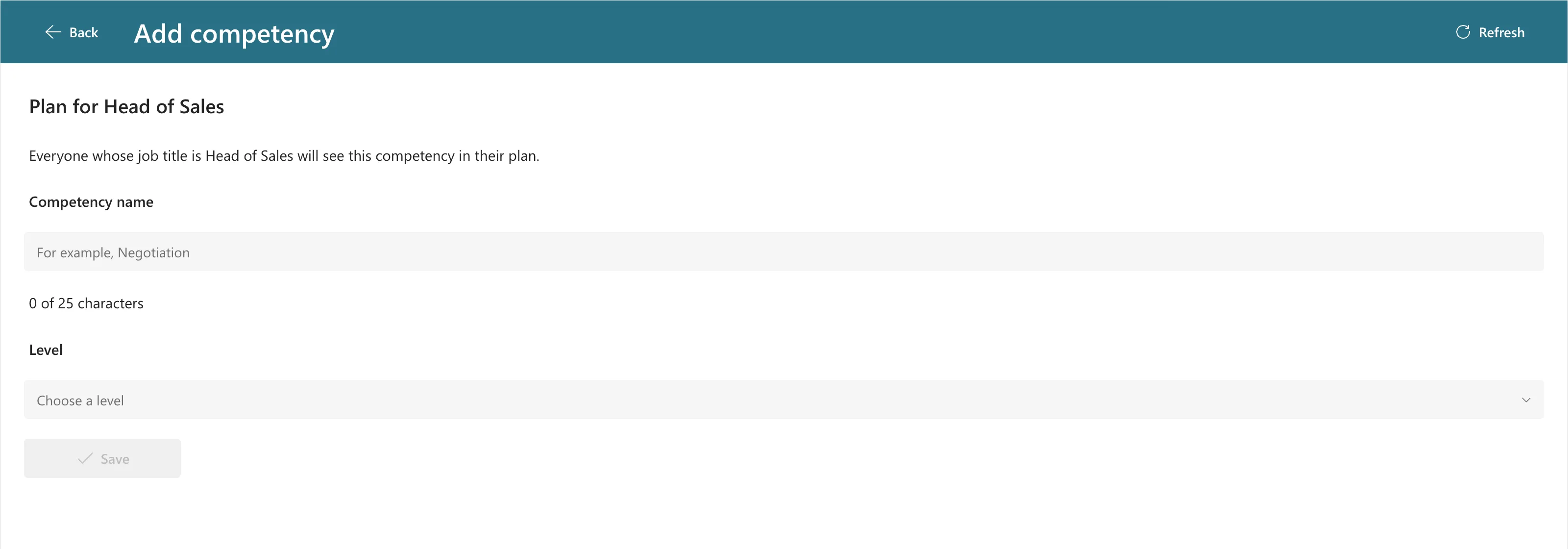
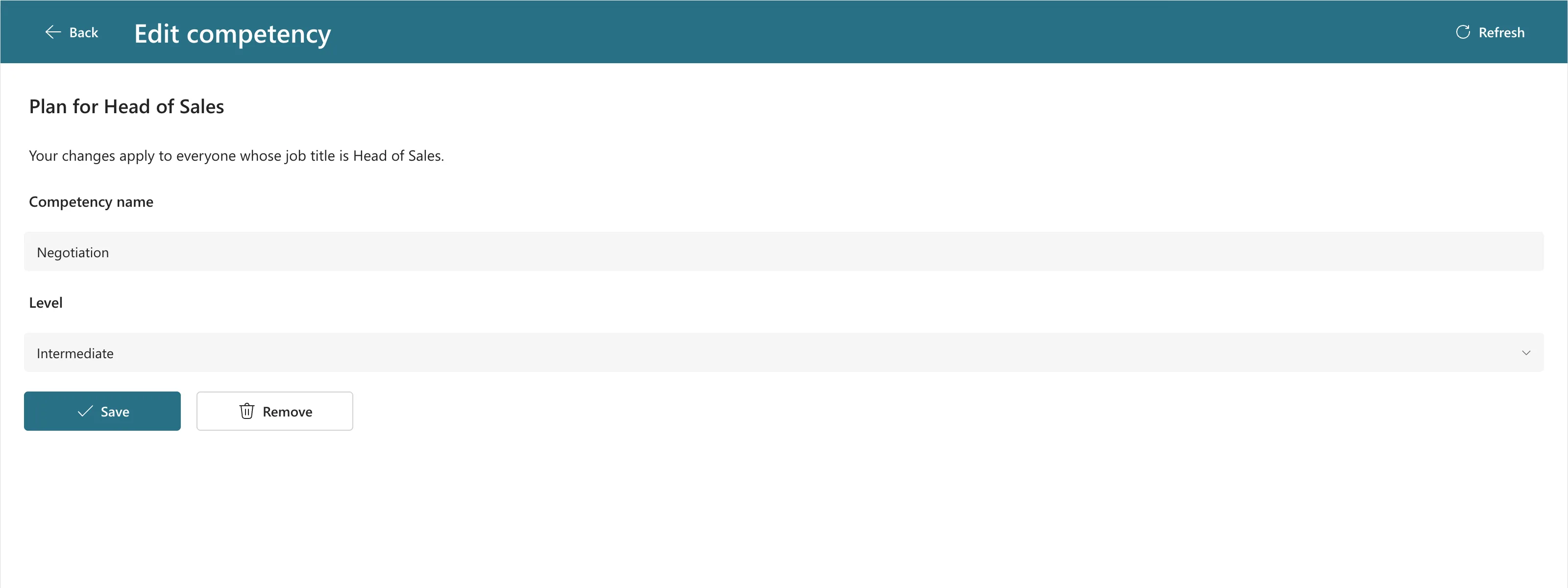
lblTitleCS | Text | If(IsBlank(locCompetencyId), "Add competency", "Edit competency") |
txtNameCS | Default | locCompetency.Competency |
txtNameCS | DisplayMode | If(locIsSaving, DisplayMode.Disabled, IsBlank(locCompetencyId), DisplayMode.Edit, DisplayMode.View) |
cmbLevelCS | DefaultSelectedItems | Filter(LevelOptions, Value = locCompetency.Level.Value) |
lblCountCS | Visible | !locIsLoading && IsBlank(locCompetencyId) |
btnRemoveCS | Visible | !IsBlank(locCompetencyId) |
When adding, locCompetency is blank, so the defaults are empty. The name can't be changed once the item exists (How to Make a Control Read-Only with DisplayMode), and Remove only makes sense for an existing item.
Adding:
Editing:
Step 4: Save Both with One Patch
Patch creates an item when its second argument is Defaults(List), and updates one when it's the loaded item (How to Create or Update a SharePoint List Item with Patch):
Patch(
    RoleCompetencies,
    If(IsBlank(existing), Defaults(RoleCompetencies), existing),
    {
        Competency: Trim(txtNameCS.Text),
        JobTitle: locJobTitle,
        Level: {Value: cmbLevelCS.Selected.Value},
        IsActive: true
    }
)
In the example, existing is the loaded item when editing, or the result of a duplicate check when adding (How to Prevent Duplicate Items). Part 9 has the complete formula.
Common Mistakes
| Mistake | What happens | Do this instead |
|---|---|---|
| Two screens for add and edit | Every change is made twice | One screen, two ways to open it |
| Looking up the item when adding | A query for an ID that doesn't exist | Load only when the ID isn't blank |
| Not resetting the inputs on open | They show the previous item | Reset them in the loading formula |
Troubleshooting
| Symptom | Likely cause | Fix |
|---|---|---|
| Name isn't valid on the ID variable | No Navigate passes it yet | Write the Navigate calls first |
| The screen opens in edit mode with empty fields | The ID passed doesn't exist | Check the Navigate that opened it |
| A new item is saved over an old one | The add path passed an ID | Pass Blank() when adding |
FAQ
Why not use an Edit form?
An Edit form has its own modes for new and existing items. This pattern suits screens built from separate controls in containers, like the rest of the example app.
Why can't the name change when editing?
That's the example app's rule. Responses point at the competency by its ID, so a renamed competency would carry its old approvals into a different meaning. To rename, remove it and add the new name.
Conclusion
Pass an ID to edit and a blank to add, load the item only when there's an ID, let each differing formula ask IsBlank(locCompetencyId), and save both with one Patch.
