How to Use ExecuteInTransactionAsync in EF Core

When a connection drops during COMMIT, nobody knows whether it worked. ExecuteInTransactionAsync handles that moment: it begins, commits and retries for you, and when the commit's outcome is unknown, it calls a function you supply to find out. You still have to give that function something to look for.
Prerequisites
- A
DbContextwith a retrying strategy. A custom one orEnableRetryOnFailure. I used EF Core 10.0.14 and MySQL 9.7.4. - Something unique to check for. I used a key column with a unique index.
Step 1: Write It
g.MapPost("/exec-in-tx", async (InventoryDbContext db, TimeProvider clock, ILogger<InventoryDbContext> log, CancellationToken cancellationToken) =>
{
    var strategy = db.Database.CreateExecutionStrategy();
    var key = Guid.NewGuid().ToString("N");
    var verified = false;
    var attempt = 0;

    db.StockMovements.Add(new StockMovement
    {
        ProductId = 1,
        Type = StockMovementType.Receipt,
        QuantityChange = 1,
        IdempotencyKey = key,
        OccurredAtUtc = clock.GetUtcNow().UtcDateTime,
    });

    await strategy.ExecuteInTransactionAsync(
        db,
        operation: (context, ct) =>
        {
            attempt++;
            log.LogInformation("Attempt {Attempt}", attempt);
            return context.SaveChangesAsync(acceptAllChangesOnSuccess: false, ct);
        },
        verifySucceeded: async (context, ct) =>
        {
            verified = true;
            return await context.StockMovements.AsNoTracking().AnyAsync(m => m.IdempotencyKey == key, ct);
        },
        cancellationToken);

    db.ChangeTracker.AcceptAllChanges();

    var saved = await db.StockMovements.CountAsync(m => m.IdempotencyKey == key, cancellationToken);

    return Results.Ok(new { attempts = attempt, verifySucceededCalled = verified, rowsSaved = saved });
});
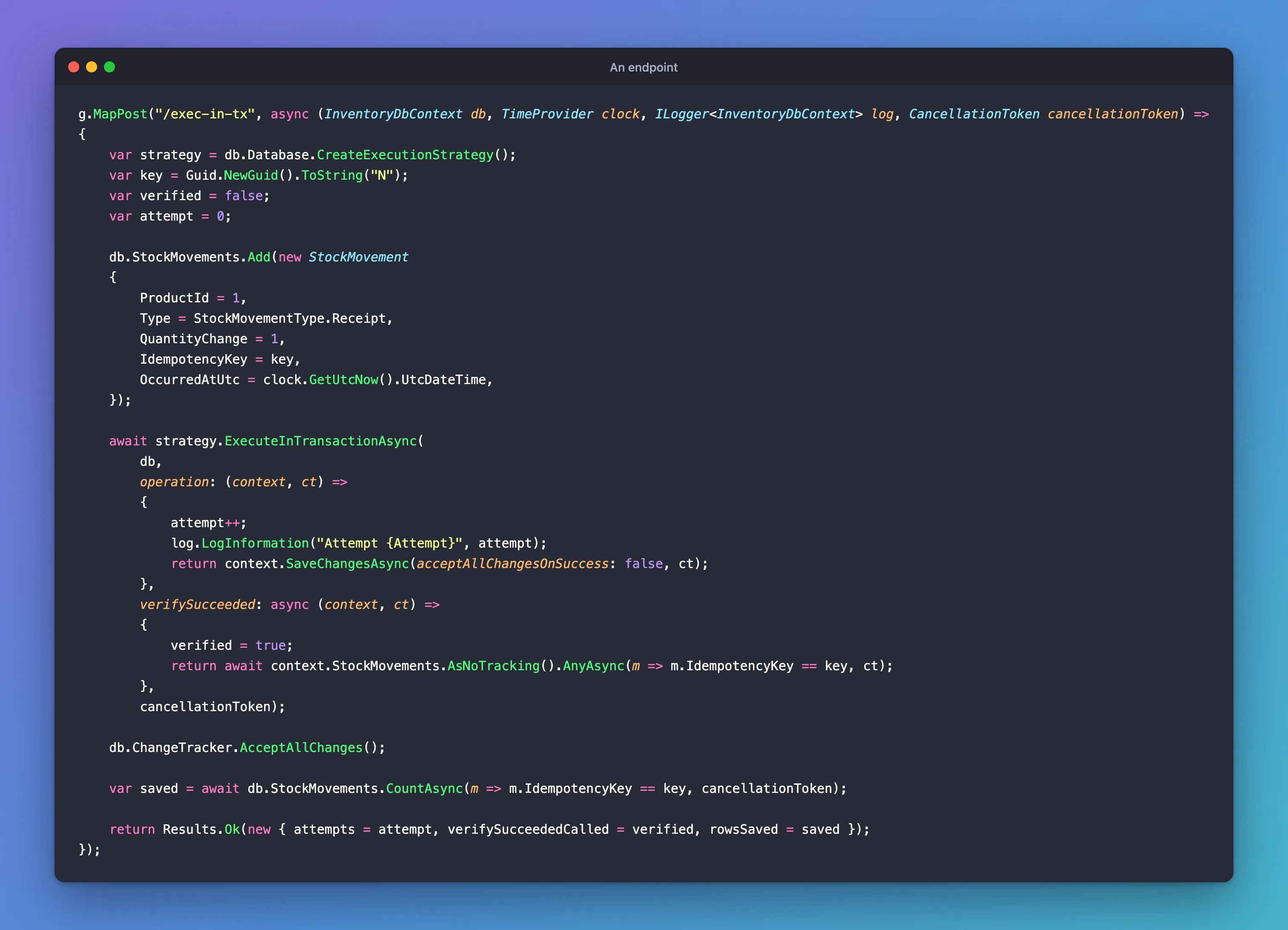
operationis your work. It doesn't begin or commit: the method does that.acceptAllChangesOnSuccess: falsekeeps the entities marked asAddedin case the work has to run again.verifySucceededanswers one question after a failed commit: did it actually work? Here it looks for the key.AcceptAllChangesthen tells the context that it's all saved.
The EF Core page describes it: "This method begins and commits a transaction and also accepts a function in the verifySucceeded parameter that is invoked when a transient error occurs during the transaction commit."
Step 2: Run It Normally
{
  "attempts": 1,
  "verifySucceededCalled": false,
  "rowsSaved": 1
}
verifySucceededCalled is false, because nothing went wrong.
Step 3: Lose the Commit's Reply
How to Test What Happens When the Reply to a COMMIT Is Lost shows how to make this happen on your machine:
{
  "attempts": 1,
  "verifySucceededCalled": true,
  "rowsSaved": 1
}
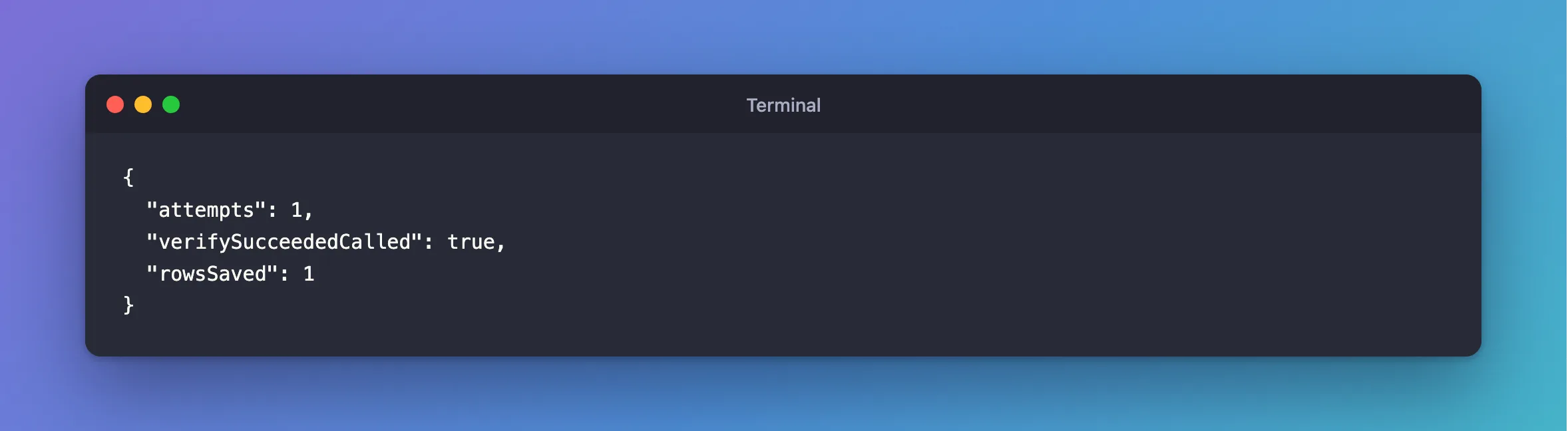
One attempt, the check ran, and one row was saved. The strategy saw that the work had succeeded, so it didn't run it again.
Step 4: Choose Between This and Your Own Check
This method suits code where the whole operation is one SaveChangesAsync. When a unit has several steps, or returns a result, I find it simpler to check for the key at the start of each attempt, which needs only ExecuteAsync.
Common Mistakes
| Mistake | What happens | Do this instead |
|---|---|---|
Forgetting acceptAllChangesOnSuccess: false | A retry finds nothing left to save | Pass it |
Forgetting AcceptAllChanges | A later save inserts it all again | Call it at the end |
A verifySucceeded that checks something other than this work | It can answer yes for another request | Check a unique key |
Troubleshooting
| Symptom | Likely cause | Fix |
|---|---|---|
verifySucceeded is never called | The commit worked, or there's no retrying strategy | Test a lost commit |
| Two rows after a lost commit | The check said no | Check the key, and the unique index |
| The method isn't found | It's an extension method | using Microsoft.EntityFrameworkCore; |
Conclusion
ExecuteInTransactionAsync wraps begin, commit and retry, and asks your verifySucceeded function what really happened when a commit's outcome is unknown. Give it a unique key to look for.
Additional Resources
- Transaction commit failure and the idempotency issue — the options.
