How to Use a readonly record struct in C#

A small value, such as a temperature reading or a point on a map, needs properties, a constructor, equality and a ToString before it's pleasant to use. A readonly record struct gets all of that from one line, and its properties can't change once it's created.
record makes the compiler write the code a data type always needs: the properties, a constructor, value-based equality and a ToString that shows the values. struct makes it a value type, copied when you pass it on, like an int. readonly stops its properties from changing after the value is created. Microsoft's reference: A positional record class and a positional readonly record struct declare init-only properties. A positional record struct declares read-write properties.
Syntax
readonly record struct <Name>(<Type1> <Property1>, <Type2> <Property2>);

<Name> <value> = new(<value1>, <value2>);
<Name> <copy> = <value> with { <Property1> = <newValue> };
| Part | What it is |
|---|---|
readonly record struct <Name>(...) | Declares the type. Each parameter in the parentheses becomes a public property with the same name |
readonly | Makes every property init-only: set when the value is created, never after |
new(<value1>, <value2>) | Creates a value, with the properties in the order they're declared |
<value> with { <Property1> = <newValue> } | A copy with the properties you list changed. The original stays as it was |
Two values of a record type are equal when they hold the same values. Microsoft's reference: For types with the record modifier (record class, record struct, and readonly record struct), two objects are equal if they are of the same type and store the same values.
The Example
A console app called RecordStruct has a Temperature with a value in degrees Celsius and a city. It creates one, makes a warmer copy, prints both, and compares the first with a new value that holds the same numbers.
Prerequisites
- The .NET 10 SDK.
dotnet --versionprints a version that starts with10.0.
Step 1: Create a Console App
dotnet new console -n RecordStruct
cd RecordStruct
The template "Console App" was created successfully.

Processing post-creation actions...
Restoring /Users/you/source/RecordStruct/RecordStruct.csproj:
  Determining projects to restore...
  Restored /Users/you/source/RecordStruct/RecordStruct.csproj (in 48 ms).
Restore succeeded.
dotnet new console -n RecordStruct creates a folder named RecordStruct with a project file and a Program.cs, and cd moves into it. Records are part of the C# language, so there's no package to add.
Step 2: Write the Code
Replace everything in Program.cs with the code that uses the temperature:
Temperature today = new(21.5, "Oslo");
Temperature warmer = today with { Celsius = 23 };

Console.WriteLine(today);
Console.WriteLine(warmer);
Console.WriteLine(today == new Temperature(21.5, "Oslo"));
new(21.5, "Oslo")creates a temperature: 21.5 degrees in Oslo.today with { Celsius = 23 }makes a copy withCelsiuschanged to 23.todayitself doesn't change.Console.WriteLine(today)prints the value with theToStringthe compiler wrote.today == new Temperature(21.5, "Oslo")compares the values, not where they're stored.
Then declare the type at the end of the file. In a Program.cs like this one, types go after the code that runs:
// A small value with two properties that can't change after it's created.
readonly record struct Temperature(double Celsius, string City);
That one line declares a value type with two init-only properties, Celsius and City, and a constructor that sets them.
Step 3: Run It
Run it in VS Code's terminal, or press Ctrl+F5 in Visual Studio:
dotnet run
Temperature { Celsius = 21.5, City = Oslo }
Temperature { Celsius = 23, City = Oslo }
True
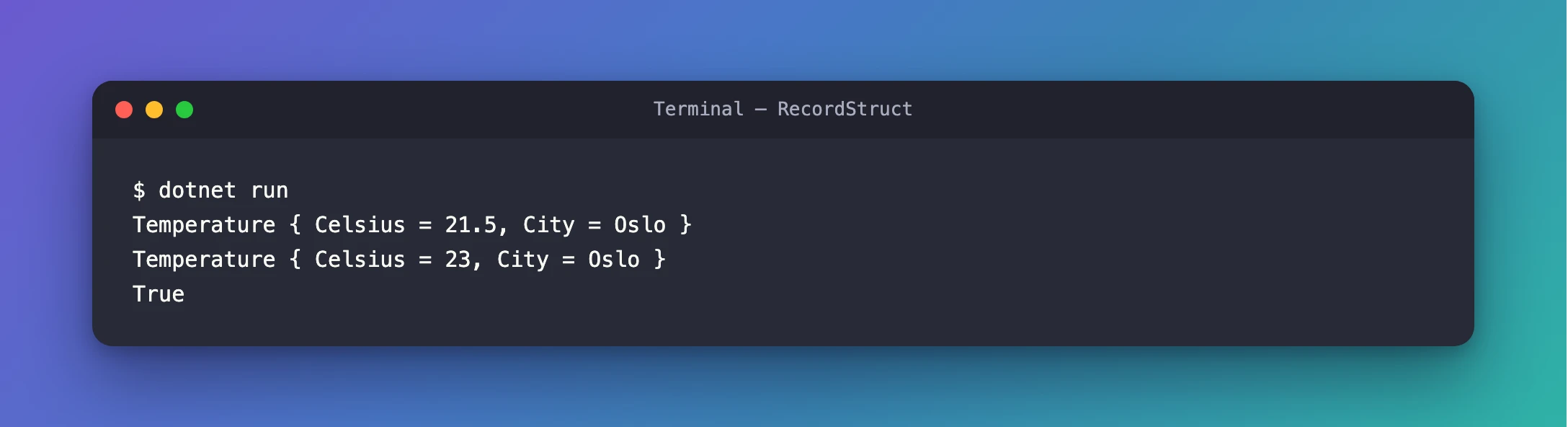
Line by line:
- The first line is the
ToStringthe compiler wrote: the type's name and every property with its value. - The second line is the copy:
Celsiusis 23 andCitycame along unchanged. The first line shows thattodaywas left alone. True: a new temperature with the same values is equal totoday.
The Complete File
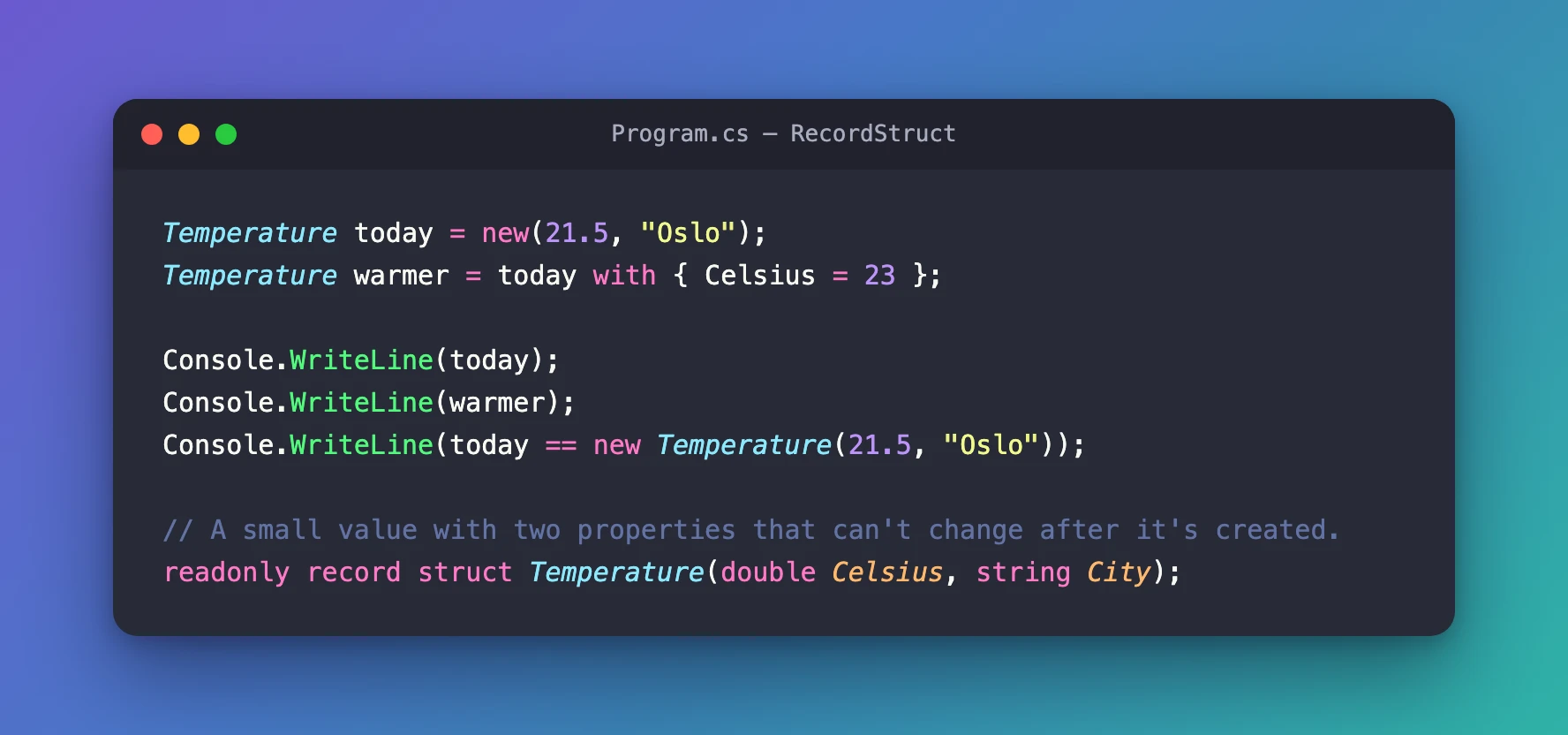
Temperature today = new(21.5, "Oslo");
Temperature warmer = today with { Celsius = 23 };

Console.WriteLine(today);
Console.WriteLine(warmer);
Console.WriteLine(today == new Temperature(21.5, "Oslo"));

// A small value with two properties that can't change after it's created.
readonly record struct Temperature(double Celsius, string City);
Common Mistakes
| Mistake | What happens | Do this instead |
|---|---|---|
Assigning a property after the value is created, such as today.Celsius = 23; | The build fails: error CS8852: Init-only property or indexer 'Temperature.Celsius' can only be assigned in an object initializer, or on 'this' or 'base' in an instance constructor or an 'init' accessor. | Make a changed copy with with |
Leaving out readonly | The properties can change: with record struct Reading(double Celsius, string City), reading.Celsius = 23 worked and printed Reading { Celsius = 23, City = Oslo } | Write readonly record struct when the values shouldn't change |
Expecting readonly to freeze a list inside the value | With a List<string> property, Items.Add("eggs") still worked and the list read milk, eggs | Remember that it's shallow: Microsoft's reference says init-only properties have shallow immutability. The property can't point to another list, but the list itself can change |
FAQ
readonly record struct or record class?
Both get value equality, with and ToString. The difference is the one between any struct and class: a struct is a value type, copied whenever you pass it on, and a class is a reference type. Microsoft's reference: Decide between a record class and a record struct similar to deciding between a class and a struct.
How do I get the values back out?
A positional record also gets a Deconstruct method, so you can split it into variables. (double celsius, string city) = today; followed by printing them gave Oslo is 21.5 °C.
Can I add my own members?
Yes: give it a body in braces instead of the semicolon, and add properties or methods there. Microsoft's records guide adds a Fahrenheit property to a readonly record struct Temperature(double Celsius) this way.
Conclusion
readonly record struct Temperature(double Celsius, string City); gives you a value type with init-only properties, value equality, a readable ToString, Deconstruct, and changed copies through with. Here a copy was 23 degrees while the original stayed at 21.5, and two temperatures with the same values were equal.
Additional Resources
- Records (C# reference) —
record class,record structandreadonly record struct. - Structure types (C# reference) — value types,
readonlystructs andwith. - with expression — nondestructive mutation.
