How to Use a Long-Lived HttpClient with PooledConnectionLifetime in C#

An HttpClient should live long, but a connection that lives forever never notices when a server's address changes. Setting PooledConnectionLifetime gives you both: one client for the whole app, and connections that renew themselves. This guide sets it and watches the connections being renewed.
Syntax
HttpClient <client> = new(new SocketsHttpHandler
{
    PooledConnectionLifetime = <lifetime>,
});
| Part | What it is |
|---|---|
SocketsHttpHandler | The part of HttpClient that opens connections and keeps them in a pool for reuse |
PooledConnectionLifetime | How long a connection can be in the pool to be considered reusable, in the reference's words. The default is InfiniteTimeSpan: forever |
<lifetime> | A TimeSpan, such as TimeSpan.FromMinutes(2) |
<client> | The client. Keep it for as long as the app runs, in a static field or a singleton |
Why It Matters
Microsoft's guidelines for HttpClient give the two problems it solves. Creating a new client for every request runs out of connections: If the rate of requests is high, the operating system limit of available ports might be exhausted. Keeping one client forever has the opposite problem: HttpClient only resolves DNS entries when a connection is created. It doesn't track any time to live (TTL) durations specified by the DNS server.
Their recommendation solves both: Use a static or singleton HttpClient instance with PooledConnectionLifetime set to the desired interval, such as 2 minutes, depending on expected DNS changes. The reference explains what the lifetime counts: the connection's age from when the connection was established, regardless of how much time it spent idle or active, and Connections are not torn down while actively being used to service requests.
The Example
A console program keeps one HttpClient, with a connection lifetime of five seconds so the effect shows quickly. It sends six requests to https://learn.microsoft.com/, two seconds apart, and writes a line every time the client opens a new connection.
Prerequisites
- The .NET 10 SDK.
dotnet --versionprints a version that starts with10.0.
Step 1: Create a Console App
dotnet new console -n PooledLifetimeDemo
cd PooledLifetimeDemo
Everything this program needs comes with .NET. Open the PooledLifetimeDemo folder in VS Code, or PooledLifetimeDemo.csproj in Visual Studio.
Step 2: Set the Lifetime and Watch the Connections
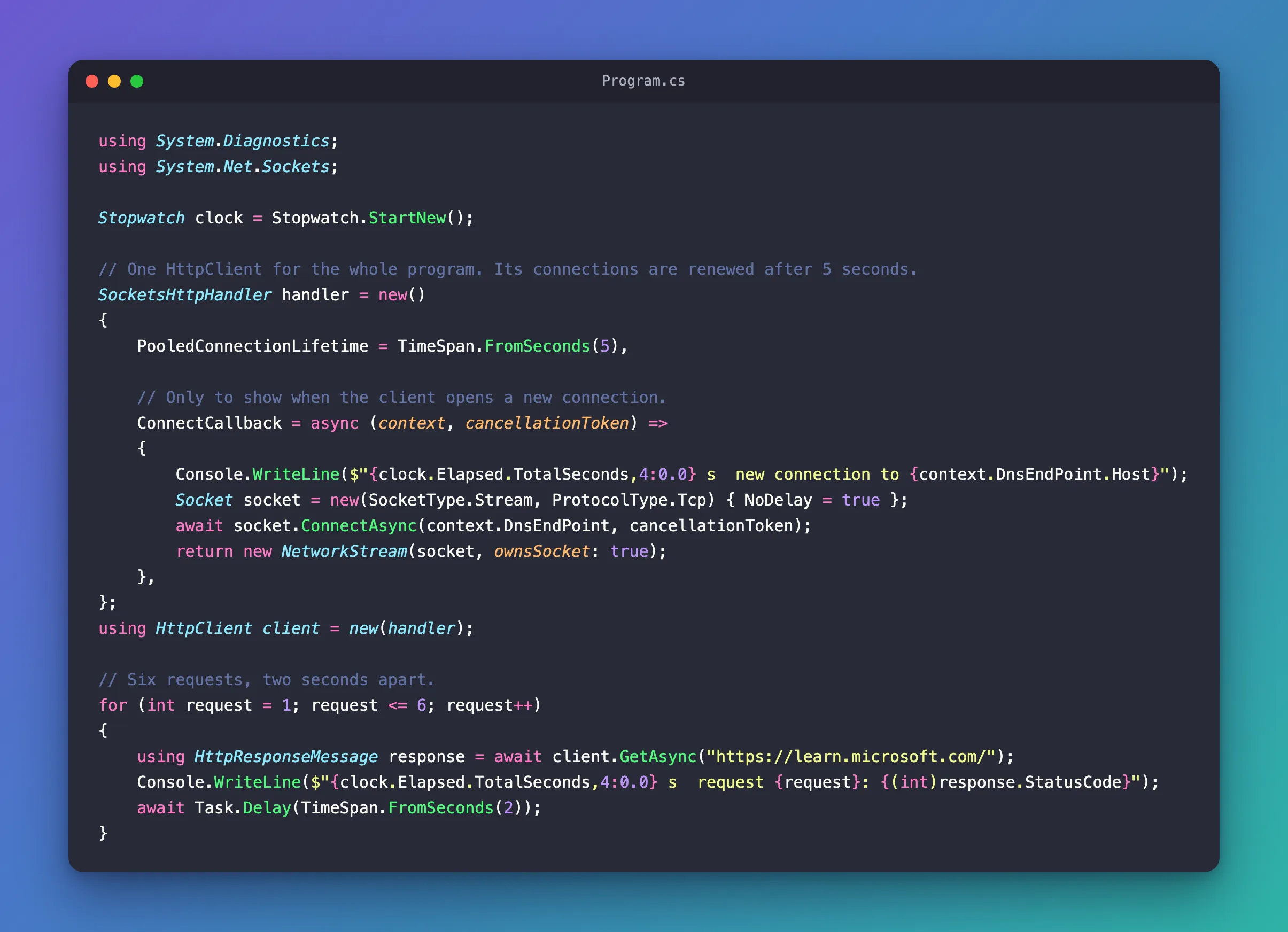
Replace everything in Program.cs with:
using System.Diagnostics;
using System.Net.Sockets;

Stopwatch clock = Stopwatch.StartNew();

// One HttpClient for the whole program. Its connections are renewed after 5 seconds.
SocketsHttpHandler handler = new()
{
    PooledConnectionLifetime = TimeSpan.FromSeconds(5),

    // Only to show when the client opens a new connection.
    ConnectCallback = async (context, cancellationToken) =>
    {
        Console.WriteLine($"{clock.Elapsed.TotalSeconds,4:0.0} s  new connection to {context.DnsEndPoint.Host}");
        Socket socket = new(SocketType.Stream, ProtocolType.Tcp) { NoDelay = true };
        await socket.ConnectAsync(context.DnsEndPoint, cancellationToken);
        return new NetworkStream(socket, ownsSocket: true);
    },
};
using HttpClient client = new(handler);

// Six requests, two seconds apart.
for (int request = 1; request <= 6; request++)
{
    using HttpResponseMessage response = await client.GetAsync("https://learn.microsoft.com/");
    Console.WriteLine($"{clock.Elapsed.TotalSeconds,4:0.0} s  request {request}: {(int)response.StatusCode}");
    await Task.Delay(TimeSpan.FromSeconds(2));
}
PooledConnectionLifetime = TimeSpan.FromSeconds(5)retires each connection five seconds after it was opened. Five seconds is only for this demonstration; an app uses minutes.ConnectCallbackis a custom callback used to open new connections. Here it only writes a line and then opens the connection the usual way, so you can see when it happens. Your app doesn't need it.- One
HttpClientsends all six requests.
Run the app:
- VS Code
- Visual Studio
In the terminal, in the PooledLifetimeDemo folder, run:
dotnet run
Press Ctrl+F5 (Debug > Start Without Debugging). The output appears in a console window.
 0.0 s  new connection to learn.microsoft.com
 1.1 s  request 1: 200
 3.6 s  request 2: 200
 5.6 s  new connection to learn.microsoft.com
 6.4 s  request 3: 200
 8.8 s  request 4: 200
11.1 s  new connection to learn.microsoft.com
11.5 s  request 5: 200
14.1 s  request 6: 200
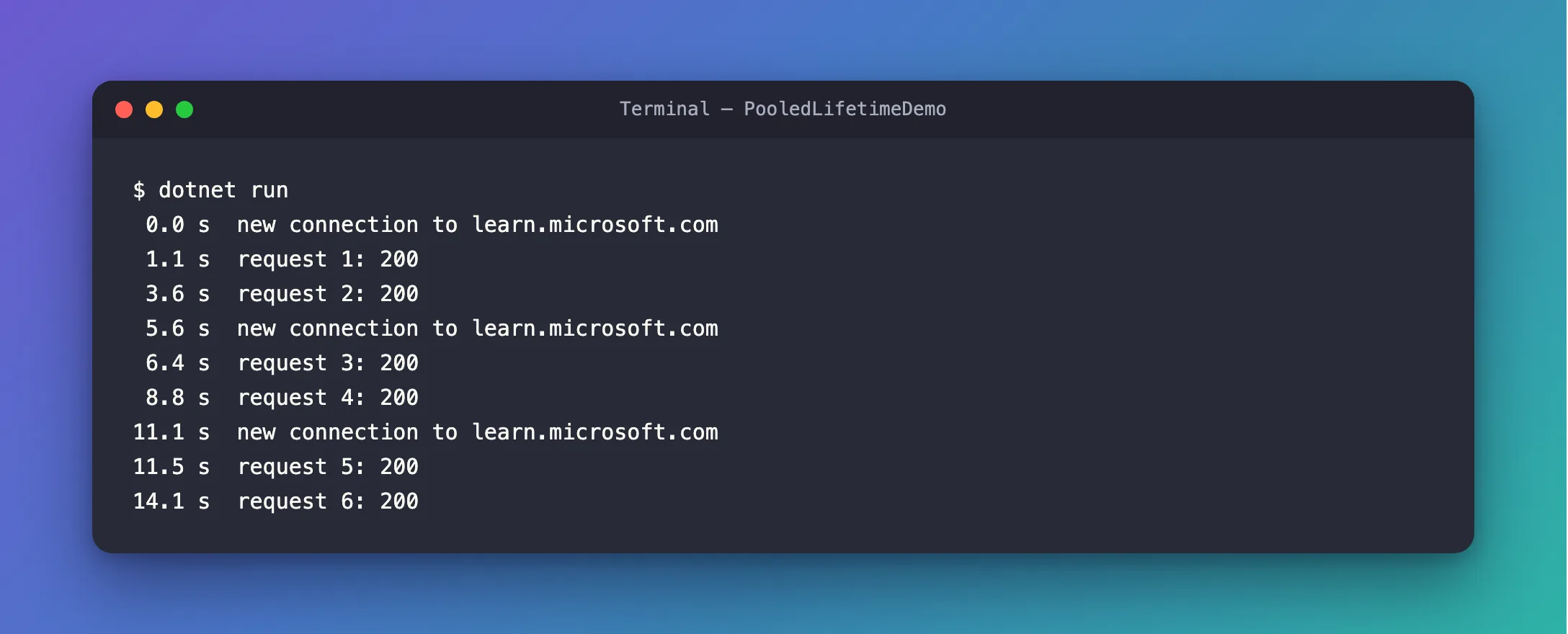
Requests 1 and 2 shared the first connection. By the time request 3 started, at 5.6 seconds, that connection was more than five seconds old, so the client opened a new one, and looked up the server's address again. The same happened at 11.1 seconds.
The Complete File
The file from Step 2 is the whole program:
Common Mistakes
| Mistake | What happens | Do this instead |
|---|---|---|
new HttpClient() for every request | Each client has its own pool, so connections aren't reused and ports can run out | Keep one client |
One client forever, without PooledConnectionLifetime | A connection in steady use is never renewed, so the client keeps the old address after a DNS change | Set a lifetime, such as two minutes |
| A lifetime of a few seconds in an app | A new connection, with its TLS handshake, every few seconds | Use minutes; the seconds here are for the demonstration |
FAQ
What about IHttpClientFactory?
It's the other recommended way: the factory renews the handlers behind the clients it creates. The guidelines say its clients are intended to be short-lived, so in a class that lives for the whole app, a single client with PooledConnectionLifetime is the simpler choice.
Does the lifetime close a connection in the middle of a request?
No. The reference says Connections are not torn down while actively being used to service requests. A connection past its lifetime finishes its request first, and the next request gets a new one.
Conclusion
Keep one HttpClient for the life of your app, and give its SocketsHttpHandler a PooledConnectionLifetime, such as two minutes. The client reuses its connections, and renews each one when it gets too old, looking up the server's address again. With a lifetime of five seconds, this program opened a new connection at 0.0, 5.6 and 11.1 seconds.
Additional Resources
- Guidelines for using HttpClient — long-lived clients, DNS behavior and the recommended setup.
- SocketsHttpHandler.PooledConnectionLifetime — what the lifetime counts.
- SocketsHttpHandler.ConnectCallback — opening connections yourself.
