How to Update Rows Without Loading Them with ExecuteUpdateAsync in EF Core

SaveChangesAsync loads rows, changes them in memory and writes them back. When you already know the change, that's wasted effort. ExecuteUpdateAsync sends one UPDATE straight to MySQL, for one row or thousands. This guide shows it in use, reads the SQL, and demonstrates the two ways it can surprise you.
Prerequisites
- A .NET C# project with EF Core 7 or later. The examples use EF Core 10, Oracle's
MySql.EntityFrameworkCore, MySQL 9.7, and aproductstable. SQL logging is on, as in How to See the SQL That EF Core Sends.
Step 1: Update One Row
Where chooses the rows, and SetProperty says what to change. This archives a product:
var now = clock.GetUtcNow().UtcDateTime;

var changed = await db.Products
    .Where(p => p.Id == id && !p.IsArchived)
    .ExecuteUpdateAsync(
        setters => setters
            .SetProperty(p => p.IsArchived, true)
            .SetProperty(p => p.ArchivedAtUtc, now)
            .SetProperty(p => p.UpdatedAtUtc, now)
            .SetProperty(p => p.Version, p => p.Version + 1),
        cancellationToken);
info: Microsoft.EntityFrameworkCore.Database.Command[20101]
      Executed DbCommand (10ms) [Parameters=[@p='?' (DbType = SByte), @p2='?' (DbType = DateTime), @p3='?' (DbType = DateTime), @id='?' (DbType = Int32)], CommandType='Text', CommandTimeout='30']
      UPDATE `products` AS `p`
      SET `IsArchived` = @p,
          `ArchivedAtUtc` = @p2,
          `UpdatedAtUtc` = @p3,
          `Version` = `p`.`Version` + 1
      WHERE (`p`.`Id` = @id) AND NOT (`p`.`IsArchived`)
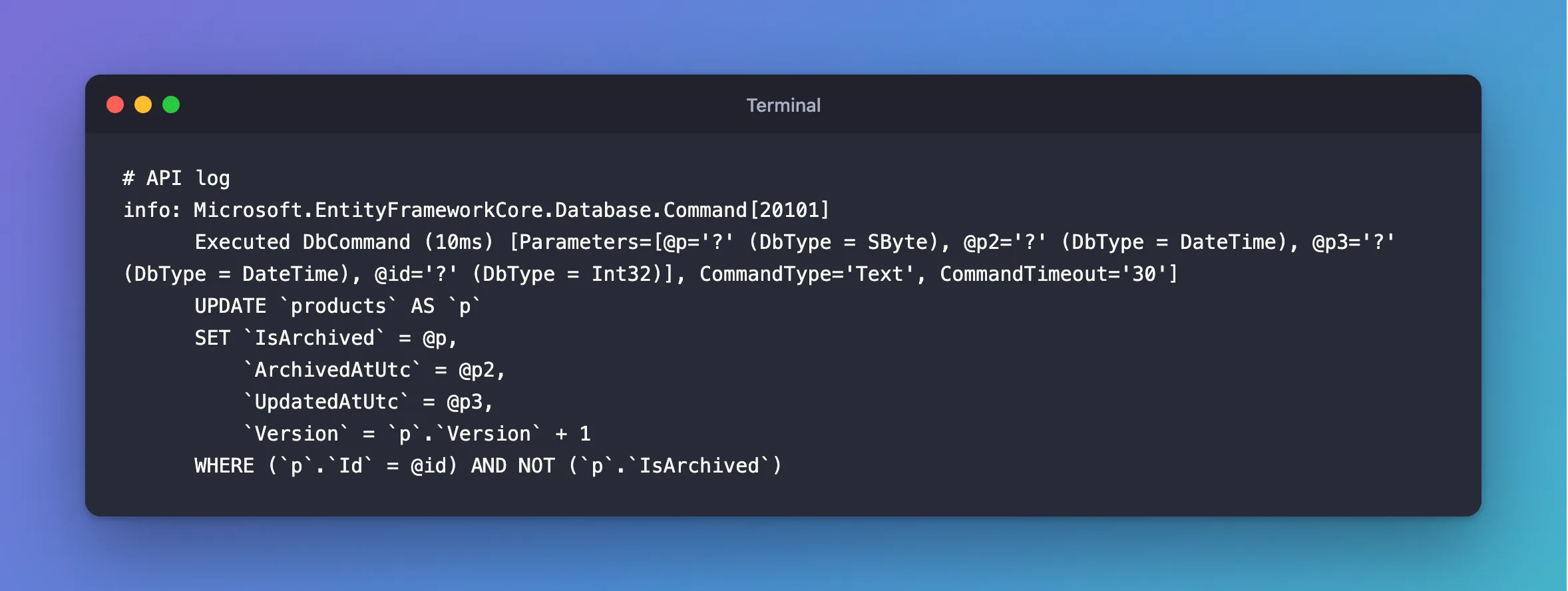
One statement, and no SELECT. The last SetProperty uses a function of the row, p => p.Version + 1, so the SQL says Version = Version + 1, and MySQL works out the value. EF Core's ExecuteUpdate page calls this "referencing the existing property value".
Step 2: Update Many Rows
The same call works for any number of rows. Raising the price of every active cable by 10%:
var changed = await db.Products
    .Where(p => !p.IsArchived && p.CategoryId == 1)
    .ExecuteUpdateAsync(s => s.SetProperty(p => p.UnitPrice, p => p.UnitPrice * (1 + percent / 100)));
HTTP/1.1 200 OK
Content-Type: application/json; charset=utf-8

{
  "changed": 4
}
info: Microsoft.EntityFrameworkCore.Database.Command[20101]
      Executed DbCommand (8ms) [Parameters=[@p='?' (DbType = Decimal)], CommandType='Text', CommandTimeout='30']
      UPDATE `products` AS `p`
      SET `UnitPrice` = `p`.`UnitPrice` * @p
      WHERE NOT (`p`.`IsArchived`) AND (`p`.`CategoryId` = 1)
With SaveChangesAsync, this would be a SELECT of those rows, and then one UPDATE per row.
Step 3: Read the Return Value
It returns the number of rows, which is how you notice a missing one:
if (changed > 0 || await db.Products.AnyAsync(p => p.Id == id, cancellationToken))
{
    return TypedResults.NoContent();
}

return TypedResults.NotFound();
On MySQL, that number means rows matched, with the default connection settings, even if their values didn't change. Setting a value it already has still returned 1 here, because Oracle's connector defaults to UseAffectedRows=false:
HTTP/1.1 200 OK
Content-Type: application/json; charset=utf-8

{
  "changed": 1
}
What UseAffectedRows Does shows the other setting.
Two Things to Watch For
A tracked object doesn't see the change. The page says these methods "take effect immediately", and that they're "completely unaware of EF's change tracker". This endpoint loads a product, then updates it with ExecuteUpdateAsync:
var tracked = await db.Products.FirstAsync(p => p.Id == id);
var before = tracked.ReorderLevel;

await db.Products.Where(p => p.Id == id)
    .ExecuteUpdateAsync(s => s.SetProperty(p => p.ReorderLevel, before + 1));

return Results.Ok(new { trackedStill = tracked.ReorderLevel, inDatabase = await db.Products.Where(p => p.Id == id).Select(p => p.ReorderLevel).FirstAsync() });
HTTP/1.1 200 OK
Content-Type: application/json; charset=utf-8

{
  "trackedStill": 7,
  "inDatabase": 8
}
The object still has the old value. If you changed it and saved, you could overwrite the update, so the page advises "to avoid mixing both tracked SaveChanges modifications and untracked modifications".
It doesn't check concurrency tokens. The page says they "cannot automatically apply concurrency control". If your table has a token, change it yourself, as the first example does with Version.
Common Mistakes
| Mistake | What happens | Do this instead |
|---|---|---|
Forgetting the Where | Every row in the table changes | Always check the Where first |
| Not updating the concurrency token | A client with an old version can overwrite the change | Add SetProperty for it |
Expecting SaveChangesAsync to send it | It has already run | Treat it as immediate |
| Running several without a transaction | The first stays if the second fails | Wrap them in a transaction |
| Trusting a tracked object afterwards | It holds old values | Read it again |
FAQ
When should I use SaveChangesAsync instead?
When you need the row's current values to decide what to do, or several changes to go together with their relationships. Use this when the change doesn't depend on loading the row.
Is there an ExecuteInsert?
No. The page says: "Only updating and deleting is currently supported; insertion must be done via DbSet<TEntity>.Add and SaveChanges()."
Conclusion
ExecuteUpdateAsync sends one UPDATE immediately, for one row or many, and returns how many it matched. SetProperty takes a value, or a function of the row. It skips the change tracker and concurrency tokens, so read tracked objects again afterwards, and update tokens yourself.
Additional Resources
- ExecuteUpdate and ExecuteDelete — the full behaviour and limits.
