How to Uninstall an App in Microsoft Teams

To remove an app from your own Teams, right-click its icon in the app bar, select Uninstall, and confirm with Remove. It leaves your Teams; nobody else's.
The example is Hello App, a small app from Power Apps that Maya Patel had added and pinned in her Teams, and no longer needs.
Microsoft's article on uninstalling the Power Apps personal app shows the same route for another app: right-click the app and select Uninstall from the shortcut menu, then confirm.
Step 1: Right-Click the App
In the app bar on the left, right-click the app's icon and select Uninstall:
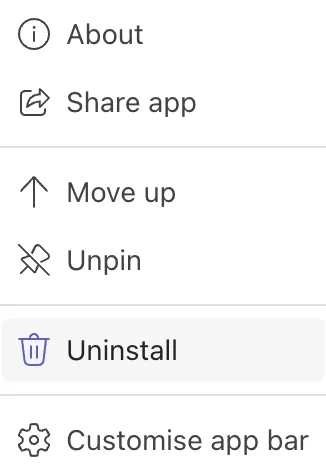
If the app isn't in the app bar, open it first from the more apps list (⋯).
Step 2: Confirm
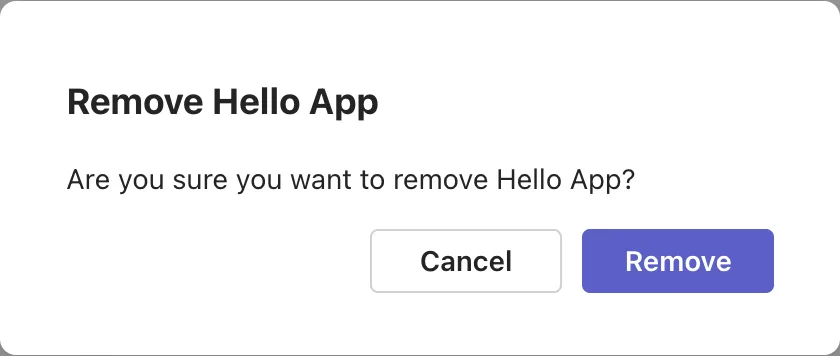
Teams asks: Are you sure you want to remove Hello App? Select Remove:
The Result
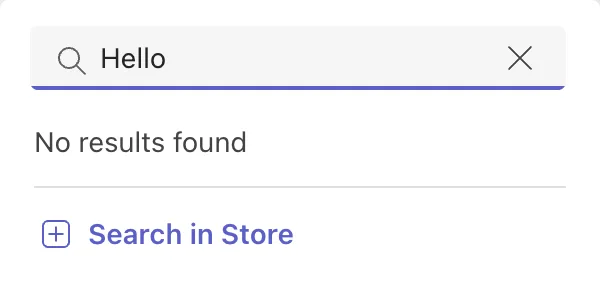
The app leaves the app bar. Searching the more apps list for it finds nothing, only a way back to the Store:
What Uninstalling Doesn't Do
- Other people keep the app.
- The app itself stays where it was made: for an app from Power Apps, in Power Apps, and in the organization's catalog if the admin put it there.
- Your access stays: you can add it again from the Store (How to Find an App Built for Your Organization in Microsoft Teams).
Common Mistakes
| Mistake | What happens | Do this instead |
|---|---|---|
| Uninstalling to tidy the app bar | You lose the app until you add it again | Unpin it instead |
| Uninstalling to remove it for everyone | Only your copy goes | The Teams admin deletes or blocks it |
Troubleshooting
| Symptom | Likely cause | Fix |
|---|---|---|
| No Uninstall in the menu | Your admin installed the app | Ask your Teams admin; Microsoft's Sales agent article gives this as the likely reason |
FAQ
Does uninstalling delete my data in the app?
Not for an app from Power Apps: its data stays where the app keeps it, such as a SharePoint list.
How do I get the app back?
Add it again from the Store, as the first time.
Conclusion
Right-click the app's icon, select Uninstall and confirm with Remove. Only your copy goes; to remove an app for everyone, the Teams admin deletes it (How to Delete a Custom App in the Teams Admin Center).
