How to Turn Off a .NET Analyzer Rule for One Folder with .editorconfig

Sometimes an analyzer rule is right for your code and wrong for one folder of it: generated files, migrations, a third-party snippet. Turning the rule off for the whole project throws away its value everywhere else. .editorconfig can set a rule's severity for files that match a pattern, so the rule stays on everywhere except where it doesn't apply. This guide does it for CA1861 in EF Core migrations, and proves the rule still works outside that folder.
Prerequisites
- A .NET C# solution with an
.editorconfigat the root: How to Add an .editorconfig to a .NET C# Project with dotnet new editorconfig. - A rule that fires where it shouldn't. Here:
AnalysisLevelset tolatest-recommended, warnings as errors, and EF Core migrations, which contain constant arrays that CA1861 objects to.
Step 1: See the Rule Fire in the Folder
Restore complete (0.6s)
  Dewiride.Inventory.Data net10.0 failed with 1 error(s) (0.2s)
    /Users/you/projects/dewiride-inventory-api/src/Dewiride.Inventory.Data/Migrations/20261103045135_AddMovementHistoryIndex.cs(19,26): error CA1861: Prefer 'static readonly' fields over constant array arguments if the called method is called repeatedly and is not mutating the passed array (https://learn.microsoft.com/dotnet/fundamentals/code-analysis/quality-rules/ca1861)

Build failed with 1 error(s) in 1.0s
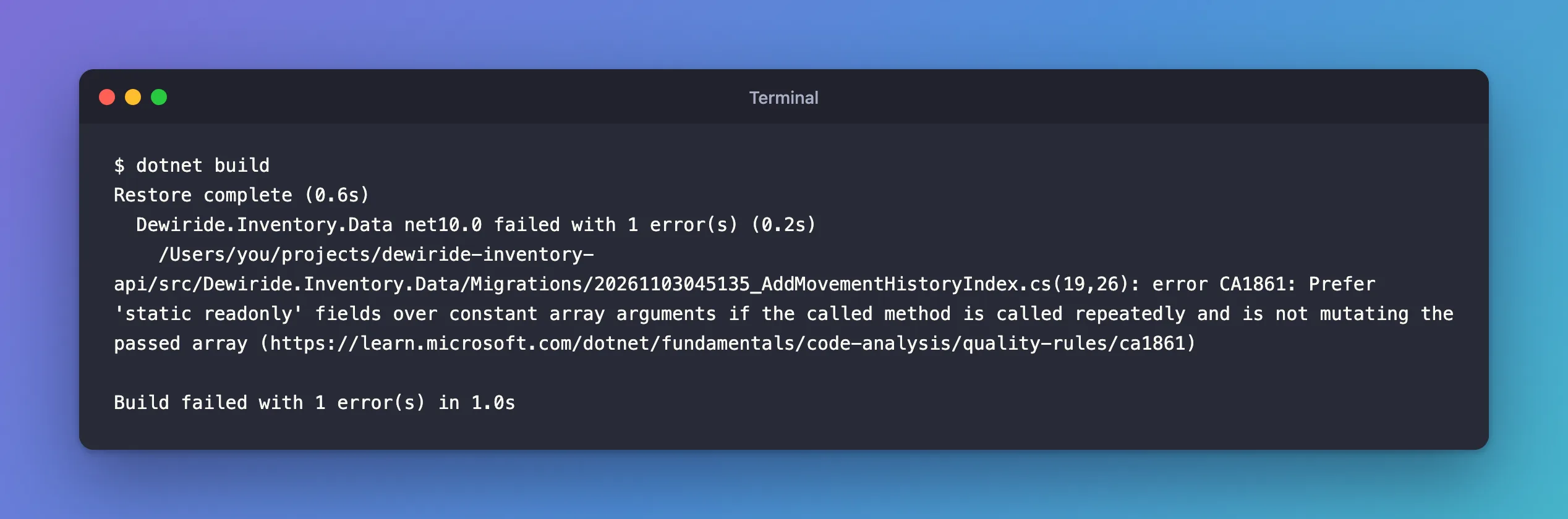
The array is in a migration EF Core generated, and a migration runs once per database, not "repeatedly". Fixed: error CA1861 in an EF Core Migration explains that case. Here the point is the mechanism.
Step 2: Add a Section for the Folder
Microsoft's configuration files page: "EditorConfig files are used to provide options that apply to specific source files or folders. Options are placed under section headers to identify the applicable files and folders." At the end of the solution's .editorconfig:
# EF Core migrations
[**/Migrations/*.cs]

# A migration runs once per database, so CA1861's advice to reuse arrays across repeated
# calls doesn't apply to the arrays EF Core writes into migrations.
dotnet_diagnostic.CA1861.severity = none
[**/Migrations/*.cs]matches every.csfile in a folder namedMigrations, at any depth:**stands for any number of folders.dotnet_diagnostic.CA1861.severity = noneis the single-rule syntax,dotnet_diagnostic.<rule ID>.severity = <severity value>;nonemeans "Rule is suppressed completely."- The comment says why, for whoever reads it next.
Restore complete (0.6s)
  Dewiride.Inventory.Data net10.0 succeeded (0.2s) → src/Dewiride.Inventory.Data/bin/Debug/net10.0/Dewiride.Inventory.Data.dll
  Dewiride.Inventory.Api net10.0 succeeded (0.4s) → src/Dewiride.Inventory.Api/bin/Debug/net10.0/Dewiride.Inventory.Api.dll

Build succeeded in 1.3s
Step 3: Prove It Still Runs Elsewhere
A suppression you haven't tested might be suppressing everything. I added a throwaway class outside Migrations, with the same pattern:
namespace Dewiride.Inventory.Data;

internal static class RuleCheck
{
    internal static string Join() => string.Join(", ", new[] { "a", "b" });
}
Restore complete (0.6s)
  Dewiride.Inventory.Data net10.0 failed with 1 error(s) (0.2s)
    /Users/you/projects/dewiride-inventory-api/src/Dewiride.Inventory.Data/RuleCheck.cs(5,56): error CA1861: Prefer 'static readonly' fields over constant array arguments if the called method is called repeatedly and is not mutating the passed array (https://learn.microsoft.com/dotnet/fundamentals/code-analysis/quality-rules/ca1861)

Build failed with 1 error(s) in 0.9s
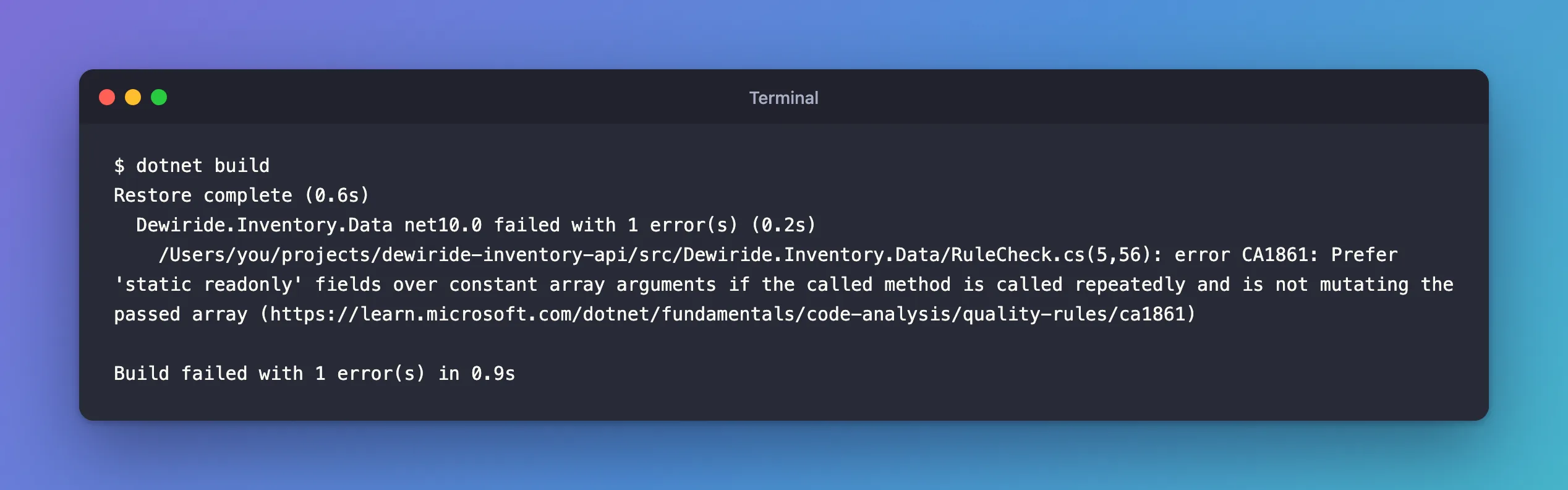
The rule caught it: off in Migrations, on everywhere else. I removed the test class afterwards.
The Severity Values
The severity levels you can set this way:
| Value | Effect, in Microsoft's words |
|---|---|
error | "Violations appear as build errors and cause builds to fail." |
warning | "Violations appear as build warnings but do not cause builds to fail (unless you have an option set to treat warnings as errors)." |
suggestion | "Violations appear as build messages and as suggestions in the Visual Studio IDE." |
silent | "Violations aren't visible to the user." |
none | "Rule is suppressed completely." |
default | "The default severity of the rule is used." |
suggestion is a gentler alternative to none: the editor still hints, the build doesn't fail.
When Two Settings Disagree
- In one file, the later entry wins: "The entry that appears later in the file wins." Put folder sections after the general
[*.cs]sections, at the end. - Across files, the deeper file wins: "The entry in the EditorConfig file that's deeper in the file system, and hence has a longer file path, wins." An
.editorconfiginsideMigrationsitself would work too. - The command line beats both: "Severity options specified at the command line as compiler options (
-nowarnor-warnaserror) always override severity configuration options specified in EditorConfig".
Why Not generated_code?
.editorconfig can also mark files as generated: "You configure additional files and folders by adding a generated_code = true | false entry to your configuration file." Generated files are excluded from analyzer diagnostics, all of them. That's the right tool for files no one edits. Migrations do get edited by hand, as several fixes on this blog show, so turning off one specific rule keeps every other check on them.
Common Mistakes
| Mistake | What happens | Do this instead |
|---|---|---|
| Putting the folder section first | A later entry for the same rule, in a general section, overrides it | Folder sections at the end |
dotnet_analyzer_diagnostic.CA1861.severity | Wrong prefix: that one is for categories and all rules | dotnet_diagnostic.<ID>.severity for one rule |
[Migrations/*.cs] without **/ | Only a Migrations folder next to the .editorconfig matches: with that header, CA1861 failed the build again in src/Dewiride.Inventory.Data/Migrations | [**/Migrations/*.cs] for any depth |
| Never testing the suppression | It may cover more than you meant | Prove the rule still fires outside the folder |
FAQ
Can I turn off a whole category instead of one rule?
Yes, with dotnet_analyzer_diagnostic.category-<category>.severity = <severity>, for example category-Performance. The docs note this "only affects rules in that category that are enabled by default", and that a single-rule entry beats a category entry.
Is #pragma warning disable better?
For one line, it can be. For a folder of generated code, a pragma in every file is a lot of noise, and every new migration EF Core generates would need it added by hand.
Conclusion
To switch an analyzer rule off for one folder, add a section like [**/Migrations/*.cs] at the end of .editorconfig with dotnet_diagnostic.<rule ID>.severity = none, and a comment saying why. Then test it: the rule should stay quiet inside the folder and still fire outside it, as CA1861 did here.
