How to Turn JSON Text into a Table with ParseJSON in Power Apps

ParseJSON reads JSON text and returns a Dynamic value: the data is there, but Power Apps doesn't know its types yet. For a JSON array, wrap it in ForAll and build a record for each element, converting each field with Value, Text or DateTimeValue. The result is an ordinary table a gallery can show.
Microsoft's ParseJSON reference explains why the conversion step is needed: without its optional second argument, ParseJSON returns a Dynamic value which requires explicit conversion of field values in supported data types.
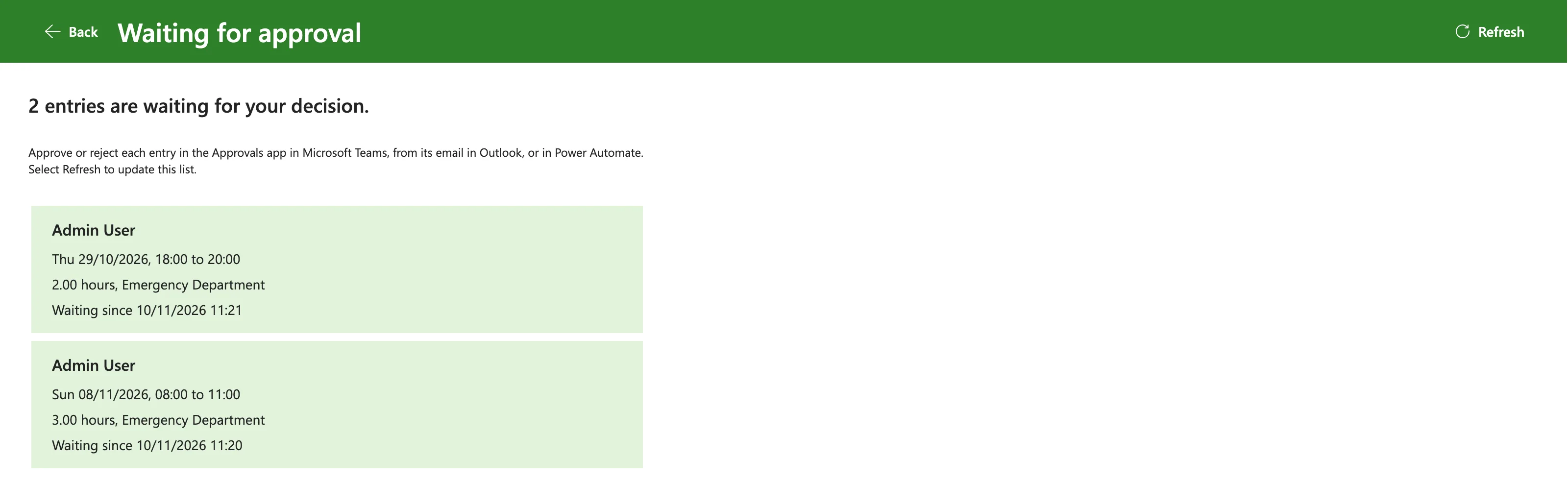
The example is the Waiting for Approval screen of the Overtime Timesheet app. A flow returns the overtime entries waiting for an approver as JSON text: an array with one object per entry (How to Return a Table from a Flow to Power Apps as JSON in Power Automate).
Prerequisites
- JSON text in the app. Here, the
entriesoutput of a flow (How to Run a Flow and Use Its Result in Power Apps). - The names of the fields in each element. Here:
id,employee,department,startTime,endTime,breakMinutesandsavedOn.
Step 1: Parse the Text
ParseJSON takes the text:
ParseJSON(response.entries)
The text is an array, so the result behaves like a table whose rows are Dynamic values, one per entry.
Step 2: Build a Typed Record for Each Element
ForAll goes through the rows. Inside it, ThisRecord is the current element, and ThisRecord.startTime reads one of its fields. Each field is converted to the type the app needs:
ForAll(
    ParseJSON(response.entries),
    {
        ID: Value(ThisRecord.id),
        Employee: Text(ThisRecord.employee),
        Department: Text(ThisRecord.department),
        StartTime: DateTimeValue(ThisRecord.startTime),
        EndTime: DateTimeValue(ThisRecord.endTime),
        BreakMinutes: Value(ThisRecord.breakMinutes),
        SavedOn: DateTimeValue(ThisRecord.savedOn)
    }
)
The reference's Arrays of Records example uses the same pattern, ForAll( ParseJSON( JsonString ).array, { id: Value(ThisRecord.id), name: Text(ThisRecord.name) }). Which function converts what:
| JSON field | Function | Why |
|---|---|---|
A number, such as id | Value() | Becomes a number |
Text, such as employee | Text() | Becomes text |
A date and time, such as startTime | DateTimeValue() | JSON has no date type; the reference says a value can be directly converted from a string in ISO 8601 format |
SharePoint dates come through a flow in ISO 8601, so DateTimeValue() reads them directly. The new names on the left, such as StartTime, are the columns of the table the app uses.
Step 3: Use the Table
Store the table in a variable and set a gallery's Items to it. In the example, locEntriesWA holds it, and each row of the gallery shows its fields, such as ThisItem.Employee and Text(ThisItem.StartTime, "ddd dd/mm/yyyy").
The Result
Two entries came through the JSON text, and the gallery showed both with their dates, times and hours:
Blanks and Missing Fields
The reference's Blanks examples say that attempting to access non-existing fields returns Blank(), and JSON null values are considered Blank(). A misspelled field name therefore gives an empty column, not an error, so check the names against the JSON.
Common Mistakes
| Mistake | What happens | Do this instead |
|---|---|---|
| Using the Dynamic value directly in a label | It isn't typed text | Convert with Text() |
DateTimeValue() on a date that isn't ISO 8601 | It's read in the user's language format | Send ISO 8601 dates from the flow |
| A field name spelled differently | The column is blank | Match the JSON's names exactly |
| Parsing the same text in several places | Repeated work | Parse once, store the table |
Troubleshooting
| Symptom | Likely cause | Fix |
|---|---|---|
ParseJSON returns an error | The text isn't valid JSON | Check the text the flow sends |
| A column is empty in every row | Field name mismatch | Compare with the JSON |
| Dates come out with day and month swapped | The text isn't ISO 8601, so it's read in the user's language format | Send ISO 8601 dates |
FAQ
What's the second argument of ParseJSON?
A type. The reference says that with it, the function returns a specific typed value, so the conversions aren't needed. This app converts each field with ForAll instead.
Can I use Table() instead of ForAll?
Table(ParseJSON(...)) gives a one-column table of Dynamic values, each in a column named Value. You still convert each field, as ThisRecord.Value.id, so ForAll straight on the array is shorter.
Conclusion
ParseJSON reads JSON text into Dynamic values. For an array, ForAll with Value, Text and DateTimeValue turns it into a typed table, ready for a gallery.
