How to Treat Warnings as Errors in .NET C# Projects (TreatWarningsAsErrors)

A warning that doesn't stop the build gets ignored, then joined by another, until nobody reads the build output at all. TreatWarningsAsErrors turns every warning into an error, so a new problem stops the build the day it appears. This guide turns it on for a whole solution, shows the exceptions you'll need, and what it does to NuGet's warnings, not only the compiler's.
What It Does
Microsoft's compiler options page: "The TreatWarningsAsErrors option treats all warnings as errors." And the effect: "All warning messages are instead reported as errors. The build process halts (no output files are built)."
Prerequisites
- A .NET C# project or solution. The examples use a class library,
src/Demo.Data, and a console app,src/Demo.App, on .NET 10. - A
Directory.Build.propsat the solution root, so the setting reaches every project: How to Share Build Settings Across .NET C# Projects with Directory.Build.props. A single project can use its own.csprojinstead.
Step 1: See a Warning That Doesn't Stop the Build
The library has a nullable warning: a string property that starts out null.
namespace Demo.Data;

public class Customer
{
    public string Name { get; set; }
}
Restore complete (0.4s)
  Demo.Data net10.0 succeeded with 1 warning(s) (0.9s) → src/Demo.Data/bin/Debug/net10.0/Demo.Data.dll
    /Users/you/projects/props-demo/src/Demo.Data/Customer.cs(5,19): warning CS8618: Non-nullable property 'Name' must contain a non-null value when exiting constructor. Consider adding the 'required' modifier or declaring the property as nullable.
  Demo.App net10.0 succeeded (0.3s) → src/Demo.App/bin/Debug/net10.0/Demo.App.dll

Build succeeded with 1 warning(s) in 1.7s
"Build succeeded with 1 warning(s)": easy to miss, and nothing stops it from shipping.
Step 2: Turn It On
<Project>
  <!-- See https://aka.ms/dotnet/msbuild/customize for more details on customizing your build -->
  <PropertyGroup>
    <!-- Stop the build on any warning, so problems get fixed while they're small. -->
    <TreatWarningsAsErrors>true</TreatWarningsAsErrors>
  </PropertyGroup>
</Project>
Restore complete (0.4s)
  Demo.Data net10.0 failed with 1 error(s) (0.1s)
    /Users/you/projects/props-demo/src/Demo.Data/Customer.cs(5,19): error CS8618: Non-nullable property 'Name' must contain a non-null value when exiting constructor. Consider adding the 'required' modifier or declaring the property as nullable.

Build failed with 1 error(s) in 0.6s
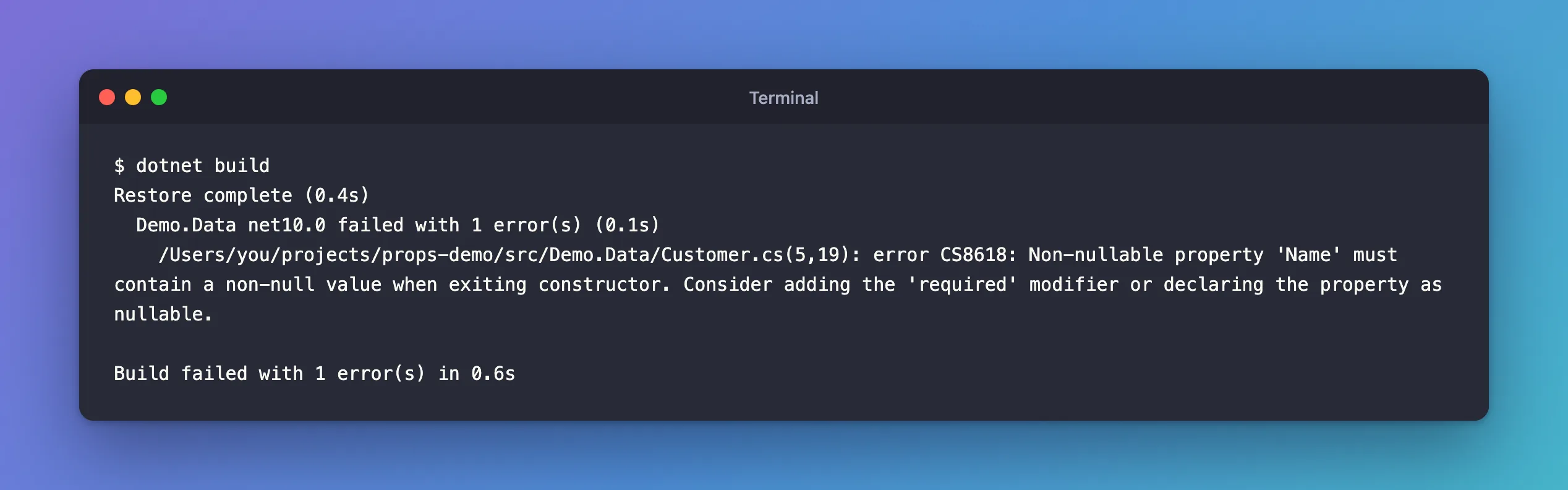
Same message, now error, and the build stops. The app wasn't built either: it depends on the library. Fix the code, here with public required string Name { get; set; }, and the build passes. Fixed: error CS8618 explains the choices.
Step 3: Keep Chosen Warnings as Warnings
Turning it on in an existing codebase can produce dozens of errors at once. WarningsNotAsErrors lists warnings that stay warnings: "If you turn on TreatWarningsAsErrors, you can use WarningsNotAsErrors to list warnings that shouldn't be treated as errors."
    <TreatWarningsAsErrors>true</TreatWarningsAsErrors>
    <!-- CS8618 stays a warning while the nullable warnings are being fixed. -->
    <WarningsNotAsErrors>CS8618</WarningsNotAsErrors>
  Demo.Data net10.0 succeeded with 1 warning(s) (0.1s) → src/Demo.Data/bin/Debug/net10.0/Demo.Data.dll
    /Users/you/projects/props-demo/src/Demo.Data/Customer.cs(5,19): warning CS8618: Non-nullable property 'Name' must contain a non-null value when exiting constructor. Consider adding the 'required' modifier or declaring the property as nullable.
  Demo.App net10.0 succeeded (0.2s) → src/Demo.App/bin/Debug/net10.0/Demo.App.dll

Build succeeded with 1 warning(s) in 0.7s
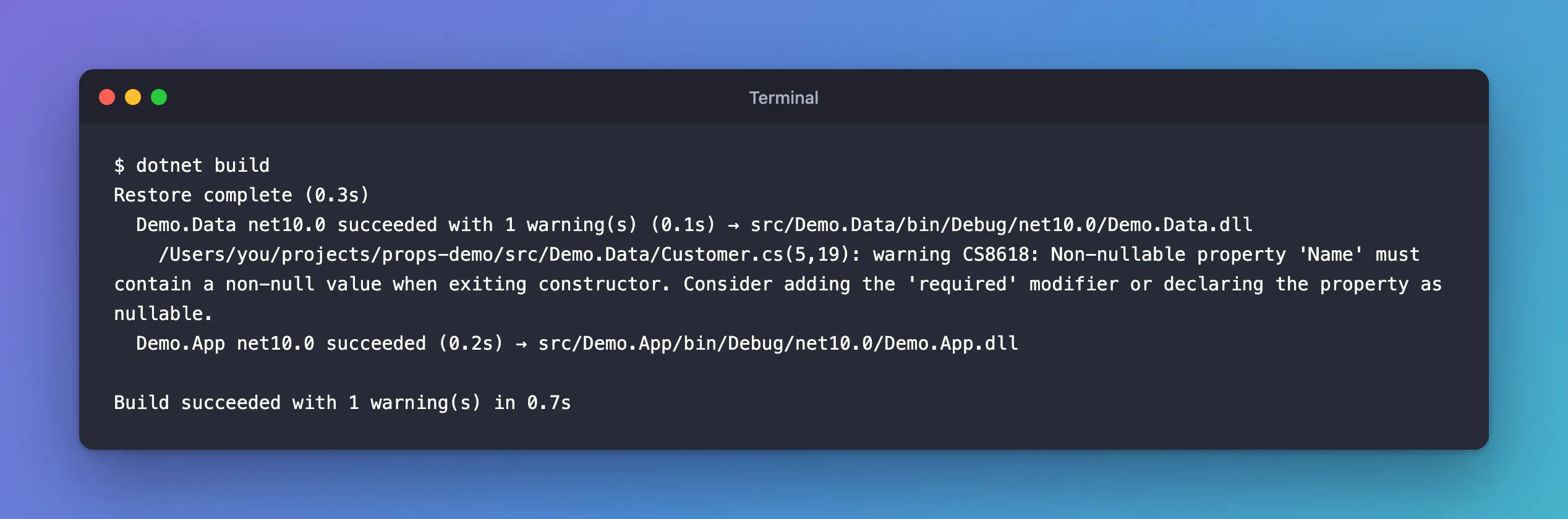
Every other warning is still an error. Separate several codes with semicolons, and remove the list as you fix them.
The Opposite: Only Some Warnings as Errors
WarningsAsErrors does the reverse: it turns only the listed warnings into errors. The docs: "You can also use the WarningsAsErrors to set only some warnings as errors." With TreatWarningsAsErrors off and WarningsAsErrors set to CS8618, the same build failed with error CS8618 again, while any other warning would have stayed a warning. I ran it with command-line properties, which override the file for one build:
dotnet build -p:TreatWarningsAsErrors=false -p:WarningsAsErrors=CS8618
  Demo.Data net10.0 failed with 1 error(s) (0.1s)
    /Users/you/projects/props-demo/src/Demo.Data/Customer.cs(5,19): error CS8618: Non-nullable property 'Name' must contain a non-null value when exiting constructor. Consider adding the 'required' modifier or declaring the property as nullable.
Build failed with 1 error(s) in 0.6s
Hiding a Warning Completely: NoWarn
NoWarn "lets you suppress the compiler from displaying one or more warnings". With -p:NoWarn=CS8618, the build said only Build succeeded in 0.8s, with no warning at all. That's the strongest tool and the easiest to misuse: a hidden warning is still a problem in the code. If you add codes in a file, keep the existing ones, as the docs show: <NoWarn>$(NoWarn);CS8618</NoWarn>.
NuGet Warnings Count Too
The compiler page has an Important note: "TreatWarningsAsErrors only impacts the C# compiler, not any other MSBuild tasks in your csproj file." The NuGet documentation says the opposite for NuGet: "NuGet also honors MSBuild properties to suppress warnings or elevate them to errors", including TreatWarningsAsErrors, which "Treats all NuGet warnings as errors". What I saw matches the NuGet docs. In a solution with the setting on, adding a package version with a known vulnerability failed the restore:
    /Users/you/projects/dewiride-inventory-api/src/Dewiride.Inventory.Api/Dewiride.Inventory.Api.csproj : error NU1903: Warning As Error: Package 'Newtonsoft.Json' 12.0.3 has a known high severity vulnerability, https://github.com/advisories/GHSA-5crp-9r3c-p9vr

Restore failed with 1 error(s) in 1.6s
"Warning As Error" says it: NuGet's audit warning NU1903 became an error. That's usually what you want, since nobody ships a known vulnerability by accident. Fixed: "NU1903: Package has a known high severity vulnerability" covers the fix.
Common Mistakes
| Mistake | What happens | Do this instead |
|---|---|---|
Turning it on and suppressing everything with NoWarn | The warnings are hidden, the problems stay | Fix them, or list them in WarningsNotAsErrors for now |
Setting it in one project's .csproj only | New projects don't get it | Set it in Directory.Build.props |
<NoWarn>CS8618</NoWarn> without $(NoWarn) | Overwrites the codes set before it, including the SDK's own | <NoWarn>$(NoWarn);CS8618</NoWarn> |
| Turning it on in a large codebase in one go | A wall of errors, then the setting gets reverted | Start with WarningsNotAsErrors for the noisy codes |
FAQ
Should it be on in local builds too, or only in CI?
Everywhere. If only CI fails on warnings, developers find out after they push. Set it in Directory.Build.props, which every build reads.
Does it affect dotnet run and dotnet test?
Yes: both build the project first, with the same properties.
Conclusion
<TreatWarningsAsErrors>true</TreatWarningsAsErrors> in Directory.Build.props makes every warning stop the build, for every project, compiler and NuGet warnings alike. Use WarningsNotAsErrors to keep specific codes as warnings while you work through them, WarningsAsErrors to make only specific codes errors, and NoWarn rarely, for warnings that truly don't apply.
