How to Trace Azure Cosmos DB Calls with OpenTelemetry in .NET C#

The Azure Cosmos DB SDK for .NET can create an OpenTelemetry span for every read and write, but its stable releases leave that off. Turning it on takes three things: DisableDistributedTracing = false, the Azure.Cosmos.Operation source and the Azure.Experimental.EnableActivitySource switch. Without the switch, SDK 3.64.0 sent nothing at all.
In OpenTelemetry, a span is one timed piece of work with a name and attributes, and a trace is the spans of one operation. For the Cosmos DB SDK, each call, such as saving or reading an item, becomes a span with the database, the container and the result as attributes.
Microsoft's Cosmos DB observability page sets the starting point. Tracing is in SDK 3.36.0 and later, and For non-preview versions, it's off by default. You can enable tracing by setting DisableDistributedTracing = false in CosmosClientOptions.CosmosClientTelemetryOptions. On the collecting side, add the Azure.Cosmos.Operation source to your trace provider. This post does both, finds that it isn't enough, and adds the missing switch.
Syntax
AppContext.SetSwitch("Azure.Experimental.EnableActivitySource", true);

using TracerProvider tracerProvider = Sdk.CreateTracerProviderBuilder()
    .AddSource("Azure.Cosmos.Operation")
    .AddOtlpExporter()
    .Build();

using CosmosClient client = new("<account-endpoint>", <token-credential>, new CosmosClientOptions
{
    CosmosClientTelemetryOptions = new CosmosClientTelemetryOptions
    {
        DisableDistributedTracing = false,
    },
});
| Part | What it is |
|---|---|
AppContext.SetSwitch(...) | Turns on the Azure SDK's experimental tracing. The Cosmos DB SDK 3.64.0 created no spans without it |
AddSource("Azure.Cosmos.Operation") | The source the Cosmos DB SDK creates its spans on |
AddOtlpExporter() | Sends the spans over OTLP. With no options, it uses gRPC and sends to localhost:4317 |
<account-endpoint> | Your account's URI, such as https://<account>.documents.azure.com:443/ |
<token-credential> | A Microsoft Entra ID credential, such as new AzureCliCredential() |
DisableDistributedTracing = false | Turns tracing on in the client |
The Example
A console app called TodoTrace saves one to-do item and reads it back: an upsert, then a point read. It signs in with your Azure CLI account and reads the account, database and container from three environment variables. It uses each item's ID as its partition key, so it needs a container whose partition key path is /id.
I ran it against my database servicedesk and container howto-otel, so those names are in the screenshots. Use your own.
Prerequisites
- The .NET 10 SDK.
dotnet --versionprints a version that starts with10.0. - The Azure CLI, signed in with
az login. The app uses that sign-in. - A Cosmos DB data role for your account on the database or container, such as Cosmos DB Built-in Data Contributor. An Azure role such as Owner isn't enough.
- The Aspire Dashboard, running on your computer. It receives OTLP at
http://localhost:4317and shows its pages athttp://localhost:18888, the ports it uses by default.
Step 1: Create a Console App and Add the Packages
dotnet new console -n TodoTrace
cd TodoTrace
The template "Console App" was created successfully.

Processing post-creation actions...
Restoring /Users/you/source/TodoTrace/TodoTrace.csproj:
Restore succeeded.
dotnet new console creates a console app in a new folder, TodoTrace, and cd moves into it. Then add four packages:
dotnet add package Microsoft.Azure.Cosmos --version 3.64.0
dotnet add package Azure.Identity --version 1.21.0
dotnet add package Newtonsoft.Json --version 13.0.4
dotnet add package OpenTelemetry.Exporter.OpenTelemetryProtocol --version 1.21.0
Each command adds a package reference and restores the project. The first one ends like this:
info : PackageReference for package 'Microsoft.Azure.Cosmos' version '3.64.0' added to file '/Users/you/source/TodoTrace/TodoTrace.csproj'.
info : Generating MSBuild file /Users/you/source/TodoTrace/obj/TodoTrace.csproj.nuget.g.targets.
info : Writing assets file to disk. Path: /Users/you/source/TodoTrace/obj/project.assets.json
log  : Restored /Users/you/source/TodoTrace/TodoTrace.csproj (in 871 ms).
Microsoft.Azure.Cosmosis the Cosmos DB SDK.Azure.Identitygives the appAzureCliCredential, so it signs in without keys.Newtonsoft.Jsonis there because the SDK needs it and leaves the version to you: without it, the build stops with an error from the SDK's own check (Fixed). Microsoft recommends 13.0.4 for this SDK version.OpenTelemetry.Exporter.OpenTelemetryProtocolis the OTLP exporter, and brings the OpenTelemetry SDK with it.
The project file now lists all four:
<Project Sdk="Microsoft.NET.Sdk">

  <PropertyGroup>
    <OutputType>Exe</OutputType>
    <TargetFramework>net10.0</TargetFramework>
    <ImplicitUsings>enable</ImplicitUsings>
    <Nullable>enable</Nullable>
  </PropertyGroup>

  <ItemGroup>
    <PackageReference Include="Azure.Identity" Version="1.21.0" />
    <PackageReference Include="Microsoft.Azure.Cosmos" Version="3.64.0" />
    <PackageReference Include="Newtonsoft.Json" Version="13.0.4" />
    <PackageReference Include="OpenTelemetry.Exporter.OpenTelemetryProtocol" Version="1.21.0" />
  </ItemGroup>

</Project>
Open the folder in VS Code, or TodoTrace.csproj in Visual Studio.
Step 2: Listen to the Cosmos DB Source
Replace everything in Program.cs with the tracer provider:
using System.Text.Json;
using Azure.Identity;
using Microsoft.Azure.Cosmos;
using OpenTelemetry;
using OpenTelemetry.Resources;
using OpenTelemetry.Trace;

// Collect the Cosmos DB SDK's spans and send them over OTLP (http://localhost:4317 by default).
using TracerProvider tracerProvider = Sdk.CreateTracerProviderBuilder()
    .ConfigureResource(resource => resource.AddService("TodoTrace"))
    .AddSource("Azure.Cosmos.Operation")
    .AddOtlpExporter()
    .Build();
AddService("TodoTrace")names the app, so the dashboard shows its spans under TodoTrace.AddSource("Azure.Cosmos.Operation")listens to the Cosmos DB SDK's source.AddOtlpExporter()sends the spans tolocalhost:4317, where the dashboard receives them.usingdisposes the provider when the program ends, so the spans it still holds are sent before the app exits.
Step 3: Create the Client with Tracing On
Add the settings and the client below it:
string endpoint = Environment.GetEnvironmentVariable("COSMOS_ENDPOINT")
    ?? throw new InvalidOperationException("Set COSMOS_ENDPOINT to your account's URI.");
string database = Environment.GetEnvironmentVariable("COSMOS_DATABASE") ?? "todos";
string containerName = Environment.GetEnvironmentVariable("COSMOS_CONTAINER") ?? "items";

using CosmosClient client = new(endpoint, new AzureCliCredential(), new CosmosClientOptions
{
    UseSystemTextJsonSerializerWithOptions = JsonSerializerOptions.Web,

    // A span for every read and write. The SDK's stable releases leave this off.
    CosmosClientTelemetryOptions = new CosmosClientTelemetryOptions
    {
        DisableDistributedTracing = false,
    },
});
- The three variables come from the environment. Without
COSMOS_ENDPOINTthe app stops with its own message; the database and container fall back totodosanditems. new AzureCliCredential()signs in as your Azure CLI account, so the app needs no keys. The client is the same as in How to Connect to Azure Cosmos DB with Microsoft Entra ID in C#, plus the telemetry options.JsonSerializerOptions.Webstores items with System.Text.Json and camelCase names, so the record'sIdis saved asid, the property every item needs.DisableDistributedTracing = falseturns tracing on in the client.
Step 4: Save and Read an Item
Add the rest:
Container container = client.GetContainer(database, containerName);

Todo todo = new("todo-1", "Buy milk", Done: false);
await container.UpsertItemAsync(todo, new PartitionKey(todo.Id));

Todo saved = await container.ReadItemAsync<Todo>(todo.Id, new PartitionKey(todo.Id));
Console.WriteLine($"Read back: {saved.Title} (done: {saved.Done})");

record Todo(string Id, string Title, bool Done);
UpsertItemAsynccreates the item, or replaces it if one with that ID exists, so the app can run again and again.new PartitionKey(todo.Id)is the item's partition key value: its ID, because the container's partition key path is/id.ReadItemAsyncreads the item back by its ID and partition key. It returns a response, and assigning that to aTodotakes the item out of it: the SDK's reference describes the conversion as Get Resource implicitly fromResponse<T>.
Step 5: Run It
Set the three variables to your own account's URI, database and container, then run the app:
- macOS / Linux
- Windows (PowerShell)
export COSMOS_ENDPOINT="https://<your-account>.documents.azure.com:443/"
export COSMOS_DATABASE="<your-database>"
export COSMOS_CONTAINER="<your-container>"
dotnet run
$env:COSMOS_ENDPOINT = "https://<your-account>.documents.azure.com:443/"
$env:COSMOS_DATABASE = "<your-database>"
$env:COSMOS_CONTAINER = "<your-container>"
dotnet run
Replace <your-account>, <your-database> and <your-container> with your names. The variables last until you close the terminal, and How to Set an Environment Variable in the Terminal covers them in more detail.
Read back: Buy milk (done: False)
The app saved the item and read it back.
Step 6: Look for the Spans
Open the dashboard at http://localhost:18888 and select Traces:

No traces found. The app talked to Cosmos DB twice, the client had DisableDistributedTracing = false, and the tracer provider listened to Azure.Cosmos.Operation: the two settings the observability page names. Still nothing arrived.
The same page's OpenTelemetry sample has one more line before it builds its trace provider: AppContext.SetSwitch("Azure.Experimental.EnableActivitySource", true). That's the Azure SDK's switch for experimental tracing. Most Azure libraries no longer need it, because Azure.Core declared ActivitySource tracing stable for most HTTP and REST-based libraries in version 1.36.0, and an Azure Identity call traces without it (How to Trace Azure SDK Calls with OpenTelemetry in .NET C#). The empty list says the Cosmos DB SDK still does (Fixed: No Azure Cosmos DB Traces in OpenTelemetry Even with DisableDistributedTracing = false).
Step 7: Turn On the Switch
Add the switch at the top of Program.cs, after the using lines and before the tracer provider:
// The Cosmos DB SDK creates its spans only with this switch on.
AppContext.SetSwitch("Azure.Experimental.EnableActivitySource", true);
Run the app again in the same terminal, so the variables are still set:
dotnet run
Read back: Buy milk (done: False)
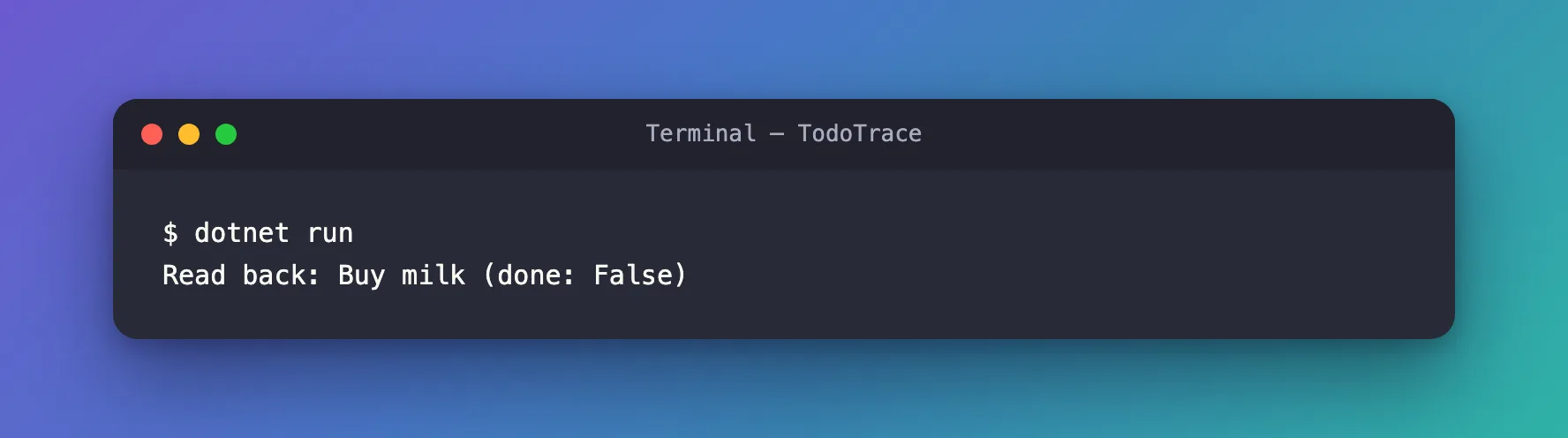
The output didn't change. The dashboard did.
Step 8: See the Cosmos DB Spans
Back in Traces, there's a trace for each call:

TodoTrace: upsert_item howto-otel took 6.55 s, and TodoTrace: read_item howto-otel took 1.33 s. Each span is named after the operation and the container.
Step 9: Read a Span's Attributes
Select the read_item trace, then its span, to open its details:
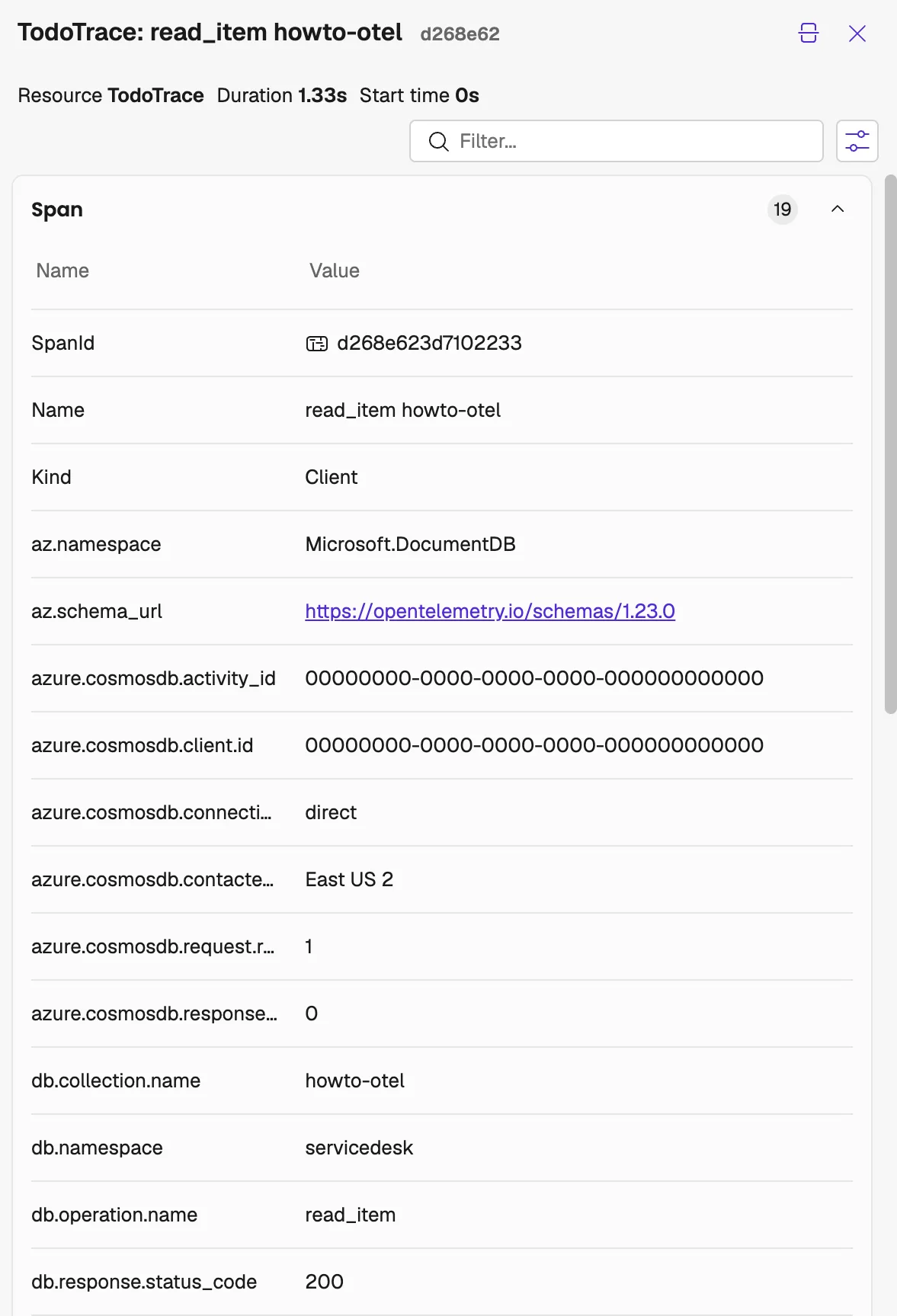
The span's kind is Client and its az.namespace is Microsoft.DocumentDB. The database details are attributes, and their names aren't the ones in the attribute table on Microsoft's observability page:
| What it holds | Name on 3.64.0's span | Value in my run | Name in the Learn table |
|---|---|---|---|
| Container | db.collection.name | howto-otel | db.cosmosdb.container |
| Database | db.namespace | servicedesk | db.name |
| Operation | db.operation.name | read_item | db.operation |
| Status code | db.response.status_code | 200 | db.cosmosdb.status_code |
So search your telemetry for the names the SDK sends, not the ones in that table. Further down the list are db.system.name, which is cosmosdb, server.address and user_agent.original, and under Context, the span's source, Azure.Cosmos.Operation. The attributes that start with azure.cosmosdb. hold Cosmos DB's own details. Their names are cut off in the dashboard's list, but values such as direct and East US 2 match what the Learn table calls the connection mode and the regions contacted.
The Complete File
using System.Text.Json;
using Azure.Identity;
using Microsoft.Azure.Cosmos;
using OpenTelemetry;
using OpenTelemetry.Resources;
using OpenTelemetry.Trace;

// The Cosmos DB SDK creates its spans only with this switch on.
AppContext.SetSwitch("Azure.Experimental.EnableActivitySource", true);

// Collect the Cosmos DB SDK's spans and send them over OTLP (http://localhost:4317 by default).
using TracerProvider tracerProvider = Sdk.CreateTracerProviderBuilder()
    .ConfigureResource(resource => resource.AddService("TodoTrace"))
    .AddSource("Azure.Cosmos.Operation")
    .AddOtlpExporter()
    .Build();

string endpoint = Environment.GetEnvironmentVariable("COSMOS_ENDPOINT")
    ?? throw new InvalidOperationException("Set COSMOS_ENDPOINT to your account's URI.");
string database = Environment.GetEnvironmentVariable("COSMOS_DATABASE") ?? "todos";
string containerName = Environment.GetEnvironmentVariable("COSMOS_CONTAINER") ?? "items";

using CosmosClient client = new(endpoint, new AzureCliCredential(), new CosmosClientOptions
{
    UseSystemTextJsonSerializerWithOptions = JsonSerializerOptions.Web,

    // A span for every read and write. The SDK's stable releases leave this off.
    CosmosClientTelemetryOptions = new CosmosClientTelemetryOptions
    {
        DisableDistributedTracing = false,
    },
});

Container container = client.GetContainer(database, containerName);

Todo todo = new("todo-1", "Buy milk", Done: false);
await container.UpsertItemAsync(todo, new PartitionKey(todo.Id));

Todo saved = await container.ReadItemAsync<Todo>(todo.Id, new PartitionKey(todo.Id));
Console.WriteLine($"Read back: {saved.Title} (done: {saved.Done})");

record Todo(string Id, string Title, bool Done);
Common Mistakes
| Mistake | What happens | Do this instead |
|---|---|---|
Setting only DisableDistributedTracing = false and AddSource | With SDK 3.64.0, no spans at all: the dashboard showed No traces found | Turn on the Azure.Experimental.EnableActivitySource switch too |
Leaving DisableDistributedTracing at its default | In the SDK's stable releases, tracing is off by default | Set it to false in CosmosClientTelemetryOptions |
Looking for db.name or db.cosmosdb.container on the spans | 3.64.0 sends db.namespace and db.collection.name instead | Search for the names the SDK sends |
| Giving your account an Azure role, such as Contributor, and expecting data access | Requests are blocked: Azure roles don't include Cosmos DB data | Give it a Cosmos DB data role |
Troubleshooting
| Symptom | Likely cause | Fix |
|---|---|---|
| No traces found, but the app works | The switch is off | AppContext.SetSwitch("Azure.Experimental.EnableActivitySource", true) before the tracer provider |
| The app stops with Set COSMOS_ENDPOINT to your account's URI. | COSMOS_ENDPOINT isn't set in this terminal | Set it, then run again in the same terminal |
CosmosException … Forbidden (403) … Request blocked by Auth | Your account has no data role on that database or container (Fixed) | Assign one, as in How to Give Your Account Access to Azure Cosmos DB Data with the Azure CLI |
error The Newtonsoft.Json package must be explicitly referenced with version >= 10.0.2 at build time | No Newtonsoft.Json reference (Fixed) | dotnet add package Newtonsoft.Json --version 13.0.4 |
FAQ
Why does the Cosmos DB SDK need the switch when other Azure libraries don't?
Its documentation doesn't say. What's documented is that Azure.Core made tracing stable for most HTTP and REST-based libraries in 1.36.0, and that Microsoft's Cosmos DB OpenTelemetry sample sets the switch. What I measured is that 3.64.0 sent no spans without it and two with it.
Can I turn the switch on without changing code?
The Azure SDK's diagnostics guide lists two more ways: set the environment variable AZURE_EXPERIMENTAL_ENABLE_ACTIVITY_SOURCE to true, or add <RuntimeHostConfigurationOption Include="Azure.Experimental.EnableActivitySource" Value="true" /> to an ItemGroup in the project file.
Does the switch change what the app does?
Not in this app: the output was the same with and without it. It changes what the SDK reports, and the diagnostics guide warns that The shape of experimental Activities may change in the future without notice.
Conclusion
To trace Azure Cosmos DB calls in .NET C#, set DisableDistributedTracing = false in CosmosClientTelemetryOptions, add the Azure.Cosmos.Operation source to your tracer provider, and turn on the Azure.Experimental.EnableActivitySource switch at the start of the app. With SDK 3.64.0, the first two alone sent nothing; with the switch, upsert_item and read_item showed up as spans of 6.55 s and 1.33 s, with the container, database, operation and status code as db. attributes.
Additional Resources
- Azure Cosmos DB SDK observability —
DisableDistributedTracing, theAzure.Cosmos.Operationsource and the OpenTelemetry sample. - Azure SDK diagnostics: distributed tracing — the experimental switch and the three ways to set it.
- Azure.Core changelog — version 1.36.0, when tracing became stable for most libraries.
- Connect to Azure Cosmos DB for NoSQL using role-based access control and Microsoft Entra ID — data roles and connecting from code.
- Standalone Aspire Dashboard — running the dashboard on its own, and its default ports.
