How to Trace a Microsoft Agent Framework Agent with OpenTelemetry in C#

UseOpenTelemetry gives a Microsoft Agent Framework agent OpenTelemetry tracing: each run becomes a trace, with a span for the agent, one for each call to the model and one for each tool call. Here an agent with one tool answered a question in 6.27 s, and its trace shows where the time went and how many tokens each model call used.
In OpenTelemetry, a trace follows one operation, and each span in it is one timed piece of work with a name and attributes. For AI work, OpenTelemetry has semantic conventions that say what the spans are called and which attributes they carry. Microsoft's Agent Framework documentation: Agent Framework integrates with OpenTelemetry, and more specifically Agent Framework emits traces, logs, and metrics according to the OpenTelemetry GenAI Semantic Conventions.
Those conventions are still changing. The documentation of OpenTelemetryAgent, the class UseOpenTelemetry adds, says The specification is still experimental and subject to change; as such, the telemetry output by this client is also subject to change.
Syntax
AIAgent <agent> = <innerAgent>
    .AsBuilder()
    .UseOpenTelemetry(sourceName: "<source-name>", configure: <configure>)
    .Build();

using TracerProvider tracerProvider = Sdk.CreateTracerProviderBuilder()
    .AddSource("<source-name>")
    .AddOtlpExporter()
    .Build();
| Part | What it is |
|---|---|
<agent> | The traced agent, the one your code runs |
<innerAgent> | The agent to trace, such as the one AsAIAgent creates |
AsBuilder() … Build() | Wraps the agent in a pipeline. UseOpenTelemetry adds the telemetry layer to it |
<source-name> | The name the agent's spans are created under. Optional: without it, they go to Experimental.Microsoft.Agents.AI |
<configure> | Optional. A callback that gets the OpenTelemetryAgent, for example to set EnableSensitiveData |
AddSource("<source-name>") | The same name, so the tracer provider collects those spans |
AddOtlpExporter() | Sends the spans over OTLP. With no options, it uses gRPC and sends to localhost:4317 |
The method's documentation is plain about the name: When specified, register the same value with TracerProviderBuilder.AddSource so the tracing pipeline subscribes to these spans. And without one, Microsoft's observability guide says to use AddSource("Experimental.Microsoft.Agents.AI").
The Example
A console app called PlantCare has an agent with one tool, get_watering_days, which says how many days to wait between waterings for a house plant. The app asks a question that needs the tool, How often should I water my snake plant?, and sends the agent's spans to the Aspire Dashboard, a local viewer for OpenTelemetry data.
Prerequisites
- A Microsoft Foundry project with a model deployment, and the Foundry User role on it.
- The Azure CLI, signed in with
az login. - The .NET 10 SDK.
- The Aspire Dashboard, running on your computer. It receives OTLP at
http://localhost:4317and shows its pages athttp://localhost:18888, the ports it uses by default.
Step 1: Create a Console App and Add the Packages
dotnet new console -n PlantCare
cd PlantCare
The template "Console App" was created successfully.

Processing post-creation actions...
Restoring /Users/you/source/PlantCare/PlantCare.csproj:
Restore succeeded.
dotnet new console creates a console app in a new folder, PlantCare, and cd moves into it. Then add three packages:
dotnet add package Microsoft.Agents.AI.Foundry --version 1.28.0-preview.261106.1
dotnet add package Azure.Identity --version 1.21.0
dotnet add package OpenTelemetry.Exporter.OpenTelemetryProtocol --version 1.21.0
Each command adds a package reference and restores the project. The first one ends like this:
info : PackageReference for package 'Microsoft.Agents.AI.Foundry' version '1.28.0-preview.261106.1' added to file '/Users/you/source/PlantCare/PlantCare.csproj'.
info : Generating MSBuild file /Users/you/source/PlantCare/obj/PlantCare.csproj.nuget.g.targets.
info : Writing assets file to disk. Path: /Users/you/source/PlantCare/obj/project.assets.json
log  : Restored /Users/you/source/PlantCare/PlantCare.csproj (in 1.6 sec).
Microsoft.Agents.AI.Foundryconnects Agent Framework to Microsoft Foundry and brings Agent Framework 1.28.0 with it. It's a preview package, as its version says.Azure.Identitygives the appAzureCliCredential, to sign in to Foundry as your Azure CLI account.OpenTelemetry.Exporter.OpenTelemetryProtocolis the OTLP exporter, and brings the OpenTelemetry SDK with it.
The project file now lists all three:
<Project Sdk="Microsoft.NET.Sdk">

  <PropertyGroup>
    <OutputType>Exe</OutputType>
    <TargetFramework>net10.0</TargetFramework>
    <ImplicitUsings>enable</ImplicitUsings>
    <Nullable>enable</Nullable>
  </PropertyGroup>

  <ItemGroup>
    <PackageReference Include="Azure.Identity" Version="1.21.0" />
    <PackageReference Include="Microsoft.Agents.AI.Foundry" Version="1.28.0-preview.261106.1" />
    <PackageReference Include="OpenTelemetry.Exporter.OpenTelemetryProtocol" Version="1.21.0" />
  </ItemGroup>

</Project>
Step 2: Listen to the Agent's Source
Replace everything in Program.cs with the tracer provider:
using System.ComponentModel;
using Azure.AI.Projects;
using Azure.Identity;
using Microsoft.Agents.AI;
using Microsoft.Extensions.AI;
using OpenTelemetry;
using OpenTelemetry.Resources;
using OpenTelemetry.Trace;

// 1. Collect the agent's spans and send them over OTLP (http://localhost:4317 by default).
using TracerProvider tracerProvider = Sdk.CreateTracerProviderBuilder()
    .ConfigureResource(resource => resource.AddService("PlantCare"))
    .AddSource("PlantCare")
    .AddOtlpExporter()
    .Build();
AddService("PlantCare")names the app, so the dashboard shows its spans under PlantCare.AddSource("PlantCare")listens to the source the agent will use in the next step.usingdisposes the provider when the program ends, so the spans it still holds are sent before the app exits.
Step 3: Create the Agent with OpenTelemetry Around It
Add the agent below it, with your own project endpoint and model deployment:
// 2. An agent with one tool, with OpenTelemetry around it.
AIAgent agent = new AIProjectClient(
        new Uri("https://foundry-devblogs-exp.services.ai.azure.com/api/projects/proj-devblogs-exp"),
        new AzureCliCredential())
    .AsAIAgent(
        model: "gpt-5.6-luna",
        instructions: "You help people look after their house plants. Answer in one or two short sentences.",
        name: "PlantCare",
        tools: [AIFunctionFactory.Create(GetWateringDays, name: "get_watering_days")])
    .AsBuilder()
    .UseOpenTelemetry(sourceName: "PlantCare")
    .Build();
AsAIAgent(...)creates the agent from the Foundry project: the model deployment, the instructions, a name and one tool..AsBuilder().UseOpenTelemetry(sourceName: "PlantCare").Build()wraps the agent, so every run creates spans on the sourcePlantCare, the name the tracer provider listens to.
The model calls and the tool call are traced too, with nothing more to add. OpenTelemetryAgent's documentation describes how: when the agent it wraps is a ChatClientAgent, the chat client underneath is automatically wrapped with OpenTelemetryChatClient for each invocation so that chat-level telemetry flows alongside agent-level telemetry, and the tool calls get spans on the agent's source as well.
Step 4: Ask a Question That Needs the Tool
Add the rest:
// 3. One question that needs the tool.
AgentResponse response = await agent.RunAsync("How often should I water my snake plant?");
Console.WriteLine(response.Text);

[Description("Gets how many days to wait between waterings for a house plant.")]
static int GetWateringDays([Description("The plant's common name, such as 'snake plant'.")] string plant) =>
    plant.Trim().ToLowerInvariant() switch
    {
        "snake plant" => 14,
        "peace lily" => 7,
        _ => 10,
    };
RunAsyncsends the question and returns the agent's answer.GetWateringDaysis the tool: 14 days for a snake plant, 7 for a peace lily and 10 for anything else.- The
Descriptionattributes describe the tool and its parameter for the model.AIFunctionFactory.Createtakes the tool's description from them: its reference says the description is derived from any DescriptionAttribute on method.
Step 5: Run It
dotnet run
Water your snake plant about every 14 days, letting the soil dry out completely between waterings. Water less often in winter or low light.
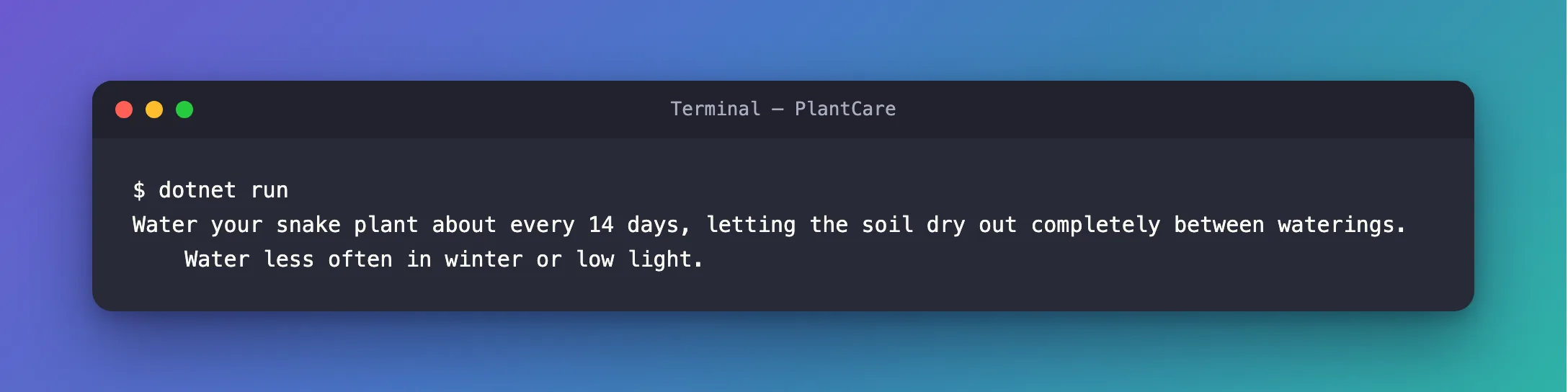
The 14 days is the tool's number for a snake plant, so the agent called the tool. The trace shows how.
Step 6: Find the Run in the Dashboard
Open the dashboard at http://localhost:18888 and select Traces:

The run is one trace with 4 spans, and it took 6.27 s. Its name is the agent's span, invoke_agent, then the agent's name and, in parentheses, its ID. The example never sets an ID, so the agent has a random one: the documentation of AIAgent.Id says that for in-memory agents it defaults to a randomly-generated ID. Yours will be different, and so will the next run's.
Step 7: See What the Run Did
Select the trace to see its spans:
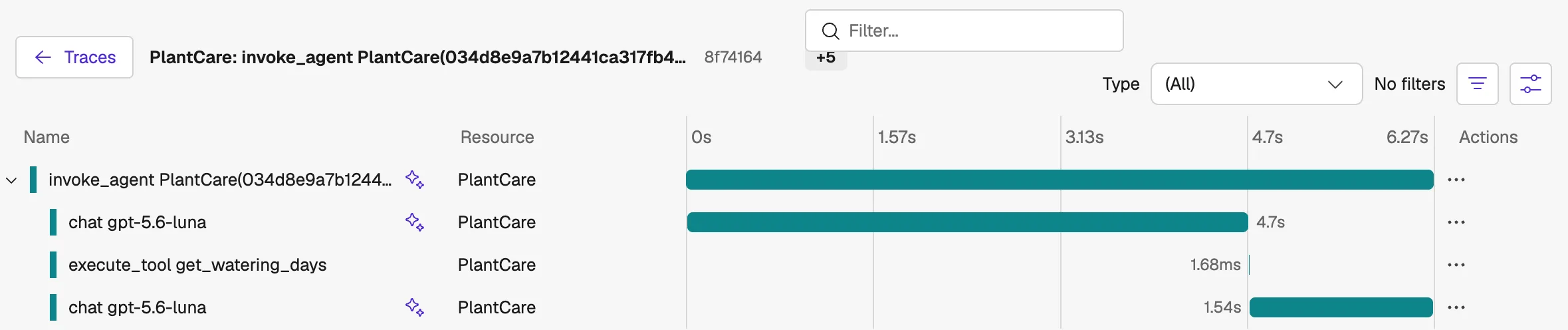
invoke_agent PlantCare(…), 6.27 s: the whole run, with the other spans inside it.chat gpt-5.6-luna, 4.7 s: the first call to the model, which asked for the tool.execute_tool get_watering_days, 1.68 ms: the tool running.chat gpt-5.6-luna, 1.54 s: the second call to the model, which wrote the answer from the tool's result.
The two model calls took 6.24 s of the 6.27 s. The tool took under 2 ms.
Step 8: Read a Model Call's Attributes
Select the first chat gpt-5.6-luna span to open its details:
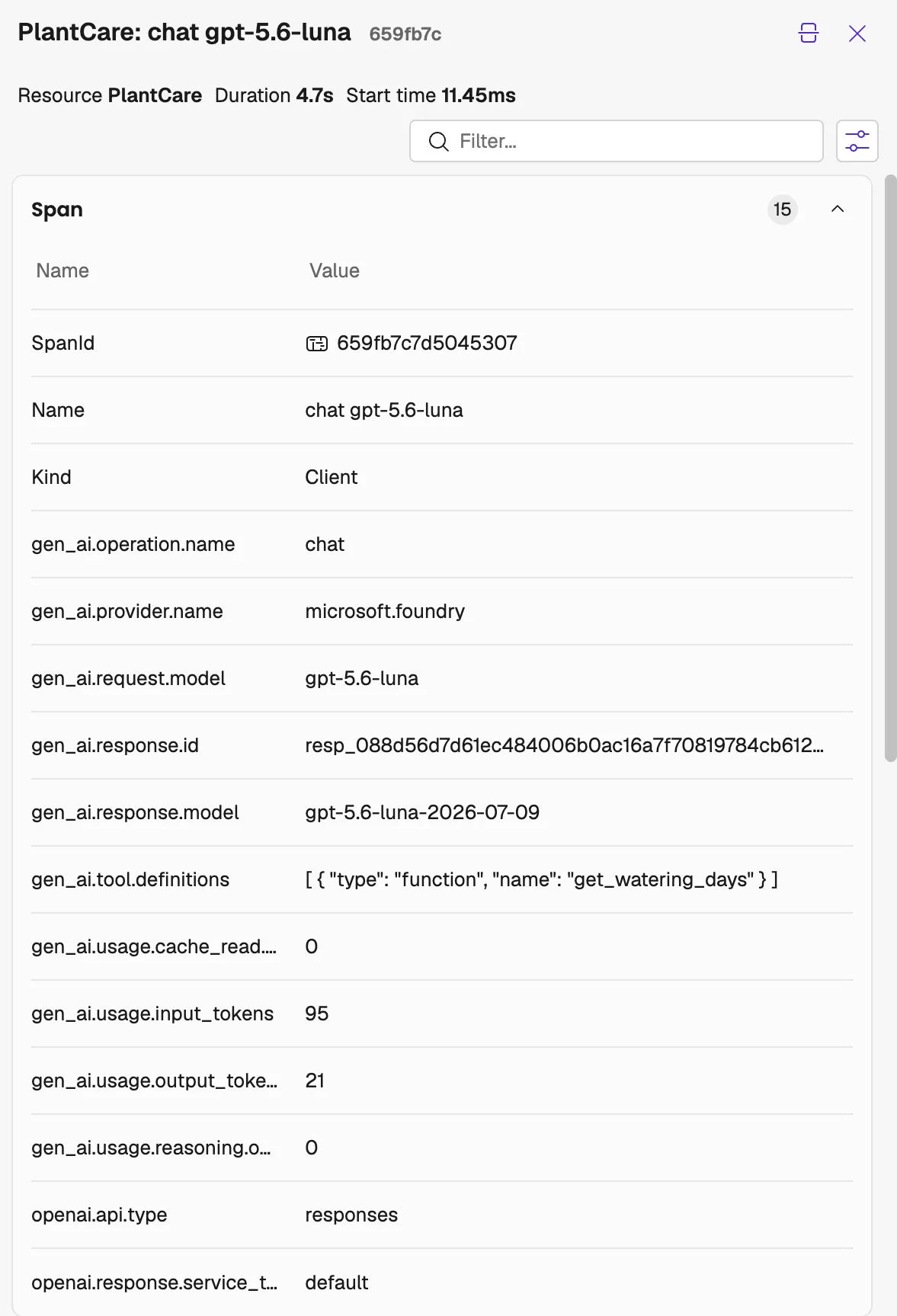
gen_ai.operation.nameischat, andgen_ai.provider.nameismicrosoft.foundry.gen_ai.request.modelisgpt-5.6-luna, andgen_ai.response.modelisgpt-5.6-luna-2026-07-09. In the conventions, the first is The name of the GenAI model a request is being made to, and the second The name of the model that generated the response.gen_ai.tool.definitionslists the one tool the model was offered,get_watering_days.gen_ai.usage.input_tokensis95, and the output tokens, the attribute below it,21. The cache-read and reasoning counts are0.
What the span leaves out matters as much: the instructions, the question and the answer aren't in it. EnableSensitiveData decides that. Its documentation says the default is false unless the OTEL_INSTRUMENTATION_GENAI_CAPTURE_MESSAGE_CONTENT environment variable is set to "true", and that by default telemetry includes metadata, such as token counts, but not raw inputs and outputs, such as message content, function call arguments, and function call results.
Microsoft's observability guide shows how to turn it on, with configure: (cfg) => cfg.EnableSensitiveData = true in UseOpenTelemetry, and warns: Only enable sensitive data in development or testing environments, as it might expose user information in production logs and traces.
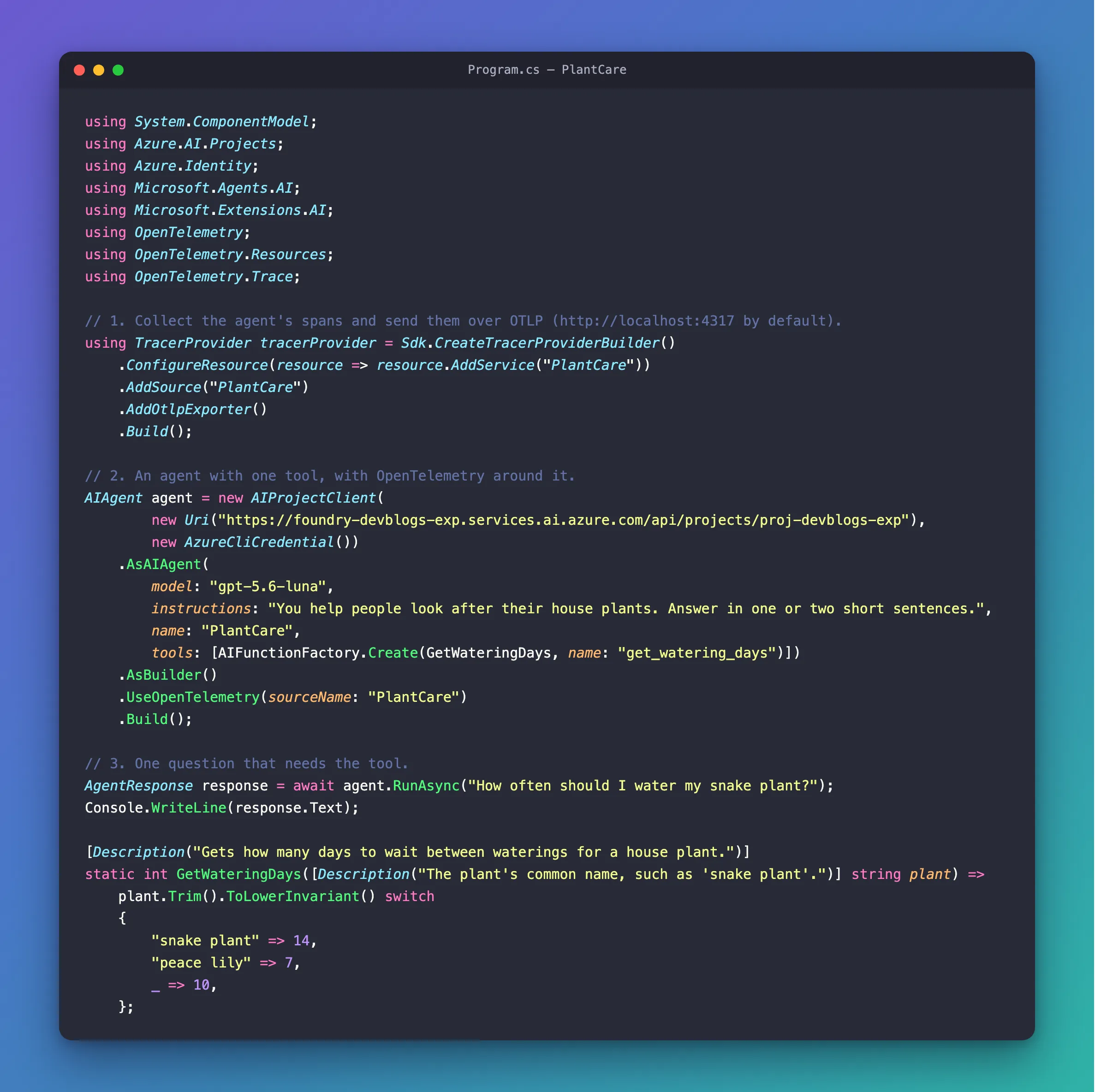
The Complete File
using System.ComponentModel;
using Azure.AI.Projects;
using Azure.Identity;
using Microsoft.Agents.AI;
using Microsoft.Extensions.AI;
using OpenTelemetry;
using OpenTelemetry.Resources;
using OpenTelemetry.Trace;

// 1. Collect the agent's spans and send them over OTLP (http://localhost:4317 by default).
using TracerProvider tracerProvider = Sdk.CreateTracerProviderBuilder()
    .ConfigureResource(resource => resource.AddService("PlantCare"))
    .AddSource("PlantCare")
    .AddOtlpExporter()
    .Build();

// 2. An agent with one tool, with OpenTelemetry around it.
AIAgent agent = new AIProjectClient(
        new Uri("https://foundry-devblogs-exp.services.ai.azure.com/api/projects/proj-devblogs-exp"),
        new AzureCliCredential())
    .AsAIAgent(
        model: "gpt-5.6-luna",
        instructions: "You help people look after their house plants. Answer in one or two short sentences.",
        name: "PlantCare",
        tools: [AIFunctionFactory.Create(GetWateringDays, name: "get_watering_days")])
    .AsBuilder()
    .UseOpenTelemetry(sourceName: "PlantCare")
    .Build();

// 3. One question that needs the tool.
AgentResponse response = await agent.RunAsync("How often should I water my snake plant?");
Console.WriteLine(response.Text);

[Description("Gets how many days to wait between waterings for a house plant.")]
static int GetWateringDays([Description("The plant's common name, such as 'snake plant'.")] string plant) =>
    plant.Trim().ToLowerInvariant() switch
    {
        "snake plant" => 14,
        "peace lily" => 7,
        _ => 10,
    };
Common Mistakes
| Mistake | What happens | Do this instead |
|---|---|---|
Different names in UseOpenTelemetry and AddSource | The tracer provider doesn't subscribe to the agent's source, and its spans never reach the dashboard | Use the same name in both |
Leaving out sourceName but adding your app's name to AddSource | The spans go to Experimental.Microsoft.Agents.AI, which the provider doesn't listen to | Pass sourceName, or add Experimental.Microsoft.Agents.AI |
| Turning on sensitive data everywhere | Prompts, answers, tool arguments and tool results go into your telemetry | Keep it for development and testing |
| Expecting the same span name on every run | The agent's ID in the name is random, and changes with each new agent | Look for the invoke_agent span and the agent's name |
FAQ
Do I need to add OpenTelemetry to the chat client as well?
Not for this agent. UseOpenTelemetry on the agent wrapped its chat client automatically, and the chat spans here came from that. Microsoft's guide shows instrumenting both and warns that you might see duplicated information; the agent's documentation adds that If the underlying chat client is already instrumented, no additional wrapping is applied.
Can I see the token usage of many runs, not one span at a time?
Yes, in the metrics that UseOpenTelemetry also records: How to See a Microsoft Agent Framework Agent's Token Usage in the Aspire Dashboard.
Why does the trace have two chat spans for one question?
Because the model was called twice: once to decide on the tool, and once more, with the tool's result, to write the answer. The execute_tool span sits between them.
Conclusion
To trace a Microsoft Agent Framework agent in C#, wrap it with .AsBuilder().UseOpenTelemetry(sourceName: "<source-name>").Build() and add the same name to your tracer provider with AddSource. PlantCare's run became one invoke_agent trace of 6.27 s, with two chat spans and an execute_tool span inside it, and the first chat span carried the model, the tool definitions and 95 input and 21 output tokens. Prompts and answers stay out of the spans unless you turn on EnableSensitiveData.
Additional Resources
- Agent Framework observability —
UseOpenTelemetry, source names, sensitive data and exporters. - Semantic conventions for generative AI spans, version 1.41.0 — the
gen_aiattributes on the chat span. - Standalone Aspire Dashboard — running the dashboard on its own, and its default ports.
- Explore the Aspire Dashboard — the Traces page and trace details.
