How to Test What Happens When the Reply to a COMMIT Is Lost

A connection that drops just after MySQL commits and just before your app hears about it is rare, which means your retry code probably hasn't met it. You can make it happen on demand with a small proxy, then see for yourself whether a retry repeats the work. Everything here is for your own machine.
Prerequisites
- Python 3 for the proxy. It uses only the standard library.
- An app using EF Core and MySQL on your machine, with retries on. I used EF Core 10.0.14 and MySQL 9.7.4 in Docker on port 3306.
Step 1: Save the Proxy
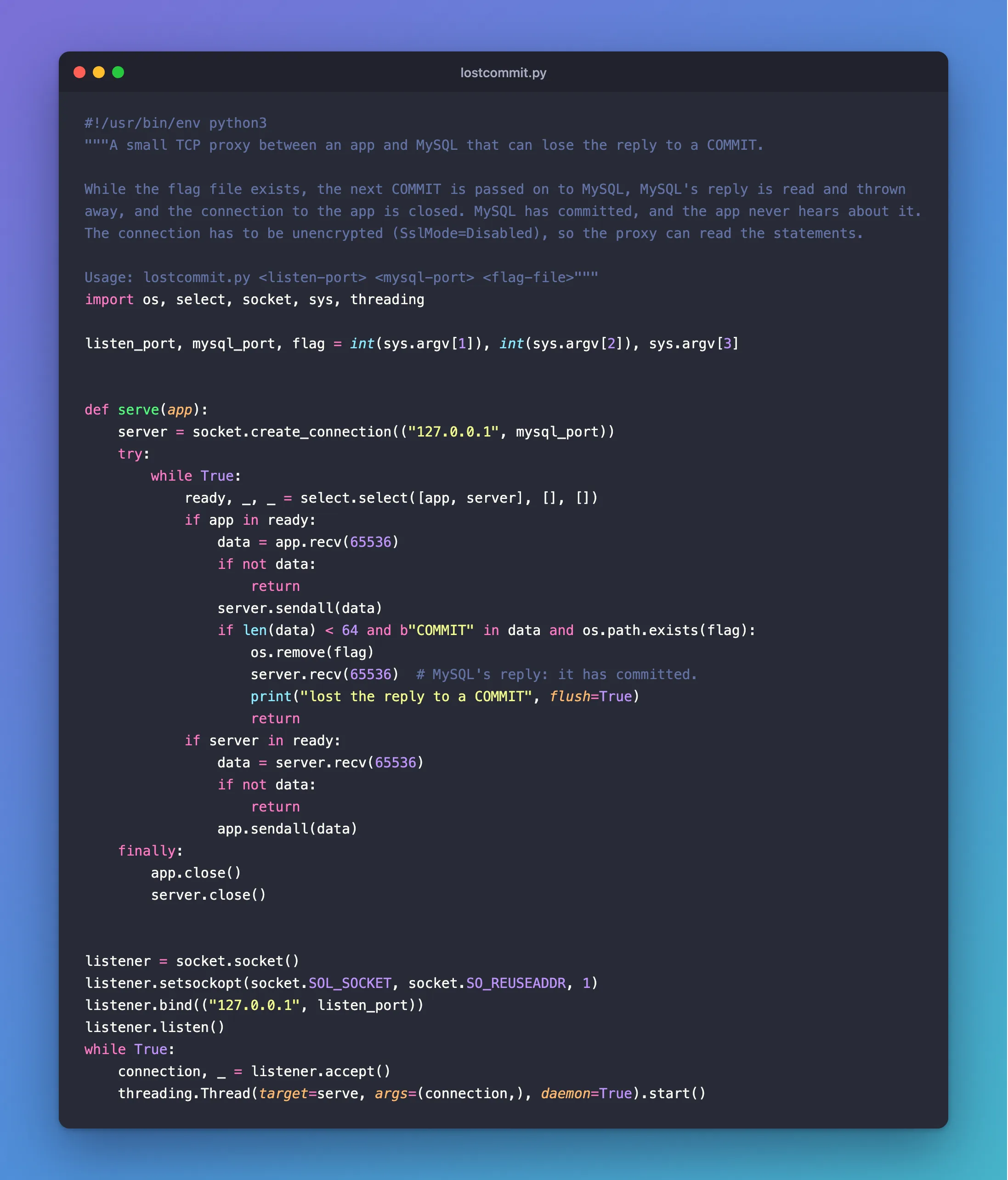
The proxy passes everything between the app and MySQL. When a flag file exists, the next COMMIT goes through to MySQL, the answer is thrown away, and the connection to the app is closed:
#!/usr/bin/env python3
"""A small TCP proxy between an app and MySQL that can lose the reply to a COMMIT.

While the flag file exists, the next COMMIT is passed on to MySQL, MySQL's reply is read and thrown
away, and the connection to the app is closed. MySQL has committed, and the app never hears about it.
The connection has to be unencrypted (SslMode=Disabled), so the proxy can read the statements.

Usage: lostcommit.py <listen-port> <mysql-port> <flag-file>"""
import os, select, socket, sys, threading

listen_port, mysql_port, flag = int(sys.argv[1]), int(sys.argv[2]), sys.argv[3]


def serve(app):
    server = socket.create_connection(("127.0.0.1", mysql_port))
    try:
        while True:
            ready, _, _ = select.select([app, server], [], [])
            if app in ready:
                data = app.recv(65536)
                if not data:
                    return
                server.sendall(data)
                if len(data) < 64 and b"COMMIT" in data and os.path.exists(flag):
                    os.remove(flag)
                    server.recv(65536)  # MySQL's reply: it has committed.
                    print("lost the reply to a COMMIT", flush=True)
                    return
            if server in ready:
                data = server.recv(65536)
                if not data:
                    return
                app.sendall(data)
    finally:
        app.close()
        server.close()


listener = socket.socket()
listener.setsockopt(socket.SOL_SOCKET, socket.SO_REUSEADDR, 1)
listener.bind(("127.0.0.1", listen_port))
listener.listen()
while True:
    connection, _ = listener.accept()
    threading.Thread(target=serve, args=(connection,), daemon=True).start()
Step 2: Run It
Listen on 3307, and pass to MySQL on 3306:
python3 lostcommit.py 3307 3306 lose-commit.flag
On Windows, use python if python3 isn't found.
Step 3: Point the App at It
The proxy has to read the statements, so this connection can't be encrypted. Change the connection string for this test only:
Server=127.0.0.1;Port=3307;Database=inventory;User ID=inventory_app;Password=…;SslMode=Disabled;AllowPublicKeyRetrieval=True
AllowPublicKeyRetrieval=True is needed because SslMode=Disabled can't sign in otherwise. Never use either of these outside a test like this. Set it with an environment variable, so your normal settings stay as they are:
- macOS / Linux
- Windows (PowerShell)
export ConnectionStrings__Inventory='Server=127.0.0.1;Port=3307;Database=inventory;User ID=inventory_app;Password=your-password;SslMode=Disabled;AllowPublicKeyRetrieval=True'
dotnet run --project src/Dewiride.Inventory.Api
$env:ConnectionStrings__Inventory = 'Server=127.0.0.1;Port=3307;Database=inventory;User ID=inventory_app;Password=your-password;SslMode=Disabled;AllowPublicKeyRetrieval=True'
dotnet run --project src/Dewiride.Inventory.Api
Step 4: Lose a Commit
Note the state before, so you can compare:
+----------------+----------------+--------------+
| QuantityOnHand | SumOfMovements | OrdersPlaced |
+----------------+----------------+--------------+
|             10 |             10 |            0 |
+----------------+----------------+--------------+
Create the flag file, in the folder where the proxy is running, and send one request:
- macOS / Linux
- Windows (PowerShell)
touch lose-commit.flag
New-Item lose-commit.flag
POST http://localhost:5190/api/v1/orders
Content-Type: application/json

{"customerName":"Ana Costa","customerEmail":"ana@example.com","lines":[{"productId":40,"quantity":1}]}
The proxy reports it:
lost the reply to a COMMIT
Step 5: Read the Result
This is what you're looking for: a will be retried line, and the numbers.
A transient exception occurred during execution. The operation will be retried after 0ms.
+----------------+----------------+--------------+
| QuantityOnHand | SumOfMovements | OrdersPlaced |
+----------------+----------------+--------------+
|              9 |              9 |            1 |
+----------------+----------------+--------------+
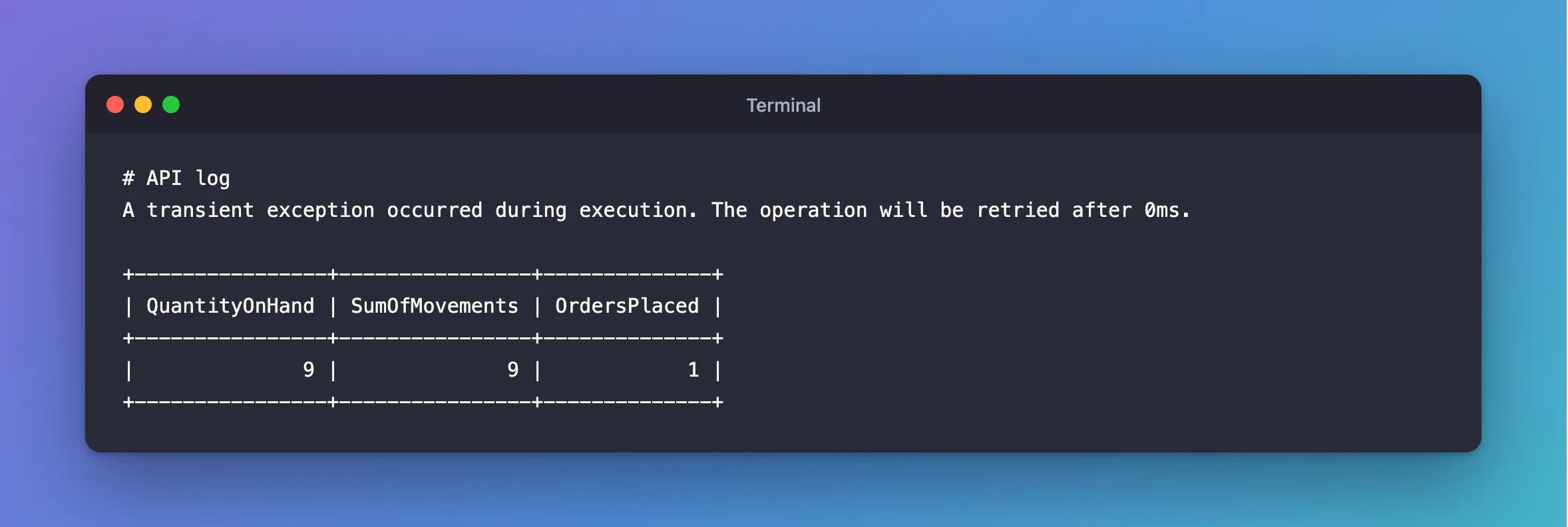
One order and one unit, so this code handled it, by looking for the request's key at the start of each attempt. Before I added that, the same test gave two orders and took two units:
+----------------+----------------+--------------+
| QuantityOnHand | SumOfMovements | OrdersPlaced |
+----------------+----------------+--------------+
|              8 |              8 |            2 |
+----------------+----------------+--------------+
Step 6: Try Your Other Writes
Test every write that a retry can repeat. A POST that creates a category, in this same API, answers 409 for the row it has just created, since the retry finds it already there:
HTTP/1.1 409 Conflict
Content-Type: application/problem+json

{
  "type": "https://tools.ietf.org/html/rfc9110#section-15.5.10",
  "title": "A category with this name already exists.",
  "status": 409,
  "detail": "Choose a name other than 'Lost 124438'. Names that differ only in upper and lower case count as the same name.",
  "traceId": "00-0d4b0fa1625ed976fdeba5f47c15d2df-6ba82db228702b06-00"
}
Nothing is duplicated, thanks to the unique index, though the client is told something misleading. Decide whether that matters for each write.
Step 7: Put It Back
Stop the proxy with Ctrl+C, stop the app, and open a new terminal, so the environment variable is gone.
Common Mistakes
| Mistake | What happens | Do this instead |
|---|---|---|
Leaving SslMode=Disabled in your settings | Passwords and data travel unencrypted | Use an environment variable for this one test |
Testing with SaveChanges that fails | That's a rollback, not a lost commit | Use the proxy |
| Reading only the status code | 201 can hide two orders | Check the rows |
Troubleshooting
| Symptom | Likely cause | Fix |
|---|---|---|
| The flag file is still there | No COMMIT went through the proxy | Check the app is on port 3307 |
Retrieval of the RSA Public Key is not enabled | AllowPublicKeyRetrieval is missing | Add it, for this test |
| No retry in the log | Retries aren't on for this error | List 0 |
The proxy never sees COMMIT | The connection's encrypted | Use SslMode=Disabled for the test |
Conclusion
A small proxy turns a rare failure into something you can test whenever you like. Lose a commit, and compare the rows: if one request made two of anything, your retry isn't safe yet.
Additional Resources
- Transaction commit failure and the idempotency issue — EF Core's options.
