How to Stream Server-Sent Events from a Next.js Route Handler

Server-Sent Events let a server push updates to the browser over a normal HTTP response that stays open: progress messages, notifications, or an AI answer appearing word by word. A Next.js route handler can send them by returning a ReadableStream. This guide streams five events a second apart, shows the exact format and headers, cleans up when the client leaves, and receives the events in a page.
What Server-Sent Events Are
With Server-Sent Events (SSE), the client makes one request, and the server keeps the response open and writes events into it whenever it has something to say. Each event is a line that starts with data:, followed by an empty line. Browsers read them with the built-in EventSource object, and anything that reads a response as it arrives — such as curl -N — can read them too.
In a Next.js route handler, the response body can be a ReadableStream: an object you write chunks into while the response is already on its way.
Prerequisites
- A Next.js app with the App Router. The examples use Next.js 16.4.6.
- curl, to watch the stream from a terminal.
Step 1: Create the Route Handler
Create app/api/clock/route.ts. It sends the time once a second, five times:
// Sends the time once a second, five times, as Server-Sent Events.
export async function GET() {
  const encoder = new TextEncoder();
  let timer: ReturnType<typeof setInterval> | undefined;

  const stream = new ReadableStream<Uint8Array>({
    start(controller) {
      let count = 0;
      timer = setInterval(() => {
        count += 1;
        const event = { count, time: new Date().toISOString() };
        controller.enqueue(
          encoder.encode(`data: ${JSON.stringify(event)}\n\n`),
        );
        if (count === 5) {
          clearInterval(timer);
          controller.close();
        }
      }, 1000);
    },
    cancel() {
      clearInterval(timer);
    },
  });

  return new Response(stream, {
    headers: {
      "Content-Type": "text/event-stream",
      "Cache-Control": "no-cache, no-transform",
    },
  });
}
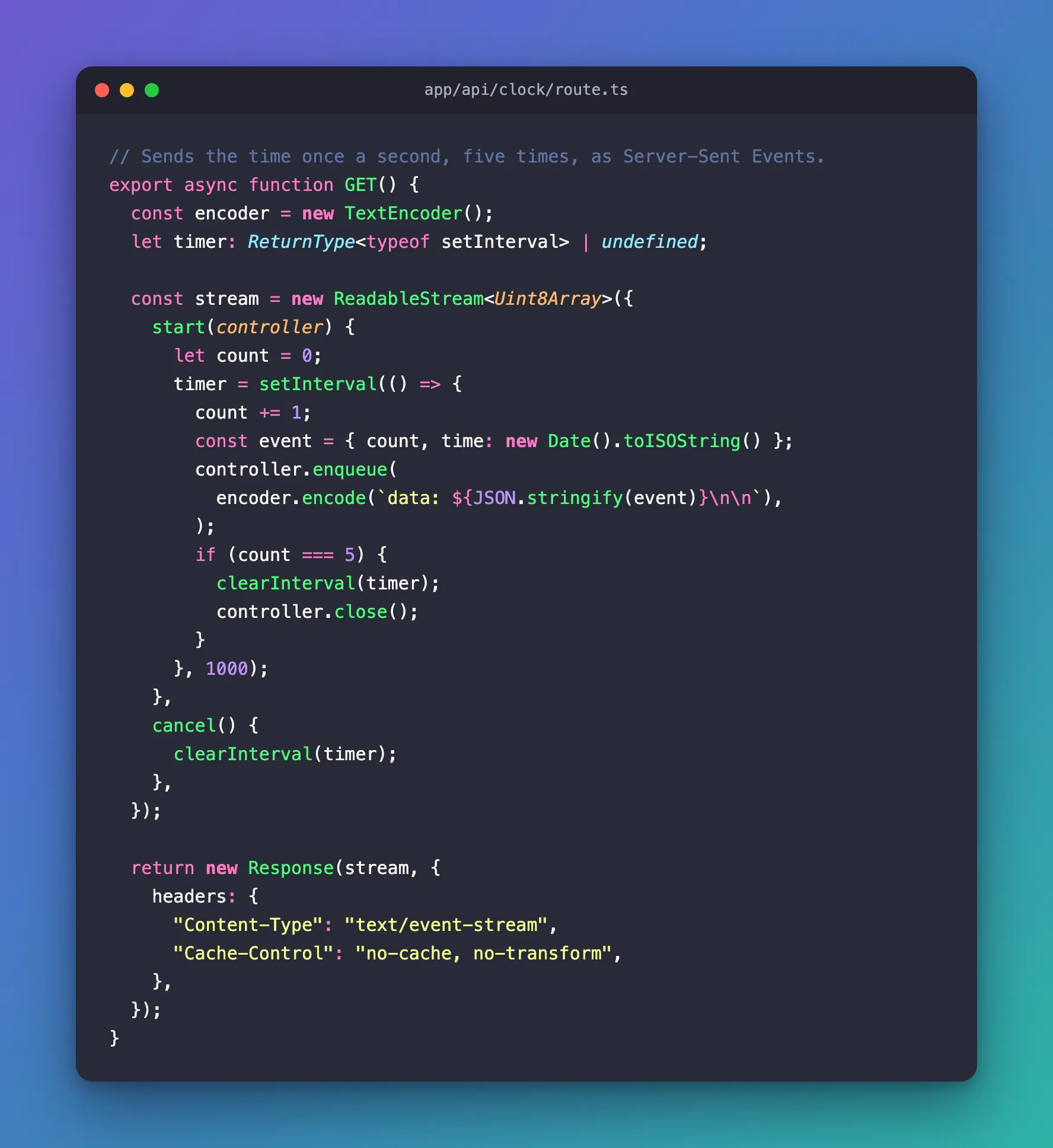
| Code | What it does |
|---|---|
new ReadableStream({ start(controller) { … } }) | start runs once, when the response begins. controller is how you write into it |
`data: ${JSON.stringify(event)}\n\n` | One event: data:, the text, and an empty line that ends the event. JSON is the usual way to send structured data |
encoder.encode(…) | A stream carries bytes; TextEncoder turns the text into UTF-8 bytes |
controller.close() | Ends the response after the fifth event |
cancel() | Runs when the client stops reading, such as a closed tab. Stop your work there — here, the timer |
Content-Type: text/event-stream | Tells the client these are Server-Sent Events |
Cache-Control: no-cache, no-transform | no-cache stops caches from storing the stream; no-transform stops proxies from compressing or buffering it, which would hold the events back |
Step 2: Watch the Stream with curl
Build and start the app (npm run build, then npm start) or run npm run dev. The build lists the route as dynamic — it runs for each request:
├ ƒ /api/clock
In a second terminal:
curl -i -N http://localhost:3000/api/clock
HTTP/1.1 200 OK
vary: rsc, next-router-state-tree, next-router-prefetch, next-router-segment-prefetch
cache-control: no-cache, no-transform
content-type: text/event-stream
Date: Wed, 11 Nov 2026 12:36:59 GMT
Connection: keep-alive
Keep-Alive: timeout=5
Transfer-Encoding: chunked

data: {"count":1,"time":"2026-11-11T12:36:59.310Z"}

data: {"count":2,"time":"2026-11-11T12:37:00.312Z"}

data: {"count":3,"time":"2026-11-11T12:37:01.313Z"}

data: {"count":4,"time":"2026-11-11T12:37:02.314Z"}

data: {"count":5,"time":"2026-11-11T12:37:03.315Z"}
-N turns off curl's own buffering, so each event appears the moment it arrives — one a second. Measured from the request, the five events arrived after 1.01, 2.01, 3.01, 4.02 and 5.02 seconds. Transfer-Encoding: chunked shows the response was sent in pieces rather than all at once.
Step 3: Receive the Events in a Page
In the browser, EventSource connects to the route and calls onmessage for every event. Create app/clock/page.tsx:
"use client";

import { useEffect, useState } from "react";

type Tick = { count: number; time: string };

export default function ClockPage() {
  const [ticks, setTicks] = useState<Tick[]>([]);

  useEffect(() => {
    const source = new EventSource("/api/clock");
    source.onmessage = (event) => {
      const tick: Tick = JSON.parse(event.data);
      setTicks((current) => [...current, tick]);
      if (tick.count === 5) {
        source.close();
      }
    };
    return () => source.close();
  }, []);

  return (
    <main style={{ padding: 48, fontFamily: "system-ui, sans-serif" }}>
      <h1>Server-Sent Events</h1>
      <ul>
        {ticks.map((tick) => (
          <li key={tick.count}>
            Event {tick.count} at {tick.time}
          </li>
        ))}
      </ul>
    </main>
  );
}
| Code | What it does |
|---|---|
"use client" | EventSource exists only in the browser, so this is a Client Component |
new EventSource("/api/clock") | Opens the stream |
event.data | The text after data: — here, the JSON |
source.close() | Closes the stream after the last event. EventSource otherwise reconnects by itself when a stream ends |
return () => source.close() | Closes it when the page goes away |
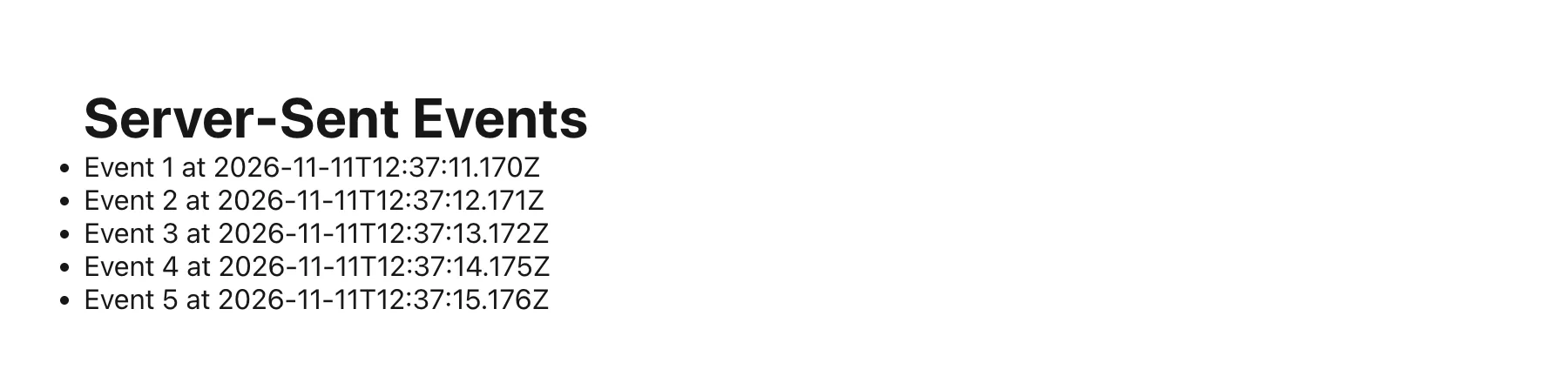
Open http://localhost:3000/clock. The list grows by one line a second:
Common Mistakes
| Mistake | What happens | Do this instead |
|---|---|---|
Forgetting the empty line after each data: line | The client doesn't see the event end, and nothing arrives | End every event with \n\n |
| Building the whole text first and returning it | Everything arrives at once, at the end | Write each event into the stream as it happens |
Leaving out cancel() | Timers and calls keep running after the client has gone | Stop the work in cancel() |
Not closing the EventSource when the stream is done | The browser reconnects and the stream starts over | source.close() after the last event |
Troubleshooting
| Symptom | Likely cause | Fix |
|---|---|---|
| All events arrive at once in curl | curl buffers its output | Use curl -N |
| All events arrive at once in the browser | Something in between buffers or compresses the response | Keep Cache-Control: no-cache, no-transform, and check your proxy's buffering settings |
| The page shows the events twice or more | The EventSource reconnected after the stream ended | Close it when the last event arrives |
FAQ
Why not WebSockets?
Server-Sent Events go one way, from server to client, over plain HTTP, which is all a progress feed or a streamed answer needs. WebSockets are for two-way messages.
Can I send events from a POST request?
Yes: return the same kind of stream from a POST handler. EventSource can only make GET requests, so read a POST stream with fetch and its response body — or a library that does that.
How do I know when the client leaves?
cancel() on the stream runs, and the request's signal fires — useful to cancel work you started for this request (How to Cancel an Upstream Request When the Browser Disconnects in Next.js).
Conclusion
A route handler streams Server-Sent Events by returning a ReadableStream with Content-Type: text/event-stream and Cache-Control: no-cache, no-transform, and writing data: …\n\n for each event. Stop your work in cancel(), read the stream with curl -N or EventSource, and close the EventSource when the last event has arrived.
Additional Resources
- MDN: Using server-sent events — the event format and
EventSource. - Next.js: Route handlers —
route.tsand streaming responses. - MDN: ReadableStream —
start,enqueue,closeandcancel.
