How to Stream a Response in the Microsoft 365 Agents SDK in C#

A long answer doesn't have to arrive in one piece. An agent built with the Microsoft 365 Agents SDK can stream it: the message appears with its first words and grows while the rest is written, the way chat assistants answer. You hand each piece of text to QueueTextChunk, and end with EndStreamAsync.
How It Works
Every turn has a stream, turnContext.StreamingResponse. Two of its methods do the work:
| Method | What it does |
|---|---|
QueueTextChunk(text) | Adds a piece of the answer. It doesn't send anything itself |
EndStreamAsync() | Sends the final message with the whole answer, and closes the stream |
Between the two, the SDK sends the text so far on a timer, at the channel's pace. On the wire, each update is a typing activity carrying the whole text written so far; Microsoft's Teams documentation puts it this way: each request represents a full message update, not just new content to be appended. The final message closes the stream.
Streaming shows on Microsoft Teams, Web Chat and Direct Line. On other channels, the SDK keeps the pieces and sends the answer as one ordinary message when you call EndStreamAsync, so the same code works everywhere.
The Example
A poem agent: send poem, and it writes a four-line poem, one line every second and a half. The delay stands in for text that takes time to write, such as an answer from a language model. The agent is one class in an ASP.NET Core project with the Agents SDK 1.9.205, hosted with AddAgentDefaults().AddAgent<PoemAgent>() and MemoryStorage, listening on port 3978.
Prerequisites
- The Microsoft 365 Agents Playground.
agentsplayground --versionshould print0.2.30. If the command isn't found, install it withnpm install -g @microsoft/m365agentsplayground.
Step 1: Queue the Text, Then End the Stream
using Microsoft.Agents.Builder;
using Microsoft.Agents.Builder.App;
using Microsoft.Agents.Builder.State;
using Microsoft.Agents.Core.Models;

namespace PoemStreamer;

public class PoemAgent : AgentApplication
{
    private static readonly string[] Lines =
    [
        "The build is green, the tests have passed,",
        "the coffee's warm, the deploy was fast.",
        "The tickets closed, the backlog small:",
        "it's Friday now, and that is all.",
    ];

    public PoemAgent(AgentApplicationOptions options) : base(options)
    {
        OnMessage("poem", StreamPoemAsync);
        OnActivity(ActivityTypes.Message, HelpAsync, rank: RouteRank.Last);
    }

    private async Task StreamPoemAsync(ITurnContext turnContext, ITurnState turnState, CancellationToken cancellationToken)
    {
        try
        {
            foreach (string line in Lines)
            {
                // Stands in for text that takes time to write, such as an answer from a language model.
                await Task.Delay(TimeSpan.FromSeconds(1.5), cancellationToken);
                turnContext.StreamingResponse.QueueTextChunk(line + "\n\n");
            }
        }
        finally
        {
            await turnContext.StreamingResponse.EndStreamAsync(cancellationToken);
        }
    }

    private Task HelpAsync(ITurnContext turnContext, ITurnState turnState, CancellationToken cancellationToken)
        => turnContext.SendActivityAsync("Send **poem** for a short poem.", cancellationToken: cancellationToken);
}
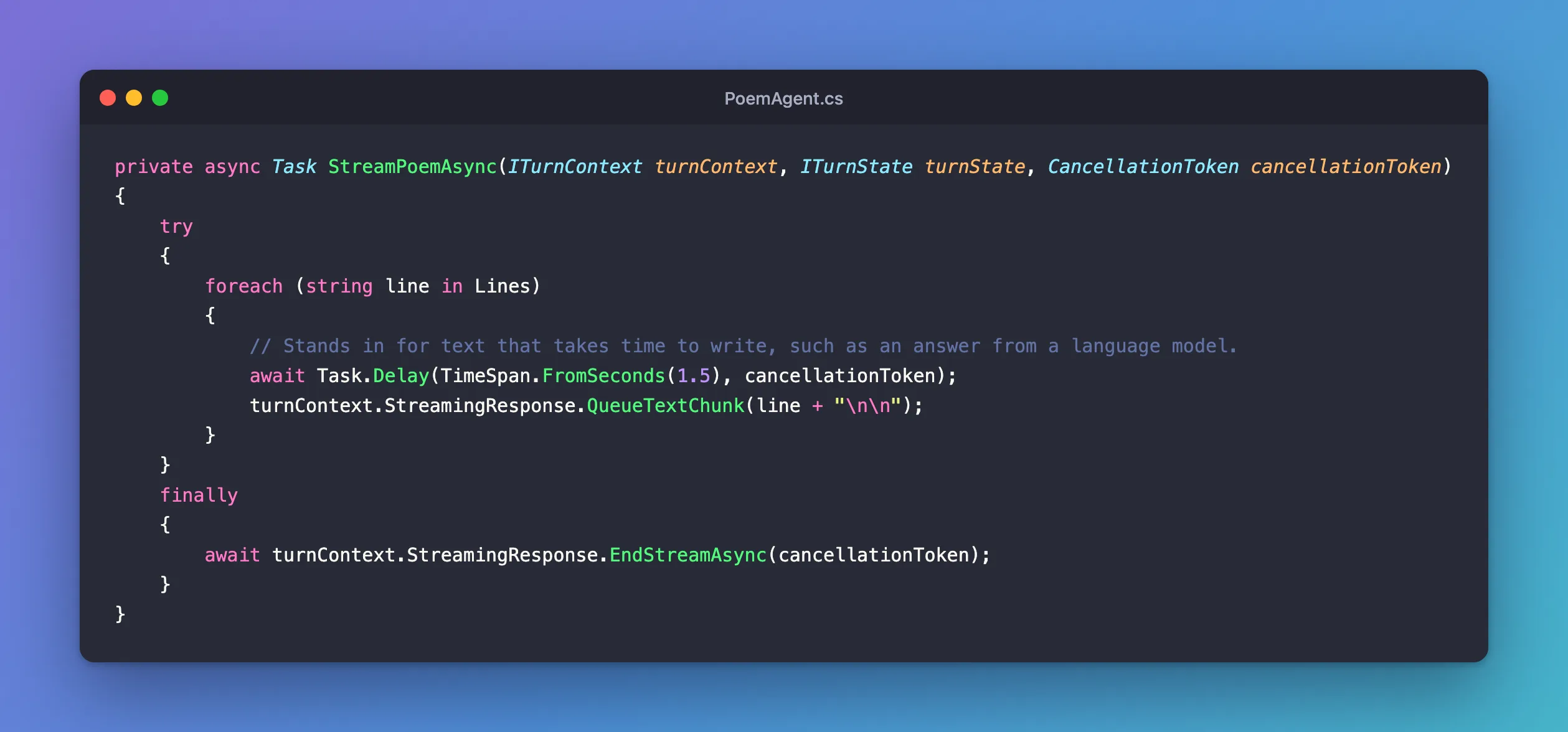
QueueTextChunk(line + "\n\n")adds one line as soon as it's ready. The blank line between them keeps each on its own line when the chat renders the text.EndStreamAsyncinfinallysends the final message and closes the stream, even if writing throws. Don't leave it out: on channels that don't stream, it's the only thing that sends the answer at all.
Step 2: Watch It Stream
Run the agent with dotnet run. The Agents Playground streams only as a channel that streams, so start it in a second terminal as Microsoft Teams:
agentsplayground -e http://localhost:3978/api/messages -c msteams
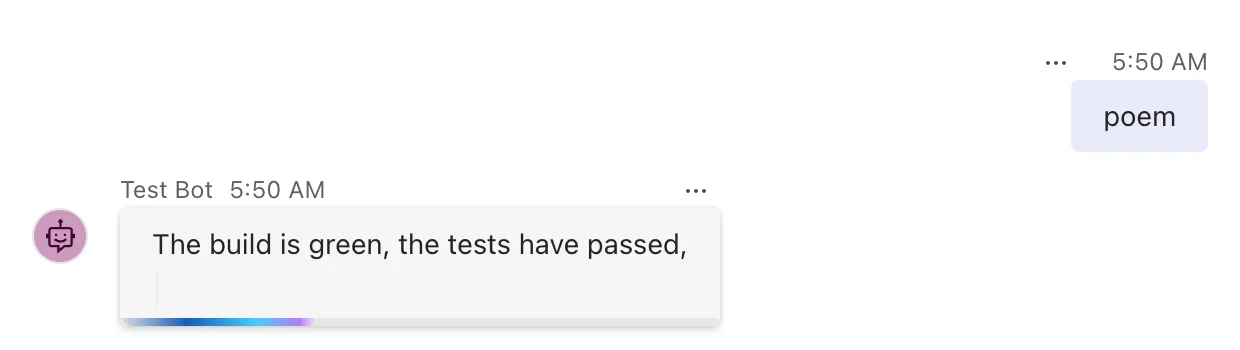
Send poem. After a second and a half, the first line appears, with a cursor where the next will go:
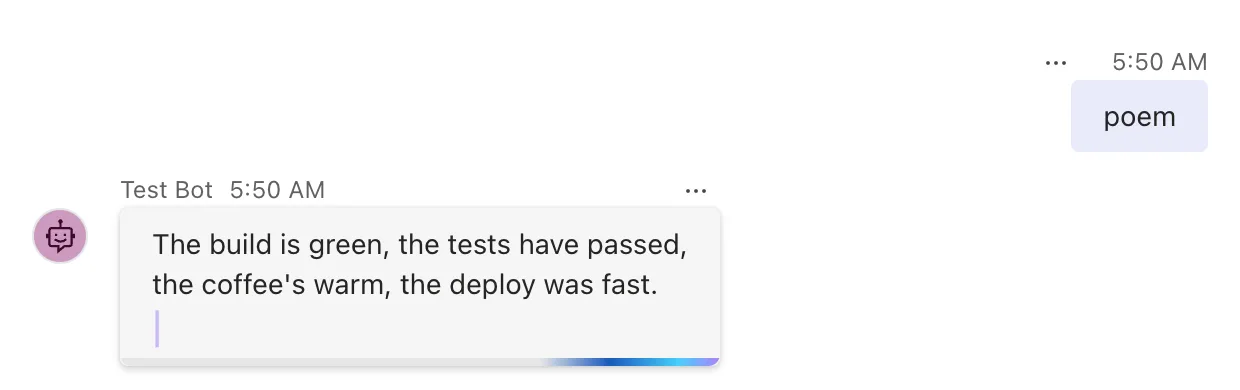
The same message grows, line by line:
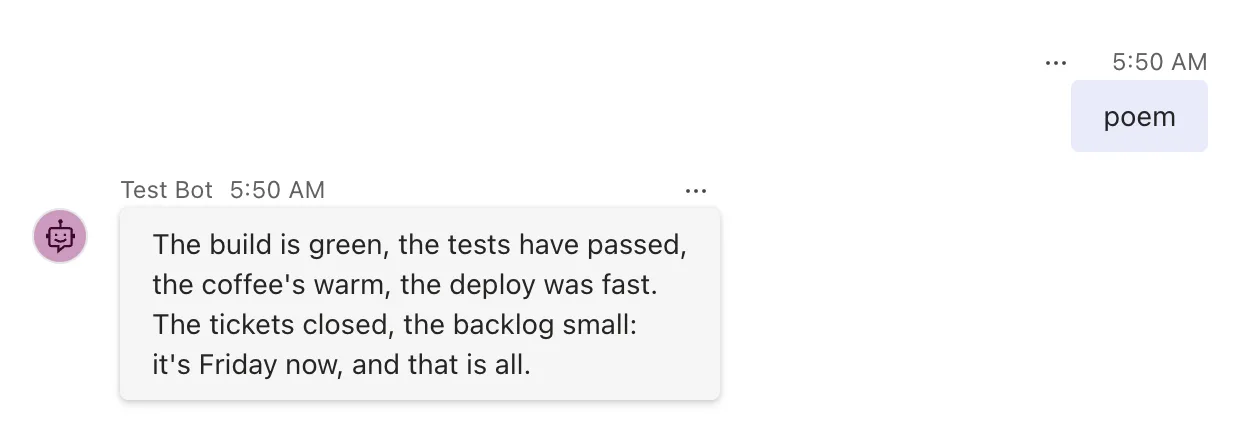
When the stream ends, the cursor goes and the poem is complete:
The Playground's Log Panel shows what the stream sent:
[5:50:48 AM] Microsoft 365 Agents Playground -> User Application message 202 poem
[5:50:50 AM] User Application -> Microsoft 365 Agents Playground typing 201 The build is green, the tests have passed,
[5:50:51 AM] User Application -> Microsoft 365 Agents Playground typing 202 The build is green, the tests have passed, the coffee's warm, the deploy was fast.
[5:50:53 AM] User Application -> Microsoft 365 Agents Playground typing 202 The build is green, the tests have passed, the coffee's warm, the deploy was fast. The tickets clo...
[5:50:54 AM] User Application -> Microsoft 365 Agents Playground typing 202 The build is green, the tests have passed, the coffee's warm, the deploy was fast. The tickets clo...
[5:50:55 AM] User Application -> Microsoft 365 Agents Playground message 202 The build is green, the tests have passed, the coffee's warm, the deploy was fast. The tickets clo...
- Each
typingactivity carries the whole poem so far, not just the new line. - The first one came back
201, Created: it opened the stream. - The final
messageclosed it with the complete text.
Common Mistakes
| Mistake | What happens | Do this instead |
|---|---|---|
Testing on the emulator channel | The answer arrives in one piece, because that channel doesn't stream | Start the Playground with -c msteams or -c webchat |
Leaving out EndStreamAsync | On channels that don't stream, the answer never arrives | Call it in finally |
| Queuing the whole answer at the end | Nothing to stream: it arrives at once | Queue each piece as soon as you have it |
Troubleshooting
| Symptom | Likely cause | Fix |
|---|---|---|
| The answer appears all at once | The channel doesn't stream | Expected on emulator; test as Teams or Web Chat |
| No text was streamed above your answer | The stream was opened, but the answer was sent with SendActivityAsync | Fixed: "No text was streamed" |
FAQ
How often does the SDK send an update?
In version 1.9.205, once a second on Teams and twice a second on Web Chat and Direct Line, however fast you queue text. Teams allows one request per second per stream, and the SDK keeps to it for you.
Where does the text come from in a real agent?
Usually from something that also produces it a piece at a time, such as a model client returning an IAsyncEnumerable of updates: read it with await foreach and queue each piece. How to Use IAsyncEnumerable and await foreach in C# explains that loop.
Can I show what the agent is doing before the text starts?
Yes, with informative updates, which go into the same stream before the first piece of text. How to Show Progress Updates in the Microsoft 365 Agents SDK in C# shows them.
Conclusion
To stream an answer, queue each piece with turnContext.StreamingResponse.QueueTextChunk as soon as it's written, and call EndStreamAsync in finally. The SDK sends the text so far at the channel's pace and closes the stream with the whole answer, and channels that don't stream get it as one message.
Additional Resources
- IStreamingResponse interface —
QueueTextChunk,EndStreamAsyncand the rest of the stream. - Stream agent messages — streaming in Teams, and its limits.
