How to Stop Users Picking a Future Date in a Power Apps Date Picker

Some dates can't be in the future: the day a shift was worked, a delivery that has arrived, an accident that has happened. Set the modern date picker's EndDate to Today(), and its calendar greys out every day after today.
The example is the Log overtime screen of the Overtime Timesheet app, where people log overtime they've already worked. How to Add a Date Picker in Power Apps adds the date picker, dpWorkDateLO.
How It Works
The modern date picker has two properties for the range people can choose from (Date picker modern control):
| Property | What it does | Default |
|---|---|---|
| StartDate | The earliest date that can be selected; earlier dates are disabled | Date(1900, 1, 1) |
| EndDate | The latest date that can be selected; later dates are disabled | Date(Year(Today())+100, 12, 31) |
Step 1: Set EndDate to Today
Select the date picker and set EndDate:
Today()
Today is the current date at midnight, so today itself can still be chosen. The preview strip shows the value Studio uses:

Step 2: Check the Calendar
Preview the app and open the calendar. In the example, on 8 November 2026, the days from the 9th onwards are greyed out, and so is the arrow to the next month and Dec in the month list:
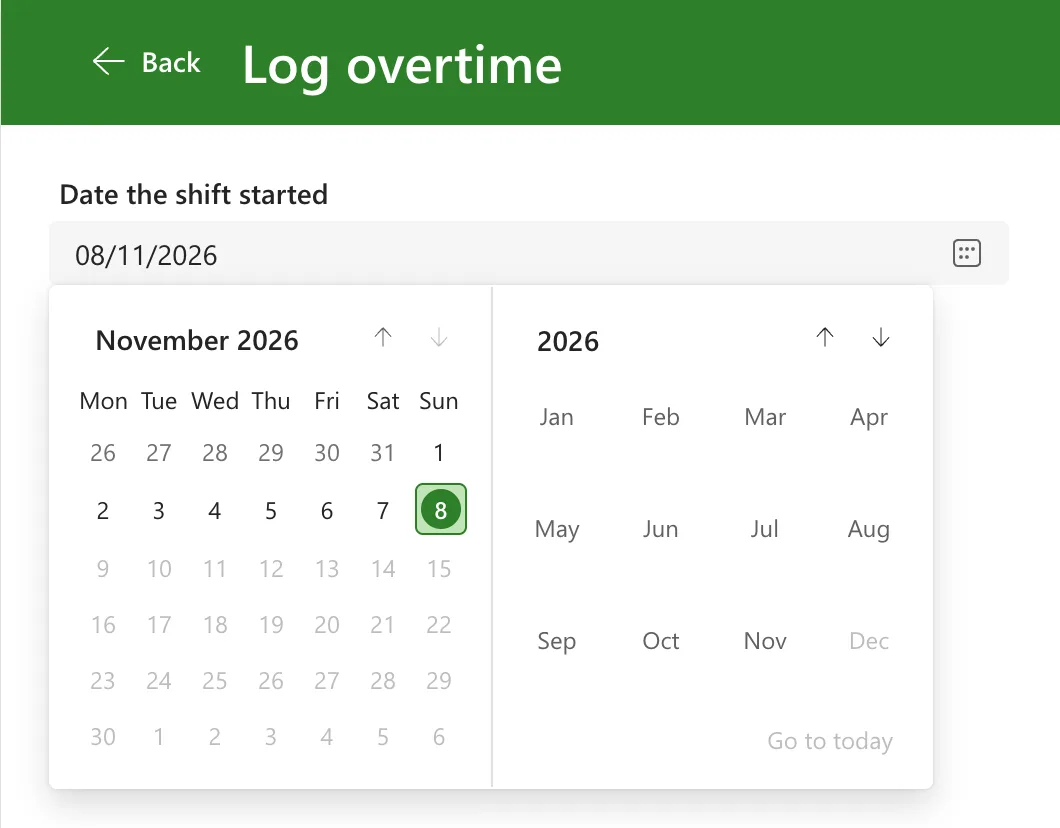
In the page, each of those day buttons was disabled: selecting them does nothing.
Check the Date When You Save Too
EndDate shapes the calendar; it isn't a rule on your data. Anyone who edits the data source another way, such as the SharePoint list itself, isn't stopped by it. The example also checks the whole shift before saving: a shift whose finish time is later than now gets the message This shift hasn't finished yet. Log it after it ends. (How to Validate a Form Without an Edit Form in Power Apps).
Common Mistakes
| Mistake | What happens | Do this instead |
|---|---|---|
Setting only DefaultDate to Today() | The calendar starts on today, but EndDate still allows the next hundred years | Set EndDate too |
| Relying on EndDate alone | Other ways of editing the data aren't covered | Check the date in your save logic as well |
| Changing StartDate to block future dates | StartDate is the earliest date, not the latest | Use EndDate |
Troubleshooting
| Symptom | Likely cause | Fix |
|---|---|---|
| Future days aren't greyed out | EndDate still has its default | Set it to Today() |
| Today is greyed out too | EndDate is set to a date before today | Use Today() |
| The next month's arrow is disabled | Every day of the next month is after EndDate | That's the restriction working |
FAQ
Can I stop dates that are too far in the past?
Yes: StartDate works the same way at the other end of the range. The example leaves it at its default, because overtime from an earlier month can still be logged.
Does EndDate stop people typing a later date?
The example's date picker has IsEditable set to false, its default, so people can only choose from the calendar. The save check above covers the rest.
Conclusion
EndDate: Today() greys out every day after today in the modern date picker's calendar. Keep a check in the save logic as well, because EndDate only shapes the calendar.
Additional Resources
- Date picker modern control in canvas apps: StartDate, EndDate and StartOfWeek.
- Now, Today, IsToday, UTCNow, UTCToday, IsUTCToday functions: what Today returns.
