How to Stop Users Deleting Items in a SharePoint List

SharePoint has no switch to turn off deleting in a list. Deleting is a permission, Delete Items, and the usual level for people who work in a list, Contribute, includes it. To stop people deleting, give them a level without it: a copy of Contribute with Delete Items and Delete Versions cleared.
In the Overtime Timesheet series, staff log overtime in a SharePoint list. An entry that's been approved for payroll mustn't just disappear: a wrong entry is corrected or rejected, never deleted. This guide sets that up and shows what staff see afterwards.
Prerequisites
- Owner of the site.
- A list with its own permissions, so you can choose the level its users get: How to Stop Inheriting Permissions on a SharePoint List.
Step 1: Make a Level Without Delete
Copy Contribute on the site's Permission Levels page and clear the two delete permissions. How to Create a Custom Permission Level in SharePoint shows every screen; this is the part that matters:
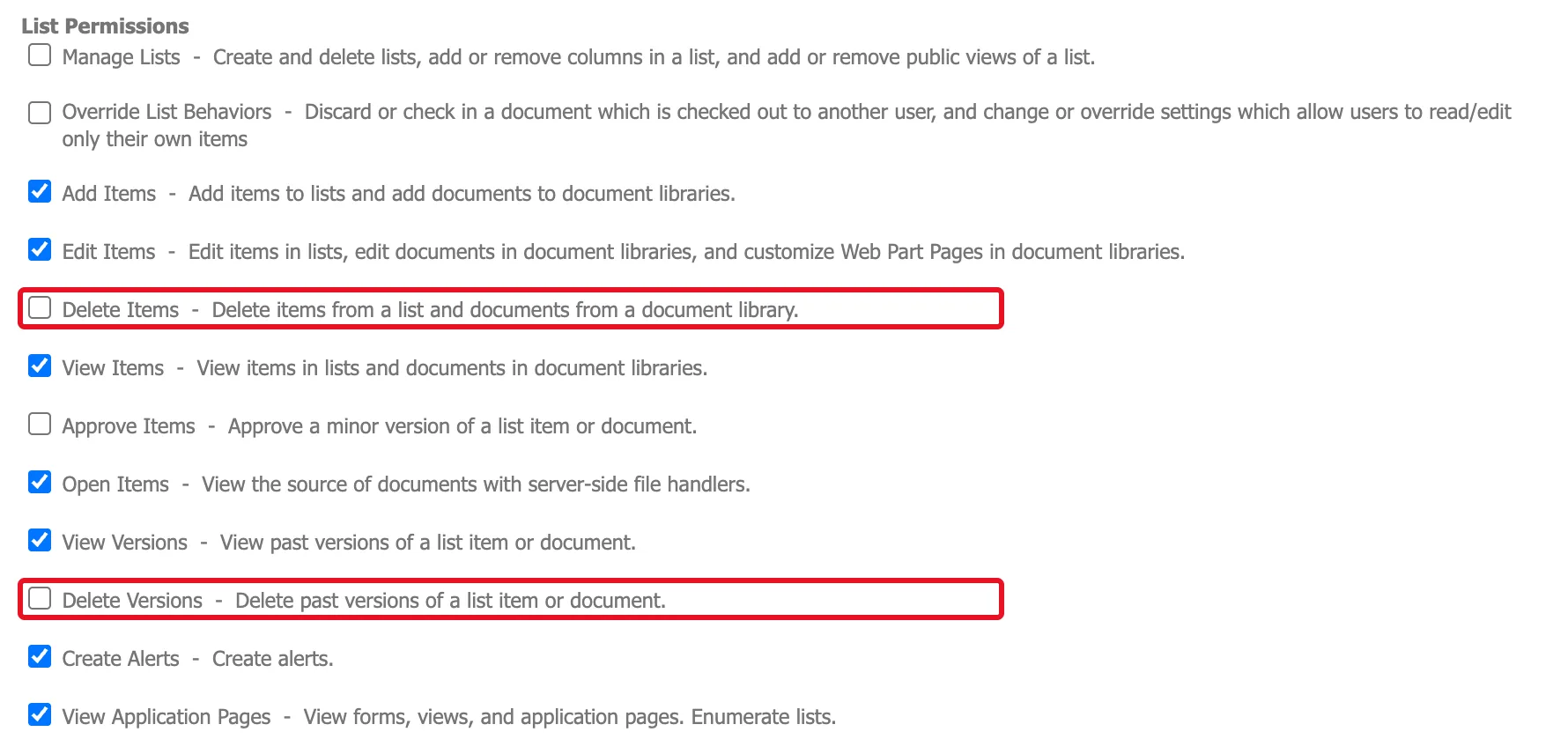
The series names it Contribute Without Delete.
- Delete Items ("Delete items from a list and documents from a document library.") is the delete command itself.
- Delete Versions ("Delete past versions of a list item or document.") would let people erase an item's history, so it goes too.
Step 2: Give the Level to the Group on the List
On the list's Permissions page, grant the group the new level instead of Contribute: How to Give a Group Access to One SharePoint List. If the group already has Contribute on the list, remove that entry, or change it with Edit User Permissions, so it doesn't add the delete permission back: when a group has two levels, it gets the permissions of both.
Step 3: Check What People See
Aisha Khan, a member of the staff group, selects her own entry. The command bar offers Edit but no Delete, and its … menu holds only Version history:

The site's owner, with Full Control, sees Delete in the same place:

The command is missing because the permission behind it is missing.
Common Mistakes
| Mistake | What happens | Do this instead |
|---|---|---|
| Clearing Delete Items in Contribute itself | Every group with Contribute on the site loses delete | Copy Contribute and change the copy |
| Leaving the group's old Contribute entry on the list | The two levels combine and delete is back | Remove or replace the old entry |
| Keeping Delete Versions | People can erase an item's history | Clear it too |
| Forgetting owners | Owners can still delete everything | Keep the Owners group small |
Troubleshooting
| Symptom | Likely cause | Fix |
|---|---|---|
| People still see Delete | They have another level with Delete Items, through another group | Use Check Permissions to see every level and where it comes from |
| People can't edit either | Edit Items was cleared by mistake | Edit the level and tick Edit Items |
| A modern page shows Access Denied | Use Remote Interfaces was cleared | Tick it again in the level |
FAQ
How do people fix a wrong item, then?
They edit it. In the Overtime Timesheet series, editing an approved entry also sends it back for approval: How to Turn On Content Approval for a SharePoint List.
Does this stop deletes from apps and flows too?
An app that connects to SharePoint as the person uses that person's permissions, so it can't delete either. A flow uses the permissions of the account its connection signed in with, which in the Overtime Timesheet series is the owner's.
Conclusion
Copy Contribute, clear Delete Items and Delete Versions, and give that level to the group on the list. People keep New and Edit; Delete is gone.
