How to Stop an Adaptive Card from Being Submitted Twice in the Microsoft 365 Agents SDK in C#

An Adaptive Card stays in the chat after it's been used, and its buttons keep working. A double click, a second try on a slow connection, or someone scrolling back to an old card, and the same submit reaches your agent again. If that submit gives something away or books something, it happens twice. The fix is to give every card an ID and to remember which IDs your agent has already handled.
The Example
The agent for this post hands out vouchers. Send it voucher, and it answers with a card, A free coffee, on us, with a Claim button. Each claim gets a voucher code. One card should give one voucher, however many times its button is pressed.
The agent is one class in an ASP.NET Core project with the Agents SDK, hosted with AddAgent<VoucherAgent>(), with MemoryStorage registered as its IStorage, and listening on port 3978. It builds its card in code, as in How to Build an Adaptive Card in Code in the Microsoft 365 Agents SDK in C#.
Prerequisites
- The Microsoft 365 Agents Playground, to chat with the agent on your own machine.
agentsplayground --versionshould print0.2.30; if the command isn't found, install it withnpm install -g @microsoft/m365agentsplayground.
Step 1: See the Problem
The first version of the agent hands out a code on every claim:
    private async Task ClaimVoucherAsync(ITurnContext turnContext, ITurnState turnState, object data, CancellationToken cancellationToken)
    {
        string code = "COFFEE-" + Random.Shared.Next(1000, 10000);

        await turnContext.SendActivityAsync($"Here's your voucher: **{code}**", cancellationToken: cancellationToken);
    }
Its card's button carries only a verb, "data": { "verb": "claimVoucher" }, and AdaptiveCards.OnActionSubmit("claimVoucher", ClaimVoucherAsync) routes it. Run the agent with dotnet run, then start the Agents Playground in a second terminal:
agentsplayground -e http://localhost:3978/api/messages -c emulator
Send voucher, select Claim, wait for the code, and select Claim again on the same card:
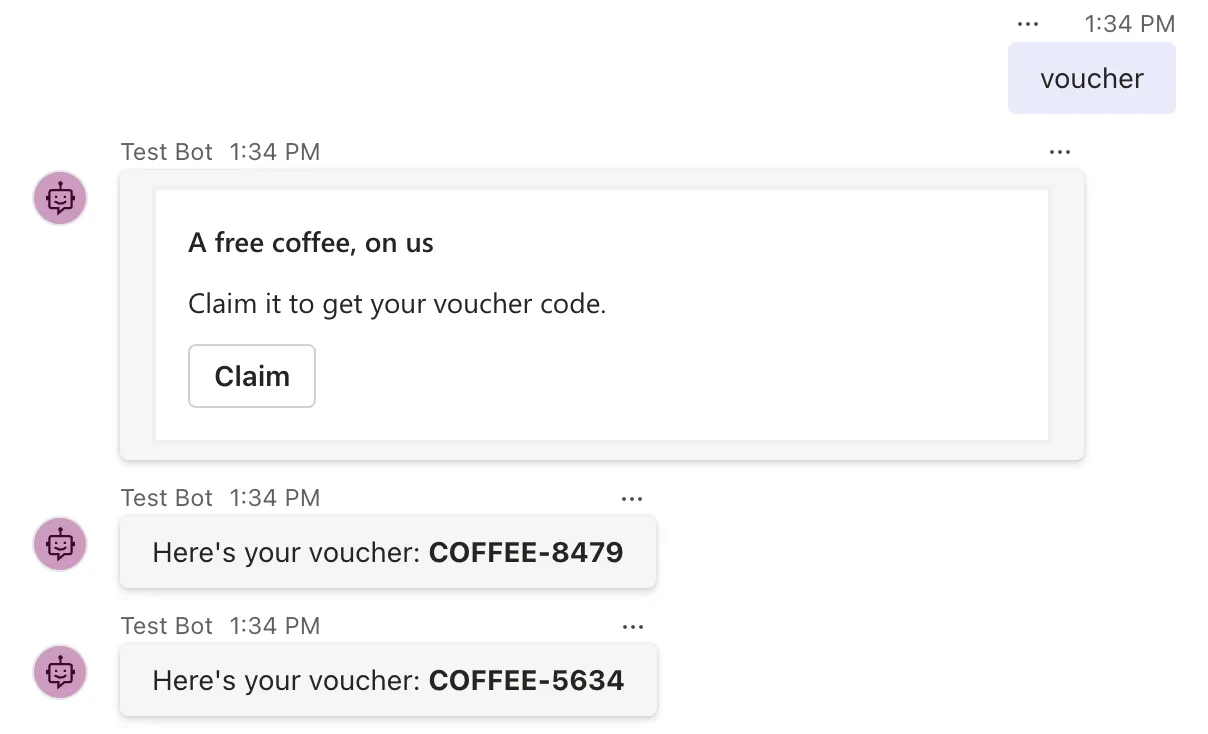
One card, two vouchers. Nothing about the second submit looks different to the agent: same verb, same data. Microsoft's Copilot Studio documentation describes exactly this: by design, Adaptive Cards allow selecting their submit buttons multiple times, and recommends including identifying data in each submit action and checking it when the submit arrives.
Step 2: Give Each Card an ID
When the agent sends a card, it makes a new ID and puts it in the button's data, next to the verb. Whatever the button sends back carries that ID with it:
    private async Task SendVoucherCardAsync(ITurnContext turnContext, ITurnState turnState, CancellationToken cancellationToken)
    {
        string cardId = Guid.NewGuid().ToString("N");

        JsonObject card = new()
        {
            ["type"] = "AdaptiveCard",
            ["version"] = "1.5",
            ["body"] = new JsonArray
            {
                new JsonObject { ["type"] = "TextBlock", ["text"] = "A free coffee, on us", ["size"] = "Medium", ["weight"] = "Bolder" },
                new JsonObject { ["type"] = "TextBlock", ["text"] = "Claim it to get your voucher code.", ["wrap"] = true }
            },
            ["actions"] = new JsonArray
            {
                new JsonObject
                {
                    ["type"] = "Action.Submit",
                    ["title"] = "Claim",
                    ["data"] = new JsonObject { ["verb"] = "claimVoucher", ["cardId"] = cardId }
                }
            }
        };

        await turnContext.SendActivityAsync(MessageFactory.Attachment(new Attachment { ContentType = ContentTypes.AdaptiveCard, Content = card }), cancellationToken);
    }
Guid.NewGuid().ToString("N") makes a random ID of 32 letters and digits, different for every card.
Step 3: Remember the IDs You've Handled
The handler reads the ID, and checks a list of used IDs in conversation state, where everyone in the chat shares it: the card belongs to the conversation, so one claim per card holds whoever presses the button.
    private async Task ClaimVoucherAsync(ITurnContext turnContext, ITurnState turnState, object data, CancellationToken cancellationToken)
    {
        VoucherClaim claim = ProtocolJsonSerializer.ToObject<VoucherClaim>(data);

        if (string.IsNullOrEmpty(claim.CardId))
        {
            await turnContext.SendActivityAsync("This card can't be used. Send **voucher** for a new one.", cancellationToken: cancellationToken);
            return;
        }

        List<string> usedCards = turnState.Conversation.GetValue<List<string>>(UsedCardsKey, () => []);
        if (usedCards.Contains(claim.CardId))
        {
            await turnContext.SendActivityAsync("This voucher has already been claimed.", cancellationToken: cancellationToken);
            return;
        }

        usedCards.Add(claim.CardId);
        turnState.Conversation.SetValue(UsedCardsKey, usedCards);

        string code = "COFFEE-" + Random.Shared.Next(1000, 10000);
        await turnContext.SendActivityAsync($"Here's your voucher: **{code}**", cancellationToken: cancellationToken);
    }
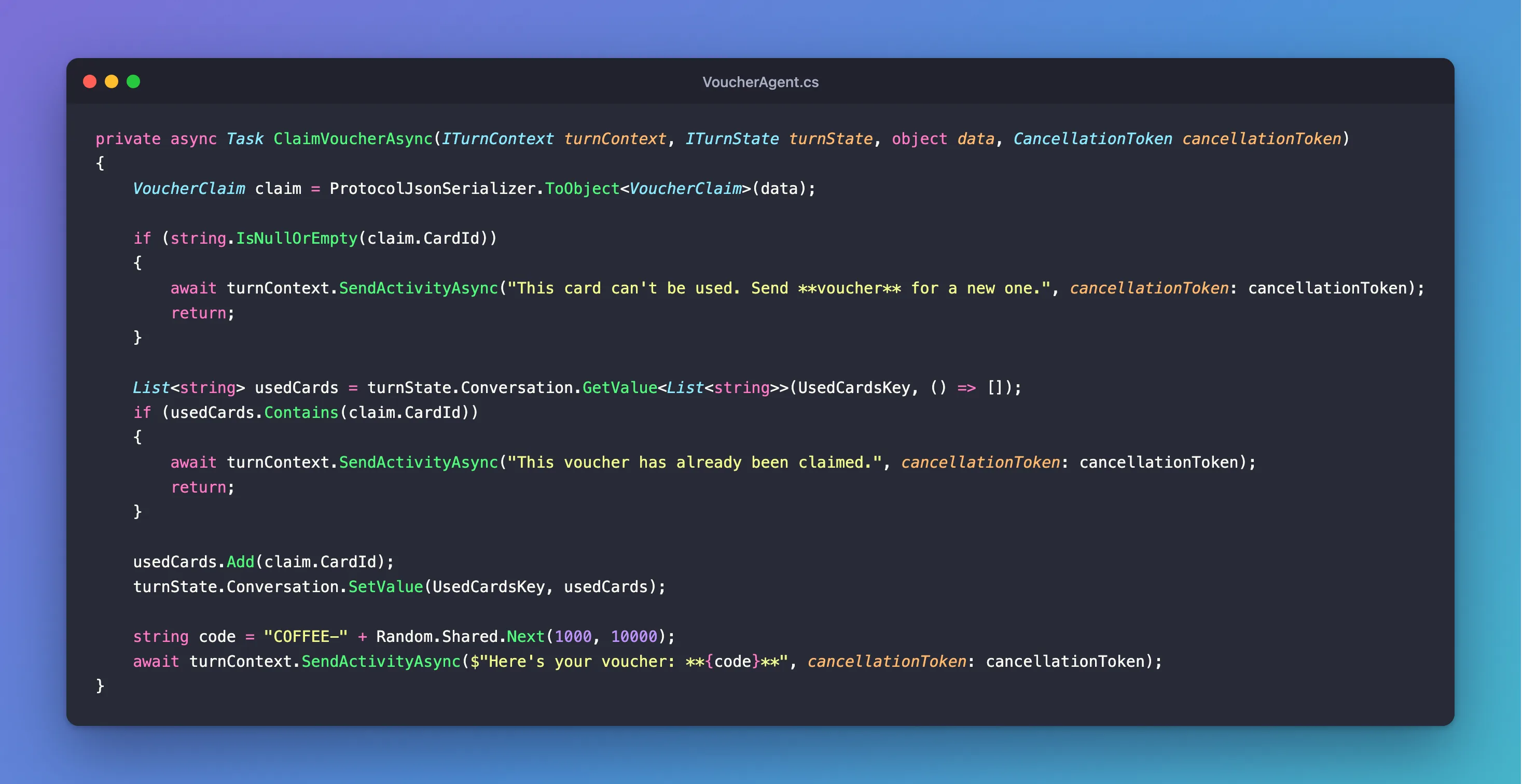
Two more pieces go with it: a name for the list, private const string UsedCardsKey = "usedCards"; at the top of the class, and a record for what the button sends, public record VoucherClaim(string? CardId);. A submit without an ID, such as one from a card sent before this change, gets a polite answer instead of a voucher.
Step 4: Try It Again
Restart the agent, send voucher, select Claim twice, then send voucher again and claim the new card:
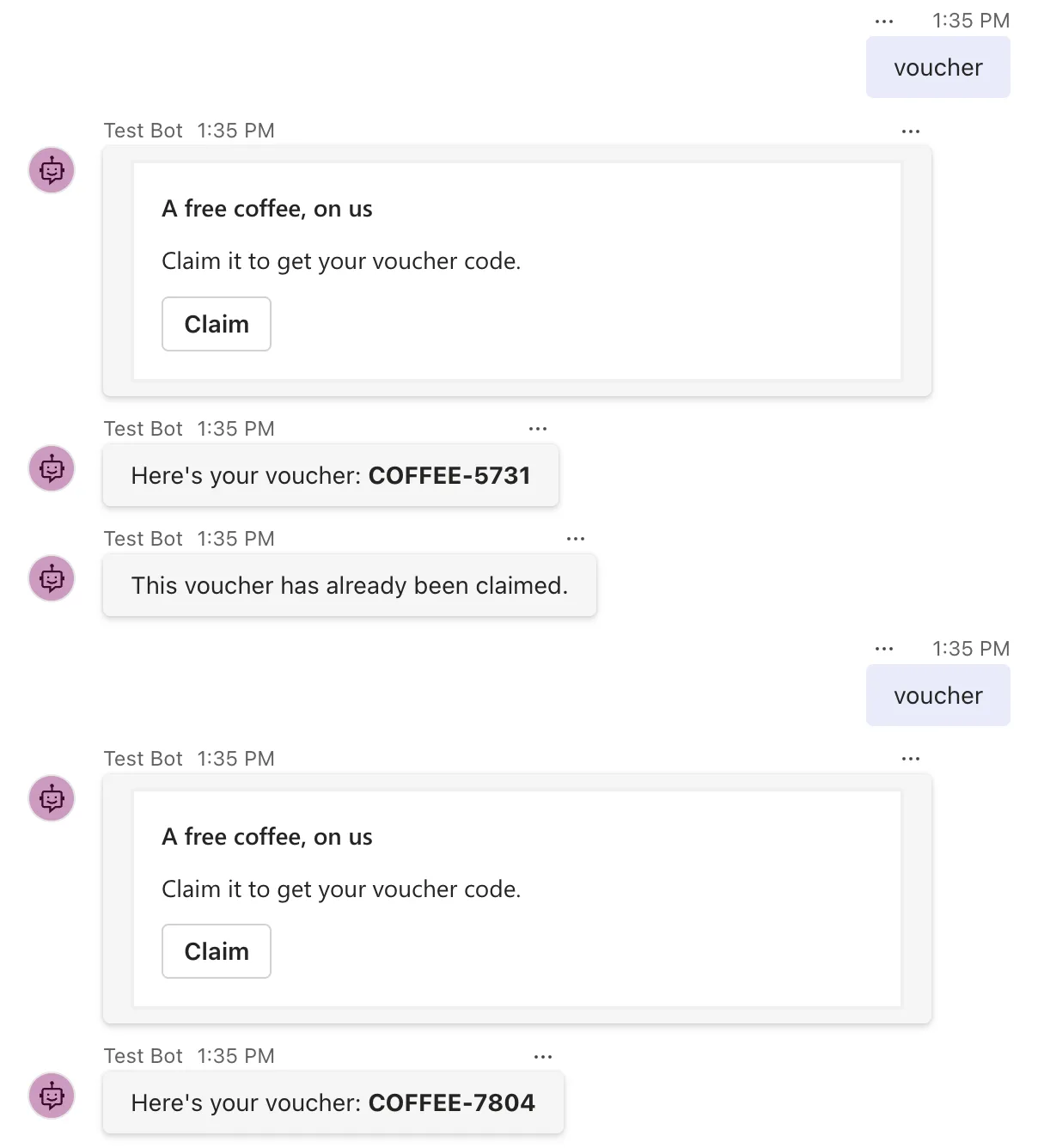
The first press got a voucher, the second press on the same card was refused, and a new card, with a new ID, worked as it should.
Common Mistakes
| Mistake | What happens | Do this instead |
|---|---|---|
| Putting the same ID in every card | After the first claim, every card is refused | Make a new ID each time you send a card |
| Keeping the used IDs in a field of the agent | The agent object is new for every message, so the list is always empty | Keep them in state |
| Keeping them in user state when the card is for the whole chat | Each person can use the same card once | Use conversation state for one use per card |
Troubleshooting
| Symptom | Likely cause | Fix |
|---|---|---|
| Every claim is refused | The ID is the same on every card, or never changes | Create the ID inside the method that sends the card |
| Old cards answer This card can't be used | They were sent before the cards had IDs | Send a new card |
| The list of used IDs keeps growing | Every card adds one | Remove old IDs, or keep them in a store that expires them |
FAQ
What about two presses at exactly the same moment?
Two submits that arrive together are handled at the same time, in two turns, and both can find the ID unused. The Agents SDK's state storage refuses the second save in that case, as Fixed: EtagException: AgentState 'conversation' could not save key because another turn updated the state first shows, including what to do about it and the one case the check doesn't cover.
Can I use a domain rule instead of a card ID?
Often, yes, and it's better when you have one: one desk per person per day, one approval per request. Look for what was already done before doing it again. A card ID is the general answer when there's no such rule.
Can I change the card so the button can't be pressed again?
Updating a card after it's been sent depends on the channel and the kind of action, and Part 9 of the Microsoft 365 Agents SDK Fundamentals, Universal Actions: Adaptive Cards That Update, will cover it. The check in your handler is needed either way, because a client that keeps old cards clickable can always send a submit again.
Conclusion
Adaptive Card buttons can be used more than once, so treat every submit as something that may have arrived before. Put an ID of your own in each card's button data, keep the IDs your agent has handled in conversation state, and answer a repeat with a message instead of doing the work again.
Additional Resources
- Ask questions with Adaptive Cards: Submit button behavior — why cards can be submitted more than once, and the identifier approach.
- Manage state — conversation state in the Agents SDK.
- Use adaptive cards in agents — sending cards and handling their actions.
