How to Start, Name and End an MLflow Run

A run is one execution of your code that MLflow records: its settings, results and files. Everything you log goes into the active run, so how you start and end runs decides where your data lands. This guide starts runs four ways, names them, checks their status, and shows what MLflow does when your code fails halfway, with real output from MLflow 3.18.0.
Syntax
import mlflow

with mlflow.start_run(run_name="<name>") as run:
    ...  # log parameters, metrics and files here

run = mlflow.start_run(run_name="<name>")
...  # log here
mlflow.end_run()
| Part | What it means |
|---|---|
mlflow.start_run() | Starts a run and makes it active: everything you log goes into it |
run_name="<name>" | The name shown in the UI. Without it, "a random name will be generated" |
with ... as run: | Ends the run when the block ends: FINISHED if the code succeeded, FAILED if it raised an error |
mlflow.end_run() | Ends the active run by hand, as FINISHED unless you pass another status |
run_id="<run ID>" | Opens an existing run again, to log more into it |
nested=True | Starts a run inside the active one |
Prerequisites
- MLflow in a uv project and a running tracking server at
http://127.0.0.1:8080: see How to Start an MLflow Tracking Server on Your Computer. - An experiment to log to. This guide uses
runs-demo: see How to Create and Set an MLflow Experiment.
The Script
runs_demo.py starts four runs, each a different way. Build it up piece by piece.
Connect and pick the experiment:
import mlflow

mlflow.set_tracking_uri("http://127.0.0.1:8080")
mlflow.set_experiment("runs-demo")
1. A named run in a with block, the usual way:
with mlflow.start_run(run_name="first-named-run") as run:
    print("Inside the block:", run.info.run_name, mlflow.active_run().info.status)
print("After the block:", mlflow.get_run(run.info.run_id).info.status)
mlflow.start_run() starts a run and makes it active; mlflow.active_run() returns it. When the block ends, MLflow ends the run.
2. A run without a name:
with mlflow.start_run() as run:
    print("No name given, MLflow picked:", run.info.run_name)
3. A run started and ended by hand, for code that can't use a with block:
run = mlflow.start_run(run_name="manual-start-and-end")
mlflow.log_param("style", "manual")
mlflow.end_run()
print("Manual run:", mlflow.get_run(run.info.run_id).info.status)
4. A run where the code fails:
try:
    with mlflow.start_run(run_name="run-that-fails") as run:
        raise ValueError("training stopped early")
except ValueError as error:
    print("Caught:", error)
print("Failed run:", mlflow.get_run(run.info.run_id).info.status)
print("Active run now:", mlflow.active_run())
Run It
uv run python runs_demo.py
2026/11/13 17:07:55 INFO mlflow.tracking.fluent: Experiment with name 'runs-demo' does not exist. Creating a new experiment.
Inside the block: first-named-run RUNNING
🏃 View run first-named-run at: http://127.0.0.1:8080/#/experiments/4/runs/b19958e538d34ba5b02bc7a6b8f5a0fc
🧪 View experiment at: http://127.0.0.1:8080/#/experiments/4
After the block: FINISHED
No name given, MLflow picked: righteous-steed-81
🏃 View run righteous-steed-81 at: http://127.0.0.1:8080/#/experiments/4/runs/c71dd749aeee41989e255d8dae763328
🧪 View experiment at: http://127.0.0.1:8080/#/experiments/4
🏃 View run manual-start-and-end at: http://127.0.0.1:8080/#/experiments/4/runs/f86b2686272e4a749cce9afb7761dab7
🧪 View experiment at: http://127.0.0.1:8080/#/experiments/4
Manual run: FINISHED
🏃 View run run-that-fails at: http://127.0.0.1:8080/#/experiments/4/runs/29fe9bf6d3ff48e6ac4f1f5535cb2393
🧪 View experiment at: http://127.0.0.1:8080/#/experiments/4
Caught: training stopped early
Failed run: FAILED
Active run now: None
What the Output Shows
- Status changes from
RUNNINGtoFINISHED. Inside the block the run is running; when the block ends, MLflow marks it finished. - No name? MLflow makes one up:
righteous-steed-81, an adjective, an animal and a number. end_run()finishes a run you started by hand. Forget it, and the run stays active until your program exits.- An error inside the block marks the run
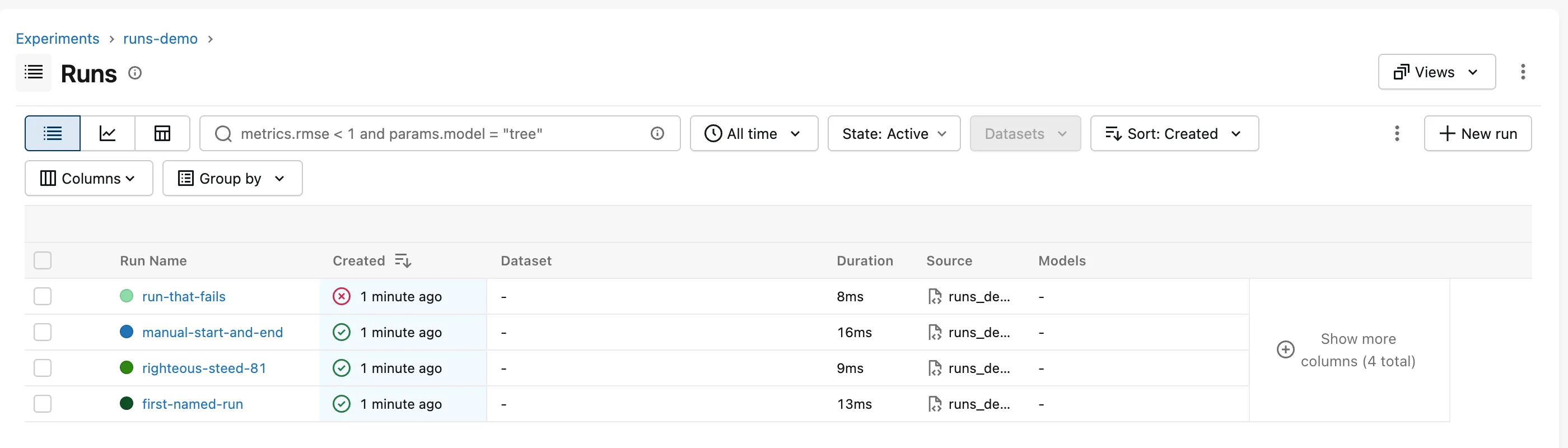
FAILED. Thewithblock ended the run with that status before the error reached theexcept. That's the main reason to preferwith: a crash never leaves a run looking healthy. - MLflow prints two links when each run ends: the run and its experiment.
- After all four, no run is active (
None).
The Runs page shows the result, newest first, with a red cross for the failed run:
Naming Runs Well
Good run names say what's different about the run, such as 300-trees or 50-trees-depth-8. A command-line option is an easy way to pass one in: MLflow Tutorial for Machine Learning in Python — Part 1 adds --run-name to its training command. The run's ID is what identifies it for MLflow; names don't have to be unique.
Common Mistakes
| Mistake | What happens | Do this instead |
|---|---|---|
mlflow.start_run() without end_run() | The run stays active, and later logging goes into it | Use a with block, or call end_run() |
Catching errors inside the with block | MLflow never sees the error, so a broken run shows Finished | Let errors leave the block, or mark the run yourself with mlflow.end_run(status="FAILED") |
| Using run names as IDs | Names repeat across runs | Use run.info.run_id |
Troubleshooting
| Symptom | Likely cause | Fix |
|---|---|---|
| A run is stuck as Running in the UI | The program stopped before the run was ended | Use with blocks; end leftover runs with MlflowClient().set_terminated(run_id) |
| Runs land in the wrong experiment | No set_experiment() before start_run() | Call set_experiment() first |
FAQ
Can I start a run inside another run?
Yes, with mlflow.start_run(nested=True). Nested runs group related runs, such as each try in a hyperparameter search, under one parent; a later part of the MLflow series uses them.
How do I find a run later?
By its ID in the UI's URL, by name in the runs table's search box, or with mlflow.search_runs().
What statuses can a run have?
RUNNING, FINISHED, FAILED, KILLED and SCHEDULED. Your code mostly sees the first three.
Conclusion
mlflow.start_run(run_name=...) in a with block started a RUNNING run and ended it as FINISHED; without a name MLflow called it righteous-steed-81; start_run() with end_run() did the same by hand; and an exception inside the block ended the run as FAILED, shown with a red cross in the UI.
Additional Resources
- mlflow.start_run — every argument, including
nestedandtags. - mlflow.end_run — ending a run with a status.
- MLflow Tracking — runs and experiments.
