How to Start an MLflow Tracking Server on Your Computer

The MLflow tracking server is the place your training runs go: a small web server that stores every run and shows them in the MLflow UI. You don't need a cloud account or a database server to run one; MLflow 3.18 brings everything, including a SQLite database. This guide starts a server on your own computer, explains every line it prints, checks that it's ready, and stops it safely.
Syntax
mlflow server [OPTIONS]
In a uv project, start it through uv so it runs with the project's MLflow: uv run mlflow server [OPTIONS]. Square brackets mean the options are optional. The ones you'll use most, from mlflow server --help:
| Option | What it sets | Default |
|---|---|---|
--host <address>, or -h | The network address the server listens on. 127.0.0.1 accepts connections from this computer only | 127.0.0.1 |
--port <number>, or -p | The port the server listens on | 5000 |
--backend-store-uri <URI> | Where experiments, runs, parameters and metrics are stored | sqlite:///mlflow.db, a database file in the folder you start from |
--artifacts-destination <URI> | Where the files that runs log are stored | ./mlartifacts, in the folder you start from |
--workers <number>, or -w | How many processes answer requests | 4 |
-h is short for --host, not for help; --help lists every option. The example below starts the server on port 8080, because on a Mac port 5000 belongs to the AirPlay Receiver: see How to Change the MLflow Server Port.
Prerequisites
- MLflow 3.18 installed in a uv project. This guide uses a folder called
mlflow-server, made withuv init --bare --python 3.15 mlflow-serveranduv add mlflow: see How to Install MLflow in a Python Project with uv. - A terminal in that folder, which the server will keep busy.
Step 1: Start the Server
uv run mlflow server --port 8080
On the very first start, the output looks like this:
Backend store URI not provided. Using sqlite:///mlflow.db
Registry store URI not provided. Using backend store URI.
2026/11/13 17:19:14 INFO mlflow.store.db.utils: Creating initial MLflow database tables...
2026/11/13 17:19:14 INFO mlflow.store.db.utils: Updating database tables
[MLflow] Security middleware enabled with default settings (localhost-only). To allow connections from other hosts, use --host 0.0.0.0 and configure --allowed-hosts and --cors-allowed-origins.
2026/11/13 17:19:15 INFO mlflow.server.jobs.executor_registry: Available backends after discovery: docker, local
2026/11/13 17:19:15 INFO mlflow.server.jobs.executor_registry: Job executor backend 'local' passed requirements check
2026/11/13 17:19:15 INFO:     Uvicorn running on http://127.0.0.1:8080 (Press CTRL+C to quit)
2026/11/13 17:19:15 INFO:     Started parent process [93838]
/Users/you/source/mlflow-server/.venv/lib/python3.15/site-packages/mlflow/server/fastapi_app.py:24: StarletteDeprecationWarning: starlette.middleware.wsgi is deprecated and will be removed in a future release. Please refer to https://github.com/abersheeran/a2wsgi as a replacement.
  from starlette.middleware.wsgi import WSGIResponder, build_environ
/Users/you/source/mlflow-server/.venv/lib/python3.15/site-packages/mlflow/server/fastapi_app.py:24: StarletteDeprecationWarning: starlette.middleware.wsgi is deprecated and will be removed in a future release. Please refer to https://github.com/abersheeran/a2wsgi as a replacement.
  from starlette.middleware.wsgi import WSGIResponder, build_environ
/Users/you/source/mlflow-server/.venv/lib/python3.15/site-packages/mlflow/server/fastapi_app.py:24: StarletteDeprecationWarning: starlette.middleware.wsgi is deprecated and will be removed in a future release. Please refer to https://github.com/abersheeran/a2wsgi as a replacement.
  from starlette.middleware.wsgi import WSGIResponder, build_environ
/Users/you/source/mlflow-server/.venv/lib/python3.15/site-packages/mlflow/server/fastapi_app.py:24: StarletteDeprecationWarning: starlette.middleware.wsgi is deprecated and will be removed in a future release. Please refer to https://github.com/abersheeran/a2wsgi as a replacement.
  from starlette.middleware.wsgi import WSGIResponder, build_environ
2026/11/13 17:19:18 INFO:     Started server process [93843]
2026/11/13 17:19:18 INFO:     Waiting for application startup.
2026/11/13 17:19:18 INFO:     Started server process [93844]
2026/11/13 17:19:18 INFO:     Waiting for application startup.
2026/11/13 17:19:18 INFO:     Started server process [93842]
2026/11/13 17:19:18 INFO:     Waiting for application startup.
2026/11/13 17:19:18 INFO:     Started server process [93841]
2026/11/13 17:19:18 INFO:     Waiting for application startup.
2026/11/13 17:19:18 INFO:     Application startup complete.
2026/11/13 17:19:19 INFO:     Application startup complete.
2026/11/13 17:19:19 INFO:     Application startup complete.
2026/11/13 17:19:19 INFO:     Application startup complete.
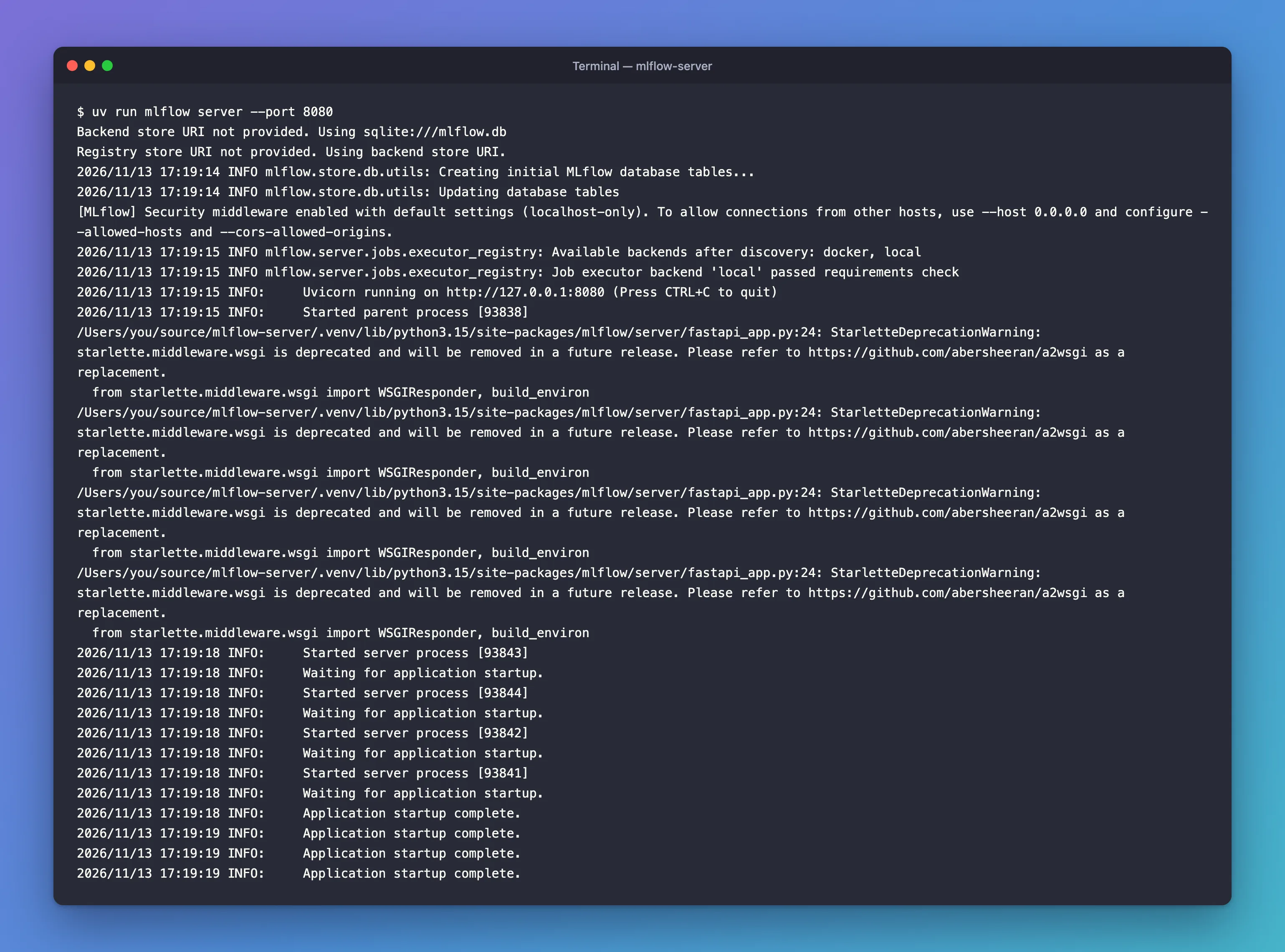
What each part means:
| Line | Meaning |
|---|---|
Backend store URI not provided. Using sqlite:///mlflow.db | Runs are stored in a SQLite database file, mlflow.db, in the folder you started from. This has been the default since MLflow 3.7.0 |
Registry store URI not provided | The Model Registry uses the same database |
Creating initial MLflow database tables... | First start only: MLflow created its tables |
Security middleware enabled … (localhost-only) | Only programs on this computer can connect |
Job executor backend 'local' passed requirements check | The background job runner, used by MLflow's AI features, can run |
Uvicorn running on http://127.0.0.1:8080 | The address of your server |
StarletteDeprecationWarning | A warning from MLflow's own code, once per worker. Harmless: Fixed: "StarletteDeprecationWarning: starlette.middleware.wsgi is deprecated" When You Start the MLflow Server |
Application startup complete × 4 | The server runs 4 worker processes by default; it's ready when all four report in |
A few seconds later, four more lines confirm the job runner's scheduled tasks. Leave the terminal open: the server stops when the terminal does.
Step 2: Check That It's Ready
The server answers two simple addresses. In a second terminal:
curl -i http://127.0.0.1:8080/health
HTTP/1.1 200 OK
date: Fri, 13 Nov 2026 12:32:04 GMT
server: uvicorn
content-length: 2
content-type: text/plain; charset=utf-8
x-content-type-options: nosniff
x-frame-options: SAMEORIGIN
vary: Origin

OK
/version returns the server's MLflow version:
curl -i http://127.0.0.1:8080/version
HTTP/1.1 200 OK
date: Fri, 13 Nov 2026 12:01:55 GMT
server: uvicorn
content-type: text/html; charset=utf-8
content-length: 6
x-content-type-options: nosniff
x-frame-options: SAMEORIGIN
vary: Origin

3.18.0
In Windows PowerShell, type curl.exe instead of curl. Or skip curl entirely and open the UI.
Step 3: Open the UI
Open http://127.0.0.1:8080 in your browser:
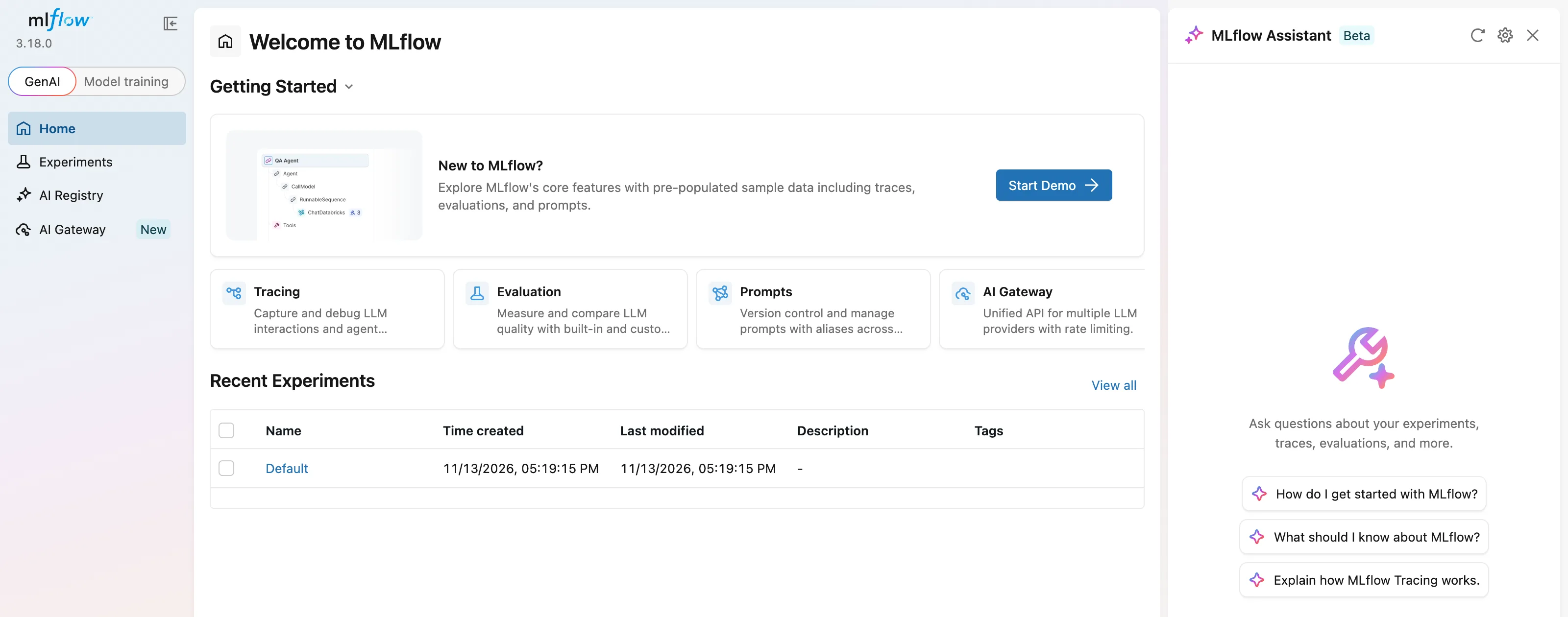
A new server has one experiment, Default. For classic machine learning, switch the sidebar to Model training and close the Assistant panel: How to Open the MLflow UI and Find Your Runs.
Where the Server Keeps Your Data
Everything lives in the folder you started the server from:
mlflow.db: the SQLite database with experiments, runs, parameters, metrics and tags. Created on the first start.mlartifacts/: files your runs log, such as charts and models. Created when the first file arrives.
So always start the server from the same folder. How to See Where MLflow Stores Runs and Artifacts looks inside both.
The Options You'll Use Most
From mlflow server --help:
| Option | Default | What it does |
|---|---|---|
--port | 5000 | The port to listen on. This series uses 8080, because on a Mac port 5000 belongs to the AirPlay Receiver |
--host | 127.0.0.1 | The network address to listen on. Keep the default on a laptop |
--workers | 4 | How many worker processes handle requests |
--backend-store-uri | sqlite:///mlflow.db | Where runs are stored, for example a PostgreSQL database |
--artifacts-destination | ./mlartifacts | Where logged files are stored |
mlflow ui still works in MLflow 3.18.0 and takes exactly the same options; MLflow's documentation uses mlflow server.
Step 4: Stop the Server
Press Ctrl+C in the server's terminal. Uvicorn shuts down its four workers and the command exits. The workers print at the same time, so the lines arrive mixed up:
^CException ignored on threading shutdown:
2026/11/13 17:17:49 INFO:     Shutting down
...
2026/11/13 17:17:49 INFO:     Received SIGINT, exiting.
2026/11/13 17:17:49 INFO:     Terminated child process [65535]
...
2026/11/13 17:17:49 INFO:     Stopping parent process [65532]
Traceback (most recent call last):
  File "/Library/Frameworks/Python.framework/Versions/3.15/lib/python3.15/threading.py", line 1721, in _shutdown
    _thread_shutdown()
    ~~~~~~~~~~~~~~~~^^
KeyboardInterrupt
The Exception ignored on threading shutdown and KeyboardInterrupt lines look alarming, but the server still stopped cleanly; Fixed: "Exception ignored on threading shutdown" KeyboardInterrupt When You Stop the MLflow Server explains where they come from.
Nothing is lost when the server stops. Run uv run mlflow server --port 8080 from the same folder, and every run is still there.
Common Mistakes
| Mistake | What happens | Do this instead |
|---|---|---|
Opening http://localhost:5000 on a Mac | "Access to localhost was denied" (HTTP ERROR 403) from the AirPlay Receiver | Use port 8080: Fixed: "Access to localhost was denied" HTTP ERROR 403 When You Open the MLflow UI on a Mac |
| Starting the server from another folder | It creates a new, empty mlflow.db there, and your runs seem to vanish | Always start from the same folder |
| Opening the UI before Application startup complete | The page doesn't load yet | Wait for all four lines |
| Closing the server's terminal | The server stops | Keep it open, or run it in its own window |
Troubleshooting
| Symptom | Likely cause | Fix |
|---|---|---|
ERROR: [Errno 48] Address already in use | Another program, or another MLflow server, uses the port | Fixed: "[Errno 48] Address already in use" When You Start the MLflow Server |
A StarletteDeprecationWarning on every start | MLflow 3.18.0 imports a module Starlette marked as deprecated | Harmless; see the Fixed post linked above |
Training code fails with Max retries exceeded … Connection refused | The server isn't running at the address the code uses | Fixed: "MlflowException: API request to … failed with exception … Max retries exceeded" Connection Refused in MLflow |
FAQ
Do I need a database server such as PostgreSQL?
Not on your own computer. SQLite is a file, built into Python, and it's MLflow's default. A team sharing one server would use a database server.
Can other computers reach my server?
No. It listens on 127.0.0.1 and only accepts connections from your own computer.
Does the server send data anywhere?
Open-source MLflow collects anonymous usage data by default. Set MLFLOW_DISABLE_TELEMETRY=true before starting the server to turn it off for the server and the UI: How to Turn Off MLflow Telemetry.
Conclusion
uv run mlflow server --port 8080 started a tracking server at http://127.0.0.1:8080, with a SQLite database in mlflow.db, files in mlartifacts/, four workers and a localhost-only security setting. /health answered OK, /version answered 3.18.0, and Ctrl+C stopped it without losing anything.
Additional Resources
- MLflow Tracking Server — every way to run and configure the server.
- Backend Stores — SQLite and the other supported databases.
- Artifact Stores — where logged files go.
