How to Start a Free 30-Day Power Apps Trial

A Power Apps trial gives your account, for 30 days, what a Power Apps per user plan includes, and Microsoft requires it before you can create a trial environment, even if you're an admin. This guide starts the trial from the page Microsoft links to, and shows what changed afterwards and what didn't.
Why You'd Need It
Microsoft's Explore Power Apps for free for 30 days lists what the trial unlocks, including premium connectors, model-driven apps and Create and manage environments and Dataverse databases. If you already have Power Apps through Microsoft 365, it adds to what that license gives you.
The reason it matters for most people reading this is the last item. Microsoft's Create and manage environments says Microsoft 365 plans can't create trial environments, a Power Apps trial can create one, and this requirement applies to tenant-level admins as well. Being a Global admin isn't enough: you need the trial, or a paid plan, first.
It costs nothing. No page asked for payment details.
Prerequisites
- A work or school account. Power Apps doesn't support personal email addresses, such as outlook.com or gmail.com.
- An organization that allows trials. An admin can turn self-service trials off. Microsoft says you then see a message that your admin has turned off sign-ups instead of the trial page.
Step 1: Check Your Current Plan
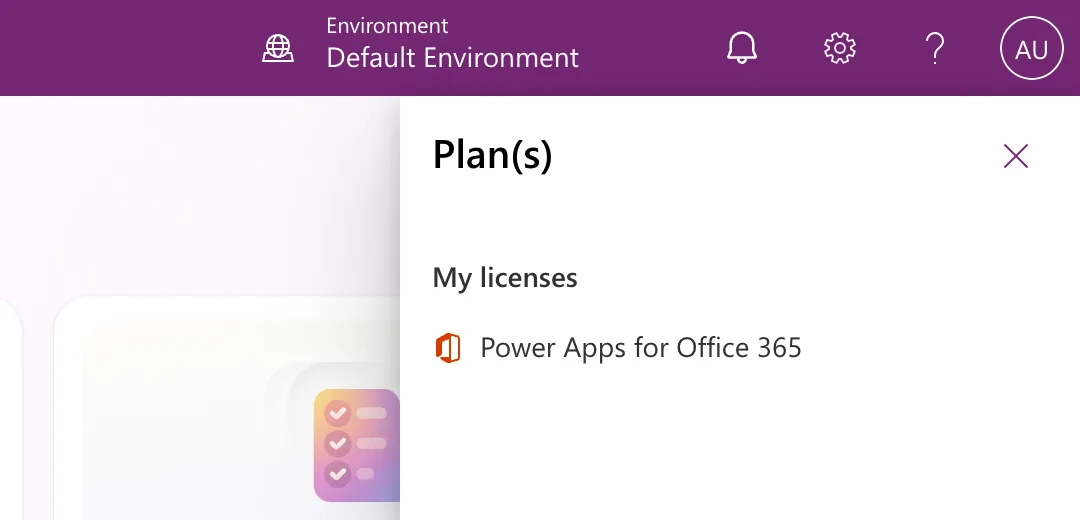
In Power Apps, select the Settings gear in the header, then Plan(s). This is where Microsoft's article says to look up your license. Mine listed only the Power Apps that comes with Microsoft 365:
Step 2: Open the Trial Page
Open https://apps.powerapps.com/trial, the page Microsoft's environment article links to as the Power Apps trial page. It says You need a Power Apps license to use this app and offers three choices:
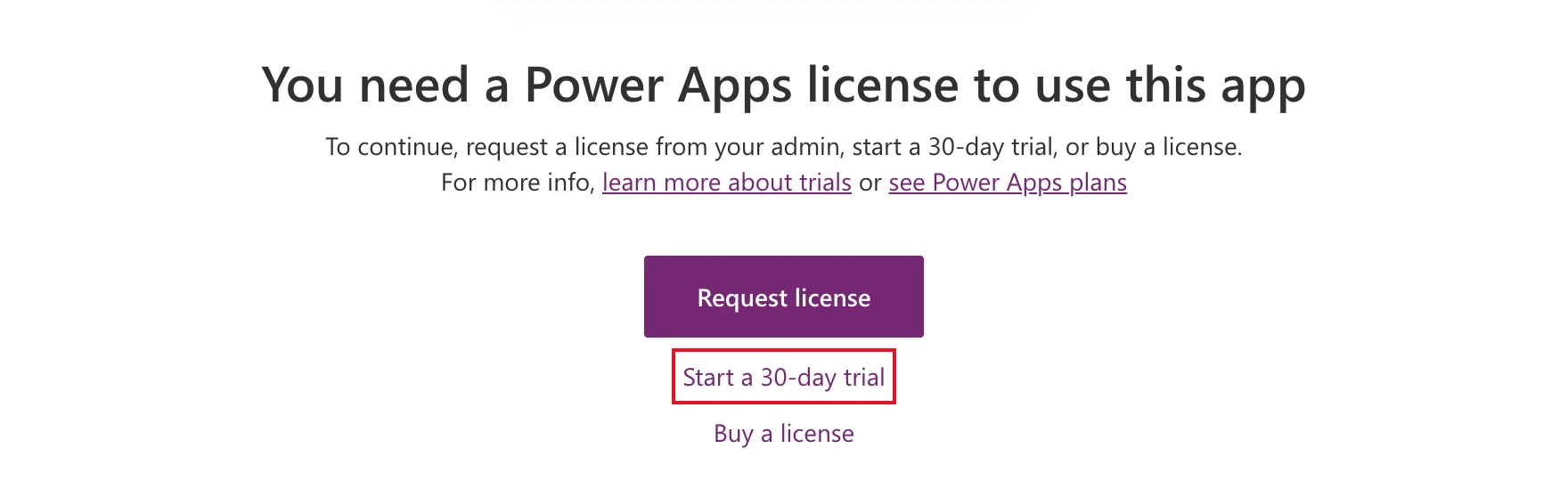
- Request license sends a request to your admin.
- Buy a license starts a purchase.
- Start a 30-day trial is the free trial. Select it.
Step 3: Choose Your Country and Start
The next page greets you by your first name and asks for one thing: Choose your country to begin. It proposed United States. My organization is in India, so I chose India.
After I changed the country, a checkbox appeared: Send me the latest Power Apps tips and information. It was unticked, and I left it that way. The page explains what the button means: By choosing Start my trial, you agree to the Power Apps terms of use and Microsoft privacy statement.
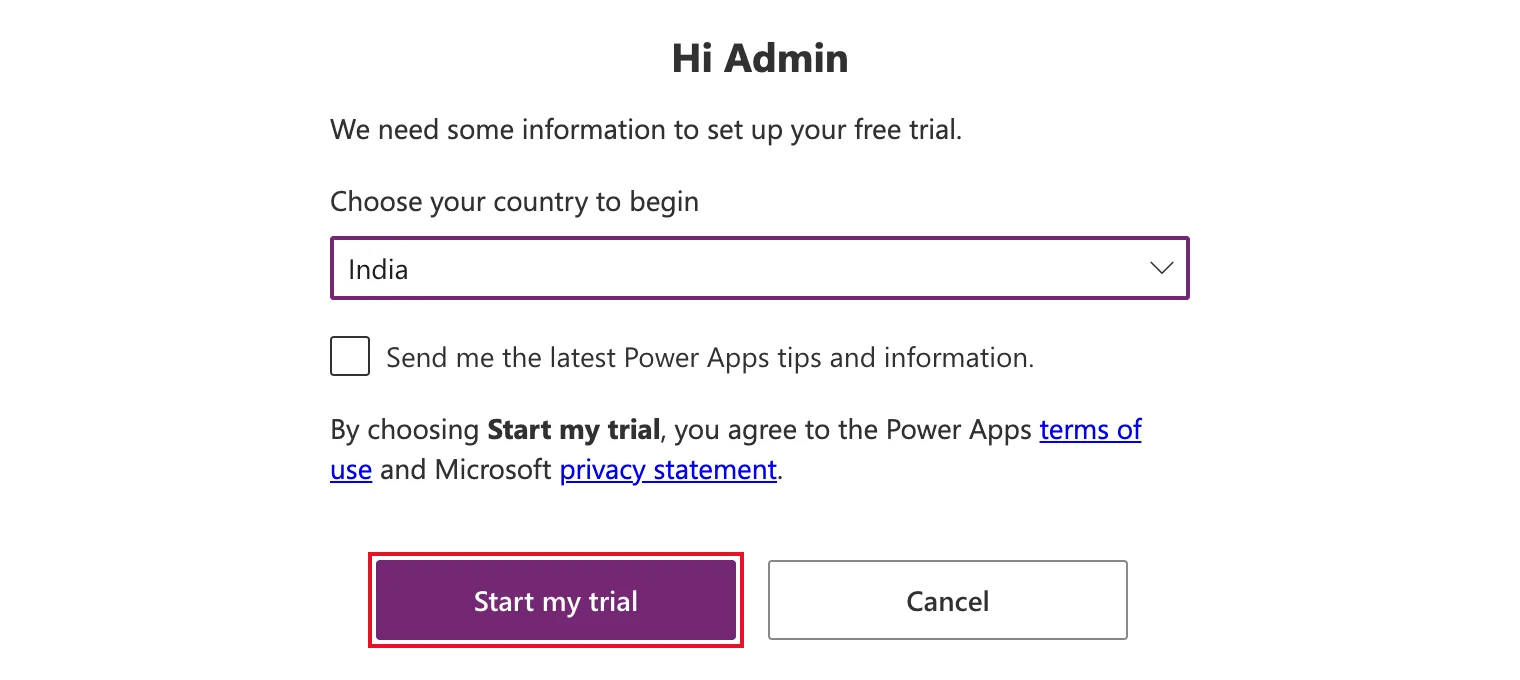
Select Start my trial.
Step 4: Check the Result
Power Apps opened its home page, with no message about the trial. I checked Plan(s) again: it still listed only Power Apps for Office 365, then and an hour later. Neither of the two admin pages that list licenses showed a Power Apps trial either:
- the Microsoft 365 admin center's Billing → Licenses;
- the Power Platform admin center's Licensing → Power Apps.
Microsoft's PowerShell support article says internal trial plans aren't visible to admins in the Microsoft 365 admin center, so the admin center not listing it doesn't prove anything. What I could confirm is the reason I needed it: the next step, creating a trial environment, worked (How to Create a Free Trial Environment in Power Platform).
So check the trial by doing the thing you needed it for.
Common Mistakes
| Mistake | What happens | Do this instead |
|---|---|---|
| Signing up with a personal email address | Power Apps refuses it | Use your work or school account |
| Selecting Buy a license | That starts a purchase | Select Start a 30-day trial |
| Treating the trial as permanent | It ends after 30 days | Finish your testing, extend it, or buy a plan |
Troubleshooting
| Symptom | Likely cause | Fix |
|---|---|---|
| A message that your admin has turned off sign-ups | Your organization blocks trial licenses | Ask an admin; Microsoft's Block trial licenses commands control it |
| Plan(s) doesn't list a trial afterwards | What I saw too | Go on with the task you needed the trial for, and check that it works |
| The trial page asks for an email address | You aren't signed in to Power Apps | Sign in with your work account first |
FAQ
Does the trial cost anything?
No. Nothing in the sign-up asked for a card or any other payment details.
What happens when it ends?
Microsoft's article says you're prompted to extend it or buy a plan after 30 days, and that you can extend it two more times, up to 90 days. If you don't, you keep whatever your other licenses give you.
Does it give everyone in my organization a trial?
No. It's for the account that signs up.
Do the people who use my apps need a trial too?
Not for apps that only use standard connectors. The Career Development Plan app, for example, runs with the Power Apps that comes with Microsoft 365 (How to Check a Canvas App's License Designation). The trial was only for creating the environment.
Conclusion
Open https://apps.powerapps.com/trial, select Start a 30-day trial, choose your country and select Start my trial. Check it under Settings → Plan(s), and if it isn't listed there, check it the practical way: by doing what you needed it for.
Additional Resources
- Explore Power Apps for free for 30 days: what the trial includes, extensions and email addresses.
- Who can create environments?: which licenses can create trial environments.
- Power Apps in your organization Q&A: how people in an organization sign up, and how admins restrict it.
