How to Split a Long Command over Several Lines in PowerShell

A PowerShell command with several parameters soon gets too long for one line. A backtick (`) at the end of a line tells PowerShell that the command goes on at the next line, and after a pipe you don't even need one. This guide splits a Get-Date command over four lines, with real output from PowerShell 7.6.10.
Syntax
<command> <parameters> `
    <more parameters> `
    <last parameters>
| Part | What it means |
|---|---|
` at the end of a line | The command goes on at the next line. It must be the last character on the line: nothing after it, not even a space |
| The lines after it | Part of the same command. The indentation only makes it easier to read |
| The last line | Has no backtick, so the command ends there |
The about_Parsing page: "The backtick character can also be used at the end of a line to allow you to continue the input on the next line." The backtick, also called the grave accent, is a different key from the apostrophe.
The Example
The example is a Get-Date command, which gets a date, with four parameters. -Year, -Month and -Day set the date to 25 December 2026, and -Format turns that date into text with the pattern "dddd, MMMM d, yyyy": the name of the day, the name of the month, the day and the year. Each parameter goes on a line of its own.
The commands run in the PowerShell 7.6.10 console. The output blocks show the whole screen, prompts included, because the prompts are part of what this guide is about. Your prompt shows your folder; here it's shortened to PS>.
Prerequisites
- PowerShell 7. This guide uses PowerShell 7.6.10.
Step 1: Split a Command with Backticks
Type each line and press Enter. After a line that ends with a backtick, PowerShell shows >> and waits for the next one:
Get-Date -Year 2026 `
    -Month 12 `
    -Day 25 `
    -Format "dddd, MMMM d, yyyy"
PS> Get-Date -Year 2026 `
>>     -Month 12 `
>>     -Day 25 `
>>     -Format "dddd, MMMM d, yyyy"
Friday, December 25, 2026
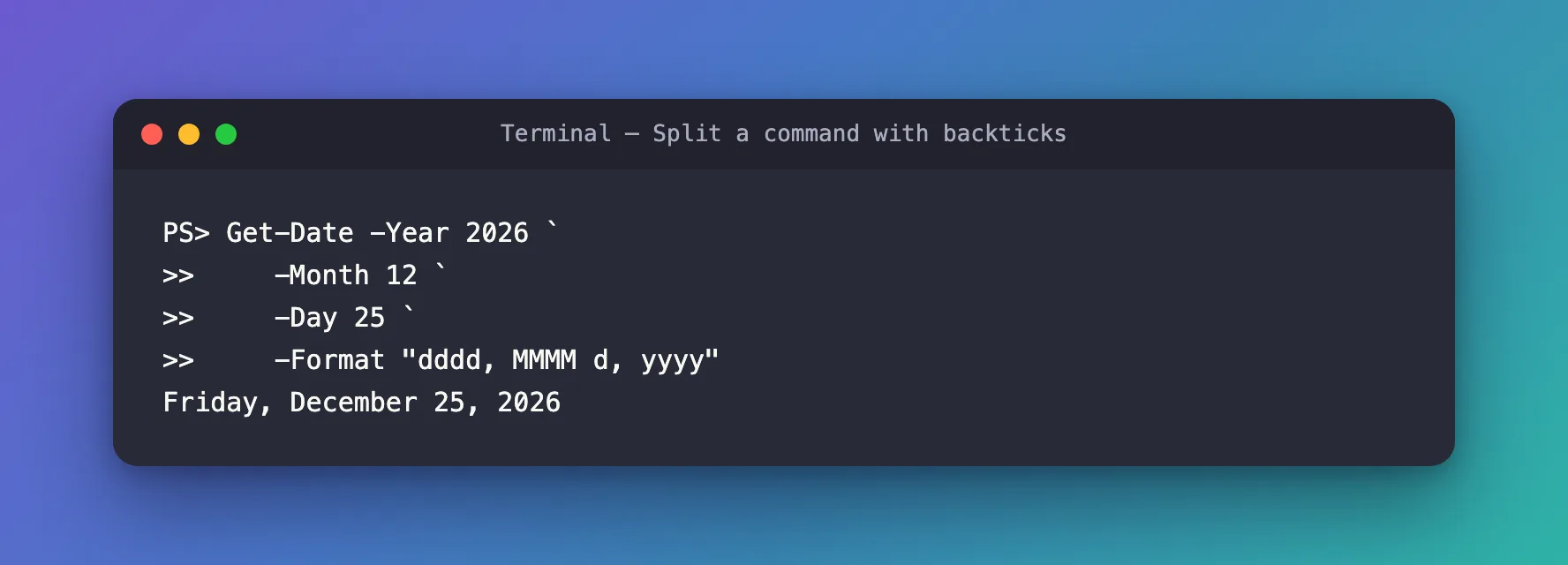
After the last line, which has no backtick, PowerShell ran the whole command: four lines, one Get-Date, and the date came out as Friday, December 25, 2026.
Step 2: See What a Space after the Backtick Does
Type the same lines again, but press the space bar once after the backtick on the second line, before you press Enter:
PS> Get-Date -Year 2026 `
>>     -Month 12 `

Monday, December 28, 2026 1:54:13 PM

PS>     -Day 25 `
>>     -Format "dddd, MMMM d, yyyy"
-Day: The term '-Day' is not recognized as a name of a cmdlet, function, script file, or executable program.
Check the spelling of the name, or if a path was included, verify that the path is correct and try again.
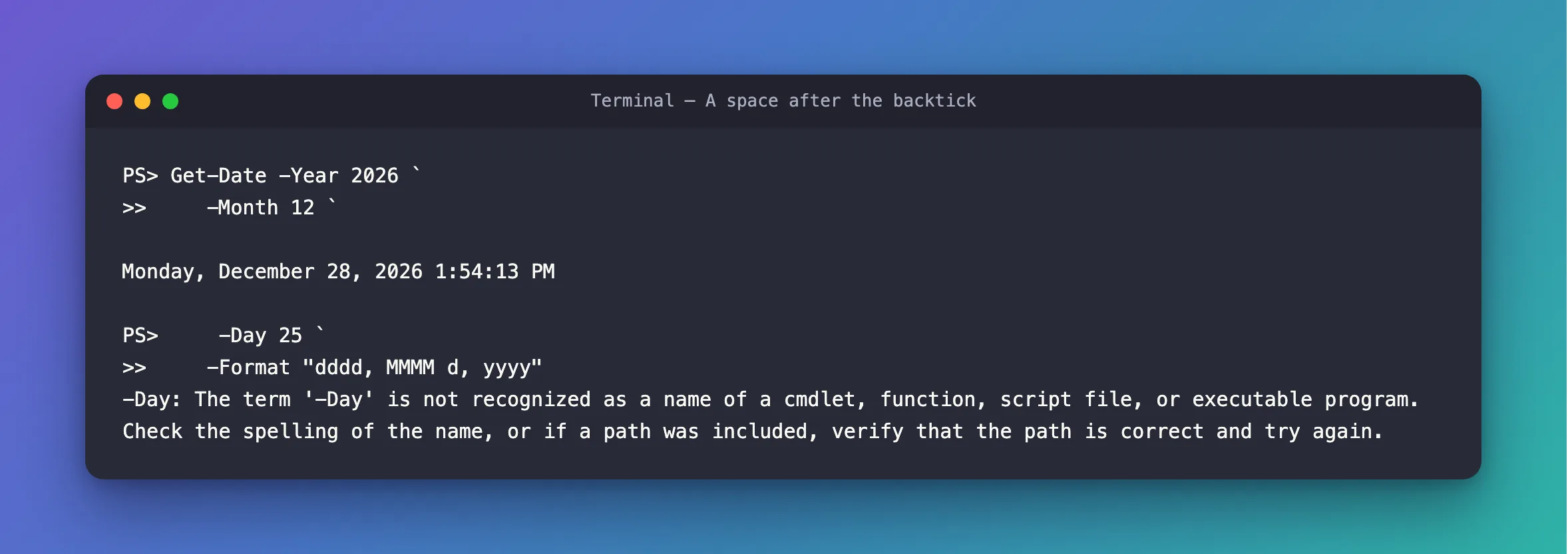
The backtick escaped the space instead of the line break, so the command ended at the second line. Get-Date ran with only a year and a month: it took the day from today, the 28th when this ran, and printed the time too. The last two lines then ran as a command of their own, and there's no command called -Day. The about_Parsing page warns about exactly this: "An extra space after the backtick breaks the line continuation. Since the space is hard to see it can be difficult to find the error."
Step 3: Break the Line after a Pipe
A line that ends with a pipe, |, goes on at the next line by itself, with no backtick. Here Select-Object -Property DayOfWeek keeps only the date's day of the week:
Get-Date -Year 2026 -Month 12 -Day 25 |
    Select-Object -Property DayOfWeek
PS> Get-Date -Year 2026 -Month 12 -Day 25 |
>>     Select-Object -Property DayOfWeek

DayOfWeek
---------
   Friday
PowerShell showed >> after the | and ran both lines as one pipeline. The about_Pipelines page: "When a pipe operator is the last token on the line, the PowerShell parser joins the next line to current command to continue the construction of the pipeline." The about_Parsing page lists the other places where a line can break without a backtick: after a binary operator such as + or -eq, after a comma in an array, and after an opening [, { or (.
Common Mistakes
| Mistake | What happens | Do this instead |
|---|---|---|
| A space after the backtick | The command ends at that line, and the next lines run on their own: The term '-Day' is not recognized as a name of a cmdlet, function, script file, or executable program. | Make the backtick the last character on the line |
| A backtick at the end of the last line | PowerShell shows >> and keeps waiting | Press Enter on the empty >> line, which ran the command, and leave that backtick out next time |
| Starting the next line with the pipe while typing in the console | The first line runs on its own, and the second fails with An empty pipe element is not allowed. | End the first line with the pipe, as in Step 3 |
Troubleshooting
| Symptom | Likely cause | Fix |
|---|---|---|
The term '-Day' is not recognized as a name of a cmdlet, function, script file, or executable program., with one of your parameters in place of -Day | A space after the backtick on the line before | Delete the space |
>> appears and nothing runs | The command isn't finished | Type the rest, or press Ctrl+C, which cancelled it and brought the prompt back |
FAQ
Can the next line start with the pipe instead?
In a script, yes. Saved as date.ps1 and run with ./date.ps1, these two lines printed the same DayOfWeek table as Step 3:
Get-Date -Year 2026 -Month 12 -Day 25
    | Select-Object -Property DayOfWeek
The about_Pipelines page: "PowerShell 7 adds support for continuation of pipelines with the pipeline character at the beginning of a line." Typed line by line in the console, though, the first line runs on its own, as Common Mistakes shows.
Should I avoid backticks?
The about_Parsing page says so: "However, you should avoid using line continuation." Its reasons are the ones in this guide: backticks are hard to see, and a space after one breaks the command. For a long list of parameters, it suggests splatting instead: put the parameters in a hash table and pass it with @ in front of its name. This printed Friday, December 25, 2026 too:
$dateParts = @{
    Year   = 2026
    Month  = 12
    Day    = 25
    Format = "dddd, MMMM d, yyyy"
}
Get-Date @dateParts
Conclusion
A backtick at the very end of each line let Get-Date and its four parameters span four lines, and a line that ended with | went on with no backtick at all. Keep the backtick the last character on its line: one space after it ends the command early.
Additional Resources
- about_Parsing — line continuation, and where a line can break without a backtick.
- about_Pipelines — splitting a pipeline over lines.
- about_Splatting — passing parameters from a hash table.
