How to Sort Runs in the MLflow UI

The MLflow runs table lists the newest run first. To put the best run on top instead, sort the table by the metric that measures it: lowest loss first, or highest accuracy first. This guide sorts four runs by a metric and by a parameter, where text ordering produces a surprise, and by clicking a column header, with real screens from MLflow 3.18.0.
Prerequisites
- An MLflow tracking server at
http://127.0.0.1:8080. MLflow's tracking server guide shows how to start one.
Step 1: Create Four Runs to Sort
The example is four training runs with different batch sizes, each with the loss it ended at. Create batch_runs.py:
import mlflow

mlflow.set_tracking_uri("http://127.0.0.1:8080")
mlflow.set_experiment("ui-sort-demo")

for name, batch_size, loss in [
    ("tiny-batch", 8, 0.42),
    ("small-batch", 16, 0.35),
    ("big-batch", 64, 0.31),
    ("huge-batch", 128, 0.38),
]:
    with mlflow.start_run(run_name=name):
        mlflow.log_param("batch_size", batch_size)
        mlflow.log_metric("loss", loss)
uv run python batch_runs.py
The script prints a View run link for each run and a View experiment link. Open the experiment, ui-sort-demo, in the UI. I added the loss and batch_size columns with the Columns button so the values show in the table.
Step 2: Open the Sort Menu
Click Sort: Created in the toolbar:
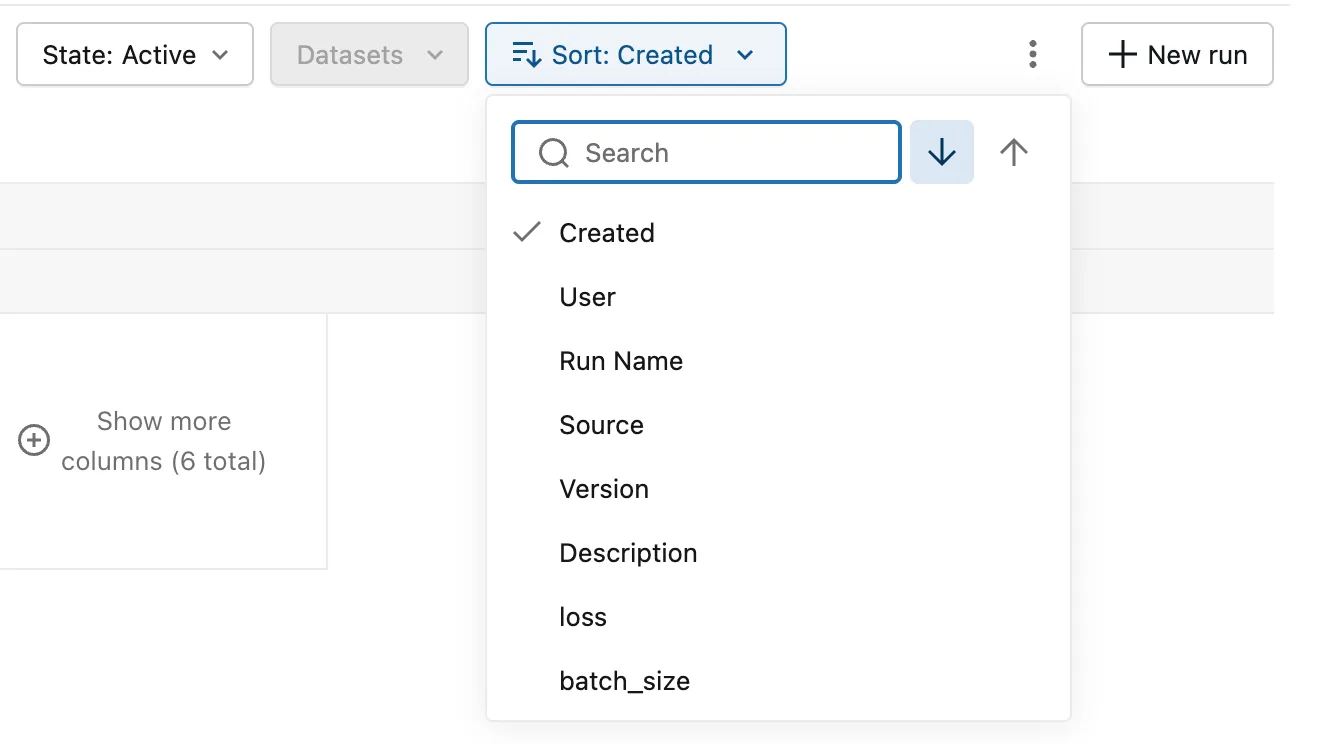
| Part | What it does |
|---|---|
| Search | Narrows the list when an experiment has many metrics and parameters |
| ↓, "Sort descending" | Highest value first: the newest run, for Created |
| ↑, "Sort ascending" | Lowest value first |
| The list | What to sort by: the run's own fields, then every metric and parameter the experiment's runs logged |
Step 3: Sort by a Metric
A lower loss is better, so the best run comes first in ascending order. Click ↑; the order changes at once and the menu closes. Open it again and click loss:
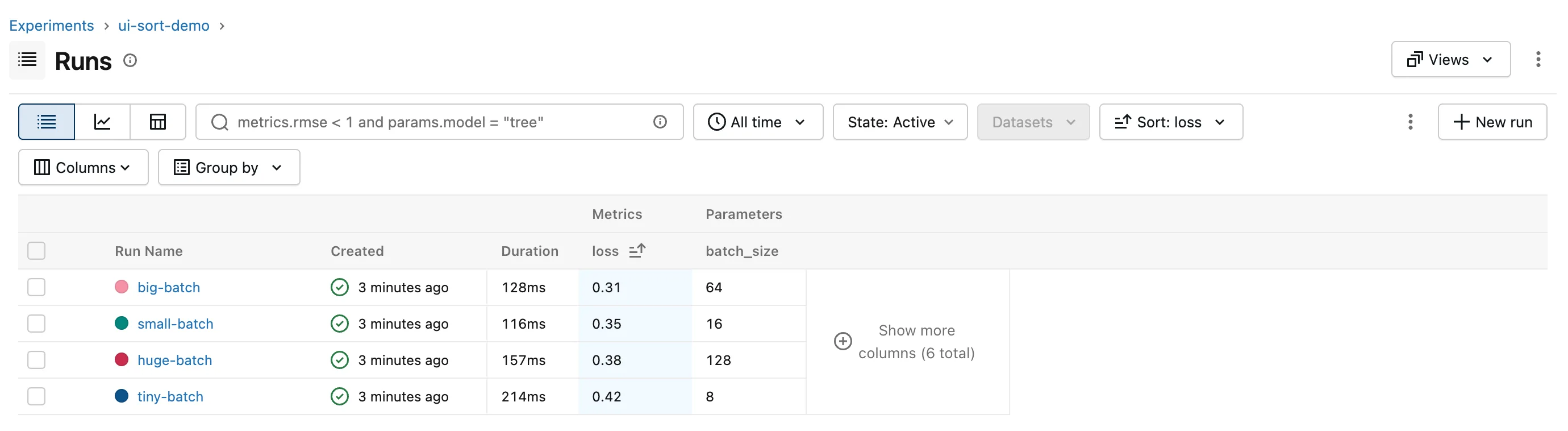
big-batch is on top with 0.31. The button reads Sort: loss, and the loss column shows the sort arrow. For a metric where higher is better, such as accuracy, choose ↓ instead.
Step 4: Sort by a Parameter
Open the menu and click batch_size, still ascending:
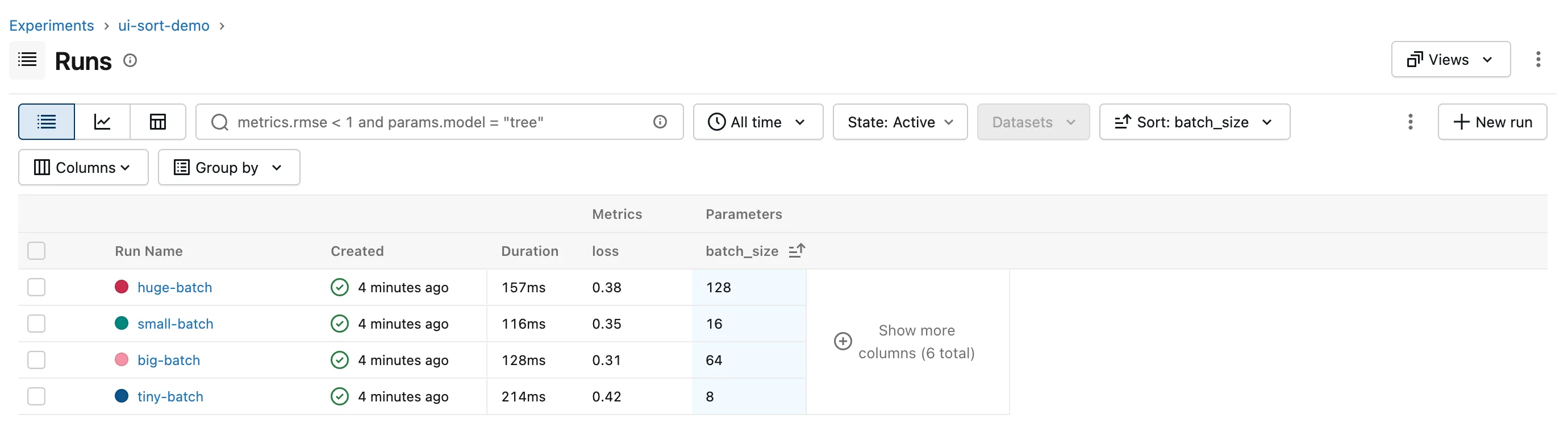
The order is 128, 16, 64, 8, not 8, 16, 64, 128. MLflow stores every parameter as text, so it sorts parameters the way a dictionary sorts words, character by character: 1 comes before 6 and 8, and 128 comes before 16 because 2 comes before 6. Metrics are numbers and sort by value.
Read a parameter column sorted this way as alphabetical. When the numeric order of a setting matters, sort by the metric that setting affects, as in Step 3.
Step 5: Sort by Clicking a Column Header
Clicking a column's header, such as loss, sorts the table by that column. Clicking the same header again reverses the order.
Common Mistakes
| Mistake | What happens | Do this instead |
|---|---|---|
| Picking a metric with ↓ still selected, when lower is better | The worst run is on top | Click ↑ for loss and error metrics |
| Expecting a parameter column to sort as numbers | 128 comes before 16 | Remember parameters are text; sort by a metric for numeric order |
| Clicking the arrow and expecting the menu to stay open | It applies the direction to the current sort and closes | Open the menu again to pick the column |
Troubleshooting
| Symptom | Likely cause | Fix |
|---|---|---|
| A metric or parameter isn't in the sort list | None of the runs in the table logged it | Check its exact name on a run's Overview |
| The best run isn't first | The direction is the wrong way round for this metric | Switch between ↑ and ↓ |
FAQ
Where do runs without the value go?
Last, whichever direction you choose. In a runs table sorted by a metric that some runs never logged, those runs are listed after all the others.
Can I sort by two columns?
The menu sorts by one column at a time. In Python, mlflow.search_runs() accepts several, such as order_by=["metrics.loss ASC", "attributes.start_time DESC"].
Is the sort saved?
It's part of the page's address, as orderByKey and orderByAsc, so a bookmark or a shared link opens with the same order.
Conclusion
Sort orders the runs table by any run field, metric or parameter: ↑ for lowest first, ↓ for highest first, and a column header click does the same and reverses on a second click. Metrics sort by value, while parameters sort as text, so 128 comes before 16.
Additional Resources
- Search Runs — MLflow's guide, including how ordering works in its Python API.
