How to Sort a pandas DataFrame by a Column

Sorting a table by one column is how you find its top or bottom rows: the most expensive houses, or the predictions a model got most wrong. DataFrame.sort_values does it in one call, and two of its options cover cases that trip people up: sorting by size regardless of sign, and renumbering the rows afterwards. This guide sorts a small table of prediction errors, with real output from pandas 3.1.1.
Syntax
<table>.sort_values("<column>")
<table>.sort_values("<column>", ascending=False)
<table>.sort_values("<column>", key=<function>, ignore_index=True)
| Part | What it means |
|---|---|
"<column>" | The column to sort by. A list of names sorts by several, in order |
ascending=False | Largest first. The default, True, is smallest first |
key=<function> | "Apply the key function to the values before sorting." pandas passes the whole column, so the function "should expect a Series and return a Series with the same shape" |
ignore_index=True | "The resulting axis will be labeled 0, 1, …, n - 1": the rows are renumbered after sorting |
sort_values returns a new, sorted DataFrame. The original stays in its old order.
Step 1: Sort a Table Three Ways
The example is four houses and how far a model's price prediction was from the real price, in hundreds of thousands: negative means too low, positive means too high. Create sort_values.py:
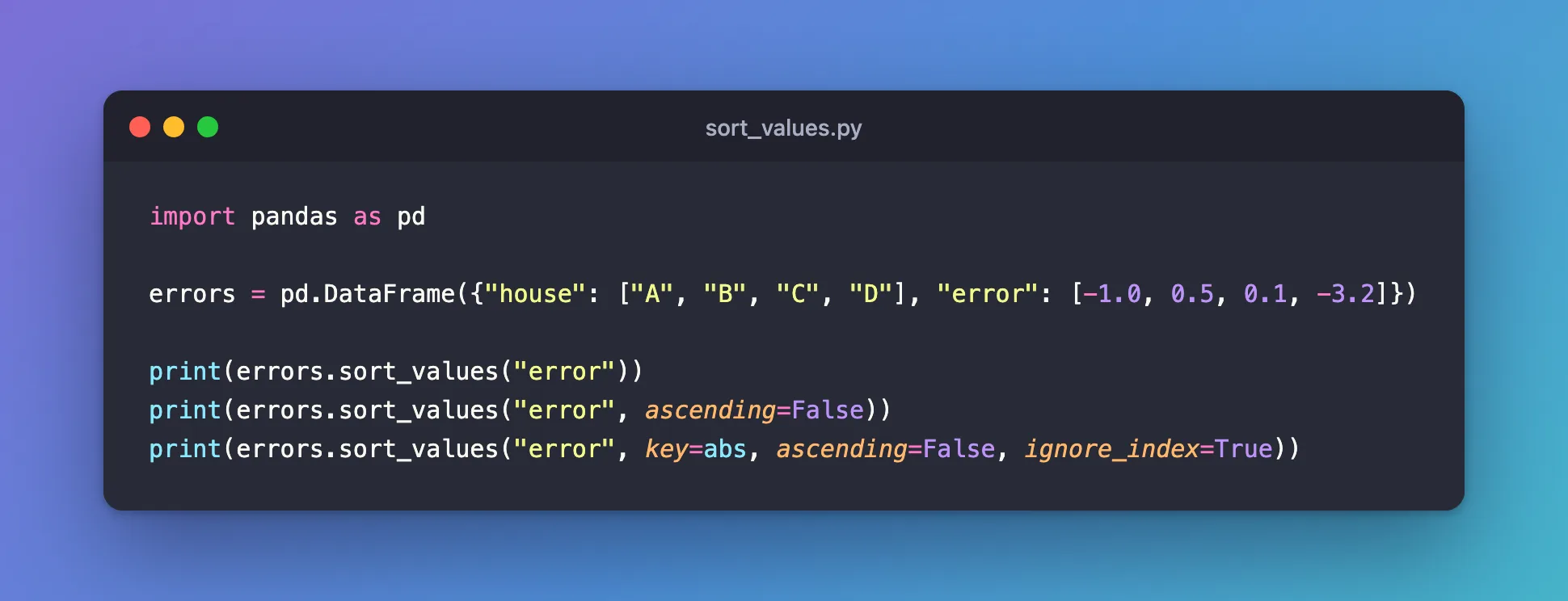
import pandas as pd

errors = pd.DataFrame({"house": ["A", "B", "C", "D"], "error": [-1.0, 0.5, 0.1, -3.2]})

print(errors.sort_values("error"))
print(errors.sort_values("error", ascending=False))
print(errors.sort_values("error", key=abs, ascending=False, ignore_index=True))
| Line | What it does |
|---|---|
sort_values("error") | Smallest error first, so the biggest underestimate comes first |
ascending=False | Largest error first, so the biggest overestimate comes first |
key=abs, ascending=False, ignore_index=True | Sorts by the error's size, ignoring its sign, biggest miss first, and numbers the rows 0 to 3 |
abs is Python's built-in absolute value. Given a pandas column, it returns the column of absolute values, which is exactly what key needs.
Step 2: Run It
uv run python sort_values.py
  house  error
3     D   -3.2
0     A   -1.0
2     C    0.1
1     B    0.5
  house  error
1     B    0.5
2     C    0.1
0     A   -1.0
3     D   -3.2
  house  error
0     D   -3.2
1     A   -1.0
2     B    0.5
3     C    0.1
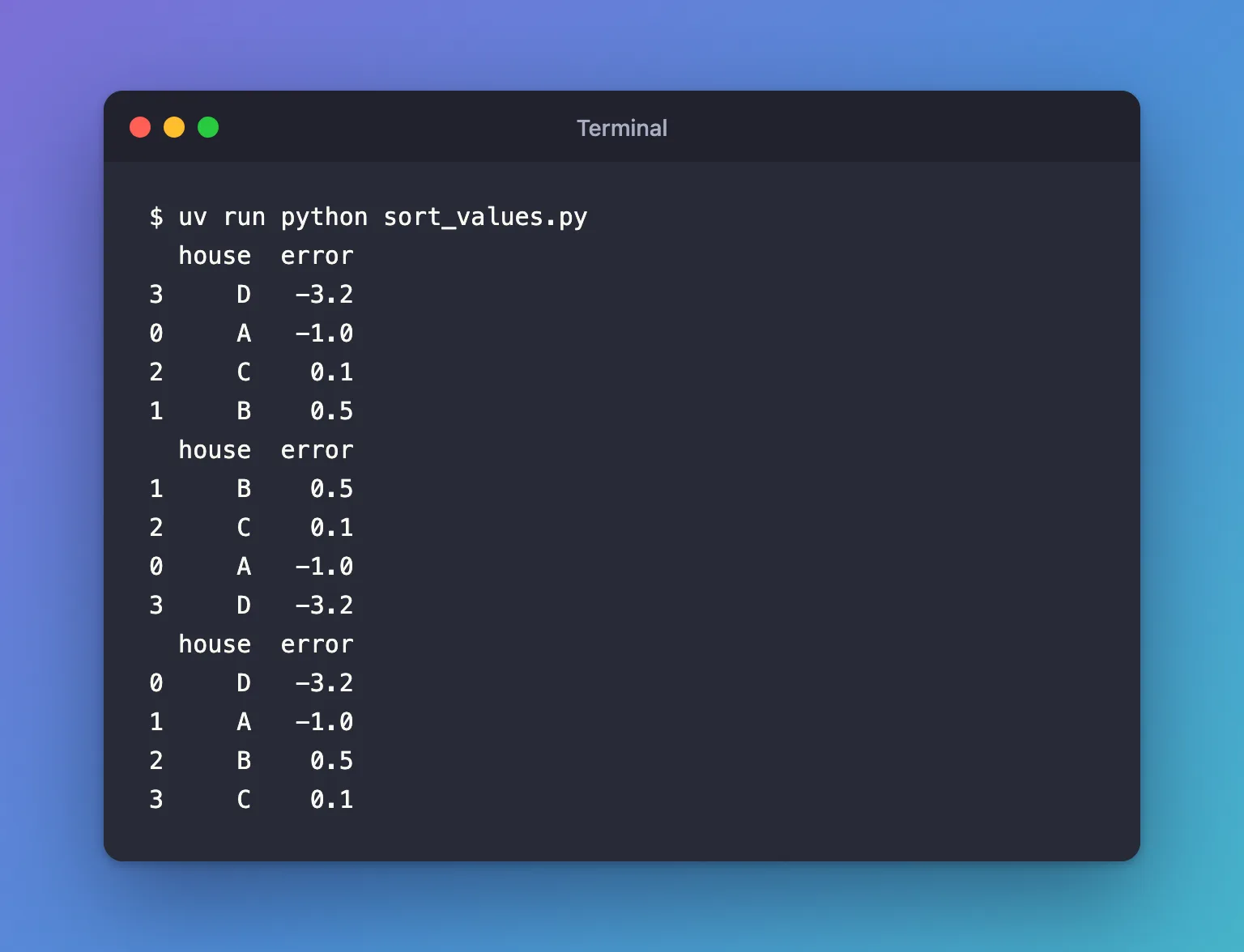
- Smallest first puts house D,
-3.2, on top. Each row keeps its original label on the left: D is still row 3. - Largest first puts B,
+0.5, on top. By value, D is now last. - By size puts D first, because
3.2is the biggest miss, then A, then B, then C. The sign no longer matters, andignore_index=Truerelabelled the rows 0 to 3 in their new order.
Common Mistakes
| Mistake | What happens | Do this instead |
|---|---|---|
Calling errors.sort_values("error") without keeping the result | errors is unchanged, because sort_values returns a new table | Assign it: errors = errors.sort_values("error") |
| Sorting a signed column largest first to find the worst errors | Big negative errors end up last | Sort with key=abs |
| Misspelling the column | KeyError: 'eror' | Copy the name from errors.columns |
A key function written for one number, such as lambda x: x if x > 0 else -x | It receives the whole column: ValueError: The truth value of a Series is ambiguous. Use a.empty, a.item(), a.any() or a.all(). | Use functions that work on a whole column, such as abs or lambda s: s.abs() |
Troubleshooting
| Symptom | Likely cause | Fix |
|---|---|---|
| The row numbers look scrambled after sorting | Rows keep their original labels | Add ignore_index=True |
| Empty values appear at the bottom | na_position defaults to "last" | Pass na_position="first" to put them on top |
FAQ
How do I sort by two columns?
Pass a list, and a list of directions if they differ: sort_values(["house", "error"], ascending=[True, False]).
Can I sort the table in place?
Yes, with inplace=True, which changes the table and returns None. Assigning the result, as above, is clearer and works the same.
How do I get only the top five rows?
Sort, then take the first five: errors.sort_values("error", key=abs, ascending=False).head(5).
Conclusion
sort_values("error") sorted four prediction errors smallest first, ascending=False reversed it, and key=abs with ignore_index=True sorted them by size whatever their sign, biggest miss first, with the rows renumbered 0 to 3. Keep the result, because the original table doesn't change.
Additional Resources
- pandas.DataFrame.sort_values — the method's reference, including
key,ignore_indexandna_position. - Sorting HOW TO — how
keyfunctions work in Python's ownsorted().
