How to Show a Date as Month and Year in Excel

For month headings, put the first day of each month in the cell and give it the custom format mmm yyyy. 01/10/2026 shows as Oct 2026, and the cell is still a real date, so formulas can compare other dates with it.
The example is the Monthly totals sheet of the old overtime timesheet from Part 1 of the Overtime Timesheet series, which has one column per month.
Prerequisites
- The first day of each month in the heading cells. I typed
01/10/2026in B1 and01/11/2026in C1; C1 was later replaced by a formula, in How to Get the First Day of the Next Month in Excel with EDATE.
Step 1: Open the Custom Category
Select the heading cells, B1:C1. On the Home tab, open the Number Format list and select More Number Formats, then set Choose Category to Custom.
When I chose Custom, the list started on General, and the cells showed their serial numbers, 46296 and 46327, until I entered a code:
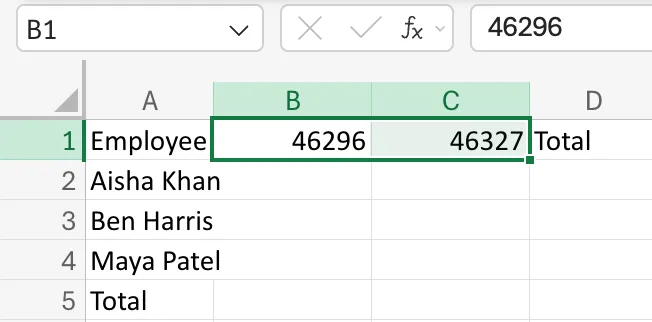
Those numbers are the dates: How to See the Serial Number Behind a Date in Excel.
Step 2: Type mmm yyyy and Confirm
Type mmm yyyy in the Type box and select Confirm, the tick next to it:
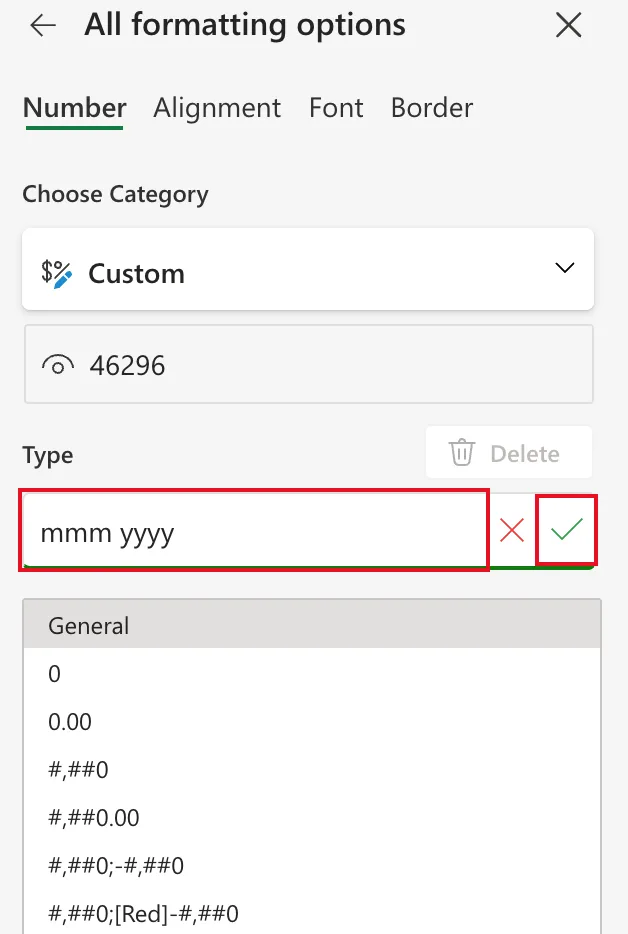
mmmis the month as three letters, Jan to Dec.yyyyis the four-digit year.
Step 3: Check the Headings
Close the pane. B1 and C1 show Oct 2026 and Nov 2026, and the formula bar still shows the date, 01/10/2026:
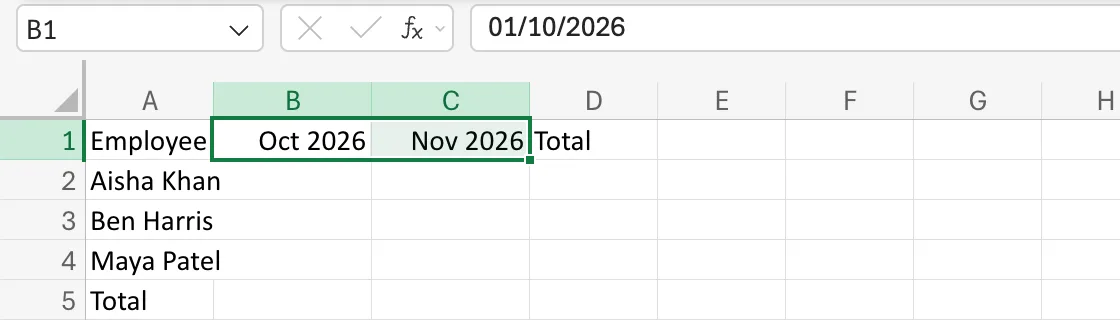
The monthly totals under these headings use them as dates: How to Total Hours by Person and Month in Excel with SUMIFS.
Other Month Codes
| Code | Shows |
|---|---|
mmm yyyy | Oct 2026 |
mmmm yyyy | October 2026 |
mm/yyyy | 10/2026 |
mmm-yy | Oct-26 (also in the built-in list) |
Common Mistakes
| Mistake | What happens | Do this instead |
|---|---|---|
Typing Oct 2026 as text | It looks right but isn't a date, so formulas can't use it | Type the first of the month and format it |
| Typing a date in the middle of the month | The heading is right, but formulas that start from it start mid-month | Use the first day of the month |
| Typing the code without Confirm | Nothing changes | Select the tick |
Troubleshooting
| Symptom | Likely cause | Fix |
|---|---|---|
| The headings show 46296 | The cells have the General format | Apply mmm yyyy |
| The month is wrong | The date was read month first | Check the regional format: How to Change the Regional Format in Excel for the Web |
FAQ
Why not just type "Oct 2026"?
Because a heading that's a real date can feed formulas: totals between it and the next month, or the next heading from EDATE.
Can I use the same code for a whole column of dates?
Yes. Select the column and apply mmm yyyy once; every date in it shows as its month and year.
Conclusion
Put the first of the month in the cell and give it the custom format mmm yyyy. It reads as Oct 2026 and stays a date.
