How to Share a Transaction Between Two DbContexts in EF Core

Most apps never need this, because one DbContext is enough. When you do have two, such as separate contexts for separate modules, they can share one transaction: they need the same connection, and the second has to be told about the transaction. Here it is, working and rolling back.
Prerequisites
- A .NET C# project using EF Core. I used EF Core 10.0.14 and MySQL 9.7.4.
Step 1: Share the Connection and the Transaction
The EF Core docs put it plainly: "To share a transaction, the contexts must share both a DbConnection and a DbTransaction."
g.MapPost("/shared/{commit:bool}", async (bool commit, IConfiguration configuration, TimeProvider clock, CancellationToken cancellationToken) =>
{
    await using var connection = new MySqlConnection(configuration.GetConnectionString("Inventory"));
    await connection.OpenAsync(cancellationToken);

    var options = new DbContextOptionsBuilder<InventoryDbContext>()
        .UseMySQL(connection)
        .Options;

    await using var first = new InventoryDbContext(options);
    await using var transaction = await first.Database.BeginTransactionAsync(cancellationToken);

    first.Categories.Add(new Category { Name = "Shared one", CreatedAtUtc = clock.GetUtcNow().UtcDateTime });
    await first.SaveChangesAsync(cancellationToken);

    await using var second = new InventoryDbContext(options);
    await second.Database.UseTransactionAsync(transaction.GetDbTransaction(), cancellationToken);

    second.Categories.Add(new Category { Name = "Shared two", CreatedAtUtc = clock.GetUtcNow().UtcDateTime });
    await second.SaveChangesAsync(cancellationToken);

    if (commit)
    {
        await transaction.CommitAsync(cancellationToken);
    }

    return Results.Ok();
});
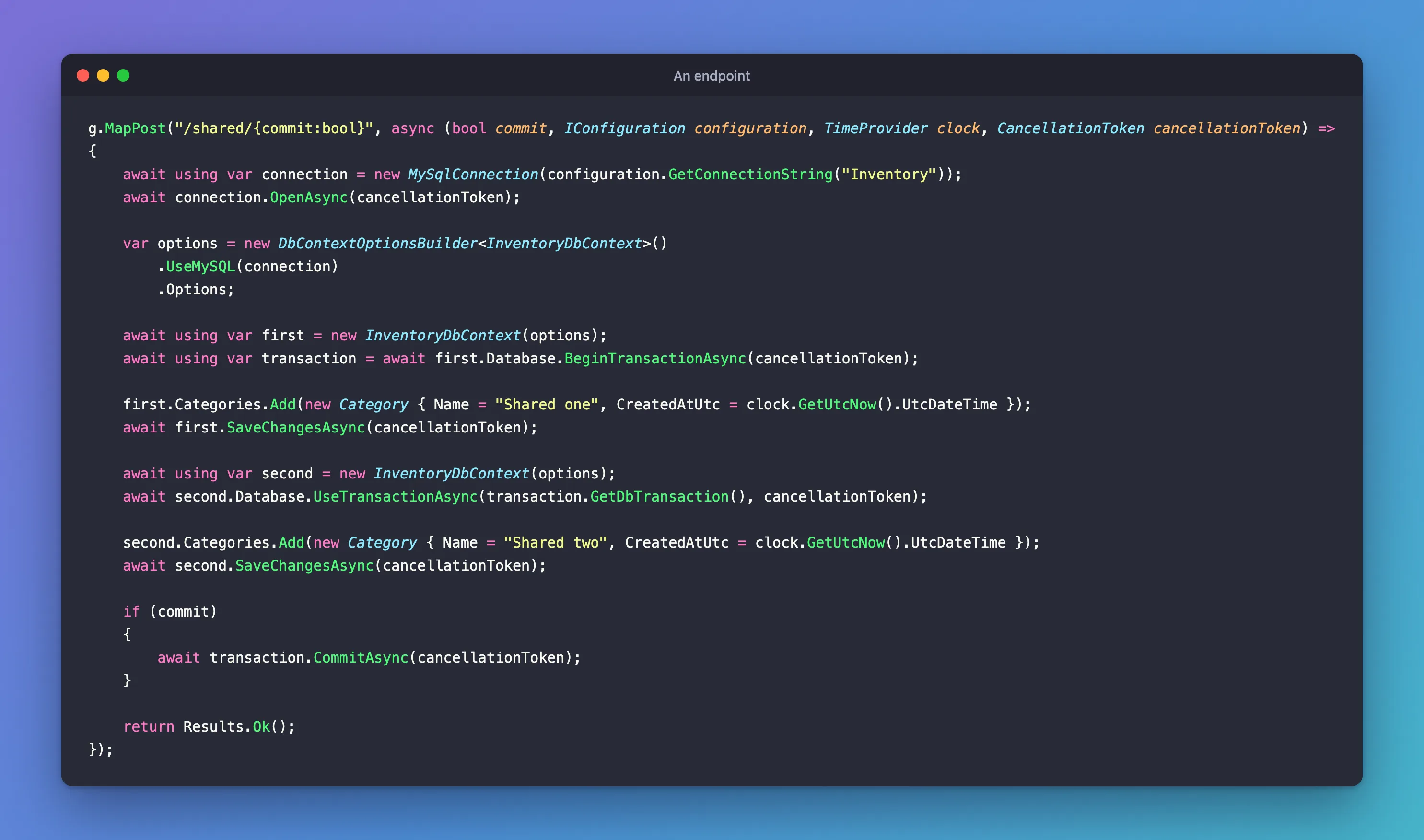
new MySqlConnection(...), thenUseMySQL(connection). You create the connection, and you dispose of it.GetDbTransaction()gets the underlying transaction out of EF Core's wrapper.UseTransactionAsynctells the second context to use it.
For two different context types, the code is the same, with an options object for each type built on the same connection.
Step 2: Commit
+------------+
| Name       |
+------------+
| Shared one |
| Shared two |
+------------+
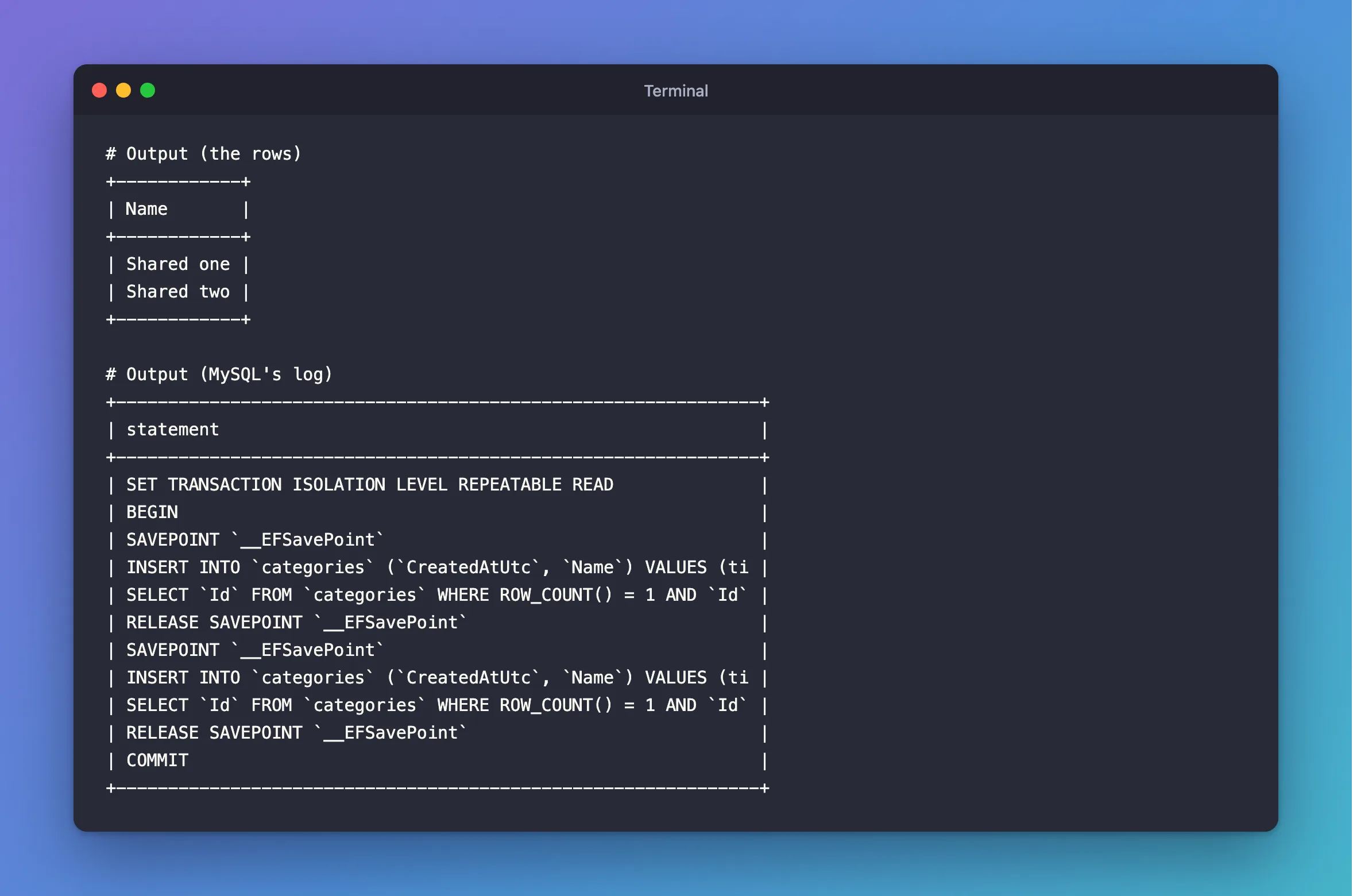
MySQL's log shows one BEGIN and one COMMIT:
+--------------------------------------------------------------+
| statement                                                    |
+--------------------------------------------------------------+
| SET TRANSACTION ISOLATION LEVEL REPEATABLE READ              |
| BEGIN                                                        |
| SAVEPOINT `__EFSavePoint`                                    |
| INSERT INTO `categories` (`CreatedAtUtc`, `Name`) VALUES (ti |
| SELECT `Id` FROM `categories` WHERE ROW_COUNT() = 1 AND `Id` |
| RELEASE SAVEPOINT `__EFSavePoint`                            |
| SAVEPOINT `__EFSavePoint`                                    |
| INSERT INTO `categories` (`CreatedAtUtc`, `Name`) VALUES (ti |
| SELECT `Id` FROM `categories` WHERE ROW_COUNT() = 1 AND `Id` |
| RELEASE SAVEPOINT `__EFSavePoint`                            |
| COMMIT                                                       |
+--------------------------------------------------------------+
Step 3: Leave Without Committing
With commit set to false, both are gone:
+-------+
| saved |
+-------+
|     0 |
+-------+
Common Mistakes
| Mistake | What happens | Do this instead |
|---|---|---|
| Giving each context a connection string | Two connections, which can't share a transaction | Pass the one connection |
| Disposing the connection too early | The contexts have nothing to use | await using it first, so it goes last |
Troubleshooting
| Symptom | Likely cause | Fix |
|---|---|---|
| The second context's rows stay after a rollback | It isn't on the same connection | Check the options |
does not support user-initiated transactions | Retries are on | Put it inside the strategy |
Conclusion
Create the connection yourself, build both contexts on it, begin on one, and UseTransactionAsync on the other. If you can use one DbContext, that's simpler.
Additional Resources
- Using Transactions: Cross-context transaction — the docs' version.
