How to Set the Request Timeout of an MLflow Model Server

An MLflow model server gives each request 60 seconds by default. A prediction that takes longer gets 504 Gateway Timeout instead of an answer, so a stuck request can't hold the client forever. --timeout changes the limit. This guide serves a model that takes three seconds per request, with limits of two seconds and of the default, with real output from MLflow 3.18.0.
Syntax
mlflow models serve -m MODEL_URI -p PORT --timeout SECONDS --env-manager uv
| Part | What it means |
|---|---|
--timeout SECONDS, -t SECONDS | The longest the server works on one request before it answers 504; the default is 60 |
MLFLOW_SCORING_SERVER_REQUEST_TIMEOUT | The number of seconds to use when the command has no --timeout |
The CLI reference: "-t, --timeout Timeout in seconds to serve a request (default: 60)."
Prerequisites
- An MLflow tracking server at
http://127.0.0.1:8080, such asmlflow server --port 8080. mlflowin your project, for example withuv add mlflow.
Step 1: Log a Slow Model
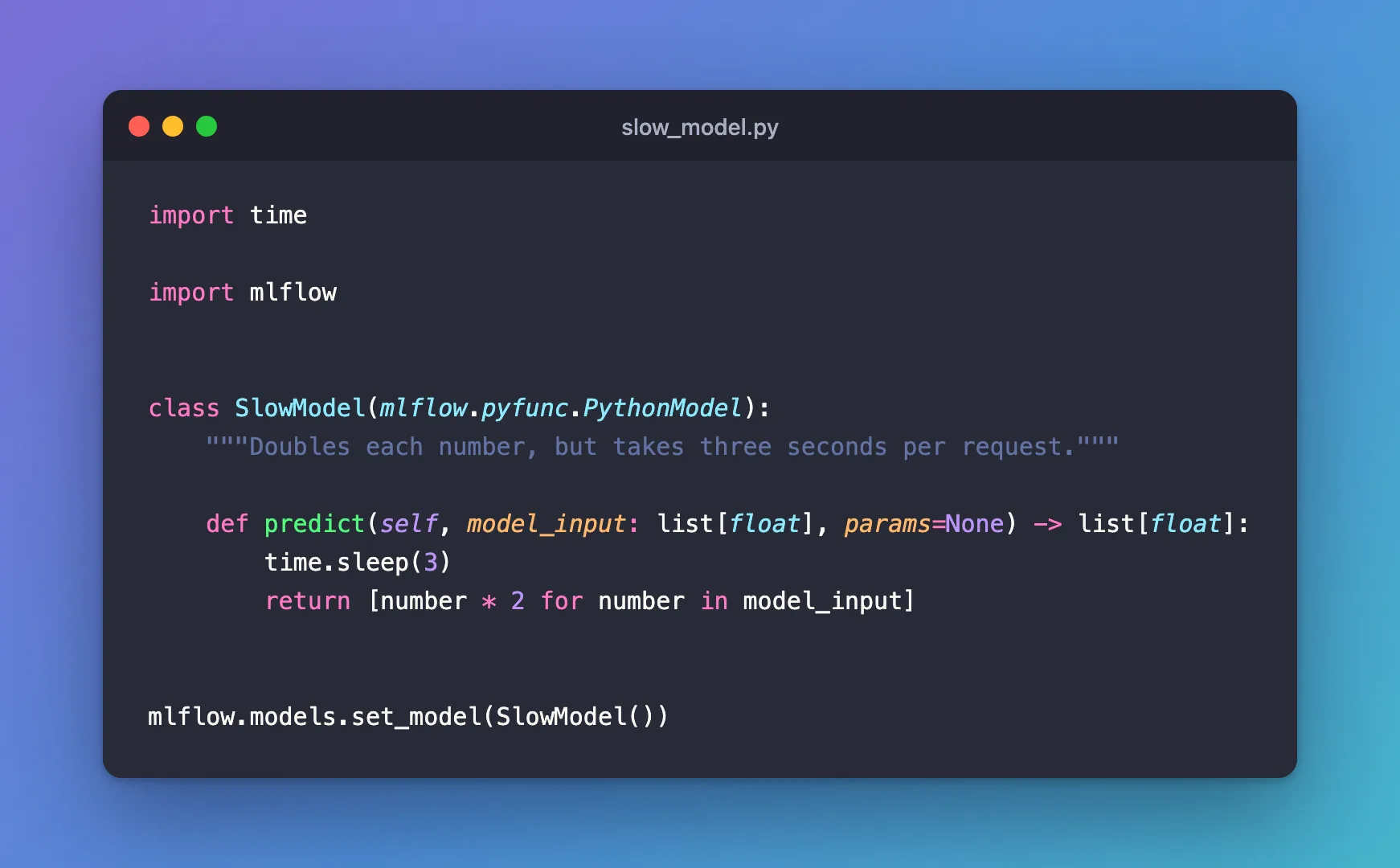
A model that takes a known time makes the limit easy to see. slow_model.py is a custom model, a PythonModel whose predict doubles each number after waiting three seconds. MLflow logs it from its script, which ends with set_model:
import time

import mlflow


class SlowModel(mlflow.pyfunc.PythonModel):
    """Doubles each number, but takes three seconds per request."""

    def predict(self, model_input: list[float], params=None) -> list[float]:
        time.sleep(3)
        return [number * 2 for number in model_input]


mlflow.models.set_model(SlowModel())
import mlflow

mlflow.set_tracking_uri("http://127.0.0.1:8080")
mlflow.set_experiment("serve-timeout-example")

with mlflow.start_run():
    info = mlflow.pyfunc.log_model(
        name="model", python_model="slow_model.py", input_example=[1.0, 2.0]
    )
print("Model URI:", info.model_uri)
uv run python log_slow_model.py
2026/11/26 05:01:42 INFO mlflow.models.signature: Running the predict function to generate output based on input example
Model URI: models:/m-132f9365354e4e2d8ea331ba234784a7
The type hints, list[float], give the model its signature, and logging the script's path instead of an object saves the model as readable code. Without them, MLflow warns: Fixed: Add type hints to the predict method and Fixed: Passing a Python object as python_model.
Step 2: Serve It with a Two-Second Limit
- macOS / Linux
- Windows (PowerShell)
export MLFLOW_TRACKING_URI=http://127.0.0.1:8080
uv run mlflow models serve -m "models:/m-132f9365354e4e2d8ea331ba234784a7" -p 5001 --timeout 2 --env-manager uv
$env:MLFLOW_TRACKING_URI = "http://127.0.0.1:8080"
uv run mlflow models serve -m "models:/m-132f9365354e4e2d8ea331ba234784a7" -p 5001 --timeout 2 --env-manager uv
Step 3: Send a Request That Takes Too Long
A model with type hints reads its input under inputs. time before curl measures how long the request takes:
- macOS / Linux
- Windows (PowerShell)
time curl -i http://127.0.0.1:5001/invocations -H 'Content-Type: application/json' --data '{"inputs": [1.0, 2.0]}'
HTTP/1.1 504 Gateway Timeout
date: Thu, 26 Nov 2026 05:01:56 GMT
server: uvicorn
content-length: 38
content-type: application/json

Request processing time exceeded limit
real    0m2.023s
user    0m0.004s
sys     0m0.007s
Invoke-RestMethod http://127.0.0.1:5001/invocations -Method Post -ContentType "application/json" -Body '{"inputs": [1.0, 2.0]}'
Invoke-RestMethod: Request processing time exceeded limit
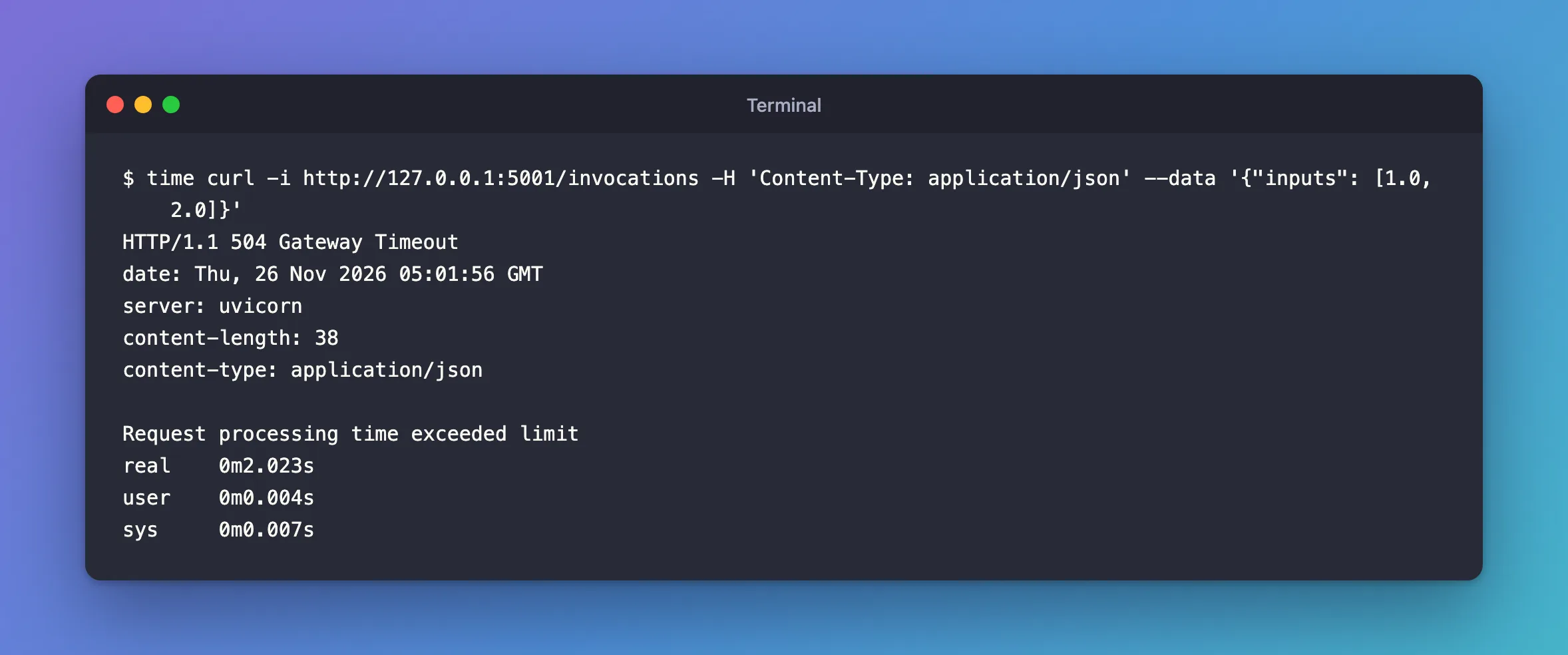
After two seconds, not three, the server gave up on the prediction and answered 504 Gateway Timeout with Request processing time exceeded limit.
Step 4: Serve It with the Default Limit
Stop the server with Ctrl+C and start it without --timeout, then send the same request:
{"predictions": [2.0, 4.0]}
real    0m3.027s
user    0m0.005s
sys     0m0.006s
Three seconds, well under the default 60, and the doubled numbers came back. PowerShell printed them as {2, 4}.
Step 5: Set the Limit with an Environment Variable
MLFLOW_SCORING_SERVER_REQUEST_TIMEOUT sets the same limit for a server started without --timeout:
- macOS / Linux
- Windows (PowerShell)
export MLFLOW_SCORING_SERVER_REQUEST_TIMEOUT=2
uv run mlflow models serve -m "models:/m-132f9365354e4e2d8ea331ba234784a7" -p 5001 --env-manager uv
$env:MLFLOW_SCORING_SERVER_REQUEST_TIMEOUT = "2"
uv run mlflow models serve -m "models:/m-132f9365354e4e2d8ea331ba234784a7" -p 5001 --env-manager uv
The same request got HTTP/1.1 504 Gateway Timeout and Request processing time exceeded limit again.
Common Mistakes
| Mistake | What happens | Do this instead |
|---|---|---|
| A timeout shorter than the model needs | Every request gets 504 | Measure a request, then set the limit above it |
Sending dataframe_split to this model | 400: Request payload must be a dictionary with 'inputs' key when the model contains a valid type hint | Send {"inputs": [...]} |
Troubleshooting
| Symptom | Likely cause | Fix |
|---|---|---|
504 although you didn't pass --timeout | MLFLOW_SCORING_SERVER_REQUEST_TIMEOUT is set in that terminal | Unset it, or raise it |
FAQ
Does a timed-out prediction stop?
In MLflow 3.18.0's server code, the prediction runs in a separate thread, and the limit only ends the wait for it: the client gets its 504 when the time is up, and the late answer is never sent.
What's a sensible limit?
One that's comfortably longer than your slowest normal request. The default is 60 seconds.
Conclusion
With --timeout 2, a three-second prediction came back as 504 Gateway Timeout, Request processing time exceeded limit, after 2.02 seconds; with the default 60 seconds it came back with [2.0, 4.0] after 3.03 seconds. MLFLOW_SCORING_SERVER_REQUEST_TIMEOUT=2 did the same as the option.
Additional Resources
- mlflow models serve —
--timeoutand its environment variable. - Models From Code — logging a model from its script, as here.
