How to Set the Number of Workers in an MLflow Model Container

A container from mlflow models build-docker doesn't start one model server worker, as mlflow models serve does, but one per CPU it can see, and every worker loads its own copy of the model. On a computer with many cores that's a lot of memory for a small model. The MLFLOW_MODELS_WORKERS environment variable sets the number. This guide runs the same image with the default and with two workers and compares them, with real output from MLflow 3.18.0.
Syntax
docker run -d --name NAME --platform linux/amd64 -e MLFLOW_MODELS_WORKERS=NUMBER -p 127.0.0.1:HOST_PORT:8080 IMAGE
| Part | What it means |
|---|---|
-e MLFLOW_MODELS_WORKERS=NUMBER | How many model server workers the container starts; without it, one per CPU |
The build-docker reference: "By default, the number of uvicorn workers is set to CPU count. If you want to set a custom number of workers, you can set the MLFLOW_MODELS_WORKERS environment variable".
Prerequisites
- Docker Desktop, running.
- An image of a model, built with
mlflow models build-docker: How to Build a Docker Image for an MLflow Model. This guide useshouse-values, a linear regression on scikit-learn's California housing data, built frommodels:/m-77c2a50ff243494e8f38920c85e80d19with-n house-values --env-manager local.
Step 1: Run It with the Default
docker run -d --name house-api --platform linux/amd64 -p 127.0.0.1:5002:8080 house-values
98d5cdf6b4b511a22e6f3e6f422ecfcd65c6f0f4e16cc82a9f1835b1f5bde398
Each worker loads the model before it answers, so give them time: wait until /ping answers and the log has an Application startup complete line for every worker. Then read the memory:
docker stats --no-stream house-api
CONTAINER ID   NAME        CPU %     MEM USAGE / LIMIT    MEM %     NET I/O           BLOCK I/O        PIDS
98d5cdf6b4b5   house-api   6.45%     2.78GiB / 7.651GiB   36.34%    12.7kB / 13.3kB   3.17MB / 131kB   225
And count the workers in the log. PowerShell's Select-String does the job of grep:
- macOS / Linux
- Windows (PowerShell)
docker logs house-api 2>&1 | grep "Started server process"
INFO:     Started server process [30]
INFO:     Started server process [28]
INFO:     Started server process [26]
INFO:     Started server process [29]
INFO:     Started server process [27]
INFO:     Started server process [32]
INFO:     Started server process [33]
INFO:     Started server process [34]
INFO:     Started server process [25]
INFO:     Started server process [31]
docker logs house-api 2>&1 | Select-String "Started server process"
INFO:     Started server process [30]
INFO:     Started server process [28]
INFO:     Started server process [26]
INFO:     Started server process [29]
INFO:     Started server process [27]
INFO:     Started server process [32]
INFO:     Started server process [33]
INFO:     Started server process [34]
INFO:     Started server process [25]
INFO:     Started server process [31]
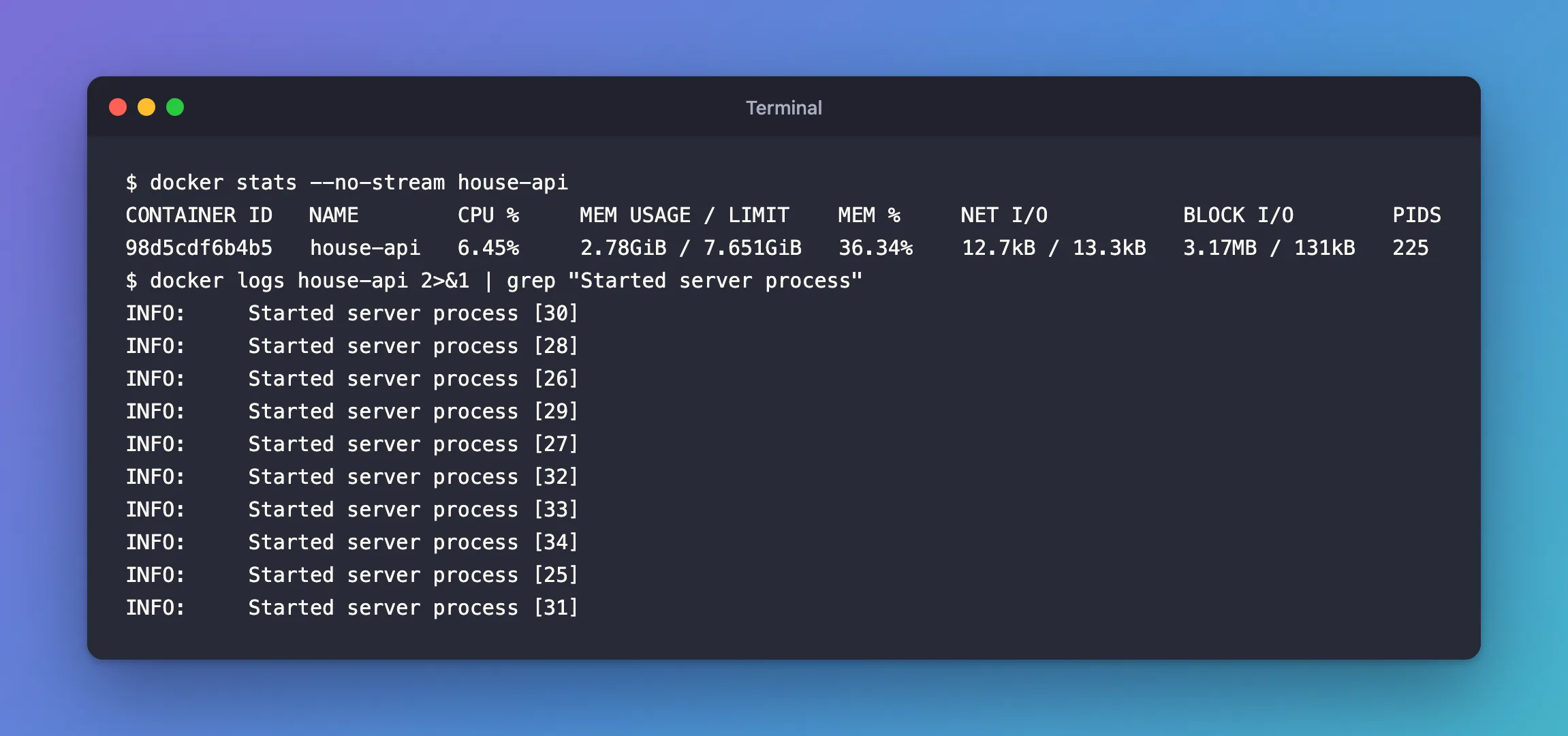
Ten workers, one per CPU that Docker Desktop gives its Linux machine here, and 2.78 GiB of memory, more than a third of what the containers may use. 2>&1 is needed because the workers write their lines to the container's error stream.
Stop and remove it:
docker stop house-api
docker rm house-api
Step 2: Run It with Two Workers
docker run -d --name house-api --platform linux/amd64 -e MLFLOW_MODELS_WORKERS=2 -p 127.0.0.1:5002:8080 house-values
3d4c9d5f85bb910567a3e84a907297620e781858456c591b4b211146ef332db4
When both workers have started, read the memory again:
docker stats --no-stream house-api
CONTAINER ID   NAME        CPU %     MEM USAGE / LIMIT     MEM %     NET I/O           BLOCK I/O    PIDS
3d4c9d5f85bb   house-api   1.83%     766.6MiB / 7.651GiB   9.79%     2.79kB / 1.86kB   0B / 340kB   57
And count the workers:
- macOS / Linux
- Windows (PowerShell)
docker logs house-api 2>&1 | grep "Started server process"
INFO:     Started server process [25]
INFO:     Started server process [24]
docker logs house-api 2>&1 | Select-String "Started server process"
INFO:     Started server process [25]
INFO:     Started server process [24]
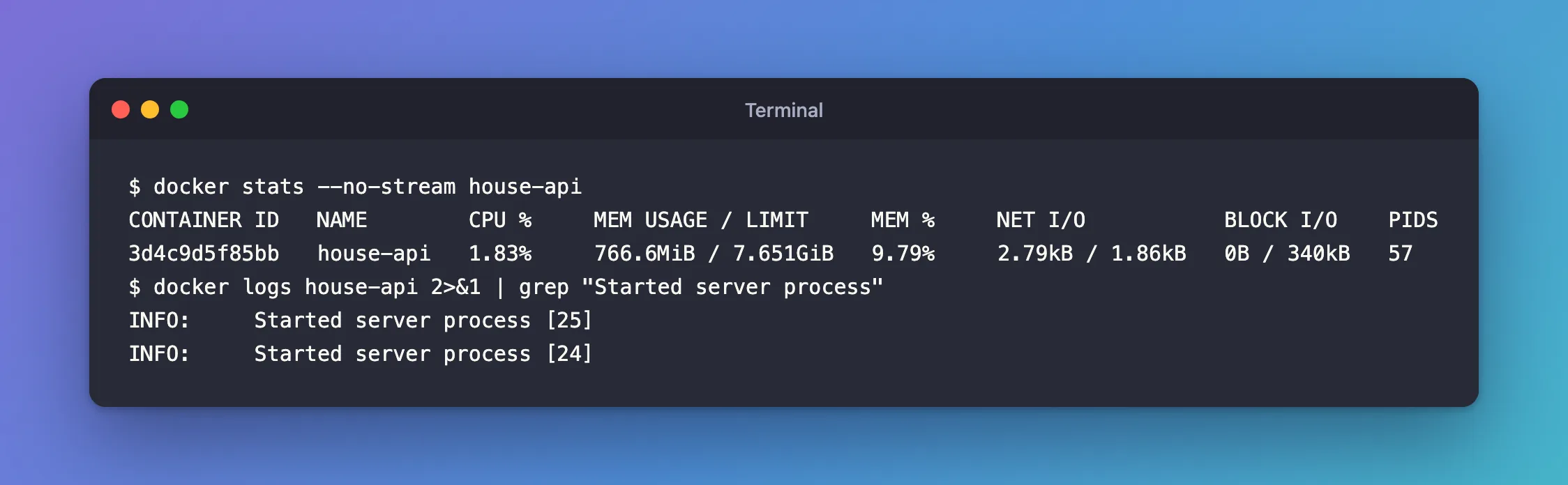
Two workers and 766.6 MiB, under a third of the default. The model still answers:
- macOS / Linux
- Windows (PowerShell)
curl http://127.0.0.1:5002/invocations -H "Content-Type: application/json" --data @two_districts.json
{"predictions": [4.13164982707675, 3.9766064387043585]}
Invoke-RestMethod http://127.0.0.1:5002/invocations -Method Post -ContentType "application/json" -InFile two_districts.json
predictions
-----------
{4.13164982707675, 3.97660643870436}
two_districts.json holds two districts in the dataframe_split layout, as in How to Send a dataframe_split Request to an MLflow Model Server. The last digits differ from mlflow models serve on a Mac, 4.1316498270767426: the container runs linux/amd64 code under emulation.
Common Mistakes
| Mistake | What happens | Do this instead |
|---|---|---|
| Leaving the default on a computer with many cores | One copy of the model per CPU, so memory grows with the number of cores | Set MLFLOW_MODELS_WORKERS to what you need |
| Setting it after the container started | The workers start once, when the container starts | Pass -e to docker run |
Expecting mlflow models serve's default of one worker | The container counts CPUs instead | Set the number explicitly in both |
Troubleshooting
| Symptom | Likely cause | Fix |
|---|---|---|
docker logs ... | grep or Select-String finds nothing | The workers write to the error stream | Add 2>&1 before | |
/ping takes longer to answer with more workers | Every worker loads the model before it's ready | Fewer workers, or wait longer |
FAQ
How many workers does a model need?
One per request you want to answer at the same time, as long as the memory allows; for a small model on your own computer, one or two.
Is it the same setting as mlflow models serve --workers?
The same number, but serve defaults to 1 and the container to one per CPU. MLFLOW_MODELS_WORKERS is also serve's default for --workers.
Conclusion
The house-values container started ten workers, one per CPU, and used 2.78 GiB. With -e MLFLOW_MODELS_WORKERS=2 it started two and used 766.6 MiB, and still answered the same predictions.
Additional Resources
- mlflow models build-docker — the container's workers and
DISABLE_NGINX. - docker stats — reading a container's memory and processes.
